React, Data Science, Agilität: Neue Workshops der Golem Akademie online
React und Typescript, Data Science, agiles Arbeiten und mehr: Die Golem Akademie bietet auch über den Sommer spannende Workshops online an. (Golem Akademie, API)
Quelle: Golem

React und Typescript, Data Science, agiles Arbeiten und mehr: Die Golem Akademie bietet auch über den Sommer spannende Workshops online an. (Golem Akademie, API)
Quelle: Golem

Mit der Studie “IT in der Liegenschaft der Zukunft (LdZ)” wirft die BWI GmbH einen Blick auf die Möglichkeiten einer volldigitalisierten Kaserne. Die Studie, die das Unternehmen im Auftrag des Bundesamtes für Ausrüstung, Informationstechnik und Nutzung der Bundeswehr (BAAINBw) durchgeführt hat, geht der Kernfrage nach, wie IT und bauliche Infrastruktur für Liegenschaften der Streitkräfte in zehn Jahren aussehen. (Digitalisierung, Innovation)
Quelle: Golem

Die Teams-App soll sich künftig im Familienkreis wiederfinden. Es kann etwa zwischen privaten und geschäftlichen Konten gewechselt werden. (Teams, Skype)
Quelle: Golem

WLAN in allen Klassenzimmern reicht nicht, der ganze Unterricht an Schulen muss sich ändern. An den Problemen dabei sind nicht in erster Linie die Lehrkräfte schuld. Ein IMHO von Gerd Mischler (Schulen, IMHO)
Quelle: Golem

Die schlanke VPN-Lösung bekommt ihren Platz im Kern des Betriebssystems. (OpenBSD, Linux-Kernel)
Quelle: Golem
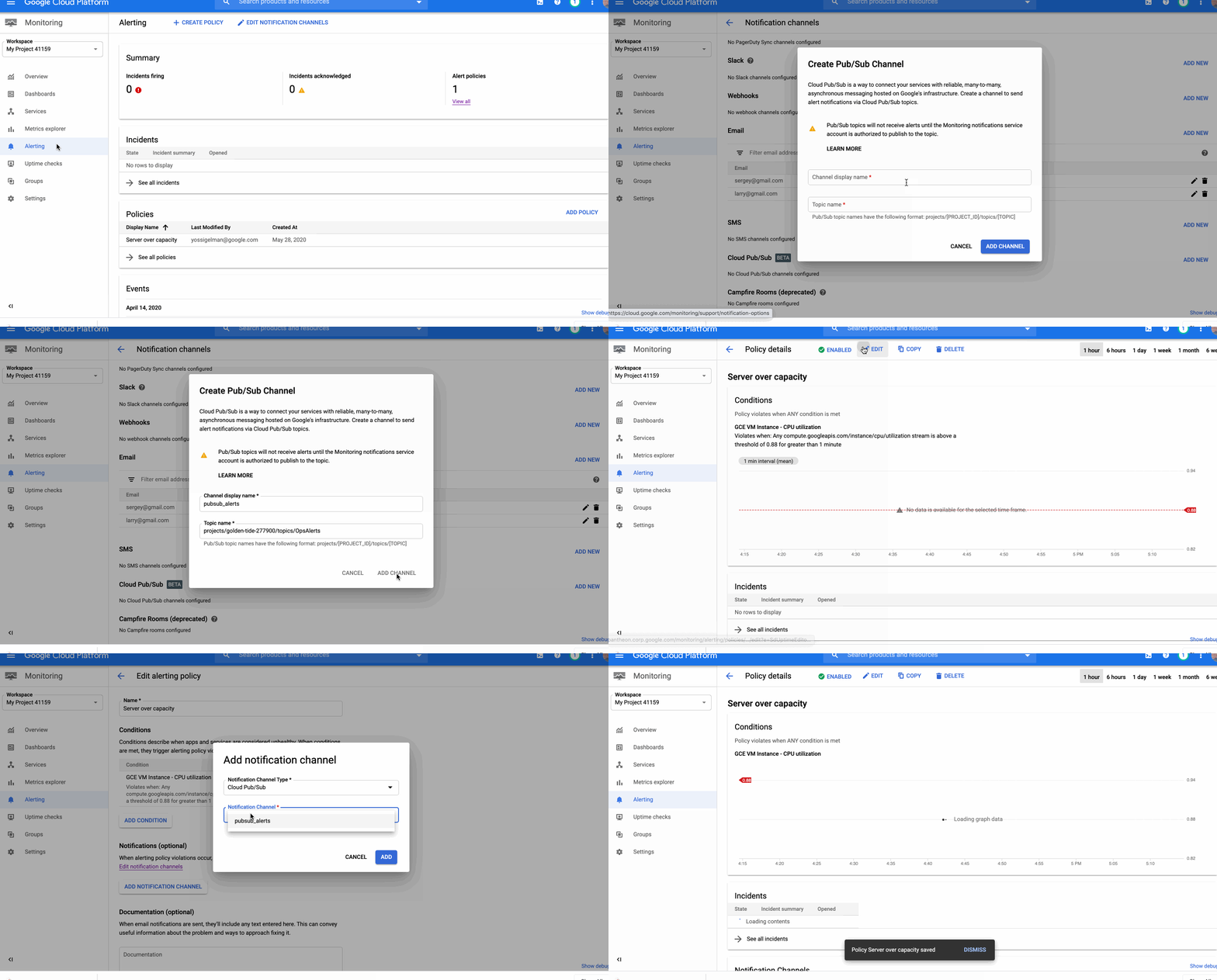
Around the world, operations teams are working to automate their monitoring and alerting workflows, looking to reduce the time they spend on rote operational work (what we call “toil”), so they can spend more time on valuable work. For instance, Google’s Site Reliability Engineering organization aims to keep toil below 50% of an SRE’s time, freeing them up to work on more impactful engineering projects.Our Cloud Monitoring service can alert you through a variety of notification channels. One of these channels, webhook, can be used for building automation into your systems with programmatic ways to respond to errors or anomalies in your applications.Today, we’re announcing a new notification channel type via Cloud Pub/Sub. Now in beta, this integration lets you create automated and programmatic workflows in response to alerts. Pub/Sub is a publish/subscribe queue that lets you build loosely coupled applications. Using Pub/Sub as your notification channel makes it easy to integrate with third-party providers for alerting and incident response workflows, you can use the Pub/Sub as a notification channel through the API and the Google Cloud Console.Pub/Sub vs webhookIt’s true that you can also use a webhook to integrate with third-party packages, so when should you use Pub/Sub rather than a webhook? Both of these methods can be used for different scenarios. The main differences between Pub/Sub and a webhook center around notions of implicit vs. explicit invocation, durability and authentication methods.When to use a webhookWebhooks are aimed at explicit invocation where the publisher (client) retains full control of the webhook’s execution. This means that the execution timing and the processing of the alert message are the server’s responsibility. Moveover, although a webhook does retry deliveries a few times upon failure, if the target endpoint is unavailable for too long, notifications are dropped entirely. Finally, this method supports only basic and token authentication. An example use case for a webhook is when you already have a central Incident Response Management (IRM) solution in place. The web server exposes endpoint URLs that third-party alerting solutions can invoke. Once the client invokes the webhook, the server receives the request, parses and processes the message and can create an incident, update or resolve it. And because the server is responsible for parsing the messages, multiple third parties, each sending a different JSON payload, can use a single endpoint. Another option is to expose separate endpoints for each third party or message format.Since different third parties can use this webhook, you can use basic or token-based authentication to authenticate the caller. And because you maintain and manage the server, you can ensure that the server is always available to receive incoming messages.When to use Pub/SubPub/Sub supports both explicit (push) and implicit (pull) invocation. In pull mode, the subscriber has control over when to pull the message from the queue and how to process an alert message. Pub/Sub provides a durable queue in which messages wait as long as necessary until the subscriber pulls the message. Pub/Sub is an access-controlled queue, with access managed by Cloud Identity and Access Management, meaning that the subscriber needs to be able to authenticate using a user or service account. Messages delivered to Pub/Sub never leave the Google network.An example of where to use Pub/Sub is if an alert message needs to be transformed before it is sent to be processed. Consider this scenario: an uptime check that you configured to check the health of your load balancers is failing. As a result, an alert is fired and a message is published to your Pub/Sub channel. A Cloud Function is triggered as soon as a new message hits the Pub/Sub topic. The function reads the message and identifies the failing load balancer. The function then sends a command to change the DNS record to point to a failover load balancer.We built our Pub/Sub notification channels capabilities to give you flexibility when defining your alerting notifications and to help reduce toil. You can get started with Pub/Sub notification channels using this guide. Also, be sure to join the discussion on our mailing list.
Quelle: Google Cloud Platform

So, you’ve started down the site reliability engineering (SRE) path at your organization. You have set up your service. You have analyzed how your users interact with it, which helped you identify some key metrics that correlate with user happiness. You set your service-level objectives, which in turn gives you an error budget. Great work!Now, the next consideration is that your organization maintains a schedule of maintenance windows that bring your service down. Should this downtime count toward your error budget? Let’s analyze it!Error budgetIn a nutshell, an error budget is the amount of error that your service can accumulate over a certain period of time before your users start being unhappy. You can think of it as the pain tolerance for your users, but applied to a certain dimension of your service: availability, latency, and so forth.If you followed our recommendation for defining an SLI, you’re likely using this SLI equation:Your SLI is then expressed as a percentage, and once you define an objective for each of those SLIs—that is, your service-level objective (SLO)—the error budget is the remainder, up to 100.Here’s an example. Imagine that you’re measuring the availability of your home page. The availability is measured by the amount of requests responded with an error, divided by all the valid requests the home page receives, expressed as a percentage. If you decide that the objective of that availability is 99.9%, the error budget is 0.1%. You can serve up to 0.1% of errors (preferably a bit less than 0.1%), and users will happily continue using the service.Remember that selecting the value for your objectives is not just an engineering decision, but a business decision made with input from many stakeholders. It requires an analysis of your users’ behavior, your business needs, and your product roadmap.Maintenance windowsIn the world of SRE practices, a maintenance window is a period of time designated in advance by the technical staff, during which preventive maintenance that could cause disruption of service may be performed.Maintenance windows are traditionally used by service providers to perform a variety of activities. Some systems require a homogeneous environment—for example, where you need to update the operating system of terminals in bulk. You may need to perform updates that introduce incompatible API/ABI changes. Some financial solutions need the database server and client software to be version-compatible, which means that major software upgrades require all the systems to be upgraded at the same time. Other examples of traditional maintenance windows are the ones required during database migrations to allow the synchronization of the data tables between the old and the new release during the downtime, and physical moves when computers are shut down to allow physical relocation of the devices.Similar to deciding your SLO, scheduling a maintenance window is a business decision that requires taking into account the agreements you may have with your users, the technical limitations of your system, and the wellbeing of the people responsible for those systems. It’s inevitably a compromise.The type of maintenance window that we are discussing in the rest of this post is the one that you, as a service provider, may perform and that affects your users directly, effectively causing a degradation of your service, or even a full outage.How to choose your maintenance windowsIn recent years, technologies like multithreaded processors, virtualization, and containerization have emerged. Using these paired with microservice architectures and good software development practices helps to reduce or completely eliminate the use of maintenance windows.However, while almost all business owners and product managers seek to minimize downtime, sometimes that is not possible. Usage of legacy software, regulations that apply to your business, or simply working in an environment in which the decision makers believe that the best way of maintaining the service is having a regular, scheduled downtime, forces us to bring our service down for a certain amount of time. So, in any of these situations, how should these maintenance windows affect your error budget? Let’s analyze some different scenarios where maintenance windows are necessary.Business hoursImagine you work at a company that serves a market with a trading window, like a Wall Street exchange. Every day your service starts operating at 9:30am and closes at 4:00pm sharp. No delays are permitted, either at the start or the end of the window.You can assume in this case that you have a maintenance window of ~15 hours a day. Should it burn through your error budget, then?Let’s remember the purpose of your error budget: It is a tool that helps identify when the reliability metrics for user journeys (your SLIs) have performed, over a period of time, at levels that are hurting your users.In this scenario, users are not able to use the service outside of business hours. In fact, users most likely should not be able to interact with the service at all. So, effectively, there is no harm in having this service down, and over this period of time, the error budget should not be affected at all.Burning your error budget in saw shapesLet’s move on to a different type of service, one that is extremely localized in space, serving only users in a single country. Think of a retailer with presence only in a small region. Your service may have a traffic pattern like this one:There are easily identifiable lows of traffic, where your users are probably sleeping, but even over those valley periods, you still receive a non-zero amount of requests. If you plan your maintenance windows during these periods, you have plenty of time to recover from errors, but at the risk of running into rising traffic if your maintenance overruns.For these saw-shape cases, let’s analyze a few strategies:Traffic projectionFor this approach, you’ll look at your past data and extrapolate the amount of valid traffic you’ll receive during the period of time your service will be unavailable by analyzing previous traffic and calculating what you expect to receive. Even if you have limited data to work with, use whatever data you have collected to calculate your traffic pattern.An important factor you have to take into account for this approach is that it is based on past performance, and it does not account for unforeseen events. To make sure the traffic that your site receives during a downtime window is not out of the ordinary, set up a captive portal that registers the incoming requests and redirects all traffic (including deep links) to a maintenance page. From those requests, you can easily analyze the traffic logs and count the valid ones. This way, you are not measuring the actual traffic, but the traffic pattern. Correlating this pattern with the actual missed traffic, using a reasonable multiplier, allows you to calculate the number of errors you are serving, and thus the error budget you are burning.Treat maintenance as downtimeWhen burning through the error budget associated with the availability of a service, it is usually done by counting the errors produced by the service. But when the service is down, you can also do it by measuring the time the service is down in relation to the total downtime your SLO allows you, as a percentage.Say that the SLO on availability for your service is 99%. Over a period of 28 days (measured using a rolling window) your service can be down a total of about seven hours and 20 minutes. If your maintenance window stretches for a period of two hours, that means you have consumed 27% of your error budget. That means that for the rest of the 28 days of your rolling window, your service can only throw (100 – 27) * 0.01 = 0.73% of errors, down from the initial 1% of total errors. Once your maintenance is finished, you can go back to using the SLI equation, and knowing how much traffic you are receiving (your valid requests) and how many errors you are returning to your users, you can calculate how much error budget you are burning over time.This approach has the disadvantage of treating all the traffic received as equal, both in size and in importance. A maintenance window occurring in the middle of the day when you are having a peak of traffic will burn the same amount of error budget as one happening in the middle of the night when traffic is low. So this approach should be used cautiously for traffic shapes that change wildly throughout the day.Considering the edge caseIn the situations described above, you need to take into account a small detail about the error budget. Say that you have an outage that burns a big chunk of your error budget, enough to bring the remaining budget close to zero (or even below), and the upcoming planned maintenance window is scheduled to happen inside the time window you use to calculate that error budget. If that scheduled downtime risks depleting your error budget, what are you supposed to do? We approach these situations by defining a number of “silver bullets”: a very small number of exceptions for truly business-critical emergency launches, despite the budget maintenance window freeze. Assuming the service still needs to be brought down, even for small updates, the use of a silver bullet lets you perform a short, very targeted maintenance window, during which only critical bug fixes can be released.In general, we don’t recommend looking for other types of exceptions, since these will most likely create a culture in which failure to maintain the reliability of the service is accepted. That nullifies the incentive to work on the reliability of your service, as the consequences of outages can simply be bypassed by escalating the problem.The curious case of not burning your error budgetLet’s, once more, remember how the error budget is used. As defined, the error budget is a tool to balance how you prioritize the time engineering teams spend between feature development and reliability improvements. It assumes that exhausting your error budget is a result of low availability, high latency, or other low score in any metric used to represent the reliability of your service.If you burn part of your error budget during maintenance windows, but you aren’t planning to get rid of them altogether (or at least reduce the length of those windows), there is no reliability work targeted at reducing your maintenance windows that you may need to prioritize as a result of burning through the budget. You are implicitly accepting a recurring error budget burn, without a plan to eliminate the maintenance window that is causing it. You have no consequences defined in your error budget policy that will prioritize work to stop your maintenance windows from consuming error budget in the future.So the lesson here is that the decision to burn through your error budget during your maintenance windows should be made only if you consider those downtime periods as part of your reliability work, and you plan to work on reducing them to minimize that downtime.If you decide to assume the risk of having a period of time when your service is down and the business owners have agreed that they are OK with scheduled downtime, with no plans in place to change the status quo, you probably don’t want it to count it toward your error budget. This acceptance of risk has some very strong implications for your business, as your maintenance windows need to:be as short as possible, to cause as little disruption as possiblebe clearly and properly communicated to your users/customers, well in advance, using channels that reach as many as possiblebe internally communicated to avoid disrupting other parts of your businesshave a clearly defined plan of execution, exit criteria, expected results, and rollback action planbe scheduled during expected low traffic hoursbe executed according to its planned time slothave well-defined (and in some cases, severe) consequences for your error budget when the windows go over timeRemember, according to the way the error budget is defined: During a maintenance window that does not count toward that error budget, you are taking a free pass for having your service down—possibly hurting your users but not accounting for it.Flat(ish) profile in global servicesIn a global service, things are quite different. While your traffic profile may have valleys of traffic, they are likely less pronounced than those deep valleys of traffic you see in a localized service, when you can bring your service down and only affect a relatively small number of users.But at the same time, due to the global nature of the service, you will probably require multi-regional presence. It’s in this situation where you can take advantage of the multi-region architecture and work to avoid localized maintenance windows by diverting traffic from the low-traffic areas to others.Our recommendation for this case is to take advantage of the distributed nature of your architecture and design your service to allow for regions to be disconnected at any given time, if you still need to bring some of your systems down for maintenance. This approach should, of course, take into account your capacity needs, so that your remaining serving capacity will be able to respond to all the active requests previously served from the disconnected regions. Additionally, you should design circuit breakers that trip whenever there is a need to blackhole some of the overflowing traffic in order to avoid creating a cascading outage.If this is your long-term goal, and assuming that your global service has no defined times of operation (like in our first scenario), any request that is not served (or served with an error) should be accounted for, and count toward your error budget burn.Putting it all togetherAlthough no single recommendation will fit all services, you can make informed decisions for your service once you examine maintenance windows in the context of SLOs and error budgets. You and your product owners are best positioned to know both your service and your users, understand their behavior, and make a decision that works best for your business.The most important analysis you need to make is how your maintenance windows affect your users (if at all), and whether depleting your error budget is going to imply a change in your reliability focus to reduce the impact of your maintenance windows.If you are considering introducing maintenance windows for your service, evaluate the pros and cons against the criteria outlined here. And if you already have them, check to see if you should change how you do them, or when you do them.Further readingIf you want to learn more about the SRE operational practices, how to analyze a service, identify SLIs, and define SLOs for your application, you can find more information in our SRE books. You can also find our Measuring and Managing Reliability course on Coursera, which is a more thorough, self-paced dive into the world of SLIs, SLOs, and error budgets.
Quelle: Google Cloud Platform
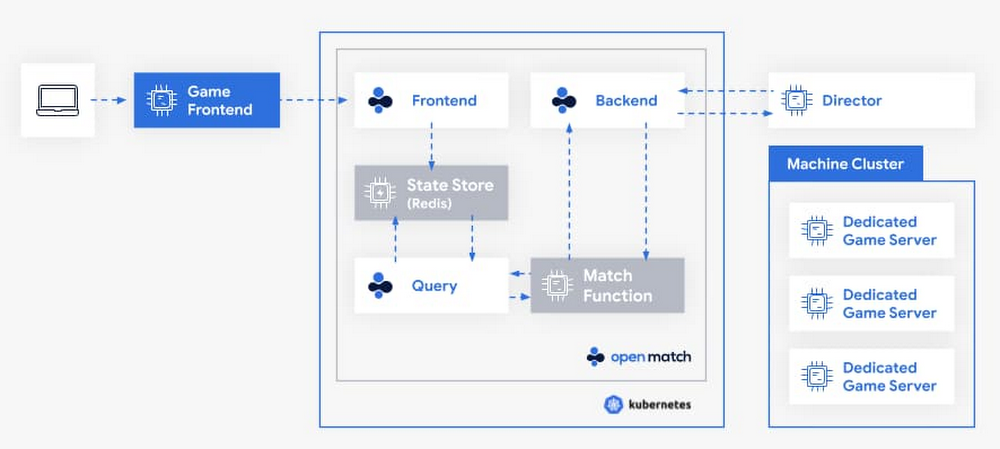
As interest in multiplayer games continues to grow, providing better and faster matches has been a key need for game developers. But matchmaking—the art of matching a set of players together to maximize their enjoyment of the game—is not easy. Each game is unique. That forces game developers to either create new matchmaking solutions from scratch, or to rely on off-the-shelf matchmakers that don’t always fit their game’s needs. In either scenario, game developers also have to dedicate time and effort to scale underlying infrastructure to support peaks and valleys in player demand.Open Match, an open source project cofounded by Google Cloud and Unity, was created to help game developers solve this problem. Open Match is a matchmaking framework that handles time consuming infrastructure management for game developers, all while giving them control over their match logic. We’re pleased to announce that Open Match has hit 1.0, meaning it’s ready for deployment in production. Let’s dig a little deeper into how Open Match works. Life of a game match When a player wants to join a game, a ticket is created and stored in the Open Match database. A concept that we call a Director will call the backend service to request matches from Open Match. Open Match will call into a Match Function, which you provide, to turn tickets into matches.Click to enlargeGiving you control of your match logicGame design evolves quickly, and you don’t want your infrastructure to limit your creativity. From battle royals to asymmetric shooters and open world experiences, new ideas are plentiful. A matchmaker which makes assumptions about game size, what matches look like, or passed data types means less flexibility when creating new experiences.Match functions are implemented and deployed by you, outside of Open Match. The match function queries for relevant tickets and then returns matches. Open Match does not prescribe any algorithm for how players find matches; instead it’s your job to choose how matches are made. Forget matching on pre-defined player attributes, or using someone’s configuration language, use the tool you really want to use: code.Solving for scaleThe flexibility the match functions provide is great. However, you don’t always want to solve scale with every new title. This is where Open Match reduces your burden.Open Match’s database layer is designed with the high query and high turnover requirements of video game matchmaking. Additionally, Open Match handles concurrency of calling multiple match functions at the same time, while preventing the match functions from creating multiple matches with the same player. We’ve tested Open Match with more than a thousand match functions, thousands of new tickets per second, and millions of tickets looking for a match concurrently, so it’s ready for your biggest game.Working with your existing infrastructureYour game is the next big thing, but what about the next game? Just like matchmaking infrastructure, you don’t want to rebuild your entire game backend for every new release. Open Match is designed to work with a variety of usage patterns, so it can work with your existing infrastructure. Open Match helps build a boundary between what needs to be created each new game, and what can be reused next time.Getting Started with Open MatchLearn more about how game developers are using Open Match or visit the developer site to begin integrating simpler matchmaking into your next game at open-match.dev.
Quelle: Google Cloud Platform

Azure provides customers a simple and intuitive way to declaratively provision and manage infrastructure through Azure Resource Manager (ARM) templates. You can describe your entire Azure environment using template language, and then use your favorite CI/CD or scripting tool to stand up this environment in minutes. The ARM template language takes the form of JSON and is a direct representation of the resource schema. Which means you can create any Azure resource using an ARM Template from day one and configure any setting on the resources. Using ARM templates, you can describe the resources needed to make up the environment in a declarative, parameterized fashion. Because the ARM templates are declarative, you need only specify what you want, and Azure Resource Manager will figure out the rest.
Over the last couple of months, we have renewed our focus in ARM template deployments with a focus on addressing some of the key challenges shared by our customers. Today, we’re sharing some of the investments we’ve made to address some of these challenges.
Simplified authoring experience with Visual Studio Code
Our newest users have shared that their first time authoring and editing an ARM template from scratch can be intimidating. We have simplified the getting started experience by enabling you to create the resources you need in the Azure Portal and exporting an ARM template that you can reuse. We also have a template Quickstart gallery of over 800 sample templates to provision resources. But now we have taken things a step further for you.
With the new Azure Resource Manager (ARM) Tools in Visual Studio Code, we've added support for snippets (pre-created resource definitions), IntelliSense, colorization, ARM template outline, and comments. With comments support in ARM templates, you can deploy any template with comments using CLI, PowerShell, and Azure portal, and it will just work. Here is a short video on the new ARM template authoring experience in VS Code.
What-if: Pre-deployment impact analysis
Our customers often need to assess the impact of deployment to an environment before submitting any changes to the deployed resources. With new what-if features in Azure, customers can do pre-deployment assessments to determine what resources will be created, updated, or deleted, including any resource property changes. The what-if command does a real-time check of the current state of the environment and eliminates the need to manage any state. Get started with what-if here. While what-if is in preview, please let us know about issues and feature requests in our GitHub repo.
Deployment scripts: completing the ‘last mile’ scenarios
There are often scenarios where customers need to run custom script code in an ARM template deployment to complete their environment setup. These scripts that previously required a step outside of a template deployment can now be executed inside of a template deployment using the deploymentScript resource. The new deploymentScript resource will execute any PowerShell or bash script as part of your template deployment. This script can be included as part of your ARM template or referenced from an external source. Deployment scripts now give you the ability to complete your end-to-end environment setup in a single ARM template. Learn more about deployment scripts with this documentation. If there are certain Azure resource actions not exposed in our APIs that you would like to see surfaced natively in our control plane, please file your request here.
Management group and subscription provisioning at scale
As an organization expands its use of Azure, there are often conversations about the need to create a management group (MG) hierarchy (grouping construct) and Azure Subscriptions to ensure separation of environments, applications, billing, or security. Customers need a consistent and declarative way to provision management group and subscriptions to save time and resources. With the new tenant and MG deployment APIs, we now support the provisioning of MGs and subscriptions using ARM templates. This enables you to automate the setup of your entire estate and the associated infrastructure resources in a single ARM template. Read more about this and get sample templates here. Additionally, we now support tagging of subscriptions, removed the 800 deployments per resource group limit, increased the limit of the number of resource groups per deployment to 800, and increased the number of subscriptions per Enterprise Agreement (EA) account to 2000 enabling you to provision and manage at scale.
Continued focus on quality and reliability
Quality and reliability are at the forefront of everything we do at Microsoft. This is an area where we have continued our focus, starting with improving the quality of our schemas and having schema coverage for all resources. The benefits of this are seen in the improved authoring experience and template export capabilities. We are diligently working to improve our error messages and enhance the quality of our pre-flight validation to catch issues before you deploy. We have also invested heavily in improving our documentation by publishing all the API versions to template references and added template snippets to resource documentation.
To help with testing your ARM Template code we open sourced the ARM Template Toolkit which we use internally at Microsoft to ensure our ARM Templates follow best practices. Lastly, we recognize speed matters and we have made significant improvements to reduce our deployment times for large-scale deployments by roughly 75 percent.
The future of Infrastructure as Code with Azure Resource Manager templates
We have just begun our journey on enhancing ARM template deployments and the teams are consciously working hard to address current gaps and innovating for the future. You can hear about some of our future investments which we shared at the recent Microsoft Build 2020 conference.
We would love your continued feedback on ARM deployments. If you are interested in deeper conversations with the engineering team, please join our Deployments and Governance Yammer group.
Quelle: Azure

Azure Lighthouse is launching the “Azure Lighthouse Vision Series,” a new initiative to help partners with the business challenges of today and provide them the resources and knowledge needed to create a thriving Azure practice.
We are starting the series with a webinar aimed at helping our IT service partners prepare for and manage a new global economic climate. This webinar will be hosted by industry experts from Service Leadership Inc., advisors to service provider owners, and executives worldwide. It will cover offerings and execution strategies for solutions and services to optimize profit, growth, and stock value. Service Leadership publishes the Service Leadership Index® of solution provider performance, the industry's broadest and deepest operational and financial benchmark service.
The impact of a recession on service providers
As we continue through unchartered economic territory, service providers must prepare for possible recovery scenarios. Service Leadership has developed an exclusive (and no-cost) guide for service provider owners and executives called the Rapid Recovery™ Planning Guide, based on historical financial benchmarks of solution providers in recessions, and likely recovery scenarios.
The guide unlocks the best practices used by those service providers who did best in past recessions, as evidenced by their financial performance from the 2008 recession to the present day. As noted in the guide, through their Service Leadership Index® Annual Solution Provider Industry Profitability Report™, Service Leadership determined that:
In the 2001 and 2008 recessions, value-added reseller (VAR) and reseller revenue declined an average 45 percent within two quarters.
In the 2008 recession, mid-size and enterprise managed services providers (MSPs) experienced a 30 percent drop in revenue within the first three quarters.
Private cloud providers saw the smallest average dip, only 10 percent, in past recessions.
Project services firms experienced the most significant decline, having dropped into negative adjusted EBITDA back in 2008.
The upcoming webinar will explore methods used by the top performing service providers to plan and execute successfully in the current economy.
Tackling the challenges of today and tomorrow
Service providers have an essential role to play in our economic recovery. As we shift to a remote working culture, companies across the globe are ramping up efforts to reduce cost, ensure continuity in all lines of business, and manage new security challenges with a borderless office.
The chart below shows how three Service Provider Predominant Business Models™ have performed since the end of the last recession.
During the webinar, Service Leadership will provide estimated financial projections using multiple economic scenarios through 2028. These predictions, coupled with service provider best practices for managing an economic downturn, will be at the heart of our presentation.
Navigating success with Azure
Our Principal PM Manager for Azure Lighthouse, Archana Balakrishnan, will join Service Leadership to illustrate how Microsoft Azure Management tools can give service providers the tools needed to scale, automate, and optimize managed services on Azure.
Join us to learn how you can build and scale your Azure practice utilizing one native Azure solution to centrally manage your customer environments, monitor cost and performance, ensure compliance and proper governance, and optimize using the latest capabilities of Azure Lighthouse and Azure Arc.
Event details
Azure Lighthouse Vision Series: Rapid Recovery Planning for IT Service Providers
In this session, industry expert Paul Dippell, CEO of Service Leadership Inc., and Principal PM Manager for Azure Lighthouse, Archana Balakrishnan will cover these topics:
Likely upcoming macro-economic scenarios.
Likely service provider revenue and profit paths through recovery.
Suggested actions for service providers to maximize revenue, profit, and safety.
Azure Management tools for building and scaling services on Azure.
Closing advice for partners.
Paul and Archana will be available for a live Q&A with attendees during this session.
The webinar will be held on Monday, June 29, 2020 from 11:00 AM – 12:00 PM PT. To register for this free event, please visit, Azure Lighthouse Vision Series: Rapid Recovery Planning for IT Service Providers.
Quelle: Azure






