Operate more efficiently and reduce your costs with the cloud

Organizations everywhere are calibrating against a new, challenging business landscape, and we want to help you reduce costs and solve for operational efficiency with cloud technology.  Please join our Solving Together Digital Conference (sessions starting today and available on demand) to hear best practices in navigating these challenges. Leaders are finding they need to make tough decisions about what projects to prioritize and how to allocate resources. Cloud technologies are playing an increasingly central role in supporting businesses as they focus on prioritization and operational efficiency.At Google Cloud, we’ve helped businesses of all sizes take advantage of the cloud to do everything from enabling entire workforces to embrace remote work, to moving on-premises environments to the cloud for scalability, to decreasing infrastructure overhead and costs through reduced on-prem hardware footprints. For example, we’ve designed a managed service that can quickly migrate applications running on VMware to Google Cloud which can reduce a VMware environment total cost of ownership by as much as 30% over on-premises costs. We’ve also developed approaches to migrating systems of record like SAP to the cloud with a 46% lower three-year cost of operations1. Data is another place where the cloud can help organizations be more efficient and drive meaningful cost savings, and businesses that switch to our data warehousing solution, BigQuery, can reduce their overall three-year costs by 52% when compared to on-premises.Our Solving Together Digital Conference kicking off May 27 shares learnings and solutions we’ve found to be the most helpful—whether organizations are recovering, adjusting, or building for the future. The conference will feature a keynote from Chris Ciauri, Google Cloud’s Vice President, EMEA, as well as more than 20 individual sessions focused on five common challenge areas, from operational efficiency, to business continuity, to remote work. Specific sessions include:Improving operational efficiency with infrastructure—The cloud provides a real opportunity for IT cost reduction while improving your ability to operate. This session walks you through how moving to Google Cloud can impact cost and operational efficiency in several infrastructure migration scenarios. Learn more. Run data analytics without busting your  IT budget—Analytics teams are looking to increase agility, efficiency, scalability, while reducing TCO. This session shows you how modernizing your data warehouse with BigQuery can provide these benefits and more, and help you run analytics without breaking the bank. Learn more.A path to more predictable cloud costs—Understanding and implementing cost optimization principles is a key part of running successful cloud infrastructure. Join this session to learn processes and best practices you can put in place to reduce costs while at the same time increasing capabilities. Learn more.Serving customers efficiently with Contact Center AI—Google AI can help transform the contact center experience, creating high-quality customer experiences at minimal cost. This session discusses how Contact Center AI applies advanced speech and language understanding models and shows you how you can get to production quickly. Learn more.The Solving Together Digital Conference is available live and on demand starting May 27. Register today for free with your Google account and watch these sessions by visiting the conference website.1. IDC research, June 2020
Quelle: Google Cloud Platform

Kubernetes Backup and Restore with Velero

akomljen.com – Recently I migrated some Kubernetes clusters, managed by Amazon EKS. The clusters were running in public subnets, so I wanted to make them more secure by utilizing private and public subnets where ne…
Quelle: news.kubernauts.io

Choosing between BigQuery on-demand and flat rate pricing

Editor’s note: This is one installment in a series about managing BigQuery costs. Check out the other posts on using Reservations effectively and how to use Flex Slots to save on costs.When you use data to guide your business decision-making process, you need to continually optimize your data analytics usage to get more out of that data. Here, we’ll share some ways to be more efficient with your BigQuery usage through ups and downs and changing demands.Like a lot of things in the data realm, there are simple answers that address simple situations. For the more complex situations, the answers get less simple, but the solutions are much more powerful. In this post, we’ll walk through a few scenarios that illustrate the ways you can deploy BigQuery to fit the particular needs of your business.First, a quick intro: BigQuery is Google Cloud’s fully managed enterprise data warehouse. We decouple storage and compute, so the costs for storage and compute are decoupled as well. We’ll only address compute costs in this post.So let’s talk about how compute is billed in BigQuery. You can use BigQuery entirely for free via the sandbox. You can use a pure pay-as-you-go model, where you pay for only the compute you use for querying data. In this pay-as-you-go model, also known as on-demand pricing, you are billed based on the number of bytes your queries scan. In the flat-rate model, you pay a fixed amount each month for dedicated resources in the BigQuery service, and you can scan as much data as you want.Let’s describe each of these in a little more detail.BigQuery sandboxThe BigQuery sandbox can be used by anyone with a Google account, even if they haven’t set up Google Cloud billing. This means the usage, while subject to some limits, is entirely free.BigQuery on-demand pricing modelBigQuery’s on-demand model gets every Google Cloud project up to 2,000 slots, with the ability to burst beyond that when capacity is available. Slots are BigQuery’s unit of computational capacity, and they get scheduled dynamically as your queries execute. As above, when your queries execute, they’ll scan data. You get billed based on how many bytes you scan in the on-demand billing model.BigQuery flat-rate pricing modelIn the flat-rate model, you decide how many slots you’d like to reserve, and you pay a fixed cost each month for those resources. You can choose whether to reserve slots for as little as one minute, or on a month-to-month basis, or commit to a year. In this model, you’re no longer billed based on your bytes scanned. Think of this like an all-you-can-query plan.How to choose the best plan for your situation? Let’s look at a few scenarios that will illuminate some of the decision points. The scenarios build on each other, with each representing an increasingly more complex environment.You’re just getting started with BigQuery. You don’t know how much querying you’re going to do, and you need to be efficient with your spend.You’ve been using BigQuery for a while. Your data is growing, and more and more people are using the warehouse as the business seeks greater access to data. You want to support this while keeping costs in check.You’re looking to consolidate data silos into one source for analytics workloads, and you’re looking to support advanced analytics using Spark or Python. This is in addition to serving multiple lines of business, with a mix of different workloads, from ad-hoc analytics to business intelligence. Some of these workloads will have tight service-level objectives, while others can tolerate best-effort service levels.Here’s how to tackle each of these scenarios.1. You’re just getting started.BigQuery’s on-demand model is perfect for anyone who’s looking for cost efficiency and to pay only for what they consume. If you follow our best practices for cost optimization and make use of custom cost controls, you will be billed for only what you use, while guarding against unexpected spikes in consumption.Since you optimize for cost and performance in BigQuery in almost exactly the same ways (by limiting the data you scan), you’ll get better performance while consuming the least resources possible—the best of all worlds!On-demand slots scale to zero when you’re not querying, and it happens instantly. You don’t need to wait for an inactivity timeout that may never come in order to shut down some nodes. BigQuery only ever schedules as many resources as are necessary to complete your queries, and when the queries complete, the resources are released immediately.One of the most important things to do early on is set up monitoring of your BigQuery usage. Your job metadata is stored for the past 180 days in INFORMATION_SCHEMA tables that you can query and report against. You should also make use of the BigQuery metrics stored in Cloud Monitoring to understand your slot utilization and more.2. You’ve been using BigQuery for a while.As your use of BigQuery grows, you’ll scan more data, so your costs will increase correspondingly. If you’re using the on-demand model, you might look for opportunities to save on cost. One option is to consider BigQuery Reservations.The first thing to know is that the BigQuery Reservations and on-demand pricing models are not mutually exclusive. You can use one or the other, you can combine them as you see fit, or you can try out a reservation with a short-term allocation of Flex Slots. What are Flex Slots? Flex Slots let you scale your data warehouse up and down very quickly—for as little as 60 seconds at a time. Flex Slots let you quickly respond to increased demand for analytics and prepare for business events such as retail holidays and app launches. In addition, Flex Slots are a great way to test a dedicated reservation for a short period of time to help determine whether a longer slot commitment is right for your workloads. Since many businesses have analytics needs that vary seasonally, monthly, or even on an hourly basis, you can reserve Flex Slots to add capacity to your slot pool when you need it.Consider also that you can address different workloads with a combination of cost models. Let’s imagine you have several workloads that revolve around BigQuery: You ingest data, you transform it in an ELT style, and serve both reporting and ad-hoc query usage.Ad-hoc workloads are less predictable, almost by definition. If you’re looking to keep costs in check without hampering your users’ ability to explore data, it can be a good idea to use the flat-rate model to provide an all-you-can-query experience. Reporting workloads are the yin to ad-hoc workloads’ yang. In contrast to the unpredictable load ad-hoc queries can bring, reporting workloads can be much more predictable. Ad-hoc workloads are usually assigned best-effort resources, while reporting workloads tend to have strict SLAs. For workloads with SLAs, it’s helpful to earmark resources for them and ensure that other workloads don’t get in the way. This is where BigQuery’s workload management through reservations comes in. You can configure a project to consume slots from the slot pool on a best-effort basis, while reserving slots for high-SLA workloads. When the high-SLA workloads are not consuming their reservation, the slots can be seamlessly shared with other workloads under the reservation. And when the workloads with strict SLAs run, BigQuery will automatically and non-disruptively pre-empt the slots that had been shared with other, less critical workloads.Finally, maybe the amount of data you transform on a daily basis is fairly predictable. In other words, you know that your ELT jobs will be processing about the same amount of data each day. Since the number of bytes you process is predictable, this workload may be a good match for on-demand pricing. So you might decide to run your ELT workloads in a project that is not assigned to a reservation, thus using on-demand resources. In addition to paying only for the bytes you scan, you also can burst beyond the usual 2,000 slots per project when conditions allow.3. You’re consolidating data silos and more.So you’re consolidating from multiple data silos, and you’ve got lots of workloads. In addition to the kinds of workloads described in the second scenario above, there are power users and data scientists consuming data from your data lake using Spark or Jupyter, and they’d like to continue to do the same thing with BigQuery. They plan to use BigQuery ML to create and get batch inferences from ML models. You might choose to mix and match models as above, but consider that flat rate also includes all BigQuery ML usage, and 300 TB per month of Storage API usage. So for data science and advanced analytics involving Python (Jupyter, Pandas, etc.) or Spark, there may be savings to be had by running those workloads in a Google Cloud project that is assigned a slot reservation.Putting it all togetherBy the time your infrastructure has matured to have a situation like that in the third scenario, you may be mixing and matching multiple billing constructs in order to achieve your cost and efficiency goals: BigQuery Reservations for cost predictability and to provide guaranteed capacity for workloads with SLAs; BigQuery Flex Slots for cyclical workloads that require extra capacity, or for workloads that need to process a lot of data in a short time, and so would be less expensive to run using reserved slots for a short time;On-demand for workloads where the volume of data to be processed is predictable. The per-byte-scanned billing model can be advantageous in that you pay precisely for what you use, with the amount of scanned data as a proxy for compute consumption.Provided you can place your workloads in Google Cloud projects aligned to reservations, or to projects that are opted out of reservations, you can choose the resource that’s right for you on a workload-by-workload basis. Learn more about BigQuery pricing models.
Quelle: Google Cloud Platform

Optimize BigQuery costs with Flex Slots

Editor’s note: This is one installment in a series about managing BigQuery costs. Check out the other posts on choosing between BigQuery pricing models and using Reservations effectively.Google Cloud’s enterprise data warehouse BigQuery offers some flexible pricing options so you can get the most out of your resources. Our recently added Flex Slots can save you money by switching your billing to flat-rate pricing for defined time windows to add maximum efficiency. Flex Slots lets you take advantage of flat-rate pricing when it’s most advantageous, rather than only using on-demand pricing.This is particularly useful for those of you querying large tables—those above 1 terabyte. Flex Slots lets you switch to flat-rate pricing to save money on these larger queries. We often hear, for example, that running data science or ELT jobs over large tables can benefit from using Flex Slots. And companies with teams of AI Notebook users running analytics jobs for several hours or more a day can benefit as well. In this blog post, you’ll see how you can incorporate Flex Slots programmatically into your BigQuery jobs to meet querying spikes or scale on demand to meet data science needs, without going over budget or using a lot of management overhead. Users on Flat Rate commitments no longer pay for queries by bytes scanned and instead pay for reserved compute resources; using Flex Slots commitments, you can cancel anytime after 60 seconds. At the time of this writing, an organization can run an hour’s worth of queries in BigQuery’s U.S. multi-region using Flex Slots for the same price as a single 4TiB on-demand query.  Setting up for Flex SlotsThe recommended best practice for BigQuery Reservations is to maintain a dedicated project for administering the reservations. In order to create reservations, the user account will need the bigquery.resourceAdmin role on the project and Reservations API slots quota.Understanding the conceptsFlex Slot commitments are purchases charged in increments of 500 slot hours for $20, or ~$0.33/minute. You can increase your slot commitments if you need faster queries or more concurrency.  Reservations create a named allocation of slots, and are necessary to assign purchased slots to a project. Find details on reservations in this documentation.Assignments assign reservations to Organizations, Folders, or Projects. All queries in a project will switch from on-demand billing to purchased slots after the assignment is made.You can manage your Flex Slots commitments from the Reservations UI in the Google Cloud Console. In this post, though, we’ll show how you can use the Python client library to apply Flex Slots reservations to your jobs programmatically, so that you can schedule slots when you need them and reduce any unnecessary idle time. This means you can run jobs at any hour, without an admin needing to click a button, and automatically remove that slot commitment when it’s no longer needed (no admin needed).  Check out the BigQuery Quickstart documentation for details on how to authenticate your client session. Here’s a look at a simple script that purchases Flex Slots for the duration of an ELT job:Confirming query reservationsYou can see your query statistics nicely formatted in the BigQuery query history tab within the BigQuery console. The Reservation name will be indicated with a property for queries that used the reserved slots, as shown here:Interpreting the run times and costsThe charts compare the query times and costs of on-demand runs,soft-capped at 2,000 slots, with runs at increments of 500 slots up to 2,000 for a single 3.15 TB on-demand query. It’s important to remember that Flex Slot customers will also pay for idle time and those costs can add up for larger reservations. Even padded with three minutes of idle time, Flex Slots cost 60% to 80% less than the cost of on-demand pricing for large queries.There’s a near-linear performance increase as slots are added.60% to 80% cost savings using Flex SlotsUsing Flex Slots and the Reservation APIs together lets you fine-tune your organization’s cost and performance profile with flexibility that is unprecedented among data warehouse solutions. For more details on how to get started with BigQuery or developing with the Reservations APIs, check out these resources:Get an introduction to BigQuery ReservationsLearn more about BigQuery slotsCheck out the  Python Client for Cloud BigQuery Reservation docsSee the details on Flex Slots pricing
Quelle: Google Cloud Platform

Effectively using BigQuery Reservations

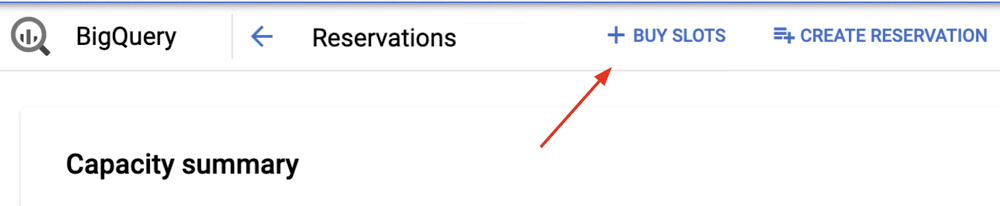
Editor’s note: This is one installment in a series about effectively managing BigQuery costs. Check out the other posts on choosing between BigQuery pricing models and how to properly size your slots.BigQuery has several built-in features and capabilities to help you save on costs, manage spend, and get the most out of your data warehouse resources. In this blog, we’ll dive into Reservations, BigQuery’s platform for cost and workload management. In short, BigQuery Reservations enables you to:Quickly purchase and deploy BigQuery slots Assign slots to various parts of your organizationSwitch your organization from bytes processed to a flat-rate pricing modelCustomers on the flat-rate pricing model purchase compute capacity, measured in slots, and can run any number of queries using this capacity. The flat-rate pricing model is a great alternative to the bytes processed pricing model, as it gives you more cost predictability and control. Think of slots as compute nodes—the more slots you have, the more horsepower you have for your queries.Getting started with ReservationsGetting going with BigQuery Reservations is very easy and low-risk. We introduced Flex Slots, which are charged per second and can be canceled after only 60 seconds, so you can run an experiment for the price of a cup of coffee! Here’s how to get started:1. Simply go into the BigQuery UI and click on “Reservations.” From there choose “Buy Slots.”2. In the purchase flow, choose “Flex Slots” as your commitment type and “500” as your size. If you’ve never bought slots before, you’ll be prompted to default your organization to flat-rate. Opt in if you want all your projects to start using your purchased slots automatically. 3. Confirm your purchase. In a few seconds, your capacity should be confirmed and deployed. 4. Go into the “Assignments” tab and assign any of your projects, or even your entire organization, to the “default” reservation. This tells BigQuery that those projects are on the slots pricing model, rather than bytes processed. Voila!Once you’re done with your test, simply delete all assignments and commitments. A 15-minute test will cost you just $5. Using BigQuery ReservationsOnce you set up Reservations, BigQuery automatically makes sure that your usage is efficient. Any provisioned slot that’s idle across your organization is available elsewhere in your organization to be used. That’s right, any idle or slack capacity is always available for you to use. This means that no matter how big or small your organization is, you get economy of scale benefits, without the penalty of creating wasteful compute silos.To increase capacity, all you need to do is buy more slots. Once your purchase is confirmed and slots are deployed, BigQuery automatically starts using this additional capacity for all your queries in flight—there’s no pausing work or waiting for new queries to start. It all happens quickly and seamlessly.Likewise, to decrease capacity, simply cancel an existing slot commitment. If you were using that capacity, BigQuery will simply pause those bits of work—your queries won’t fail, and at worst they’ll just slow down.Head over to documentation on slots to learn more about what BigQuery slots are and how they are distributed to do work.  Using Reservations for workload managementBigQuery Reservations is built for simplicity, first and foremost. That said, it’s a highly configurable platform that helps complex organizations manage their entire BigQuery operations in one place.It’s typical for an organization administrator to want to isolate and compartmentalize their departments or workloads. For example, you may have a “business” department, an “IT” department, and a “marketing” department, and you’d like each department to have their own set of BigQuery resources, like this:In the above example, you could set up your Reservations as follows:You purchase a 1000-slot commitment. This is your organization’s total processing capacity.You earmark 500 slots for “business,” 300 slots for “IT,” and 200 slots for “marketing” by creating a reservation for each.You assign Google Cloud folder “business_folder” to “business” reservation, and any other Google Cloud project that the business department is using.You assign Google Cloud folder “IT” to “IT” reservation, and project “it_project”You assign the Google Cloud project used by the marketing team for Looker dashboards to “dashboard_proj” We mentioned earlier that idle capacity is seamlessly shared across your organization. In the above example, if at this moment “business” reservation has 20 idle slots, they are automatically available to “IT” and “marketing.” As soon as “business” reservation wants them back, they’re pre-empted from “IT” and “marketing.” Pre-emption is graceful—queries slow down and accelerate seamlessly, rather than error out. Reservations also enables you to centrally manage your entire organization, mitigating the risk of “shadow IT” and unbounded spend. Only folks with bigquery.resourceAdmin, bigquery.admin, or owner roles set at the org level can dictate which projects and folders are assigned to which reservations. Cost attribution back to each department may be important to you. Simply query INFORMATION_SCHEMA jobs tables for reservation_id field and aggregate over slots consumed to report on what portion of the total bill is attributable to each team. To make this even easier, in the coming weeks you’ll see project-level cost attribution in the Google Cloud billing console. When to use Reservations Let’s unpack some examples of how you could set up Reservations for specific use cases.If you have a dev, test, or QA workload, you may only want it to have access to a small amount of resources, and you may not want it to leverage any idle capacity. In this instance, you could create a reservation “dev” with 50 slots and set ignore_idle_slots to true. This way this reservation will not use any idle capacity in the system beyond the 50 slots it requires.If you have a batch processing workload, and you’d like it to only run when there’s slack in the overall system, you can create a reservation “batch” with 0 slots. Any query in this reservation will sit queued up waiting for slack capacity, and will only make forward progress if there’s slack capacity.Suppose you have a reservation that is used to generate Looker dashboards, and you know that every Monday between 9 and 11 in the morning this dashboard experiences higher than normal demand. You may set up a scheduled job (via cron or any other scheduling tool) to increase the size of this reservation at 9am, and reduce it back at 11am.Using Google Cloud folders for advanced configurationGoogle Cloud supports organizations and folders, a powerful way to map your organization to Google Cloud Identity and Access Management (Cloud IAM). Child folders acquire properties of their parent folders, unless explicitly specified otherwise, and users with access to parent folders automatically acquire access to all child folders and their resources.BigQuery Reservations can be used in conjunction with folders to manage complex organizations.Consider the above scenario:Folder C is set up for a specific department in the organization.Org admin has IAM credentials to the entire organization.Folder admin has IAM credentials to Folder C (and hence Folder E as well).Folder admin wants to control her department’s BigQuery costs and resources autonomouslyOrg admin is the central IT department that oversees security and budget conformism.Folder D represents another department in the organization, managed by org admin.To configure BigQuery for this organization, do the following:Folder admin sets up BigQuery Reservations in Folder CFolder admin assigns Folder C and any projects she owns to her reservationsOrg admin sets up BigQuery Reservations in a project in Folder D, and in a project tied to the organizationOrg admin assigns Folder D and any projects he owns to his reservations in Folder DOrg admin assigns the entire organization to the reservations at org levelWith the above setup, folder admin is able to self-manage BigQuery for Folder C and Folder E, and org admin is able to manage BigQuery for every folder in their organization, including Folder C and Folder D. The only caveat is that in this configuration, idle slots are not shared between reservations in Folder C, Folder D, and the organization node.With BigQuery Reservations, managing your BigQuery costs and your workloads is easy. And BigQuery Reservations offers the power and flexibility to meet the goals of the most complex organizations out there while maximizing efficiency and minimizing waste. To learn more about BigQuery Reservations, head over to the documentation.
Quelle: Google Cloud Platform