Custom Alerts Using Prometheus in Rancher

rancher.com – This article is a follow up to Custom Alerts Using Prometheus Queries. In this post, we will also demo installing Prometheus and configuring Alertmanager to send emails when alerts are fired, but in …
Quelle: news.kubernauts.io

Discover, understand and manage your data with Data Catalog, now GA

Google Cloud Data Catalog is a fully managed and scalable metadata management service. It can help your organization quickly discover, understand, and manage all your data from one simple interface. Accessible from within the Google Cloud console, Data Catalog allows immediate access to data discovery without requiring any upfront setup.The Data Catalog service is now generally available, providing regionalized service in 23 different regions globally. In addition to providing higher resilience against potential outages, the regionalized service delivers metadata residency at rest in each of the supported regions while providing a unified view of all data assets distributed across multiple regions.Most organizations today are dealing with a large and growing number of data assets, and want to open up access to that data so business users can find the right data assets through self-service. Past approaches have failed to scale up, required tedious set up, and did not deliver easy data discovery for all.At Google, we also faced this challenge for large and growing data assets, and built an internal data catalog service to help bring comprehensive metadata management to all data users. You can see more about the techniques used to build an effective data catalog in Goods: Organizing Google’s Datasets. Data Catalog builds on that foundation, bringing a scalable managed service to all Google Cloud users for data within BigQuery, Pub/Sub, and Cloud Storage. Here are some details on how Data Catalog works, and how it can help.Auto-syncing technical metadataTechnical metadata for all Google BigQuery data assets like datasets, tables, and views is synced into Data Catalog on a continuous basis. This means you can start using Data Catalog instantly and don’t need to deal with any tedious setup. Data Catalog also auto-syncs technical metadata from Pub/Sub and user-created filesets from Cloud Storage. These filesets are simple to create—you just need to specify a pattern with wildcards and apply it to a bucket. A fileset groups together all files in the bucket that match the wildcard pattern.Technical metadata vs. business metadataTechnical metadata refers to metadata that is available in the source system. Technical metadata for a BigQuery table includes table name, table description, column names, column types, column descriptions, creation date, last modification date, and more. For Pub/Sub, technical metadata refers to Pub/Sub topic names and date created. For Cloud Storage filesets, technical metadata refers to the fileset name, the pattern used for creating the fileset, creation date, and modification date.Business metadata refers to the collection of metadata that is critical for business and operational purposes but is not available in technical metadata. Business metadata might include the person responsible for a particular data asset, whether the data asset contains personally identifiable information (PII), if the data is approved for official use, the data retention policy for the data asset, the life cycle stage of the data asset, the data quality score, any known data quality issues, or data asset freshness. Data Catalog supports structured tags for capturing complex business metadata (more on that below).Data discoveryData Catalog can be used from a Google Cloud project by simply enabling it in that project. Data Catalog discovers data assets that are located not only in the project where the API is enabled but across all projects and across all regions. Support for data assets outside of BigQuery, Pub/Sub and Cloud Storage are in the Data Catalog roadmap, while support for non-Google Cloud data sources are available through open-source connectors (see below). You can use Data Catalog to search for all your data assets by simply typing a keyword and discovering all matching data assets. You can also narrow down your search to locate data assets in specific projects, systems, types of data assets, or data assets created during specific time periods.Structured tags for business metadataAt Google, we believe that simple string tags, once used widely, are no longer sufficient to capture the richness of business metadata. With Data Catalog, you can create tags with structure such that each tag contains multiple attributes, and each attribute is of one of the types string, double, boolean, enumerated, and datetime. Creating structured tags is a two-step process. First, define the structure of your tag in a tag template, then create tags with metadata that adhere to the template. You can attach each tag to individual data assets like datasets, tables, views, and even columns.As illustrated below, the structured tags on data assets provide rich business metadata to all data users. You as a data analyst or a data scientist can search for specific tags and better understand your data assets with the business context provided by the collection of tags. You as a data curator or a data governor can better manage data assets by using the metadata on data quality and data governance.Access control for metadataData Catalog is integrated with Cloud Identity and Access Management (Cloud IAM). All operations, including search for data discovery, are serviced in accordance with the applicable access control specifications. If user A has read access to a data asset and user B does not have any access to that data asset, a search carried out by user A reveals the data asset, while the same search carried out by user B does not return the data asset.Metadata can be sensitive in nature and data governance teams might want certain business metadata tags to be visible only to select groups of users. Data Catalog provides access control on templates, and the access control extends to all tags created using that template.Auto-tagging PII data with Cloud DLPData Catalog’s integration with Cloud Data Loss Prevention (Cloud DLP) enables users to run Cloud DLP inspection jobs on BigQuery and automatically create Data Catalog tags for identifying PII data. You can find this in the Cloud DLP interface. You can also refer to the Google tutorial Create Data Catalog tags by inspecting BigQuery data with Cloud Data Loss Prevention and use the accompanying source code.Data Catalog support for non-Google Cloud data assetsThe Data Catalog API supports ingestion of technical metadata from non-Google Cloud data assets as well. The open-source connectors are organized in four Google Cloud Github repositories: datacatalog-connectors contains the common components for all connectors; datacatalog-connectors-rdbms has connectors for Oracle, SQL Server, Teradata, Redshift, PostgreSQL, MySQL, Vertica, and Greenplum; datacatalog-connectors-bi hosts connectors for Looker and Tableau; and data catalog-connectors-hive provides the connector for Hive with the option for live syncing.You can attach structured metadata tags on the Data Catalog entries for data assets that reside outside of Google Cloud. The single interface of Data Catalog lets you discover, annotate, and manage all your data assets. Next steps with Data Catalog Data Catalog is now GA and provides self-service data discovery at scale to enterprise users across all regions. Getting started with Data Catalog couldn’t be easier, as it does not require any setup to quickly discover, understand, and manage all your data in Google Cloud and supports ingesting on-premises metadata from non-Google Cloud data sources. Learn more about Data Catalog, check out our comprehensive documentation, or try the Quickstart guide.
Quelle: Google Cloud Platform

Anthos in depth: What new AWS multi-cloud support means for you

Last week we announced new features for Anthos that our customers tell us will drive business agility and efficiency. Today, we’d like to dive a bit deeper into one of Anthos’ most exciting new features: support for multi-cloud. Now, you can use Anthos to consolidate all your operations across on-premises, Google Cloud, and other clouds (starting with AWS).Getting multi-cloud rightMany of you deploy workloads to multiple clouds to take advantage of best-of-breed capabilities and improve the resiliency of your services. But managing applications across different clouds is easier said than done. I’ve heard from many of you that the specialized skill sets required for multi-cloud deployments lead to siloed, disconnected, teams—even if those teams are working on the same application. Despite these challenges, concerns about lock-in to one cloud provider and availability in the case of an outage make succeeding with multi-cloud a priority for many of you.Taking advantage of an open application modernization platform like Anthos can help ease some of those challenges and enable you to modernize your existing applications, build new ones, and run them anywhere. According to a new app modernization survey from Enterprise Strategy Group, “92% of organizations feel it is important to utilize a multi-cloud enabled container management and orchestration solution.“1 Let’s take a deeper look at how Anthos can help you build a successful multi-cloud strategy. Enabling consistency across multiple cloudsDisjointed management tools slow down teams, waste valuable time and money, and ultimately lead to reduced employee productivity. Anthos layers on top of Kubernetes and brings consistency to orchestration and policy enforcement across multiple clouds and on-premises. With the same open software experience across all environments, your platform teams can move faster while your security teams maintain consistent controls, all while reducing both complexity and your exposed attack surface. Anthos lets you take a holistic view of your services running across a multi-cloud architecture. Anthos Service Mesh manages, and secures, traffic running in your data center, on Google Cloud and on other clouds such as AWS. Anthos Config Management allows you to distribute and enforce hierarchical policies (such as authorization, resource quotas, and limits for namespaces) at scale across multiple apps running in multiple clouds. In short, Anthos frees you from cloud provider constraints and gives you the tools to run your applications anywhere.When you’re developing your application, Anthos helps by providing a “build once, deploy anywhere” platform so you can take your applications to multiple public clouds, starting with AWS. Regardless of the environment for which your app was developed, Anthos gives you the same development experience. You spend less time focused on the tool chain, configuration, and management of your app, and more time writing great code. Empowering you with flexibility and choiceSince we launched Anthos, we’ve been committed to giving you more choice in cloud providers. Far too often we hear from customers who started building applications in one cloud and are stuck with proprietary technology that prevents them from moving fast and using the services they need, in the locations that they want. The open technology underpinning Anthos unlocks the flexibility you need to make the best decision for your organization and avoids lock-in to any cloud—even our own. But we also know that trusting a new cloud vendor with your critical workloads is not a decision you take lightly. That’s why we made getting started with Anthos for AWS as seamless as possible. If your team has built processes and tooling around your AWS practice, those teams can install Anthos directly into your existing AWS VPC and reuse your existing AWS security groups and IAM resources. To make your services accessible to other services within your organization, or publicly accessible to your users, you can also expose them using AWS load balancers.Anthos multi-cloud features available todaySupport for Anthos for AWS is generally available. This release includes several of the top features that you have been asking for, bringing a variety of benefits:High reliability: Your clusters can be deployed in a high availability (HA) configuration, where both control plane instances, as well as node pools, can be placed across multiple availability zones. AWS Auto Scaling groups are also used for resiliency.Auto-scaling: Automatically resize your number of nodes based on traffic volumes so you are only paying for the resources you need.Integration with an existing AWS environment: Anthos can be deployed into your existing AWS VPCs, and you can leverage existing security groups to secure those clusters. If your existing AWS setup has been approved by your security team, you can deploy Anthos into it, as long as the firewalls allow connections back to Google. You can also expose services via AWS load balancers so deploying Anthos is easy and configuration of the environment is minimal.Operational consistency: Now, you can manage workloads running on Google Cloud as well as AWS from one place. The Google Cloud Console provides single-pane-of-glass management for all your clusters. Additionally, system logs for all these environments can be stored in Cloud Logging (formerly Stackdriver).Integration with the full Anthos stack: You can set policy on your AWS workloads with Anthos Config Management, and use Anthos Service Mesh to securely connect and manage your resources running in AWS so your policies and monitoring have a view of your entire application and not just a silo of one part.To support more of your multi-cloud plans, we’re also offering support for Anthos for Azure later this year.Ensuring success in the new multi-cloud futureMulti-cloud can ensure your teams can develop and build across environments, pivot quickly, and keep your applications running if disaster strikes. Anthos makes multi-cloud easy by providing a single pane of glass for management and ensures that it is done right with a consistent, integrated, experience for your developers, operators, and administrators. This message rings true for our partners, who report that Anthos’ approach to multi-cloud is resonating with their customers.“We’re seeing very positive feedback from the early adopters of Anthos on AWS,” said Kyle Bassett, Partner at Arctiq. “Anthos sets itself apart with the ability to provide a full-stack cloud-agnostic Kubernetes experience from low-level resource management all the way up to policy enforcement—all while providing an enhanced developer experience. For customers committed to containers but tired of managing everything themselves, Anthos does the heavy lifting for you.” If you’re looking to get started with Anthos for AWS, we have partners including Arctiq, IGNW, SADA, SoftServe, and World Wide Technology that are eager to help. And if you are interested in seeing how Anthos can help your organization get multi-cloud right, please reach out to our sales team to schedule an architecture design session.1. ESG Custom Research Survey, Measuring App Modernization and its Impact, Commissioned by Google, March 2020.
Quelle: Google Cloud Platform

What’s happening in BigQuery: Efficient new views and Cloud AI integrations

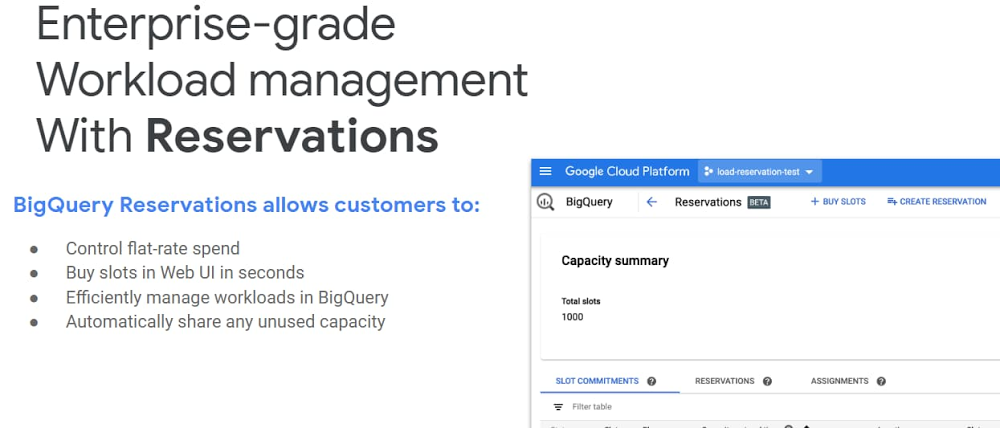
BigQuery, Google Cloud’s petabyte-scale data warehouse, lets you ingest and analyze data quickly and with high availability, so you can find new insights, trends, and predictions to efficiently run your business. Our engineering team is continually making improvements to BigQuery so you can get even more out of it. Recently added BigQuery features include new materialized views, column-level security, and BigQuery ML additions.Read on to learn more about these new capabilities and how they can help you speed up queries, add access controls, and focus on innovation.Accelerate performance and improve cost savings with BigQuery materialized viewsWe’re happy to announce that BigQuery materialized views are now available in beta. BigQuery materialized views are precomputed views that periodically cache the results of a query in a BigQuery table for increased performance and efficiency. A materialized view is a database object that contains the results of a query. For example, it may be a subset of the rows and/or columns of a table or join result, or may be a summary using an aggregate function. So when a query is re-run and a materialized view exists, the query doesn’t need to rescan all the tables again, but can quickly report the answer from the materialized view. This significantly improves performance and cuts down cost because the amount of data scanned is much smaller.BigQuery materialized views are easy to set up and work with in real time. Here’s an overview of the benefits: Zero maintenance: The system automatically synchronizes data refreshes with data changes in base tables. All incremental data changes from the base tables are automatically added to the materialized views—no user inputs required.  Always fresh: Materialized views are always consistent with the base table (including BigQuery streaming tables). Materialized views unite their data with the delta changes in the base table and return any new data in real time.Self-tuning: If a query or part of a query against the source table can instead be resolved by querying the materialized views, BigQuery will rewrite (reroute) the query to use the materialized view for better performance and efficiency.Customers such as Viant have seen tremendous benefits. “We have been using BigQuery Materialized Views in production for more than a year now,” says Adrian Witas, SVP and chief architect at Viant. “Not only does it come with great cost reduction, but it also hugely improves performance. Query latency is critical in our case where reporting data is directly consumed by the UI, which processes about 8,000 SQL queries per day with each query needing to complete in under a second. This has allowed us to successfully migrate our Vertica Reporting cluster to BigQuery.”Learn more about BigQuery materialized views in the documentation.Use BigQuery ML models for online prediction and build recommendation models You can export models from BigQuery ML in TensorFlow SavedModel format, and use those for online prediction in Cloud AI Platform, or your own serving layer. This also enables data scientists to tune the model in Python after it has been created in BigQuery ML, when further tuning is desired. Importing TensorFlow models for batch prediction in BigQuery is already generally available. This ability enables data scientists, data analysts, ML engineers, and data engineers to easily build end-to-end data to model deployment workflows. See the BigQuery ML documentation for more details.In addition, BigQuery ML has added support for training matrix factorization, a new type of model, which is now in beta. Matrix factorization allows users to train recommendation systems on large datasets in BigQuery through SQL. To learn more, see the tutorials forimplicit recommendations (user behavior-based; i.e.,used for product recommendations) andexplicit recommendations (rating-based; i.e., app and movie recommendations). Set access controls on data classes with column-level securitySensitive data is often scattered alongside less sensitive data within the same dataset, and managing the appropriate access to that sensitive data becomes challenging if you only look at table, dataset, or project-level permissions. BigQuery column-level security, now in beta, lets you set access controls on data classes, abstracted by policy tags at column-level granularity. With this new capability, you can tag sensitive columns containing a protected data class (i.e., PII, financial, health) and restrict these columns to privileged groups. Furthermore, you can create policy tag hierarchies, wherein tags in the root nodes aggregate permissions for tags at the leaf nodes. For example, if a “patient health” tag is nested below a general “restricted” tag, anyone who can access restricted data can access patient health data. Read more about BigQuery column-level security or dive into the documentation. Price predictability with BigQuery ReservationsPrice predictability continues to be top of mind for many organizations looking to understand and manage their data warehousing spend. We announced the beta release of BigQuery Reservations to help customers take advantage of BigQuery flat-rate pricing in an easy and flexible way. Advanced enterprise users can use Reservations to facilitate complex workload management scenarios. Reservations is now generally available in all BigQuery regions.Read more about BigQuery flat-rate pricing or dive into the documentation to get started.Command and control with BigQuery scripting and stored proceduresScripting allows data engineers and data analysts to execute a wide range of tasks, from simple ones like running queries in a sequence to complex, multi-step tasks with control flow including IF statements and WHILE loops. Stored procedures allow you to save these scripts within BigQuery and share them so that any user can run them in the future. We’re announcing general availability of scripting and stored procedures in all BigQuery regions. Since the beta release, we have added the following new capabilities:Exception handling: Support for EXCEPTION clauses to handle errors generated during the script executionSystem variable support: Support for key variables such as time zone, current project, and job ID, to display information specific to the user during execution.Validation of the PROCEDURE body during creation: Validation of the commands in the body of the PROCEDURE during creation to detect problems before executionJDBC and ODBC support: Support for standard APIs to enable execution by third-party execution engines that rely on the JDBC and ODBC drivers.Read more about scripting and stored procedures in the BigQuery documentation. In case you missed it:Launched COVID-19 public dataset program, making a hosted repository of public datasets like Johns Hopkins Center for Systems Science and Engineering (JHU CSSE), the Global Health Data from the World Bank, and OpenStreetMap data free to access and query.Federated ORC and Parquet federated queries in Cloud Storage are now generally available.Geospatial data ingest: Launched integration of FME and BigQuery so that users can transform hundreds of different geospatial file types and projections directly into BigQuery tables.To keep up on what’s new with BigQuery, subscribe to our release notes. You can try BigQuery with no charge in our sandbox. And let us know how we can help.
Quelle: Google Cloud Platform