New WAF capabilities in Cloud Armor for on-prem and cloud workloads

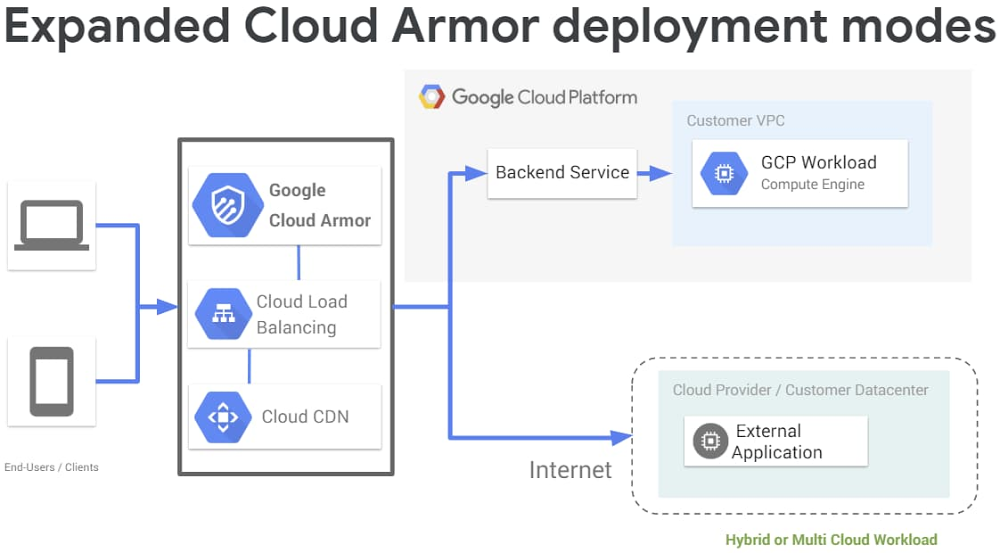
No matter where your applications are deployed, it’s important for admins to be able to quickly and easily scale security across the entire infrastructure. Google Cloud Armor is the web-application firewall (WAF) and DDoS mitigation service that helps users defend their web apps and services at Google scale at the edge of Google’s network. Last November, we introduced, as beta, new WAF capabilities and increased telemetry through the Security Command Center. Since then we’ve seen rapid adoption from customers looking to deploy Google Cloud-native offerings to defend and maintain the availability of their applications. As a result, we recently made the WAF generally available to all customers, including features such as:Geo-based access control Pre-configured WAF rules for SQL injection (SQLi) and Cross-Site Scripting (XSS) defense A custom rules language for custom Layer 7 (L7) filtering policies Security Command Center integration”At ATB Financial, security is a top priority,” says Innes Holman, Head of Technology Strategy and Architecture at ATB Financial. “With Google Cloud Armor, we can safely deploy workloads in the cloud. It protects our applications at scale while helping meet ATB’s security and compliance requirements.”What’s newToday, we’re also announcing the general availability of Cloud Armor support for Cloud CDN for origin server protection, as well as support for hybrid deployments, to help protect applications and services whether they’re deployed on Google Cloud, in a hybrid deployment, or in a multi-cloud architecture.Cloud Armor for Cloud CDN: origin server protectionWeb applications and websites often serve both static and dynamic content. While enabling Cloud CDN helps optimize the way static content is served, a client request for dynamic content still needs to reach the application server for processing and response. A CDN can typically scale to serve cached content in the face of an attack, but origin servers frequently need an upstream WAF to prevent unwelcome requests from overloading limited resources. Enterprises frequently have a security and compliance need to apply WAF rules and L7 filtering policies to reduce risk and ensure the availability of the application server. To fulfill this need, you can now configure Cloud Armor security policies to help protect backend services with Cloud CDN enabled. When a security policy is attached to a CDN-enabled backend service, Cloud Armor will enforce the policy for all requests destined to the origin server, including cache-misses and dynamic requests bypassing the cache. To get started, in your Google Cloud Load Balancing (GCLB) configuration, enable a backend service for Cloud CDN and then expand Advanced Configurations to attach a Cloud Armor security policy:Cloud Armor for hybrid and multi-cloud deploymentsCloud Armor, in addition to Cloud CDN and the Cloud Load Balancers, can now be used to front applications that are not deployed on Google Cloud. Enterprise workloads are increasingly complex and often are deployed with infrastructure on-prem and in the cloud, or spanning multiple infrastructure providers. Whether such hybrid architectures are a permanent fixture of an enterprise’s operations or part of a migration plan, security teams have a need to apply consistent security controls regardless of where the application is deployed—even internet-facing applications deployed on premise need to be protected from attacks from the internet.Users can now leverage the full scale and scope of Google’s edge infrastructure, including Cloud Armor, to help protect workloads that are deployed anywhere as long as they are accessible over the public internet. To get started, configure a GCLB backend service to point at an Internet Network Endpoint Group (NEG). Next, attach a Cloud Armor security policy to that backend service and configure one or more rules to filter Layer 7 traffic targeting the protected application.Next stepsWith Google Cloud Armor’s recent releases, Google Cloud customers can now utilize a native enterprise-grade WAF and DDoS mitigation service, leveraging the full scale of Google’s edge network to help defend their applications from DDoS attacks and mitigate risk from targeted application attacks. The support for hybrid deployment and CDN-enabled workloads means you have the option of deploying Google Cloud edge services—including Google Cloud Armor, Cloud CDN, and Cloud Load Balancing—to help protect applications and websites, whether they’re deployed on Google Cloud, on premise, or with other cloud providers, while maintaining a uniform edge and consistent set of policies and access controls. To learn more, check out the resources below:Cloud Armor documentation and resourcesCloud Armor security policy overview WAF rule tuning guideLanguage specificationInternet NEG documentationCDN origin protection documentation
Quelle: Google Cloud Platform

Migrate to Azure: Save now, be future ready

The global health crisis has transformed the way we work and live. Remote work has surged across industries, and the ability to scale and manage your business from anywhere has become essential. As our customers are moving beyond resolving immediate crisis needs, many are thinking about the next set of IT investments that can set them up for long term success. Microsoft is here to help.

Moving to the cloud has clear economic benefits. Convert upfront capital expenditures into operating expenditures and pay as you consume. The cloud scales up and down to meet demand as you need, so you don’t need to over-provision resources to be ready for peak usage and incur expenses on idle servers. Best of all, the cloud improves operational productivity for your staff, so they can focus on priority business initiatives.

When migrating to the cloud, Azure can provide unique and differentiated value that can help you save. Here’s how…

Save money with unique offers and programs

Meeting your business and budget needs has always been a priority for us. We make this possible through unique offers, transparent and competitive pricing, and free cost management tools. Azure is the most cost-effective cloud for Windows Server and SQL Server with offers like Azure Hybrid Benefit and free extended security updates—AWS is 5x more expensive. Lower your migration costs and risk through best practice guidance with the Cloud Adoption Framework for Azure, expert assistance with the Azure Migration Program, and free cost optimization tools.

Having worked with many of you, we have found that a simple ‘lift-optimize-shift’ migration strategy is your best bet to quickly realize cost savings and efficiencies. Start this process with a few simple steps. First, perform an assessment with our free Azure Migrate tool to help identify which workloads are cloud-ready, understand rightsizing recommendations, and opportunities to apply cost-savings offers unique to Azure. Next, migrate your Windows Server, SQL Server, and Linux infrastructure to Azure IaaS (or Azure VMware Solutions for VMware environments) using assessment results. And then keep your workloads secure and well managed on Azure. Customers such as Allscripts and Maersk have used this approach to save money and time.

Drive scale and operational efficiencies and focus on what matters

Many customers are migrating to the cloud to scale their most demanding workloads—for example, e-commerce web sites or health care portals—to drive cost savings and reliability. Migrating these web applications to Azure App Service unlocks benefits like automated load balancing and infrastructure maintenance, giving your staff valuable time back. There is opportunity to easily assess whether your website can be rapidly moved to App Service with the App Service Migration assistant. And, migrating your website’s database to a fully managed database like Azure SQL Database reduces the management and database administration overhead such as patching, high availability setup, and access control. Migrating to these Azure services requires little to no change to your existing web application and database, so it’s low-risk and cost-effective.

Keep your investments safe with unmatched security and built-in resiliency

Microsoft spends $1B annually on cybersecurity. We have over 3,500 Microsoft security professionals constantly monitoring our customers’ environments through advanced AI, analyzing more than 6.5 trillion security signals to detect and respond to threats with Azure Security Center. Use Azure Sentinel, a cloud native security information event management (SIEM) for end to end threat detection and response across your enterprise.

Azure provides built-in high-availability and disaster recovery options to ensure maximum resilience for your workloads. This includes infrastructure investments such as paired datacenter regions and availability zones for the best possible performance and security, as well as cost effective services like Azure Backup and Azure Site Recovery to keep your applications running during planned or unplanned outages.

Stay flexible with the cloud that’s hybrid by design

We understand that your organization will be in a hybrid state with investments that span multiple environments for the foreseeable future. We also know that you need flexibility to extend your on-premises investments and leverage them as you move to the cloud. Azure Hybrid Benefit enables you to re-use your existing Windows Server and SQL Server investments in the cloud and save money.

If you are ready to make the move and need help, join the Azure Migration Program, where we, along with our partner ecosystem, will help you accelerate your journey in a low-risk, cost-effective way. Learn more by visiting Azure migration center.
Quelle: Azure

Monitor your Azure workload compliance with Azure Security Benchmark

The Azure Security Benchmark v1 was released in January 2020 and is being used by organizations to manage their security and compliance policies for their Azure workloads. We are pleased to share that you can now track and monitor your compliance with the benchmark across your Azure environment in Azure Security Center.

The Azure Security Benchmark is a collection of over 90 security best practice recommendations you can employ to increase the overall security and compliance of all your workloads in Azure. The Azure Security Benchmark is based on common compliance frameworks and standards but is tailored to cloud deployments and specifically to Azure workloads. The benchmark provides specific guidance on how these common controls apply to Azure, and what you specifically need to implement in Azure to meet those requirements.

Now, not only can you understand the fundamental compliance framework requirements in Azure terms, but you can also measure and track how your own deployed Azure workloads are meeting those requirements at any given time.

Azure Security Center provides built-in automation for monitoring your compliance with the benchmark controls across different Azure resource types and workloads. Azure Security Center not only measures your compliance with the controls but also provides actionable recommendations for how to remediate the non-compliant resources and meet the requirements. The benchmark guidance and recommendations are contextualized for each Azure service, making it easier for you to implement the controls for the Azure services you are actively using.

The benchmark can be monitored using the Azure Security Center Regulatory Compliance Dashboard. The Azure Security Center compliance dashboard enables you to track and monitor industry-driven common compliance frameworks like NIST 800-53, Azure CIS, PCI-DSS, and ISO 27001, among others. To monitor the benchmark in this dashboard, you need to onboard the Azure Security Benchmark as a tracked standard. Once you onboard, you get a clear view of how your currently deployed Azure environment is meeting the benchmark controls. You can use the dashboard to track the status of your Azure resources with respect to benchmark requirements, download a summary report, and improve your compliance posture using Azure Security Center remediation guidance and automation.

To onboard the benchmark to your Azure Security Center compliance dashboard, you need to add the Azure Security Benchmark initiative package to your compliance view. You can then view the dashboard and start tracking your compliance status with benchmark controls.


Increasing coverage of the Azure Security Benchmark

The Azure Security Benchmark core requirements are already being met by all major Azure services, and those controls can be monitored and tracked in this dashboard today. With time, coverage will increase even further as Azure services are working to create additional features supporting the full set of security and compliance requirements of the Azure Security Benchmark, and monitors for those.
Here are a couple of recent examples of Azure services providing added capabilities to help you implement the security benchmark:

Encrypt sensitive information at rest: In some cases, you may want to use your own encryption key to protect your data. Fifty new services including Azure Cosmos DB and Azure Data Lake now support customer-managed keys for encryption at rest.
Protect Azure resources within virtual networks: Private Link allows you to securely access an Azure Service over a private endpoint in your virtual network. Thirteen new services including Azure Kubernetes Service and Azure Data Explorer now support Private Link.

Over time, a larger portion of controls will be supported and will be monitorable using the dashboard. 

The Azure Security Benchmark and Secure Score

Secure Score in Azure Security Center is a measure that helps you track your security posture, and effectively and efficiently improve your security by prioritizing the actions most likely to create a risk to your organization. Secure Score is comprised of a set of controls, where each control reflects a certain attack surface. Each control has an associated score (number of points) that represents your vulnerability for that attack surface, along with a set of security recommendations for reducing your vulnerability and improving your security. The cumulative scores for all controls are then used to calculate your overall Secure Score, which is a single KPI measurement representing your security posture.

The underlying security recommendations stipulated by Secure Score are the same as those associated with the Azure Security Benchmark controls. They are comprised of the same set of actions, that ultimately serve the common purpose of maximizing your Azure security posture. The Secure Score adds the additional dimension of threat analysis, risk, and vulnerability to each of those recommendations, and thus helps you prioritize action according to the most significant factors in reducing risk in your environment. The benchmark then illustrates how these security settings and factors apply to compliance framework requirements. It also adds some additional requirements that are compliance-focused but don’t have a direct impact on security risk.
 

Our recommendation is to use Azure Secure Score view to address misconfigurations starting with the highest priority recommendations.  The Azure Security Benchmark view is helpful for understanding your compliance and is sorted by controls rather than score impact.

Summary and next steps

The Azure Security Benchmark compliance dashboard in Azure Security Center can help you continuously track your compliance posture in Azure and improve your Azure workloads’ adherence to compliance requirements.

Get started now by learning about the Azure Security Benchmark and onboarding the benchmark to the Security Center compliance dashboard.

You can look forward to seeing upcoming releases of the dashboard with additional automation and improved coverage for benchmark controls, as well as extended capabilities to manage compliance controls and additional report types.

We would love to hear your feedback, you can use this link to send us an email.
Quelle: Azure






