EKS Best Practices Guide for Security

aws.github.io – This guide provides advice about protecting information, systems, and assets that are reliant on EKS while delivering business value through risk assessments and mitigation strategies. The guidance h…
Quelle: news.kubernauts.io

Tinkerbell.org

tinkerbell.org – Tinkerbell has four major components: a DHCP server (boots), a workflow engine (tink), an in-memory operating system (OSIE) and a metadata service (hegel). The workflow engine is comprised of a serve…
Quelle: news.kubernauts.io

Deploy Mayastor on GKE

medium.com – Today I’ll be writing about another one of OpenEBS storage engines. I’ll be going through how to deploy Mayastor on GKE. If you’re new to OpenEBS, take a look at the concepts about cStor and how you …
Quelle: news.kubernauts.io

Audiobahn: Use this AI pipeline to categorize audio content–fast

Creating content is easier than ever before. Many applications rise to fame by encouraging creativity and collaboration for the world to enjoy: think of the ubiquity of online video uploads, streaming, podcasts, blogs and comment forums, and much more. This variety of platforms gives users the freedom to post original content without knowing how to host their own app or website.Since new applications can become extremely popular in a matter of days, however, managing scale becomes a real challenge. While application creators wish to maximize new users and content, keeping track of that content is complex. The freedom to post their own content empowers creators, but it also creates an administration challenge for the platform. This forces organizations providing the platform to straddle between protecting the creator and the user: How can they ensure that creators have the freedom to post what they wish, while ensuring that the content they are displaying to users is appropriate for their audience? This isn’t a black-and-white issue, either. Different audience segments may react differently to the same content. Take music, for example. Some adults may appreciate an artist’s freedom to use explicit language, but that same language may be inappropriate for an audience of children. For podcasts, the problem is even more nuanced. An application needs to consider both the problem of ensuring that a listener feels safe as well as how to manage this moderation. While a reviewer only needs to spend three minutes listening to a song to determine if it’s appropriate, they may need to listen for 30 minutes to an hour—or more—to gauge the content of a podcast. Providing content that serves both audiences is an important task that requires careful management. In this blog, we’ll look more closely at the challenges that scaling presents, and how Google Cloud can help providers scale efficiently and responsibly.The challenge of scalabilityPlatforms rarely have a scalable model for evaluating or triaging content uploads to their site—especially when they can receive multiple new posts per second. Some rely on users or employees to manually flag inappropriate content. Others may try to sample and evaluate a subset of their content at regular intervals. Both of these methods, however, are prone to human error and potentially expose their users to toxic content. Without a workable solution for dealing with this firehose of content, some organizations have had to turn off commenting on their sites or even disable user new uploads until they catch up on evaluating old posts. The problem becomes even more complex when evaluating different forms of input. Written text can be screened and passed through machine learning (ML) models to extract words that are known to be offensive. Audio, however, must first be transcribed in a preprocessing step to convert it to text by applying various machine learning algorithms. These algorithms utilize deep learning to predict the written text, given their knowledge of grammar, language, and overall context of what’s being said. Because of this, transcription models typically prefer a sequence of speech which is more common in everyday usage. However, since profane words or sentences occur less often, the speech-to-text model may not prefer them, thus highlighting the complexity of audio content moderation. The solutionTo help platform providers manage content at scale, we combined a variety of Google Cloud products, including the Natural Language API and Jigsaw’s Perspective API, to create a processing pipeline to analyze audio content and a corresponding interface to view the results. This fosters a safe environment for content consumers and lets creators trust that they can upload their content and collaborate without being incorrectly shut down.Click to enlargeStep 1: Upload the audio contentThe first step of the solution involves uploading an audio file to Cloud Storage, our object storage product. This upload can be performed directly, either in Cloud Storage from the command-line interface (CLI) or web interface, or from a processing pipeline, such as a batch upload job in Dataflow. This upload is independent of our pipeline.In our architecture, we want to begin performing analysis whenever new files are uploaded, so we’ll set up notifications to be triggered whenever there’s a new upload. Specifically, we’ll enable an object finalize notification to be sent whenever a new object is added to a specific Cloud Storage bucket. This object finalize event triggers a corresponding Cloud Function, which will allow us to perform simple serverless processing, meaning that it scales up and down based on the resources that it needs to run. We use Cloud Functions here because they are fully managed, meaning we don’t have to provision any infrastructure, and they are triggered based on a specific type of event. In this function, our event is the upload to Cloud Storage. There are many different ways to trigger a Cloud Function, however, and we use them multiple times throughout this architecture to decouple the various types of analysis that we will perform. Step 2: Speech-to-text analysisThe purpose of the first Cloud Function is to begin the transcription process. Because of this, the function sends a request to the Speech-to-Text API, which immediately returns a job ID for this specific request. The Cloud Function then publishes the job ID and name of the audio file to Cloud PubSub. This lets us save the information for later, until the transcription process is complete, and lets us queue up multiple transcription jobs in parallel.Step 3: Poll for transcription results To allow for multiple uploads in parallel, we’ll create a second Cloud Function that checks whether transcription jobs are complete. The trigger for this Cloud Function is different from the first. Since we’re not using object uploads as notifications in this case, we’ll use Cloud Scheduler as the service to call the function to make it begin. Cloud Scheduler allows us to execute recurring jobs at a specified cadence. This managed cron job scheduler means that we can request the Cloud Function to run at the same time each week, day, hour, or minute, depending on our needs. For our example, we’ll have the Cloud Function run every 10 minutes. After it pulls all unread messages from PubSub it iterates through them to extract out each job ID. It then calls the Speech-to-Text API with the specified job ID to request the transcription job’s status. If the transcription job isn’t done, the Cloud Function republishes the job ID and audio file name back into PubSub so that it can check the status again the next time it’s triggered. If the transcription job is done, the Cloud Function receives a JSON output of the transcription results and stores them in a Cloud Storage bucket for further analysis. The next two steps involve performing two types of machine learning analysis on the transcription result. Each creates separate Cloud Functions that are triggered by the object finalize notification generated from uploading the transcription to Cloud Storage. Step 4: Entity and sentiment analysisThe first step calls the Natural Language API to perform both entity and sentiment analysis on the written content. For entity analysis, the API looks at various segments of text to extract out the various subjects that may be mentioned in the audio clip and groups them into known categories—“Person,” “Location,” “Event,” and much more. For sentiment analysis, it rates the content on a scale of -1 to 1 to determine if certain subjects are spoken about in a positive or negative way. For example, suppose we have the API analyze the phrase “Kaitlin loves pie!” It will first work to understand what the text is talking about. This means that it will extract out both “pie” and “Kaitlin” as entities. It will then look to categorize them as particular nouns and generate the corresponding labels of “Kaitlin” as “Person” and “pie” as “Other.” The next step is to understand the overall attitude or opinion conveyed by the text. For this specific phrase, “pie” would generate a corresponding high sentiment score, likely between 0.9 and 1, due to the positive attitude conveyed by the verb “loves.” The output from this phrase would indicate that it’s a person speaking favorably about a noun.Going back to our pipeline, the Cloud Function for this step calls the Natural Language API to help us better understand the overall content of the audio file. Since it’s time-consuming for platforms to listen to all uploaded files in their entirety, the Natural Language API helps generate a quick initial check of the overall feeling of each piece of content so users can understand what is being spoken about and how. For example, the output from “Kaitlin loves pie!” would let a user quickly identify that the spoken content is positive and probably OK to host on their platform.In this step, the Cloud Function begins once the transcription is uploaded to Cloud Storage. It then reads the transcription and sends it to the Natural Language API with a request for both sentiment and entity analysis. The API returns the overall attitude and entities described in the file, broken up into logical chunks of text. The Cloud Function then stores this output in Cloud Storage in a new object to be read later.  Step 5: toxicity analysisThe next Cloud Function invokes the Perspective API, also when the transcription is uploaded to Cloud Storage, meaning that it runs in parallel with the previous step. This API analyzes both chunks of text and individual words and rates their corresponding toxicity. Toxicity can refer to explicitness, hatefulness, offensiveness, and much more. While toxicity is traditionally used for small comments to enable conversations on public forums, it can be used for other formats as well. For an example, let’s look at the case of an employee trying to moderate an hour-long podcast that contains some dark humor. It can be difficult to absorb longform content like this in a digestible format. So, if a user flags the podcast’s humor as offensive it would require a moderator on the platform to listen to the entire file to decide if the content is truly presented in an offensive manner, or if it was playful, or even flagged by accident. Given the amount of podcasts and large audio files on popular sites, listening to each and every piece of flagged content would take a significant amount of time. This means that offensive files may not be taken down in a swift manner and could continue to offend other users. Similarly, some content might include playful humor that may seem insulting but could be innocuous. To help with this challenge, the Cloud Function analyzes the text to generate predictions about the content. It reads in the transcription from Cloud Storage, calls the Perspective API, and supplies the text as input. It then receives back predictions on the toxicity for each chunk of text, and stores it in a new file in Cloud Storage. With this, the analysis is complete. To understand the full context, we come to the final piece of the solution: the user interface (UI).Click to enlargeThe user interfaceThe UI is built on top of App Engine, which allows us to deploy a fully managed application without managing servers ourselves. Under the hood, the UI simply reads in the produced output from Cloud Storage and presents it in a user-friendly fashion that’s easy to digest and understand.The UI first allows users to view a list of the file names of each transcription in Cloud Storage. After selecting a file, a moderator can see the full audio transcription divided into logical, absorbable pieces. Each piece of text is then sorted based on its level of toxicity, as generated by the Perspective API, or by the order it appears in the file. Alongside the text is a percentage that indicates the probability that it contains toxic content. Users can filter the results based on the generated toxicity levels, and for quick consumption, organizations can choose a certain threshold above which they should manually review all files. For instance, a file that contains scores that are all less than 50% may not need an initial review, but a file containing sections consistently rating above 90% probably warrants a review. This allows moderators to be more proactive and purposeful when looking at audio content, rather than waiting for users to flag content or needing to listen to the whole piece. Each piece of text also contains a pop-up that indicates the results from the Natural Language API. It shows the various attitudes and subjects of each piece of content, presenting the user with a quick summary of what the content is about. OutcomeWhile this architecture uses Google Cloud’s pre-trained Speech-to-Text API and Natural Language API, you can customize it with more advanced models. As one example, the Speech-to-Text API can be augmented by including in the speech context configuration option. The speech context provides an opportunity to include hints, or expected words, that may be included in the audio. By including known profanity or other inappropriate words, clients can customize their API requests with these hints to help provide context when the model is determining the transcription.Additionally, suppose, for example, that your platform is interested in flagging certain types of content or is aware of certain subjects that you want to categorize in certain ways. Perhaps you want to know about political comments that may be present in an audio segment. With AutoML Natural Language, you can train your custom model against specific known entities, or use domain-specific terms. The advantage here is similar to the Natural Language API: It doesn’t require a user to have machine learning expertise—Google Cloud still builds the model for you, now with your own data.If you want to supply your own model for more custom analysis, you can use TensorFlow or transferred learning. The upside is that your model and analysis will be custom to your use cases, but it doesn’t leverage Google Cloud’s managed capabilities, and you have to maintain your own model over time. The pipeline we demonstrated in this blog enables organizations to moderate their content in a more proactive manner. It lets them understand the full picture of audio files, so they know what topics are being discussed, the overall attitude of those topics, and the potential for any offensive content. It drastically speeds up the review process for moderators by providing a full transcript, with key phrases highlighted and sorted by toxicity, rather than having to listen to a full file when making a decision. This pipeline touches all phases of the content chain—platforms, creators, and users—helping us all have a great user experience while enjoying all the creative work available at our fingertips. To learn more about categorizing audio content, check out this tutorial, concept document, and source code.
Quelle: Google Cloud Platform

Protect your organization from account takeovers with reCAPTCHA Enterprise

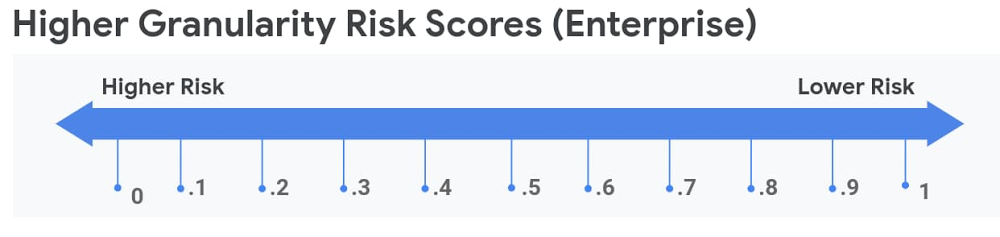
As more enterprises are requiring customers to create accounts to do things like access services or make a purchase, attackers have increased their focus on account takeovers. These attackers are highly motivated and can be extremely evasive when trying to avoid detection during campaigns. For example, bad actors often attempt to hide their activities by acting during normal traffic times to blend in with genuine customer activity. reCAPTCHA Enterprise can help protect your websites from fraudulent activity like this. Last week, we talked about how reCAPTCHA Enterprise can help keep your end users safe against a variety of attacks, including fraudulent transactions, scraping, synthetic accounts, and account takeovers. Today, we’re going to take a deeper look at how reCAPTCHA Enterprise can help you combat account takeovers and hijacking. Account takeover and hijacking basicsAccount takeovers and hijacking are when a bad actor uses a stolen or leaked credential to login and take over a legitimate user’s account. Account takeovers happen when an attacker uses someone else’s login credentials, successfully gets into his or her account, and then starts to perform fraud, such as the transferring of money or gift card and purchase fraud. How do these bad actors obtain stolen credentials? There are a number of ways, but the easiest is simply to purchase them from the dark web or other sources. This can be done extremely inexpensively, and in the last several years, billions of account records have been leaked from breaches. With exponential growth anticipated for credentials available after a data breach, that number will only continue to increase. When a malicious actor has a large set of these stolen or purchased credentials, it’s not financially feasible for them to manually attempt to login to an account. So, they rely on automated credential stuffing attacks to login and verify the accounts before they manually perform fraud on the accounts. This process of validating stolen credentials typically requires three parts: a list of potential credentials and accountsa distributed botnet (large swaths of infected “zombie” machines)some type of automation software or toolkit to orchestrate the attacking botnet Since these credentials have a long list of potential username and password combinations, attackers usually use a botnet to see which logins are correct. Botnets generally attack through proxy servers or ephemeral addresses that can be hard to blacklist or block, which also allows attackers to quickly change where the attacks are originating from. Determined attackers will pivot and attempt to evade detection as quickly as possible if they realize they’ve been noticed. Account takeover and hijacking attacks have been on the rise over the last years, and they are very costly to the organizations that are targeted. According to a study by Javelin Strategy & Research, billions of dollars are spent each year cleaning up and containing the stolen accounts to try to combat fraudulent activity. How reCAPTCHA can helpDue to the growing sophistication of attacks, it has become increasingly difficult for security teams to manage the line between letting valid customers in and keeping out fraudulent attackers and bots. reCAPTCHA Enterprise is here to help. reCAPTCHA Enterprise is a frictionless fraud detection service that leverages our experience from more than a decade of defending the internet with reCAPTCHA and data for our network of four million sites. A simple JavaScript snippet enables reCAPTCHA Enterprise to verify that requests on your webpages are coming from real humans. This is done through behavioral analysis that uses site-specific training and models. reCAPTCHA Enterprise will detect malicious requests and give you actionable insights to help protect your enterprise. reCAPTCHA Enterprise gives you the granularity and flexibility to help protect your webpages in the way that makes the most sense to your business. Our enterprise API provides risk scores for an interaction with your site. With 1.0 being a likely good interaction and 0.0 likely being an abusive one, you can decide which action to take based on that score. This means there’s no one-size-fits-all approach to managing your risk, you can have different levels of protection for different web pages. For example, a suspected fraudulent request on a login page could force a two-factor authorization challenge, while you could just block the request on a less valuable webpage.Using reCAPTCHA Enterprise, you can train your site specific model by sending reCAPTCHA IDs back to Google labeled as false positives or false negatives. SDKs are available for both iOS and Android to provide the same controls for your mobile applications. The danger of bot-led account takeover and hijacking attacks are on the rise, costing organizations large amounts of money and consuming the time of valuable internal resources in security, legal, and fraud teams. reCAPTCHA Enterprise can help detect these botnets and give you the insights you need to block the requests while allowing real users into your website and their account. To learn more about how you can help protect your enterprise from account takeovers and hijacking, visit our documentation. To get started with reCAPTCHA today, contact sales.
Quelle: Google Cloud Platform

How to run SAP on Google Cloud if high availability is high priority

Over the past few months, businesses across every industry have faced unexpected challenges in keeping their enterprise IT systems safe, secure, and available to users. Many have experienced sudden spikes or drops in demand for their products and services, and even more have shifted almost overnight to a home-based workforce. Even enterprises that experienced the stress of these changes and came through with flying colors may be wondering whether their current approach to protecting the availability of these applications is as robust as it needs to be.This question can be especially urgent for companies that run their SAP enterprise applications in on-premises environments. These organizations are often already struggling with running business-critical SAP instances on-premises because they can be complex and costly to maintain. But they see the on-prem option—backed up with major investments in high-availability (HA) systems and infrastructure—as the best way to ensure the security and availability of these essential applications. They know just how much their users depend on these systems and how disruptive it can be to deal with unplanned outages. However, IT organizations charged with running on-premises SAP landscapes, in many cases, must also manage a growing number of other business-critical applications—all while under pressure to do more with less.For many organizations, this is an unsustainable approach. In fact, according to a 2018 survey looking at trends in HA solutions, companies at the time were already struggling to hold the line with on-premises application availability:95% of the companies surveyed reported at least occasional failures in the HA services that support their applications.98% reported regular or occasional application performance issues.When HA application issues occured, companies surveyed spent 3–5 hours, on average, to identify and fix the problem.Things aren’t getting easier for these companies. Today’s IT landscape is dominated by risk, uncertainty, and the prospect of belt-tightening down the road. At the same time, it’s especially important now to keep your SAP applications—the software at the heart of your business—secure, productive, and available at all times.At Google Cloud, we’ve put a lot of thought into solving the challenges around high-availability for SAP environments. We recognized this as a potential make-or-break issue for customers. And we prioritized giving them a solution: a reliable, scalable, and cost-effective SAP environment, built on a cloud platform designed to deliver high-availability and performance.3 levels that define the SAP availability landscapeUnderstanding how to give SAP customers the best possible high-availability solution starts with recognizing that “availability” means different things to different customers, depending on their business needs, budgets, SAP application use cases, and other factors. That’s why we look at the SAP high availability (HA) landscape in terms of three levels, each with its own costs, benefits, and trade-offs to consider within an overall availability strategy.Level 1: InfrastructureFor some customers, simply moving an SAP system from on-premises hardware to Google Cloud infrastructure can deliver big improvements in uptime. Google Cloud has two built-in capabilities that are especially important to achieving this goal and together can reduce or even eliminate downtime due to hardware failures:Live Migration. When a customer’s VM instances are running on a host system that needs scheduled maintenance, Google Live Migration moves the VM instance from one host to another, without triggering a restart or disrupting the application. This is a built-in feature that every Google Cloud user gets at no additional cost. It works seamlessly and automatically, no matter how large or complex a user’s workloads happen to be. Google Cloud conducts hardware maintenance, applies security patches and updates, globally, without telling a single customer to restart their VM, all with the power of Live Migration. Host auto restart. When an unplanned shutdown affects a user’s VM instances, this feature swings into action, automatically restarting the VM instance on a different host. When necessary, it calls up a user-defined startup script to ensure that the application running on top of the VM restarts at the same time. The goal is to ensure the fastest possible recovery from an unplanned shutdown, while keeping the process as simple and reliable as possible for users.  Level 2: DatabaseEvery SAP environment depends on a central database system to store and manage business-critical data. Any SAP high-availability solution must consider how to maintain the availability and integrity of this database layer. In addition, SAP systems support a variety of database systems—many of which employ different mechanisms to achieve high-availability performance. By supporting and documenting the use of HA architectures for SAP HANA, IBM Db2, MaxDB, SAP ASE, and Microsoft SQL Server, Google Cloud gives customers the freedom to decide how to balance the costs and benefits of HA database systems for their SAP environments.Level 3: Application serverSAP’s NetWeaver architecture helps users avoid app-server bottlenecks that can threaten HA uptime requirements. Google Cloud takes that advantage and runs with it by giving customers the high-availability compute and networking capabilities they need to protect against the loss of data through syncronizationand to get the most reliability and performance from NetWeaver.5 ways Google Cloud supports high-availability SAP systemsThere are many other ways Google Cloud can help maximize SAP application uptime, even in the most challenging circumstances. Consider a few examples, and keep in mind how tough it can be for enterprises, even larger ones, to implement similar capabilities at an affordable cost:1. Geographic distribution and redundancy. Google Cloud’s global footprint currently includes 22 regions, divided into 67 zones and over 130 points of presence. By distributing key Google Cloud services across multiple zones in a region, most SAP users can achieve their availability goals without sacrificing performance or affordability. For example:Compute Engine instance groups can be distributed and managed across the available zones in a region.Compute Engineregional persistent disks are synchronously replicated across zones in a region.2. Powerful and versatile load-balancing capabilities. For many enterprises, load balancing and distribution is another key to maintaining the availability of their SAP applications. Google Cloud meets this need with a range ofload-balancing options, including global load balancing that can direct traffic to a healthy region closest to users. Google Cloud Load Balancing reacts instantaneously to changes in users, traffic, network, backend health, and other related conditions. And, as a software-defined service, it avoids the scalability and management issues many enterprises encounter with physical load-balancing infrastructure.3. Tools that keep developers focused and productive. Google Cloud’sserverless platform includes managed compute and database products that offer built-in redundancy and load balancing. It allows a company’s SAP development teams to deploy code without worrying about the underlying infrastructure. Google Cloud alsosupports CI/CD through native tools and integrations with popular open source technologies, giving modern DevOps organizations the tools they need to deliver software faster and more securely.4. Flexible, full-stack monitoring. Google Cloud Monitoring gives enterprises deep visibility into the performance, uptime, and overall health of their SAP environments. It collects metrics, events, and metadata from Google Cloud, Amazon Web Services, hosted uptime probes, application instrumentation, and even application components such as Cassandra, Nginx, Apache Web Server, Elasticsearch, and many others. Cloud Monitoring uses this data to power flexible dashboards and rich visualization tools, which helps SAP teams identify and fix emerging issues before they affect your business.5. Making the most of an SAP system’s inherent HA capabilities. Every SAP instance already includes some very powerful HA technologies, and one of our most important jobs is to ensure that Google Cloud fully supports these built-in capabilities. Let’s look at two examples of how we do this:At the database level, Synchronous SAP ​HANA System Replication​ (HSR) is one of the most important application-native technologies for ensuring HA for any SAP HANA system. It works by replicating data continuously from a primary system to a secondary system, and it can be preloaded into memory to allow for a rapid failover if there’s a disaster.Google Cloud supports and complements HSR by allowing the use of synchronous replication for SAP instances that reside in any zone within the same region. That means users can place their primary and secondary instances in different zones, keeping them geographically separated and protected against failure on an entire zone.At the application level, the SAP architecture allows the use of multiple NetWeaver app server instances to maintain high-availability performance. Yet there’s still a single point of failure to contend with: the SAP NetWeaver global file system, which must be available to all SAP NetWeaver instances in a HA system.Google Cloud offers two ways to address this issue. The first uses a high-availability shared storage solution, such as NetApp Cloud Volumes​. The second uses Google Cloud’s support of replicated zonal persistent disks to replicate the SAP global file system between the nodes in an HA cluster. Both of these approaches ensure that a file system failure won’t put a business’s high-availability SAP environments at risk.Explore your HA optionsWe’ve only scratched the surface when it comes to understanding the many ways Google Cloud supports and extends HA for SAP instances. For an even deeper dive, our white paper, “SAP on Google Cloud: High Availability”goes into more technical detail on how you can set up a high-availability architecture for SAP landscapes using Google Cloud services.
Quelle: Google Cloud Platform

Azure Analytics: Clarity in an instant

What 2020 is teaching us is that the world can change in an instant. In the span of a few months, we have witnessed massive disruptions across every industry around the globe. Factories are idle, hotels are empty, and the transportation backbone that connects us all is quiet. Navigating these unprecedented times is challenging and requires a new level of agility for businesses to deal with abrupt changes in our world.

Core to achieving this agility is the ability to gain fresh, continuous insights from data. Our commitment to customers is to make analytics in Azure the most performant and secure experience it can be, and when we debuted Azure Synapse Analytics in November 2019, we effectively removed the barriers between enterprise data warehousing and big data analytics to enable data professionals to collaborate, build, and manage their analytics solutions with ease. Azure Synapse Analytics is a game-changer in the industry, and it has been exciting to see the strong customer interest since its debut.

But we didn’t stop there. Another barrier that has long existed is the one that separates operational data from analytical systems. Historically, supporting hybrid transactional analytical processing (HTAP) workloads has been complex, costly, and has forced customers to make tradeoffs between transactional and analytical processing needs. They either had to over-provision expensive resources such as memory to support both analytics and transactions in a single system or maintain distinct systems. Most customers opted for the latter, which means that they are forced to manage complex extract, load, and transform (ETL) pipelines to connect their analytical and operational systems, adding lag to their time to insights.

There has never been a simple, low cost, cloud-native HTAP implementation that enables immediate, in-the-moment insights on a business—until today.

Introducing: Azure Synapse Link

Today, we're pleased to announce the preview of Azure Synapse Link, a cloud-native implementation of HTAP. A capability that removes the barriers between Azure operational database services and Azure Synapse Analytics, Azure Synapse Link enables customers to get insights from their real-time transactional data stored in their operational databases with a single click, without managing data movement or placing a burden on their operational systems. Azure Synapse Link is now available in Azure Cosmos DB and will be available in our other operational database services such as Azure SQL, Azure Database for PostgreSQL, Azure Database for MySQL, and others in the future.


How does it work? Fundamental to Azure Synapse Link is our cloud-native architecture. To enable it, customers simply click a button in their favorite Azure database service, and a direct link to the data is established with Azure Synapse Analytics. The operational data is then automatically and continuously made available to Azure Synapse Analytics in an optimized columnar structure, similar to a covering index. No complex ETL pipelines or additional database compute resources are required and customers can run their analytics workloads on real-time data through Azure Synapse Analytics immediately and cost-effectively.

To learn more about Azure Synapse Link, check out my Mechanics video:

Get started today

Get started today with Azure Cosmos DB and Azure Synapse Analytics for free.
For more details about Azure Synapse Link, check out the documentation.

Quelle: Azure

Build AI you can trust with responsible ML

As AI reaches critical momentum across industries and applications, it becomes essential to ensure the safe and responsible use of AI. AI deployments are increasingly impacted by the lack of customer trust in the transparency, accountability, and fairness of these solutions. Microsoft is committed to the advancement of AI and machine learning (ML), driven by principles that put people first, and tools to enable this in practice.

In collaboration with the Aether Committee and its working groups, we are bringing the latest research in responsible AI to Azure. Let’s look at how the new responsible ML capabilities in Azure Machine Learning and our open-source toolkits empower data scientists and developers to understand ML models, protect people and their data, and control the end-to-end ML process.

Understand

As ML becomes deeply integrated into our daily business processes, transparency is critical. Azure Machine Learning helps you to not only understand model behavior but also assess and mitigate unfairness.

Interpret and explain model behavior

Model interpretability capabilities in Azure Machine Learning, powered by the InterpretML toolkit, enable developers and data scientists to understand model behavior and provide model explanations to business stakeholders and customers.

Use model interpretability to:

Build accurate ML models.
Understand the behavior of a wide variety of models, including deep neural networks, during both training and inferencing phases.
Perform what-if analysis to determine the impact on model predictions when feature values are changed.

"Azure Machine Learning helps us build AI responsibly and build trust with our customers. Using the interpretability capabilities in the fraud detection efforts for our loyalty program, we are able to understand models better, identify genuine cases of fraud, and reduce the possibility of erroneous results." 
—Daniel Engberg, Head of Data Analytics and Artificial Intelligence, Scandinavian Airlines

Assess and mitigate model unfairness

A challenge with building AI systems today is the inability to prioritize fairness. Using Fairlearn with Azure Machine Learning, developers and data scientists can leverage specialized algorithms to ensure fairer outcomes for everyone.

Use fairness capabilities to:

Assess model fairness during both model training and deployment.
Mitigate unfairness while optimizing model performance.
Use interactive visualizations to compare a set of recommended models that mitigate unfairness.

“Azure Machine Learning and its Fairlearn capabilities offer advanced fairness and explainability that have helped us deploy trustworthy AI solutions for our customers, while enabling stakeholder confidence and regulatory compliance.”  —Alex Mohelsky, EY Canada Partner and Advisory Data, Analytic and AI Leader

Protect

ML is increasingly used in scenarios that involve sensitive information like medical patient or census data. Current practices, such as redacting or masking data, can be limiting for ML. To address this issue, differential privacy and confidential machine learning techniques can be used to help organizations build solutions while maintaining data privacy and confidentiality.

Prevent data exposure with differential privacy

Using the new WhiteNoise differential privacy toolkit with Azure Machine Learning, data science teams can build ML solutions that preserve privacy and help prevent reidentification of an individual’s data. These differential privacy techniques have been developed in collaboration with researchers at Harvard’s Institute for Quantitative Social Science (IQSS) and School of Engineering.

Differential privacy protects sensitive data by:

Injecting statistical noise in data, to help prevent disclosure of private information, without significant accuracy loss.
Managing exposure risk by tracking the information budget used by individual queries and limiting further queries as appropriate.

Safeguard data with confidential machine learning

In addition to data privacy, organizations are looking to ensure security and confidentiality of all ML assets.

To enable secure model training and deployment, Azure Machine Learning provides a strong set of data and networking protection capabilities. These include support for Azure Virtual Networks, private links to connect to ML workspaces, dedicated compute hosts, and customer managed keys for encryption in transit and at rest.

Building on this secure foundation, Azure Machine Learning also enables data science teams at Microsoft to build models over confidential data in a secure environment, without being able to see the data. All ML assets are kept confidential during this process. This approach is fully compatible with open source ML frameworks and a wide range of hardware options. We are excited to bring these confidential machine learning capabilities to all developers and data scientists later this year.

Control

To build responsibly, the ML development process should be repeatable, reliable, and hold stakeholders accountable. Azure Machine Learning enables decision makers, auditors, and everyone in the ML lifecycle to support a responsible process.

Track ML assets using audit trail

Azure Machine Learning provides capabilities to automatically track lineage and maintain an audit trail of ML assets. Details—such as run history, training environment, and data and model explanations—are all captured in a central registry, allowing organizations to meet various audit requirements.

Increase accountability with model datasheets

Datasheets provide a standardized way to document ML information such as motivations, intended uses, and more. At Microsoft, we led research on datasheets, to provide transparency to data scientists, auditors and decision makers. We are also working with the Partnership on AI and leaders across industry, academia, and government to develop recommended practices and a process called ABOUT ML. The custom tags capability in Azure Machine Learning can be used to implement datasheets today and over time we will release additional features.

Start innovating responsibly

In addition to the new capabilities in Azure Machine Learning and our open-source tools, we have also developed principles for the responsible use of AI. The new responsible ML innovations and resources are designed to help developers and data scientists build more reliable, fairer, and trustworthy ML. Join us today and begin your journey with responsible ML!

Additional resources

Learn more about responsible ML.
Get started with a free trial of Azure Machine Learning.
Learn more about Azure Machine Learning and follow the quick start guides and tutorials.

Quelle: Azure

Developer Velocity: Empowering developers to fuel business performance

Developers have been drivers of innovation and transformation for decades. They have pioneered innovation across countless industries and helped businesses weather tough conditions. Now, we are living in unprecedented times where organizations in every industry and sector are working to adjust to a new normal, rethinking how business is done and meeting new, changing customer demands.

Because technology underpins everything from how businesses run to the products and services you sell, organizations must learn to excel at developing software. Business leaders need to empower developers to unlock productivity and innovation, in what the industry has started referring to as Developer Velocity.

Developer Velocity isn’t just about increasing the speed of delivery, but about unleashing developer ingenuity—turning developers’ ideas into software that supports the needs of your customers, and the goals of your business.

McKinsey & Company recently conducted a comprehensive review of what it takes for a company to become a technology company (have tech intensity) and converged on a single holistic metric—Developer Velocity Index (DVI). They shared their findings and key insights in their recent Developer Velocity: How software excellence fuels business performance report.

The report concluded that driving business performance from software development comes down to creating the right environment and removing points of friction for developers to innovate. Organizations that recognize this outpace revenue growth up to five times that of their competitors. They also have 60 percent higher total shareholder returns and 20 percent higher operating margins and perform better on customer satisfaction and brand perception.  

Helping every organization increase Developer Velocity

How do you increase Developer Velocity for your organization? Developer Velocity involves focusing on critical enablers and minimizing barriers to developer productivity. Microsoft understands the core enablers as we’ve been building software and tools to support the unique needs of developers for decades. Microsoft’s comprehensive developer toolchain and platforms are designed to help modern developers and development teams. The more you enable developers to build productively, collaborate globally and securely, and scale what they invent, the better business outcomes you’ll see in areas including financial performance, innovation, and customer satisfaction.

Build productively with best-in-class tools

In my journey as an engineering and business leader, I’ve learned that a key driver in digital transformation for every company is hiring top talent. Attracting and retaining top engineering talent comes down to providing developers with opportunities to work on interesting projects and enabling them with the best engineering systems and tools to do their job.

According to McKinsey, the leading driver of business performance is best-in-class tools. Organizations with strong tools are 65 percent more innovative, and their developer satisfaction and retention rates are 47 percent higher.

Software development is a constantly evolving craft and developer tools need to reflect the changes in development workflows. As developers’ responsibilities continue to expand to embrace new technologies, it’s important to automate core development processes like testing and CI/CD so that developers can focus on what matters. In addition, empowering developers to use their favorite languages, open source frameworks, and tools helps them be more productive and feel at home.

At Microsoft, we infuse modern development practices and emerging technologies into our tools. Our mission with the Visual Studio product family is to provide best-in-class tools for every developer. I am humbled by the millions of developers around the world who use Visual Studio Code and Visual Studio as their preferred tools every day.

Many development teams have long been distributed and geographically dispersed, but now everyone is making this transition, in addition to new challenges like developers being disconnected from their dedicated dev boxes. To address one of the biggest pain points for developers—setting up a new dev box, a common scenario when engaging on a new project, or moving to remote work, we recently announced Visual Studio Codespaces. Developers can experience Codespaces with Visual Studio and Visual Studio Code, or directly within GitHub. Codespaces uses the power of the cloud to enable developers to create fully configured development environments in minutes. Today at Build, we're announcing even more innovation to help developers code, collaborate, and ship from anywhere.

Collaborate globally and securely

The top-performing organizations as measured by McKinsey showed that open-source adoption is the biggest differentiator. These organizations are seeing three times more impact from the adoption of open source than the rest of the industry. Organizations that are best-in-class on open source capabilities score 30 percent higher on innovation and 20 percent higher on developer satisfaction.

Open source adoption is not just about the use of open source code or technologies. It’s about embracing an open source mindset—creating a culture of knowledge sharing and contributing to software development to realize the collective power of a broader development team or community. Effective collaboration is the biggest accelerator in helping making teams be more productive and satisfied. 

With GitHub, you can bring the collaboration best practices used by over 50 million developers into your organization. Through empowering collaboration internally, you can both attract and retain the best talent and increase the impact of your software development investments. To ensure GitHub is accessible for all developers, we recently announced that GitHub is free for teams. And to provide a seamless code-to-cloud experience, today we are announcing new integrations for GitHub Actions for Azure. More than 30 GitHub Actions for Azure help your development teams easily create and automate workflows to build, test, package, release, and deploy to Azure. You can learn more about GitHub’s latest announcements here.

Scale your innovation with Azure 

McKinsey identified public-cloud adoption as a catalyst of Developer Velocity is especially strong for non-software companies—public-cloud adoption has four times the impact on their business performance than it does for software companies.

With Azure, we’ve built an end-to-end cloud that enables developers to focus on building apps and not have to worry about the underlying infrastructure the apps run on. Azure supports developers’ favorite languages, open source frameworks, and tools while also creating easy pathways to learn new skills.

Our latest Azure innovations enable developers to build cloud-native applications as well as modernize existing applications. To ensure developers in your organizations can modernize Windows applications, we recently announced the general availability of Windows Server containers for Azure Kubernetes Service. To make it incredibly easy for developers to instantly scale applications on demand with limitless, guaranteed speed and performance, today we announced new innovations to Azure Cosmos DB and considerable cost savings gained by pairing autoscale with the Azure Cosmos DB free tier. Azure also makes it easy for developers to add AI to applications with Azure Cognitive Services. Today, we announced several new capabilities including enhanced voice styles and container support for Azure Cognitive Services.

The McKinsey research also reported that leading companies use low-code and no-code platforms. Companies that utilize this technology score 33 percent higher on innovation compared with bottom-quartile companies. Power Apps offers a low code application development platform designed to rapidly build web and mobile experiences. Today, we’re seeing many of our customers turning to a combination of Power Apps and Azure to quickly deliver solutions that respond to changing business needs. You can learn more about Power Apps and Azure here.

Developing with Azure puts the latest cloud technology and best-in-class tools at the fingertips of developers with a breadth of skills. Today at Build, we're announcing even more innovation in Azure here.

Next steps with Developer Velocity

In times like this, every organization in every industry is evolving to address the current realities. At Microsoft, we're working closely with organizations around the world to build and accelerate the delivery of secure, cost-effective, cloud-based solutions. Companies like Carhartt, Optio3, and Swedish Health Services are examples of organizations increasing Developer Velocity with the support of Microsoft developer tools and cloud platform.

You can learn more about Developer Velocity and how Microsoft can help here. Today, we are also releasing the new Developer Velocity Assessment tool to help you measure your organization’s Developer Velocity Index (DVI) score, get a benchmark relative to peers in your industry, and actionable recommendations and guidance to drive better business outcomes for your organization.

I’d like to welcome every developer around the world to Build 2020. Today’s announcements give developers cutting-edge tools to create the next generation of applications. Please join us at the Microsoft Build 2020 digital event including my Azure: Invent with Purpose keynote. I look forward to seeing what you build!
Quelle: Azure

Code, collaborate, and ship your apps from anywhere

Welcome to Microsoft Build 2020! This all-new 48-hour digital experience is designed to help you and other developers around the world come together to solve challenges, share knowledge, and stay connected. Here we’ll cover some of our latest innovations in developer tools and cloud platform technologies—to help you code, collaborate, and ship your apps from anywhere, so you can support the changing needs of your business and continue to deliver the quality experiences that your customers expect.

So how do you overcome the challenges of today and remain productive as developers? Thankfully, in today’s digital world there are tools to help you work remotely and be as productive as ever: with Azure as your trusted cloud platform and cloud-powered developer tools with Visual Studio and GitHub.

Code

Developers often spend endless hours configuring dev machines for new projects: cloning source code, installing runtimes, setting up linters and debuggers, configuring extensions—just to do it all again for the next project, the next bug, or the next code review. The challenge is even more prevalent in times of remote work, where you might not have access to your preferred development machine. Visual Studio Codespaces, available in preview, enables you to create a cloud-hosted development environment that’s ready to code, in seconds. You can access it from Visual Studio Code or Visual Studio and it also includes a full web-based editor you can use to edit, run, and debug your applications from any device. We recently announced that Codespaces is coming to GitHub in preview, so you can also easily code from any repo.

To help .NET developers share code across platforms, today we released .NET 5 Preview 4. With .NET 5, we continue the journey to unify the .NET platform across all workloads like mobile, desktop, and web. .NET 5 Preview 4 also has many improvements for working with containers and reducing the size of images particularly for multi-stage build scenarios.

For developers with C# and HTML skillsets looking to create web apps, Blazor is a free and open-source web framework that allows you to do that—without writing JavaScript. Today, we announced ASP.NET Blazor WebAssembly that lets you build web apps that run completely in the browser with C#, which can perform better, take up less memory than JavaScript, and can run completely offline.

If you are building a modern single page application with JavaScript and looking for minimal configuration and deployment globally in minutes, then check out a new hosting option in Azure App Service, Static Web Apps, now available in preview. Static Web Apps supports frameworks like Angular, React, and Vue or Static Site Generators such as Gatsby and Hugo. Initializing a Static Web App with a Git repo hooks up GitHub Actions that then connects smart defaults to your CI/CD pipeline. This means that any time a developer makes a change, it will go through the quality and security checks.

For applications optimized for cloud scale and performance, we recently announced the general availability of Azure Kubernetes Service (AKS) support for Windows Server containers. If you’re looking to lift and shift your Windows applications in containers, you can now run them on a managed Kubernetes service in Azure and get the full benefits of portability, scalability, and self-healing for your production workloads. To help you instantly scale your apps on demand with limitless, guaranteed speed and performance, today we announced new innovations to Azure Cosmos DB and considerable costs savings gained by pairing autoscale with the Azure Cosmos DB free tier.

Azure also makes it easy for developers to add AI into applications with Azure Cognitive Services. Today, we announced new capabilities, such as enhanced voice styles, enabling you to tailor the voice of your app to fit your brand or unique scenario. If you’re looking to run AI anywhere, we also announced general availability of container support for Language Understanding and Text Analysis.

And, if you need deliver apps quickly, take advantage of the combination of Microsoft Power Apps, a low code platform, and Azure to analyze data, automate processes and create virtual agents. Learn how to extend Power Apps with Azure services such as Bot Services, Logic Apps, and Functions. 

Collaborate

To effectively collaborate as a local or distributed development team, you need the ability to accommodate flexible work schedules, collaborate both asynchronously and in real-time when needed, and track and prioritize work. With Visual Studio Live Share, you can create shared coding sessions and co-edit, co-debug applications with your peers securely—no matter where you are. Today, we announced expanded capabilities for Visual Studio Live Share, which include text and voice chat support. With these additions, your team can collaborate more effectively from the comfort of your own dev tools, without the need for additional apps.

With over 50 million developers, GitHub is the place where developers code together. We continue to innovate to ensure collaboration is seamless at every stage of the software development lifecycle. For example, you may find yourself needing to brainstorm feature ideas, help new users get their bearings, and collaborate on best ways to use the software.  GitHub Discussions recently announced at GitHub Satellite helps you do just that and is in public beta. Learn more about the latest GitHub innovations to help you collaborate with your team members.

Ship

Over the past six months, we’ve published more than 30 GitHub Actions for Azure to help you create workflows to build, test, package, release and deploy to multiple Azure services, from web applications to serverless functions to Kubernetes. We heard from you that it can be difficult to craft CI/CD pipelines by editing a bunch of YAMLs and you spend a considerable time setting up and switching between different discrete tools. We are pleased to announce that GitHub Actions for Azure are now integrated into Visual Studio Code, Azure CLI and the Azure Portal simplifying the experience of deploying to Azure from your preferred entry points. Download the new Visual Studio Code extension or install the Azure Command-Line Interface (CLI) extension for GitHub Actions for Azure.

Security is also top of mind when releasing code into production. At GitHub Satellite, we announced cloud betas of code scanning and secret scanning to help developers consume and ship code safely. With code scanning enabled in GitHub, every “Git push” is scanned for new security concerns using the world’s most advanced semantic analysis engine, CodeQL. Secrets scanning is now available for private repositories. This feature watches private repositories for known secret formats and immediately notifies developers when they are found. Developers can now identify, remediate, and prevent vulnerabilities in source code before they are deployed into production.

More exciting news for every developer

With all the new coding improvements and advancements combined with Windows 10—it truly is a great time to be a developer. Today, we announced the general availability of Windows Terminal 1.0, which provides a modern, fast terminal application for users of command-line tools and shells like Command Prompt, PowerShell, WSL, and Azure Cloud Shell. We also announced upcoming support for GPU compute in the Windows Subsystem for Linux (WSL) for faster computations. And coming soon is GUI app support which means you can open a WSL instance and run a Linux GUI app directly (without the need of a third-party X Server). You can use this feature to run your favorite IDE in a Linux environment, or some applications that you could only find on Linux.​ 

Join us

Regardless if your team is onsite or remote, we want to help developers spend less time setting up environments, configuring systems and dealing with underlying infrastructure so you can spend more time coding and building solutions. We want to ensure development teams can easily collaborate on projects regardless of where you sit. We want to help you deliver and maintain code with automated workflows that are free from security vulnerabilities. Microsoft offers an end-to-end cloud platform and developer tools designed to meet your engineering needs and keep you and your team as productive as possible wherever you work.

Please join me in Scott Guthrie’s, Azure: Invent with purpose session, and make sure to watch Scott Hanselman’s session, Every Developer is Welcome, to see many of these new innovations designed for every developer. I can’t wait to see what you build!
Quelle: Azure