Make Your Business More Accessible with New Blocks

From our support sessions with customers each month, we know that growing your brand or business is a top website goal. And in this unprecedented time in which more people around the world are staying at home, it’s important to promote your products and services online to reach a wider audience and connect with more people.

Our team has been hard at work improving the block editor experience. We’ve launched six new blocks that integrate WordPress.com and Jetpack-enabled sites with popular services — Eventbrite, Calendly, Pinterest, Mapbox, Google Calendar, and OpenTable — enabling you to embed rich content and provide booking and scheduling options right on your blog or website.

Whether you’re an online boutique, a pilates studio, an independent consultant, or a local restaurant, these blocks offer you more ways to promote your brand or business. Take a look at each block — or simply jump to a specific one below.

EventbriteCalendlyPinterestMapboxGoogle CalendarOpenTable

Promote online events with the Eventbrite block

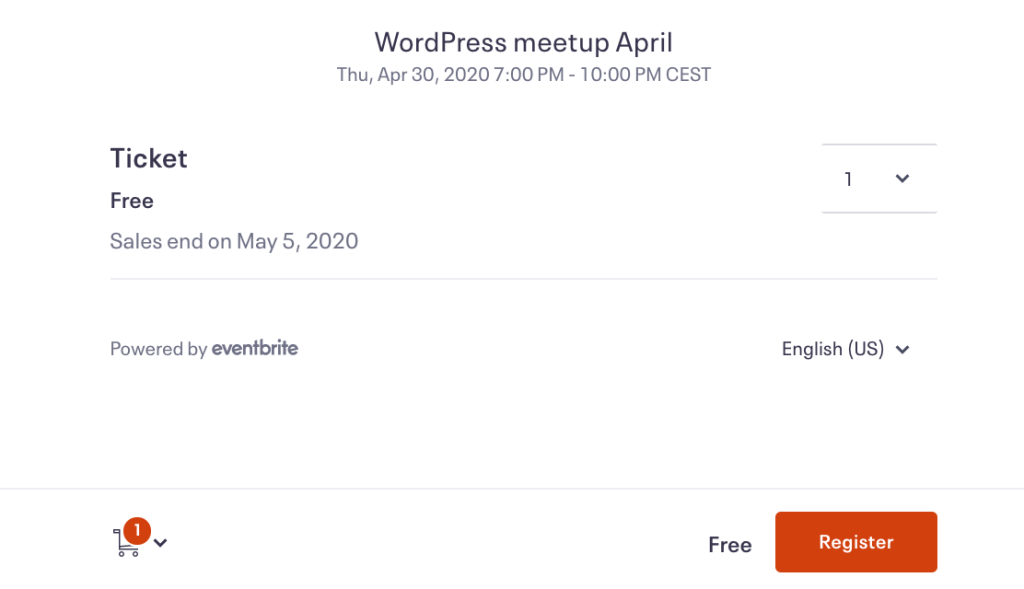
Looking for a way to promote an online event (like your museum’s virtual curator talk or your company’s webinar on remote work), or even an at-home livestream performance for your fans and followers? Offering key features of the popular event registration platform, the Eventbrite block embeds events on posts and pages so your visitors can register and purchase tickets right from your site.

Quick-start guide:

To use this block, you need an Eventbrite account. If you don’t have one, sign up at Eventbrite for free.In the block editor, click the Add Block (+) button and search for and select the Eventbrite Checkout block.Enter the URL of your Eventbrite event. Read these steps from Eventbrite if you need help.Select from two options: an In-page Embed shows the event details and registration options directly on your site. The Button & Modal option shows just a button; when clicked, the event details will pop up so your visitor can register.

Learn more on the Eventbrite block support page.

Schedule sessions with the Calendly block

Want to make it easier for people to book private meditation sessions or language lessons with you? The Calendly block, featured recently in our guide on moving your classes online, is a handy way for your clients and students to book a session directly on your site — eliminating the time spent coordinating schedules. You can also use the Calendly block to schedule team meetings or group events.

Quick-start guide:

To use this block, you need a Calendly account. Create one for free at Calendly.In the block editor, click the Add Block (+) button and search for and select the Calendly block.Enter your Calendly web address or embed code. Follow these steps from Calendly if you need help.Select from two styles: the Inline style embeds a calendar directly onto your site; the Link style inserts a button that a visitor can click to open a pop-up calendar.This block is currently available to sites on the WordPress.com Premium, Business, or eCommerce plans. It’s free on Jetpack sites.

Learn more on the Calendly block support page.

Up your visual game with the Pinterest block

Strong visuals help to provide inspiration, tell your stories, and sell your products and services. Pinterest is an engaging way for bloggers, influencers, and small business owners to enhance their site content and expand their following. With the Pinterest block, you can embed and share pins, boards, and profiles on your site.

Quick-start guide:

In the block editor, click the Add Block (+) button and search for and select the Pinterest block.Paste the URL of a pin, board, or profile you’d like to display and click Embed. Note that you can only embed public boards.Pro tip: in the block editor, go to Layout Elements and select Layout Grid to create a visually striking layout with pins, boards, and profiles, as shown above.

Display locations with the Map block

A map on your site is a quick visual way to display a location, like your restaurant’s takeout window or the drop-off spot for donations to a local food bank. Powered by mapping platform Mapbox, the Map block embeds a customized map on your site. Show the location of your business, a chain of boutique hotels, the meeting spots for your nonprofit’s volunteers, and more.

Quick-start guide:

In the block editor, click the Add Block (+) button and search for and select the Map block.In the text field, type the location you want to display and select the correct location from among the results that appear.Click on the red marker to edit the title and caption of the marker.Explore the toolbar for block-specific settings. Add more markers, for example, by clicking the Add a marker button.In the sidebar, customize your map’s appearance (including colors, height, and zoom level).

Explore more settings on the Map block support page.

Share your calendar with the Google Calendar block

Are you an author planning a book tour (or a series of online readings)? A digital marketing consultant hosting social media workshops? A neighborhood pop-up bakery? With the Google Calendar block, you can display a calendar of upcoming events or your hours of operation.

Quick-start guide:

In Google Calendar, click the three dots next to your calendar name and select Settings and sharing. Under Access Permissions, ensure Make available to public is checked. Click on Integrate calendar on the left and copy the code under Embed code.In the block editor, click the Add Block (+) button, search for and select the Custom HTML block, and paste the code you copied in Google Calendar.Publish your post or page. The next time you edit this post or page, you’ll see the code has been converted to shortcode.

Explore more settings on the Google Calendar block support page.

Streamline reservations with the OpenTable block

If you’re a restaurant or cafe owner, a primary goal of your site is to increase the number of bookings. Sure, people aren’t dining out right now, but you can be ready to take reservations in the future. With the OpenTable block, people can reserve a table directly from a post or page instead of calling or booking through a different reservation service.

Quick-start guide:

To use this block, your restaurant must be listed on OpenTable. Create an OpenTable listing now.In the block editor, click the Add Block (+) button and search for and select the OpenTable block.Enter your OpenTable Reservation Widget embed code. Check this OpenTable guide if you need help.Explore the block’s toolbar and sidebar settings. For example, choose from four different embed styles: Standard, Tall, Wide, and Button.This block is currently available to sites on the WordPress.com Premium, Business, or eCommerce plans. It’s free on Jetpack sites.

Learn more on the OpenTable block support page.

Which blocks are you most excited about?

Stay tuned for more new blocks soon!
Quelle: RedHat Stack

Powering up caching with Memorystore for Memcached

In-memory data stores are a fundamental infrastructure for building scalable, high-performance applications. Whether it is building a highly responsive ecommerce website, creating multiplayer games with thousands of users, or doing real-time analysis on data pipelines with millions of events, an in-memory store helps provide low latency and scale for millions of transactions. Redis is a popular in-memory data store for use cases like session stores, gaming leaderboards, stream analytics, API rate limiting, threat detection, and more. Another in-memory data store, open source Memcached, continues to be a very popular choice as a caching layer for databases and is used for its speed and simplicity.We’re announcing Memorystore for Memcached in beta, a fully managed, highly scalable service that’s compatible with the open source Memcached protocol. We launched Memorystore for Redis in 2018 to let you use the power of open source Redis easily without the burden of management. This announcement brings even more flexibility and choice for your caching layer. Highlights of Memorystore for MemcachedMemcached offers a simple but powerful in-memory key value store and is popular as a front-end cache for databases. Using Memcached as a front-end store not only provides an in-memory caching layer for faster query processing, but it can also help save costs by reducing the load on your back-end databases.Using Memorystore for Memcached provides several important benefits:Memorystore for Memcached is fully open source protocol compatible. If you are migrating applications using self-deployed Memcached or other cloud providers, you can simply migrate your application with zero code changes. Memorystore for Memcached is fully managed. All the common tasks that you spend time on, like deployment, scaling, managing node configuration on the client, setting up monitoring, and patching, are all taken care of. You can focus on building your applications.Right-sizing a cache is a common challenge with distributed caches. The scaling feature of Memorystore for Memcached, along with detailed open source Memcached monitoring metrics, allows you to scale your instance up and down easily to optimize for your cache-hit ratio and price. With Memorystore for Memcached, you can scale your cluster up to 5 TB per instance.Auto-discovery protocol lets clients adapt to changes programmatically, making it easy to deal with changes to the number of nodes during scaling. This drastically reduces manageability overhead and code complexity.You can monitor your Memorystore for Memcached instances with built-in dashboards in the Cloud Console and rich metrics in Cloud Monitoring. Memorystore for Memcached can be accessed from applications running on Compute Engine, Google Kubernetes Engine (GKE), App Engine Flex, App Engine Standard, and Cloud Functions.The beta launch is available in major regions across the U.S., Asia, and Europe, and will be available globally soon.Getting started with Memorystore for MemcachedTo get started with Memorystore for Memcached, check out the quick start guide. Sign up for a $300 credit to try Memorystore and the rest of Google Cloud. You can start with the smallest instance and when you’re ready, you can easily scale up to serve performance-intensive applications. Enjoy your exploration of Google Cloud and Memorystore for Memcached.
Quelle: Google Cloud Platform

Filling the NCAA void: Using BigQuery to simulate March Madness

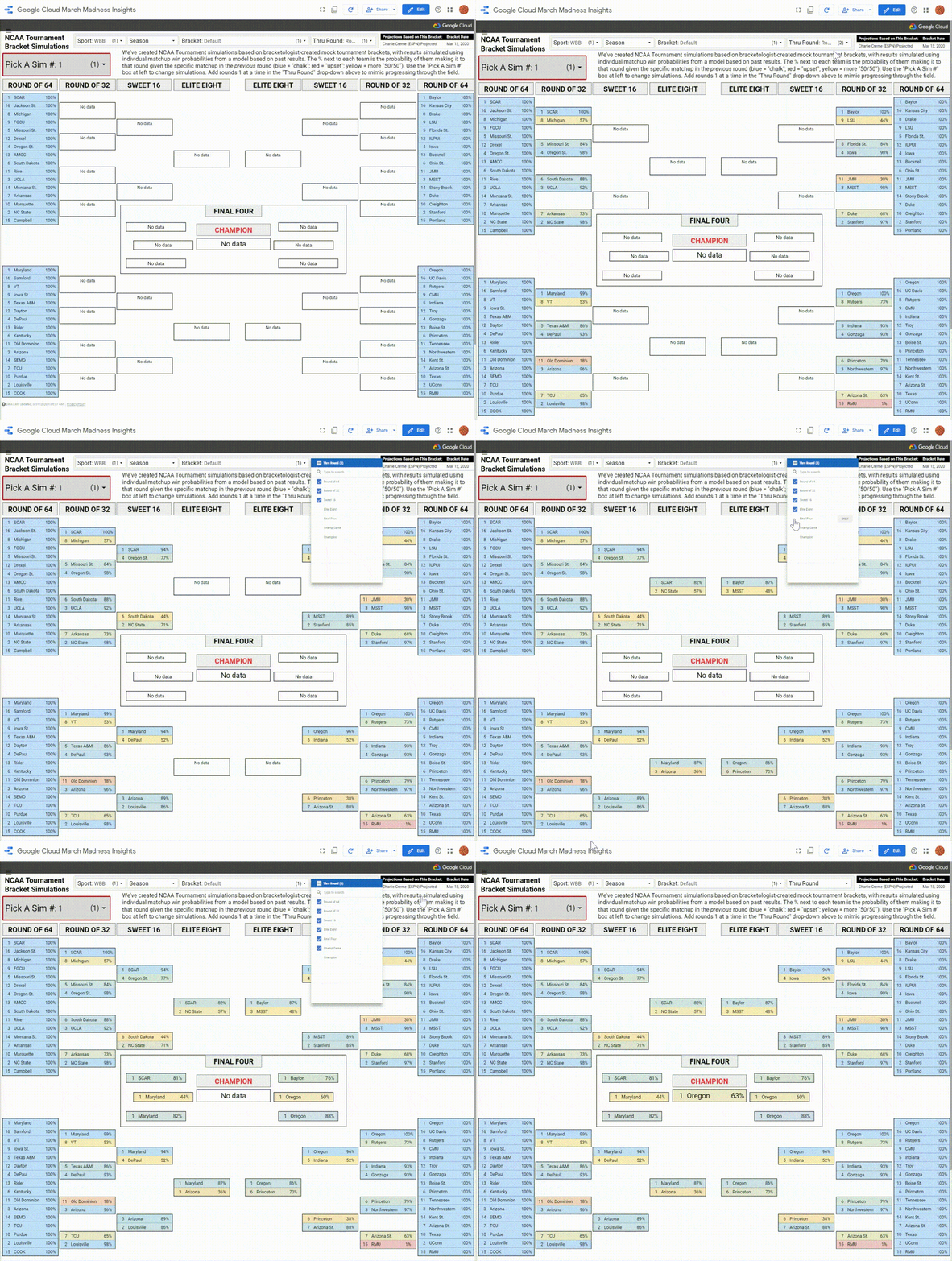
As COVID-19 continues to have enormous impact around the world, we’ve focused on supporting customers and making available public data to help research efforts, among various other initiatives. Beyond the essential issues at hand, it’s been a truly strange time for sports fans, with virtually every league shut down across the globe. Even though sports may be non-essential, they are one of our greatest distractions and forms of entertainment.In particular, the recent American sports calendar has been missing an annual tradition that excites millions: March Madness®. The moniker represents the exciting postseason of college basketball, with both men’s and women’s teams competing to be crowned champions in the annual NCAA® Tournaments. Along with watching these fun, high-stakes games, sports fans fill out brackets to predict who will win in each stage of the tournament.In our third year as partners with the NCAA, we had planned for a lot of data analysis related to men’s and women’s basketball before the cancellation of all remaining conference tournaments and both NCAA tournaments on March 12. It took us a few days to process a world with no tournament selections, no brackets, no upsets, and no shining moments, but we used Google Cloud tools and our data science skills to make the best of the situation by simulating March Madness.Simulation is a key tool in the data science toolkit for many forecasting problems. Using Monte Carlo methods, which rely on repeated random sampling from probability distributions, you can model real-world scenarios in science, engineering, finance, and of course, sports. In this post, we’ll demonstrate how to use BigQuery to set up, run, and explore tens of thousands of NCAA basketball bracket simulations. We hope the example code and explanation can serve as inspiration for your own analyses that could use similar techniques. (Or you can skip ahead to play around with thousands of simulated brackets right now on Data Studio.)Predicting a virtual tournamentIn the context of projecting any NCAA Tournament, the first piece necessary is a bracket, which includes which teams make the field and creates the structure for determining who could play whom in each tournament round. The NCAA basketball committees didn’t release 2020 brackets, but we felt pretty good about using the final “projected” brackets from well-known bracketologists as proxies, since games stopped only a couple days short of selections. Specifically, we used bracket projections from Joe Lunardi at ESPN and Jerry Palm at CBS for the men, and Charlie Creme at ESPN and Michelle Smith at the NCAA for the women. These take into account a lot of different factors related to selection, seeding, and bracketing, and are fairly representative of the type of fields we might have seen from the committees.The next step was finding a way to get win probabilities for any given matchup in a tournament field—i.e., if Team X played Team Y, how likely is it that Team X would win? To estimate these, we used past NCAA Tournament games for training data and created a logistic regression model that took into account three factors for each matchup:The difference between the teams’ seeds. 1-seeds are generally better than 2-seeds, which are better than 3-seeds, and so on, down to 16-seeds.The difference between the teams’ pre-tournament schedule-adjusted net efficiency. Think of these as team performance-based power ratings similar to the popular KenPom or Sagarin ratings, also applied to women’s teams (this post has further details on the calculations).Home-court advantage. This is applicable for early-round women’s games that are often held at a top seed’s home stadium; almost all men’s games are at “neutral” sites.BigQuery enables us to prepare our data so that each of those predictors is aligned with the results from past games. Then, we used BigQuery ML to create a logistic regression model with minimal code and without having to move our data outside the warehouse. Separate models were created for men’s and women’s tournament games, using the factors mentioned above. The code for the women’s tournament game model is shown here:Both models had solid accuracy and log loss metrics, with sensible weights on each of the factors. The models then had to be applied to all possible team matchups in the projected 2020 brackets, which were generated along with each team’s seed, adjusted net efficiency, and home-court advantage using BigQuery. Then, we generated predictions from our saved models with BigQuery ML, again with minimal code and from within the data warehouse, as shown here:The resulting table contains win probabilities for every potential tournament matchup, and sets us up for the real payoff: using the bracket structure to calculate advancement probabilities for each team getting to each round. For first-round matchups where matchups are already set— i.e., 1-seed South Carolina to face 16-seed Jackson State in Charlie Creme’s bracket—this is simply a lookup of the predicted win probability for the matchup in the table. But in later rounds, there’s more to consider: the probability that the team gets there at all, and if they do, that there is more than one possible opponent. For example, a 1-seed could face either the 8- or 9-seed in the Round of 32, the 4-, 5-, 12-, or 13-seed in the Sweet 16, and so on.So, a team’s chance of advancing out of a given round is the chance they get to that round in the first place, multiplied by a weighted average of win probabilities—their chances of beating each possible opponent they might face, weighted by how likely they are to face them. Consider the example of an 8-seed advancing to the Sweet 16:They are usually something like 50-50 to beat the 9-seed in the Round of 64They are likely a sizable underdog in a potential matchup against a 1-seedThey likely have a very good chance of beating the 16-seed if they play themBut the 1-seed is the much more likely opponent in the Round of 32, so the lower matchup win probability gets weighted much higher in the advance calculationPutting it all together, an 8-seed’s projected chance of making the Sweet 16 is usually well below 20%, since they have a (very likely) uphill battle against a top seed to get there.Running this type of calculation for the entire bracket is naturally iterative. First, we use matchup win probabilities for all possible matchups in a given round to calculate the chances of all teams making it to the next round. Then, we use those chances as weights for each team and possible opponent’s likelihood of meeting in that next round, then repeat the first step using matchup win probabilities for the possible matchups in that round.Doing this for all tournament rounds might typically be done using tools like Python or R, which requires moving data out of BigQuery and doing calculations in one of those languages, then perhaps writing results back to the database. But this particular problem is a great use case for BigQuery scripting, a feature that allows you to send multiple statements in one request, using variables and control statements (such as loops). This allows similar functionality for iterative scripts like in Python or R, but while still using SQL code and without having to leave the warehouse. In this case, as shown below, we’re using a WHILE loop cycling through each tournament round and outputting each team’s advance probabilities to a specific table that gets referenced back in the script (“[…]” represents code left out for clarity in this case):We collected the results and put them into this interactive Data Studio report, which lets you filter and sort every tournament team’s chances (in each projected bracket). Our results show Kansas would’ve been title favorites in the men’s bracket, with around a 15% to 16% chance to win it all. Oregon was the most likely women’s champion at either 27% or 31% (depending on projected bracket chosen). Keep in mind that this is NOT saying Kansas or Oregon was going to win—the probabilistic forecasts actually show a 5-in-6 chance of a champion other than the Jayhawks on the men’s side and a greater than 2-in-3 chance of the Ducks not winning the women’s title.While fun to play around with, these results are not particularly unique. Companies like ESPN, FiveThirtyEight, and TeamRankings have provided probabilistic NCAA Tournament forecasts for years. The probabilities are fairly accurate gauges of each specific team’s chances, but filling out a bracket using the most likely team in each slot ends up looking very chalky—the better seeds almost always advance. “Real” March Madness isn’t exactly like this—it’s only one tournament with 63 slots on the bracket that get filled in with a specific winner. While top seeds and better teams generally advance in aggregate, there are always upsets, Cinderella runs, and unexpected results. Simulating thousands of NCAA TournamentsFortunately, our procedure for the model and projections accounts for that randomness. To demonstrate this, we can simulate the actual bracket many times and actually look at results. The procedure is similar to the one we used to create the projections, using BigQuery scripting and the matchup win probabilities to loop round-by-round through the tournament. The differences are that we use random number generation to simulate an actual winner for each matchup (based on the win probability), and that we do so across many simulations to generate not just one possible bracket, but thousands of them—true Monte Carlo simulations. See the code below for details (again, “[…]” used as a placeholder for code removed to simplify presentation):Let this run for a few minutes and we wind up with not just one completed NCAA Tournament bracket per gender, but 20,000 brackets each for men and women (10,000 for each projected bracket we started with). We’ve made all of these brackets available in this interactive Data Studio dashboard, accelerated using BigQuery BI Engine. Use “Pick A Sim #” to flip through many of them, and use the dropdowns up top to filter by gender or starting bracket. Within the bracket, the percentage next to each team is the probability of them making it to that round, given the specific matchup in the previous round (blue represents an expected result, red an upset, and yellow a more 50/50 outcome). You can use “Thru Round” to mimic progressing through each round of the tournament, one at a time.Feel free to go through a few (dozen, hundred, …) simulations until you find the one you like the best…there are some wild ones in there. Check out Men’s Lunardi bracket simulation 108, where Boston University (the author’s alma mater) pulls three upsets and makes the Elite Eight as a 16-seed!Perhaps one upside of having no tournaments is that we can pick a favorable simulation and convince ourselves that if the tournament had taken place, this is how it would’ve turned out!Of course, these brackets aren’t just based on random coin flipping, where total chaos brackets are as likely as more plausible ones with fewer upsets. BU doesn’t get to the Final Four in any simulated bracket (though we could use the easy scalability of BigQuery to run more simulations), while the top seeds get there much more often. The simulations reflect accurate advancement chances for each matchup based on the modeling described above, so the resulting corpus of brackets reflect the proper amount of madness that typifies college basketball in March. Capturing the randomness appropriately is a good general point to keep in mind when creating these types of simulations to help solve non-basketball data science problems.With the lack of actual national semifinals and title games going on over the next couple days, we hope the ability to play with thousands of simulated Final Fours provides some small bit of consolation to those of you missing the NCAA basketball tournaments in 2020. And you can check out our Medium NCAA blog for all of our past basketball data analysis using Google Cloud. Here’s to hoping that we’ll be watching and celebrating the real March Madness in future years.
Quelle: Google Cloud Platform

New Azure RTOS collaborations with leaders in the semiconductor industry

IoT is reaching mainstream adoption across businesses in all market segments. Our vision is to enable Azure to be the world’s computer, giving businesses real-time visibility into every aspect of their operations, assets, and products. Businesses are harnessing signals from IoT devices of all shapes and sizes, from the very smallest microcontroller units (MCUs) to very capable microprocessor units (MPUs). This presents a great opportunity for collaboration between semiconductor manufacturers with extensive expertise in MCUs/MPUs and Azure IoT, an industry leader in IoT.

It has been nearly one year since we acquired Express Logic and their popular ThreadX RTOS, and last year we announced Azure RTOS that provides customers those capabilities with the leading real-time operating system (RTOS) in the industry.

Today, we’re announcing additional collaborations with industry leaders, which together represent the vast majority of the market for 32-bit MCUs. Their MCUs are embedded into billions of devices from sensors, streetlights, and shipping containers to smart home appliances, medical devices, and more.

STMicroelectronics, Renesas, NXP, Microchip, and Qualcomm will all offer embedded development kits featuring Azure RTOS ThreadX, one of the components of the Azure RTOS embedded application development suite. This allows embedded developers to access reliable, real-time performance for resource-constrained devices, and seamless integration with the power of Azure IoT to connect, monitor, and control a global fleet of IoT assets.

We will also be releasing the full source code for all Azure RTOS components on GitHub, allowing developers to freely explore, develop, test, and adapt Azure RTOS to suit their needs. When developers are ready to take their code into production, the production license will be included automatically if they deploy to any of the supported MCU devices from STMicroelectronics, Renesas, NXP, Microchip, or Qualcomm. If they prefer to use a different device in production, they may contact Microsoft for direct licensing details.

As we work with our semiconductor partners to implement best practices for connected devices, Azure RTOS will include easy-to-use reference projects and templates for connectivity to Azure IoT Hub, Azure IoT Central, Azure IoT Edge Gateways as well as first-class integration with Azure Security Center. Azure RTOS will soon ship with an Azure Security Center module for monitoring threats and vulnerabilities on IoT devices.

When combined with Azure Sphere, Azure RTOS enables embedded developers to quickly build real-time, highly-secured IoT devices for even the most demanding environments—robust devices that offer real-time performance and protection from evolving cybersecurity threats. For MCUs and system on chips (SoCs) that are smaller than what Azure Sphere supports, Azure RTOS and Azure IoT Hub Device Management enable secure communications for embedded developers and device operators who have the ability to implement best practices to protect devices from cybersecurity attacks.

For partners wishing to deliver reliable, real-time performance on highly-secured connected devices that stay secured against evolving cybersecurity threats over time, we recommend Azure RTOS and Azure Sphere together for the most demanding environments.

Here are more details on our collaboration with industry leaders.

STMicroelectronics (ST)

STMicroelectronics (ST) is a renowned world leader in ARM® Cortex®-M MCUs with its STM32 family, providing their OEM and mass-market customers with a wide portfolio of simple-to-use MCUs, coming with a complete development environment and best-in-class ecosystem.

“We are delighted to be collaborating with Microsoft to address even better our customers’ needs,” said Ricardo de Sa Earp, Group Vice-President, Microcontrollers Division General Manager, STMicroelectronics. “Leveraging our installed base of more than five billion STM32 MCUs shipped to date to the global embedded market, we see Azure RTOS ThreadX and middleware as a perfect match to both our mass-market and OEM IoT strategies, complementing our development environment with industry-proven, reliable, high-quality source code.” 

Renesas Electronics Corporation

Renesas Electronics Corporation is a premier supplier of advanced semiconductor solutions. Last October, we announced that Azure RTOS will be broadly available across Renesas' products, including the Synergy and RA MCU families. Renesas is also working to build Azure RTOS into their broader set of MCUs and MPUs.

“Our Synergy and RX cloud kits combined with Azure RTOS and other Azure IoT building blocks offer MCU customers a quick and secure end-to-end solution for cloud connectivity,” said Sailesh Chittipeddi, Executive Vice President, General Manager of Renesas’ IoT and Infrastructure business unit. “We are excited to expand our collaboration with Microsoft and look forward to bringing Microsoft Azure to our MCU and MPU customers, including solutions that will support Azure IoT Edge Runtime for Linux on our RZ MPUs.”

NXP Semiconductors 

NXP Semiconductors is a world leader in secure connectivity solutions for embedded applications, serving customers in the automotive, industrial and IoT, mobile, and communication infrastructure sectors. Microsoft has been collaborating with NXP to extend intelligent cloud computing to the intelligent edge, from adding voice control directly to devices to offering machine learning solutions for edge devices, to device security with Azure Sphere. They plan to integrate Azure RTOS into their evaluation kits and some of the most popular IoT processor families in the industry.

“Edge computing reduces the latency, bandwidth and privacy concerns of a cloud-only Internet of Things," said Jerome Schang, Head of Cloud Partnership programs at NXP. “Enabling Azure RTOS on NXP’s MCUs is yet another step to provide edge computing solutions that unlock the benefits of edge to Azure IoT cloud interaction.”

Microchip Technology, Inc.

Microchip Technology Inc. is a leading provider of smart, connected, and secure embedded control solutions. Their solutions serve customers across the industrial, automotive, consumer, aerospace and defense, communications, and computing markets. Microchip plans to incorporate support for Azure RTOS and Azure IoT Edge across their product families.

“Microchip is building on its already comprehensive portfolio of tools and solutions to enable quick, easy development of secure IoT applications across the full spectrum of embedded control devices and architectures,” said Greg Robinson, associate vice president of Microchip’s 8-bit microcontroller business unit. “Our partnership with Microsoft Azure extends our dedication to developing innovative solutions.”

Qualcomm Technologies, Inc.

Qualcomm is a pioneer of wireless technology and powers the cellular connection of smartphones and tablets all over the planet. Qualcomm will be offering a cellular-enabled Azure Sphere certified chip and will be bringing Azure RTOS to cellular-connected device solutions found inside asset trackers, health monitors, security systems, smart city sensors, and smart meters, as well as a range of wearables.

”Qualcomm is a leader in wireless compute and connectivity technologies – not just in mobile, but in emerging markets like the Internet of Things as well,” said Jeff Torrance, Vice President, IoT, Qualcomm. “We’re proud to continue to work closely with Microsoft on solutions like Azure RTOS and Azure Sphere to jointly advance the IoT industry around the world.”

Learn more

We continue to work diligently with industry-leaders to create a rich, robust ecosystem that serves the world’s unique and diverse needs. Our collective aim is to enable customers to easily bring their ideas to life and truly unlock the opportunities available on the intelligent edge and the intelligent cloud. Find out more about why so many IoT industry leaders are excited about the benefits that Azure RTOS brings to their device solutions.
Quelle: Azure

Update from Docker on COVID-19 Actions

As the novel coronavirus causing COVID-19 continues to spread, Docker has been taking precautionary measures to support the health, well-being, and safety of our global team members and their families, as well as ensuring our customers and community at large can continue building and shipping apps using Docker. We are also following the World Health Organization (WHO) and the Center for Disease Control and Prevention (CDC) guidelines, as well as guidelines from local public health administrations. 

Docker has always been about community, and here are the steps we have taken to ensure employees are taken care of as well as to ensure business continuity for our users worldwide:

Protecting Employees

On March 2, 2020, we asked all global employees to cancel or postpone any non-essential, work-related travel. Additionally, on March 9, 2020, we closed all of our offices globally to employees and visitors. We are using all available technologies like our phones, Zoom, Slack, GitHub, and Confluence now that we have transitioned to a fully remote workforce. While Docker is a geographically distributed organization, we understand this is a big shift for many of our employees and, as such, we are encouraging as much flexibility around work schedules and hours as possible as we all adjust to these new circumstances.

Delivering for Our Users

Docker Hub is, by design, a highly-available cloud service which means it is accessible 24×7 for developers and teams of developers, including now during this difficult period, regardless of other limitations that may be on teams due to a pandemic. The team at Docker is well-positioned to work remotely without interruption, allowing us to be agile and adapt to changing market and other conditions.We remain focused on executing our public roadmap and continuing to deliver a unique connected experience from source code to cloud deployment for developers and development teams. 

Keeping our Community Strong – and Safe

Back in December 2019, prior to the widespread virus outbreak, we announced that DockerCon 2020 would no longer be a physical event and would instead evolve into DockerCon LIVE, a virtual event for our community taking place on May 28, 2020. This is the safest and healthiest option for our community, and we are excited to still bring everyone together to learn and share from one another.  We miss in-person meetups too, however, there are many ways to still remain connected with the Docker community including Docker Community Slack and the Docker Virtual Meetup Group. In addition, in lieu of in-person birthday meetups, we recently celebrated Docker’s 7th birthday with our community via a live show on YouTube (check out the recording here). 

And finally, we have seen a number of examples springing up on Docker Hub of how developers are using Docker to create applications, data analysis tools, and dashboards for public health research. It is very inspiring to see how global teams of developers are using Docker in the fight against this global pandemic.

Though this is a challenging time in human history, we believe that by coming together as a community and taking care of one another, we will persevere and come out of this stronger and more united. Please stay well! 
The post Update from Docker on COVID-19 Actions appeared first on Docker Blog.
Quelle: https://blog.docker.com/feed/

Announcing server-side encryption with customer-managed keys for Azure Managed Disks

Today, we're announcing the general availability for server-side encryption (SSE) with customer-managed keys (CMK) for Azure Managed Disks. Azure customers already benefit from SSE with platform-managed keys for Managed Disks enabled by default. SSE with CMK improves on platform-managed keys by giving you control of the encryption keys to meet your compliance need.

Today, customers can also use Azure Disk Encryption, which leverages the Windows BitLocker feature and the Linux dm-crypt feature to encrypt Managed Disks with CMK within the guest virtual machine (VM). SSE with CMK improves on Azure Disk encryption by enabling you to use any OS types and images, including custom images, for your VMs by encrypting data in the Azure Storage service.

SSE with CMK is integrated with Azure Key Vault, which provides highly available and scalable secure storage for your keys backed by Hardware Security Modules. You can either bring your own keys (BYOK) to your Key Vault or generate new keys in the Key Vault.

About the key management

Managed Disks are encrypted and decrypted transparently using 256-bit Advanced Encryption Standard (AES) encryption, one of the strongest block ciphers available. The Storage service handles the encryption and decryption in a fully transparent fashion using envelope encryption. It encrypts data using 256-bit AES-based data encryption keys, which are, in turn, protected using your keys stored in a Key Vault.

The Storage service generates data encryption keys and encrypts them with CMK using RSA encryption. The envelope encryption allows you to rotate (change) your keys periodically as per your compliance policies without impacting your VMs. When you rotate your keys, the Storage service re-encrypts the data encryption keys with the new CMK.

Full control of your keys

You are in full control of your keys in your Key Vault. Managed Disks uses system-assigned managed identity in your Azure Active Directory (Azure AD) for accessing keys in Key Vault. An administrator with required permissions in the Key Vault must first grant access to Managed Disks in Key Vault to use the keys for encrypting and decrypting the data encryption key. You can prevent Managed Disks from accessing your keys by either disabling your keys or by revoking access controls for your keys—doing so for disks attached to running VMs will cause the VMs to fail. Moreover, you can track the key usage through Key Vault monitoring to ensure that only Managed Disks or other trusted Azure services are accessing your keys.

Availability of SSE with CMK

SSE with CMK is available for Standard HDD, Standard SSD, and Premium SSD Managed Disks that can be attached to Azure Virtual Machines and VM scale sets. Ultra Disk Storage support will be announced separately. SSE with CMK is now enabled in all the public and Azure Government regions and will be available in the regions in Germany (Sovereign) and China in a few weeks.

You can use Azure Backup to back up your VMs using Managed Disks encrypted with SSE with CMK. Also, you can choose to encrypt the backup data in your Recovery Services vaults using your keys stored in your Key Vault instead of platform-managed keys available by default. Refer to documentation for more details on the encryption of backups using CMK.

You can use Azure Site Recovery to replicate your Azure virtual machines that have Managed Disks encrypted with SSE with CMK to other Azure regions for disaster recovery. You can also replicate your on-premises virtual machines to Managed Disks encrypted with SSE with CMK in Azure. Learn more about replicating your virtual machines using Managed Disks encrypted with SSE with CMK.

Get started

To enable the encryption with CMK for Managed Disks, you must first create an instance of a new resource type called DiskEncryptionSet and then grant the instance access to the key Vault. DiskEncryptionSet represents a key in your Key Vault and allows you to reuse the same key for encrypting many disks, snapshots, and images with the same key.

Let’s look at an example of creating an instance of DiskEncryptionSet:

1. Create an instance of DiskEncryptionSet by specifying a key in your Key Vault.

keyVaultId=$(az keyvault show –name yourKeyVaultName –query [id] -o tsv)

keyVaultKeyUrl=$(az keyvault key show –vault-name yourKeyVaultName –name yourKeyName –query [key.kid] -o tsv)

az disk-encryption-set create -n yourDiskEncryptionSetName -l WestCentralUS -g yourResourceGroupName –source-vault $keyVaultId –key-url $keyVaultKeyUrl

2. Grant the instance access to the Key Vault. When you created the instance, the system automatically created a system-assigned managed identity in your Azure AD and associated the identity with the instance. The identity must have access to the Key Vault to perform required operations such as wrapkey, unwrapkey and get.

desIdentity=$(az disk-encryption-set show -n yourDiskEncryptionSetName -g yourResourceGroupName –query [identity.principalId] -o tsv)

az keyvault set-policy -n yourKeyVaultName -g yourResourceGroupName –object-id $desIdentity –key-permissions wrapkey unwrapkey get

az role assignment create –assignee $desIdentity –role Reader –scope $keyVaultId

You are ready to enable the encryption for disks, snapshots, and images by associating them with the instance of DiskEncryptionSet. There is no restriction on the number of resources that can be associated with the same DiskEncryptionSet.

Let’s look at an example of enabling for an existing disk:

1. To enable the encryption for disks attached to a VM, you must stop(deallocate) a virtual machine.

az vm stop –resource-group MyResourceGroup –name MyVm

2. Enable the encryption for an attached disk by associating it with the instance of DiskEncryptionSet.

diskEncryptionSetId=$(az disk-encryption-set show -n yourDiskEncryptionSetName -g yourResourceGroupName –query [id] -o tsv)

az disk update -n yourDiskEncryptionSetName -g yourResourceGroupName –encryption-type EncryptionAtRestWithCustomerKey –disk-encryption-set $diskEncryptionSetId

3. Start the VM.

az vm start -g MyResourceGroup -n MyVm

Refer to the Managed Disks documentation for detailed instructions on enabling server side encryption with CMK for Managed Disks.

Send us your feedback

We look forward to hearing your feedback for SSE with CMK. Please email us here. 
Quelle: Azure