Model S und Model X: Tesla bietet Bordcomputer-Upgrade an
Tesla tauscht den Bordcomputer älterer Model S und Model X auf Wunsch der Eigentümer kostenpflichtig gegen ein besseres Modell aus. (Tesla, Technologie)
Quelle: Golem

Tesla tauscht den Bordcomputer älterer Model S und Model X auf Wunsch der Eigentümer kostenpflichtig gegen ein besseres Modell aus. (Tesla, Technologie)
Quelle: Golem

Ford hat seinen Transporter Transit in einer vollelektrischen Version vorgestellt, die 2021 auf den Markt kommt. (Ford, Technologie)
Quelle: Golem

Die Telekom baut im Zuge der IP-Umstellung ihre zellbasierte Netzwerk- und Übertragungstechnik ATM ab. Für den Kunden bedeute das höhere Datenraten. (ISDN, Telekom)
Quelle: Golem
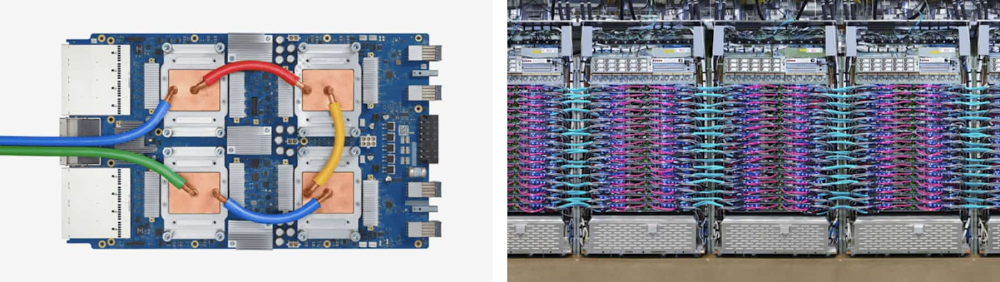
Cloud TPU Pods have gained recognition recently for setting world performance records in both training and inference. These custom-built AI supercomputers are now generally available to help all types of enterprises solve their biggest AI challenges. “We’ve been greatly impressed with the speed and scale of Google TPU while making use of it for a variety of internal NLP tasks,” said Seobok Jang, AI Development Infra Lead at LG. “It helped us minimize tedious training time for our unique language models based on BERT, thus making it remarkably productive. Overall, the utilization of TPU was an excellent choice especially while training complex and time consuming language models.”Not only are Cloud TPUs now more widely available, they are increasingly easy to use. For example, the latest TensorFlow 2.1 release includes support for Cloud TPUs using Keras, offering both high-level and low-level APIs. This makes it possible to leverage petaflops of TPU compute that’s optimized for deep learning with the same user-friendly APIs familiar to the large community of Keras users. (The TensorFlow 2.x series of releases will also continue to support the older TPUEstimator API.)In this post, we’ll walk through how to use Keras to train on Cloud TPUs at small scale, demonstrate how to scale up to training on Cloud TPU Pods, and showcase a few additional examples and new features.A single Cloud TPU v3 device (left) with 420 teraflops and 128 GB HBM, and a Cloud TPU v3 Pod (right) with 100+ petaflops and 32 TB HBM connected via a 2-D toroidal mesh network.Train on a single Cloud TPU deviceYou can use almost identical code whether you’re training on a single Cloud TPU device or across a large Cloud TPU Pod slice for increased performance. Here, we show how to train a model using Keras on a single Cloud TPU v3 device.Scale up to Cloud TPU PodsYou only need minimal code changes to scale jobs from a single Cloud TPU (four chips) to a full Cloud TPU Pod (1,024 chips). In the example above, you need to set FLAGS.tpu to your Cloud TPU Pod instance name when creating the TPUClusterResolver. To use Cloud TPU slices effectively, you may also need to scale the batch size and number of training steps in your configuration. TensorFlow Model Garden examplesTensorFlow 2.1 includes example code for training a diverse set of models with Keras on TPUs, as well as full backward compatibility for Cloud TPU models written using TPUEstimator in TensorFlow 1.15. At the time of writing, Keras implementations for BERT, Transformer, MNIST, ResNet-50, and RetinaNet are included in the TensorFlow Model Garden GitHub repo, and a larger set of models with tutorials is available via the official Cloud TPU documentation.The TensorFlow Model Garden includes Keras examples with user-implemented “custom training loops” as well as Keras examples using higher-level model.compile and model.fit APIs. Writing your own training loop, as shown in this blog post, provides more power and flexibility, and is often a higher-performance choice when working with Cloud TPUs.Additional featuresTensorFlow 2.1 makes working with Cloud TPUs even easier by adding support for the following features.Automatic handling of unsupported opsIn common cases, unsupported ops can now be automatically handled when porting models to Cloud TPUs. Adding tf.config.set_soft_device_placement(True) to TensorFlow code (as shown below) will cause any ops that aren’t supported on Cloud TPUs to be detected and placed on the host CPUs. This means that custom tf.summary usage in model functions, tf.print with string types unsupported on Cloud TPUs, and others will now just work.Improved support for dynamic shapesWorking with dynamic shapes on Cloud TPUs is also easier in TensorFlow 2.1. TensorFlow 1.x Cloud TPU training requires specifying static per-replica and global batch sizes, for example by setting drop_remainder=True in the input dataset. TensorFlow 2.1 no longer requires this step. Even if the last partial batch is not even across replicas or some replicas have no data, the training job will run and complete as expected.Using ops with dynamic output dimensions and slicing with dynamic indexes is also now supported on Cloud TPUs.Mixed precision The Keras mixed precision API now supports Cloud TPUs, and it can significantly increase performance in many applications. The example code below shows how to enable bfloat16 mixed precision on Cloud TPUs with Keras. Check out the mixed precision tutorial for more information.Get startedTo quickly try out Cloud TPU on TensorFlow 2.1, check out this free codelab, Keras and modern convnets on TPUs. You can also experiment with Cloud TPUs in a Kaggle competition for the first time. It includes starter material to build a model that identifies flowers. Once you’re ready to accelerate your AI workloads on Cloud TPU Pods, learn more about reservations and pricing on the product page. Stay tuned for additional posts about getting started on Cloud TPUs and TensorFlow 2.1 in the coming weeks.
Quelle: Google Cloud Platform
Amazon Elastic Kubernetes Service (Amazon EKS) ist jetzt in der AWS-Region China (Ningxia) und der AWS-Region China (Peking) verfügbar, die von NWCD bzw. Sinnet betrieben werden.
Quelle: aws.amazon.com
Im letzten Jahr wurde in AWS Config die erweiterte Abfragefunktion eingeführt, mit der Sie über einfache SQL-artige Abfragen die Konfigurationseigenschaften Ihrer AWS-Ressourcen für Audit-, Compliance- und Fehlerbehebungszwecke abfragen können. Ab sofort können Sie die erweiterte Abfragefunktion mit Konfigurationsaggregatoren kombinieren und dieselben Abfragen konto- und regionsübergreifend durchführen. Sie erhalten damit einen unkomplizierten Mechanismus zur Abfrage aller Ihrer AWS-Ressourcen über ein zentrales Konto. Mögliche Einsatzbeispiele für diese Abfragefunktion ist das Abrufen von Amazon Elastic Compute Cloud (Amazon EC2)-Instances mit einer bestimmten Größe, Amazon Elastic Block Store (Amazon EBS)-Volumes, die mit keiner Amazon EC2-Instance verbunden sind, oder Ressourcen mit deaktivierter Verschlüsselung. Das funktioniert in AWS Organizations konto-, regions- und organisationsübergreifend.
Quelle: aws.amazon.com
AWS Identity and Access Management (IAM) unterstützt jetzt den neuen Bedingungsschlüssel aws:CalledVia, der mit allen Services verwendet werden kann, die mit Ihren Anmeldeinformationen Anfragen stellen. Der neue Release von Amazon Athena unterstützt jetzt den Schlüssel CalledVia.
Quelle: aws.amazon.com
AWS Control Tower unterstützt jetzt die Kontoerstellung in einem Schritt über die Control Tower-Konsole. Masterkonto-Administratoren können mithilfe dieser Option direkt über die Control Tower-Konsole neue Konten bereitstellen.
Quelle: aws.amazon.com

Data manipulation language (DML) statements in BigQuery, such as INSERT, UPDATE, DELETE, and MERGE, enable users to add, modify, and delete data stored in BigQuery, Google Cloud’s enterprise data warehouse. DML in BigQuery supports inserting, updating, or deleting an arbitrarily large number of rows in a table in a single job. We are constantly making improvements to our DML functionality for better performance, scalability, and volume. We on the BigQuery team are happy to announce that we have removed all quota limits for DML operations, so BigQuery can now support an unlimited number of DML statements on a table. With this release, you can update your tables at a higher frequency without running into conflicts between different updates. Specifically, for scenarios like change data capture, this allows you to apply the changes more frequently, thus allowing you to get improved freshness for your data.In this blog, we’ll describe the changes made to BigQuery that make this possible. We will refer to UPDATE, MERGE and DELETE as mutating DML statements to differentiate them from INSERT DML statements, which only add new rows to a table.Execution of a DML statementBigQuery is a multi-version database. Any transaction that modifies or adds rows to a table is ACID-compliant. BigQuery uses snapshot isolation to handle multiple concurrent operations on a table. DML operations can be submitted to BigQuery by sending a query job containing the DML statement. When a job starts, BigQuery determines the snapshot timestamp to use to read the tables used in the query. Unless the input tables used in a query explicitly specify a snapshot timestamp (using FOR SYSTEM_TIME AS OF), BigQuery will use this snapshot timestamp for reading a table. This timestamp determines the snapshot of the data in the table for the job to operate on. Specifically, for the table that is the target of the DML statement, BigQuery attempts to apply the mutations produced by it on this snapshot. Rather than table locking, BigQuery uses a form of optimistic concurrency control. At the time of committing the job, BigQuery checks if the mutations generated by this job conflict with any other mutations performed on this table while this job was running. If there is a conflict, it aborts the commit operation and retries the job. Thus, the first job to commit wins. This could mean that if you run a lot of short DML mutation operations, you could starve longer-running ones. Automatic retry on concurrent update failuresRunning two mutating DML statements concurrently against a table will succeed as long as the two statements don’t modify data in the same partition. Two jobs that try to mutate the same partition may sometimes experience concurrent update failures. In the past, BigQuery failed such concurrent update operations. Applications would have to retry the operation. BigQuery now handles such failures automatically. To do this, BigQuery will restart the job, first determining a new snapshot timestamp to use for reading the tables used in the query. It then applies the mutations on the new snapshot, using the process described above. BigQuery will retry concurrent update failures on a table up to three times. This change significantly reduces the number of concurrent update errors seen by users.Queuing of mutating DML statementsPreviously, BigQuery allowed up to 1,000 DML statements to the table during any 24-hour period. BigQuery no longer imposes such quota limits. To achieve this, BigQuery runs a fixed number of mutating DML statements concurrently against a table at any point. Any additional mutating DML jobs against that table will be automatically queued in PENDING state. Once a previously running job finishes, the next PENDING job is de-queued and run. In practice, this new queueing behavior can make it seem like DML operations are taking longer, since they can exist in PENDING state while waiting for other operations to complete. If you want to check whether this is happening, you can look up the state of your DML jobs. If the job state is PENDING, then there is a good chance that this is the reason. Moreover, you can inspect this information after the fact. There are three times that get recorded in job statistics: creation time, which is the time the BigQuery servers received the request to run a job; start time, which is the time the job began executing in RUNNING state; and end time, which is the time the query completed. If there is a gap between creation time and start time, then the job was queued for some reason.BigQuery allows up to 20 such jobs to be queued in PENDING state for each table. Concurrently running load jobs or INSERT DML statements against this table are not considered when computing the 20-job limit, since they can start immediately and do not affect the execution of mutation operations. INSERT DML statementsBigQuery generally does not limit the number of concurrent INSERT DML statements that write to a single table. During the immediately previous 24-hour period (which is a rolling window), BigQuery runs the first 1,000 statements that INSERT into a table concurrently. To prevent system overload, INSERT DML statements over this limit will be queued while allowing a fixed number of them to run concurrently. Once a previous job finishes, the next PENDING job is de-queued and run. Once it starts queuing, BigQuery allows up to 100 INSERT DML statements to be queued against the table.Best practices for DML statementsBigQuery can scale to arbitrarily large mutations. With the changes described above, DML support offered by BigQuery works well with smaller size mutations as well. In general, the number of DML statements that can be executed against a table depends on the time it takes to execute each operation. To get the best performance, we recommend the following patterns:Use partitioned tables if updates or deletions generally happen on older data or on data in a date-localized manner. This ensures that the changes are limited to the specific partitions and can accelerate the update process.Use updates over clustered tables where there is clustering locality on the modified rows—they will generally perform better. This ensures that the changes are limited to specific sets of blocks, reducing the amount of data that needs to be read and written.Group DML operations together into larger ones to amortize the cost of running smaller operations.Avoid partitioning tables if the amount of data in each partition is small, and each update modifies a large fraction of partitions in the table. This reduces the amount of churn on metadata and improves the performance of the updates.Learn more about BigQuery DML.
Quelle: Google Cloud Platform
The pace of technological change is relentless across all markets. Edge computing continues to play an essential role in allowing data to be managed closer to its source, where workloads can range from basic services like data filtering and de-duplication to advanced capabilities like event-driven processing. Gartner estimates that by 2025 75 percent of Enterprise data will be generated at the Edge. As computing resources and IoT networking devices become more powerful, the ability to manage vast amounts of data near the edge will mean infrastructure and operations teams are required to manage more advanced data workloads, while keeping pace with business needs.
Our leadership in the cloud and the Internet of Things is no coincidence and they are intertwined. These technology trends are accelerating ubiquitous computing and bringing unparalleled opportunities for transformation across industries. Our goal has been to create trusted, scalable solutions that our customers and partners can build on, no matter where they are starting in their IoT journey.
What if there was an integrated set of hardware, software, and cloud capabilities that allowed seamless connectivity and streamlined edge data flow directly from essential operations like autonomous driving, robotic factory lines, and oil and gas refinery operations into Azure IoT? This is where Azure IoT is partnering with Cisco to provide to customers a pre-integrated Cisco Edge to Microsoft Azure IoT Hub solution.
Value of the partnership, Microsoft Azure IoT and Cisco IoT
With both Azure IoT and Cisco IoT being known as leaders in the industrial IoT market, we have decided to team up to share the availability of an integrated Azure IoT solution, that provides the necessary software, hardware, and cloud services that businesses need to rapidly launch IoT initiatives and quickly realize business value. Using software-based intelligence pre-loaded onto Cisco IoT network devices, telemetry data pipelines from industry-standard protocols like OPC-Unified Architecture (OPC-UA) and Modbus can be easily established using a friendly UI directly into Azure IoT Hub. Services like Microsoft Azure Stream Analytics, Microsoft Azure Machine Learning, and Microsoft Azure Notification Hub services can be used to quickly build IoT applications for the enterprise. Additional telemetry processing is also supported by Cisco through local scripts developed in Microsoft Visual Studio, where filtered data can also be uploaded directly into Azure IoT Hub. This collaboration provides customers with a fully integrated solution that will give access to powerful design tools, global connectivity, advance analytics, and cognitive services for analyzing IoT data.
These capabilities will help to illuminate business opportunities across many industries. Using Cisco Edge Intelligence software to connect to Azure IoT Hub and Device Provisioning Services enable simple device provisioning and management at scale, without the headache of a complex setup.
Customers across industries want to leverage IoT data to deliver new use-cases and solve business problems.
“This partnership between Cisco and Azure IoT will significantly simplify customer deployments. Customers can now securely connect their assets, and simply ingest and send IoT data to the cloud. Our IoT Gateways will now be pre-integrated to take advantage of the latest in cloud technology from Azure. Cisco and Microsoft are happy to help our customers realize the value of their IoT projects faster than ever before. Our early field customer, voestalpine, is benefiting from this integration as they digitize their operations to improve production planning and operational efficiencies.”—Vikas Butaney, Cisco IoT VP of Product Management
“At voestalpine, we are going through a digital journey to rethink and innovate manufacturing processes to bring increased operational efficiency. We face challenges to consistently and securely extract data from these machines and deliver the right data to our analytics applications. We are validating Cisco’s next-generation edge data software, Cisco Edge Intelligence along with Azure IoT services for our cloud software development. Cisco’s out-of-the-box edge solution with Azure IoT services helps us accelerate our digital journey.”—Stefan Pöchtrager, Enterprise Architect, voestalpine AG
By enabling Azure IoT with Cisco IoT network devices infrastructure, IT, and operations teams can quickly take advantage of a wide variety of hardware and easily scalable telemetry collection from connected assets, to kickstart their Azure IoT application development. Our customers can now augment their existing Cisco networks with Azure IoT ready gateways across multiple industries and use cases, without compromising the ability to implement data control and security that both Microsoft and Cisco are known for.
Please visit Microsoft Azure for more information regarding Azure IoT.
Please visit Cisco Edge Intelligence for more information regarding Cisco IoT.
Quelle: Azure






