Announcing a New Scholarship for LGBTQ+ WordPress Community Members

The Queeromattic Employee Resource Group, Automattic’s LGBTQ+ internal organization, is proud to announce a scholarship for LGBTQ+ WordPress Community members who need financial support to attend a WordCamp flagship event for the first time. 

For those unfamiliar with WordCamps, they are informal, community-organized events that are put together by WordPress users like you. Everyone from casual users to core developers participate, share ideas, and get to know each other. There are currently four flagship events each year: WordCamp Europe, WordCamp Asia, WordCamp US, and WordCamp Latin America. We’re going to sponsor one member of the LGBTQ+ community to attend each of these events!

Our hope in sponsoring folks to attend an initial WordCamp flagship event is that it will provide a career-enhancing opportunity for folks to connect more deeply with members of the WordPress community and level up their own WordPress skills to take back into their everyday life. Many of us at Automattic found our way here through the wider WordPress community and we’re really excited to share that chance with folks from the LGBTQ+ community who might not have the opportunity otherwise. 

Right now, we’re accepting applications to WordCamp US 2020. If you’re a member of the LGBTQ+ community and a WordPress user, we encourage you to apply: https://automattic.com/scholarships/queeromattic/  To be considered, please apply no later than Sunday, May 31, 2020 at 12 a.m. Pacific Time.

If you know someone who would be perfect for an opportunity like this, please share it with them! We want folks from all over the world to have the chance to benefit from this new scholarship.
Quelle: RedHat Stack

Use SRE principles to monitor pipelines with Cloud Monitoring dashboards

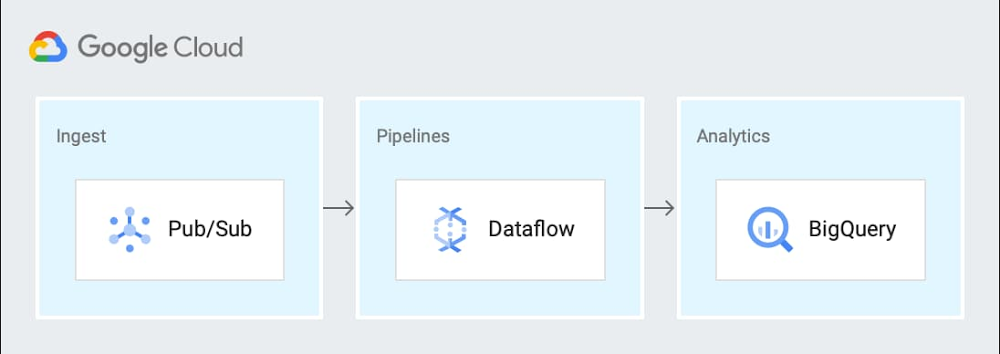
Data pipelines provide the ability to operate on streams of real-time data and process large data volumes. Monitoring data pipelines can present a challenge because many of the important metrics are unique. For example, with data pipelines, you need to understand the throughput of the pipeline, how long it takes data to flow through it and whether your data pipeline is resource-constrained. These considerations are essential to keeping your cloud infrastructure up and running—and staying ahead of business needs.Monitoring complex systems that include real-time data is an important part of smooth operations management. There are some tips and tricks you can use to measure your systems and spot potential problems. Luckily, we have excellent guidance from the Google site reliability engineering (SRE) team via Chapter 6 of the Monitoring Distributed Systems book. You’ll find details about the Four Golden Signals, recommended as you’re planning how and what to monitor in your system. The Four Golden Signals are:Latency—The time it takes for your service to fulfill a requestTraffic—How much demand is directed at your serviceErrors—The rate at which your service failsSaturation—A measure of how close to fully utilized the service’s resources areYou can use these monitoring categories when considering what to monitor in your system or in a specific data processing pipeline. Cloud Monitoring (previously known as Stackdriver) provides an integrated set of metrics that are automatically collected for Google Cloud services. Using Cloud Monitoring, you can build dashboards to visualize the metrics for your data pipelines. Additionally, some services, including Dataflow, Kubernetes Engine and Compute Engine, have metrics that are surfaced directly in their respective UIs as well as in the Monitoring UI. Here, we’ll describe the metrics needed to build a Cloud Monitoring dashboard for a sample data pipeline.Choosing metrics to monitor a data processing pipelineConsider this sample event-driven data pipeline based on Pub/Sub events, a Dataflow pipeline, and BigQuery as the final destination for the data.You can generalize this pipeline to the following steps:Send metric data to a Pub/Sub topicReceive data from a Pub/Sub subscription in a Dataflow streaming jobWrite the results to BigQuery for analytics and Cloud Storage for archivalCloud Monitoring provides powerful logging and diagnostics for Dataflow jobs in two places: in the Job Details page of Dataflow, and in the Cloud Monitoring UI itself. Dataflow integration with Cloud Monitoring lets you access Dataflow job metrics such as job status, element counts, system lag (for streaming jobs), and user counters directly in the Job Details page of Dataflow (we call this integration observability-in-context, because metrics are displayed and observed in the context of the job that generates them).If your task is to monitor a Dataflow job, the metrics surfaced in the Job Details page of Dataflow itself should provide great coverage. If you need to monitor other components in the architecture, you can combine the Dataflow metrics with metrics from the other services such as BigQuery and Pub/Sub on a dashboard within Cloud Monitoring. Since Monitoring also surfaces the same Dataflow metrics in the Cloud Monitoring UI, you can use the metrics to build dashboards for the data pipeline by applying the “Four Golden Signals” monitoring framework. For the purposes of monitoring, you can treat the entire pipeline as the “service” to be monitored. Here, we’ll look at each of the Golden Signals:LatencyLatency represents how long it takes to service a request over a given time. A common way to measure latency is time required to service a request in seconds. In the sample architecture we’re using, the metric that may be useful to understand latency is how long data takes to go through Dataflow or the individual steps in the Dataflow pipeline. System lag chartUsing the metrics related to processing time and lag area is a reasonable choice, since they represent the amount of time that it takes to service requests. The job/data_watermark_age, which represents the age (time since event timestamp) of the most recent item of data that has been fully processed by the pipeline and the job/system_lag, which represents the current maximum duration that an item of data has been awaiting processing, in seconds, align well with measuring the time taken to be processed through the Dataflow pipeline, as shown here:TrafficGenerally, traffic represents how many user requests are being received over a given time. A common way to measure traffic is requests/second. In the sample data pipeline, there are three main services that can provide insight into the traffic being received. In this example, you’ll see we built three different charts for the three technologies in the data processing pipeline architecture (Pub/Sub, Dataflow, and BigQuery) to make it easier to read, because the Y axis scales are orders of magnitude different for each metric. You can include them on a single chart for simplicity.Dataflow traffic chartCloud Monitoring provides many different metrics for Cloud Dataflow, which you can find in the metrics documentation. The metrics are categorized into overall Dataflow job metrics like job/status or job/total_vcpu_time and processing metrics like job/element_count and job/estimated_byte_count.In order to monitor the traffic through Dataflow, the job/element_count, which represents the number of elements added to the pcollection so far, aligns well with measuring the amount of traffic. Importantly, the metric will increase with an increase in the volume of traffic. So it’s a reasonable metric to use to understand the traffic coming into a pipeline.Pub/Sub traffic chartCloud Monitoring metrics for Pub/Sub are categorized into topic, subscription, and snapshot metrics. Using the metrics for the inbound topics that receive the data is a reasonable choice, since the metrics represent the amount of incoming traffic. The topic/send_request_count, which represents the cumulative count of publish requests, grouped by result, aligns well with measuring the amount of traffic, as shown here:BigQuery traffic chartCloud Monitoring metrics for BigQuery are categorized into bigquery_project, bigquery_dataset, and query metrics. The metrics related to uploaded data are a reasonable choice, since the metrics represent the amount of incoming traffic. The storage/uploaded_bytes aligns well with measuring incoming traffic to BigQuery, like this:ErrorsErrors represent application errors, infrastructure errors, or failure rates. You may want to monitor for an increased error rate to understand whether errors reported in the logs for the pipeline may be related to saturation or other error conditions.Data processing pipeline errors chartCloud Monitoring provides metrics that report the errors that are reported in the logs for the services. You can filter the metrics to limit them to the specific services that you are using. Specifically, you can monitor the number of errors and the error rate. The log_entry_count, which represents the number of log entries for each of the three services, aligns well with measuring the increases in the number of errors, as shown in this chart:SaturationSaturation represents how utilized the resources are that run your service. You want to monitor saturation to know when the system may become resource-constrained. In this sample pipeline, the metrics that may be useful to understand saturation are the oldest unacknowledged messages (if processing slows down, then the messages will remain in Pub/Sub longer); and in Dataflow, the watermark age of the data (if processing slows down, then messages will take longer to get through the pipeline).Saturation chartIf a system becomes saturated, the time to process a given message will decrease as the system approaches fully utilizing its resources. The metrics job/data_watermark_age, which we used above, and the topic/oldest_unacked_message_age_by_region, which represents age (in seconds) of the oldest unacknowledged message in a topic, align well with measuring the increases in Dataflow processing time and time for the pipeline to receive/acknowledge input messages from Pub/Sub, like so:Building the dashboardPutting all these different charts together in a single dashboard provides a single view for the data processing pipeline metrics, like this:You can easily build this dashboard with these six charts by hand in the Dashboards section of the Cloud Monitoring console using the metrics described above. Building the dashboards for multiple different Workspaces such as DEV, QA, and PROD means a lot of repeated manual work, which the SRE team calls toil. A better approach is to use a dashboard template and create the dashboard programmatically. You can also try the Stackdriver Cloud Monitoring Dashboards APIto deploy the sample dashboard from a template. Learn more about SRE and CREFor more about SRE, learn about the fundamentals or explore the full SRE book. Read about real-world experiences from our Customer Reliability Engineers (CRE) by reading our CRE Life Lessons blog series.
Quelle: Google Cloud Platform

Introducing Cloud AI Platform Pipelines

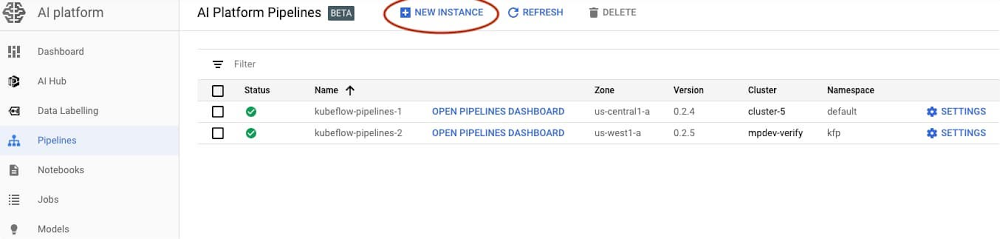
When you’re just prototyping a machine learning (ML) model in a notebook, it can seem fairly straightforward. But when you need to start paying attention to the other pieces required to make a ML workflow sustainable and scalable, things become more complex. A machine learning workflow can involve many steps with dependencies on each other, from data preparation and analysis, to training, to evaluation, to deployment, and more. It’s hard to compose and track these processes in an ad-hoc manner—for example, in a set of notebooks or scripts—and things like auditing and reproducibility become increasingly problematic.Today, we’re announcing the beta launch of Cloud AI Platform Pipelines. Cloud AI Platform Pipelines provides a way to deploy robust, repeatable machine learning pipelines along with monitoring, auditing, version tracking, and reproducibility, and delivers an enterprise-ready, easy to install, secure execution environment for your ML workflows.AI Platform Pipelines gives you:Push-button installation via the Google Cloud ConsoleEnterprise features for running ML workloads, including pipeline versioning, automatic metadata tracking of artifacts and executions, Cloud Logging, visualization tools, and more Seamless integration with Google Cloud managed services like BigQuery, Dataflow, AI Platform Training and Serving, Cloud Functions, and many others Many prebuilt pipeline components (pipeline steps) for ML workflows, with easy construction of your own custom componentsAI Platform Pipelines has two major parts—the enterprise-ready infrastructure for deploying and running structured ML workflows that are integrated with GCP services; and the pipeline tools for building, debugging, and sharing pipelines and components. In this post, we’ll highlight the features and benefits of using AI Platform Pipelines to host your ML workflows, show its tech stack, and then describe some of its new features. Benefits of using AI Platform PipelinesEasy installation and managementYou access AI Platform Pipelines by visiting the AI Platform panel in the Cloud Console.The installation process is lightweight and push-button, and the hosted model simplifies management and use. AI Platform Pipelines runs on a Google Kubernetes Engine (GKE) cluster. A cluster is automatically created for you as part of the installation process, but you can use an existing GKE cluster if you like. The Cloud AI Platform UI lets you view and manage all your clusters. You can also delete the Pipelines installation from a cluster and then reinstall, retaining the persisted state from the previous installation while updating the Pipelines version.Easy authenticated accessAI Platform Pipelines gives you secure and authenticated access to the Pipelines UI via the Cloud AI Platform UI, with no need to set up port-forwarding. You can also give access to other members of your team.It is similarly straightforward to programmatically access a Pipelines cluster via its REST API service. This makes it easy to use the Pipelines SDK from Cloud AI Platform notebooks, for example, to perform tasks like defining pipelines or scheduling pipeline run jobs. The AI Platform Pipelines tech stackWith AI Platform Pipelines, you specify a pipeline using the Kubeflow Pipelines (KFP) SDK, or by customizing the TensorFlow Extended (TFX) Pipeline template with the TFX SDK. The SDK compiles the pipeline and submits it to the Pipelines REST API. The AI Pipelines REST API server stores and schedules the pipeline for execution. AI Pipelines uses the Argo workflow engine to run the pipeline and has additional microservices to record metadata, handle components IO, and schedule pipeline runs. Pipeline steps are executed as individual isolated pods in a GKE cluster, enabling the Kubernetes-native experience for the pipeline components. The components can leverage Google CLoud services such as Dataflow, AI Platform Training and Prediction, BigQuery, and others, for handling scalable computation and data processing. The pipelines can also contain steps that perform sizeable GPU and TPU computation in the cluster, directly leveraging GKE autoscaling and node autoprovisioning.Let’s look at parts of this stack in more detail.SDKs Cloud AI Platform pipelines supports two SDKs to author ML pipelines: the Kubeflow Pipelines SDK—part of the Kubeflow OSS project—and the TFX SDK. Over time, these two SDK experiences will merge. The TFX SDK will support framework-agnostic operations available in the KFP SDK. And we will provide transition paths that make it easy for existing KFP SDK users to upgrade to the merged SDK.Why have two different SDKs?The Kubeflow Pipelines SDK is a lower-level SDK that’s ML-framework-neutral, and enables direct Kubernetes resource control and simple sharing of containerized components (pipeline steps). The TFX SDK is currently in preview mode and is designed for ML workloads. It provides a higher-level abstraction with prescriptive, but customizable components with predefined ML types that represent Google best practices for durable and scalable ML pipelines. It also comes with a collection of customizable TensorFlow-optimized templates developed and used internally at Google, consisting of component archetypes, for production ML. You can configure the pipeline templates to build, train, and deploy your model with your own data; automatically perform schema inference, data validation, model evaluation, and model analysis; and automatically deploy your trained model to the AI Platform Prediction service.When choosing the SDK to run your ML pipelines with the AI Platform Pipelines beta, we recommend:TFX SDK and its templates for E2E ML Pipelines based on TensorFlow, with customizable data pre-processing and training code. Kubeflow Pipelines SDK for fully custom pipelines, or pipelines that use prebuilt KFP components, which support access to a wide range of GCP services.The metadata store and MLMD AI Platform Pipeline runs include automatic metadata tracking, using ML Metadata (MLMD), which is a library for recording and retrieving metadata associated with ML developer and data scientist workflows. It’s part of TensorFlow Extended (TFX), but it’s designed to also be used independently.The automatic metadata tracking logs the artifacts used in each pipeline step, pipeline parameters, and the linkage across the input/output artifacts, as well as the pipeline steps that created and consumed them.New Pipelines featuresThe beta launch of AI Platform Pipelines includes a number of new features, including support for template-based pipeline construction, versioning, and automatic artifact and lineage tracking.Build your own ML pipeline with TFX templates To make it easier for developers to get started with ML pipeline code, the TFX SDK provides templates, or scaffolds, with step-by-step guidance on building a production ML pipeline for your own data. With a TFX template, you can incrementally add different components to the pipeline and iterate on them. TFX templates can be accessed from the AI Platform Pipelines Getting Started page in the Cloud Console. The TFX SDK currently provides a template for classification problem types and is optimized for TensorFlow, with more templates on the way for different use cases and problem types. A TFX pipeline typically consists of multiple pre-made components for every step of the ML workflow. For example, you can use ExampleGen for data ingestion, StatisticsGen to generate and visualize statistics of your data, ExampleValidator and SchemaGen to validate data, Transform for data preprocessing, Trainer to train a TensorFlow model, and so on. The AI Platform Pipelines UI lets you visualize the state of various components in the pipeline, dataset statistics, and more, as shown below.Visualize the state of various components of a TFX pipeline run, and artifacts like data statistics.Pipelines versioningAI Platform Pipelines supports pipeline versioning. It lets you upload multiple versions of the same pipeline and group them in the UI so you manage semantically-related workflows together.AI Platform Pipelines lets you group and manage multiple versions of a pipeline.Artifact and lineage tracking AI Platform Pipelines supports automatic artifact and lineage tracking powered by ML Metadata, and rendered in the UI. Artifact Tracking: ML workflows typically involve creating and tracking multiple types of artifacts—things like models, data statistics, model evaluation metrics, and many more. With AI Platform Pipelines UI, it’s easy to keep track of artifacts for a ML pipeline.Artifacts for a run of the “TFX Taxi Trip” example pipeline. For each artifact, you can view details and get the artifact URL—in this case, for the model.Lineage tracking: Just like you wouldn’t code without version control, you shouldn’t train models without lineage tracking. Lineage Tracking shows the history and versions of your models, data, and more. You can think of it like an ML stack trace. Lineage tracking can answer questions like: What data was this model trained on? What models were trained off of this dataset? What are the statistics of the data that this model trained on?For a given run, the Pipelines Lineage Explorer lets you view the history and versions of your models, data, and more.Other improvementsThe recent releases of the Kubeflow Pipelines SDK include many other improvements. A couple worth noting are improved support for building Pipeline components from Python functions, and easy specification of component inputs and outputs, including the ability to easily share large datasets between pipeline steps.Getting startedTo get started, visit the Google Cloud Console, navigate to AI Platform > Pipelines, and click on NEW INSTANCE. You can choose whether you want to use an existing GKE cluster or have a new one created for you as part of the installation process. If you create a new cluster, you can check a box to allow access to any Cloud Platform service from your pipelines. (If you don’t, you can specify finer-grained access with an additional step. Note that demo pipelines and TFX templates require access to Dataflow, AI Platform, and Cloud Storage.)See the instructions for more detail. If you prefer to deploy Kubeflow Pipelines to a GKE cluster via the command line, those deployments are also accessible under AI Platform > Pipelines in the Cloud Console.Once your AI Platform Pipelines cluster is up and running, click its OPEN PIPELINES DASHBOARD link. From there, you can explore the Getting Started page, or click on Pipelines in the left navigation bar to run one of the examples. The <add name> pipeline shows an example built using the ML pipeline templates described above. You can also build, upload, and run one of your own pipelines.When you click on one of the example pipelines, you can view its static DAG, get information about its steps, and run it.The static graph for a pipeline. (The Templates section above shows an image of a pipeline’s runtime graph, including visualizations it has generated).Once a pipeline is running—or after it has finished—you can view its runtime graph, logs, output visualizations, artifacts, execution information, and more. See the documentation for more details. What’s next?We have some new Pipelines features coming soon, including support for: Multi-user isolation, so that each person accessing the Pipelines cluster can control who can access their pipelines and other resourcesWorkload identity, to support transparent access to GCP servicesEasy, UI-based setup of off-cluster storage of backend data—including metadata, server data, job history, and metrics—for larger scale deployments and so that it can persist after cluster shutdownEasy cluster upgrades More templates for authoring ML workflows To get started with AI Platform Pipelines, try some of the example pipelines included in the installation, or check out the “Getting Started” landing page of the Pipelines Dashboard. These notebooks also provide more examples of pipelines written using the KFP SDK.
Quelle: Google Cloud Platform

Microsoft named a leader in The Forrester New Wave: Functions-as-a-Service Platforms

We’re excited to share that Forrester has named Microsoft as a leader in the inaugural report, The Forrester New Wave™: Function-As-A-Service Platforms, Q1 2020 based on their evaluation of Azure Functions and integrated development tooling. We believe Forrester’s findings reflect the strong momentum of event-driven applications in Azure and our vision, crediting Azure Functions with“robust programming model and integration capabilities”, and also confirm Microsoft’s commitment to be the best technology partner for you as customers call out the responsiveness of Microsoft Azure's "engineering and support teams as key to their success.”

Best-in-class development experience

Azure Functions is an event-driven serverless compute platform with a programming model based on triggers and bindings for accelerated and simplified applications development. Fully integrated with other Azure services and development tools, its end-to-end development experience allows you to build and debug your functions locally on any major platform (Windows, macOS, and Linux), as well as deploy and monitor them in the cloud. You can even deploy the exact same functions code to other environments, such as your own infrastructure or your Kubernetes cluster, enabling seamless hybrid deployments.

In their report, Forrester noted Azure Functions programming model“supports a multitude of programming languages with extensive integration options, … and bindings for Azure Event Hub, and Azure Event Grid helps developers build event-driven microservices.”

Enterprise-grade FaaS platform

Enterprise customers like Chipotle love the velocity and productivity that event-driven architectures bring to developing applications. We are committed to building great experiences that enable the modernization of those enterprise workloads, and the Forrester report states that “strategic adopters of Azure will find that Azure Functions helps integrate Microsoft’s fast-expanding array of cloud services”, making that transformation journey easier. Some of our latest innovations are focused on the needs of enterprise customers, such as the Premium plan to host functions without cold-start for low latency workloads or PowerShell support enabling serverless automation scenarios for cloud and hybrid deployments.

In their report, Forrester also recognized Azure Functions as “a good fit for companies that need stateful functions” thanks to Durable Functions, an extension to the Azure Functions runtime that brings stateful and orchestration capabilities to serverless functions. Durable Functions stands alone in the serverless space, providing stateful functions and a way to define serverless workflows programmatically. Forrester mentioned specifically in the report that “clients modernizing enterprise apps will find that Durable Functions offers an alternative to refactoring existing business logic into bite-size stateless chunks."

Read the full Forrester report and learn more about Azure Functions today.

If you have any feedback or questions, please reach us on Twitter, GitHub, StackOverflow or UserVoice.
Quelle: Azure