Einführung von Inhaltsfiltern für Amazon EventBridge

Amazon EventBridge stellt jetzt zusätzliche Inhaltsfilteroptionen für Entwickler ereignisgesteuerter Architekturen bereit. Mit Inhaltsfiltern nach Ereignismuster können Sie komplexe Regeln erstellen, die nur unter von Ihnen festgelegten Bedingungen ausgelöst werden. Dies verringert die Menge an benutzerdefiniertem Code, der in nachgelagerten Services erforderlich ist, indem der Inhalt am Ereignis-Bus mithilfe eines deklarativen Ansatzes gefiltert wird. 
Quelle: aws.amazon.com

AWS RoboMaker unterstützt jetzt die Erstellung von Simulationsjobs im Batchbetrieb mit einem einzigen API-Aufruf

AWS RoboMaker, ein Service, der die Entwicklung, Simulation und Bereitstellung von Robotikanwendungen erleichtert, unterstützt jetzt die Erstellung von Simulationsjobs im Batchbetrieb mit einem einzigen API-Aufruf. Die neue Unterstützung für Batchsimulationen ermöglicht es Entwicklern, auf einfache Weise mehrere Simulationsjobs für Anwendungsfälle wie automatisierte Regressionstests und Reinforcement Learning Model Training zu erstellen. Die Batch-API bietet auch eine Warteschlangenfunktion, so dass ein Entwickler nun mehr Simulationsjobs einreichen kann, als mit dem bestehenden Limit für die gleichzeitige Auftragsausführung möglich ist. Die Batch-API reiht alle eingereichten Jobs in eine Warteschlange ein und führt sie auf der Grundlage des Limits für die gleichzeitige Ausführung in Batches aus.
Quelle: aws.amazon.com

Amazon Personalize kann jetzt 10x mehr Artikelattribute verwenden, um die Relevanz der Empfehlungen zu verbessern

Amazon Personalize ist ein Machine Learning-Service, mit dem Websites, Anwendungen, Anzeigen, E-Mails und mehr personalisiert werden können. Dazu werden benutzerdefinierte Machine Learning-Modelle verwendet, die ohne vorherige Machine Learning-Kenntnisse in Amazon Personalize erstellt werden können. AWS freut sich bekannt zu geben, dass Amazon Personalize jetzt zehnmal mehr Artikelattribute unterstützt. Bisher konnten Sie beim Erstellen eines ML-Modells in Amazon Personalize bis zu fünf Artikelattribute verwenden. Dieses Limit beträgt nun 50 Attribute. Sie können nun mehr Informationen über Ihre Artikel verwenden, z. B. Kategorie, Marke, Preis, Dauer, Größe, Autor, Erscheinungsjahr usw., um die Relevanz der Empfehlungen zu erhöhen.
Quelle: aws.amazon.com

What Matters Most to OpenShift Users?

Using the Top Tasks method
Red Hat OpenShift Container Platform has a broad set of powerful functions available to users as soon as it’s deployed. Providing so many functions within OpenShift poses a challenge to the OpenShift User Experience Design (UXD) team.
Which functions and tasks are the most important to our users? What aspects of the product and interface should we focus on? To answer these questions, our UXD researchers are implementing the Top Tasks method to get insights from our users on how to craft the next stages of OpenShift’s user experience.
Take the survey here
The Top Tasks approach is a two-phase survey method pioneered by Gerry McGovern. In the first phase, already completed by our team, we sent a survey to Red Hatters to arrive at a list of all possible OpenShift tasks. Using qualitative coding and an expert review process, we consolidated 416 open responses from 67 Red Hatters into 124 final tasks. These tasks serve as the input to the second phase survey: the most important part of the Top Tasks process.
What our final data will look like after phase two

In phase two, OpenShift users and customers will vote for the five most important tasks they complete using the web console (visual interface) and command line interface. By quantitatively analyzing the responses gathered during phase two, the OpenShift team will get a deep understanding of what product features/functions our users care most about. Thus, we’ll build out our future roadmap according to the preferences of you, the user, in the most egalitarian way possible.
Are you ready to help influence the future of OpenShift’s user experience?
Survey link: give your input here
The post What Matters Most to OpenShift Users? appeared first on Red Hat OpenShift Blog.
Quelle: OpenShift

Mobilfunk: BUND will 5G-Stopp in Hamburg durchsetzen

Ein Teil der Umweltorganisation BUND stellt 5G grundsätzlich in Frage. Bereits große europäische Städte wie Brüssel, Florenz und Genf, Orte in Irland und über 100 Kommunen in Italien haben sich nach Angaben der Umweltschützer für einen 5G-Ausbaustopp ausgesprochen. (Umweltschutz, GreenIT)
Quelle: Golem

Running workloads on dedicated hardware just got better

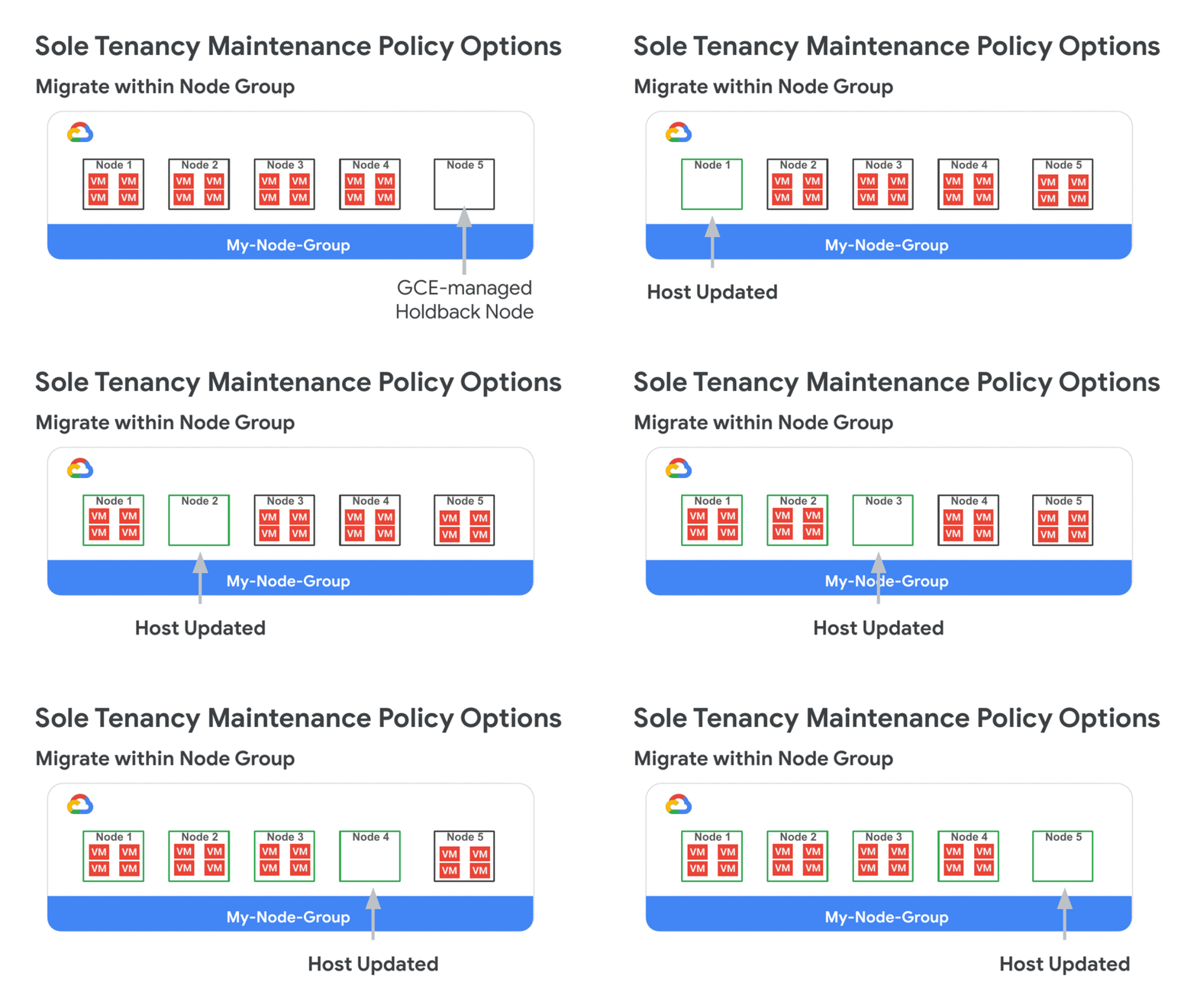
At Google Cloud, we repeatedly hear how important flexibility, openness, and choice are for your cloud migration and modernization journey. For enterprise customers that require dedicated hardware due to requirements such as performance isolation (for gaming), physical separation (for finance or healthcare), or license compliance (Windows workloads), we’ve improved the flexibility of our sole-tenant nodes to better meet your isolation, security, and compliance needs. Sole-tenant nodes already let you mix, match, and right-size different VM shapes on each node, take advantage of live migration for maintenance events, as well as auto-schedule your instances onto a specific node, node group, or group of nodes using node affinity labels. Today, we are excited to announce the availability of three new features on sole-tenant nodes: Live migration within a fixed node pool for bring your own license (BYOL) (beta)Node group autoscaler (beta)Migrate between sole- and multi-tenant nodes (GA) These new features make it easier and more cost-effective to deploy, manage, and run workloads on dedicated Google Cloud hardware.More refined maintenance controls for Windows BYOLThere are several ways to license Windows workloads to run on Google Cloud: you can purchase on-demand licenses, use License Mobility for Microsoft applications, or bring existing eligible server-bound licenses onto sole-tenant nodes. Sole-tenant nodes let you launch your instances onto physical Compute Engine servers that are dedicated exclusively to your workloads to comply with dedicated hardware requirements. At the same time, sole-tenant nodes also provide visibility into the underlying host hardware and support your license reporting through integration with BigQuery.Now, sole-tenant nodes offer you extended control over your dedicated machines with a new node group maintenance policy. This setting allows you to specify the behavior of the instances on your sole-tenant node group during host maintenance events. To avoid additional licensing costs and provide you with the latest kernel and security updates while supporting your per-core or per-processor licenses, the new ‘Migrate Within Node Group’ maintenance policy setting enables transparent installation of kernel updates, without VM downtime, and while keeping your unique physical core usage to a minimum.Node groups configured with this setting live migrate instances within a fixed pool of sole-tenant nodes (dedicated servers) during host maintenance events. By limiting migrations to that fixed pool of hosts, you are able to dynamically move your virtual machines between already licensed servers and avoid license pollution. It also helps us keep you running on the newest kernel updates for better performance and security, and enables continuous uptime through automatic migrations. Now your server-bound bring-your-own-license workloads can strike a better balance between licensing cost, workload uptime, and platform security.In addition to the ‘Migrate Within Node Group’ setting, you can also choose to configure your node group to the ‘Default’ setting, which moves instances to a new host during maintenance events (recommended for workloads without server affinity requirements), or to the ‘Restart In Place” setting which terminates the instances and restarts them on the same physical server following host maintenance events.For more information on node-group maintenance policies visit the bring your own license documentation.Node group autoscalerIf you have dynamic capacity requirements, autoscaler for sole-tenant node groups automatically manages your pool of sole-tenant nodes, allowing you to scale your workloads without worrying about independently scaling your node group. Autoscaler for sole-tenant node groups increases the size of your node group when there is insufficient capacity to accommodate a new instance, and automatically decreases the size of a node group when it detects the presence of an empty node. This reduces scheduling overhead, increases resource utilization, and drives down your infrastructure costs.Autoscaler allows you to set the minimum and maximum boundaries for your node group size and scales behind the scenes to accommodate your changing workload. For additional flexibility, autoscaling also supports a scale-out (increase-only) mode to support monotonically increasing workloads or workloads whose licenses are tied to a physical cores or processors. Migrating into sole tenancyFinally, if you need additional agility for your workloads, you can now move instances into, between, and out of sole-tenant nodes. This allows you to achieve hardware isolation for existing VM instances based on your changing security, compliance, or performance isolation needs. You might want to move an instance into a sole-tenant node for special events like a big online shopping day, game launch, or any moment that requires peak performance and the highest level of control. The example below illustrates the steps for migrating an instance onto a sole-tenant node:For details on rescheduling your instances onto dedicated hardware, see the documentation.Pricing and availabilityPricing for sole-tenant nodes remains simple: pay only for the nodes you use on a per-second basis, with a one-minute minimum charge.  Sustained use discounts automatically apply, as do any new or existing committed use discounts. Visit the pricing page to learn more about sole-tenant nodes, as well as the regional availability page to find out if they are available in your region.
Quelle: Google Cloud Platform

BigQuery under the hood: How zone assignments work

BigQuery is a serverless, highly scalable, and cost-effective cloud data warehouse. It’s designed to be flexible and easy to use. There are lots of interesting features and design decisions made when creating BigQuery, and we’ll dive into how zone assignments work in this post. Like other Google Cloud services, BigQuery takes advantage of our global cloud regions to make sure your data is available when you need it.One key aspect of BigQuery’s architecture is that it is multi-tenant; it runs workloads from different customers on compute and storage infrastructure that does not require any customer involvement in capacity planning. When loading data into BigQuery, customers choose a region to load the data and, optionally, purchase a compute reservation. Then, the service takes care of provisioning.Zone assignments keep your data flowingEach BigQuery region is internally deployed in multiple availability zones. Customer data is replicated between these zones, and there is fast automatic failover to the secondary zone if the primary zone is experiencing issues. The failover is designed to be transparent to customers and have no downtime. We’re always expanding our capacity footprint to support customer growth and onboard new customers. To make sure that each customer gets to think of storage as infinite, and gets sufficient compute resources to load and analyze their data, we continuously recompute the best placement for the primary and secondary zones in the region.To ensure the best primary and secondary zone assignments, the assignment algorithm takes into account the storage and compute usage of each customer and the available capacity in each zone. Then it makes sure that the usage will fit in the currently assigned zones. If it doesn’t, it finds another suitable zone for that customer and orchestrates a move from their current zone to a new zone. All of this happens in the background without causing any disruptions to your workload.Any datasets that share the same region can be joined together in a single query. To ensure good query performance, we attempt to colocate compute and storage so that I/O is within the same zone in order to take advantage of high-throughput networking within the zone. I/O bandwidth within a zone is very high (Google’s Jupiter network fabric can sustain more than 1 petabit/second of total bisection bandwidth), but network capacity between zones is much more constrained. Our assignment algorithm makes sure that Google Cloud projects within the same Google Cloud organization are assigned to the same subset of zones in every region. To support very large orgs, we compute project cliques based on cross-project query patterns within the organization. That breaks it up into more manageable chunks that can be placed separately. To handle cross-org reads, the algorithm also looks into past query patterns to discover relationships between organizations and make an effort to have at least one common zone between orgs that are related. The query engine also allows reading small amounts of data not being colocated by either reading remotely or copying some data to the compute zone before running the query. In rare cases, when the algorithm cannot ensure this or there is a new cross-org query pattern, queries that read large amounts of data may fail.Best practices for organizing and moving your dataTo get the best performance for workloads that read/write data in datasets belonging to different projects, ensure that the projects are in the same Google Cloud org.If you want to make your data available to other BigQuery users in your Google Cloud organization, you can use IAM permissions to grant access. If you wish to share data with BigQuery users outside your organization, use Table Copy to move data to the target project. From there, they can do any subsequent analysis in that project. Table Copy is supported via asynchronous replication and can support cross-zone data moves. You can move data across regions using the dataset copy feature.Learn more about regions and zones in Google Cloud services, and find more details on how Compute Engine handles zones.
Quelle: Google Cloud Platform

Exploring Container Security: Run what you trust; isolate what you don’t

From vulnerabilities to cryptojacking to well, more cryptojacking, there were plenty of security events to keep container users on their toes throughout 2019. With Kubernetes being used to manage most container-based environments (and increasingly hybrid ones too), it’s no surprise that Forrester Research, in their 2020 predictions, called out the need for “securing apps and data in an increasingly hybrid cloud world.” On the Google Cloud container security team, we want your containers to be well protected, whether you’re running in the cloud with Google Kubernetes Engine or hybrid with Anthos, and for you to be in-the-know about container security. As we kick off 2020, here’s some advice on how to protect your Kubernetes environment, plus a breakdown of recent GKE features and resources.Run only what you trust, from hardware to servicesMany of the vulnerabilities we saw in 2019 compromised the container supply chain or escalated privileges through another overly-trusted component. It’s important that you trust what you run, and that you apply defense-in-depth principles to your containers. To help you do this, Shielded GKE Nodes is now generally available, and will be followed shortly by the general availability of Workload Identity–a way to authenticate your GKE applications to other Google Cloud services that follows best practice security principles like defense-in-depth.Let’s take a deeper look at these features.Shielded GKE NodesShielded GKE Nodes ensures that a node running in your cluster is a verified node in a Google data center. By extending the concept of Shielded VMs to GKE nodes, Shielded GKE Nodes improves baseline GKE security in two respects:Node OS provenance check: A cryptographically verifiable check to make sure the node OS is running on a virtual machine in Google data centerEnhanced rootkit and bootkit protection: Secure and measured boot, virtual trusted platform module (vTPM), UEFI firmware, and integrity monitoringYou can now turn on these Shielded GKE Nodes protections when creating a new cluster or upgrading an existing cluster. For more information, read the documentation.Workload IdentityYour GKE applications probably use another service–like a data warehouse–to do their job. For example, in the vein of “running only what you trust,” when an application interacts with a data warehouse, that warehouse will require your application to be authenticated. Historically the approaches to doing this haven’t been in line with security principles—they were overly permissive, or had the potential for a large blast radius if they were compromised. Workload Identity helps you follow the principle of least privilege and reduce that blast radius potential by automating workload authentication through a Google-managed service account, with short-lived credentials. Learn more about Workload Identity in the beta launch blog and the documentation. We will soon be launching general availability of Workload Identity.Stronger security for the workloads you don’t trustBut sometimes, you can’t confidently vouch for the workloads you’re running. For example, an application might use code that originated outside your organization, or it might be a  software-as-a-service (SaaS) application that ingests input from an unknown user. In the case of these untrusted workloads, a second layer of isolation between the workload and the host resources is part of following the defense-in-depth security principle. To help you do this, we’re releasing the general availability of GKE Sandbox.  GKE SandboxGKE Sandbox uses the open source container runtime gVisor to run your containers with an extra layer of isolation, without requiring you to change your application or how you interact with the container. gVisor uses a user space kernel to intercept and handle syscalls, reducing the direct interaction between the container and the host, and thereby reducing the attack surface. However, as a managed service, GKE Sandbox abstracts away these internals, giving you  single-step simplicity for multiple layers of protection. Get started with GKE Sandbox. Up your container security knowledgeAs more companies use containers and Kubernetes to modernize their applications, decision makers and business leaders need to understand how they apply to their business—and how they will help keep them secure.  Core concepts in container securityWritten specifically for readers who are new to containers and Kubernetes, Why Container Security Matters to Your Business takes you through the core concepts of container security, for example supply chain and runtime security. Whether you’re running Kubernetes yourself or through a managed service like GKE or Anthos, this white paper will help you connect the dots between how open-source software like Kubernetes responds to vulnerabilities and what that means for your organization.  New GKE multi-tenancy best practices guideMulti-tenancy, when one or more clusters are shared between tenants, is often implemented as a cost-saving or productivity mechanism. However, incorrectly configuring the clusters to have multiple tenants, or the corresponding compute or storage resources, can not only deny these cost-savings, but open organizations to a variety of attack vectors. We’ve just released a new guide, GKE Enterprise Multi-tenancy Best Practices, that takes you through setting up multi-tenant clusters with an eye towards reliability, security, and monitoring. Read the new guide, see the corresponding Terraform modules, and improve your multi-tenancy security.Learn how Google approaches cloud-native security internallyJust as the industry is transitioning from an architecture based on monolithic applications to distributed “cloud-native” microservices, Google has also been on a journey from perimeter-based security to cloud-native security.In two new whitepapers, we released details about how we did this internally, including the security principles behind cloud-native security. Learn more about BeyondProd, Google’s model for cloud-native security; and about Binary Authorization for Borg, which discusses how we ensure code provenance and use code identity.Let 2020 be your year for container securitySecurity is a continuous journey. Whether you’re just getting started with GKE or are already running clusters across clouds with Anthos, stay up to date with the latest in Google’s container security features and see how to implement them in the cluster hardening guide.
Quelle: Google Cloud Platform