Low code programming with Node-RED comes to GCP

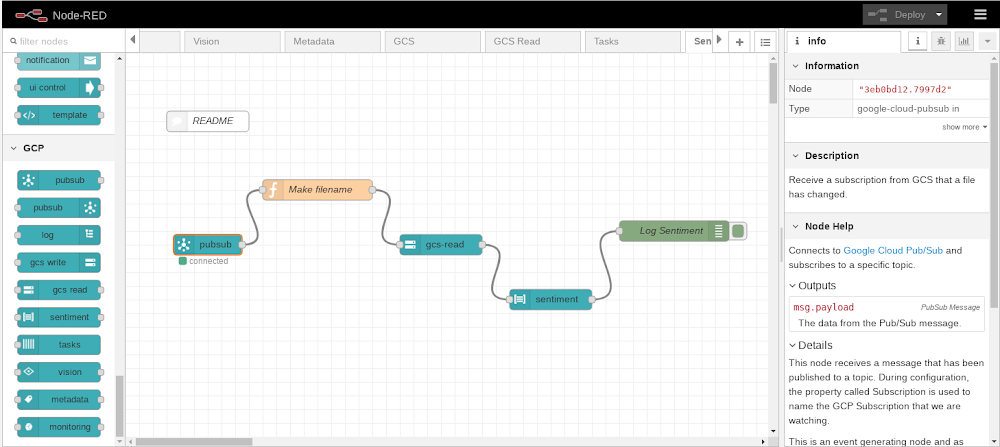
Wouldn’t it be great if building a new application were as easy as performing some drag and drop operations within your web browser? This article will demonstrate how we can achieve exactly that for applications hosted on Google Cloud Platform (GCP) with Node-RED, a popular open-source development and execution platform that lets you build a wide range of solutions using a visual programming style, while still leveraging GCP services.Through Node-RED, you create a program (called a flow) using supplied building blocks (called nodes). Within the browser, Node-RED presents a canvas area alongside a palette of available nodes. You then drag and drop nodes from the palette onto the canvas and link those nodes together by drawing connecting wires. The flow describes the desired logic to be performed by specifying the steps and their execution order, and can then be deployed to the Node-RED execution engine.One of the key features that has made Node-RED successful is its ability to be easily extended with additional custom nodes. Whenever a new API or technology becomes available, it can be encapsulated as a new Node-RED node and added to the list of available nodes found in the palette. From the palette, it can then be added into a flow for use in exactly the same way that the base supplied nodes are used. These additional nodes can then be published by their authors as contributions to the Node-RED community and made available for use in other  projects. There is a searchable and indexed catalog of contributed Node-RED nodes.A node hides how it internally operates and exposes a clean consumable interface allowing the new function to be used faster. Now, let’s take a look at how to run Node-RED on GCP and use it with GCP services.Installing Node-REDYou can use the Node Package Manager (npm) to install Node-RED on any environment that has a Node.JS runtime. For GCP, this includes Compute Engine, Google Kubernetes Engine (GKE), Cloud Run, Cloud Shell as well as other GCP environments. There’s also a publically available Docker image, which is what we’ll use for this example.Now, let’s create a Compute Engine instance using the Google Cloud Console and specify the public Node-RED docker image for execution.Visit the Cloud Console and navigate to Compute Engine. Create a new Compute Engine instance. Check the box labeled “Deploy a container image to this VM instance”.  Enter “nodered/node-red” for the name of the container image:You can leave all the other settings as their defaults and proceed to completing the VM creation.Once the VM has started, Node-RED is running. To work with Node-RED, you must connect to it from a browser. Node-RED listens on port 1880. The default VPC network firewall deliberately restricts incoming requests which means that requests to port 1880 will be denied. The next step will be to allow a connection into our network at the Node-RED port. We strongly discourage you from opening up Node-RED for development for unrestricted access. Instead, define the firewall rule to only allow ingress from the IP address that your browser presents. You can find your own browser address by performing a Google search on “my ip address”.Connecting to Node-REDNow that Node-RED is running on GCP, you can connect to it from a browser, by passing the external public IP address of the VM at port 1880.  For example:http://35.192.185.114:1880You can now see the Node-RED development environment within your browser:Working with GCP nodesAt this point, you have Node-RED running on GCP and can start constructing flows by dragging and dropping nodes from the palette onto the canvas and wiring them together. The nodes that come pre-supplied are merely a starter set—there are many more available that you can install and use in future flows. At Google, we’ve built a set of GCP nodes to illustrate how to extend Node-RED to interact with GCP functions. To install these nodes, navigate to the Node-RED system menu and select “Manage palette”:Switch to the Palette tab and then switch to the Install tab within Palette. Search for the node set called “node-red-contrib-google-cloud” and then click install.Once installed, scroll down through the list of available palette nodes and you’ll find a GCP section containing the currently available GCP building blocks.Here’s a list of currently available GCP nodes:PubSub in – The flow is triggered by the arrival of a new message associated with a named subscriptionPubSub out – A new message is published to a named topicGCS read – Reads the content of a Cloud Storage objectGCS write – Writes to a new Cloud Storage objectLanguage sentiment – Performs sentiment analysis on a piece of textVision – Analyzes an image for distinct attributesLog – Writes a log message to Stackdriver LoggingTasks – Initiates a Cloud Tasks instanceMonitoring – Writes a new monitoring record to StackdriverSpeech to Text – Converts audio input to a textual data representationTranslate – Converts textual data from one language to anotherDLP – Performs Data Loss Prevention processing on input dataBigQuery – Interacts with Google’s BigQuery databaseFireStore – Interacts with Google’s Firestore databaseMetadata – Retrieves the metadata for the Compute Engine upon which Node-RED is runningGoing forward, we hope to make additional GCP nodes available. It’s also not hard to create a custom node yourself—check out the public Github repository to see how easy it is to create one.A sample Node-RED flowHere is an example flow:At a high level, this flow listens on incoming REST requests and creates a new Google Cloud Storage object for each request received.This flow starts with an HTTP input node which causes Node-RED to listen on the /test URL path for an HTTP GET request. When an incoming REST request arrives, the incoming data undergoes some manipulations:Specifically, two fields are set: one called msg.filename, which is the name of a file to create in Cloud Storage, and the other called msg.payload, which is the content of the new file we are creating. In this example, the query parameters passed in the HTTP request are being logged.The next node in the flow is a GCP node that performs a Cloud Storage object write that writes/creates a new file. The final node sends a response back concluding the original HTTP request that triggered the flow.Securing Node-REDNode-RED is designed to get you up and running as quickly as possible. To that end, the default environment isn’t configured for security. We don’t recommend this. Fortunately, Node-RED provides security features that can be quickly enabled.  These features include authorization to be able to make flow changes and enablement of SSL/TLS for encryption of incoming and outgoing data. When initially studying Node-RED, define a firewall rule that only permits ingress from your browser’s IP address.Visual programming on GCP the Node-RED wayNode-RED has proven itself as a data flow and event processor for many years. Its extremely simple architectural model and low barrier to entry means that even a novice user can get value from it in a very short period of time. A quick Internet search reveals many tutorials on YouTube, the documentation is mature and polished, and the community active and vibrant. With the addition of the rich set of GCP nodes that we’ve contributed to the community, you can now incorporate GCP services into Node-Red whether it’s hosted on GCP, on another public cloud, or on-premises. ReferencesNode-RED – The Node-RED home pageGithub: Google Cloud Node-RED repositorySecuring Node-RED
Quelle: Google Cloud Platform

Amazon EC2 I3en- und C5-Instances sind jetzt in zusätzlichen Regionen verfügbar

Amazon EC2 I3en-Instances sind ab heute in der AWS-Region Asien-Pazifik (Mumbai) verfügbar. Darüber hinaus haben wir die Verfügbarkeit von C5-Instance-Größen in den AWS-Regionen Asien-Pazifik (Seoul) und GovCloud (USA-Ost) erweitert. Die Größen c5.12xlarge, c5.24xlarge und c5.metal sind nun in der AWS-Region GovCloud (USA-Ost) und C5.metal in der Region Asien-Pazifik (Seoul) verfügbar.
Quelle: aws.amazon.com

AWS Elastic Beanstalk führt Python 3.7 auf der AL2-Plattform (Beta) ein

Sie können jetzt Ihre Python-Anwendungen auf AWS Elastic Beanstalk mit Python 3.7 auf der Amazon Linux 2-Beta-Plattform ausführen. Die Beta-Plattform von Python 3.7 auf Amazon Linux 2 enthält mehrere Verbesserungen und wichtige neue Funktionen, unter anderem Support für Pipfile und Gunicorn. Eine vollständige Liste von Python 3.7-Funktionen finden Sie in der offiziellen Veröffentlichungsmitteilung für Python 3.7.
Quelle: aws.amazon.com

Amazon RDS for PostgreSQL unterstützt jetzt zusätzliche Größen für die Instance-Klassen db.m5 und db.r5

Ab heute unterstützt Amazon RDS for PostgreSQL die Größen 8xlarge und 16xlarge für die Instance-Klassen db.m5 und db.r5. Mit diesen neuen Instance-Größen steht Kunden, die derzeit entweder m4.10xlarge, m4.16xlarge, r4.8xlarge oder r4.16xlarge verwenden, eine unkomplizierte Upgrade-Möglichkeit auf die neueste Generation von Instances bereit.  
Quelle: aws.amazon.com

IBM and Red Hat bring OpenShift to IBM Z and LinuxONE

One of the things we often assume with the Red Hat OpenShift platform, and with Kubernetes in general, is that our users have computing needs that always fit inside a standard cloud node. While this is definitely the case for most cloud-based applications, there are plenty of non-JavaScript-and-Redis style applications out there that still need to move into the cloud. Some enterprise applications were written before the cloud existed, and still others were created before JavaScript, C#, and Python even existed. Older systems written in languages, like PL/I and COBOL, can also benefit from the move to cloud, and from the use of containers, they just need a little extra attention to make the transition. Sometimes, they might need more specifically tailored environments than are available in the commodity-hardware-based clouds.
Or maybe, those systems need to also run extremely large, mission-critical databases, like IBM DB2. In order to unlock the true potential of a multi-cloud compute environment, that cloud software needs to run on a diverse array of hardware similar to what is already in place in some of the world’s largest enterprises and governments offices. Spreading cloud capabilities into these larger systems enables containers to exist in the same environment as the company’s central database, and to embrace and modernize those older applications that may still run the most the basic aspects of a business’ day-to-day operations.
To that end, IBM has announced that Red Hat OpenShift is now available to run on IBM Z and IBM LinuxONE systems. From their announcement:
The availability of OpenShift for Z and LinuxONE is a major milestone for both hybrid multicloud and for enterprise computing. OpenShift supports cloud-native applications being built once and deployed anywhere – and now extends this to on premises enterprise servers such as IBM Z and LinuxONE. This offering has been the result of the collaboration between the IBM and Red Hat development teams, and co-creation with early adopter clients. But this is just the beginning, as we are also bringing IBM Cloud Paks to IBM Z and LinuxONE, packaging containerized enterprise and open source software with Red Hat OpenShift.
OpenShift then brings together the core open source technologies of Linux, containers and Kubernetes, adds additional open source capabilities such developer tools and a registry, and hardens, tests and optimizes the software for enterprise production use. 
Partnering with IBM Hybrid Cloud, we have also developed a robust roadmap for bringing the ecosystem of enterprise software to the OpenShift platform. IBM Cloud Paks containerize key IBM and open source software components to enable faster enterprise application development and delivery. Today we are also announcing that IBM Cloud Pak for Applications is available for IBM Z and LinuxONE – supporting modernization of existing apps and building new cloud-native apps. In the future, we intend to deliver additional Cloud Paks for IBM Z and LinuxONE.
There are a lot of moving parts inside to enable this integration. IBM and Red Hat have been working together to enable this usage model. This includes new capabilities for IBM’s Cloud Paks.
IBM z/OS Cloud Broker enables OpenShift applications to easily interact with data and applications on IBM Z. IBM z/OS Cloud Broker is the first software product to provide access to z/OS services by the broader development community. 
Customers using OpenShift on IBM Z and LinuxONE can also use IBM Cloud Infrastructure Center to manage the underpinning cluster infrastructure. Cloud Infrastructure Center is an Infrastructure-as-a-Service offering which provides simplified infrastructure management in support of z/VM based Linux virtual machines on IBM Z and LinuxONE.
Here are some additional resources to get you up to speed on everything that’s happening between IBM Z and Red Hat OpenShift:

IBM’s page on Cloud Native Development.
IBM’s page on Linux Containers.
Two announcement webcasts, including speakers from IDC, Red Hat and IBM, on March 5 for IBM Z customers, and on March 17 for the wider Linux community.
A sponsored IDC white paper: Transforming a Corporate Datacenter into a Modern Environment: Kubernetes as a Foundation for Hybrid Cloud.
An IBM Systems Magazine article: Red Hat OpenShift, IBM Cloud Paks and more facilitate digital transformation.

The post IBM and Red Hat bring OpenShift to IBM Z and LinuxONE appeared first on Red Hat OpenShift Blog.
Quelle: OpenShift

Plan your Next ‘20 journey: Session guide available now

Get ready to make the most of Google Cloud Next ‘20: our session guide is now available.At Google Cloud Next, our aim is to give you the tools you need to sharpen your technical skills, expand your network, and accelerate personal development. Across our hundreds of breakout sessions you’ll get the chance to connect and learn about all aspects of Google Cloud—from multi-cloud deployments, to application modernization, to next-level collaboration and productivity. Developers, practitioners, and operators from all over the world will come together at Next, and we hope you’ll join them.This year we’re going deep on the skills and knowledge enterprises need to be successful in the cloud. Our catalog of technical content keeps growing, and this year we’re offering more than 500 breakout sessions, panels, bootcamps, and hands-on labs. These sessions will give you in-depth knowledge in seven core areas: Infrastructure—Migrate and modernize applications and systems on premises and in the cloud.Application modernization—Develop, deploy, integrate, and manage both your existing apps and new cloud-native applications.Data management and analytics—Take advantage of highly available and scalable tools to store and manage your structured and unstructured data, then derive meaningful insights from that data.Cloud AI and machine learning—Leverage your data by applying artificial intelligence and machine learning to transform your business.Business application development—Reimagine app development by helping you innovate with no-code development, workflow automation, app integration, and API management. Cloud security—Keep your systems, apps, and users better protected with world-class security tools.Productivity and collaboration—Transform the ways teams grow, share, and work together.This means you can troubleshoot and debug microservices in Kubernetes, get a primer on big data and machine learning fundamentals, then finish up your day by learning to build, deploy, modernize and manage apps using Anthos. Or pick from hundreds of other topics. Want to learn which sessions you don’t want to miss? Beginning in March, we’ll be publishing guides to Next from Google experts. Keep an eye on our blog.
Quelle: Google Cloud Platform






