AWS CloudFormation StackSets führt automatische Bereitstellungen über Konten und Regionen durch AWS Organizations ein

AWS CloudFormation StackSets kündigt neue Automatisierungsfunktionen an, um die Bereitstellung von Ressourcen für mehrere Konten und Regionen durch AWS Organizations zu rationalisieren. Mit diesem Start können Sie StackSets verwenden, um Einsätze für die Konten in einer oder mehreren Organisationseinheiten (OEs) oder für alle Konten in Ihrer Organisation zentral zu verwalten. Sie können auch automatische Bereitstellungen für alle neuen Konten aktivieren, die Ihrer Organisation oder OEs hinzugefügt werden. Die für die kontenübergreifende Bereitstellung erforderlichen Berechtigungen werden automatisch vom StackSets-Dienst übernommen.  
Quelle: aws.amazon.com

Amazon Cognito User Pools-Dienst unterstützt jetzt die Unterscheidung der Groß- und Kleinschreibung für Benutzer-Aliase

In den Amazon Cognito User Pools können Kunden nun die Groß- und Kleinschreibung für Benutzer-Aliase konfigurieren, einschließlich des nativen Benutzernamens, des E-Mail-Alias und des bevorzugten Benutzernamen-Alias. Mit diesem Update muss bei neuen Benutzer-Pools standardmäßig nicht mehr die Groß- und Kleinschreibung beachtet werden, und Kunden können die Konfiguration in der Konsole auf „Groß- und Kleinschreibung beachten“ ändern, bevor ein Benutzer-Pool erstellt wird. Bei bestehenden Benutzerpools muss weiterhin auf Groß- und Kleinschreibung geachtet werden. Bei der Erstellung eines Benutzerpools über Cognito-APIs wird beim Benutzerpool standardmäßig zwischen Groß- und Kleinschreibung unterschieden. Wir werden die Standardeinstellung für die API in Zukunft nach einer Kundenbenachrichtigungskampagne ändern.
Quelle: aws.amazon.com

SQL Server runs best on Azure. Here’s why.

SQL Server customers migrating their databases to the cloud have multiple choices for their cloud destination. To thoroughly assess which cloud is best for SQL Server workloads, two key factors to consider are:

Innovations that the cloud provider can uniquely provide.

Independent benchmark results.

What innovations can the cloud provider bring to your SQL Server workloads?

As you consider your options for running SQL Server in the cloud, it's important to understand what the cloud provider can offer both today and tomorrow. Can they provide you with the capabilities to maximize the performance of your modern applications? Can they automatically protect you against vulnerabilities and ensure availability for your mission-critical workloads?

SQL Server customers benefit from our continued expertise developed over the past 25 years, delivering performance, security, and innovation. This includes deploying SQL Server on Azure, where we provide customers with innovations that aren’t available anywhere else. One great example of this is Azure BlobCache, which provides fast, free reads for customers. This feature alone provides tremendous value to our customers that is simply unmatched in the market today.

Additionally, we offer preconfigured, built-in security and management capabilities that automate tasks like patching, high availability, and backups. Azure also offers advanced data security that enables both vulnerability assessments and advanced threat protection. Customers benefit from all of these capabilities both when using our Azure Marketplace images and when self-installing SQL Server on Azure virtual machines.

Only Azure offers these innovations.

What are their performance results on independent, industry-standard benchmarks?

Benchmarks can often be useful tools for assessing your cloud options. It's important, though, to ask if those benchmarks were conducted by independent third parties and whether they used today’s industry-standard methods.

The images above show performance and price-performance comparisons from the February 2020 GigaOm performance benchmark blog post. 

In December, an independent study by GigaOm compared SQL Server on Azure Virtual Machines to AWS EC2 using a field test derived from the industry standard TPC-E benchmark. GigaOm found Azure was up to 3.4x faster and 87 percent cheaper than AWS.1 Today, we are pleased to announce that in GigaOm’s second benchmark analysis, using the latest virtual machine comparisons and disk striping, Azure was up to 3.6x faster and 84 percent cheaper than AWS.2 These results continue to demonstrate that SQL Server runs best on Azure.

Get started today

Learn more about how you can start taking advantage of these benefits today with SQL Server on Azure.


1Price-performance claims based on data from a study commissioned by Microsoft and conducted by GigaOm in October 2019. The study compared price performance between SQL Server 2017 Enterprise Edition on Windows Server 2016 Datacenter edition in Azure E64s_v3 instance type with 4x P30 1TB Storage Pool data (Read-Only Cache) + 1x P20 0.5TB log (No Cache) and the SQL Server 2017 Enterprise Edition on Windows Server 2016 Datacenter edition in AWS EC2 r4.16xlarge instance type with 1x 4TB gp2 data + 1x 1TB gp2 log. Benchmark data is taken from a GigaOm Analytic Field Test derived from a recognized industry standard, TPC Benchmark™ E (TPC-E). The Field Test does not implement the full TPC-E benchmark and as such is not comparable to any published TPC-E benchmarks. Prices are based on publicly available US pricing in West US for SQL Server on Azure Virtual Machines and Northern California for AWS EC2 as of October 2019. The pricing incorporates three-year reservations for Azure and AWS compute pricing, and Azure Hybrid Benefit for SQL Server and Azure Hybrid Benefit for Windows Server and License Mobility for SQL Server on AWS, excluding Software Assurance costs. Actual results and prices may vary based on configuration and region.

2Price-performance claims based on data from a study commissioned by Microsoft and conducted by GigaOm in February 2020. The study compared price performance between SQL Server 2019 Enterprise Edition on Windows Server 2019 Datacenter edition in Azure E32as_v4 instance type with P30 Premium SSD Disks and the SQL Server 2019 Enterprise Edition on Windows Server 2019 Datacenter edition in AWS EC2 r5a.8xlarge instance type with General Purpose (gp2) volumes. Benchmark data is taken from a GigaOm Analytic Field Test derived from a recognized industry standard, TPC Benchmark™ E (TPC-E). The Field Test does not implement the full TPC-E benchmark and as such is not comparable to any published TPC-E benchmarks. Prices are based on publicly available US pricing in West US for SQL Server on Azure Virtual Machines and Northern California for AWS EC2 as of January 2020. The pricing incorporates three-year reservations for Azure and AWS compute pricing, and Azure Hybrid Benefit for SQL Server and Azure Hybrid Benefit for Windows Server and License Mobility for SQL Server in AWS, excluding Software Assurance costs. Actual results and prices may vary based on configuration and region.
Quelle: Azure

Konfigurieren des feinkörnigen Datenzugriffs mit Amazon Elasticsearch Service

Der Amazon Elasticsearch Service bietet jetzt eine feinkörnige Zugriffskontrolle, die mehrere Funktionen hinzufügt, um Ihnen eine detailliertere Kontrolle über Ihre Daten zu ermöglichen. Zu den neuen Funktionen gehört die Möglichkeit, Rollen zu verwenden, um granulare Berechtigungen für Indizes, Dokumente oder Felder zu definieren und Kibana um schreibgeschützte Ansichten und sichere Multi-Tenant-Unterstützung zu erweitern.
Quelle: aws.amazon.com

Einführung einer Multi-Region-Lösung für die asynchrone Replikation von Objekten

Die Multi-Region-Lösung für die asynchrone Replikation von Objekten stellt automatisch alle AWS-Services bereit und konfiguriert sie, die für die Einrichtung einer Multi-Region-Replikationskonfiguration mit Amazon S3-Buckets erforderlich sind. Sie können z.B. Objekte in Oregon anlegen, in Singapur umbenennen und in Dublin löschen, und die Änderungen werden in alle anderen Regionen repliziert. Diese Lösung ist für Arbeitsbelastungen konzipiert, die verlorene Ereignisse und Schwankungen in der Replikationsgeschwindigkeit tolerieren können.
Quelle: aws.amazon.com

How Udacity students succeed with Google Cloud

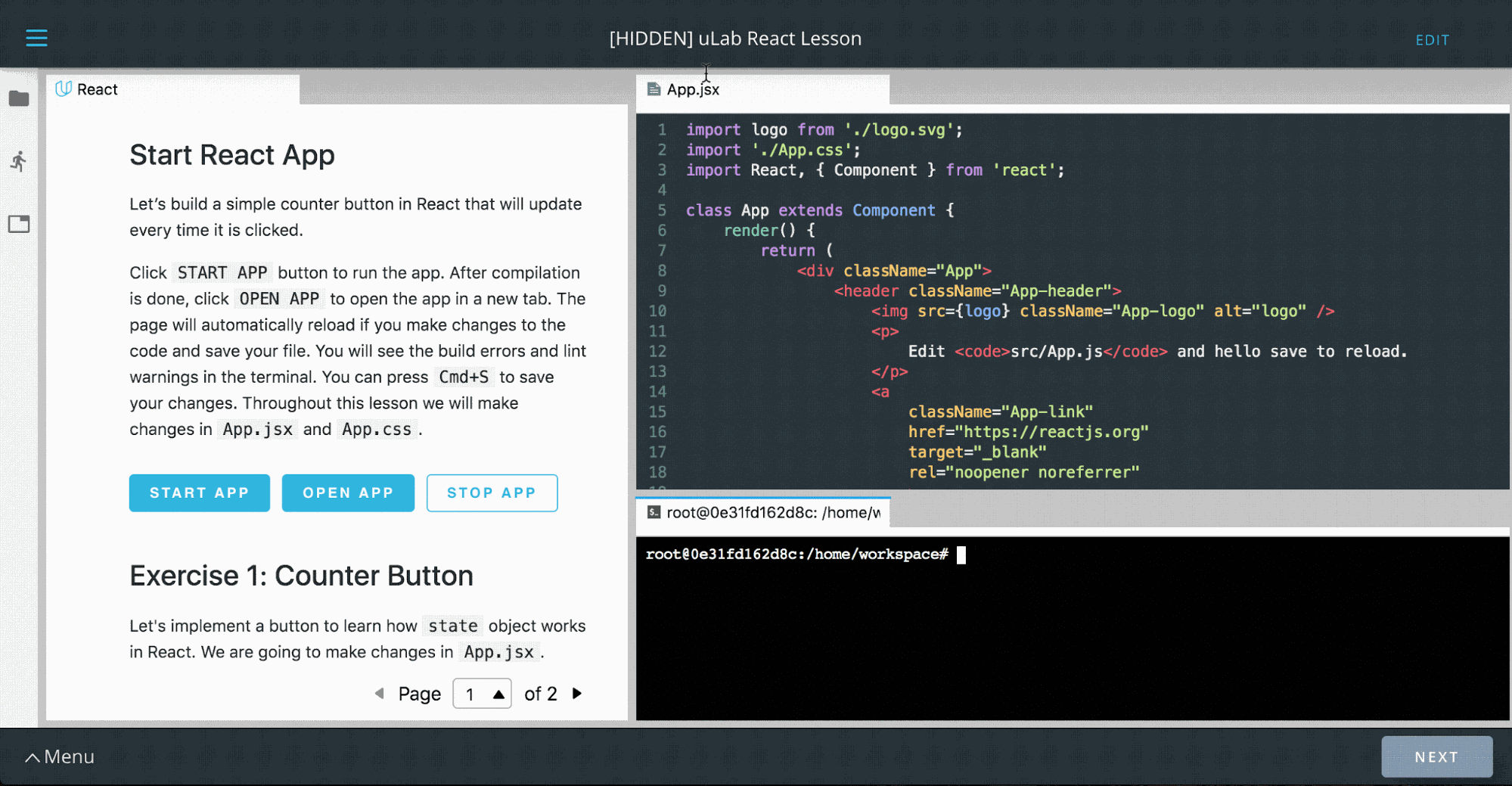
Editor’s note: Today we hear from Udacity, which uses a variety of Google Cloud technologies for its online learning platform. Read on to learn how they built online workspaces that give students immediate access to fast, isolated compute resources and private data sets. At Udacity, we use advanced technologies to teach about technology. One example is our  interactive “Workspaces,” which students use to gain hands-on experience with a variety of advanced topics like artificial intelligence, data science, programming and cloud. These online environments comprise everything from SQL interpreters to coding integrated development environments (IDEs), Jupyter Notebooks and even fully functional 3D graphical desktops—all accessible via an everyday browser.Udacity’s latest IDE environment, “uLab,” where “Learning Guides” can demonstrate skills interactively.To build these Workspaces, we relied heavily on Google Cloud Platform (GCP) in numerous interesting and novel ways. This article details our implementation and where we hope to take it in the future. Workspaces design goalsUdacity customers are smart, busy learners from all over the world, who access our courses remotely. To meet their needs, we designed Udacity Workspaces to:Be ready to use in under 15 secondsOffer advanced functionality directly inside the browser-based Udacity ClassroomInstantly furnish starter and example files to students in a new Workspace, and automatically save all student work and progress for the next sessionProvide quick access to large external datasetsFunction well with any session duration… from two minutes to four hours, or moreProvide reliable compute availability and GPU power wherever neededWe chose GCP for its ease of use, reliability, and cost-effectiveness. Let’s see how we used different GCP offerings to meet these goals.Fast, personalized access to Workspaces Students demand immediate access to their Workspaces, but booting up a full GCP host from an image can take awhile. That’s OK if a student plans on using their Workspace for an hour, but not if they’re using it for a two minute Workspace coding challenge.To address this, we built a custom server management tool (“Nebula”) that maintains pools of ready servers to assign to students immediately. To control costs, the pools are sized by a custom usage-pressure measurement algorithm to be fairly surge ready, but which also reduces the pools to as small as a single instance during idle periods. Pools are maintained in multiple data centers, to maximize access to GPUs.GCP’s by-the-second pricing and flexible reservations policy served us well here. Given the short usage windows of some student exercises, hourly billing or bulk billing might have proved cost prohibitive.Having ready-to-go server pools minimizes startup time, but we also needed to place “starter files,” or later on, the student’s own work from a previous session, onto the hosts as quickly as possible. After experimenting with several approaches, we decided to store these files as tarballs in Cloud Storage. We found that we can copy up to 3GB to and from Cloud Storage within our SLA time window, so we set a hard limit of 3GB for student drives.Every time a student’s session goes idle for half an hour, we deallocate the host, compress and copy the student’s files to Cloud Storage, then delete the host. In this manner we make time-stamped backups of each session’s files, that students can opt to restore any time they need to (via the Workspaces GUI). An alternative approach could be to leverage Cloud Storage’s version control, which provides access to GCP’slifecycle controls as well. However, at the time we built the student files storage system, this GCP feature was still in beta, so we opted for a home-grown facility.In addition, we take advantage of Cloud Functions to duplicate the student files in a second region to ensure against regional outages. Side note: if we were to build this feature today, we could take advantage of dual-region buckets to automatically save student files in two regions.Access to large datasetsFrom time to time, students need to access large datasets, e.g., in our machine learning courses. Rather than writing these datasets on server images, we mount read-only drives to share a single dataset across multiple student hosts. We can update these datasets on new shared drives, and Nebula can point new sessions at these new drives without interrupting existing session mounts. To date, we’ve never run into a concurrent read-only mount limit for these drives. However, we do see a need for quick-mount read-write dataset drives. One example could be a large SQL database that a student is expected to learn to modify in bulk. Duplicating a large drive on-the-fly isn’t feasible, so one approach could be to manage a pool of writeable drive copies to mount just-in-time, or to leverage Google Cloud’s Filestore. With the Filestore approach, you’d pre-create many copies of data drives in a folder tree, and mount a particular folder on the Filestore to a specific student’s container when access is needed; that copy would then never be assigned to anybody else, and asynchronously deleted/replaced with a fresh, unaltered copy when the student’s work is finished.Consistent compute powerIn a shared environment (e.g. Google Kubernetes Engine ), one student’s runaway process could affect the compute performance of another student’s entire container (on the same metal). To avoid that, we decided on a “one-server-per-student” model, where each students gets access to a single Compute Engine VM, running several Docker containers—one container for the student’s server, another for an auto-grading system, and yet another for handling file backups and restores. In addition to providing consistent compute power, this approach also has a security advantage: it allows us to run containers in privileged mode, say, to use specialized tools, without risking a breach beyond the single VM allocated to any one student.This architecture also ensures that GPU-equipped hosts aren’t shared either, so students benefit from all available performance. This is especially important as students fire up long-running, compute intensive jobs such as performing image recognition. As a cost control measure, we meter GPU host usage and display available remaining GPU time to students, so they  switch their GPUs on and off. This “switching” actually allocates a new host from our pools to the student (either GPU-enabled or not). Because we can do the switch in under 15 seconds, it feels approximately like a toggle switch, but some aspects of the session (such as open files) may be reset (e.g., in an IDE configuration). We encourage students to ration their GPU time and perform simpler tasks such as editing or file management in “CPU mode.”One of our GPU host configurations provides an in-browser Ubuntu desktop with pass-through Nvidia K80 GPUs for high-performance compute and graphics. This configuration is heavily employed by our Autonomous Systems students, who run graphics-intensive programs like Gazebo (shown), and run robot environment simulations. You can read more about this configuration here.Wanted: flexible and isolated imagesThis configuration has hit all our goals except for true image flexibility. For our large variety of courses we require many variations of software installations. Normally such needs would be satisfied with containers, but the requirement of isolated compute environments eliminates that as an option. In the past two years, we’ve empowered hundreds of thousands of Udacity students to advance their careers and learn new skills with powerful learning environments called Workspaces, built on top of GCP. Throughout, GCP has proven itself to be a robust platform and a supportive partner, and we look forward to future product launches on top of Google Cloud. If you’d like to learn more about the solutions we’ve built, feel free to reach out to me on Twitter, @Atlas3650.
Quelle: Google Cloud Platform