AWS bringt das Activate Founders-Paket für die Auswahl von Bootstrap-Start-ups auf den Markt und bietet bis zu 1 000 USD in Form von Guthaben

Heute stellt AWS das Activate Founders-Paket vor – eine neue Reihe von Vorteilen, die speziell für Bootstrap-Start-ups entwickelt wurden. Das Paket wird im Rahmen des AWS Activate-Programms angeboten und steht Gründern und Start-ups offen, die noch kein Risikokapital, keine Seed- oder Angel-Finanzierung aufgenommen haben und nicht mit Anschubfonds oder Gründerforen in Verbindung stehen. Erfolgreiche Bewerber können bis zu 1 000 USD in Form von AWS Activate-Guthaben erhalten, die zwei Jahre lang gültig sind, sowie ein Jahr technischen Support.
Quelle: aws.amazon.com

Amazon CloudFront in China kündigt Unterstützung für Nutzungs- und Aktivitätsberichte in der Konsole an

Amazon CloudFront-Kunden in China können jetzt detaillierte Informationen über ihre CloudFront-Nutzung und -Aktivität erhalten, indem sie CloudFront-Berichte in der AWS-Managementkonsole verwenden. Kunden in China können den CloudFront Cache-Statistik-Bericht verwenden, um die Gesamtanforderungen, den Prozentsatz der Zuschaueranforderungen nach Ergebnistyp, übertragene Bytes, HTTP-Statuscodes und den Prozentsatz der GET-Anforderungen, die den Download nicht beendet haben, zu sehen. Der CloudFront Beliebte-Objekte-Bericht zeigt die 50 beliebtesten Objekte und Statistiken über diese Objekte. Der CloudFront Top-Referrer-Bericht zeigt die 25 Top-Referrer und die Anzahl der Anfragen von jedem Referrer. Der CloudFront-Nutzungsbericht zeigt die Anzahl der Anfragen und Daten, die nach Protokoll oder Zielort übertragen wurden. Der CloudFront-Zuschauer-Bericht zeigt die Aufschlüsselung der Zuschauer nach Geräten, Browsern, Betriebssystemen und Standorten. Diese Berichte sind für alle CloudFront-Kunden ohne zusätzliche Kosten verfügbar. Für erste Schritte mit CloudFront in China besuchen Sie Amazon CloudFront. Dokumentation finden Sie unter CloudFront-Berichte in der Konsole im Amazon CloudFront-Entwicklerhandbuch.
Quelle: aws.amazon.com

Latest Mirantis Addition Provides Developer-Friendly Tool to Run Kubernetes

The post Latest Mirantis Addition Provides Developer-Friendly Tool to Run Kubernetes appeared first on Mirantis | Pure Play Open Cloud.
Latest Mirantis Addition Provides Developer-Friendly Tool to Run Kubernetes
 
Following Docker Enterprise acquisition, the addition of Kontena resources brings technology and expertise to modernize apps at enterprise scale 
 
Campbell, Calif – February 25, 2020 — Following its November acquisition of Docker Enterprise, Mirantis, the open cloud company, took another step to bolster its Kubernetes lineup, announcing today the addition of the engineering and leadership of cloud container services company Kontena.
 
Kontena provides easy-to-use, fully integrated Kubernetes products for DevOps and software development teams to deploy, run, monitor and operate Kubernetes clusters and workloads on private, public, and hybrid cloud infrastructures running bare metal or virtual machines. The software is open source and available under the Apache 2.0 license. Kontena is currently used by hundreds of start-ups and software development teams working for some of the biggest enterprises in the world. The entire Kontena team will join Mirantis. 
 
Mirantis has made significant investments in Kubernetes, and this latest acquisition will accelerate its product roadmap in multi-cluster management, cluster visibility and insights, and tools for application developers. Mirantis will leverage the IP acquired from Kontena for existing Kubernetes technology in Docker Enterprise, including Docker Kubernetes Service (DKS) and Universal Control Plane (UCP). 
 
“We want to deliver the best Kubernetes experience for developers and enterprises,” said Adrian Ionel, Mirantis CEO. “With a small but talented team, Kontena engineers have built tools that make Kubernetes significantly easier for developers to use. Together, Mirantis and talent acquired from Kontena will extend our core Kubernetes offering, based on Docker Enterprise, with key developer-facing capabilities that deliver faster app development.”The post Latest Mirantis Addition Provides Developer-Friendly Tool to Run Kubernetes appeared first on Mirantis | Pure Play Open Cloud.
Quelle: Mirantis

Amazon FSx for Lustre startet persistente Dateisysteme, erhöht die Leistung auf Scratch-Dateisystemen, unterstützt AWS KMS und ermöglicht die Verschlüsselung während des Transports

Amazon FSx for Lustre – ein Service, der es einfach und kostengünstig macht, das weltweit beliebteste Hochleistungsdateisystem Lustre zu starten und auszuführen – führt mehrere Verbesserungen ein, die es noch einfacher machen, ein Lustre-Dateisystem für jede Arbeitslast zu verwenden, in der die Speichergeschwindigkeit wichtig ist: Die Möglichkeit, persistente Dateisysteme zu starten, die dauerhaft und hoch verfügbar sind, der Durchsatz für nicht dauerhafte Scratch-Dateisysteme und verbesserte Verschlüsselungsfunktionen.
Quelle: aws.amazon.com

Now, you can explore Google Cloud APIs with Cloud Code

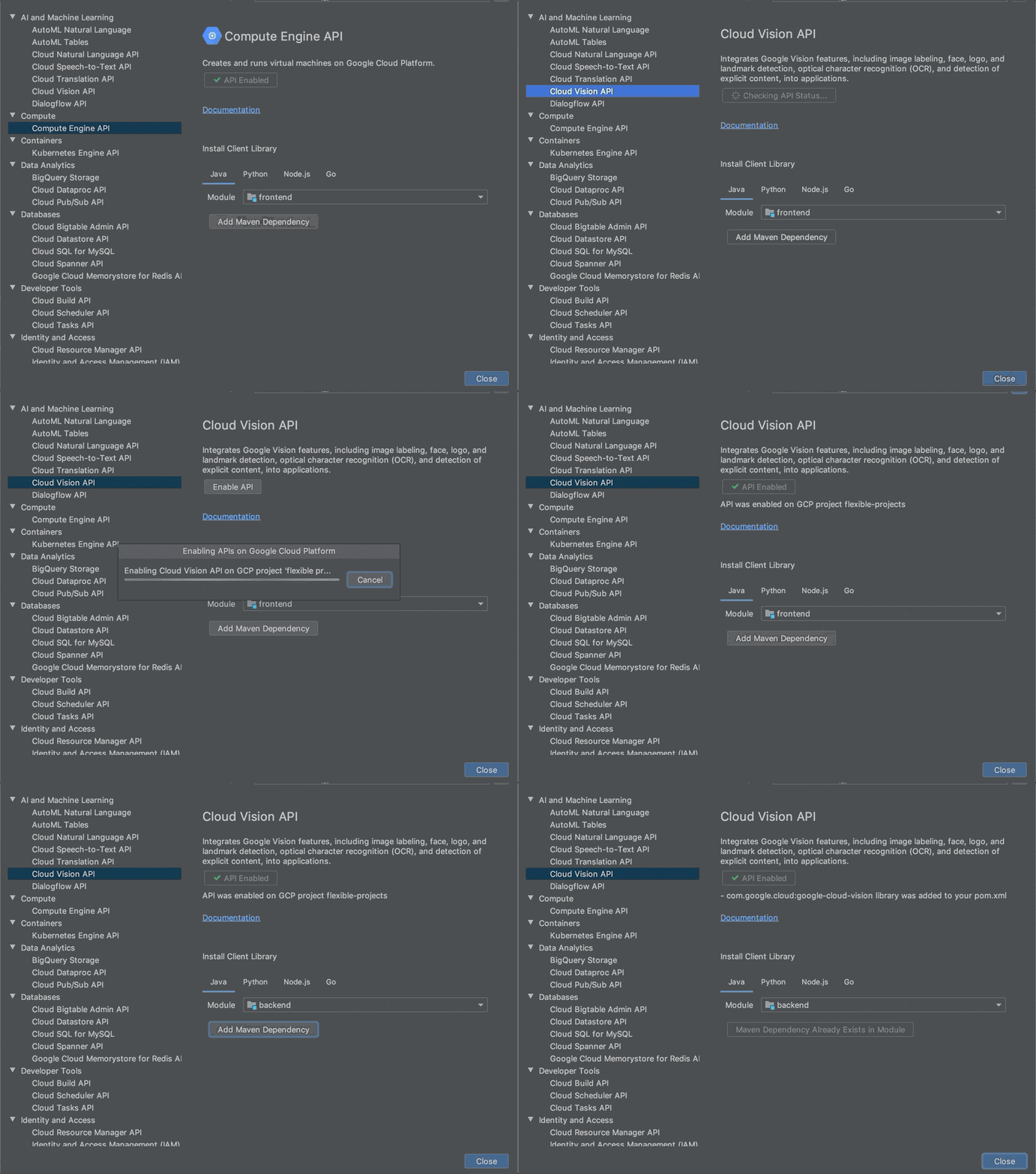
Applications often rely on external services to provide capabilities such as data storage, messaging and networking with the help of APIs. Google Cloud offers a wide array of such APIs—covering everything from translating text, building AI/ML models, managing database operations, through to secret management and storage. But adding an APIs to your application often means performing a number of somewhat repetitive steps outside of the integrated development environment (IDE), across different websites. We are pleased to announce that we have streamlined this process and made it easy to add Google Cloud APIs to your project and start using them without leaving the IDE, with the help of a new API manager in Cloud Code.Cloud Code is our set of extensions for VS Code and the JetBrains family of integrated development environments (IDEs). With extensions to VSCode, IntelliJ, Goland, PyCharm, and WebStorm, Cloud Code can help you develop, deploy, and debug Kubernetes applications.The Cloud Code API manager further enhances the existing Cloud Code feature set by providing several features directly within your favorite IDE that you can use to Google Cloud APIs to your application, whether it runs on Kubernetes or otherwise: Browse and enable Google Cloud APIsInstall corresponding client libraries, with support for Java, NodeJS, Python and GoAccess detailed API documentationEach of these reduces the amount of “context switching” that you need to do and let’s you spend more time focused on writing code. Let’s look at each of these Cloud Code features in a little more depth. Browse and enable Google Cloud APIsFinding the right API to add to your application can take time. For example, even if you develop a simple app like “bookshelf” getting started app, you need to enable Cloud Storage, Logging and Error Reporting APIs. For more complex applications that use more services, it’s even more difficult. The API browser in Cloud Code lets you browse all the Google Cloud APIs, which have been categorized into logical groups and provided in an easy to view format, from within the IDE. You can sort and search for your favorite Google Cloud API and click on it to view more details. In the details page, you can also view the status of a Google Cloud API and enable it for a GCP project.Here, you can see how to navigate between various Google Cloud APIs, view the status of an API, enable an API and automatically add Maven dependency for Java Maven projects in the IntelliJ IDEA.Install client librariesIn addition to showing the information about Google Cloud API in the details page, Cloud Code provides instructions for installing client libraries. Client libraries allow  you to consume your preferred Cloud API in the programming language of your choice, instead of directly consuming low-level REST APIs or protobufs. Currently, installation instructions are available for Java, NodeJS, Python and Go. If you are using Java, diamond dependencies are handled automatically through libraries bom.With Cloud Code, you can now browse the Google Cloud APIs, view documentation for and the status of an API, and copy installation instructionsAccess detailed documentationSo far, the API manager has made it easy to discover and add an API into your code base. When it comes to using the API, you may also often need to refer to the reference documentation. Cloud Code’s API manager brings all of the critical links right into context inside the IDE so that you can easily find examples, review the structure of the overall API and discover details about pricing and additional detailed use cases.Get startedCloud Code helps you get started on various Google Cloud APIs in a seamless manner from within your favorite IDE. To learn more, check out the documentation for Cloud Code for VS Code and JetBrains IDEs. If you are new to Cloud Code, start by learning how to install Cloud Code.
Quelle: Google Cloud Platform