5 Software Development Predictions for 2020

Photo by Jamie Street on Unsplash

To kick off the new year, we sat down with Docker CEO Scott Johnston and asked him what the future holds for software development. Here are his 2020 predictions and trends to keep an eye on.
Existing Code and Apps Become New Again
Developers will find new ways to reuse existing code instead of reinventing the wheel to start from scratch. Additionally, we’ll see companies extend the value to existing apps by adding more functionality via microservices.
The Changing Definition of a Modern Application
Today’s applications are more complex than those of yesterday. In 2020, modern apps will power tomorrow’s innovation and this requires a diverse set of tools, languages and frameworks for developers. Developers need even more flexibility to address this new wave of modern apps and evolve with the rest of the industry.
Containers Pave the Way to New Application Trends
Now that containers are typically considered a common deployment mechanism, the conversation will evolve from the packaging of individual containers to the packaging of the entire application (which are becoming increasingly diverse and distributed). Organizations will increasingly look for guidance and solutions that help them unify how they build and manage their entire application portfolio no matter the environment: on premises, hybrid/multi-cloud, edge, etc.
Digital Transformation Transforms Itself 
Digital transformation was the buzzword of 2019, but we’ll see the term become less ambiguous this year. It’ll evolve to have a more specific meaning: a process for creating business impact through modernizing existing technology investments and delivering new applications/services.
A Container-First Strategy Proves Itself 
Developers have long been proponents of containers, but there’s been a huge shift toward establishing container-first strategies that are foundational to business transformation. 2020 will mark the year that these container-centric initiatives become the go-to-approach and play out on a larger scale. This will happen across enterprises and industries as it proves immediate impact by providing a clear path to the cloud for all applications, regardless of programming language or whether they’re three-tier brownfield apps or cloud-native greenfield microservices, while reducing cost and risk.
The post 5 Software Development Predictions for 2020 appeared first on Docker Blog.
Quelle: https://blog.docker.com/feed/

Join us in a Digital Climate Strike

With fires raging in the Amazon, hurricanes ripping across the Atlantic, and typhoons flooding Japan, our planet and our climate are sending us a message: We can no longer continue with business as usual.

The week starting September 20th, 350.org is organizing a Global Climate Strike, in association with Fridays For Future, to show global leaders that the time to act is now. Alongside the people walking out of workplaces, schools, and homes around the world, 350.org is organizing a digital climate strike. Websites participating in the digital strike will promote the physical strikes in the lead-up to the date, and partially block themselves to users on September 20th itself. That is where you come in!

Starting today, you can opt into the digital climate strike with your WordPress.com site, showing your commitment to this critical topic and spreading the word about the event. Between now and September 20th, your site will display a small climate strike banner. On the 20th, it will transform into a dismissible full-screen overlay.

WordPress.com site owners can head to My Site > Manage > Settings. At the top of the Settings menu, you will see a toggle switch — flip it on to join the digital climate strike.

Other WordPress sites can also join the movement by installing the Digital Climate Strike plugin from the WordPress.org plugin repository.

After the day of action, the banner will automatically disappear (or if you’ve installed the plugin, it will automatically disable) and your site will return to normal.

Together we can make a difference, and we hope you’ll join us in supporting this movement.
Quelle: RedHat Stack

A New Way to Earn Money on WordPress.com

It’s hard to be creative when you’re worried about money. Running ads on your site helps, but for many creators, ad revenue isn’t enough. Top publishers and creators sustain their businesses by building reliable income streams through ongoing contributions.

Our new Recurring Payments feature for WordPress.com and Jetpack-powered sites lets you do just that: it’s a monetization tool for content creators who want to collect repeat contributions from their supporters, and it’s available with any paid plan on WordPress.com.

Let your followers support you with periodic, scheduled payments. Charge for your weekly newsletter, accept monthly donations, sell yearly access to exclusive content — and do it all with an automated payment system.

With recurring payments, you can:

Accept ongoing payments from visitors directly on your site.Bill supporters automatically, on a set schedule. Subscribers can cancel anytime from their WordPress.com account.Offer ongoing subscriptions, site memberships, monthly donations, and more, growing your fan base with exclusive content.Integrate your site with Stripe to process payments and collect funds.

Enable Recurring Payments in three steps

Start accepting ongoing payments in just five minutes, without any technical background. 

1. Connect (or create) a Stripe account

WordPress.com partners with Stripe, one of the internet’s biggest payment processors, to make sure transactions are fast and secure. You’ll need a Stripe account to use Recurring Payments. 

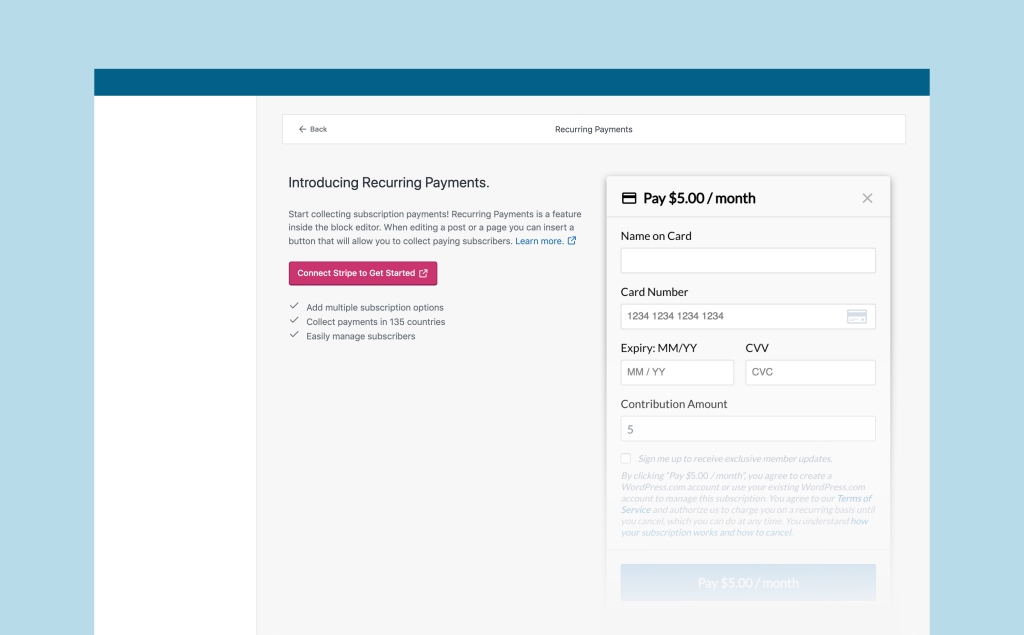
Head to your Earn page and click Connect Stripe to Get Started — we’ll walk you through the setup and help you create a Stripe account if you don’t have one.

2. Put a Recurring Payments button on your site

Recurring Payments takes advantage of the powerful block editor. To start collecting revenue, open a post or page, click the (+) to add a new block, and insert a Recurring Payments button.

3. Customize the details of the recurring payment

You can create as many payment plans for your site as you’d like—different currencies, amounts, payment frequencies, and names, so you can offer different tiers or subscriptions.

You can also choose one of your previously created plans when you insert a new button.

Bravo!

You just set up Recurring Payments for your site. Now your fans can support you, just like they do on Longreads.com and around the web.

For more detailed setup instructions, visit the Recurring Payments support page.

So many options to grow your supporter base

With Recurring Payments, you can turn your content into revenue, accept donations, or fund your next big idea. 

Sell access to members-only newsletters.Collect club membership dues automatically.Let fans fund your next art project.

Some people even collect rent with recurring payments!

It’s easier than ever for your visitors to support your site

Recurring Payments make it easy to purchase a subscription or become a supporter on any WordPress.com or Jetpack-connected site — your subscribers will be able to use the same payment information and manage all their subscriptions in one place. To do that, they’ll just need a WordPress.com account.

During the checkout process, they will enter their email address. If they already have a WordPress.com account linked to that address, we will associate the purchase with that account. If they don’t, we’ll create an account for them. When they complete the purchase, they’ll receive an email with more info and login instructions for their new account.

The transaction is between you and your subscriber. WordPress.com only facilitates the processing and management of the subscription. We don’t save your subscribers’ credit card information, either — it’s stored by Stripe, the payment processor, so that the charge can renew automatically. Your subscribers can manage, edit, or cancel their recurring payments on their own, without your intervention, by visiting Me > Manage Purchases > Other sites.

A competitive fee structure helps you share your work far and wide

Recurring Payments is available on all paid plans, for both WordPress.com and Jetpack-connected sites. You pay a percentage of the revenue your site generates through Recurring Payments, which varies depending on your plan. As you collect more subscribers, you might consider switching to a different plan in order to retain more revenue.

WordPress.com PlanJetpack planRelated FeesWordPress.com eCommerce —NoneWordPress.com BusinessJetpack Professional2%WordPress.com PremiumJetpack Premium4%WordPress.com PersonalJetpack Personal 8%

In addition to the fees you pay us, Stripe collects 2.9% + $0.30 for each payment made to your Stripe account.

Make the most of our collection of monetizing tools

Recurring payments is the latest addition to the monetizing tools available on WordPress.com. Here are the other tools you can find by visiting WordPress.com/earn.

Use Simple Payments to take one-time payments, or to sell digital or physical products with minimal configuration.Add WordAds to run advertisements on your site, and earn revenue from your traffic.Move to WooCommerce when you’re ready to create a full shopping experience for visitors — it’s the most customizable online-store platform on the web, with thousands of extensions.

Ready to add Recurring Payments? Head to your site’s Earn section right now.

Quelle: RedHat Stack

PHP 7.4 Just Came Out, and So Did Our PHP Version Switcher

PHP is still one of the most popular languages used to build the web. The newest version, PHP 7.4, was released today — and Business and eCommerce plan customers can opt to start using it immediately.

WordPress.com sites run PHP 7.3 by default — it’s still our recommended version, since it’s been stress-tested across all of WordPress.com — but if you have a site on the Business or eCommerce plan and want to be on the leading technological edge, you can opt to switch to version 7.4 immediately.

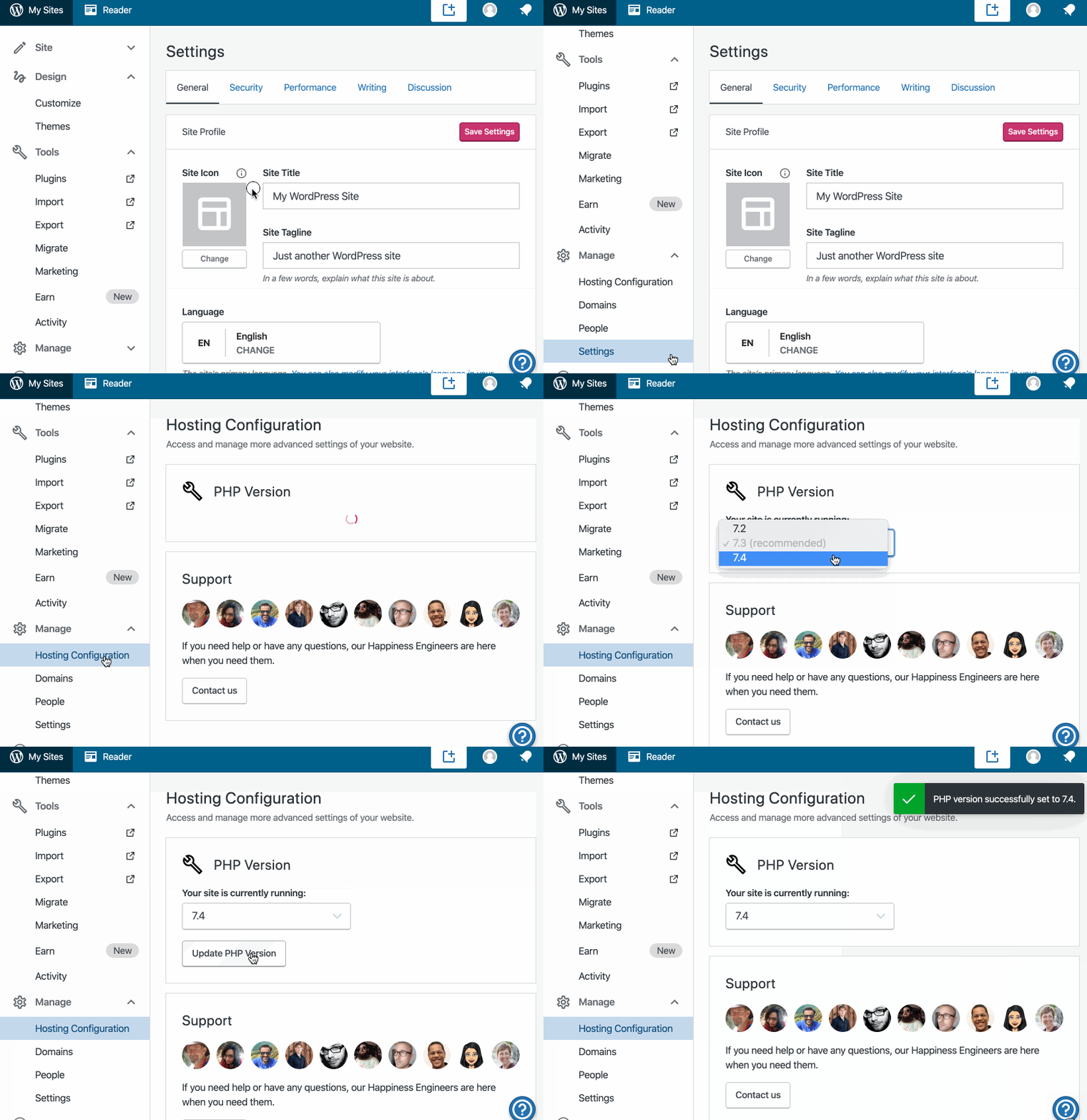
Head to My Site > Manage > Hosting Configuration to find the new PHP Version Switcher:

Choose which version of PHP you want your site to run on, click the “Update PHP version” button, and voilà.

(Note: All sites with eCommerce plans can make the switch right now. Sites on the Business plan need to have either an active plugin or a custom theme to use the PHP Version Switcher.)

PHP’s evolved with each version 7 release, and PHP 7.4 promises to have the strongest performance yet. It will eventually power all WordPress.com sites, but Business and eCommerce customers can take advantage of the update today!
Quelle: RedHat Stack

New Theme: Twenty Twenty

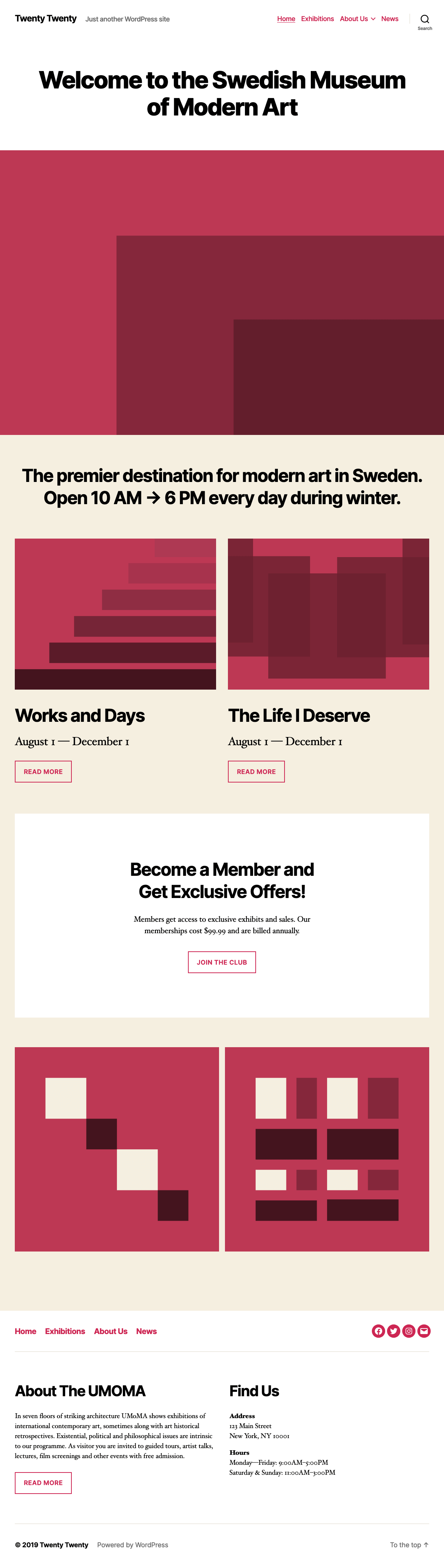
We’re pleased to announce that Twenty Twenty — the new WordPress default theme designed by Anders Norén— is available to all WordPress.com sites.

Twenty Twenty was designed with the flexibility of the new WordPress Editor at its core. If you want to use it for an organization or a business, you can combine columns, groups, and media to create dynamic layouts that show off your services or products. If you want to use it for a traditional blog, the centered content column and considered typography makes it perfect for that as well.

It also has been designed and developed to take maximum advantage of the creative freedom enabled by the block editor. Extra care has been given to the Columns and Group blocks, which can be combined into impressive landing pages with intricate blocks layouts. Twenty Twenty includes full editor styles for the block editor, so what you see in the editor will almost exactly match the end result.

Learn more about WordPress’s latest default theme here, or check out the demo site!
Quelle: RedHat Stack

Power Users Rejoice: You've Got SFTP and Database Access

Three new hosting management tools give you direct access to your site’s files and data.

Have a site on a Business or eCommerce plan? Now you have three new ways to customize your WordPress.com site: SFTP access, database access, and PHP version switching give you behind-the-scenes access to the nuts and bolts of your site, which means more freedom and flexibility than ever before. If you’ve ever gotten stuck trying to modify your WordPress.com site because you couldn’t manually upload file changes or delete something from your database, website management is about to get a lot easier.

You’ll find all these features in a new section of your dashboard: Manage > Hosting Configuration.

The Hosting Configuration Screen

SFTP credentials

SFTP is a secure way to access the files and folders on your WordPress.com site using a program on your local computer like Filezilla. Some custom plugins and themes ask you to create specific folders or add files via SFTP. While many of those tasks can be accomplished with tools already built into your WordPress.com dashboard, folks who like using SFTP can now have SFTP access so they can make these changes directly. Check out our step-by-step guide to get started.

Database access

At WordPress.com, we regularly optimize your database so you don’t have to, but there might still be times when you need an efficient way to modify data, like purging all the tables created by a plugin you’ve decided to delete. Accessing your site’s database is an effective way to do this. 

Database access is a powerful tool, so if you’re at all unsure about working with a database, reach out to our Happiness Engineers! If you’re unfamiliar with databases, you can also find information on getting started in our help documentation.

PHP version switching

PHP is still one of the key languages used to build the web, and a new version, PHP 7.4, was recently released. WordPress.com sites currently run PHP 7.3, which has been tested extensively across all of WordPress.com, but sites on Business or eCommerce plans can switch to version 7.4 immediately. Learn more.

Since these new tools let you dig into some of the code and data the powers your site, you’ll find a link for our support team right from the dashboard so you can get help if you need it. Have fun getting under the hood, power users!
Quelle: RedHat Stack

Google Cloud and FDA MyStudies: Harnessing real-world data for medical research

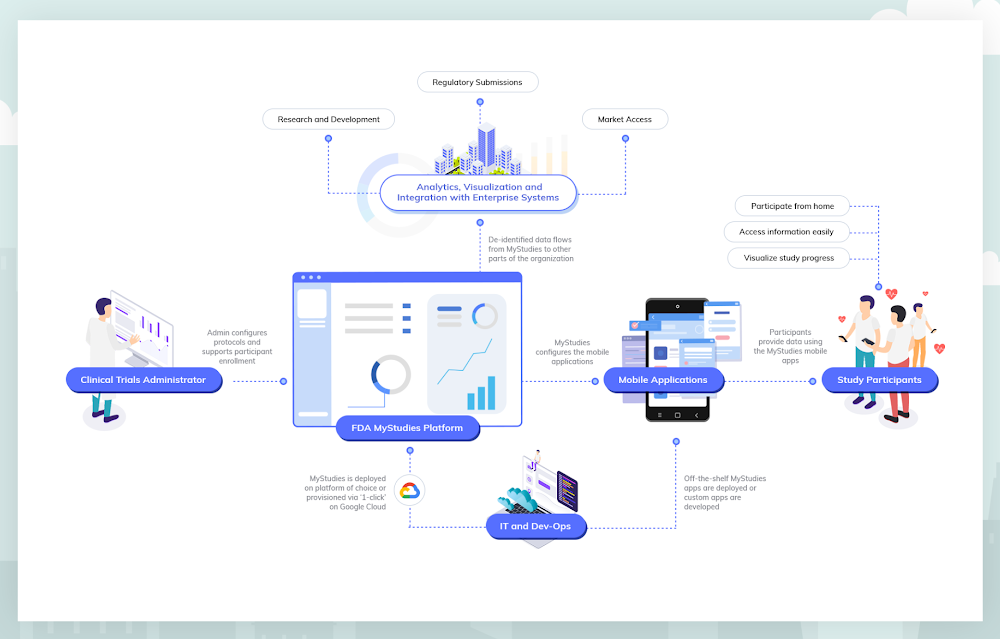
Google Cloud is committed to helping customers conduct life-saving research that results in new medications, devices and therapeutics by unlocking the knowledge hidden in real-world data. That’s why we’re supporting the goals of the U.S. Food & Drug Administration, by making the FDA’s open-source MyStudies platform available on Google Cloud Platform. By building on the platform developed by the FDA, we hope to stimulate an open ecosystem that will improve the ability of organizations to perform research that leads to better patient outcomes. This collaboration continues our long history of open-source work, and our commitment to producing easy-to-use tools that serve the healthcare and life sciences community.Because of the FDA’s focus on real-world evidence, drug and device organizations are increasingly looking to incorporate patient-generated data into regulatory submissions for new products and treatment indications. But until recently, there haven’t been mobile technologies or methodologies to help collect, store and submit this kind of data in a regulatory compliant manner. In order to address this gap, the FDA developed MyStudies, an open-source technology platform that supports drug, biologic and device organizations as they collect and report real-world data for regulatory submissions.Google Cloud is now working to expand the FDA’s MyStudies platform with built-in security and configurable privacy controls, and the ability for research organizations to automatically detect and protect personally identifying information. When an organization deploys FDA MyStudies on Google Cloud, a unique and logically isolated instance of the platform is created that only that organization and its delegates are authorized to access. These technologies will allow a research organization to select which of its researchers and clinicians are able to access what data, and to help optimize the use of that data as directed by participants. By leveraging Google Cloud as the underlying infrastructure for their FDA MyStudies deployments, organizations will have more safeguards in the ownership and management of data in their studies.Further, Google Cloud is providing sponsorship to bring Stanford University’s MyHeart Counts cardiovascular research study onto the FDA MyStudies platform, enabling this groundbreaking virtual clinical study to begin enrolling users of both Android and iOS devices. Since it launched as one of the initial iOS research applications, MyHeart Counts has enrolled more than 60,000 participants and driven significant understanding of the feasibility of conducting large-scale, smartphone-based clinical trials. Enabling patient-reported data with MyStudiesThe FDA relies on clinical trials and studies submitted by study sponsors to determine whether to approve, license or clear a drug, biologic or device for marketing in the United States. Historically, this information has been obtained almost exclusively through traditional clinical trials conducted under tightly controlled conditions. However, the increased digitalization of patient healthcare data may help to improve health with high-quality real-world evidence and more efficient clinical trials.The FDA has recognized this opportunity. For example, the agency’s Patient Engagement Advisory Committee is now helping assure the experiences of patients are included as part of the FDA’s deliberations on complex issues involving the regulation of medical devices. And, in 2017, the FDA Center for Devices and Radiological Health released a guidance document addressing real-world evidence generation for medical devices. The FDA has also released several draft Patient-Focused Drug Development guidance documents addressing how stakeholders can collect and submit patient experience data to support regulatory decision-making. Finally, in 2018, the FDA also released a Real-World Evidence Framework which details the agency’s efforts to evaluate real-world evidence for drugs and biologics as mandated by the 21st Century Cures Act.Originally launched as a publicly available resource in November of 2018, FDA’s MyStudies platform includes important features supporting patient accessibility and privacy. The patient-facing mobile application was built for Android using the open-source ResearchStack framework, and for iOS using Apple’s ResearchKit framework. By using these frameworks, developers can expand the capabilities of open-source mobile applications or create their own proprietary and branded applications. MyStudies mobile applications are configurable for different therapeutic areas and health outcomes through a web-based interface that reduces the need for custom software development. The overall platform has been designed to support auditing requirements for compliance with 21 CFR Part 11, allowing the platform to be used for trials under Investigational New Drug (IND) oversight.Study sponsors have already leveraged the FDA’s existing MyStudies platform to build branded and customized mobile applications to administer questionnaires that assess patient-reported outcomes, patient reports of prescription and over-the-counter medication use, trial medication diaries and other patient experience data. Supporting MyStudies on Google Cloud will make it even easier for new study sponsors to benefit from the MyStudies platform.New platform, new opportunitiesNow, Google Cloud is equipping the FDA’s MyStudies platform with an additional set of capabilities that reduce complexity and overhead, allowing pharma and medtech organizations to get up and running fast. For study designers who do not want to configure a compliant environment from scratch, a ‘click-to-deploy’ option will be available in the Google Cloud Marketplace later this year. When deploying FDA MyStudies on Google Cloud using this option, a private MyStudies instance is built from the open-source repository. That instance is then configured following best practices to operate with selected Google Cloud services. This allows research groups to establish their own, preconfigured instance of the FDA’s MyStudies platform in minutes.“Consistent with our obligations under the 21st Century Cures Act, FDA engages in public-private demonstration projects to advance the regulatory science around real-world evidence. The Patient Centered Outcomes Research Trust Fund investment that launched FDA MyStudies is a step toward this goal,” said David Martin, MD, associate director for Real-World Evidence Analytics, Office of Medical Policy, FDA Center for Drug Evaluation and Research. “FDA MyStudies is publicly available, but it requires professional expertise and time to progress from open-source resources to deployment of a new re-branded platform. As a company may do, Google Cloud is taking these resources and creating a click-to-deploy option linked to additional health data management and analytics.”Besides streamlined deployment of the open-source software, drug and device companies running FDA MyStudies on Google Cloud can benefit from integration with other Google Cloud offerings, such as managed services that support HIPAA compliance like the Healthcare API and our serverless data warehouse, BigQuery. More information about compliance on Google Cloud and an up-to-date list of products covered by our BAA can be found here.In addition to HIPAA compliance, Google Cloud can support customer compliance with CFR 21 Part 11 regulations when using Google Cloud in a prescribed manner to handle related data and workloads. While Google has a cloud technology stack that is ready for many CFR 21 Part 11 compliant workloads, the ultimate compliance determination depends on configuration choices made by the customer.MyHeart Counts + FDA MyStudies on Google CloudStanford University made mobile health history when it launched MyHeart Counts in 2015 as part of the inaugural cohort of iOS research applications. As an open enrollment study, any eligible individual who downloads the MyHeart Counts app may consent to participate in cardiovascular research. Once enrolled, participants are asked survey questions related to their health and physical activity. Participants may allow MyHeart Counts to collect physical activity data from their phone and other wearable devices. If participants are physically able, they will be asked to perform a 6-minute walk test, then enter information about risk factors and blood tests, which is used to determine a cardiovascular risk score.The current version of MyHeart Counts is only available on iOS devices. By using FDA MyStudies on Google Cloud, the Stanford researchers behind MyHeart Counts will conduct a multi-arm, randomized controlled trial that runs on both Android and iOS devices—the first of its kind. Additional improvements to the FDA MyStudies platform will allow researchers like those conducting MyHeart Counts to configure and deploy studies in days rather than months, without needing to develop any software.The study is being overseen by Professor Euan Ashley, MBChB, DPhil, professor of medicine, of genetics and of biomedical data science at Stanford. “In this digital era where everyone uses a smartphone, hosting a trial on an app lets us tap into a huge population. We are grateful for Google’s support because it enables us to expand our reach to include Android participants in addition to iOS, and incorporate an open-enrollment randomized controlled trial into a mobile application for the first time,” Prof. Ashley said.“MyHeart Counts and digital apps like it allow experts to connect directly to patients in a way that’s more immediate and more extensive, through direct, sensor-based measurement collection. Google Cloud’s support of these efforts not only helps researchers organize and deploy important research programs faster and more reliably, but ultimately will help patients and doctors notice health issues early, so they can address them sooner,” said Prof. Ashley.What’s next?In the spirit of our commitment to healthcare and open-source, Google Cloud will continue investing in MyStudies to bring general improvements to the platform, expand the number of supported assessments and enable integration with downstream analytics and visualization tools.Get in touch to learn more and be notified when FDA MyStudies becomes available on the Google Cloud Marketplace.Click to enlarge
Quelle: Google Cloud Platform

Your guide to Kubernetes best practices

Kubernetes made a splash when it brought containerized app management to the world a few years back. Now, many of us are using it in production to deploy and manage apps at scale. Along the way, we’ve gathered tips and best practices on using Kubernetes and Google Kubernetes Engine (GKE) to your best advantage. Here are some of the most popular posts on our site about deploying and using Kubernetes. Use Kubernetes Namespaces for easier resource management. Simple tasks get more complicated as you build services on Kubernetes. Using Namespaces, a sort of virtual cluster, can help with organization, security, and performance. This post shares tips on which Namespaces to use (and not to use), how to set them up, view them, and create resources within a Namespace. You’ll also see how to manage Namespaces easily and let them communicate.Use readiness and liveness probes for health checks. Managing large, distributed systems can be complicated, especially when something goes wrong. Kubernetes health checks are an easy way to make sure app instances are working. Creating custom health checks lets you tailor them to your environment. This blog post walks you through how and when to use readiness and liveness probes.Keep control of your deployment with requests and limits. There’s a lot to love about the scalability of Kubernetes. However, you do still have to keep an eye on resources to make sure containers have enough to actually run. It’s easy for teams to spin up more replicas than they need or make a configuration change that affects CPU and memory. Learn more in this post about using requests and limits to stay firmly in charge of your Kubernetes resources.  Discover services running outside the cluster. There are probably services living outside your Kubernetes cluster that you’ll want to access regularly. And there are a few different ways to connect to these services, like external service endpoints or ConfigMaps. Those have some downsides, though, so in this blog post you’ll learn how best to use the built-in service discovery mechanisms for external services, just like you do for internal services.Decide whether to run databases on Kubernetes. Speaking of external services: there are a lot of considerations when you’re thinking about running databases on Kubernetes. It can make life easier to use the same tools for databases and apps, and get the same benefits of repeatability and rapid spin-up. This post explains which databases are best run on Kubernetes, and how to get started when you decide to deploy.Understand Kubernetes termination practices. All good things have to come to an end, even Kubernetes containers. The key to Kubernetes terminations, though, is that your application can handle them gracefully. This post walks through the steps of Kubernetes terminations and what you need to know to avoid any excessive downtime.For even more on using GKE, check out our latest Containers and Kubernetes blog posts. Want a refresher? Get certified with the one month promo for the Architecting with GKE, Coursera specialization at http://goo.gle/k8s5. Offer valid until 01/31/2020, while supplies last.
Quelle: Google Cloud Platform