AWS Auto Scaling jetzt in AWS GovCloud (USA)-Regionen verfügbar

AWS Auto Scaling ist jetzt in AWS GovCloud (USA)-Regionen verfügbar. AWS GovCloud (USA)-Kunden können jetzt AWS Auto Scaling verwenden, um die Konfiguration der dynamischen Skalierung für mehrere Ressourcen wie Amazon EC2-Instances, Amazon ECS-Aufgaben, Amazon DynamoDB-Tabellen und -Indizes und Amazon Aurora Read Replicas mit nur einem Skalierungsplan zu verwalten. 
Quelle: aws.amazon.com

Amazon CloudWatch Synthetics jetzt in 13 weiteren Regionen verfügbar

Ab sofort steht Amazon CloudWatch Synthetics in 13 weiteren Regionen zur Verfügung: USA West (Oregon), USA West (Nordkalifornien), EU (Frankfurt), EU (London), EU (Paris), EU (Stockholm), Kanada (Zentral), Asien-Pazifik (Tokio), Asien-Pazifik (Seoul), Asien-Pazifik (Singapur), Asien-Pazifik (Sydney), Asien-Pazifik (Mumbai) und Südamerika (São Paulo). Mit Amazon CloudWatch Synthetics können Sie Canaries zur Überwachung Ihrer Endpunkte und APIs erstellen. 
Quelle: aws.amazon.com

AWS Control Tower führt Benachrichtigungen zu Lebenszyklusereignissen ein

AWS Control Tower gibt die Verfügbarkeit von Benachrichtigungen zu Lebenszyklusereignissen bekannt. Ein Lebenszyklusereignis markiert den Abschluss einer Control Tower-Aktion, die den Zustand von Ressourcen wie Organisationseinheiten (OUs), Konten und Schutzvorkehrungen ändern kann, die von Control Tower erstellt und verwaltet werden. Lebenszyklusereignisse werden als AWS CloudTrail-Ereignisse aufgezeichnet und als Ereignisse an Amazon EventBridge geliefert. Im Ereignisprotokoll ist angegeben, ob die Control Tower-Aktion erfolgreich abgeschlossen wurde oder nicht.
Quelle: aws.amazon.com

MSC Mediterranean Shipping Company on Azure Site Recovery

Today’s Q&A post covers an interview between Siddharth Deekshit, Program Manager, Microsoft Azure Site Recovery engineering and Quentin Drion, IT Director of Infrastructure and Operations, MSC. MSC is a global shipping and logistics business, our conversation focused on their organization’s journey with Azure Site Recovery (ASR). To learn more about achieving resilience in Azure, refer to this whitepaper.

I wanted to start by understanding the transformation journey that MSC is going through, including consolidating on Azure. Can you talk about how Azure is helping you run your business today?

We are a shipping line, so we move containers worldwide. Over the years, we have developed our own software to manage our core business. We have a different set of software for small, medium, and large entities, which were running on-premises. That meant we had to maintain a lot of on-premises resources to support all these business applications. A decision was taken a few years ago to consolidate all these business workloads inside Azure regardless of the size of the entity. When we are migrating, we turn off what we have on-premises and then start using software hosted in Azure and provide it as a service for our subsidiaries. This new design is managed in a centralized manner by an internal IT team.

That’s fantastic. Consolidation is a big benefit of using Azure. Apart from that, what other benefits do you see of moving to Azure?

For us, automation is a big one that is a huge improvement, the capabilities in terms of API in the integration and automation that we can have with Azure allows us to deploy environments in a matter of hours where before that it took much, much longer as we had to order the hardware, set it up, and then configure. Now we no longer need to worry about the set up as well as hardware support, and warranties. The environment is all virtualized and we can, of course, provide the same level of recovery point objective (RPO), recovery time objective (RTO), and security to all the entities that we have worldwide.

Speaking of RTO and RPO, let’s talk a little bit about Site Recovery. Can you tell me what life was like before using Site Recovery?

Actually, when we started migrating workloads, we had a much more traditional approach, in the sense that we were doing primary production workloads in one Azure region, and we were setting up and managing a complete disaster recovery infrastructure in another region. So the traditional on-premises data center approach was really how we started with disaster recovery (DR) on Azure, but then we spent the time to study what Site Recovery could provide us. Based on the findings and some testing that we performed, we decided to change the implementation that we had in place for two to three years and switch to Site Recovery, ultimately to reduce our cost significantly, since we no longer have to keep our DR Azure Virtual Machines running in another region. In terms of management, it's also easier for us. For traditional workloads, we have better RPO and RTO than we saw with our previous approach. So we’ve seen great benefits across the board.

That’s great to know. What were you most skeptical about when it came to using Site Recovery? You mentioned that your team ran tests, so what convinced you that Site Recovery was the right choice?

It was really based on the tests that we did. Earlier, we were doing a lot of manual work to switch to the DR region, to ensure that domain name system (DNS) settings and other networking settings were appropriate, so there were a lot of constraints. When we tested it compared to this manual way of doing things, Site Recovery worked like magic. The fact that our primary region could fail and that didn’t require us to do a lot was amazing. Our applications could start again in the DR region and we just had to manage the upper layer of the app to ensure that it started correctly. We were cautious about this app restart, not because of the Virtual Machine(s), because we were confident that Site Recovery would work, but because of our database engine. We were positively surprised to see how well Site Recovery works. All our teams were very happy about the solution and they are seeing the added value of moving to this kind of technology for them as operational teams, but also for us in management to be able to save money, because we reduced the number of Virtual Machines that we had that were actually not being used.

Can you talk to me a little bit about your onboarding experience with Site Recovery?

I think we had six or seven major in house developed applications in Azure at that time. We picked one of these applications as a candidate for testing. The test was successful. We then extended to a different set of applications that were in production. There were again no major issues. The only drawback we had was with some large disks. Initially, some of our larger disks were not supported. This was solved quickly and since then it has been, I would say, really straightforward. Based on the success of our testing, we worked to switch all the applications we have on the platform to use Site Recovery for disaster recovery.

Can you give me a sense of what workloads you are running on your Azure Virtual Machines today? How many people leverage the applications running on those Virtual Machines for their day job?

So it's really core business apps. There is, of course, the main infrastructure underneath, but what we serve is business applications that we have written internally, presented to Citrix frontend in Azure. These applications do container bookings, customer registrations, etc. I mean, we have different workloads associated with the complete process of shipping. In terms of users, we have some applications that are being used by more than 5,000 people, and more and more it’s becoming their primary day-to-day application.

Wow, that’s a ton of usage and I’m glad you trust Site Recovery for your DR needs. Can you tell me a little bit about the architecture of those workloads?

Most of them are Windows-based workloads. The software that gets the most used worldwide is a 3-tier application. We have a database on SQL, a middle-tier server, application server, and also some web frontend servers. But for the new one that we have developed now, it's based on microservices. There are also some Linux servers being used for specific usage.

Tell me more about your experience with Linux.

Site Recovery works like a charm with Linux workloads. We only had a few mistakes in the beginning, made on our side. We wanted to use a product from Red Hat called Satellite for updates, but we did not realize that we cannot change the way that the Virtual Machines are being managed if you want to use Satellite. It needs to be defined at the beginning otherwise it's too late. But besides this, the ‘bring your own license’ story works very well and especially with Site Recovery.

Glad to hear that you found it to be a seamless experience. Was there any other aspect of Site Recovery that impressed you, or that you think other organizations should know about?

For me, it's the capability to be able to perform drills in an easy way. With the more traditional approach, each time that you want to do a complete disaster recovery test, it's always time and resource-consuming in terms of preparation. With Site Recovery, we did a test a few weeks back on the complete environment and it was really easy to prepare. It was fast to do the switch to the recovery region, and just as easy to bring back the workload to the primary region. So, I mean for me today, it's really the ease of using Site Recovery.

If you had to do it all over again, what would you do differently on your Site Recovery Journey?

I would start to use it earlier. If we hadn’t gone with the traditional active-passive approach, I think we could have saved time and money for the company. On the other hand, we were in this way confident in the journey. Other than that, I think we wouldn’t have changed much. But what we want to do now, is start looking at Azure Site Recovery services to be able to replicate workloads running on on-premises Virtual Machines in Hyper-V. For those applications that are still not migrated to Azure, we want to at least ensure proper disaster recovery. We also want to replicate some VMware Virtual Machines that we still have as part of our migration journey to Hyper-V. This is what we are looking at.

Do you have any advice for folks for other prospective or current customers of Site Recovery?

One piece of advice that I could share is to suggest starting sooner and if required, smaller. Start using Site Recovery even if it's on one small app. It will help you see the added value, and that will help you convince the operational teams that there is a lot of value and that they can trust the services that Site Recovery is providing instead of trying to do everything on their own.

That’s excellent advice. Those were all my questions, Quentin. Thanks for sharing your experiences.

Learn more about resilience with Azure. 
Quelle: Azure

Mediterranean Shipping Company on Azure Site Recovery

Today’s Q&A post covers an interview between Siddharth Deekshit, Program Manager, Microsoft Azure Site Recovery engineering and Quentin Drion, IT Director of Infrastructure and Operations, MSC. MSC is a global shipping and logistics business, our conversation focused on their organization’s journey with Azure Site Recovery (ASR). To learn more about achieving resilience in Azure, refer to this whitepaper.

I wanted to start by understanding the transformation journey that MSC is going through, including consolidating on Azure. Can you talk about how Azure is helping you run your business today?

We are a shipping line, so we move containers worldwide. Over the years, we have developed our own software to manage our core business. We have a different set of software for small, medium, and large entities, which were running on-premises. That meant we had to maintain a lot of on-premises resources to support all these business applications. A decision was taken a few years ago to consolidate all these business workloads inside Azure regardless of the size of the entity. When we are migrating, we turn off what we have on-premises and then start using software hosted in Azure and provide it as a service for our subsidiaries. This new design is managed in a centralized manner by an internal IT team.

That’s fantastic. Consolidation is a big benefit of using Azure. Apart from that, what other benefits do you see of moving to Azure?

For us, automation is a big one that is a huge improvement, the capabilities in terms of API in the integration and automation that we can have with Azure allows us to deploy environments in a matter of hours where before that it took much, much longer as we had to order the hardware, set it up, and then configure. Now we no longer need to worry about the set up as well as hardware support, and warranties. The environment is all virtualized and we can, of course, provide the same level of recovery point objective (RPO), recovery time objective (RTO), and security to all the entities that we have worldwide.

Speaking of RTO and RPO, let’s talk a little bit about Site Recovery. Can you tell me what life was like before using Site Recovery?

Actually, when we started migrating workloads, we had a much more traditional approach, in the sense that we were doing primary production workloads in one Azure region, and we were setting up and managing a complete disaster recovery infrastructure in another region. So the traditional on-premises data center approach was really how we started with disaster recovery (DR) on Azure, but then we spent the time to study what Site Recovery could provide us. Based on the findings and some testing that we performed, we decided to change the implementation that we had in place for two to three years and switch to Site Recovery, ultimately to reduce our cost significantly, since we no longer have to keep our DR Azure Virtual Machines running in another region. In terms of management, it's also easier for us. For traditional workloads, we have better RPO and RTO than we saw with our previous approach. So we’ve seen great benefits across the board.

That’s great to know. What were you most skeptical about when it came to using Site Recovery? You mentioned that your team ran tests, so what convinced you that Site Recovery was the right choice?

It was really based on the tests that we did. Earlier, we were doing a lot of manual work to switch to the DR region, to ensure that domain name system (DNS) settings and other networking settings were appropriate, so there were a lot of constraints. When we tested it compared to this manual way of doing things, Site Recovery worked like magic. The fact that our primary region could fail and that didn’t require us to do a lot was amazing. Our applications could start again in the DR region and we just had to manage the upper layer of the app to ensure that it started correctly. We were cautious about this app restart, not because of the Virtual Machine(s), because we were confident that Site Recovery would work, but because of our database engine. We were positively surprised to see how well Site Recovery works. All our teams were very happy about the solution and they are seeing the added value of moving to this kind of technology for them as operational teams, but also for us in management to be able to save money, because we reduced the number of Virtual Machines that we had that were actually not being used.

Can you talk to me a little bit about your onboarding experience with Site Recovery?

I think we had six or seven major in house developed applications in Azure at that time. We picked one of these applications as a candidate for testing. The test was successful. We then extended to a different set of applications that were in production. There were again no major issues. The only drawback we had was with some large disks. Initially, some of our larger disks were not supported. This was solved quickly and since then it has been, I would say, really straightforward. Based on the success of our testing, we worked to switch all the applications we have on the platform to use Site Recovery for disaster recovery.

Can you give me a sense of what workloads you are running on your Azure Virtual Machines today? How many people leverage the applications running on those Virtual Machines for their day job?

So it's really core business apps. There is, of course, the main infrastructure underneath, but what we serve is business applications that we have written internally, presented to Citrix frontend in Azure. These applications do container bookings, customer registrations, etc. I mean, we have different workloads associated with the complete process of shipping. In terms of users, we have some applications that are being used by more than 5,000 people, and more and more it’s becoming their primary day-to-day application.

Wow, that’s a ton of usage and I’m glad you trust Site Recovery for your DR needs. Can you tell me a little bit about the architecture of those workloads?

Most of them are Windows-based workloads. The software that gets the most used worldwide is a 3-tier application. We have a database on SQL, a middle-tier server, application server, and also some web frontend servers. But for the new one that we have developed now, it's based on microservices. There are also some Linux servers being used for specific usage.

Tell me more about your experience with Linux.

Site Recovery works like a charm with Linux workloads. We only had a few mistakes in the beginning, made on our side. We wanted to use a product from Red Hat called Satellite for updates, but we did not realize that we cannot change the way that the Virtual Machines are being managed if you want to use Satellite. It needs to be defined at the beginning otherwise it's too late. But besides this, the ‘bring your own license’ story works very well and especially with Site Recovery.

Glad to hear that you found it to be a seamless experience. Was there any other aspect of Site Recovery that impressed you, or that you think other organizations should know about?

For me, it's the capability to be able to perform drills in an easy way. With the more traditional approach, each time that you want to do a complete disaster recovery test, it's always time and resource-consuming in terms of preparation. With Site Recovery, we did a test a few weeks back on the complete environment and it was really easy to prepare. It was fast to do the switch to the recovery region, and just as easy to bring back the workload to the primary region. So, I mean for me today, it's really the ease of using Site Recovery.

If you had to do it all over again, what would you do differently on your Site Recovery Journey?

I would start to use it earlier. If we hadn’t gone with the traditional active-passive approach, I think we could have saved time and money for the company. On the other hand, we were in this way confident in the journey. Other than that, I think we wouldn’t have changed much. But what we want to do now, is start looking at Azure Site Recovery services to be able to replicate workloads running on on-premises Virtual Machines in Hyper-V. For those applications that are still not migrated to Azure, we want to at least ensure proper disaster recovery. We also want to replicate some VMware Virtual Machines that we still have as part of our migration journey to Hyper-V. This is what we are looking at.

Do you have any advice for folks for other prospective or current customers of Site Recovery?

One piece of advice that I could share is to suggest starting sooner and if required, smaller. Start using Site Recovery even if it's on one small app. It will help you see the added value, and that will help you convince the operational teams that there is a lot of value and that they can trust the services that Site Recovery is providing instead of trying to do everything on their own.

That’s excellent advice. Those were all my questions, Quentin. Thanks for sharing your experiences.

Learn more about resilience with Azure. 
Quelle: Azure
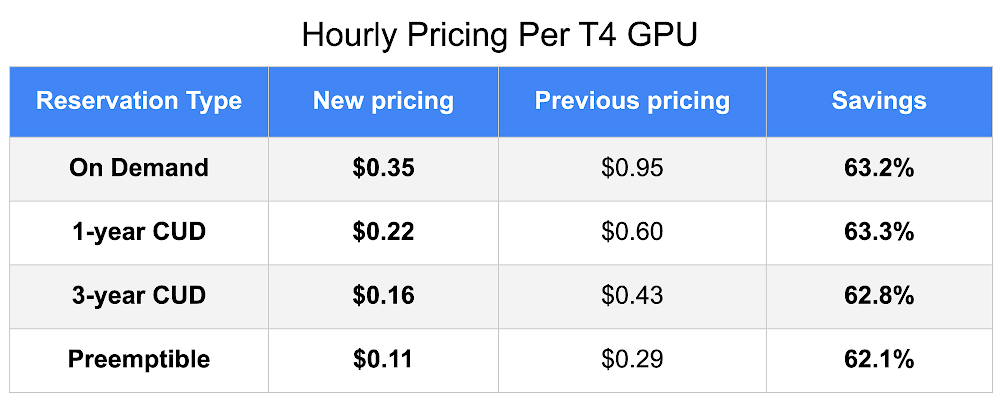
Cheaper Cloud AI deployments with NVIDIA T4 GPU price cut

Google Cloud offers a wide range of GPUs to accelerate everything from AI deployment to 3D visualization. These use cases are now even more affordable with the price reduction of the NVIDIA T4 GPU. As of early January, we’ve reduced T4 prices by more than 60%, making it the lowest cost GPU instance on Google CloudPrices above are for us-central1 and vary by region. A full GPU pricing table is here.Locations and configurationsGoogle Cloud was the first major cloud provider to launch the T4 GPU and offer it globally (in eight regions). This worldwide footprint, combined with the performance of the T4 Tensor Cores, opens up more possibilities to our customers. Since our global rollout, T4 performance has improved. The T4 and V100 GPUs now boast networking speeds of up to 100 Gbps, in beta, with additional regions coming online in the future. These GPU instances are also flexible to suit different workloads. The T4 GPUs can be attached to our n1 machine types that support custom VM shapes. This means you can create a VM tailored specifically to meet your needs, whether it’s a low cost option like one vCPU, one GB memory, and one T4 GPU, or as high performance as 96 vCPUs, 624 GB memory, and four T4 GPUs—and most anything in between. This is helpful for machine learning (ML), since you may want to adjust your vCPU count based on your pre-processing needs. For visualization, you can create VM shapes for lower end solutions all the way up to powerful, cloud-based professional workstations.Machine LearningWith mixed precision support and 16 GB of memory, the T4 is also a great option for ML workloads. For example, Compute Engine preemptible VMs work well for batch ML inference workloads, offering lower cost compute in exchange for variable capacity availability. We previously shared sample T4 GPU performance numbers for ML inference of up to 4,267 images-per-second (ResNet 50, batch size 128, precision INT8). That means you can perform roughly 15 million image predictions in an hour for a $0.11 add-on cost for a single T4 GPU with your n1 VM. Google Cloud offers several options to access these GPUs. One of the simplest ways to get started is through Deep Learning VM Images for AI Platform and Compute Engine, and Deep Learning Containers for Google Kubernetes Engine (GKE). These are configured for software compatibility and performance, and come pre-packaged with your favorite ML frameworks, including PyTorch and TensorFlow Enterprise. We’re committed to making GPU acceleration more accessible, whatever your budget and performance requirements may be. With the reduced cost of NVIDIA T4 instances, we now have a broad selection of accelerators for a multitude of workloads, performance levels, and price points. Check out the full pricing table and regional availability and try the NVIDIA T4 GPU for your workload today.
Quelle: Google Cloud Platform






