January Virtual Meetup Recap: Improve Image Builds Using the Features in BuildKit

This is a guest post by Docker Captain Nicholas Dille, a blogger, speaker and author with 15 years of experience in virtualization and automation. He works as a DevOps Engineer at Haufe Group, a digital media company located in Freiburg, Germany. He is also a Microsoft Most Valuable Professional.

In this virtual meetup, I share how to improve image builds using the features in BuildKit. BuildKit is an alternative builder with great features like caching, concurrency and the ability to separate your image build into multiple stages – which is useful for separating the build environment from the runtime environment. 

The default builder in Docker is the legacy builder. This is recommended for use when you need support for Windows. However, in nearly every other case, using BuildKit is recommended because of the fast build time, ability to use custom BuildKit front-ends, building stages in parallel and other features.

Catch the full replay below and view the slides to learn:

Build cache in BuildKit – instead of relying on a locally present image, buildkit will pull the appropriate layers of the previous image from a registry.How BuildKit helps prevent disclosure of credentials by allowing files to be mounted into the build process. They are kept in memory and are not written to the image layers.How BuildKit supports access to remote systems through SSH by mounting the SSH agent socket into the build without adding the SSH private key to the image.How to use the CLI plugin buildx to cross-build images for different platforms.How using the new “docker context,” the CLI is able to manage connection to multiple instances of the Docker engine. Note that it supported SSH remoting to Docker Engine.And finally, a tip that extends beyond image builds: When troubleshooting a running container, a debugging container can be started sharing the network and PID namespace. This allows debugging without changing the misbehaving container.

I also covered a few tools that I use in my workflow, namely:

goss, which allows images to be tested to match a configuration expressed in YAML. It comes with a nice wrapper called `dgoss` to use it with Docker easily. And it even provides a health endpoint to integrate into your imagetrivy, an OS tool from AquaSecurity that scans images for known vulnerabilities in the OS as well as well-known package managers.

And finally, answered some of your questions:

Why not use BuildKit by default? 

If your workflow involves building images often, then we recommend that you do set BuildKit as the default builder. Here is how to enable BuildKit by default in the docker daemon config. 

Does docker-compose work with BuildKit? 

Support for BuildKit was added in docker-compose 1.25.0 which can be enabled by setting DOCKER_BUILDKIT=1 and COMPOSE_DOCKER_CLI_BUILD=1.

What are the benefits of using BuildKit? 

In addition to the features presented, BuildKit also improves build performance in many cases.

When would I use BuildKit Secrets? (A special thank you to Captain Brandon Mitchell for answering this question)

BuildKit secrets are a good way to use a secret at build time, without saving the secret in the image. Think of it as pulling a private git repo without saving your ssh key to the image. For runtime, it’s often different compose files to support compose vs swarm mode, each mounting the secret a different way, i.e. a volume vs. swarm secret.

How do I enable BuildKit for Jenkins Docker build plugin? 

The only reference to BuildKit I was able to find refers to adding support in the Docker Pipeline plugin.

Does BuildKit share the build cache with the legacy builder? 

No, the caches are separate.

What are your thoughts on having the testing step as a stage in a multi-stage build? 

The test step can be a separate stage in the build. If the test step requires a special tool to be installed, it can be a second final stage. If your multi-stage build increases in complexity, take a look at CI/CD tools.

How does pulling the previous image save time over just doing the build? The download can be significantly faster than redoing all the work.

Is the created image still “identical” or is there any real difference in the final image artifact? 

The legacy builder, as well as BuildKit, produces identical (or rather equivalent) images.

Will Docker inspect show that the image was built using BuildKit? 

No.

Do you know any combination of debugging with docker images/containers (I use the following technologies: python and Django and Pycharm)?

No. Anyone have any advice here? 

Is Docker BuildKit supported with maven Dockerfile plugin? 

If the question is referring to Spotify’s Dockerfile Maven plugin (which is unmaintained), the answer is no. Other plugins may be able to use BuildKit when providing the environment variable DOCKER_BUILDKIT=1. Instead of changing the way the client works, you could configure the daemon to use BuildKit by default (see first question above).

What do you think about CRI-O? 

I think that containerd has gained more visibility and has been adopted by many cloud providers as the runtime in Kubernetes offerings. But I have no experience myself with CRI-O.

To be notified of upcoming meetups, join the Docker Virtual Meetup Group using your Docker ID or on Meetup.com.
The post January Virtual Meetup Recap: Improve Image Builds Using the Features in BuildKit appeared first on Docker Blog.
Quelle: https://blog.docker.com/feed/

Azure Cost Management updates – January 2020

Whether you're a new student, thriving startup, or the largest enterprise, you have financial constraints and you need to know what you're spending, where, and how to plan for the future. Nobody wants a surprise when it comes to the bill, and this is where Azure Cost Management comes in.

We're always looking for ways to learn more about your challenges and how Azure Cost Management can help you better understand where you're accruing costs in the cloud, identify and prevent bad spending patterns, and optimize costs to empower you to do more with less. Here are a few of the latest improvements and updates based on your feedback:

Automate reporting for Microsoft Customer Agreement with scheduled exports
Raising awareness of disabled costs
What's new in Cost Management Labs
Custom RBAC role preview for management groups
New ways to save money with Azure
Recent changes to Azure usage data

Documentation updates

Let's dig into the details. 

Automate reporting for Microsoft Customer Agreement with scheduled exports

You already know you can dig into your cost and usage data from the Azure portal. You may even know you can get rich reporting from the Cost Management Query API or get the full details, in all its glory, from the UsageDetails API. These are both great for ad-hoc queries, but maybe you're looking for a simpler solution. This is where Azure Cost Management exports come in.

Azure Cost Management exports automatically publish your cost and usage data to a storage account on a daily, weekly, or monthly basis. Up to this month, you've been able to schedule exports for Enterprise Agreement (EA) and pay-as-you-go (PAYG) accounts. Now, you can also schedule exports across subscriptions for Microsoft Customer Agreement billing accounts, subscriptions, and resource groups.

Learn more about scheduled exports in Create and manage exported data. 

Raising awareness of disabled costs

Enterprise Agreement (EA) and Microsoft Customer Agreement (MCA) accounts both offer an option to hide prices and charges from subscription users. While this can be useful to obscure negotiated discounts (including vendors), it also puts you at risk of over-spending since teams that deploy and manage resources don't have visibility and cannot effectively keep costs down. To avoid this, we recommend using custom Azure RBAC roles for anyone who shouldn't see costs, while allowing everyone else to fully manage and optimize costs.

Unfortunately, some organizations may not realize costs have been disabled. This can happen when you renew your EA enrollment or when you switch between EA partners, as an example. In an effort to help raise awareness of these settings, you will see new messaging when costs have been disabled for the organization. Someone who does not have access to see costs will see a message like the following in cost analysis:

EA billing account admins and MCA billing profile owners will also see a message in cost analysis to ensure they're aware that subscription users cannot see or optimize costs.

To enable access to Azure Cost Management, simply click the banner and turn on "Account owners can view charges" for EA accounts and "Azure charges" for MCA accounts. If you're not sure whether subscription users can see costs on your billing account, check today and unlock new cost reporting, control, and optimization capabilities for your teams. 

What's new in Cost Management Labs

With Cost Management Labs, you get a sneak peek at what's coming in Azure Cost Management and can engage directly with us to share feedback and help us better understand how you use the service, so we can deliver more tuned and optimized experiences. Here are a few features you can see in Cost Management Labs:

Get started quicker with the cost analysis Home view
Azure Cost Management offers five built-in views to get started with understanding and drilling into your costs. The Home view gives you quick access to those views so you get to what you need faster.
NEW: Try Preview gives you quick access to preview features—Now available in the public portal
You already know Cost Management Labs gives you early access to the latest changes. Now you can also opt in to individual preview features from the public portal using the Try preview command in cost analysis.

Of course, that's not all. Every change in Azure Cost Management is available in Cost Management Labs a week before it's in the full Azure portal. We're eager to hear your thoughts and understand what you'd like to see next. What are you waiting for? Try Cost Management Labs today. 

Custom RBAC role preview for management groups

Management groups now support defining custom RBAC roles to allow you to assign more specific permissions to users, groups, and apps within your organization. One example could be a role that allows someone to be able to create and manage the management group hierarchy as well as manage costs using Azure Cost Management + Billing APIs. Today, this requires both the Management Group Contributor and Cost Management Contributor roles, but these permissions could be combined into a single custom role to streamline role assignment.

If you're unfamiliar with RBAC, Azure role-based access control (RBAC) is the authorization system used to manage access to Azure resources. To grant access, you assign roles to users, groups, service principals, or managed identities at a particular scope, like a resource group, subscription, or in this case, a management group. Cost Management + Billing supports the following built-in Azure RBAC roles, from least to most privileged:

Cost Management Reader: Can view cost data, configuration (including budgets exports), and recommendations.
Billing Reader: Lets you read billing data.
Reader: Lets you view everything, but not make any changes.
Cost Management Contributor: Can view costs, manage cost configuration (including budgets and exports), and view recommendations.
Contributor: Lets you manage everything except access to resources.
Owner: Lets you manage everything, including access to resources.

While most organizations will find the built-in roles to be sufficient, there are times when you need something more specific. This is where custom RBAC roles come in. Custom RBAC roles allow you to define your own set of unique permissions by specifying a set of wildcard "actions" that map to Azure Resource Manager API calls. You can mix and match actions as needed to meet your specific needs, whether that's to allow an action or deny one (using "not actions"). Below are a few examples of the most common actions:

Microsoft.Consumption/*/read – Read access to all cost and usage data, including prices, usage, purchases, reservations, and resource tags.
Microsoft.Consumption/budgets/* – Full access to manage budgets.
Microsoft.CostManagement/*/read – Read access to cost and usage data and alerts.
Microsoft.CostManagement/views/* – Full access to manage shared views used in cost analysis.
Microsoft.CostManagement/exports/* – Full access to manage scheduled exports that automatically push data to storage on a regular basis.
Microsoft.CostManagement/cloudConnectors/* – Full access to manage AWS cloud connectors that allow you manage Azure and AWS costs together in the same management group. 

New ways to save money with Azure

Lots of cost optimization improvements over the past month! Here are a few you might be interested in:

Save up to 90 percent with Azure Spot VMs, now in preview—Spot will replace low priority VMs starting Feb 3, 2020.
Azure Dedicated Hosts now generally available, enabling you to save more compared to individually deployed VMs.
Check out new regions available in Norway that offer lower prices for some services. 

Recent changes to Azure usage data

Many organizations use the full Azure usage and charges dataset to understand what's being used, identify what charges should be internally billed to which teams, and/or to look for opportunities to optimize costs with Azure reservations and Azure Hybrid Benefit, just to name a few. If you're doing any analysis or have setup integration based on product details in the usage data, please update your logic for the following services.

All of the following changes were effective January 1:

Azure Data Box service renamed to "Azure Stack Edge"
Azure Data Share dataset movement meters renamed to "Snapshot Execution"
PostgreSQL, MySQL, and MariaDB General Purpose Large Scale Storage service tier and meter IDs changed
Azure Functions premium plan meter IDs changed

Also, remember the key-based Enterprise Agreement (EA) billing APIs have been replaced by new Azure Resource Manager APIs. The key-based APIs will still work through the end of your enrollment, but will no longer be available when you renew and transition into Microsoft Customer Agreement. Please plan your migration to the latest version of the UsageDetails API to ease your transition to Microsoft Customer Agreement at your next renewal. 

Documentation updates

There were tots of documentation updates. Here are a few you might be interested in:

Added Azure Database, Data Explorer, and Premium SSD reservations to list of supported reservation offers.
Minor updates and corrections to the scheduled exports tutorial and API reference.
Documented preview support for custom RBAC roles for management groups.
Corrected documentation about tags support by different resources—Azure NetApp Files and Managed database instances do not include tags in usage data.

Want to keep an eye on all of the documentation updates? Check out the Cost Management doc change history in the azure-docs repository on GitHub. If you see something missing, select Edit at the top of the document and submit a quick pull request.

What's next?

These are just a few of the big updates from last month. We're always listening and making constant improvements based on your feedback, so please keep the feedback coming.

Follow @AzureCostMgmt on Twitter and subscribe to the YouTube channel for updates, tips, and tricks. And, as always, share your ideas and vote up others in the Cost Management feedback forum.
Quelle: Azure

Azure IoT improves pharmaceutical sample management and medication adherence

For the recent IoT Signals report, commissioned by our Azure IoT team and conducted by Hypothesis Group, more than 3,000 decision makers at enterprise companies across the US, UK, Germany, France, China, and Japan who were currently involved in IoT, participated in a 20-minute online survey. Healthcare was one of the industries included in the research. Of the healthcare executives surveyed, 82 percent said they have at least one IoT project in either the learning, proof of concept, purchase, or use phase, with many reporting they have one or more projects currently in ‘use.’ The top use cases cited by the healthcare executives included:

Tracking patient staff and inventory.
Remote device monitoring and service.
Remote health monitoring and assistance.
Safety, security, and compliance.
Facilities management.

Today we want to shed light on how two innovative companies are building upon this momentum and their own research to build IoT-enabled solutions with Azure IoT technologies that support medication management and adherence. These solutions address the safety, security, compliance, and inventory use cases highlighted in the report.

The Cost of Pharmaceutical Samples

According to a January 2019 article published by JAMA, Medical Marketing in the United States, 1997-2016, “Marketing to health care professionals by pharmaceutical companies accounted for [the] most promotional spending and increased from $15.6 billion to $20.3 billion, including $5.6 billion for prescriber detailing, $13.5 billion for free samples.”

Improving sample management

With billions of dollars on the line, one of our partners has developed an innovative way to ensure that pharmaceutical companies manage their samples in a cost-effective way. Using their own knowledge of the pharmaceutical industry and in-depth research, P360 (formerly Prescriber360), developed Swittons to bridge the gap between pharmaceutical companies and physicians. Designed as a “virtual pharmaceutical representative,” this IoT-enabled device offers real-time, secure communications between the physician and the pharmaceutical company. With this single device, physicians can order a sample, request a visit from a medical science liaison (MSL) or sales rep, or connect with the pharmaceutical company’s inside sales rep (as shown in the graphic below).

Designed to be branded with each pharmaceutical company’s product, the device is a physician engagement tool that enables pharmaceutical companies to customize and manage a sales channel that remains fully authentic to their brand experience. Furthermore, it provides an audit trail to manage samples more economically, enabling pharmaceutical companies to penetrate market whitespace and extend efficient sampling in areas that were previously unreachable.

Built on our Azure IoT platform, Swittons takes advantage of the latest in cloud, security, telecommunications, and analytics technology. “We strategically selected Azure IoT as the foundation for our Swittons ‘Virtual Rep.’ Microsoft’s vision, investments and the breadth of Azure cloud were the key criteria for selection. Having a reliable IoT platform along with world-class data and security infrastructure in Azure made the choice very easy,” commented Anupam Nandwana, CEO, P360, parent company of Swittons.

On the other end of the pharmaceutical supply chain is another scenario that dramatically affects the efficacy of pharmaceutical products—medication adherence.

Ensuring medication adherence

In the US today, 25 to 50 percent of all adults fail to take their prescribed medication on time, contributing to poor health outcomes, over-utilization of healthcare services and significant cost increases.

The causes of low levels of medication adherence are multi-faceted and include factors like carelessness, fear, supply, cost, and lack of understanding or information, with forgetfulness as the primary cause.

Furthermore, as cited in an editorial from BMJ Quality and Safety, “medication adherence thus constitutes one of the ‘big hairy problems’ or ‘big hairy audacious goals’ of healthcare. As well as affecting patients’ long-term outcomes, non-adherence can increase healthcare costs through consumption of medicines below the threshold of adherence required for clinical benefit, as well as contributing to healthcare resource use such as hospital admissions.

In response to this, the global market for medication adherence (hardware-based automation and adherence systems and software-based applications) was worth nearly $1.7 billion in 2016. The market is expected to reach more than $3.9 billion by 2021, increasing at a CAGR of 18.0 percent from 2016 through 2021. This steep increase is fueled by burgeoning demand for advanced medication adherence systems and a growing number of people worldwide with chronic diseases.

Personal experience leads to action

Emanuele Musini knows all too well the implications of not taking medications properly. In fact, it was the pain of losing his father in 2005 from a chronic condition and a lack of adhering to the prescribed medication regimen that became the catalyst for Emanuele to start studying the issue in-depth, searching for a solution. In 2015, Emanuele, along with his multidisciplinary team of doctors, entrepreneurs, engineers, and user-experience professionals, created Pillo Health, a health platform centered around a robot and digital assistant designed to prevent other family members from enduring what Emanuele and his family experienced. Since their founding, they’ve partnered with leading manufacturers, such as Stanley Black & Decker, to bring in-home medication management solutions to market with solutions like Pria, a winner of the 2019 CES Innovation Awards.”

The Pillo Health team built their medication adherence solution on Microsoft Azure Cloud Services using Azure Cognitive Services for voice technology and facial recognition, and services from the Azure IoT platform, including IoT Hub. The result is a voice-first, personalized, cloud-enabled, medication assistant that can help people maintain their medication regimen through social connectivity and delivery of important medical information at home. In a 4-week study conducted with AARP in 2018 for diabetic patients who were prescribed Metformin, Pillo delivered an average medication adherence rate of more than 87 percent—a meaningful 20 to 30 percent improvement from conventional reported standards.

Antonello Scalmato, Director of Cloud Services at Pillo Health noted, “We selected Microsoft Azure because it provided the best infrastructure for PaaS applications, allowed us to speed up the development of our complex product and avoided the overhead of machine and security management for traditional web API infrastructure. Moreover, IoT Hub provides a channel for secure communications and notifications to our users, and also enables simple device management that protects our product, from the factory into the users' homes.”

Learn More

To learn more about how Microsoft and our partners are transforming healthcare, visit or healthcare industry webpage. To get started building your IoT solutions, explore our portfolio for Azure IoT.
To learn more about Pillo Health, check out this video. You can also learn more about Pillo Health in their new white paper, “Improving the State of Medication Adherence.”

Quelle: Azure

Unify Kubernetes and GCP resources for simpler and faster deployments

Adopting containers and Kubernetes means adopting new ways of doing things, not least of which is how you configure and maintain your resources. As a declarative system, Kubernetes allows you to express your intent for a given resource, and then creates and updates those resources using continuous reconciliation. Compared with imperative configuration approaches, Kubernetes-style declarative config helps ensure that your organization follows GitOps best practices like storing configuration in a version control system, and defining it in a YAML file.   However, applications that run on Kubernetes often use resources that live outside of Kubernetes, for example, Cloud SQL or Cloud Storage, and those resources typically don’t use the same approach to configuration. This can cause friction between teams, and force developers into frequent “context switching”. Further, configuring and operating those applications is a multi-step process: configuring the external resources, then the Kubernetes resources, and finally making the former available to the latter. To help, today, we’re announcing the general availability of Config Connector, which lets you manage Google Cloud Platform (GCP) resources as Kubernetes resources, giving you a single place to configure your entire application.Config Connector is a Kubernetes operator that makes all GCP resources behave as if they were Kubernetes resources, so you don’t have to learn and use multiple conventions and tools to manage your infrastructure. For cloud-native developers, Config Connector simplifies operations and resource management by providing a uniform and consistent way to manage all of cloud infrastructure through Kubernetes.Automating infrastructure consistencyWith its declarative approach, Kubernetes is continually reconciling the resources it manages. Resources managed by Kuberentes are continuously monitored, and “self-heal” to continuously meet the user’s desired state. However, monitoring and reconciliation of non-Kubernetes resources (a SQL server instance for example), happens as part of a separate workflow. In the most extreme cases, changes to your desired configuration, for example, changes to the number of your Cloud Spanner nodes, are not propagated to your monitoring and alerting infrastructure, causing false alarms and creating additional work for your teams. By bringing these resources under the purview of Kuberentes with Config Connector, you get resource reconciliation across your infrastructure, automating the work of achieving eventual consistency in your infrastructure. Instead of spinning up that SQL server instance separately and monitoring it for changes as a second workflow, you ask Config Connector to create a SQL server instance and an SQL database on that instance. Config Connector creates these resources, and now that they’re part of your declarative approach, the SQL server instance is effectively self-healing, just like the rest of your Kubernetes deployment. Using Kubernetes’ resource model relieves you from having to explicitly order resources in your deployment scripts. Just like for pods, deployments, or other native Kubernetes resources, you no longer have to explicitly wait for the SQL instance to be completed before starting to provision an SQL database on that instance, as illustrated in the YAML manifests below.Additionally, by defining GCP resources as Kubernetes objects, you now get to leverage familiar Kubernetes features with these resources, such as Kubernetes Labels and Selectors. For example, here  we used cost-center as a label on the resources. You can now filter by this label using kubectl get. Furthermore, you can apply your organization’s governance policy using admission controllers, such as Anthos Policy Controller. For example, you can enforce that the cost-center label should exist on all resources in the cluster and only have an allowed range of values:Faster development with simplified operationsFor Etsy, Kubernetes was instrumental in helping them to move to the cloud, but the complexity of their applications meant they were managing resources in multiple places, slowing down their deployments.“At Etsy, we run complex Kubernetes applications that combine custom code and cloud resources across many environments. Config Connector will allow Etsy to move from having two distinct, disconnected CI/CD pipelines to a single pipeline for both application code and the infrastructure it requires. Config Connector will simplify our delivery and enable end-to-end testing of cloud infrastructure changes, which we expect will result in faster deployment and lower friction usage of cloud infrastructure” – Gregg Donovan, Senior Staff Software Engineer, Etsy. Getting started with Config ConnectorToday, Config Connector can be used to manage more than 60+ GCP services, including Bigtable, BigQuery, IAM Policies, Service Account and Service Account Keys, Pub/Sub, Redis, Spanner, Cloud SQL, Cloud Storage, Compute Engine, Networking and Cloud Load Balancer. Config Connector can be installed standalone on any Kubernetes cluster, and is also integrated into Anthos Config Management, for managing hybrid and multi-cloud environments. Get started with Config Connector today to simplify configuration management across GKE and GCP.
Quelle: Google Cloud Platform

10 top tips: Unleash your BigQuery superpowers

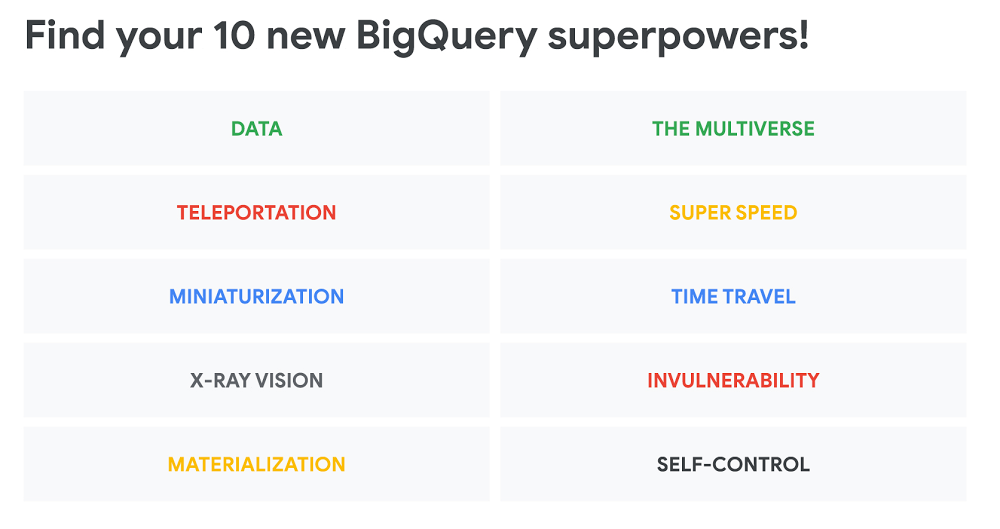
Lots of us are already tech heroes by day. If you know SQL, for example, you’re a hero.You have the power to transform data into insights. You can save the day when someone in need comes to you to reveal the magic numbers they can then use in their business proposals. You can also amaze your colleagues with patterns you found while roaming around your data lakes.With BigQuery, Google Cloud’s enterprise data warehouse, you quickly become a superhero: You can run queries faster than anyone else. You’re not afraid of running full table scans. You’ve made your datasets highly available, and you no longer live in fear of maintenance windows. Indexes? We don’t need indexes where we’re going, or vacuums either.If you’re a BigQuery user, you’re already a superhero. But superheroes don’t always know all their superpowers, or how to use them. Here are the top 10 BigQuery superpowers to discover.1. The power of dataLet’s say your favorite person has been trapped by an evil force, which will only release them if you answer this simple riddle: Who were the top superheroes on Wikipedia the first week of February 2018?Oh no! Where will you get a log of all the Wikipedia page views? How can you tell which pages are superheroes? How long will it take to collect all of this data, and comb through it all? Well, I can answer that question (see the source data here). Once data is loaded, it will only take 10 seconds to get the query results. This is how:There it is—all the superheroes on the English Wikipedia page, and the number of page views for whatever time period you choose. And these are the top 10, for the first week of February 2018:You’ve saved your friend! But first, the evil spirit needs more detail. Well, this query will do:You can have the power of data too: check out the Wikipedia pageviews, and my latest Wikidata experiments (plus all of BigQuery’s public datasets) and copy paste these queries, modify them, and save your friends.2. The power of teleportationYou want to see the tables with the Wikipedia pageviews and Wikidata? Let’s jump to the BigQuery web UI. Did you know that you can autocomplete your queries while typing them? Just press tab while writing your queries. Or you can run a sub-query by selecting it and pressing CMD-E. And teleportation? Jump straight to your tables with CMD and click on them. For example, that Wikipedia 2018 page views table we queried previously has more than 2TB of data, and the Wikidata one has facts for more than 46 million entities. And we just joined them to get the results we wanted.Also, while looking at the schema, you can click on the fields, and that will auto-populate your query. Ta-da!3. The power of miniaturizationDid I just say that the page views table has more than 2TB of data? That’s a lot! Remember that in BigQuery you have 1TB of free queries every month, so going through 2TB in one query means you will be out of the free quota pretty quickly. So how much data did I just consume? Let me run that first query again, without hitting the cache.The result? 4.6 sec elapsed, 9.8 GB processed.How is that possible? I just joined a 2TB table with a 750GB one. Even with partitioning, one week of Wikipedia page views is 2TB, divided by 52 weeks…that’s 38.5GB. So even with daily partitioning, I’m somehow querying less data.Well, turns out I have the data in the tables clustered by the language of the Wikipedia and title, so I can make sure to always use those filters when going through the Wikipedia logs.And that’s how you miniaturize your queries!4. The power of X-ray visionLet’s say you want to get more data out of Wikidata for each superhero. Well, this query will do:Why did this query take more time to process? Well, with our X-ray vision powers, we can see what BigQuery did in the background. Let’s look at the query history and the execution details tab.Those are all the steps BigQuery had to go through to run our query. Now, if this is a little hard to read, we have some alternatives. For example, the legacy BigQuery web UI has more compact results:You can see that the slowest operations were computing while reading the 56-million-row table twice.I’ll focus on that to improve performance. If I change the two, shown in these lines:Now my query runs in half the time! The slowest part has moved elsewhere, as shown here:Which is this JOIN now:It even shows us that it’s looking for all the superheroes between “3-D Man” and “Zor-El”… yes, it’s going through the whole alphabet. Get an even deeper view of the BigQuery query plan visualizer.5. The power of materializationIt’s really cool to have these tables in BigQuery. But how did I load them? I periodically bring new raw files into Cloud Storage, and then I read them raw into BigQuery. In the case of the Wikipedia pageviews, I do all the CSV parsing inside BigQuery, as there are many edge cases, and I need to solve some case by case.Then I materialize these tables periodically into my partitioned and clustered tables. In the case of Wikidata, they have some complicated JSON—so I read each JSON row raw into BigQuery. I could parse it with SQL, but that’s not enough. And that brings us to our next super power.6. Navigating the multiverseSo we live in this SQL universe, a place where you can go beyond SQL alone. It’s an incredible place to manipulate and understand data, but each universe has its limitations and its rules. What if we could jump to a different universe, with different rules and powers, and manage to connect both universes, somehow? What if we could jump into the…JavaScript universe? We can, with UDFs—user-defined functions. They can easily extend BigQuery’s standard SQL. For example, I can download a random JavaScript library and use it from within BigQuery, like for performing natural language processing and lots more. Using UDFs means I can take each row of Wikidata JSON from above and parse it inside BigQuery, using whatever JavaScript logic I want to use, and then materialize this into BigQuery.7. Time travelLet’s take one particular table. It’s a beautiful table, with a couple thousand rows. But not everyone is happy—turns out someone wants to delete half of its rows, randomly. How would our super-enemy pull this off?Oh no. Half of the rows of our peaceful universe are gone. Randomly. How is that even fair? How will we ever recover from this?5 days laterWe learned how to move forward without these rows, but we still miss them. If only there was a way to travel back in time and bring them back.Yes we can.Instead of:we can write:Warning: CREATE OR REPLACE TABLE deletes the table history, so write the results elsewhere. 8. The power of super-speedHow fast is BigQuery? It’s this fast.The quick summary: BigQuery can run HyperLogLog++, Google’s internal implementation of the HyperLogLog algorithm, for cardinality estimation. It lets BigQuery count uniques a lot faster than other databases can do, and has some other cool features that make BigQuery perform incredibly well.  9. InvulnerabilityOur most annoying enemy? It’s a black hole of data, that thing that happens when we try to divide by zero. However it’s possible to avoid that using BigQuery expressions like the SAFE. prefix.SAFE. prefixSyntax:DescriptionIf you begin a function with the SAFE. prefix, it will return NULL instead of an error.Operators such as + and = do not support the SAFE. prefix. To prevent errors from a division operation, use SAFE_DIVIDE. Some operators, such as IN, ARRAY, and UNNEST, resemble functions, but do not support the SAFE.prefix. The CAST and EXTRACT functions also do not support the SAFE. prefix. To prevent errors from casting, use SAFE_CAST. Find out more in the BigQuery docs.10. The power of self-controlAll superheroes struggle when they first discover their super-powers. Having super strength is cool, but you can break a lot of things if you’re not careful. Having super-speed is fun—but only if you also learn how to brake. You can query 5PB of data in three minutes, sure—but then remember that querying 1PB is one thousand times more expensive than querying 1TB. And you only have 1TB free every month. If you have not entered a credit card, don’t worry—you will have your free terabyte every month, no need to have a credit card. But if you want to go further, now you need to be aware of your budget and set up cost controls.Check out this doc on creating custom cost controls, and find out how BigQuery Reservations work to easily use our flat-rate pricing model. Remember, with great powers comes great responsibility. Turn on your cost controls.And there are a lot more. How about the power to predict the future? And there’s a whole world of ML to explore, not to mention all the GIS capabilities you can find in BigQuery. Check out Lak Lakshmanan talk about more of the awesome resources we have. And that brings me to our bonus super power:11. The power of communityNo superhero should stand alone. Join our Reddit community, where we share tips and news. Come to Stack Overflow for answers, and to help new superheroes learning the ropes. We can all learn from each other. And follow me and my friends on Twitter. If you’re ready to test your powers, try to solve our weekly BigQuery Data Challenge. It’s fun, free of charge, and you might win $500 in cloud credits!
Quelle: Google Cloud Platform

Assess your servers with a CSV import into Azure Migrate

At Microsoft Ignite, we announced new Azure Migrate assessment capabilities that further simplify migration planning. In this post, we will demonstrate how to import servers into Azure Migrate Server Assessment through a CSV upload. Virtual servers of any hypervisor or cloud as well as physical servers can be assessed. You can get started with the CSV import feature by creating an Azure Migrate project or using your existing project.

Previously, Server Assessment required setting up an appliance in customer premises to perform discovery of VMware, Hyper-V virtual machines (VMs), and physical servers. We now also support importing and assessing servers without deploying an appliance. Import-based assessments provide support for Server Assessment features like Azure suitability analysis, migration cost planning, and performance-based rightsizing. The import-based assessment is helpful in the initial stages of migration planning, when you may not be able to deploy the appliance due to pending organizational or security constraints that prevent you from sending data to Azure.

Importing your servers is easy. Simply upload the server inventory in a CSV file as per the template provided by Azure Migrate. Only four data points are mandatory — server name, number of cores, size of memory, and operating system name. While you can run the assessment with this minimal information, we recommend you provide disk data as well to avail disk sizing in assessments.

Azure suitability analysis

The assessment determines whether a given server can be migrated as-is to Azure. Azure support is checked for each server discovered; if it is found that a server is not ready to be migrated, remediation guidance is automatically provided. You can customize your assessment by changing its properties, and regenerate the assessment reports. You can also generate an assessment report by choosing a VM series of your choice and specify the uptime of the workloads you will run in Azure.

Cost estimation and sizing

Assessment reports provide detailed cost estimates. You can optimize on cost using performance-based rightsizing assessments; the performance utilization value you specify of your on-premises server is taken into consideration to recommend an appropriate Azure Virtual Machine and disk SKU. This helps to optimize and right-size on cost as you migrate servers that might be over-provisioned in your on-premises data center. You can apply subscription offers and Reserved Instance pricing on the cost estimates

Assess your imported servers in four simple steps

Create an Azure Migrate project and add the Server Assessment solution to the project. If you already have a project, you do not need to create a new one. Download the CSV template for importing servers.
Gather the inventory data from a configuration management database (CMDB), or from your vCenter server, or Hyper-V environments. Convert the data into the format of the Azure Migrate CSV template.
Import the servers into Azure Migrate by uploading the server inventory in a CSV file as per the template.
Once you have successfully imported the servers, create assessments and review the assessment reports.

When you are ready to deploy an appliance, you can leverage the performance history gathered by the appliance for more accurate sizing, as well as plan migration phases using dependency analysis.

Get started right away by creating an Azure Migrate project. Note that the inventory metadata uploaded is persisted in the geography you select while creating the project. You can select a geography of your choice. Server Assessment is available today in Asia Pacific, Australia, Brazil, Canada, Europe, France, India, Japan, Korea, United Kingdom, and United States geographies.

In the upcoming blog, we will talk about application discovery and agentless dependency analysis.

Resources to get started

Read this tutorial on how to import and assess servers using Azure Migrate Server Assessment.
Read these tutorials on how to assess Hyper-V, VMware, or any physical or virtual servers using the appliance in Server Assessment.

Quelle: Azure