Exploring container security: Bringing Shielded VMs to GKE with Shielded GKE Nodes

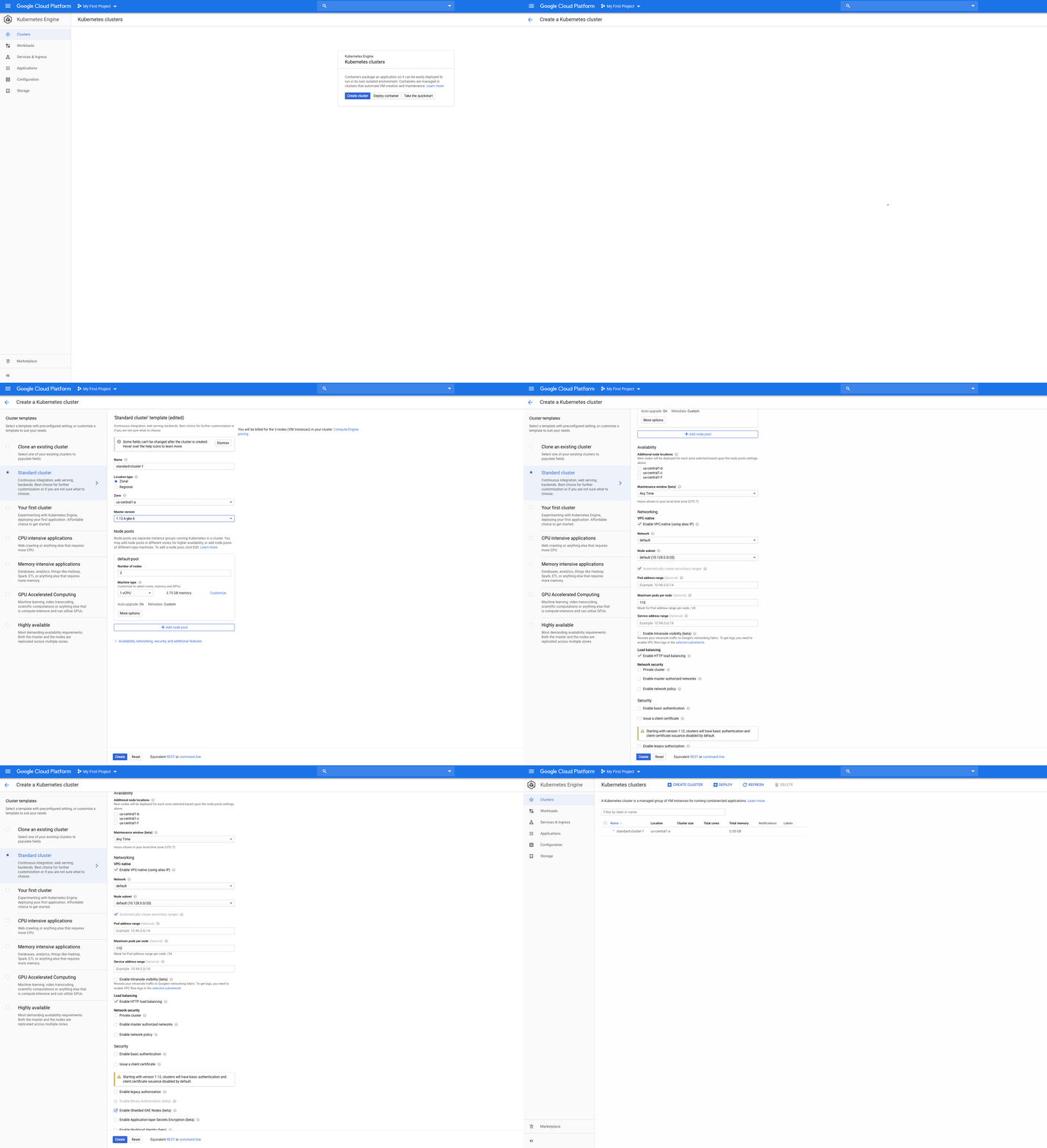
Where workloads go, attackers follow. As more organizations adopt containers and deploy sensitive workloads with Kubernetes, there are new container-specific surface areas that need to be hardened. Today, we are announcing Shielded GKE Nodes in beta, which provides strong, verifiable node identity and integrity to increase the protection of your Google Kubernetes Engine (GKE) nodes. A compromised Kubernetes node gives malicious actors a wide range of opportunities for attack. For example, one potential attack on a Kubernetes node can give adversaries the opportunity to gain (persistent) access to valuable user code, compute and/or data. This isn’t just a theoretical risk—a security researcher exploited it last year. In this case, by exploiting how credentials are bootstrapped for a worker node, the researcher got full access to the cluster. Shielded GKE Nodes protects against a variety of attacks by hardening the underlying GKE node against rootkits and bootkits. More specifically, Shielded GKE Nodes provides:Node OS provenance check: A cryptographically verifiable check to make sure the node OS is running on a virtual machine in a Google data centerEnhanced rootkit and bootkit protection: Protection against advanced rootkits and bootkits in the node by leveraging advanced platform security capabilities such as secure and measured boot, virtual trusted platform module (vTPM), UEFI firmware, and integrity monitoringStandards-based security: Built on the Trusted Computing Group’s (TCG) Trusted Platform Module (TPM), Shielded GKE Nodes uses a standardized specification for trusted computing, such as verifying the boot integrity of the node and enhancing the node bootstrapping processShopify offers an ecommerce platform that allows merchants to process payments online, in person, or through social media apps, and is a strong proponent of Shielded GKE Nodes. With  50 GKE clusters in multiple regions running 10,000 Kubernetes services, Shielded GKE Nodes gives them extra security, with less overhead. “Shopify’s thousands of nodes must each run a proxy to prevent metadata servers from divulging kubelet bootstrap credentials, which are required for a node to join a cluster but shouldn’t be needed after that. We’re excited to migrate to Shielded GKE Nodes, which can only use those credentials in conjunction with a secure vTPM-based method to establish trust with the cluster,” said Shane Lawrence, Security Infrastructure Engineer at Shopify. “The change allows us to turn off the proxies to save resources, and limiting the capabilities of the bootstrap credentials eliminates an attack vector, so our platform is even more secure.”Image and region availabilityShielded GKE Nodes is built on top of Google Compute Engine Shielded VM, which provides verifiable integrity and data exfiltration protection for virtual machines (VMs). Just like Shielded VM, GKE customers can use Shielded GKE Nodes at no extra charge. Shielded GKE Nodes is available in all regions, for both Ubuntu and Container Optimized OS (COS) node images running GKE v1.13.6 and later versions. Getting startedTo use Shielded GKE Nodes, when creating the new cluster, specify the –enable-shielded-nodes flag:To use Shielded GKE Nodes, you need a minimum cluster version of 1.13.6-gke.0, which can be specified via –cluster-version or –release-channel flags. Alternatively, you can specify –cluster-version=latest. To migrate an existing cluster, upgrade your cluster to at least the minimum version, and specify the –enable-shielded-nodes flag on a cluster update command:For further details, see the [documentation].Start running Shielded GKE NodesIf you run production applications, you want as much protection as possible. Shielded GKE Nodes provides you with the benefits of UEFI firmware, secure boot, and vTPM in a hardened Kubernetes environment. Improve your security posture— try Shielded GKE Nodes today.
Quelle: Google Cloud Platform

Shrinking the impact of production incidents using SRE principles—CRE Life Lessons

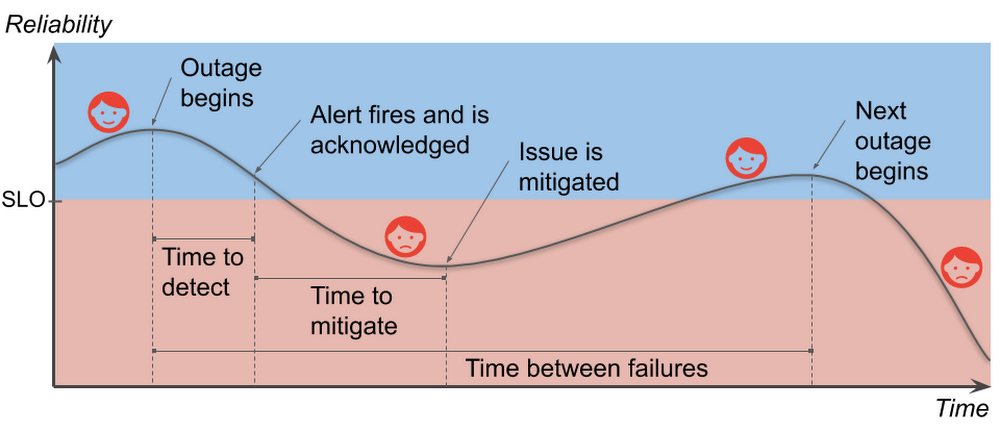
If you run any kind of internet service, you know that production incidents happen. No matter how much robustness you’ve engineered in your architecture, no matter how careful your release process, eventually the right combination of things go wrong and your customers can’t effectively use your service. You work hard to build a service that your users will love. You introduce new features to delight your current users and to attract new ones. However, when you deploy a new feature (or make any change, really), it increases the risk of an incident; that is, something user-visible goes wrong. Production incidents burn customer goodwill. If you want to grow your business, and keep your current users, you must find the right balance between reliability and feature velocity. The cool part is, though, that once you do find that balance, you’ll be poised to increase both reliability and feature velocity.In this post, we’ll break down the production incident cycle into phases and correlate each phase with its effect on your users. Then we’ll dive into how to minimize the cost of reliability engineering to keep both your users and your business happy. We’ll also discuss the Site Reliability Engineering (SRE) principles of setting reliability targets, measuring impact, and learning from failure so you can make data-driven decisions on which phase of the production incident cycle to target for improvements.Understanding the production incident cycleA production incident is something that affects the users of your service negatively enough that they notice and care. Your service and its environment are constantly changing. A flood of new users exploring your service (yay!) or infrastructure failures (boo!), for example, threaten the reliability of your service. Production incidents are a natural—if unwelcome—consequence of your changing environment. Let’s take a look at the production incident cycle and how it affects the happiness of your users:User happiness falls during a production incident and stabilizes when the service is reliable.Note that the time between failures for services includes the time for the failure itself. This differs from the traditional measure since modern services can fail in independent, overlapping ways. We want to avoid negative numbers in our analysis.Your service-level objective, or SLO, represents the level of reliability below which your service will make your users unhappy in some sense. Your goal is clear: Keep your users happy by sustaining service reliability above its SLO. Think about how this graph could change if the time to detect or the time to mitigate were shorter, or if the slope of the line during the incident were less steep, or if you had more time to recover between incidents. You would be in less danger of slipping into the red. If you reduce the duration, impact, and frequency of production incidents—shrinking them in various ways—it helps keep your users happy.Graphing user happiness vs. reliability vs. costIf keeping your reliability above your SLO will keep most of your users happy, how much higher than your SLO should you aim? The further below your SLO you go, of course, the unhappier your users become. The amazing thing, though, is that the further above the target level for your SLO you go, users will become increasingly indifferent to your reliability. You will still have incidents, and your users will notice them, but as long as your service is, on average, above its SLO, the incidents are happening infrequently enough that your users stay sufficiently satisfied. In other words, once you’re above your SLO, improving your reliability is not valuable to your users.The optimal SLO threshold keeps most users happy while minimizing engineering costs.Reliability is not cheap. There are costs not only in engineering hours, but also in lost opportunities. For example, your time to market may be delayed due to reliability requirements. Moreover, reliability costs tend to be exponential. This means it can be 100 times more expensive to run a service that is 10 times more reliable. Your SLO sets a minimum reliability requirement, something strictly less than 100%. If you’re too far above your SLO, though, it indicates that you are spending more on reliability than you need to. The good news is that you can spend your excess reliability (i.e., your error budget) on things that are more valuable than maintaining excess reliability that your users don’t notice. You could, for example, release more often, run stress tests against your production infrastructure and uncover hidden problems, or let your developers work on features instead of more reliability. Reliability above your SLO is only useful as a buffer to prevent your users from noticing your instability. Stabilize your reliability, and you can maximize the value you get out of your error budget.An unstable reliability curve prevents you from spending your error budget efficiently.Laying the foundation to shrink production incidentsWhen you’re thinking about best practices for improving phases of the production incident cycle, there are three SRE principles that particularly matter for this task. Keep these in mind as you think about reliability.1. Create and maintain SLOsWhen SREs talk about reliability, SLOs tend to come up a lot. They’re the basis for your error budgets and define the desired measurable reliability of your service. SLOs have an effect across the entire production incident cycle, since they determine how much effort you need to put into your preparations. Do your users only need a 90% SLO? Maybe your current “all at once” version rollout strategy is good enough. Need a 99.95% SLO? Then it might be time to invest in gradual rollouts and automatic rollbacks.SLOs closer to 100% take greater effort to maintain, so choose your target wisely.During an incident, your SLOs give you a basis for measuring impact. That is, they tell you when something is bad, and, more importantly, exactly how bad it is, in terms that your entire organization, from the people on call to the top-level executives, can understand.If you’d like help creating good SLOs, there is an excellent (and free, if you don’t need the official certification) video walkthrough on Coursera.2. Write postmortemsThink of production incidents as unplanned investments where all the costs are paid up front. You may pay in lost revenue. You may pay in lost productivity. You always pay in user goodwill. The returns on that investment are the lessons you learn about avoiding (or at least reducing the impact of) future production incidents. Postmortems are a mechanism for extracting those learned lessons. They record what happened and why it happened, and they identify specific areas to improve. It may take a day or more to write a good postmortem, but they capture the value of your unplanned investment instead of just letting it evaporate.Identifying both technical and non-technical causes of incidents is key to preventing recurrence.When should you write a postmortem? Write one whenever your SLO takes a significant hit. Your postmortems become your reliability feedback loop. Focus your development efforts on the incident cycle phases that have recurring problems. Sometimes you’ll have a near miss when your SLO could have taken a hit, but it didn’t because you got lucky for some reason. You’ll want to write one then, too. Some organizations prefer to have meetings to discuss incidents instead of collaborating on written postmortems. Whatever you do, though, be sure to leave some written record that you can later use to identify trends. Don’t leave your reliability to luck! As the SRE motto says: Hope is not a strategy. Postmortems are your best tool for turning hope into concrete action items.For really effective postmortems, those involved in the incident need to be able to trust that their honesty in describing what happened during the incident won’t be held against them. For that, you need the final key practice:3. Promote a blameless cultureA blameless culture recognizes that people will do what makes sense to them at the time. It’s taken as a given that later analysis will likely determine these actions were not optimal (or sometimes flat-out counterproductive). If a person’s actions initiated a production incident, or worsened an existing one, we should not blame the person. Rather we should seek to make improvements in the system to positively influence the person’s actions during the next emergency.A blameless culture means team members assume coworkers act with good intentions and seek technical solutions to human fallibility instead of demanding perfection from people.For example, suppose an engineer is paged in the middle of the night, acknowledges the page, and goes back to bed while a production incident develops. In the morning we could fire that engineer and assume the problem is solved now that there are only “competent” engineers on the team. But to do so would be to misunderstand the problem entirely: competence is not an intrinsic property of the engineer. Rather, it’s something that arises from the interaction between the person and the system that conditions them, and the system is the one we can change to durably affect future results. What kind of training are the on-call engineers given? Did the alert clearly convey the gravity of the incident? Was the engineer receiving more alerts than they could handle? These are the questions we should investigate in the postmortem. The answers to these questions are far more valuable than determining just that one person dropped the ball.A blameless culture is essential for people to be unafraid to reach out for help during an emergency and to be honest and open in the resulting postmortem. This makes the postmortem more useful as a learning tool. Without a blameless culture, incident response is far more stressful. Your first priority becomes protecting yourself and your coworkers from blame instead of helping your users. This could come out as a lack of diligence, too. Investigations may be shallow and inconclusive if specifics could get someone—maybe you—fired. This ultimately harms the users of your service.Blameless culture doesn’t happen overnight. If your organization does not already have a blameless culture, it can be quite a challenge to kick-start it. It requires significant support from all levels of management in order to succeed. But once a blameless culture has taken root, it becomes much easier to focus on identifying and fixing systemic problems.What’s next?If you haven’t already, start thinking about SLOs, postmortems, and blameless culture to discuss all of them with your coworkers. Think about what it would take to stabilize your reliability curve, and think about what your organization could do if you had that stability. And if you’re just getting started with SRE, learn more about developing your SRE journey.Many thanks to Nathan Bigelow, Matt Brown, Christine Cignoli, Jesús Climent Collado, David Ferguson, Gustavo Franco, Eric Harvieux, Adrian Hilton, Piotr Hołubowicz, Ib Lundgren, Kevin Mould, and Alec Warner for their contributions to this post.
Quelle: Google Cloud Platform

Developing supportability for a public cloud

The Google Cloud technical support team resolves customer support cases. We also spend a portion of our time improving the supportability of Google Cloud services so that we can solve your cases faster and also so that you have fewer cases in the first place. The challenges of improving supportability for the large, complex, fast-changing distributed system that underpins Google Cloud products have led us to develop several tools and best practices. Many challenges remain to be solved, of course, but we’ll share some of our progress in this post.Defining supportability. The term “supportability” is defined by Wikipedia as a synonym for serviceability: it’s the speed with which a problem in a product can be fixed. But we wanted to go further and redefine supportability in a way that encompasses the whole of the customer technical support experience, not just how quickly support cases can be resolved. Measuring supportability. As we set out, we wanted an objective way to measure supportability in order to evaluate our performance, like the SLOs used by our colleagues in site reliability engineering (SRE), to measure reliability. To do this, we initially relied on transactional surveys of customer satisfaction. These can give us good signals in cases where we’re exceeding customer expectations, or failing. But these surveys do not give us a good overall picture of our support quality. We have recently started making more use of customer effort score, a metric gleaned from customer surveys that helps show the effort required by customers to fix their problems. Research shows that effort score correlates well with what customers actually want from support: a low-friction way of getting their problems resolved.But this only considers customer effort, so it would incentivize us to just throw people or other resources at the problem, or even to push effort onto the Google Cloud product engineering teams. So we needed to include overall effort, leading to this way to measure supportability:Effort by customer, support and product teams to resolve customer support cases.One thing to note is that higher effort means lower supportability, but we find it more intuitive to measure effort than lack of effort.We currently use various metrics to measure the total effort, the main ones being:Customer effort score: customer perception of effort required to fix their problemsTotal resolution time: time from case open to case closeContact rate: cases created per user of the productBug rate: Proportion of cases escalated to the product engineering teamConsult rate: Proportion of cases escalated to a product specialist on the support teamWith some assumptions, we can normalize these metrics to make them comparable between products, then set targets.Supportability challenges. Troubleshooting problems in a large distributed system is considerably more challenging than it is for monolithic systems, for some key reasons:The production environment is constantly changing. Each product has many components, all of which have regular rollouts of new releases. In addition, each of these components may have multiple dependencies with their own rollout schedules.Customers are developers who may be running their code on our platform, if they are using a product like App Engine. We do not have visibility into the customer’s code and the scope of failure scenarios is much larger than it is for a product that presents a well-defined API.The host and network are both virtualized, so traditional troubleshooting tools like ping and traceroute are not effective.If you are supporting a monolithic system, you may be able to look up an error message in a knowledge base, then find potential solutions. Error messages in a distributed system may not be easy to find due to an architecture that uses high RPC (remote procedure call) fanout. In addition, the high scale in a large public cloud involving millions of operations per second for some APIs can make it hard to find relevant errors in the logs.Building a supportability practiceAs our team has evolved, we’ve created some practices that help lead to better support outcomes and would like to share some of them with you.Launch reviews. We have launched more than 100 products in the past few years, and each product has a steady stream of feature releases, resulting in multiple feature launches per day. Over these years, we’ve developed a system of communications among the teams involved. For each product, we assign a supportability program manager and a support engineer, known as the product engagement lead (PEL), to interface with each product engineering team and approve every launch of a significant customer-facing feature. Like SREs with their product readiness reviews, we follow a launch checklist that verifies we have the right support resources and processes in place for each stage of a product’s lifecycle: alpha, beta and generally available. Some critical checklist items include: internal knowledge base, training for support engineers, ensuring that bug triage processes meet our internal SLAs, access to troubleshooting tools, and configuring our case tracking tools to collect relevant reporting data. We also review deprecations to ensure that customers have an acceptable migration path and we have a plan to ensure that they are properly notified.Added educational tools. Our supportability efforts also focus on helping customers avoid the need to create a case. With one suite of products, more than 75% of support cases were “how to” questions. Engineers on our technical support team designed a system to point customers to relevant documentation as they were creating a case. This helped customers self-solve their issues, which is much less effort than creating a case. The same system helps us identify gaps in the documentation. We used A/B testing to measure the amount of case deflection and carefully monitored customer satisfaction to ensure that we did not cause frustration by making it harder for customers to create cases.Some cases can be solved without human intervention. For example, we found that customers creating P1 cases for one particular product often were experiencing outages caused by exceeding quotas. We built an automated process for checking incoming cases, and then handling them without human intervention for this and other types of known issues. Our robot case handler scores among the highest in the team in terms of satisfaction in transactional surveys.To help customers write more reliable applications, members of the support team helped found the Customer Reliability Engineering (CRE) team, which teaches customers the principles used by Google SREs. CREs provides “shared fate,” in which Google pagers go off when a customer’s application experiences an incident.Supportability at scale. One way to deal with complexity is for support engineers to specialize in handling as small a set of products as possible so that they can quickly ramp up their expertise. Sharding by product is a trade-off between coverage and expertise. Our support engineers may specialize in one or two products with high case volume, and multiple products with lower volume. As our case volume grows, we expect to be able to have narrower specializations. We maintain architecture diagrams for each product, so that our support engineers understand how the product is implemented. This knowledge helps them to identify the specific component that has failed and contact the SRE team responsible for that part of the product. We also maintain a set of playbooks for each product. Prescriptive playbooks provide steps to follow in a well-known process, such as a quota increase. These playbooks are potential candidates for automation. Diagnostic playbooks are troubleshooting steps for a category of problem, for example, if a customer’s App Engine application is slow. We try to have coverage for the most commonly occurring set of customer issues in our diagnostic playbooks. The Checklist Manifesto does a great job of describing the benefits of this type of playbook. We have found it particularly useful to focus on cases that take a long time to resolve. We hold weekly meetings for each product to review long-running cases. We are able to identify patterns that cause cases to take a long time, and we then try to come up with improvements in processes, training or documentation to prevent these problems. The future of supportability. Our supportability practices in Google Cloud were initially started by our program management team in an effort to introduce more rigor and measurement when evaluating the quality, cost and scalability of our support. As this practice evolves, we are now working on defining engineering principles and best practices. We see parallels with the SRE role, which emerged at Google because our systems were too large and complex to be managed reliably and cost-effectively with traditional system administration techniques. So SREs developed a new set of engineering practices around reliability. Similarly, our technical solutions engineers on the support team use their case-handling experience to drive supportability improvements. We continually look for ways to use our engineering skills and operational experience to build tools and systems to improve supportability. The growth in the cloud keeps us on our toes with new challenges. We know that we need to find innovative ways to deliver high-quality support at scale. It is an exciting time to be working on supportability and there are huge opportunities for us to have meaningful impact on our customers’ experience. We are currently expanding our team.Lilli Mulvaney, head of supportability programs, Google Cloud Platform, also contributed to this blog post.
Quelle: Google Cloud Platform
Announcing the general availability of 6 and 12 TB VMs for SAP HANA instances on Google Cloud Platform

Many of the world’s largest enterprises run their businesses on SAP. As these companies drive toward digital transformation and plan for the upgrade to S/4HANA, they are increasingly looking to the cloud to support their mission critical workloads. One of the main advantages of the cloud is its flexibility. Whether enterprises are undergoing substantial organic growth, expanding their portfolio, or contemplating a merger, they want the peace of mind that they have the room to grow and expand as needed. To help more enterprises scale and grow their SAP HANA workloads, today we’re expanding our support for larger SAP deployments through a new set of large-memory machine types. We’ve added two new machine types to our VM portfolio, enabling customers to deploy workloads that require up to 12 TB of memory in a single node (scale-up) configuration on Google Compute Engine. These VMs, built on the latest Intel Cascade Lake architecture, are certified by SAP for HANA and are generally available to customers starting today.  “Our 9TB of SAP data is growing about 1TB per year. Moving to a 12TB virtualized environment with the help of Google Cloud is going to provide us with a better platform for growth as we look to optimize and scale. It’s been a great partnership, I can’t stress enough the excitement I have for where we’re going to take this with Google in the future.” —Duy Trinh, SAP Center of Excellence, Cardinal HealthWhat 6 and 12 TB VMs on Google Cloud mean for SAP HANA customersGoogle Cloud’s unique all-VM approach gives SAP customers the true flexibility to scale up and scale down their SAP HANA workload, without financial penalty. It also simplifies the operational/procurement process, increasing IT’s agility as it serves its business teams.  Here’s more on what Google Cloud’s unique all-VM approach offers:Flexibility—Upfront sizing is notoriously difficult; you either oversize and waste money, or undersize and risk not meeting business needs. Google Clouds certified large VM sizes give you the headroom for future needs.Simplicity—It can take a lot of work to manage scale-out systems for upgrades, patching, performance, manual table placement, and more. With larger systems, you can simplify by consolidating into a single node. Implementation choice—Not all SAP workloads support scale-out deployments. For example, to avoid complexity, management and performance considerations, many businesses prefer to use larger (and fewer) nodes for analytics workloads. Larger certified VM sizes mean larger scale-up environments. Only Google Cloud offers these fully virtualized, without the constraints of  bare metal.Google Cloud’s all VM infrastructure is not just about scalability. It also improves uptime of SAP environments through our VM Live Migration. This allows for infrastructure updates and patching on the fly, without painful reboots or other patching events that result in application interruption—capabilities not available on bare metal implementations. Lastly, Google Cloud complements VM infrastructure for SAP customers with lightning speed network performance, sub-millisecond latencies and robust security.  To learn more about how we’re supporting SAP customers on Google Cloud, visit our SAP solutions page.  You can also join our  Cloud on Air webinar on September 5th and lear how Cardinal Health plans to deploy a 12TB SAP HANA instance on Google Cloud. Register here.
Quelle: Google Cloud Platform