Protecting your GCP infrastructure at scale with Forseti Config Validator

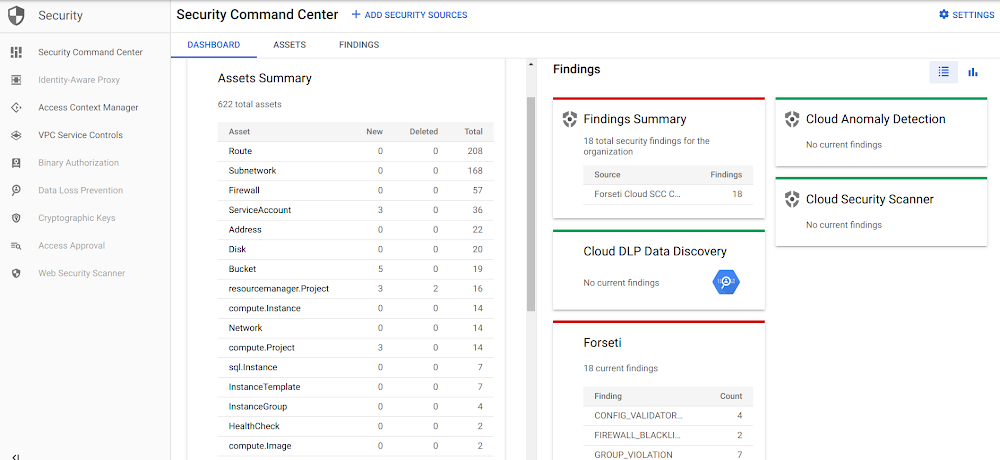
One of the greatest challenges customers face when onboarding in the cloud is how to control and protect their assets while letting their users deploy resources securely. In this series of four articles, we’ll show you how to start implementing your security policies at scale on Google Cloud Platform (GCP). The goal is to write your security policies as code once and for all, and to apply them both before and after you deploy resources in your GCP environment.In this first post, we’ll discuss two open-source tools that can help you secure your infrastructure at scale and scan for non-compliant resources: Forseti and Config Validator. You can see it in action in this live demo from Alex Sung, PM for Forseti at Google Cloud.In follow-up articles, we’ll go over how you can use policy templates to add policies to your Forseti scans on your GCP resources (using the enforce_label template as an example). Then, we’ll explain how to write your own templates, before expanding to securing your deployments by applying your policies  in your CI/CD pipelines using the terraform-validator tool.Scanning for violations with Forseti and the config_validator scanner Cloud environments can be very dynamic. It’s a best practice to use Forseti to scan your GCP resources on a regular basis (a new scan runs every two hours by default) and evaluate them for violations. In this example, Forseti will forward its findings to Cloud Security Command Center (Cloud SCC) for integration, using a custom notifier. Cloud SCC also integrates with the most popular security tools within the Google Cloud ecosystem like DLP, Cloud Security Scanner, Cloud Anomaly Detection, as well as third party tools (Chef Automate, Cloudflare, Dome9, Qualys etc.).This provides a single-pane of glass for your security and operation teams to look for violations.Here is an example of the Cloud SCC dashboard with few security sources set up. At a high level, here’s what you need to do to get your Forseti integration working:Deploy a basic Forseti infrastructure with the config_validator scanner enabled in a dedicated projectAdd a new SCC connector for Forseti via the UI manually (the other alternative is to use the API directly at this point)Update your Forseti notifier configuration to send the violations to SCCAdd your custom policy library to the forseti server GCS bucket so that the next scan applies your constraints on your infrastructure. You can use Google’s open-source policy-library as a starting point for this.Let’s go over these steps in greater detail.1. Forseti initial setupThe official Forseti documentation lists a few options to deploy Forseti in your organization. A good option is the Forseti Terraform module, since it’s easy to maintain, and we because it’s easy to deploy Terraform templates from a CI/CD pipeline, as you’ll see in next posts.Another alternative for installing Forseti is to follow this simple tutorial for the Terraform module (includes a full Cloud Shell tutorial).There are 139 inputs (for v2.2.0) you can play with to configure your Forseti deployment if you feel like it. For this demo, we recommend you use the default values for most of them.First, clone the repo:Then, set some variables to specify the input you need in a new terraform.tfvars file:Note: Make sure your credential file is valid and corresponds to a service account with the right permissions, unless you are leveraging an existing CI/CD pipeline that handles that part for you. Check out the module helper script to create the service account using your own credentials if needed.You can now test your setup. First run terraform init:Then create a terraform plan from these templates and save it as a file.If everything looks good, you can deploy your plan:You now have a Forseti client and a Forseti server in your project (among many other things, like a SQL instance and Cloud Storage buckets). 2. Setting up Cloud SCCAt this point, you’ll need to follow these steps to configure Cloud SCC to receive Forseti notifications. You simply need to create a new source, that you’ll use in your Forseti configuration.Note: Stop at step #4 (do not follow step 5) in the Cloud SCC setup instructions, as you’ll do this using Terraform instead of manually updating the Forseti server.If you follow the steps in the link above to add the Forseti Cloud SCC Connector as a new security source, you should end up with something like this in your Cloud SCC settings:Take a note of your Forseti Cloud SCC Connector source ID and Service Account for the next step.3. Updating the Forseti configurationNow, you’ll need to update our Forseti infrastructure to configure the server to send the notifications to Cloud SCC. Here is your updated terraform.tfvars file:If you run terraform plan and terraform deploy again, your Forseti server should now be correctly configured.You can check the /home/ubuntu/forseti-security/configs/forseti_conf_server.yaml file on the Forseti server to see the changes, or by running the forseti server configuration get command). Then, add your policy library to let the config_validator scanner check for violations once everything is set up.4. Setting up the config_validator scanner in ForsetiNow, you need to import your policy-library folder in the Forseti server Cloud Storage bucket and reload its configuration. Please refer to the Config Validator user guide to learn more about these steps.Then, once the config validator scanner is enabled, you can add your own constraints to it. You do this by updating the Forseti Cloud Storage server bucket, following these instructions. The end result should look like this (after Forseti first runs):Note: All of these steps should be automated in your CI/CD pipeline. Any merge to your policy-library repository should trigger a build that updates this bucket. As a general rule, constraints need to be added in the policies/constraints folder and use a template in the policies/templates folder.You can also check that the config-validator service is running and healthy using:Now you can test out your setup, by running a scan and sending the violations manually to Cloud SCC. This is just to confirm that everything is working as expected and avoid waiting until the next scheduled scan to troubleshoot it.The traditional way to query a Forseti server is SSH to the forseti client, using the console UI, and create a new model based on the latest inventory (or you can create a new inventory if you need to capture newly created resources). Using this model you can run the server scanners manually and finally run the notifier command to send out the result to Cloud SCC.A quicker way to test out this setup is to run the same script that will run automatically on the server every two hours. Simply SSH into the server and manually run (from /home/ubuntu/forseti-security):This gets the latest data from the Cloud Storage bucket, and run all the steps mentioned earlier (create a model from the latest inventory, run the scanners and then the notifiers) in an automated fashion. Once it successfully runs, you can check in Cloud SCC what violations (if any) were found. Since you didn’t add any custom constraints in the policy-library/policies/constraints folder, the config_validator scanner shouldn’t find any violations at this point.If you are having issues in any of the setup steps, please read the Troubleshooting tips section for common issues that people run into. Troubleshooting tipsForseti install issuesIf you do not see the forseti binary when you SSH in the client or the server. Check out your various log files, to see if the install was successful. This is usually a red flag that means your Forseti installation failed. You cannot move forward from there; you need to fix the situation first. Most of the useful logs are in /var/log: syslog, cloud-init.log, cloud-init-output.log and forseti.log.Do not hesitate to run ‘terraform destroy’ and double check every variable you passed to the module too, to check for permissions issues.Config Validator issuesForseti runs scanners independently, based on the server configuration file. If everything is configured properly, when you run the forseti scanner command, you should see among other things, something like:If the Forseti config validator scanner does not run, check out the forseti server configuration file to see if it’s enabled (/home/ubuntu/forseti-security/configs/forseti_conf_server.yaml under scanners):Also check out if the current configuration has the same value, using ‘forseti server configuration get | grep –color config_validator’ to make it easier to spot.Finally, verify that the config_validator service is up and running.If your issue is that your latest constraint changes are not automatically updated in your scan results (even though they should be), you can upload the latest version to the Cloud Storage bucket, and restart the config_validator service on the server.Cloud SCC issuesIf you don’t see the Forseti connector in your Cloud SCC UI, restart the steps to enable the Forseti connector in SCC, or check that your connector is enabled in the settings.If you don’t receive the violations you can see in the Forseti server, make sure that the Forseti server’s service-account has the Security Center Findings Editor role assigned at the org level.Next stepsAt this point, you are ready to add your own constraints in your policy-library and start scanning your infrastructure for violations based on them. The Forseti project offers a great list of sample constraints you can use freely to get started.In the next article of this series, you’ll learn to we will add a new constraint to scan for labels in your existing environment. This can prove quite useful to ensure your environment is like you expect it to be (no shadow infrastructure, for instance) and let you react quickly whenever some non-compliant (or mislabeled in this case) resource is detected.Useful linksForseti / Config ValidatorForseti Config Validator overview User GuideWriting your own custom constraint templatesRepositories:Forseti Terraform moduleForseti source codeConfig Validator source codeConfig Validator policy library
Quelle: Google Cloud Platform

HDInsight support in Azure CLI now out of preview

We are pleased to share that support for HDInsight in Azure CLI is now generally available. The addition of the az hdinsight command group allows you to easily manage your HDInsight clusters using simple commands while taking advantage of all that Azure CLI has to offer, such as cross-platform support and tab completion.

Key Features

Cluster CRUD: Create, delete, list, resize, show properties, and update tags for your HDInsight clusters.
Script actions: Execute script actions, list and delete persistent script actions, promote ad-hoc script executions to persistent script actions, and show the execution history of script action runs.
Manage Azure Monitor integration: Enable, disable, and show the status of Azure Monitor integration on HDInsight clusters.
Applications: Create, delete, list, and show properties for applications on your HDInsight clusters.
Core usage: View available core counts by region before deploying large clusters.

Create an HDInsight cluster using a single, simple Azure CLI command

Azure CLI benefits

Cross platform: Use Azure CLI on Windows, macOS, Linux, or the Azure Cloud Shell in a browser to manage your HDInsight clusters with the same commands and syntax across platforms.
Tab completion and interactive mode: Autocomplete command and parameter names as well as subscription-specific details like resource group names, cluster names, and storage account names. Don't remember your 88-character storage account key off the top of your head? Azure CLI can autocomplete that as well!
Customize output: Make use of Azure CLI's globally available arguments to show verbose or debug output, filter output using the JMESPath query language, and change the output format between json, tab-separated values, or ASCII tables, and more.

Getting started

You can get up and running to start managing your HDInsight clusters using Azure CLI with 3 easy steps.

Install Azure CLI for Windows, macOS, or Linux. Alternatively, you can use Azure Cloud Shell to use Azure CLI in a browser.
Log in using the az login command.
Take a look at our reference documentation, “az hdinsight” or run az hdinsight -h to see a full list of supported HDInsight commands and descriptions and start using Azure CLI to manage your HDInsight clusters.

About HDInsight

Azure HDInsight is an easy, cost-effective, enterprise-grade service for open source analytics that enables customers to easily run popular open source frameworks, such as Apache Hadoop, Spark, Kafka, and more. The service is available in 28 public regions and Azure Government Clouds in the US, Germany, and China. Azure HDInsight powers mission-critical applications in a wide variety of sectors and enables a wide range of use cases including ETL, streaming, and interactive querying.
Quelle: Azure

SAP on Azure Architecture – Designing for security

This blog post was contributed to by Chin Lai The, Technical Specialist, SAP on Azure.

This is the first in a four-part blog series on designing a great SAP on Azure Architecture, and will focus on designing for security.

Great SAP on Azure Architectures are built on the pillars of security, performance and scalability, availability and recoverability, and efficiency and operations.

Microsoft investments in Azure Security

Microsoft invests $1 billion annually on security research and development and has 3,500 security professionals employed across the company. Advanced AI is leveraged to analyze 6.5 trillion global signals from the Microsoft cloud platforms and detect and respond to threats. Enterprise-grade security and privacy are built into the Azure platform including enduring, rigorous validation by real world tests, such as the Red Team exercises. These tests enable Microsoft to test breach detection and response as well as accurately measure readiness and impacts of real-world attacks, and are just one of the many operational processes that provide best-in-class security for Azure.

Azure is the platform of trust, with 90 compliance certifications spanning nations, regions, and specific industries such as health, finance, government, and manufacturing. Moreover, Azure Security and Compliance Blueprints can be used to easily create, deploy, and update your compliant environments.

Security – a shared responsibility

It’s important to understand the shared responsibility model between you as a customer and Microsoft. The division of responsibility is dependent on the cloud model used – SaaS, PaaS, or IaaS. As a customer, you are always responsible for your data, endpoints, account/access management, irrespective of the chosen cloud deployment.

SAP on Azure is delivered using the IaaS cloud model, which means security protections are built into the service by Microsoft at the physical datacenter, physical network, and physical hosts. However, for all areas beyond the Azure hypervisor i.e. the operating systems and applications, customers need to ensure their enterprise security controls are implemented.

Key security considerations for deploying SAP on Azure

Resource based access control & resource locking

Role-based access control (RBAC) is an authorization system which provides fine-grained access for the management of Azure resources. RBAC can be used to limit access and control permissions on Azure resources for the various teams within your IT operations.

For example, the SAP basis team members can be permissioned to deploy virtual machines (VMs) into Azure virtual networks (VNets). However, the SAP basis team can be restricted from creating or configuring VNets. On the flip side, members of the networking team can create and configure VNets, however, they are prohibited from deploying or configuring VMs in VNets where SAP applications are running.

We recommend validating and testing the RBAC design early during the lifecycle of your SAP on Azure project.

Another important consideration is Azure resource locking which can be used to prevent accidental deletion or modification of Azure resources such as VMs and disks.  It is recommended to create the required Azure resources at the start of your SAP project. When all additons, moves, and changes are finished, and the SAP on Azure deployment is operational all resources can be locked. Following, only a super administrator can unlock a resource and permit the resource (such as a VM) to be modified.

Secure authentication

Single-sign-on (SSO) provides the foundation for integrating SAP and Microsoft products, and for years Kerberos tokens from Microsoft Active Directory have been enabling this capability for both SAP GUI and web-browser based applications when combined with third party security products.

When a user logs onto their workstation and successfully authenticates against Microsoft Active Directory they are issued a Kerberos token. The Kerberos token can then be used by a 3rd party security product to handle the authentication to the SAP application without the user having to re-authenticate. Additionally, data in transit from the users front-end towards the SAP application can also be encrypted by integrating the security product with secure network communications (SNC) for DIAG (SAP GUI), RFC and SPNEGO for HTTPS.

Azure Active Directory (Azure AD) with SAML 2.0 can also be used to provide SSO to a range of SAP applications and platforms such as SAP NetWeaver, SAP HANA and the SAP Cloud Platform.

This video demonstrates the end-to-end enablement of SSO between Azure AD and SAP NetWeaver

Protecting your application and data from network vulnerabilities

Network security groups (NSG) contain a list of security rules that allow or deny network traffic to resources within your Azure VNet. NSGs can be associated to subnets or individual network interfaces attached to VMs. Security rules can be configured based on source/destination, port, and protocol.
NSG’s influence network traffic for the SAP system. In the diagram below, three subnets are implemented, each having an NSG assigned – FE (Front-End), App and DB.

A public internet user can reach the SAP Web-Dispatcher over port 443
The SAP Web-Dispatcher can reach the SAP Application server over port 443
The App Subnet accepts traffic on port 443 from 10.0.0.0/24
The SAP Application server sends traffic on port 30015 to the SAP DB server
The DB subnet accepts traffic on port 30015 from 10.0.1.0/24.
Public Internet Access is blocked on both App Subnet and DB Subnet.

SAP deployments using the Azure virtual Ddatacenter architecture will be implemented using a hub and spoke model. The hub VNet is the central point for connectivity where an Azure Firewall or other type of network virtual appliances (NVA) is implemented to inspect and control the routing of traffic to the spoke VNet where your SAP applications reside.

Within your SAP on Azure project, it is recommended to validate that that inspection devices and NSG security rules are working as desired, this will ensure that your SAP resources are shielded appropriately against network vulnerabilities.

Maintaining data integrity through encryption methods

Azure Storage service encryption is enabled by default on your Azure Storage account where it cannot be disabled. Therefore, customer data at rest on Azure Storage is secured by default where data is encrypted/decrypted transparently using 256-bit AES. The encrypt/decrypt process has no impact on Azure Storage performance and is cost free.  You have the option of Microsoft managing the encryption keys or you can manage your own keys with Azure Key Vault. Azure Key Vault can be used to manage your SSL/TLS certificates which are used to secure interfaces and internal communications within the SAP system.

Azure also offers virtual machine disk encryption using BitLocker for Windows and DM-Crypt for Linux to provide volume encryption for virtual machine operating system and data disks. Disk encryption is not enabled by default.

Our recommended approach to encrypting your SAP data at rest is as follows:

Azure Disk Encryption for SAP Application servers – operating system disk and data disks.
Azure Disk Encryption for SAP Database servers – operating system disks and those data disk not used by the DBMS.
SAP Database servers – leverage Transparent Data Encryption offered by the DBMS provider to secure your data and log files and to ensure the backups are also encrypted.

Hardening the operating system

Security is a shared responsibility between Microsoft and you as a customer where your customer specific security controls need to be applied to the operating system, database, and the SAP application layer. For example, you need to ensure the operating system is hardened to eradicate vulnerabilities which could lead to attacks on the SAP database.

Windows, SUSE Linux, RedHat Linux and others are supported for running SAP applications on Azure and various images of these operating systems are available within the Azure Marketplace. You can further harden these images to comply with the security policies of your enterprise and within the guidance from the Center of Internet Security (CIS)- Microsoft Azure foundations benchmark.

Enterprises generally have operational processes in place for updating and patching of their IT software including the operating system. Once an operating system vulnerability has been exposed, it is published in security advisories and usually remediated quickly. The operating system vendor regularly provides security updates and patches. You can use the Update Management solution in Azure Automation to manage operating system updates for your Windows and Linux VMs in Azure. A best practice approach is a selective installation of security updates for the operating system on a regular cadence and installation of other updates such as new features during maintenance windows.

Learn more

Within this blog we have touched upon a selection of security topics as they relate to deploying SAP on Azure. Incorporating solid security practices will lead to a secure SAP deployment on Azure.

Azure Security Center is the place to learn about the best practices for securing and monitoring your Azure deployments. Also, please read the Azure Security Center technical documentation along with Azure Sentinel to understand how to detect vulnerabilities, generate alerts when exploitations have occurred and provide guidance on remediation.

In blog number two in our series we will cover designing for performance and scalability.

Quelle: Azure

Announcing Azure Private Link

Customers love the scale of Azure that gives them the ability to expand across the globe, and while being highly available. Through the rapidly growing adoption of Azure, customers need to access the data and services privately and securely from their networks grow exponentially. To help with this, we’re announcing the preview of Azure Private Link.

Azure Private Link is a secure and scalable way for Azure customers to consume Azure Services like Azure Storage or SQL, Microsoft Partner Services or their own services privately from their Azure Virtual Network (VNet). The technology is based on a provider and consumer model where the provider and the consumer are both hosted in Azure. A connection is established using a consent-based call flow and once established, all data that flows between the service provider and service consumer is isolated from the internet and stays on the Microsoft network. There is no need for gateways, network address translation (NAT) devices, or public IP addresses to communicate with the service.

Azure Private Link brings Azure services inside the customer’s private VNet. The service resources can be accessed using the private IP address just like any other resource in the VNet. This significantly simplifies the network configuration by keeping access rules private.

Today we would like to highlight a few unique key use cases that are made possible by the Azure Private Link announcement:

Private connectivity to Azure PaaS services

Multi-tenant shared services such as Azure Storage and Azure SQL Database are outside your VNet and have been reachable only via the public interface. Today, you can secure this connection using VNet service endpoints which keep the traffic within the Microsoft backbone network and allow the PaaS resource to be locked down to just your VNet. However, the PaaS endpoint is still served over a public IP address and therefore not reachable from on-premises through Azure ExpressRoute private peering or VPN gateway. With today’s announcement of Azure Private Link, you can simply create a private endpoint in your VNet and map it to your PaaS resource (Your Azure Storage account blob or SQL Database server). These resources are then accessible over a private IP address in your VNet, enabling connectivity from on-premises through Azure ExpressRoute private peering and/or VPN gateway and keep the network configuration simple by not opening it up to public IP addresses.

Private connectivity to your own service

This new offering is not limited to Azure PaaS services, you can leverage it for your own service as well. Today, as a service provider in Azure, you have to make your service accessible over a public interface (IP address) in order for it to be accessible for other consumers running in Azure. You could use VNet peering and connect to the consumer’s VNet to make it private, but it is not scalable and will soon run into IP address conflicts. With today’s announcement, you can run your service completely private in your own VNet behind an Azure Standard Load Balancer, enable it for Azure Private Link, and allow it to be accessed by consumers running in different VNet, subscription, or Azure Active Directory (AD) tenant all using simple clicks and approval call flow. As a service consumer all you will have to do is create a private endpoint in your own VNet and consume the Azure Private Link service completely private without opening your access control lists (ACLs) to any public IP address space.

Private connectivity to SaaS service

Microsoft’s multiple partners already offer many different software-as-a-service (SaaS) solutions to Azure customers today. These solutions are offered over the public endpoints and to consume these SaaS solutions, Azure customers must open their private networks to the public internet. Customers want to consume these SaaS solutions within their private networks as if they are deployed right within their networks. The ability to consume the SaaS solutions privately within the customer's own network has been a common request. With Azure Private Link, we’re extending the private connectivity experience to Microsoft partners. This is a very powerful mechanism for Microsoft partners to reach Azure customers. We're confident that a lot of future Azure Marketplace offerings will be made through Azure Private Link. 

Key highlights of Azure Private Link

Private on-premises access: Since PaaS resources are mapped to private IP addresses in the customer’s VNet, they can be accessed via Azure ExpressRoute private peering. This effectively means that the data will traverse a fully private path from on-premises to Azure. The configuration in the corporate firewalls and route tables can be simplified to allow access only to the private IP addresses.
Data exfiltration protection: Azure Private Link is unique with respect to mapping a specific PaaS resource to private IP address as opposed to mapping an entire service as other cloud providers do. This essentially means that any malicious intent to exfiltrate the data to a different account using the same private endpoint will fail, thus providing built-in data exfiltration protection.
Simple to setup: Azure Private Link is simple to setup with minimal networking configuration needed. Connectivity works on an approval call flow and once a PaaS resource is mapped to a private endpoint, the connectivity works out of the box without any additional configurations on route tables and Azure Network Security Groups (NSGs).

Overlapping address space: Traditionally, customers use VNet peering as the mechanism to connect multiple VNets. VNet peering requires the VNets to have non-overlapping address space. In enterprise use cases, its often common to find networks with an overlapping IP address space. Azure Private Link provides an alternative way to privately connect applications in different VNets that have an overlapping IP address space.

Roadmap

Today, we’re announcing Azure Private Link preview in a limited set of regions. We will be expanding to more regions in the near future. In addition, we will also be adding more Azure PaaS services to Azure Private Link including Azure Cosmos DB, Azure MySQL, Azure PostgreSQL, Azure MariaDB, Azure Application Service, and Azure Key Vault, and Partner Services in coming months.

We encourage you to try out the Azure Private Link preview and look forward to hearing and incorporating your feedback. Please refer to the documentation for additional details.
Quelle: Azure