Google Cloud Firewall Rules Logging: How and why you should use it

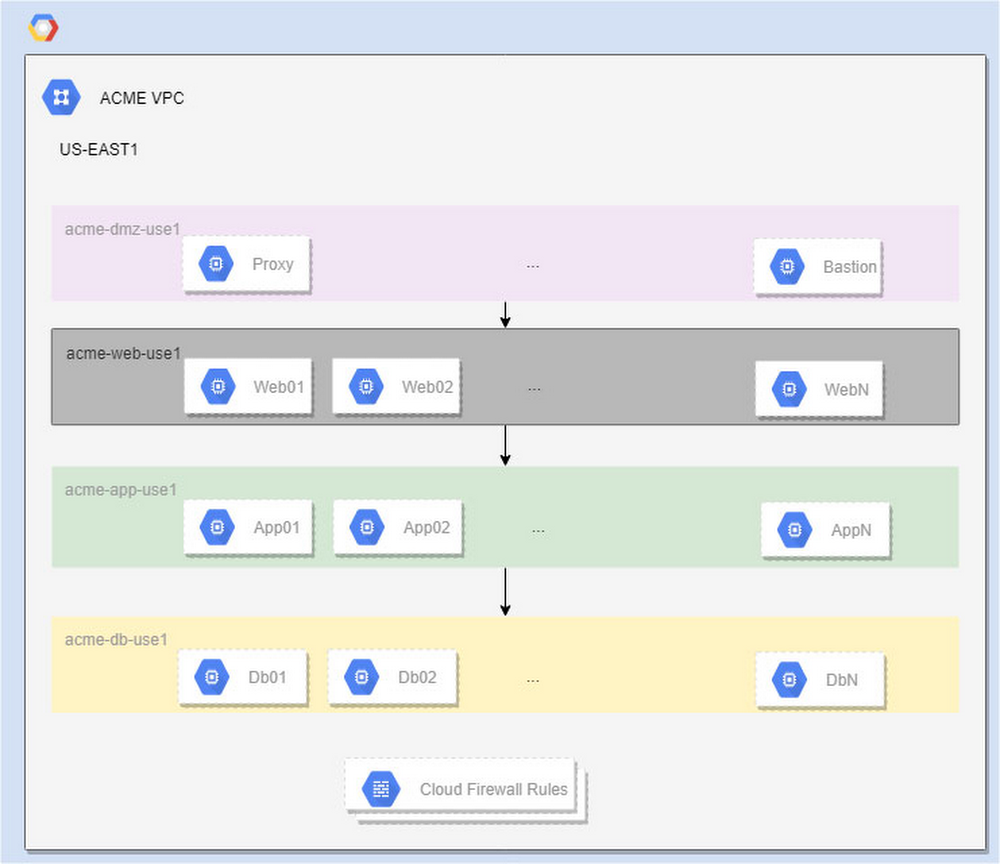
Google Cloud Platform (GCP) firewall rules are a great tool for securing applications. Firewall rules are customizable software-defined networking constructs that let you allow or deny traffic to and from your virtual machine (VM) instances. To secure applications and respond to modern threats, firewall rules require monitoring and adjustment over time. GCP Firewall Rules Logging, which Google Cloud made generally available in February 2019, is a feature that allows the network administrators to monitor, verify and analyze the effects of firewall rules in Google Cloud. In this blog (the first of many on this topic), we’ll discuss the basics of Firewall Rule Logging, then look at an example of how to use it to identify mislabeled VMs and refine firewall rules with minimal traffic interruption.GCP Firewall Rules Logging: The BasicsFirewall Rules Logging provides visibility to help you better understand the effectiveness of rules in troubleshooting scenarios. It helps answer common questions, like: How can I ensure the firewall rules are doing (or not doing) what they were created for?How many connections match the firewall rules I just implemented? Are firewall rules the root cause of some application failures?Unlike VPC flow logs, firewall rules logs are not sampled. Every connection is logged (subject to some limits. Please refer to the Appendix for details). The Firewall Rule log format can be found here.Additionally, network administrators have the options to export firewall logs toGoogle Cloud Storage for long term log retention,to BigQuery for in-depth analysis using standard SQL, or to Pub/Sub to integrate with popular security information and event management software (SIEM), such assplunk for detecting/alerting traffic abnormalities and threats at near real time.For reference, GCP firewall rules are software-defined constructs with the following properties:GCP firewalls are VM-centric. Unlike traditional firewall devices, which are applied at the network edge, GCP firewall rules are implemented at VM level. This means the firewall rules can exist between your instances and other networks, and also between individual instances within the same VPC.GCP firewall rules always have targets. The targets are considered source VMs when defining egress firewall rules, and destination VMs when defining ingress firewall rules. Do not confuse “target” with the “destination” in the traditional firewall concept.GCP firewall rules are defined within the scope of aVPC network. There is no concept of subnets when defining firewall rules. However, you can specify source CIDR ranges, which give you better flexibility than subnets.Every VM has two immutable implied firewall rules: implied allow of egress, and implied deny of ingress at lowest priority. However, Firewall Rule Logging does not generate any entries for these implied firewall rules.While GCP firewall rules support many protocols—including TCP, UDP, ICMP, ESP, AH, SCTP, and IPIP—Firewall Rule Logging only logs entries for TCP and UDP connections.Firewall Best Practices Follow the least privilege principle — make firewall rules as tight as possible. Only allow well-documented and required traffic (ingress and egress), and deny all others. Use a good naming convention to indicate each firewall rule’s purpose.Use fewer and broader firewall rule sets when possible. Observe the standard quota of 200 firewall rules per project. The complexity of the firewall also matters. A good rule of thumb is to not throw too many atoms (tags/service accounts, protocols/ports, source/destination ranges) at the firewall rules. Please refer to the Appendix for more on firewall quota/limits.Progressively define and refine rules; start with the broader rules first, and then use rules to narrow down to a smaller set of VMs.Isolate VMs using service accounts when possible. If you can’t do that, use network tags instead. But do not use both. Service account access is tightly controlled by IAM. While network tags are more flexible, anyone with the instanceAdmin role can change them. More on filtering using service accounts versus network tags can be foundin our firewall rules overview.Conserve network space by planning proper CIDR blocks (segmentations) for your VPC network to group related applications in the same subnet.Use firewall rule logging to analyze traffic, detect misconfigurations, and report real-time abnormalities.In practice, there are many uses for Firewall Rule Logging. One common use case is to help identify mislabeled VM instances. Let’s walk through this scenario in more detail.Scenario: Mislabeled VM instancesACME, Inc. is migrating on-prem applications to Google Cloud. Their network admins implemented a shared VPC to centrally manage the entire company’s networking infrastructure. There are dozens of applications, run by multiple engineering teams, deployed in each GCP region with multi-tiered applications. User-facing proxies in the DMZ talk to the web servers, which communicate with the application servers, which, talk to database layers.This diagram represents one of many regions, each of which has multiple subnets. This region, US-EAST1, includes:acme-dmz-use1: 172.16.255.0/27acme-web-use1: 10.2.0.0/22acme-app-use1: 10.2.4.0/22acme-db-use1: 10.2.8.0/22Here are the traffic directions and firewall rules in place for this region:Proxy can access web servers in acme-web-use1:firewall rule: acme-web-use1-allow-ingress-acme-dmz-use1-proxyWeb servers can access app servers in acme-app-use1:firewall rule: acme-app-use1-allow-ingress-acme-web-use1-webserverApp servers can access database servers in acme-db-use1:firewall rule: acme-db-use1-allow-ingress-acme-app-use1-appsvrThis setup has granular partitions of network space that categorize compute resources by application function. This makes it possible for firewall rules to control the network space and lock the network infrastructure to comply with the least-privilege principle.For large organizations with thousands of VMs provisioned by dozens of application teams, we use service accounts or network tags to group the VMs, in conjunction with subnet CIDR ranges to define firewall rules. For simplicity, we use the network tags to demonstrate each use case.The problemIt’s not unusual for large enterprises to have hundreds of firewall rules due to the scale of the infrastructure and the complexity of network traffic patterns.With so much going on, it’s understandable, that application teams sometimes mislabel the VMs when they migrate them from on-prem to cloud and scale-up applications after migration. The consequences of mislabeling range from an application outage to a security breach. The same problem can also arise if we (mis)use service accounts.Going back to our example, an ACME application team mislabeled one of their new VMs as “appsrv” when it should actually be “appsvr”. As a result, the web server’s requests to access app servers are denied.Solution 1In order to identify the mislabeling and mitigate the impact quickly, we can enable the firewall rule logging for all the firewall rules using the following gcloud command.Next, we export the logs to BigQuery for further analysis with following steps: Create a BigQuery dataset to store the Firewall Rule Log entries:Create the BigQuery sink to export the firewall rules logs:You can also export individual firewall rules by adding filters on the jsonPayload.rule_details.reference. Here is a sample filter:When the BigQuery sink is created, a service account is generated automatically by the GCP. The service account follows the naming convention of “p<project_number>-[0–9]*@gcp-sa-logging.iam.gserviceaccount.com” and is used to write the log entries to the BigQuery table. We need to grant this service account the Data Editor role on the BigQuery dataset as following three steps:Once the logs are populated to the BigQuery sink, you can run queries to determine which rule denies what as following:The BigQuery table will be loaded with the log entries from the logFileName filter, which, in this case, contains all the firewall rules logs. The BigQuery table schema is directly mapped to the log entry’s json format. To keep it simple, for our example we’ll use the log viewer to inspect the log entries.Since we have implicit ingress and the denial rule is not being logged, we create a “deny all” rule with priority 65534 to capture anything that gets denied.The firewall rules for this scenario are:As we can see in the viewer,  “acme-deny-all-ingress-internal” is taking effect, and  “acme-allow-all-ingress-internal” is disabled, so we can ignore it.Below, we can see that the connection from websvr01 to the new appsvr02 (with the incorrect “appsrv” label) is denied.While this approach works for this example, it presents two potential problems:If we have a large amount of traffic, it will generate too much data for real-time analysis. In fact, one of our clients implemented this approach and ended up generating 5TB of firewall logs per day.Mislabeled VMs can cause traffic interruptions. The firewall is doing what it is designed to do, but nobody likes outages.So, we need a better approach to address both of the issues above.Solution 2To resolve the potential issues mentioned above, we can create another ingress rule to allow all traffic at priority 65533 and turn it on for a short period of time whenever there are new deployments.In this scenario, we don’t need to turn on all the Firewall Rules Logging. In fact, we could turn off most of it to save space.Any allowed evaluation logged by this firewall rule is a violator, and we do not expect many of them. The suspects are identified in real time.Now, we fix the label.As we can see, the connection from websvr01 to appsvr02 now works fine.After all the mislabels are fixed, we can turn off the allow and capture rule. Everyone is happy… until the next time new resources are added to the network.ConclusionWith Firewall Rules Logging, we can refine our firewall rules by following a few best-practices and identify undesired network traffic in near real-time. In addition to firewall rules logging, we’re always working on more tools and features to make managing firewall rules and network security in general easier. AppendixFirewall quotas and limitsThe default quota is 200 firewall rules per project, but can be bumped up to 500 through quota requests. If you need more than 200 firewall rules, we recommend  that you review the firewall design to see whether there is a way to consolidate the firewall rules. The upcoming hierarchical firewall rules can define firewall rules at folders/org level, and are not counted toward the per-project limit.The maximum number of source/target tags per firewall rule is 30/70, and the maximum number of source/target per service account is 10/10. A firewall rule can use network tags or service accounts, but not both.As mentioned, the complexity of the firewall rules also matters. Anything that is defined in firewall rules, such as source ranges, protocol/ports, network tags, and service accounts, counts towards an aggregated per-network hard limit. This number is at the scale of tens of thousands, so it doesn’t concern most customers, except in rare cases where a large enterprise may reach this limit.There are per-VM maximum number of logged connections in a 5-second interval depending on machine types: f1-macro (100), g1-small (250), and other machine types (500 per vCPU up to 4,000 in total).
Quelle: Google Cloud Platform

Virtual display devices for Compute Engine now GA

Today, we’re excited to announce the general availability (GA) of virtual display devices for Compute Engine virtual machines (VMs), letting you add a virtual display device to any VM on Google Cloud. This gives your VM Video Graphics Array (VGA) capabilities without having to use GPUs, which can be powerful but also expensive. Many solutions such as system management tools, remote desktop software, and graphical applications require you to connect to a display device on a remote server. Compute Engine virtual displays allow you to add a virtual display to a VM at startup, as well as to existing, running VMs. For Windows VMs, the drivers are already included in the Windows public images; and for Linux VMs, this feature works with the default VGA driver. Plus, this feature is offered at no extra cost. We’ve been hard at work with partners Itopia, Nutanix, Teradici and others to help them integrate their remote desktop solutions with Compute Engine virtual displays to allow our mutual customers to leverage Google Cloud Platform (GCP) for their remote desktop and management needs. Customers such as Forthright Technology Partners and PALFINGER Structural Inspection GmbH (StrucInspect) are already benefiting from partner solutions enabled by virtual display devices. “We needed a cloud provider that could effectively support both our 3D modelling and our artificial intelligence requirements with remote workstations,” said Michael Diener, Engineering Manager for StrucInspect. “Google Cloud was well able to handle both of these applications, and with Teradici Cloud Access Software, our modelling teams saw a vast improvement in virtual workstation performance over our previous solution. The expansion of GCP virtual display devices to support a wider range of use cases and operating systems is a welcome development that ensures customers like us can continue to use any application required for our client projects.”Our partners are equally excited about the general availability of virtual display devices.“We’re excited that the GCP Virtual Display feature is now GA because it enables our mutual customers to quickly leverage Itopia CAS with Google Cloud to power their Virtual Desktop Infrastructure (VDI) initiatives,” said Jonathan Lieberman, itopia Co-Founder & CEO.”With the new Virtual Display feature, our customers get a much wider variety of cost-effective virtual machines (versus GPU VMs) to choose from in GCP,” said Carsten Puls, Sr. Director, Frame at Nutanix. “The feature is now available to our joint customers worldwide in our Early Access of Xi Frame for GCP.”Now that virtual display devices is GA, we welcome you to start using the feature in your production environment. For simple steps on how you can use a virtual display device when you create a VM instance or add it to a running VM, please refer to the documentation.
Quelle: Google Cloud Platform

Azure Files premium tier gets zone redundant storage

Azure Files premium tier is now zone redundant!

We're excited to announce the general availability of zone redundant storage (ZRS) for Azure Files premium tier. Azure Files premium tier with ZRS replication enables highly performant, highly available file services, that are built on solid-state drives (SSD).

Azure Files ZRS premium tier should be considered for managed file services where performance and regional availability are critical for the business. ZRS provides high availability by synchronously writing three replicas of your data across three different Azure Availability Zones, thereby protecting your data from cluster, datacenter, or entire zone outage. Zonal redundancy enables you to read and write data even if one of the availability zones is unavailable.

With the release of the ZRS for Azure Files premium tier, premium tier now offers two sets of durability options to meet your storage needs, zone redundant storage (ZRS) for intra-region high availability and locally-redundant storage (LRS) for lower-cost single region durable storage.

Getting started

You can create ZRS Azure premium files account through Azure Portal, Azure CLI, or Azure PowerShell.

Azure Files premium tier requires FileStorage as the account kind. To create a ZRS account in the Azure Portal, set the following properties:

Currently, ZRS option for Azure Files premium tier is available in West Europe and we will be gradually expanding the regional coverage. Stay up to date on the premium tier ZRS region availability through the Azure documentation.

Migration from LRS premium files account to ZRS premium files account requires manual copy or movement of data from an existing LRS account to a new ZRS account. Live account migration on request is not supported yet. Please check the migration documentation for the latest information.

Refer to the pricing page for the latest pricing information.

To learn more about premium tier, visit Azure Files premium tier documentation. Give it a try and share your feedback on the Azure Storage forum or email us at azurefiles@microsoft.com.

Happy sharing!
Quelle: Azure

A Look into the Technical Details of Kubernetes 1.16

This week Kubernetes 1.16 is expected and we want to highlight the technical features that enterprise Kubernetes users should know about. With Custom Resource Definitions (CRDs) moving into official general availability, storage improvements, and more, this release hardens the project and celebrates the main extension points for building cloud native applications on Kubernetes.
CRDs to GA
Custom Resource Definitions (CRDs) were introduced into upstream Kubernetes by Red Hat engineers in version 1.7. From the beginning, they were designed as a future-proof implementation of what was previously prototyped as ThirdPartyResources. The road of CRDs has focused on the original goal of making custom resources production ready, bringing it to be a generally available feature in Kubernetes, highlighted with the promotion of the API to v1 in 1.16.
CRDs have become a cornerstone of API extensions in the Kubernetes ecosystem, and is the basis of innovation and a core building block of OpenShift 4. Red Hat has continued pushing CRDs forward ever since, as one of the main drivers in the community behind the features and stability improvements, which finally lead to the v1 API. This progress made OpenShift 4 possible.
Let’s take a deeper look at what will change in the v1 API of Custom Resource Definitions (in the apiextensions.k8s.io/v1 API group). The main theme is around consistency of data stored in CustomResources:
The goal is that consumers of data stored in CustomResources can rely on that it has been validated on creation and on every update such that the data: 

follows a well-known schema
is strictly typed
and only contains values that were intended by the developers to be stored in the CRD.

 
We know all of these properties from native resources like, for example, pods.
 Pods have a well-known structure for metadata, spec, spec.containers, spec.volumes, etc.

Every field in a pod is strictly typed, e.g. every field is either a string, a number, an array, an object or a map. Wrong types are rejected by the kube-apiserver: one cannot put a string where a number is expected.
Unknown fields are stripped when creating a pod: a user or a controller cannot store arbitrary custom fields, e.g. pod.spec.myCustomField. For API compatibility reasons the Kubernetes API conventions say to drop and not reject those fields.

In order to fulfill these 3 properties, CRDs in the v1 version of apiextensions.k8s.io require:

That a schema is defined (in `CRD.spec.versions[n].schema`) – example:
apiVersion: apiextensions.k8s.io/v1
kind: CustomResourceDefinition
metadata:
name: crontabs.example.openshift.io
spec:
group: example.openshift.io
versions:
– name: v1
served: true
storage: true
schema:
openAPIV3Schema:
type: object
properties:
spec:
type: object
properties:
cronSpec:
type: string
image:
type: string
replicas:
type: integer
scope: Namespaced
names:
plural: crontabs
singular: crontab
kind: CronTab
2. That the schema is structural (https://kubernetes.io/blog/2019/06/20/crd-structural-schema/) — KEP: https://github.com/kubernetes/enhancements/blob/master/keps/sig-api-machinery/20190425-structural-openapi.md – the example above is structural.
3. That pruning of unknown fields (those which are not specified in the schema of (1)) is enabled (pruning used be opt-in in v1beta1 via `CRD.spec.preserveUnknownFields: false`) — KEP: https://github.com/kubernetes/enhancements/blob/master/keps/sig-api-machinery/20180731-crd-pruning.md – pruning is enabled for the example as it is a v1 manifest where this is the default.

These are all formal requirements about CRDs and their CustomResources, checked by the kube-apiserver automatically. But there is an additional dimension of high quality APIs in the Kubernetes ecosystem: API review and approval.
API Review and Approval
Getting APIs right does not only mean to be a good fit for the described business logic. APIs must be

compatible with Kubernetes API Machinery of today and tomorrow,
future-proof in their own domain, i.e. certain API patterns are good and some are knowingly bad for later extensions.

The core Kubernetes developers had to learn painful lessons in the first releases of the Kubernetes platform, and eventually introduced a process called “API Review”. There is a set of people in the community who very carefully and with a lot of experience review every change against the APIs that are considered part of Kubernetes. Concretely, these are the APIs under the *.k8s.io domain.
To make it clear to the API consumer that APIs in *.k8s.io are following all quality standards of core Kubernetes, CRDs under this domain must also go through the API Review process (this is not a new requirement, but has been in place for a long time) and – and this is new – must link the API review approval PR in an annotation::
metadata:
annotations:
“api-approved.kubernetes.io”: “https://github.com/kubernetes/kubernetes/pull/78458″
Without this annotation, a CRD under the *.k8s.io domain is rejected by the API server.
There are discussions about introducing other reserved domains for the wider Kubernetes community, e.g. *.x-k8s.io, with different, lower requirements than for core resources under *.k8s.io.
CRD Defaulting to Beta
Next to the presented theme of CRD data consistency, another important feature in 1.16 is the promotion of defaulting to beta. Defaulting is known to everybody for native resources, i.e. unspecified fields in a manifest are automatically set to default values on creation by the kube-apiserver.
For example, pod.spec.restartPolicy defaults to Always. Hence, if the user does not set that field, the API server will set and persist Always as the value.
Also old objects already persisted in etcd can get new fields when read from etcd using the defaulting mechanism. This is an important difference to mutating admission webhooks, which are not called on read from etcd, and hence cannot simulate real defaulting.
Defaults are an important API feature which heavily drives an API design. Defaults are now definable in CRD OpenAPI schemas. Here is an example from an OpenShift 4 CRD:
apiVersion: apiextensions.k8s.io/v1
kind: CustomResourceDefinition
metadata:
 name: kubeapiservers.operator.openshift.io
spec:
 scope: Cluster
 group: operator.openshift.io
 names:
   kind: KubeAPIServer
   plural: kubeapiservers
   singular: kubeapiserver
 subresources:
   status: {}
 versions:
 – name: v1
   served: true
   storage: true
   schema:
     openAPIV3Schema:
       spec:
           type: object
           properties:
             logLevel:
               type: string
               default: Normal
             managementState:
               pattern: ^(Managed|Force)$
               default: Managed
               type: string

When such an object is created with explicitly setting logLevel and managementState, the log level will be Normal and the managementState will be Managed.
Kubectl independence
Kubectl came to life almost five years ago as a replacement for the initial CLI for Kubernetes: kubecfg. Its main goals were:

improved user experience 
and modularity. 

Initially, these goals were met, but over time it flourished in some places, but not in others. Red Hat engineers worked on allowing extensibility and stability of kubectl since the beginning because this was required to make pieces of OpenShift as an enterprise distribution of Kubernetes possible.
The initial discussions about the possibility of splitting kubectl out of the main Kubernetes repository to allow faster iteration and shorter release cycles were started almost two years ago. Unfortunately, the years the kubectl code lived in the main Kubernetes repository caused it to have a tight coupling with some of the internals of Kubernetes. 
Several Red Hat engineers were involved in this effort from the start, refactoring the existing code to make it less coupled with internals, exposing libraries such as k8s.io/api (https://github.com/kubernetes/api/) and k8s.io/client-go (https://github.com/kubernetes/client-go/), to name a few, which are the foundation for many of the existing integrations. 
One of the biggest offenders in that internals fight was the fact that entire kubectl code relied on the internal API versions (iow. internal representation of all the resources exposed in kube-apiserver). Changing this required a lot of manual and mundane work to rewrite every piece of code to properly work with external, official API (iow. the ones you work on a regular basis when interacting with a cluster).
Many long hours of sometimes hard, other times dull work was put into this effort, which resulted in the recent initial brave step which moved (almost all) kubectl code to staging directory. In short, a staging repository is one that is treated as an external one, having its own distinct import path (in this case k8s.io/kubectl).
Reaching this first visible goal brings us several important implications. Kubectl is currently being published (through the publishing-bot) into its own repository that can be easily consumed by the external actors as k8s.io/kubectl. Even though there are a few commands left in the main kubernetes tree, we are working hard on closing this gap, while trying to figure out how the final extraction piece will work, mostly from the testing and release point of view.
Storage improvements
For this release, SIG-storage focused on bringing feature parity between Container Storage Interface (CSI) and in-tree drivers, as well as improving the stability of CSI sidecars and filling in functionality gaps.
We are working on migrating in-tree drivers and replacing them with their CSI equivalent. This is an effort across releases, with more work to follow, but we made steady progress. 
Some of the features the Red Hat storage team designed and implemented include:

Volume cloning (beta) to allow users to create volumes from existing sources.
CSI volume expansion as default, which brings feature parity between in-tree and CSI drivers. 
Raw block support improvements and bug fixes, especially when using raw block on iSCSI volumes.

Learn more
Kubernetes 1.16 brings enhancements to CRDs and storage. Check out the Kubernetes 1.16 release notes to learn more.
The post A Look into the Technical Details of Kubernetes 1.16 appeared first on Red Hat OpenShift Blog.
Quelle: OpenShift





