Erneuerbare Energien: Wenn Wellen Strom erzeugen

Trotz einiger Rückschläge soll Meereskraft künftig einen erheblichen Teil unseres Strombedarfs decken. Dafür werden Ebbe und Flut, Strömungen und Wellen genutzt – in dezentralen Projekten bis hin zu Multi-Megawatt-Anlagen. Ein Bericht von Jan Oliver Löfken (Wasserkraft, Technologie)
Quelle: Golem

DACH businesses embrace Google Cloud for digital transformation

Whether they’re lifting-and-shifting workloads or taking cloud-native approaches to application development, enterprises are increasingly looking to the cloud to build and grow their businesses. As a result, over the past 12 months we’ve seen extraordinary momentum in Germany, Austria, and Switzerland—also known as the DACH region—as more and more businesses take advantage of Google Cloud. In March, we launched a new Google Cloud region in Zurich to support businesses in the region. We continue to expand our support of regional and global certifications and standards, now including FINMA-regulated customers in Switzerland. And we continue to work closely with many enterprises in the region, such as METRO AG, and many more.Yesterday’s Cloud Summit in Munich is a great example of the continuing momentum we’re seeing. With 2200 attendees and 45 customer speakers, the summit was an important opportunity for us to connect with—and learn from—businesses in the region. Customers across every industry shared with us how they’re transforming with the power of the cloud. Here are a few highlights.DLR: Groundbreaking robotics research with the help of Google Cloud infrastructurePart of Deutsches Zentrum für Luft- und Raumfahrt(DLR), Germany’s national aerospace center, the Institute of Robotics and Mechatronics is one of the largest pure robotics research institutes in the world. To advance its work, the institute relies on deep learning techniques, but this requires a substantial amount of compute resources for training and running simulations. Thanks to Google Cloud, it can now easily configure powerful instances with Compute Engine, even using hundreds of CPU cores if necessary. And it now has the flexibility to spin up specialized configurations when needed—something it couldn’t do with in-house servers. You can learn more in DLR’s case study.“With Google Cloud, we can train our robots between five to ten times faster than before and really explore things like deep reinforcement learning,” says Berthold Bäuml, Head of Autonomous Learning Robots Lab, DLR. “We can do cutting edge research and we’re no longer bound by our computing resources. It’s providing totally new opportunities for us.”ARD: From monolithic architecture to modern microservicesA joint organization of Germany’s regional public-service broadcasters, the ARD network produces key national and regional television and radio programs, and faces challenges shared by many media organizations aiming to serve customers with the content they want, where and when they want it. Starting from a monolithic, rigid structure, ARD wanted a technology stack that fit its own culture—open and scalable. With Google Cloud, ARD is able to focus on five digital, scalable core products and take advantage of fully-managed services which has allowed it to increase its number of releases from once a year to 50 releases a day. In addition to using GCP as a scalable underlying platform, ARD is also using an API-as-a-service approach with Apigee to rethink the way they are delivering content to German citizens by making content delivery universally accessible to other broadcasting entities.Deutsche Börse Group: Embracing a multi-cloud approach to infrastructureAs an international exchange organization and market infrastructure provider, Deutsche Börse Group offers its customers a wide range of products, services and technologies covering the entire value chain of financial markets. As a result, Deutsche Bӧrse Group has frequently been an early adopter of new technologies that drive its industry forward, whether that’s using distributed ledger/blockchain technology in new ways or offering new advanced analytics and artificial intelligence (AI) services to clients. Most recently, Deutsche Bӧrse Group has ramped up its cloud-first strategy, led by its inaugural Chief Cloud Officer Michael Girg, choosing Google Cloud to help them modernize, develop and operate its enterprise workloads in a more efficient and secure way that also supports compliance. “As a key technology, cloud lays the foundation for enabling some of Deutsche Börse’s major initiatives focussing on new technologies,” says Michael Girg, Chief of Cloud Officer at Deutsche Börse. “Together with Google Cloud as a strong partner, we are very much looking forward to accelerating cloud adoption and to jointly define innovative solutions that further push ahead data security for the financial industry” You can read more on their progress in our recent blog post.MediaMarktSaturn Retail Group: Transforming retail, online and offlineOne of the world’s largest consumer electronics retailers, the MediaMarktSaturn Retail Group operates more than 1,000 stores across 15 countries in Europe, including a sizeable ecommerce presence. But the company was increasingly finding that its on-premises infrastructure, used to first built its online stores, was not able to keep up with evolving business and customer demands. So MediaMarktSaturn turned to the cloud, upgrading its infrastructure but also to adopting a new way of working that places technology at the heart of its strategy. For MediaMarktSaturn, this meant combining data streams into a new data lake from which it can query data with and derive insights with ease, as well as adopting Google Kubernetes Engine (GKE), to manage the Kubernetes clusters that form the backbone of its new online system.“Google Cloud has paved the way for us to break new ground not only technically, but also in our way of working,” says Dr. Johannes Wechsler, Managing Director, MediaMarktSaturn Technology. “Thanks to this strong partnership, we are well equipped to offer our customers a great user experience even in high-load situations and at the same time deliver new features more quickly.”Looking aheadWe’re excited to see what enterprises in Germany, Austria, and Switzerland can do as they embrace Google Cloud. We remain committed to working with them to help them grow and digitally transform their businesses.
Quelle: Google Cloud Platform

New in Docker Hub: Personal Access Tokens

The Hub token list view.
On the heels of our recent update on image tag details, the Docker Hub team is excited to share the availability of personal access tokens (PATs) as an alternative way to authenticate into Docker Hub.
Already available as part of Docker Trusted Registry, personal access tokens can now be used as a substitute for your password in Docker Hub, especially for integrating your Hub account with other tools. You’ll be able to leverage these tokens for authenticating your Hub account from the Docker CLI – either from Docker Desktop or Docker Engine: 
docker login –username <username>
When you’re prompted for a password, enter your token instead.
The advantage of using tokens is the ability to create and manage multiple tokens at once so you can generate different tokens for each integration – and revoke them independently at any time.
Create and Manage Personal Access Tokens in Docker Hub 
Personal access tokens are created and managed in your Account Settings.
From here, you can:

Create new access tokens
Modify existing tokens
Delete access tokens

Creating an access token in Docker Hub.
Note that the actual token is only shown once, at the time of creation. You will need to copy the token and save it in either a credential manager or use it immediately. If you lose a token, you will need to delete the lost token and create a new one. 
The Next Step for Tokens
Personal access tokens open a new set of ways to authenticate into your Docker Hub account. Their introduction also serves as a foundational building block for more advanced access control capabilities, including multi-factor authentication and team-based access controls – both areas that we’re working on at the moment. We’re excited to share this and many other updates that are coming to Docker Hub over the next few months. Give access tokens a try and let us know what you think!
To learn more about personal access tokens for Docker Hub:

Read more about Docker Hub
Explore the Docker Hub documentation 
Get started with Docker by creating your Hub account

New in #DockerHub: Personal Access TokensClick To Tweet

The post New in Docker Hub: Personal Access Tokens appeared first on Docker Blog.
Quelle: https://blog.docker.com/feed/

3 steps to detect and remediate security anomalies with Cloud Anomaly Detection

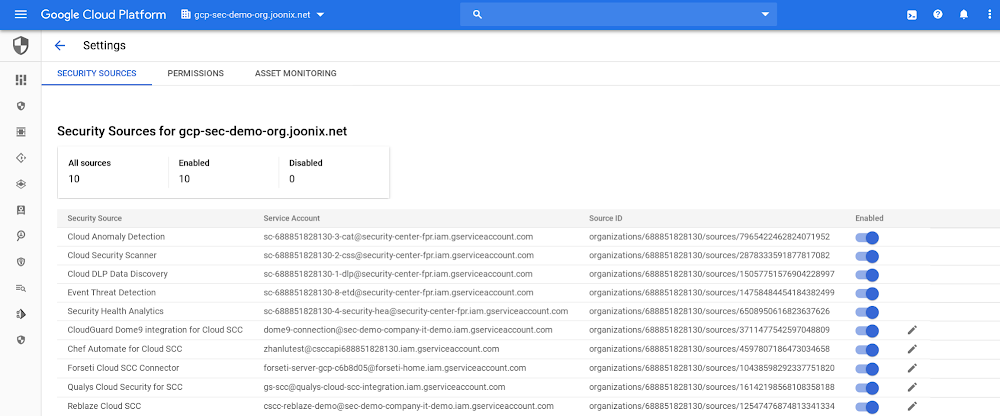
Editor’s Note:This is the third blog in our six-part series on how to use Cloud Security Command Center. There are links to the first two blogs in the series at the end of this post. When a threat is detected, every second counts. But, sometimes it can be difficult to know if a threat is present or how to respond. Cloud Anomaly Detection is a built-in Cloud Security Command Center (Cloud SCC) feature that uses behavioral signals to detect security abnormalities, such as leaked credentials or unusual activity, in your GCP projects and virtual machines. In this blog, and the accompanying video, we’ll look at how to enable Cloud Anomaly Detection and quickly respond to threats. 1. Enable Cloud Anomaly Detection from Cloud Security Command CenterCloud Anomaly Detection is not turned on by default. You need to go to Security Sources from the Cloud SCC dashboard and activate it. Keep in mind, to enable a security source, you need to have the Organization Administrator Cloud IAM role. Once it’s turned on, findings will automatically be surfaced and displayed in the Cloud Anomaly Detection card on the Cloud Security Command Center dashboard.2. View findings in Cloud Security Command Center Cloud Anomaly Detection can surface a variety of anomalous findings, including:Leaked service account credentials: GCP service account credentials that are accidentally leaked online or compromised.Resource used for outbound intrusion: One of the resources or GCP services in your organization is being used for intrusion activities, like an attempt to break in to or compromise a target system. These include SSH brute force attacks, Port scans, and FTP brute force attacks.Potential compromised machine: A potential compromise of a resource in your organization.Resource used for crypto mining: Behavioral signals around a VM in your organization indicate that it might have been compromised and could be getting used for crypto mining.Unusual Activity/Connection: Unusual activity from a resource in your organization.Resource used for phishing: One of the resources or GCP services in your organization is being used for phishing.3. Remediate findings from Cloud Security Command Center After Cloud Anomaly Detection generates a finding, you can click on the finding for more information about what happened and use that information to fix the security issue.To learn more about Cloud Anomaly Detection, including how to turn it on and how it can help your organization, check out the video below.Previous blogs in this series:5 steps to improve your cloud security posture with Cloud Security Command CenterCatch web app vulnerabilities before they hit production with Cloud Web Security Scanner
Quelle: Google Cloud Platform

Three ways to leverage composite indexes in Azure Cosmos DB

Composite indexes were introduced in Azure Cosmos DB at Microsoft Build 2019. With our latest service update, additional query types can now leverage composite indexes. In this post, we’ll explore composite indexes and highlight common use cases.

Index types in Azure Cosmos DB

Azure Cosmos DB currently has the following index types that are used for the following types of queries:

Range indexes:

Equality queries
Range queries
ORDER BY queries on a single property
JOIN queries

Spatial indexes:

Geospatial functions

Composite indexes:

ORDER BY queries on multiple properties
Queries with a filter as well as an ORDER BY clause
Queries with a filter on two or more properties

Composite index use cases

By default, Azure Cosmos DB will create a range index on every property. For many workloads, these indexes are enough, and no further optimizations are necessary. Composite indexes can be added in addition to the default range indexes. Composite indexes have both a path and order (ASC or DESC) defined for each property within the composite index.

ORDER BY queries on multiple properties

If a query has an ORDER BY clause with two or more properties, a composite index is required. For example, the following query requires a composite index defined on age and name (age ASC, name ASC):

SELECT * FROM c WHERE c.age ASC, c.name ASC

This query will sort all results in ascending order by the value of the age property. If two documents have the same age value, the query will sort the documents by name.

Queries with a filter as well as an ORDER BY clause

If a query has a filter as well as an ORDER BY clause on different properties, a composite index will improve performance. For example, the following query will require fewer request units (RU’s) if a composite index on name and age is defined and the query is updated to include the name in the ORDER BY clause:

Original query utilizing range index:

SELECT * FROM c WHERE c.name = “Tim” ORDER BY c.age ASC

Revised query utilizing a composite index on name and age:

SELECT * FROM c WHERE c.name = “Tim” ORDER BY c.name ASC, c.age ASC

While a composite index will significantly improve query performance, you can still run the original query successfully without a composite index. When you run the revised query with a composite index, it will sort documents by the age property. Since all documents matching the filter have the same name value, the query will return them in ascending order by age.

Queries with a filter on multiple properties

If a query has a filter with two or more properties, adding a composite index will improve performance.

Consider the following query:

SELECT * FROM c WHERE c.name = “Tim” and c.age > 18

In the absence of a composite index on (name ASC, and age ASC), we will utilize a range index for this query. We can improve the efficiency of this query by creating a composite index for name and age.

Queries with multiple equality filters and a maximum of one range filter (such as >,<, <=, >=, !=) will utilize the composite index. In some cases, if a query can’t fully utilize a composite index, it will use a combination of the defined composite indexes and range indexes. For more information, reference our indexing policy documentation.

Composite index performance benefits

We can run some sample queries to highlight the performance benefits of composite indexes. We will use a nutrition dataset that is used in Azure Cosmos DB labs.

In this example, we will optimize a query that has a filter as well as an ORDER BY clause. We will start with the default indexing policy which indexes all properties with a range index. Executing the following query as referenced in the image below in the Azure Portal, we observe the query metrics:

Query metrics:

This query, with the default indexing policy, required 21.8 RU’s.

Adding a composite index on foodGroup and _ts and updating the query text to include foodGroup in the ORDER BY clause significantly reduced the query’s RU charge.

Query metrics:

After adding a composite index, the query’s RU charge decreased from 21.8 RU’s to only 4.07 RU’s. This query optimization will be particularly impactful as the total data size increases. The benefits of a composite index are significant when the properties in the ORDER BY clause have a high cardinality.

Creating composite indexes

You can learn more about creating composite indexes in this documentation. It’s simple to update the indexing policy directly through the Azure Portal. While creating a composite index for data that’s already in Azure Cosmos DB, the index update will utilize the RU’s leftover from normal operations. After the new indexing policy is defined, Azure Cosmos DB will automatically index properties with a composite index as they’re written.

Explore whether composite indexes will improve RU utilization for your existing workloads on Azure Cosmos DB.
Quelle: Azure