Amazon EC2 I3en-Instances jetzt in den AWS-Regionen AWS GovCloud (USA-Ost), Asien-Pazifik (Sydney) und Europa (London) verfügbar

Ab heute sind Amazon EC2 I3en-Instances in den AWS-Regionen AWS GovCloud (USA-Ost), Asien-Pazifik (Sydney) und Europa (London) verfügbar. Die weltweite Verfügbarkeit von I3en erstreckt sich auf die folgenden Regionen: Asien-Pazifik (Tokio, Seoul, Singapur, Sydney), Europa (Frankfurt, Irland, London), USA Ost (Nord-Virginia, Ohio, AWS GovCloud) und USA West (Oregon, Nordkalifornien, AWS GovCloud). 
Quelle: aws.amazon.com

Amazon S3 führt Same-Region Replication (regioninterne Replikation) ein

Amazon S3 unterstützt jetzt die automatische und asynchrone Replikation neu hochgeladener S3-Objekte in ein Ziel-Bucket in der selben AWS-Region. Amazon S3 Same-Region Replication (SRR) ergänzt eine neue Replikationsoption zu Amazon S3, die auf S3 Cross-Region Replication (CRR) basiert. Damit werden Daten über verschiedene AWS-Regionen hinweg repliziert. SRR und CRR bilden zusammen Amazon S3 Replication. Damit können Replikationsfunktionen der Enterprise-Klasse wie Cross-Account Replication für Schutz vor zufälliger Löschung und Replikation auf die Amazon S3-Speicherklassen, einschließlich S3 Glacier und S3 Glacier Deep Archive zur Erstellung von Backups und langfristigen Archiven bereitgestellt werden. Mit SRR werden neue in ein Amazon S3-Bucket hochgeladene Objekte für die Replikation auf der Bucket-, Präfix- oder Objekt-Tag-Ebene konfiguriert. Replizierte Objekte können wie die Originalkopie Eigentum desselben AWS-Kontos sein oder zum Schutz vor zufälliger Löschung auch von unterschiedlichen Konten.
Quelle: aws.amazon.com

OpenShift Commons Gathering in Milan 2019 – Recap [Slides]

The first Italian OpenShift Commons Gathering
gathered over 300 participants to Milan!
 
On September 18th, 2019, the first OpenShift Commons Gathering Milan brought together over 300 experts to discuss container technologies, operators, the operator framework and the open source software projects that support the OpenShift ecosystem. This was the first OpenShift Commons Gathering to take place in Italy.
The standing room only event hosted 11 talks in a whirlwind day of discussions. Of particular interest to the community was Christian Glombek’s presentation updating the status and roadmap for OKD4 and CoreOS.
Highlights from the Gathering induled an OpenShift 4 Roadmap Update, customer stories from Amadeus, the leading travel technology company, and local stories from Poste Italiane and SIA S.p.A. In addition to the technical updates and customer talks, there was plenty of time to network during the breaks and enjoy the famous Italian coffee.
Here are the slides from the event:
{please note: edited videos will be uploaded to youtube soon}

9:30 a.m.
Welcome to the Commons: Collaboration in Action
Diane Mueller (Red Hat)
Slides
Video

9:50 a.m.
Red Hat’s Unified Hybrid Cloud Vision
Brian Gracely (Red Hat)
Slides
Video

10:30 a.m.
OpenShift 4.1 Release Update and Road Map
William Markito Oliveira (Red Hat)  |  Christopher Blum (Red Hat)
Slides
Video

11:30 a.m.
Customer Keynote: OpenShift @ Amadeus
Salvatore Dario Minonne (Amadeus)
Slides
Video

12:00 a.m.
State of the Operators: Framework, SDKs, Hubs and beyond
Guil Barros (Red Hat)
Slides
Video

12:30 p.m.
Update on OKD4 and Fedora CoreOS
Christian Glombek (Red Hat)
Slides
Video

2:00 p.m.
OpenShift Managed su Azure
Marco D’Angelo (Microsoft)
Slides
Video

2:30 p.m.
Open Banking with Microservices Architectures and Apache Kafka on OpenShift
Paolo Gigante (Poste Italiane) | Pierluigi Sforza (Poste Italiane) | Paolo Patierno (Red Hat)
Slides
Video

3:00 p.m.
State of Serverless/Service Mesh
Giuseppe Bonocore (Red Hat) | William Markito Oliveira (Red Hat)
Slides
Video

4:15 p.m.
Case Study: OpenShift @ SIA
Nicola Nicolotti (SIA Spa) | Matteo Combi (SIA S.p.A.)
Slides
Video

4:45 p.m.
State of Cloud Native Storage
Christopher Blum (Red Hat)
Slides
Video

5:10 p.m.
AMA panel
Engineers & Product Managers (Red Hat OpenShift) + customer
 N/A
Video

5:30 p.m.
Road Ahead at OpenShift Wrap-Up
Diane Mueller & Tanja Repo (Red Hat)
Slides
Video

 
To stay updated of all the latest releases and events, please join the OpenShift Commons and join our mailing lists & Slack channel.
 
What is OpenShift Commons?
Commons builds connections and collaboration across OpenShift communities, projects, and stakeholders. In doing so we enable the success of customers, users, partners and contributors as we deepen our knowledge and experiences together.
Our goals go beyond code contributions. Commons is a place for companies using OpenShift to accelerate its success and adoption. To do this we’ll act as resources for each other, share best practices and provide a forum for peer-to-peer communication.
Join OpenShift Commons today!
 
Join us in the upcoming Commons Gatherings!
The OpenShift Commons Gatherings continue – please join us next time at:

October 28, 2019 in San Francisco, California – event is co-located with ODSC/West
November 18, 2019 in San Diego, California –  event is co-located with Kubecon/NA

 
The post OpenShift Commons Gathering in Milan 2019 – Recap [Slides] appeared first on Red Hat OpenShift Blog.
Quelle: OpenShift

Amazon WorkSpaces führt WorkSpaces-Wiederherstellung auf den letzten bekannten einwandfreien Zustand ein

Wir freuen uns, die Wiederherstellungsfunktion für Amazon WorkSpaces einführen zu können, mit der Sie Ihren WorkSpace auf den letzten bekannten einwandfreien Zustand zurücksetzen können. Die neue Funktion kann als einfache Wiederherstellungsoption zur Verhinderung von unzugänglichen WorkSpaces dienen, die durch inkompatible Drittanbieter-Updates verursacht wurden.
Quelle: aws.amazon.com

Container-native load balancing on GKE now generally available

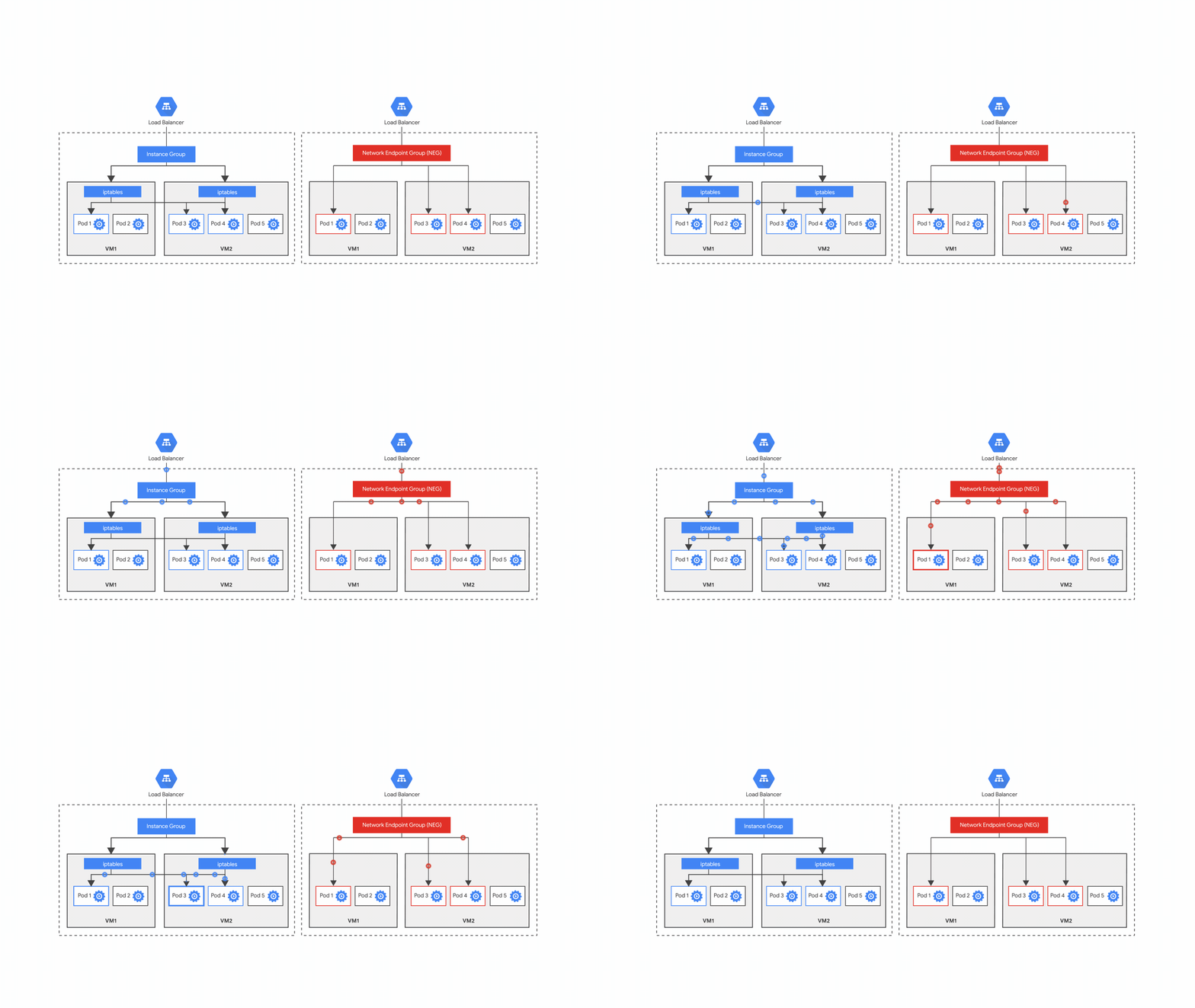
Last year, we announced container-native load balancing, a feature that allows you to create services using network endpoint groups (NEGs) so that requests to your service get load balanced directly to the containers serving the requests. Since announcing the beta, we have worked hard to improve the performance, scalability and user experience of container-native load balancing and are excited to announce that it is now generally available.Container-native load balancing removes the second hop between virtual machines running containers in your Google Kubernetes Engine (GKE) cluster and the containers serving the requests, improving efficiency, traffic visibility and container support for advanced load balancer capabilities. The NEG abstraction layer that enables this container-native load balancing is integrated with the Kubernetes Ingress controller running on Google Cloud Platform (GCP). If you have a multi-tiered deployment where you want to expose one or more services to the internet using GKE, you can also create an Ingress object, which provisions an HTTP(S) load balancer and allows you to configure path-based or host-based routing to your backend services.Figure 1. Ingress support with instance groups vs. with network endpoint groups.Improvements in container-native load balancingThanks to your feedback during the beta period, we’ve made several improvements to container-native load balancing with NEGs. In addition to having several advantages over the previous approach (based on IPTables), container-native load balancing now also includes:Latency improvements: The latency of scaling down your load-balanced application to zero pod backends and then subsequently scaling back up is now faster by over 90%. This significantly improves response times for low-traffic services, which can now quickly scale back up from zero pods when there’s traffic. Improved Kubernetes integration: Using the Kubernetes pod readiness gate feature, a load-balancer backend pod is considered ‘Ready’ once the Load balancer health check for the pod is successful and the pod is healthy. This ensures that rolling updates will proceed only after the pods are ready and fully configured to serve traffic. Now, you can manage the load balancer and backend pods with native Kubernetes APIs without injecting any unnecessary latency. Standalone NEGs (beta): You can now manage your own load balancer (without having to create an HTTP/S based Ingress on GKE) using standalone NEGs, allowing you to configure and manage several flavors of Google Cloud Load Balancing. These include TCP proxy or SSL proxy based load balancing for external traffic, HTTP(S) based load balancing for internal traffic (beta) and global load balancing using Traffic Director for internal traffic. You can also create a load balancer with hybrid backends (GKE pods and Compute Engine VMs) or a load balancer with backends spread across multiple GKE clusters.Getting started with container-native load balancingYou can use container-native load balancing in several scenarios. For example, you can create an Ingress using NEGs with VPC-native GKE clusters created using Alias IPs. This provides native support for pod IP routing and enables advertising prefixes. Check out how to create an Ingress using container native load balancing. Then, drop us a line about how you use NEGs, and other networking features you’d like to see on GCP.
Quelle: Google Cloud Platform

Moving a publishing workflow to BigQuery for new data insights

Google Cloud’s technology powers both our customers as well as our internal teams. Recently, the Solutions Architect team decided to move an internal process to use BigQuery to streamline and better focus efforts across the team. The Solutions Architect team publishes reference guides for customers to use as they build applications on Google Cloud. Our publishing process has many steps, including outline approval, draft, peer review, technical editing, legal review, PR approval and finally, publishing on our site. This process involves collaboration across the technical editing, legal, and PR teams.With so many steps and people involved, it’s important that we effectively collaborate. Our team uses a collaboration tool running on Google Cloud Platform (GCP) as a central repository and workflow for our reference guides. Increased data needs required more sophisticated toolsAs our team of solution architects grew and our reporting needs became more sophisticated, we realized that we couldn’t effectively provide the insights that we needed directly in our existing collaboration tool. For example, we needed to build and share status dashboards of our reference guides, build a roadmap for upcoming work, and analyze how long our solutions take to publish, from outline approval to publication. We also needed to share this information outside our team, but didn’t want to share unnecessary information by broadly granting access to our entire collaboration instance.Building a script with BigQuery on the back endSince our collaboration tool provides a robust and flexible REST API, we decided to write an export script which stored the results in BigQuery. We chose BigQuery because we knew that we could write advanced queries against the data and then use Data Studio to build our dashboards. Using BigQuery for analysis provided a scalable solution that is well-integrated into other GCP tools and has support for both batch and real-time inserts using the streaming API.We used a simple Python script to read the issues from the API and then insert the entries into BigQuery using the streaming API. We chose the streaming API, rather than Cloud Pub/Sub or Cloud Dataflow, because we wanted to repopulate the BigQuery content with the latest data several times a day. The Google API Python client library was an obvious choice, because it provides an idiomatic way to interact with the Google APIs, including the BigQuery streaming API. Since this data would only be used for reporting purposes, we opted to keep only the most recent version of the data as extracted. There were two reasons for this decision: Master data: There would never be any question about which data was the master version of the data. Historical data: We had no use cases that required capturing any historical data that wasn’t already captured in the data extract. Following common extract, transform, load (ETL) best practices, we used a staging table and a separate production table so that we could load data into the staging table without impacting users of the data. The design we created based on ETL best practices called for first deleting all the records from the staging table, loading the staging table, and then replacing the production table with the contents. When using the streaming API, the BigQuery streaming buffer remains active for about 30 to 60 minutes or more after use, which means that you can’t delete or change data during that time. Since we used the streaming API, we scheduled the load every three hours to balance getting data into BigQuery quickly and being able to subsequently delete the data from the staging table during the load process.Once our data was in BigQuery, we could write SQL queries directly against the data or use any of the wide range of integrated tools available to analyze the data. We chose Data Studio for visualization because it’s well-integrated with BigQuery, offers customizable dashboard capabilities, provides the ability to collaborate, and of course, is free. Because BigQuery datasets can be shared with users, this opened up the usability of the data for whomever was granted access and also had appropriate authorization. This also meant that we could combine this data in BigQuery with other datasets. For example, we track the online engagement metrics for our reference guides and load them into BigQuery. With both datasets in BigQuery, it made it easy to factor in the online engagement numbers to build dashboards.Creating a sample dashboardOne of the biggest reasons that we wanted to create reporting against our publishing process is to track the publishing process over time. Data Studio made it easy to build a dashboard with charts, similar to the two charts below. Building the dashboard in Data Studio allowed us to easily analyze our publication metrics over time and then share the specific dashboards with teams outside ours.Monitoring the load processMonitoring is an important part of any ETL pipeline. Stackdriver Monitoring provides monitoring, alerting and dashboards for GCP environments. We opted to use the Google Cloud Logging module in the Python load script, because this would generate logs for errors in Stackdriver Logging that we could use for error alerting in Stackdriver Monitoring. We set up a Stackdriver Monitoring Workspace specifically for the project with the load process. We then created a management dashboard to track any application errors. We set up alerts to send an SMS notification whenever errors appeared in the load process log files. Here’s a look at the dashboards in the Stackdriver Workspace:And this shows the details of the alerts we set up:BigQuery provides the flexibility for you to meet your business or analytical needs, whether they’re petabyte-sized or not. BigQuery’s streaming API means that you can stream data directly into BigQuery and provide end users with rapid access to data. Data Studio provides an easy-to-use integration with BigQuery that makes it simple to develop advanced dashboards. The cost-per-query approach means that you’ll pay for what you store and analyze, though BigQuery also offers flat-rate pricing if you have a high number of large queries. For our team, we’ve been able to gain considerable new insights into our publishing process using BigQuery, which have helped us both refine our publishing process and focus more effort on the most popular technical topics. If you haven’t already, check out what BigQuery can do using the BigQuery public datasets and see what else you can do with GCP in our reference guides.
Quelle: Google Cloud Platform