Docker Release Party Recap

We Celebrated the Launch of Docker Enterprise 3.0 and Docker 19.03 Last Week

Last week, Docker Captain Bret Fisher hosted a 3-day Release Party for Docker 19.03 and Docker Enterprise 3.0. Captains and the Docker team demonstrated some of their favorite new features and answered live audience questions. Here are the highlights (You can check out the full release party here).

Docker Desktop Enterprise

To kick things off, Docker Product Manager Ben De St Paer-Gotch shared Docker Desktop Enterprise. Docker Desktop Enterprise ships with the Enterprise Engine and includes a number of features that makes enterprise development easier and more productive. For example, version packs allow developers to switch between Docker Engine versions and Kubernetes versions, all from the desktop.

For admins, Docker Desktop Enterprise includes the ability to lock down the settings of Docker Desktop, so developers’ machines stay aligned with corporate requirements. Ben also demonstrated Docker Application Designer, a feature that allows users to create new Docker applications by using a library of templates, making it easier for developers in the enterprise to get updated app templates – or “gold standard” versions like the right environment variable settings, custom code, custom editor settings, etc. – without a dependency on central IT.

Check out the full demo and discussion here:

Docker Buildx

Docker Captain Sujay Pillai shared the power of Buildx, the next generation image builder. Docker Buildx is a CLI plugin that extends the Docker command with the features provided by Moby BuildKit builder toolkit. It supports the features available for docker build including the new features in Docker 19.03 such as outputs configuration, inline build caching or specifying target platform. In addition, Buildx supports new features not yet available for regular docker build like building manifest lists, distributed caching, exporting build results to OCI image tarballs, creating scoped builder instances, building against multiple nodes concurrently etc.

Buildx is an experimental feature, meaning Docker is providing early access to the feature for testing and feedback purposes, but it is not yet supported or production ready. Buildx is included in Docker 19.03, Docker Desktop Enterprise version 2.1.0 and Docker Desktop Edge version 2.0.4.0 or higher. (Side note: The Buildx plugin in these versions supersedes the old environment variable for Buildkit and it does not require DOCKER_BUILDKIT=1 environment variable for starting builds.)

You can download Buildx here and catch Sujay’s demo here:

Docker Cluster

Docker Director of Engineering Joe Abbey introduced and demonstrated Docker Cluster, a newly released command line tool in Enterprise 3.0 that greatly simplifies managing the lifecycle of server clusters on AWS. Docker Cluster for Azure will be released later this year. Commands include: backup, create, inspect, list all available, restore, remove, update, and print version commit and build type. Check out the demo below:

Docker Context

Docker Captain (and co-creator of Play with Docker and Play with Kubernetes) Marcos Nils demonstrated context switching within the command line, available in 19.03. Users can now create contexts for both Docker and Kubernetes endpoints, and then easily switch between them using one command. To create contexts, you can copy the host name whenever you set up a new context or copy the context information from another context.

Docker Context removes the needs to have separate scripts with environment variables to switch between environments. To find out what context you are using, go to the Docker command line. The command line will show both the default stack (i.e. Swarm or Kubernetes orchestrator) and the default context you have set up.

Try it out now using Docker 19.03 and Play with Docker, as demonstrated by Marcos in this video:

Rootless Docker

Rootless functionality allows users to run containers without having root access to the operating system. For operators, rootless Docker provides an additional layer of security by isolating containers from the OS. For developers, rootless Docker means you can run Docker on your machine even when you don’t have root access. Docker Captain Dimitris Kapanidis demonstrates how to install rootless Docker in this video:

You can find a full demo of rootless Docker on Github here.

Docker App

Docker App is based on Cloud Native Application Bundles (CNAB), the open source, cloud-agnostic specification for packaging and running distributed applications. That makes it easy to share and parameterize apps by making your Docker Stack and Compose files reusable and shareable on Docker Hub. With the 19.03 release, you now get two binaries of Docker App: 1) A command line plug-in that enables you to access Docker App from a single command and 2) The existing standalone CLI install for Docker App.

Below, Docker Captain Michael Irwin demonstrates Docker App’s ability to parameterize anything within the compose files except for the image. In other words, with Docker App you can easily define the ports you want to expose, how many replicas, what CPU memories to give to the app and more.

Want to learn more about how these all work in Docker Enterprise 3.0? Join us for our upcoming webinar series on driving High-Velocity Innovation with Docker Enterprise 3.0.

Sign up for the Webinar

Want to learn more?

Try Docker Enterprise 3.0 for YourselfLearn More about What’s New in Docker Enterprise 3.0

Check out the highlights from the #Docker 19.03 and Enterprise 3.0 release party:Click To Tweet
The post Docker Release Party Recap appeared first on Docker Blog.
Quelle: https://blog.docker.com/feed/

Better security with enhanced access control experience in Azure Files

We are making it easier for customers to “lift and shift” applications to the cloud while maintaining the same security model used on-premises with the general availability of Azure Active Directory Domain Services (Azure AD DS) authentication for Azure Files. By integrating Azure AD DS, you can mount your Azure file share over SMB using Azure Active Directory (Azure AD) credentials from Azure AD DS domain joined Windows virtual machines (VMs) with NTFS access control lists (ACLs) enforced.

Azure AD DS authentication for Azure Files allows users to specify granular permissions on shares, files, and folders. It unblocks common use cases like single writer and multi-reader scenario for your line of business applications. As the file permission assignment and enforcement experience matches that of NTFS, lifting and shifting your application into Azure is as easy as moving it to a new SMB file server. This also makes Azure Files an ideal shared storage solution for cloud-based services. For example, Windows Virtual Desktop recommends using Azure Files to host different user profiles and leverage Azure AD DS authentication for access control.

Since Azure Files strictly enforces NTFS discretionary access control lists (DACLs), you can use familiar tools like Robocopy to move data into an Azure file share persisting all of your important security control. Azure Files access control lists are also captured in Azure file share snapshots for backup and disaster recovery scenarios. This ensures that file access control lists are preserved on data recovery using services like Azure Backup that leverages file snapshots.

Follow the step-by-step guidance to get started today. To better understand the benefits and capabilities, you can refer to our overview Azure Azure AD DS authentication for Azure Files.

What’s new in general availability?

Based on your feedback, there are several new features to share since the preview:

Seamless integration with Windows File Explorer on permission assignments: When we demoed this feature at Microsoft Ignite 2018, we showed changing and view permissions with a Windows command line tool called icacls. There were clearly some challenges, since icacls is not easily discoverable or consistent with common user behavior. Starting with general availability, you can view or modify the permissions on a file or folder with Windows File Explorer, just like any regular file shares.

New built-in role-based access controls to simplify share level access management: To simplify share-level access management, we have introduced three new built-in role-based access controls—Storage File Data SMB Share Elevated Contributor, Contributor, and Reader. Instead of creating custom roles, you can use the built-in roles for granting share-level permissions for SMB access to Azure Files.

What is next for Azure Files access control experience?

Supporting authentication with Azure Active Directory Domain Services is most useful for application lift and shift scenarios, but Azure Files can help with moving all on-premises file shares, regardless of whether they are providing storage for an application or for end users. Our team is working to extend authentication support to Windows Server Active Directory hosted on-premises or in the cloud.

If you are interested to hear future updates on Azure Files Active Directory Authentication, sign up today. For general feedback on Azure Files, email us at AzureFiles@microsoft.com.
Quelle: Azure

How secure are your APIs? Apigee API security reporting can help

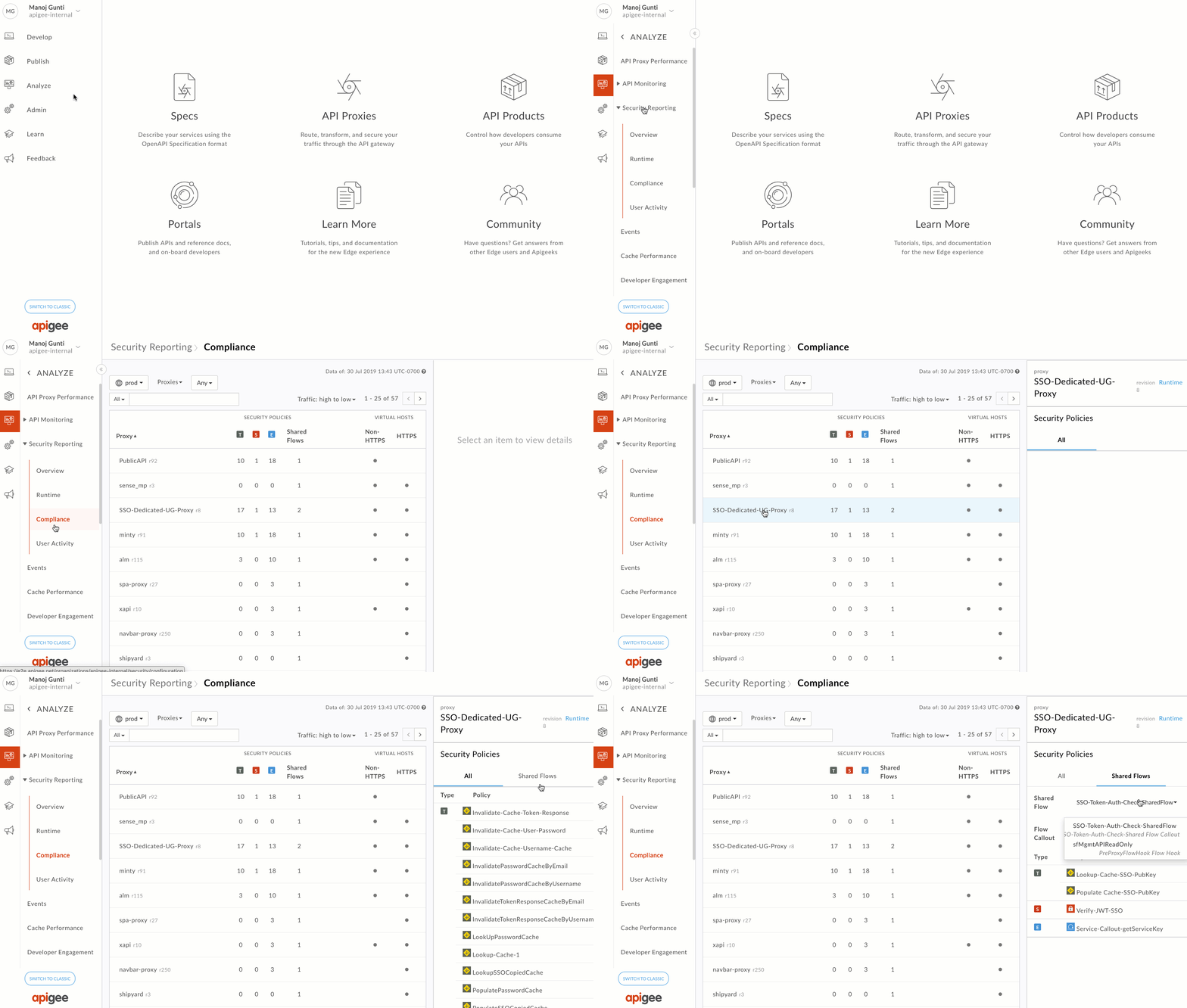
As APIs become the de facto standard for building and connecting business-critical applications, it’s important for operations teams to gain visibility into the security attributes of your APIs in order to continuously monitor and maintain the health of your API programs.  As you scale your API-powered digital initiatives, it’s important to have tools that help harness key signals from your data, which is why we’ve added a new API security reporting feature to our Apigee API management platform.This new capability provides broader, in-depth insights for operations teams to adhere to policies and compliance requirements, protect APIs from internal and external abuse, and quickly identify and resolve security incidents. Now available in beta, we’ll roll out API security reporting in phases to all Apigee Edge enterprise cloud customers over the next few weeks. Apigee API security reporting provides several core capabilities. Here’s a closer look:Security complianceAs an administrator, you can now ensure that every API across your organization adheres to your business’s security policies and compliance requirements. You can quickly review traffic, security and extension policy configurations, shared flow configurations and revisions across proxies. You can also monitor which virtual hosts and their respective ports receive HTTPS and non-HTTPS traffic.Data protectionAPI security reporting helps you protect sensitive data by providing insights into user access and behavior, letting you monitor who in your organization is accessing and exporting sensitive information, and identify suspicious behavior by analyzing patterns.Precision diagnosisAPI security reporting also lets you precisely identify where in the API value chain a security incident occurred and quickly diagnose its root cause. This significantly reduces your MTTD (mean-time-to-detect), allowing you to spend more time on problem resolution than on diagnostics. It also helps you detect anomalies in traffic patterns and identify the apps causing them, distinguish secure traffic vs. insecure traffic, and identify which apps and targets are being affected.Getting startedNow, more than ever, you need an easy way to monitor and maintain the security of your APIs. To learn more about best practices for securing APIs, download our latest eBook.  If you’re already an Apigee Edge cloud customer, check out our latest documentation to get started with API security reporting, where you’ll find a complete feature overview, guided tutorials, FAQs, and more. And if you’re not already an Apigee Edge customer, you can try it for free!
Quelle: Google Cloud Platform

Disaster recovery of Azure disk encryption (V2) enabled virtual machines

Choosing Azure for your applications and services allows you take advantage of a wide array of security tools and capabilities. These tools and capabilities help make it possible to create secure solutions on Azure. Among these capabilities is Azure disk encryption, designed to help protect and safeguard your data to meet your organizational security and compliance commitments. It uses the industry standard BitLocker Drive Encryption for Windows and DM-Crypt for Linux to provide volume encryption for OS and data disks. The solution is integrated with Azure Key Vault to help you control and manage disk encryption keys and secrets, and ensures that all data on virtual machine (VM) disks are encrypted both in-transit and at rest while in Azure Storage.

Beyond securing your applications, it is important to have a disaster recovery plan in place to keep your mission critical applications up and running when planned and unplanned outages occur. Azure Site Recovery helps orchestrate replication, failover, and recovery of applications running on Azure Virtual Machines so that they are available from a secondary region if you have any outages in the primary region.

Azure Site Recovery now supports disaster recovery of Azure disk encryption (V2) enabled virtual machines without Azure Active Directory application. While enabling replication of your VM for disaster recovery, all the required disk encryption keys and secrets are copied from the source region to the target region in the user context. If the user managing disaster recovery does not have the appropriate permissions, the user can hand over the ready-to-use script to the security administrator to copy the keys and secrets and proceed with configuration.

This feature currently supports only Windows VMs using managed disks. The support for Linux VMs using managed disks will be available in the coming weeks. This feature is available in all Azure regions where Azure Site Recovery is available. Configure disaster recovery for Azure disk encryption enabled virtual machines using Azure Site Recovery today and become both secure and protected from outages.
Quelle: Azure

Cloud IAP enables context-aware access to VMs via SSH and RDP without bastion hosts

Ever since 2011, we’ve been leveraging the BeyondCorp security model (also known as zero trust) to protect access to our internal resources. In the past few years, we’ve made it easier for you to adopt the same model for your apps, APIs, and infrastructure through context-aware access capabilities that are natively built into our cloud platform. This January, we enhanced context-aware access capabilities in Cloud Identity-Aware Proxy (IAP) to help you protect SSH and RDP access to your virtual machines (VMs)—without needing to provide your VMs with public IP addresses, and without having to set up bastion hosts. This capability is now generally available for all customers.Context-aware access: High-level architectureContext-aware access allows you to define and enforce granular access policies for apps and infrastructure based on a user’s identity and the context of their request. This can help strengthen your organization’s security posture while giving users an easier way to access apps or infrastructure resources without using a VPN client, from virtually any device, anywhere. With the general availability of context-aware access in Cloud IAP for SSH and RDP, you can now control access to VMs based on a user’s identity and context (e.g. device security status, location, etc). In addition, VMs protected by Cloud IAP don’t require any changes and no separate infrastructure deployment—simply configure IAP and access to your VM instance is automatically protected with a planet-scale load balancer, complete with DDoS protection, TLS termination, and context-aware access controls.One of our partners, Palo Alto Networks, has been using this capability to protect access to their cloud workloads. “Customers trust us with their data, so keeping it secure is our number one goal,” says Karan Gupta, SVP, Application Framework. “Context-aware access in combination with Palo Alto Networks endpoint protection enables us to control access to our infrastructure deployed in GCP following zero trust principles, helping to secure our public cloud workloads while making our work easier and keeping our costs low.”How it worksImagine you want to allow SSH access to VMs for a group of users in GCP. You can use Cloud IAP to enable access without exposing any services directly to the Internet simply by configuring its TCP forwarding feature.The Cloud IAP admin experienceThis is how it works: When a user runs SSH from the gcloud command-line tool, SSH traffic is tunneled over a TLS connection to Cloud IAP, which applies any relevant context-aware access policies. If access is allowed, the tunneled SSH traffic is transparently forwarded to the VM instance. SSH encryption happens end-to-end from gcloud command-line tool to the target VM–Cloud IAP does not terminate the SSH connection; it only forwards traffic as permitted by the access policies. Remote Desktop Protocol (RDP) works similarly. As an administrator, all you have to do is configure access to the VM instances from the Cloud IAP IP subnet; your VM instances don’t need public IP addresses or dedicated bastion hosts. Beyond SSH, it’s also possible to set up “port forwarding” style access to any fixed TCP port on your VMs via Cloud IAP for access from the administrator’s client machine (for example, access to a SQL database for admin operations). Getting startedControlling SSH and RDP access to VMs with Cloud IAP brings context-aware access to your backend systems. To get started, navigate to the admin console, check out the documentation for step-by-step instructions, and read our new guide on establishing internet connectivity for private VMs. You can also use a plugin for Microsoft’s Remote Desktop Connection Manager that adds “Connect server via Cloud IAP” option to the context menu, making it easier to connect to your Windows VMs in GCP.
Quelle: Google Cloud Platform

Google Cloud networking in-depth: Series digest

With everything from physical cables to software for building the next generation of cloud-native applications, Google Cloud’s networking portfolio is deep and wide. Sometimes, it can help to think of networking features as under one of five key functions: connect, scale, secure, optimize and modernize. Recently, we’ve been discussing these capabilities in our Google Cloud networking in-depth series. We have several more installments in that series coming up, but now is a good time to do a recap of what we’ve discussed so far.Resilient connectivity is the foundation of hybrid cloudWithin the connect pillar, we made several advancements in our hybrid connectivity portfolio. With High Availability (HA) VPN, enterprises can connect their on-premises deployment to a Google Cloud Platform (GCP) VPC with an industry-leading SLA of 99.99% by creating redundant VPNs. 100 Gbps Dedicated Interconnect enables and accelerates bandwidth-heavy applications with 10X the circuit bandwidth for your hybrid and multi-cloud deployments.We’ve also made major strides with Cloud DNS. Cloud DNS private zones (GA), peering (beta), and logging (beta)help improve the flexibility of your private cloud architecture, while providing you visibility into your private DNS traffic.Building for scale and performanceGoogle has eight services that serve over a billion users every day. At the core of our infrastructure are distributed software defined systems such as the highly-scalable Jupiter network fabric and high-performance, flexible Andromeda virtual network stack. With Andromeda 2.2, we were able to increase VM-to-VM bandwidth by nearly 18X as well as reduce latency by 8X—all without introducing any downtime. In addition, you can now raise the egress bandwidth cap to 32 Gbps for same-zone VM-to-VM traffic, and we’ll soon raise the  bandwidth caps for VMs with eight NVIDIA V100 or four T4 GPUs attached to 100 Gbps.Software-defined principles are ingrained in our DNA. Unlike traditional load balancing solutions, even our load balancing solutions are designed as large-scale distributed software-defined systems. This blog provides a comprehensive view of our load balancing portfolio. Content delivery is another key requirement for enterprises, helping you scale your applications around the world. Cloud CDN lets you deliver content closer to your users. It caches content in 96 locations around the world, and hands it off to 134 network edge locations with industry-leading performance and throughput.  Choice matters when it comes to optimizing your networkWith Network Service Tiers, GCP lets you customize your underlying network, letting you optimize for performance or cost on a per workload basis. Premium Tier delivers exceptional performance around the globe by taking advantage of Google’s well-connected, high-bandwidth, low-latency, highly reliable global backbone network, whereas the standard tier offers regional networking with performance comparable to that of other cloud service providers. Comprehensive network security should be top of mindThe need for trust is one of the biggest hurdles for enterprises operating in the cloud. Google Cloud was recently named a leader in the Forrester Wave™: Data Security Portfolio Vendors, Q2 2019 report.GCP offers a robust set of network security controls that help you reduce risk and protect your resources and environment, helping you adopt a comprehensive defense-in-depth security strategy: Secure your internet-facing servicesSecure your VPC for private deploymentsMicro-segment access to your applications and servicesNetworking innovations for application modernization At Google Cloud we continue to innovate so we can empower you to modernize your applications. Read this blog to read more on enterprise modernization enabled by our migration and networking portfolio. We hope you’ve enjoyed our Google Cloud networking in-depth series so far. Stay tuned for future installments, in particular, a deep dive about the new Layer 7 Internal Load Balancer.
Quelle: Google Cloud Platform

High Availability Add-On updates for Red Hat Enterprise Linux on Azure

High availability is crucial to mission-critical production environments. The Red Hat Enterprise Linux High Availability Add-On provides reliability and availability to critical production services that use it. Today, we’re sharing performance improvements and image updates around the High Availability Add-On for Red Hat Enterprise Linux (RHEL) on Azure.

Pacemaker

Pacemaker is a robust and powerful open-source resource manager used in highly available compute clusters. It is a key part of the High Availability Add-On for RHEL.

Pacemaker has been updated with performance improvements in the Azure Fencing Agent to significantly decrease Azure failover time, which greatly reduces customer downtime. This update is available to all RHEL 7.4+ users using either the Pay-As-You-Go images or Bring-Your-Own-Subscription images from the Azure Marketplace.

New pay-as-you-go RHEL images with the High Availability Add-On

We now have RHEL Pay-As-You-Go (PAYG) images with the High Availability Add-On available in the Azure Marketplace. These RHEL images have additional access to the High Availability Add-On repositories. Pricing details for these images are available in the pricing calculator.

The following RHEL HA PAYG images are now available in the Marketplace for all Azure regions, including US Government Cloud:

RHEL 7.4 with HA
RHEL 7.5 with HA
RHEL 7.6 with HA

New pay-as-you-go RHEL for SAP images with the High Availability Add-On

We also have RHEL images that include both SAP packages and the High Availability Add-On available in the Marketplace. These images come with access to SAP repositories as well as 4 years of support per standard Red Hat policies. Pricing details for these images are available in the pricing calculator.

The following RHEL for SAP with HA and Update Services images are available in the Marketplace for all Azure regions, including US Government Cloud:

RHEL 7.4 for SAP with HA and Update Services
RHEL 7.5 for SAP with HA and Update Services
RHEL 7.6 for SAP with HA and Update Services

Refer to the Certified and Supported SAP HANA Hardware Directory to see the list of SAP-certified Azure VM sizes.

You can also get a full listing of RHEL images on Azure, including the RHEL with HA and RHEL for SAP with HA images with the following Azure CLI command:

az vm image list –publisher redhat –all

Support

All the RHEL with HA and RHEL for SAP with HA images on Azure are fully supported by the Red Hat and Microsoft integrated support team.

See the support site here and the Red Hat support site here.

Full details on the Red Hat Enterprise Linux support lifecycle are available here.

Next steps

Visit the Red Hat on Azure site to learn more about Red Hat workloads on Azure.
View pricing information at the pricing calculator.
Get started with the RHEL HA PAYG images and the RHEL for SAP with HA PAYG images.
Learn to create a Pacemaker cluster for SAP using RHEL by following our instructions here.
Deploy SAP on RHEL with our Quickstart Guide.

Quelle: Azure