Amazon EMR kündigt Unterstützung für die Laufzeitinstallation externer Bibliotheken mit EMR-Notebooks an

Sie können jetzt externe Python-Bibliotheken während der Laufzeit mithilfe von EMR-Notizbüchern auf EMR-Clustern installieren. In der Vergangenheit mussten Sie vor dem Starten des EMR-Clusters eine Bootstrap-Aktion oder eine benutzerdefinierte AMI verwenden, um zusätzliche Bibliotheken zu installieren, die nicht mit dem AMI gepackt wurden. Dank dieser Funktion können Sie von Ihrem Notebook aus Ihre bevorzugten Bibliotheken importieren und sie zum Erstellen Ihrer Spark-Anwendung, Analysieren von Daten und Visualisieren der Ergebnisse verwenden. Die Python-Bibliotheken, die Sie mit EMR Notebooks installieren, sind für die Notebook-Sitzung isoliert und beeinträchtigen vorhandene Bibliotheken im EMR-Cluster nicht. Sie können diese Bibliotheken entweder aus öffentlichen oder privaten PyPI-Repositorys importieren. Weitere Informationen über diese Funktion finden Sie unter Verwenden von Notebook-definierten Bibliotheken.
Die Funktion ist ab EMR Version 5.26.0 verfügbar.
EMR Notebooks ist in den Regionen USA Ost (Nord-Virginia und Ohio), USA West (Nordkalifornien und Oregon), Kanada (Zentral), EU (Frankfurt, Irland und London) sowie Asien-Pazifik (Mumbai, Seoul, Singapur, Sydney und Tokio) verfügbar.
 
Quelle: aws.amazon.com

Amazon Redshift empfiehlt ab sofort Verteilungsschlüssel für eine bessere Abfrageleistung

Amazon Redshift Advisor empfiehlt ab sofort den passendsten Verteilungsschlüssel für häufig abgefragte Tabellen, um die Abfrageleistung zu verbessern. Advisor generiert maßgeschneiderte Empfehlungen, indem die Leistung und Abfragemuster des Clusters analysiert werden. Sie können dann den Befehl ALTER TABLE ALTER DISTKEY nutzen, um den Verteilungsschlüssel einer Tabelle hinzuzufügen oder zu bearbeiten. Dabei werden keine zeitgleichen Lese- oder Schreibabfragen beeinflusst.
Quelle: aws.amazon.com

Amazon EMR führt die Konfiguration Block Public Access ein, um EMR-Cluster vor unbeabsichtigten Netzwerkschwachstellen zu schützen.

Amazon hat eine neue Konfiguration auf Kontoebene vorgestellt: Block Public Access. Sie soll Administratoren dabei unterstützen, ihre EMR-Cluster vor uneingeschränktem Zugriff über öffentliche Netzwerke zu schützen. Wenn Sie diese Konfiguration aktivieren, können Sie damit verhindern, dass Ihre Kontobenutzer Cluster mit Sicherheitsgruppenregeln starten, die Ports für eingehenden Datenverkehr von IPv4 0.0.0.0/0 oder IPv6 ::/0 öffnen. Auch Ausnahmen können in Block Public Access erstellt werden, sodass der Zugriff über öffentliche Netzwerke anhand eines bestimmten Ports oder verschiedener Ports möglich ist, bevor EMR-Cluster gestartet werden. Besuchen Sie Verwenden der Konfiguration Amazon EMR Block Public Access für weitere Informationen.
Diese Funktion ist ab sofort im Osten der USA (Nördliches Virginia und Ohio), im Westen der USA (Nördliches Kalifornien und Oregon), Kanada (zentral), in der EU (Frankfurt, Irland, London, Paris und Stockholm), sowie in bestimmten Regionen des asiatisch-pazifischen Raums (Mumbai, Seoul, Singapur, Sydney und Tokio) und Südamerikas (São Paulo) verfügbar.
Quelle: aws.amazon.com
Amazon AppStream 2.0 unterstützt ab sofort Amazon Virtual Private Cloud-Endpunkte für API-Operationen und Datenverkehr-Streaming

Sie können ab sofort über Ihre Amazon Virtual Private Cloud (Amazon VPC) mithilfe von VPC-Endpunkten Datenverkehr-Streams (z. B. Pixel, USB, Benutzereingaben, Audio, Zwischenablage, Upload und Download von Dateien, Drucker) an Ihre Amazon AppStream 2.0 Streaming-Instances leiten. Sie können außerdem einen VPC-Endpunkt dazu nutzen, API-Operationen ohne Internetverbindung durchzuführen. Mit dieser Funktion kann die Netzwerkverbindung zwischen Ihren Benutzern, Ihren AppStream 2.0-Streaming-Instances und Ihren API-Operationen auf private Netzwerkpfade beschränkt werden, was Ihre Anwendungen noch weiter absichert. VPC-Endpunkte für AppStream 2.0 werden von AWS PrivateLink bereitgestellt, einer hochverfügbaren, skalierbaren Technologie, die es Kunden ermöglicht, ihre Amazon VPC privat mit unterstützten AWS-Services zu verbinden.
Quelle: aws.amazon.com

Amazon AppStream 2.0 fügt Support für die Umleitung des lokalen Dateisystems hinzu

Amazon AppStream 2.0 unterstützt jetzt die lokale Dateisystemumleitung mit dem AppStream 2.0-Client für Windows. Mit dieser Funktion können Ihre Benutzer Dateien innerhalb ihrer Streaming-Sitzung nahtlos auf ihrem lokalen Computer öffnen oder speichern. Um die Funktion zu verwenden, verknüpfen Benutzer die lokalen Laufwerke und Ordner, auf die sie in ihrer Streaming-Sitzung zugreifen möchten. Nachdem ihre lokalen Laufwerke und Ordner verknüpft wurden, können Benutzer im Datei-Explorer auf diese Ressourcen zugreifen, wenn sie Dateisystemvorgänge wie Datei öffnen, Datei speichern und Datei speichern unter ausführen. Diese Funktion ist nur über den AppStream 2.0-Client für Windows verfügbar. Für diese Funktion fallen keine zusätzlichen Gebühren an. Weitere Informationen finden Sie unter Aktivieren der Dateisystemumleitung für Ihre AppStream 2.0-Benutzer
Quelle: aws.amazon.com

From the Enterprisers Project: What Are Kubernetes Secrets?

The Enterprisers Project always has terrific information that can help you and your team communicate those complex cloud computing concepts to the C-levels. This past week, they published an excellent article describing what exactly secrets are in Kubernetes, how to manage them and what security benefits they provide. From the article:
Kubernetes Secrets defined, three ways
Let’s add a few more clear-cut definitions of Secrets to your arsenal that should help you either get up to speed as necessary or explain the concept to others on the team.
1. “As applications run in Kubernetes, apps need credentials to interact with the surrounding infrastructure or another application. Those credentials are kept in Kubernetes, and your applications can use a credential by specifying the name of a Secret as opposed to having the application keep the contents of the Secret.” –Eric Han, VP of product management at Portworx. (Han was also the first Kubernetes product manager when it was still an internal system at Google.)
2. “Kubernetes Secrets provide a means to protect sensitive information in a way that limits accidental exposure and provides flexibility in how the information is utilized. Secrets are only accessible to Pods if they are explicitly part of a mounted volume or at the time when the Kubelet is pulling the image to be used for the Pod. This prevents the need to store sensitive information in a Pod image, which mitigates the risk that data is compromised and makes it easier to vary things like credentials, cryptographic keys, etc. for different pods.” –Jonathan Katz, director of customer success & communications at Crunchy Data
3. “Kubernetes Secrets are a way to store and distribute sensitive information – think passwords, or an SSL certificate – that are used by applications in your Kubernetes cluster. Importantly, the declarative nature of Kubernetes definitions allows third-party solutions to be integrated with the Secret management.” –Gary Duan, CTO at NeuVector
Read the full article here.
The post From the Enterprisers Project: What Are Kubernetes Secrets? appeared first on Red Hat OpenShift Blog.
Quelle: OpenShift

DR for cloud: Architecting Microsoft SQL Server with GCP

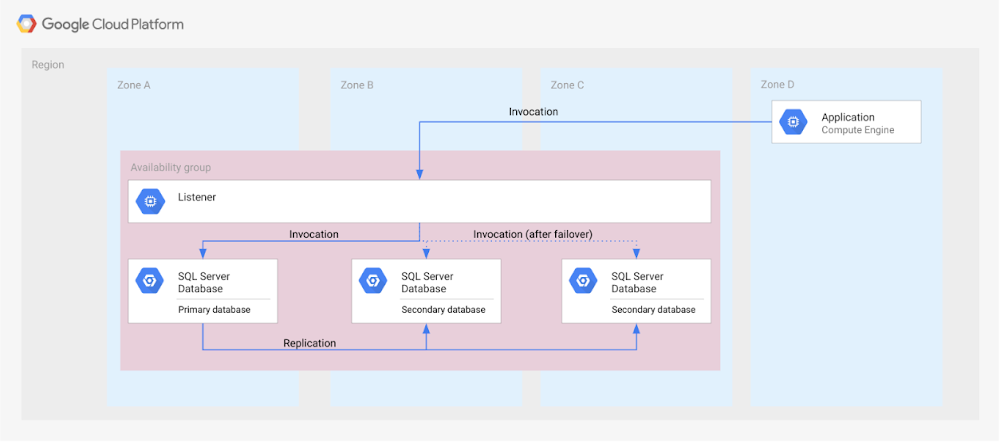
Database disaster recovery (DR) planning is an important component of a bigger DR plan, and for enterprises using Microsoft SQL Server on Compute Engine, it often involves critical data. When you’re architecting a disaster recovery solution with Microsoft SQL Server running on Google Cloud Platform (GCP), you have some decisions to make to build an effective, comprehensive plan. Microsoft SQL Server includes a variety of disaster recovery strategies and features, such as Always On availability groups or Failover Cluster Instances. And Google Cloud is designed from the start for resilience and availability. There are several types of data centers available within GCP where you can map SQL Server’s availability features based on your specific requirements: zones and regions. Zones are autonomous data centers co-located within a GCP region. These regions are available in different geographies such as North America or APAC. However, there is no single disaster recovery strategy to map Microsoft SQL Server DR features to Google Cloud’s data center topology that satisfies every possible combination of disaster recovery requirements. As a database architect, you have to design a custom disaster recovery strategy based on your specific use cases and requirements.Our new Disaster Recovery for Microsoft SQL Server solution provides information on Microsoft’s SQL Server disaster recovery strategies, and shows how you can map them to zones and regions in GCP based on your business’s particular criteria and requirements. One example is deploying an availability group within a region across three zones (shown in the diagram below). For successful DR planning, you should have a clear conceptual model and established terminology in place. In this solution, you’ll find a base set of concepts and terms in context of Google Cloud DR. This includes defining terms like primary database, secondary database, failover, switchover, and fallback.You’ll also find details on recovery point objective, recovery time objective and single point of failure domain, since those are key drivers for developing a specific disaster recovery solution.Building a DR solution with Microsoft SQL Server in GCP regionsTo get started with implementing the availability features of Microsoft SQL Server in the context of Google Cloud, take a look at this diagram, which shows the implementation of an Always On availability group in a GCP region, using several zones:In the new solution, you’ll see other availability features, like log shipping, along with how they map to GCP. In addition, features in Microsoft SQL Server that are not deemed availability features—like server replication and backup file shipping—can actually be used for disaster recovery, so those are included as well. Disaster recovery features of Microsoft SQL Server do not have to be used in isolation and can be combined for more complex and demanding use cases. For example, you can set up availability groups in two regions with log shipping as the transfer mechanism between the regions.Disaster Recovery for Microsoft SQL Server also describes the disaster recovery process itself, how to test and verify a defined disaster recovery solution, and outlines a basic approach, step-by-step. Learn more about SQL Server on GCP and check out all of our solutions.
Quelle: Google Cloud Platform






