AWS IoT Device Tester für Amazon FreeRTOS unterstützt jetzt Amazon FreeRTOS 201908.00

AWS IoT Device Tester für Amazon FreeRTOS v 1.4.0 unterstützt jetzt Amazon FreeRTOS 201908.00. Mit dieser Version können Hersteller von Microcontrollern Entwicklungsplatinen für das neueste Amazon FreeRTOS mit aktualisierten PKCS#11-Testgruppen qualifizieren. Der AWS IoT Device Tester v1.4.0 enthält auch aussagekräftige Fehlermeldungen für Hersteller, um Fehler schneller zu beheben.
Quelle: aws.amazon.com

5 steps to improve your cloud security posture with Cloud Security Command Center

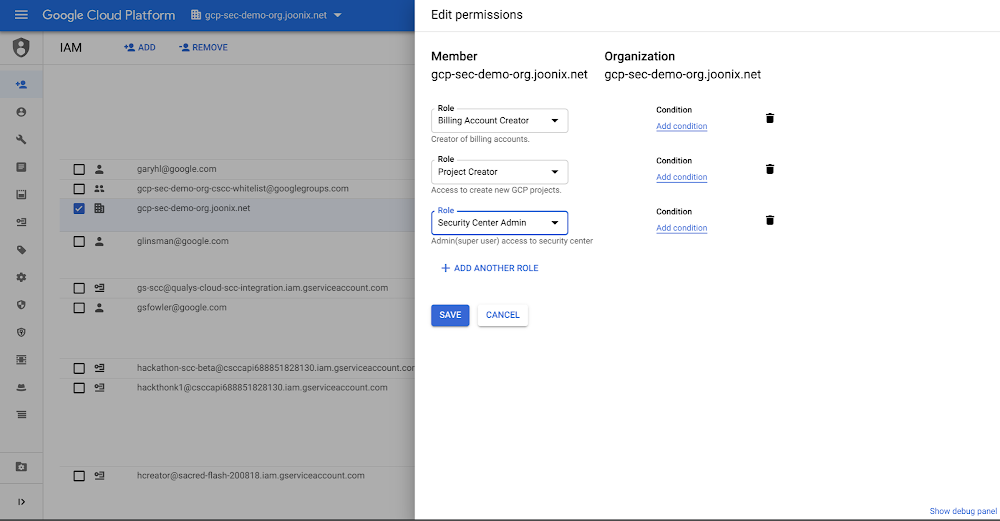
Editor’s note:This the first blog in our six part series on how to use Cloud Security Command Center. One of the great benefits of cloud-based services is how easy they are to deploy. However,  this ease of deployment can make it so your organization isn’t always aware of exactly what services you’re running. When you combine this with the increasing volume of cyber attacks, it becomes clear that you need to be able to see what resources you’re running, the vulnerabilities and threats present, and how to fix them before they can result in damage or loss. Cloud Security Command Center (Cloud SCC) helps you with all of these tasks by providing a centralized dashboard to help you prevent, detect, and respond to threats in your GCP environment. You can start improving your cloud security posture today in five steps. Step 1: Set up Cloud IAM permissions To use Cloud Security Command Center, someone in your organization needs to have the Security Center IAM role. This role provides access to Cloud SCC and ensures that users with the role assigned have the right level of permissions to complete their tasks.Step 2: Enable Cloud Security Command Center Cloud Security Command Center is not enabled by default, giving you the flexibility to choose where you want to use it. We recommend that you enable Cloud SCC for organizations running development, testing, and production workloads.To enable Cloud SCC, you’ll also need to turn on Asset Monitoring. This allows Cloud SCC to discover what GCP assets—our term for resources—you’re running in Google Cloud.Step 3: Turn on Security SourcesOnce you’ve enabled Cloud SCC, you can toggle on our built-in features and products to see the security state of your GCP assets. These features and products can surface information such as misconfigured identity and access management policies, leaked credentials, or what storage buckets contain sensitive and regulated data. We recommend that you turn on all our built-in capabilities and products to increase your visibility into misconfigurations, vulnerabilities, and threats in your environment.Step 4: View your security state by AssetsNow that you’ve turned on Cloud Security Command Center, Asset Monitoring, and Security Sources, you can see the security state of your GCP assets. Looking at your security state by project within Assets lets you see issues related to a specific project.You can also view your security state by asset type. This lets you see the state of your organization at a specific time, or check out which assets have changed, so you can look for  unauthorized modifications.Step 5: View your security state by FindingsFindings are what Cloud SCC has discovered about your assets or resources. You can filter your findings by type, the issue Cloud SCC discovered with your resource, or by source (the feature or product that found the issue). You can also filter findings based on time, so you can quickly gain insight into all the security issues surfaced at a particular time.Cloud SCC in actionTo learn more about how to get started with Cloud SCC, and see it in action, check out our video.
Quelle: Google Cloud Platform

5 Things That Happen When You Get Locked In to an Application Platform

The Consequences of Application Platform Lock-in 
If you’ve worked in IT for a few years, you’ve seen it happen. You select an application framework, operating system, database platform, or other infrastructure because it meets the checklist, the price is right, or sometimes because of internal politics. You quickly discover that it doesn’t play well with other solutions or across platforms — except of course it’s “easy and seamless” when used with offerings from the same vendor.

But try telling your developers that they can’t use their favorite framework, development toolset, or have to use a specific operating system for everything they do. If developers feel like they don’t have flexibility, they quickly adopt their own tools, creating a second wave of shadow IT.
And it doesn’t just affect developers. IT operations and security get bogged down in managing multiple systems and software sprawl. The business suffers because efficiency and innovation lag when teams get caught up in fighting fires.
Below are 5 things that can go wrong when you get locked in to an infrastructure platform:
#1 Other Platforms Become Inaccessible
Will the platform you pick work with any combination of public and private clouds? Will you get cornered into using a specific operating system for anything tied to their platform? When an infrastructure vendor pushes you to use their other platforms because they’re “well-integrated,” think carefully about whether you’re willing to limit your choices as this will likely cost more and result in unhappy developers.
#2 Your Best Developers Find Other Opportunities
Developers want to work with the best frameworks and tools for their task at hand. Node.js and .NET Core may be popular with developers, but there are a wide range of tools out there. The  2019 Stack Overflow Developer survey results, make it clear that  developers have diverse preferences and work best when they have the most choice and flexibility.
#3 Application Development Will Slow Down
If developers are forced into a particular development framework, innovation and creativity can be hindered. Good developers rarely have trouble finding work, so your best talent may leave. Even if most of your developers stick around, they’ll spend more time testing applications across platforms. What works on one machine won’t necessarily work on another if developers are busy finding work-arounds to use the tools they prefer.
#4 Operations Teams Will Spend More Time Fighting Fires
Keeping the lights on already consumes 70 to 80 percent of IT budgets. Using application platforms and tools from a single vendor may seem like it will save time, but the reality can be quite different. Other solutions come into the picture (usually whether you want them to or not!), creating silos of infrastructure that IT ops teams need to look after.
#5 The Business May Not Be Able to Pick the Best Technology
If you’re stuck primarily with one platform and framework but a new, promising tool isn’t compatible, you can either adopt another platform or pick a second-rate tooling. Platform lock-in means the business can end up forced to make technology choices that ultimately don’t serve the best interests of the company.
Platform Lock-in is Bad for Your Business
At Docker, we believe in simplicity and choice. We simplified containers and offer the broadest choice for developers and operators. You should be able to build, share and run applications across any combination of clouds, operating systems, languages and frameworks. That’s why Docker Enterprise works with every cloud provider, runs on all major operating systems, and supports Kubernetes for orchestration across that hybrid architecture. It’s no accident that containerd, the runtime engine developed by Docker, is the industry standard.
And developers love the flexibility Docker gives them. They even ranked Docker as the #1 “Most Loved Platform”, #2 “Most Wanted Platform” and #3 “Platform In Use” in the Stack Overflow survey. 
Start a Free Trial

5 Things That Happen When You Get Locked In to an App PlatformClick To Tweet

To learn more about how Docker gives you simplicity and choice:

Try a free, hosted trial or catch our Docker Enterprise 3.0 Launch Webinar Series
Learn about Docker for Developers
Learn more about the Docker Kubernetes Service

The post 5 Things That Happen When You Get Locked In to an Application Platform appeared first on Docker Blog.
Quelle: https://blog.docker.com/feed/

Latency is the new currency of the Cloud: Announcing 31 new Azure edge sites

Providing users fast and reliable access to their cloud services, apps, and content is pivotal to a business’ success.

The latency when accessing cloud-based services can be the inhibitor to cloud adoption or migration. In most cases, this is caused by commercial internet connections that aren’t tailored to today’s global cloud needs. Through deployment and operation of globally and strategically placed edge sites, Microsoft dramatically accelerates the performance and experience when you are accessing apps, content, or services such as Azure and Office 365 on the Microsoft global network.

Edges optimize network performance through local access points to and from the vast Microsoft global network, in many cases providing 10x the acceleration to access and consume cloud-based content and services from Microsoft.

What is the network edge?

Solely providing faster network access isn’t enough, and applications need intelligent services to expedite and simplify how a global audience accesses and experiences their offerings. Edge sites provide application development teams increased visibility and higher availability to access services that improve how they deliver global applications.

Edge sites benefit infrastructure and development teams in multiple key areas

Improved optimization for application delivery through Azure Front Door (AFD.) Microsoft recently announced AFD, which allows customers to define, manage, accelerate, and monitor global routing for web traffic with customizations for the best performance and instant global failover for application accessibility.
An enhanced customer experience via high-bandwidth access to Azure Blob storage, web applications, and live video-on-demand streams. Azure Content Delivery Network delivers high-bandwidth content by caching objects to the consumer’s closest point of presence.
Private connectivity and dedicated performance through Azure ExpressRoute. ExpressRoute provides up to 100 gigabits per second of fully redundant bandwidth directly to the Microsoft global network at select peering locations across the globe, making connecting to and through Azure a seamless and integrated experience for customers.

New edge sites

Today, we’re announcing the addition of 31 new edge sites, bringing the total to over 150 across more than 50 countries. We’re also adding 14 new meet-me sites to Azure ExpressRoute to further enable and expand access to dedicated private connections between customers’ on-premises environments and Azure.

More than two decades of building global network infrastructure have given us a keen awareness of globally distributed edge sites and their critical role in a business’ success.

By utilizing the expanding network of edge sites, Microsoft provides more than 80 percent of global GDP with an experience of sub-30 milliseconds latency. We are adding new edges every week, and our ambition is to provide this level of performance to all of our global audience.

This expansion proves its value further when workloads move to the cloud or when Microsoft cloud services such as Azure, Microsoft 365, and Xbox are used. By operating over a dedicated, premium wide-area-network, our customers avoid transferring customer data over the public internet, which ensures security, optimizes traffic, and increases performance.

New edge sites

Country

City

Colombia

Bogota

Germany

Frankfurt
Munich

India

Hyderabad

Indonesia

Jakarta

Kenya

Nariobi

Netherlands

Amsterdam

New Zealand

Auckland

Nigeria

Lagos

Norway

Stavanger

United Kingdom

London

United States

Boston
Portland

Vietnam

Saigon

Upcoming edge sites

Country

City

Argentina

Buenos Aires

Egypt

Cairo

Germany

Dusseldorf

Israel

Tel Aviv

Italy

Rome

Japan

Tokyo

Norway

Oslo

Switzerland

Geneva

Turkey

Istanbul

United States

Detroit
Jacksonville
Las Vegas
Minneapolis
Nashville
Phoenix
Quincy (WA)
San Diego

New ExpressRoute meet-me sites

Country

City

Canada

Vancouver

Colombia

Bogota

Germany

Berlin
Dusseldorf

Indonesia

Jakarta

Italy

Milan

Mexico

Queretaro (Mexico City)

Norway

Oslo
Stavanger

Switzerland

Geneva

Thailand

Bangkok

United States

Minneapolis
Phoenix
Quincy (WA)

With this latest announcement, Microsoft continues to offer cloud customers the fastest and most accessible global network, driving a competitive advantage for organizations accessing the global market and increased satisfaction for consumers.

Explore the Microsoft global network to learn about how it can benefit your organization today.
Quelle: Azure
Cloud Text-to-Speech expands its number of voices by nearly 70%, now covering 33 languages and variants

In February, we provided an update on how we’re expanding our support for new languages/variants and voices in Cloud Text-to-Speech. Today, we’re adding to that progress by announcing:Voices in 12 new languages or variants, including Czech, English (India), Filipino, Finnish, Greek, Hindi, Hungarian, Indonesian, Mandarin Chinese (China), Modern Standard Arabic, Norwegian (Nynorsk), and Vietnamese—bringing the list of total languages/variants available to 33. 76 new voices (now 187 in total) overall across all languages/variants, including 38 new WaveNet neural net-powered voices (now 95 in total). See the complete list here.Availability of at least one WaveNet voice in all 33 languages/variants.With these updates, Cloud Text-to-Speech developers can now reach millions more people across numerous countries with their applications—with many more languages to come. This enables a broad range of use cases, including Contact Center AI virtual agents, interacting with IoT devices in cars and the home, and audio-enablement of books and other text-based content.Google Cloud Text-to-Speech runs on Google’s Tensor Processing Units (TPUs)—custom silicon chips that we designed from the ground up to accelerate machine learning and AI workloads. Our unique compute infrastructure, together with DeepMind’s cutting-edge research, has allowed us to develop and deploy WaveNet voices much faster than is typical in the industry. Cloud Text-to-Speech launched a year and a half ago with 6 WaveNet voices in 1 language, and we now have 95 WaveNet voices in 33 languages.Among the major public cloud platforms, Cloud Text-to-Speech now offers the most languages/variants with “natural” (neural net-powered) voices, and the most voices overall:The WaveNet advantageWhen customers call into contact centers, use verbal commands with connected devices in cars or in their homes, or listen to audio conversions of text-based media, they increasingly expect a voice that sounds natural and human. Businesses that offer human-sounding voices offer the best experiences for their customers, and if that experience can also be provided in numerous languages and countries, that advantage becomes global. WaveNet in Cloud Text-to-Speech makes that advantage possible without the need for vast investments in developing your own AI-powered speech synthesis. Based on neural-net technology, WaveNet creates natural-sounding voices, closing the perceived quality gap between speech synthesis and human speech in US English by 70% per Mean Opinion Score. The practical impact is that for most listeners, a WaveNet voice makes human/computer interaction a smooth and familiar experience.The difference between a standard synthetic voice and a WaveNet one is pretty clear; just listen to some of the new voices for yourself:English (India):Standard Voice vs WaveNet VoiceHungarian: Standard Voice vs WaveNet VoiceVietnamese: Standard Voice vs WaveNet VoiceMandarin Chinese: Standard Voice vs WaveNet VoiceJapanese: Standard Voice vs WaveNet VoiceFor a demo using text of your choosing, test-drive the example UI we built using the Cloud Text-to-Speech API.Next stepsCloud Text-to-Speech is free to use up to the first million characters processed by the API, so it’s easy to get started by building a simple test/demo app using your own data. We look forward to seeing what you build!
Quelle: Google Cloud Platform






