Automate MLOps workflows with Azure Machine Learning service CLI

This blog was co-authored by Jordan Edwards, Senior Program Manager, Azure Machine Learning

This year at Microsoft Build 2019, we announced a slew of new releases as part of Azure Machine Learning service which focused on MLOps. These capabilities help you automate and manage the end-to-end machine learning lifecycle.

Historically, Azure Machine Learning service’s management plane has been via its Python SDK. To make our service more accessible to IT and app development customers unfamiliar with Python, we have delivered an extension to the Azure CLI focused on interacting with Azure Machine Learning.

While it’s not a replacement for the Azure Machine Learning service Python SDK, it is a complimentary tool that is optimized to handle highly parameterized tasks which suit themselves well to automation. With this new CLI, you can easily perform a variety of automated tasks against the machine learning workspace, including:

Datastore management
Compute target management
Experiment submission and job management
Model registration and deployment

Combining these commands enables you to train, register their model, package it, and deploy your model as an API. To help you quickly get started with MLOps, we have also released a predefined template in Azure Pipelines. This template allows you to easily train, register, and deploy your machine learning models. Data scientists and developers can work together to build a custom application for their scenario built from their own data set.

The Azure Machine Learning service Command-Line Interface is an extension to the interface for the Azure platform. This extension provides commands for working with Azure Machine Learning service from the command-line and allows you to automate your machine learning workflows. Some key scenarios would include:

Running experiments to create machine learning models
Registering machine learning models for customer usage
Packaging, deploying, and tracking the lifecycle of machine learning models

To use the Azure Machine Learning CLI, you must have an Azure subscription. If you don’t have an Azure subscription, you can create a free account before you begin. Try the free or paid version of Azure Machine Learning service to get started today.

Next steps

Learn more about the Azure Machine Learning service.

Get started with a free trial of the Azure Machine Learning service.
Quelle: Azure

Highlights from SIGMOD 2019: New advances in database innovation

The emergence of the cloud and the edge as the new frontiers for computing is an exciting direction—data is now dispersed within and beyond the enterprise, on-premises, in the cloud, and at the edge. We must enable intelligent analysis, transactions, and responsible governance for data everywhere, from creation through to deletion (through the entire lifecycle of ingestion, updates, exploration, data prep, analysis, serving, and archival).

Our commitment to innovation is reflected in our unique collaborative approach to product development. Product teams work in synergy with research and advanced development groups, including Cloud Information Services Lab, Gray Systems Lab, and Microsoft Research, to push boundaries, explore novel concepts and challenge hypotheses.

The Azure Data team continues to lead the way in on-premises and cloud-based database management. SQL Server has been identified as the top DBMS by Gartner for four consecutive years.  Our aim is to re-think and redefine data management by developing optimal ways to capture, store and analyze data.

I’m especially excited that this year we have three teams presenting their work: “Socrates: The New SQL Server in the Cloud,” “Automatically Indexing Millions of Databases in Microsoft Azure SQL Database,” and the Gray Systems Lab research team’s “Event Trend Aggregation Under Rich Event Matching Semantics.” 

The Socrates paper describes the foundations of Azure SQL Database Hyperscale, a revolutionary new cloud-native solution purpose-built to address common cloud scalability limits. It enables existing applications to elastically scale without fixed limits without the need to rearchitect applications, and with storage up to 100TB.

Its highly scalable storage architecture enables a database to expand on demand, eliminating the need to pre-provision storage resources, providing flexibility to optimize performance for workloads. The downtime to restore a database or to scale up or down is no longer tied to the volume of data in the database and database point-in-time restores are very fast, typically in minutes rather than hours or even days. With read-intensive workloads, Hyperscale provides rapid scale-out by provisioning additional read replicas instantaneously without any data copy needed.

Learn more about Azure SQL Database Hyperscale.

Azure SQL Database also introduced a new serverless compute option: Azure SQL Database serverless. Serverless allows compute and memory to scale independently and on-demand based on the workload requirements. Compute is automatically paused and resumed, eliminating the requirements of managing capacity and reducing cost, and is an efficient option for applications with unpredictable or intermittent compute requirements.

Learn more about Azure SQL Database serverless.

Index management is a challenging task even for expert human administrators. The ability to create efficiencies and fully automate the process is of critical significance to business, as discussed in the Data team’s presentation on the auto-indexing feature in Azure SQL Database.

This, coupled with the identification of how to achieve optimal query performance for complex real-world applications, underpins the auto-indexing feature.

The auto-indexing feature is generally available and generates index recommendations for every database in Azure SQL Database. If the customer chooses, it can automatically implement index changes on their behalf and validate these index changes to ensure that performance improves. This feature has already significantly improved the performance of hundreds of thousands of databases.

Discover the benefits of the auto-tuning feature in Azure SQL Database.

In the world of streaming systems, the key challenges are supporting rich event matching semantics (e.g. Kleene patterns to capture event sequences of arbitrary lengths), and scalability (i.e. controlling memory pressure and latency at very high event throughputs). 

The advanced research team focused on supporting this class of queries at a very high scale and compiled their findings in Event Trend Aggregation Under Rich Event Matching Semantics. The key intuition is to incrementally maintain the coarsest grained aggregates that can support a given query semantics, enabling control of memory pressure and attainment of very good latency at scale. By carefully implementing this insight, a research prototype was built that achieves six orders of magnitude speed-up and up to seven orders of magnitude memory reduction compared to state-of-the-art approaches.

Microsoft has the unique advantage of a world-class data management system in SQL Server and a leading public cloud in Azure. This is especially exciting at a time when cloud-native architectures are revolutionizing database management.

There has never been a better time to be part of database systems innovation at Microsoft, and we invite you to explore the opportunities to be part of our team.

Enjoy SIGMOD 2019; it’s a fantastic conference! 
Quelle: Azure

To run or not to run a database on Kubernetes: What to consider

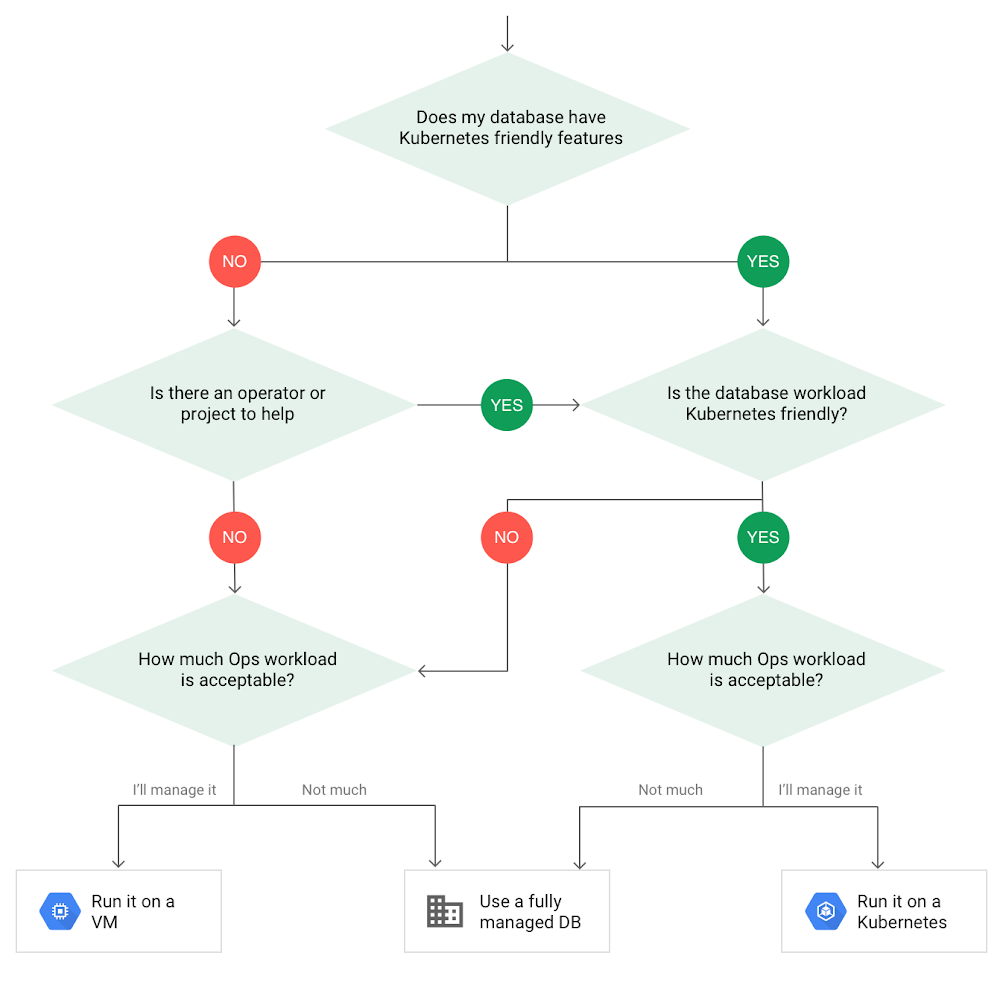
Today, more and more applications are being deployed in containers on Kubernetes—so much so that we’ve heard Kubernetes called the Linux of the cloud. Despite all that growth on the application layer, the data layer hasn’t gotten as much traction with containerization. That’s not surprising, since containerized workloads inherently have to be resilient to restarts, scale-out, virtualization, and other constraints. So handling things like state (the database), availability to other layers of the application, and redundancy for a database can have very specific requirements. That makes it challenging to run a database in a distributed environment. However, the data layer is getting more attention, since many developers want to treat data infrastructure the same as application stacks. Operators want to use the same tools for databases and applications, and get the same benefits as the application layer in the data layer: rapid spin-up and repeatability across environments. In this blog, we’ll explore when and what types of databases can be effectively run on Kubernetes.Before we dive into the considerations for running a database on Kubernetes, let’s briefly review our options for running databases on Google Cloud Platform (GCP) and what they’re best used for.Fully managed databases. This includes Cloud Spanner, Cloud Bigtable and Cloud SQL, among others. This is the low-ops choice, since Google Cloud handles many of the maintenance tasks, like backups, patching and scaling. As a developer or operator, you don’t need to mess with them. You just create a database, build your app, and let Google Cloud scale it for you. This also means you might not have access to the exact version of a database, extension, or the exact flavor of database that you want.Do-it-yourself on a VM. This might best be described as the full-ops option, where you take full responsibility for building your database, scaling it, managing reliability, setting up backups, and more. All of that can be a lot of work, but you have all the features and database flavors at your disposal.Run it on Kubernetes. Running a database on Kubernetes is closer to the full-ops option, but you do get some benefits in terms of the automation Kubernetes provides to keep the database application running. That said, it is important to remember that pods (the database application containers) are transient, so the likelihood of database application restarts or failovers is higher. Also, some of the more database-specific administrative tasks—backups, scaling, tuning, etc.—are different due to the added abstractions that come with containerization.Tips for running your database on KubernetesWhen choosing to go down the Kubernetes route, think about what database you will be running, and how well it will work given the trade-offs previously discussed. Since pods are mortal, the likelihood of failover events is higher than a traditionally hosted or fully managed database. It will be easier to run a database on Kubernetes if it includes concepts like sharding, failover elections and replication built into its DNA (for example, ElasticSearch, Cassandra, or MongoDB). Some open source projects provide custom resources and operators to help with managing the database.Next, consider the function that database is performing in the context of your application and business. Databases that are storing more transient and caching layers are better fits for Kubernetes. Data layers of that type typically have more resilience built into the applications, making for a better overall experience.  Finally, be sure you understand the replication modes available in the database. Asynchronous modes of replication leave room for data loss, because transactions might be committed to the primary database but not to the secondary database(s). So, be sure to understand whether you might incur data loss, and how much of that is acceptable in the context of your application.After evaluating all of those considerations, you’ll end up with a decision tree looking something like this:How to deploy a database on KubernetesNow, let’s dive into more details on how to deploy a database on Kubernetes using StatefulSets. With a StatefulSet, your data can be stored on persistent volumes, decoupling the database application from the persistent storage, so when a pod (such as the database application) is recreated, all the data is still there. Additionally, when a pod is recreated in a StatefulSet, it keeps the same name, so you have a consistent endpoint to connect to. Persistent data and consistent naming are two of the largest benefits of StatefulSets. You can check out the Kubernetes documentation for more details.If you need to run a database that doesn’t perfectly fit the model of a Kubernetes-friendly database (such as MySQL or PostgreSQL), consider using Kubernetes Operators or projects that wrap those database with additional features. Operators will help you spin up those databases and perform database maintenance tasks like backups and replication. For MySQL in particular, take a look at the Oracle MySQL Operator and Crunchy Data for PostgreSQL. Operators use custom resources and controllers to expose application-specific operations through the Kubernetes API. For example, to perform a backup using Crunchy Data, simply execute pgo backup [cluster_name]. To add a Postgres replica, use pgo scale cluster [cluster_name].There are some other projects out there that you might explore, such as Patroni for PostgreSQL. These projects use Operators, but go one step further. They’ve built many tools around their respective databases to aid their operation inside of Kubernetes. They may include additional features like sharding, leader election, and failover functionality needed to successfully deploy MySQL or PostgreSQL in Kubernetes.While running a database in Kubernetes is gaining traction, it is still far from an exact science. There is a lot of work being done in this area, so keep an eye out as technologies and tools evolve toward making running databases in Kubernetes much more the norm. When you’re ready to get started, check out GCP Marketplace for easy-to-deploy SaaS, VM, and containerized database solutions and operators that can be deployed to GCP or Kubernetes clusters anywhere.
Quelle: Google Cloud Platform

How Dutch telco KPN is making new connections with APIs

Editor’s note: Today’s post is by Anuschka Diderich, Platform Lead at KPN, a 130-year-old Dutch landline and mobile telecommunications services company. Read on to learn how KPN is connecting people using API-powered products and services.“I’ll connect you.”Those were the first words uttered over the line in 1881, when the first public telephone network in the Netherlands started operating. Though our name has changed since then, as a leading telco in The Netherlands, KPN has been making connections for over 130 years. One of our newest tools we’re using to do this is APIs.I’m responsible for the development of new platform business models, which is part of KPN’s Open Innovation Hub. A lot of our new development and initiatives start here, like the KPN API Store; successful projects in the hub grow into bigger things. Via the API Store, our APIs are offered to our existing B2B customers and also to prospects, including SMEs and large corporate customers. We take a marketplace approach to commercializing our APIs, offering homegrown KPN solutions along with third-party products; this is why we call it a store rather than a marketplace. Our partners range from startups to big companies, and our ecosystem keeps growing. We use the Apigee API management platform to power the KPN API Store.An API store for the telco industryAs a telco, communications APIs are obviously our core competency, and we offer quite a few contextual communications products. For example, we offer APIs for B2B call centers that enable them to add chat or SMS notifications to existing solutions, or move conversations from email to SMS and messaging apps. These are the building blocks that our customers use to create their own products and services.A good example: a software development company in the healthcare space developed a video consultation app for doctors. The app enables some types of appointments to happen outside of the hospital, freeing up precious time and resources for doctors, hospitals, and patients. The video API was developed by an ecosystem partner, acquired through the KPN store, and managed with Apigee, helping ensure that the high level of security and data protection required in healthcare is built into the app. The launch was so successful that now the app is being rolled out to 12 hospitals in the Netherlands.Another of our ecosystem partners, Contexta, is just out of the startup phase but already offering specialized speech-to-text functionality focused on the Dutch language. Clients integrate this service with APIs that improve quality control, training, regulation, and analytics in call centers. It is used to automatically identify which calls, based on keywords, need to be stored for a certain number of years to comply with Dutch regulatory requirements. Security and usabilityKPN has a dedicated team working with the Apigee platform across development, platform management, and monitoring. We took a soft launch approach to introduce the minimum viable product of the API Store, and then extended the portal’s functionality and started to build up a portfolio. We’ve been very satisfied with the speed to market that the platform gives us. Security is also an important consideration for KPN—it’s part of our value proposition to customers. During our evaluation, we put Apigee through rigorous testing so we would know the platform could meet our high security standards. We concluded that it offers us the right level of security, which helps us keep our promise to our customers. The developer portal that we’ve built on top of the Apigee platform targets two of our API Store’s target markets. One is of course developers, who like the convenience and usability of the portal. It’s easy to find APIs, test them in a sandbox environment, register, and start consuming them. But the second part of our strategy is focused on business owners, product owners, innovation managers, and product managers who want to extend their products’ functionality and who need APIs to do that. Setting the stage for innovationWith so many new APIs published every day, we appreciate that people only have to register once for the API Store and can then access multiple APIs. With the API Store, the documentation flow is standardized, there’s a single point of contact for support, and users only receive one invoice for all the APIs consumed.APIs provide endless possibilities for new products and services. Our API Store has enabled us to broaden our target market and create new revenue streams. We’ve been able to expand services like SMS that we already had internally. And we’ve also been able to combine services from KPN with those from third parties to create new functionality. All these APIs are available in the store, and we see clients starting to bundle them to create new products that KPN can help them to integrate.To learn more about API management with Apigee, visit our website.
Quelle: Google Cloud Platform