Scale action groups and suppress notifications for Azure alerts

In Azure Monitor, defining what to monitor while configuring alerts can be challenging. Customers need to be capable of defining when actions and notifications should trigger for their alerts, and more importantly, when they shouldn’t. The action rules feature for Azure Monitor, available in preview, allows you to define actions for your alerts at scale, and allows you to suppress alerts for scenarios such as maintenance windows.

Let’s take a closer look at how action rules (preview) can help you in your monitoring setup!

Defining actions at scale

Previously you could define what action groups trigger for your alerts while defining an alert rule. However, the actions that get triggered, whether it is an email that is sent or a ticket created in a ticketing tool, are usually associated with resource on which the alert is generated rather than the individual alert rule.

For example, for all alerts generated on the virtual machine contosoVM, I would typically want the following.

The same email address to be notified (e.g. contosoITteam@contoso.com)
Tickets to be created in the same ITSM tool

While you could define a single action group such as contosoAG and associate it with each and every alert rule authored on contosoVM, wouldn’t it be easier if you could easily associate contosoAG for every alert generated on contosoVM, without any additional configuration?

That’s precisely what action rules (preview) allow you to do. They allow you to define an action group to trigger for all alerts generated on the defined scope, this could be a subscription, resource group, or resource so that you no longer have to define them for individual alert rules!

Suppressing notifications for your alerts

There are often many scenarios where it would be useful to suppress the notifications generated by your alerts. This could be a planned maintenance window or even the suppression of notifications during non-business hours. You could possibly do this by disabling each and every alert rule individually, with complicated logic that accounts for time windows and recurrence patterns or you can get all of this out of the box by using action rules (preview).

Working on the same principle as before, action rules (preview) also allow you to define the suppression of actions and notifications for all alerts generated on a defined scope, which could be a subscription, resource group, or resource, while the underlying alert rules would continue to monitor. Furthermore, you have the capability to configure both the period as well as recurrence for the suppression, all out of the box! With this you could easily setup notification suppression based on your business requirements, which could be anything from suppression for all weekends such as a maintenance window, to suppression between 5pm – 9am everyday or normal business hours.

Filters for more flexibility

While you can easily define action rules (preview) to either author actions at scale or suppress them, action rules come with additional knobs and levers in the form of filters that allow you to fine tune what specific subset of your alerts the action rule acts on.

For example, going back to the example of suppressing notifications during non-business hours. Perhaps you might still want to receive notifications if there is an alert with severity zero or one, while the rest are suppressed. In such a scenario, I can define a severity filter as part of my action rule, which defines that the rule does not apply to alerts with severity of zero or one, and thus only applies to rules with severity of two, three or four.

Similarly, there are additional filters that provide even more granular definitions from the description of the alert to string matching within the alert’s payload. You can learn more about the supported filters by visiting our documentation, “Action rules (preview).”

Next steps

To best leverage action rules, we recommend reading the documentation which goes into more detail about how to configure action rules (preview), example scenarios, best practices, and FAQs. It is recommended to use action rules (preview) in conjunction with action groups, which have the common alert schema enabled to define consistent alert consumption experiences across different alert types. You can also learn more by reading our documentation, “How to integrate the common alert schema with Logic Apps” which goes into more details on how you can setup an action group with a logic app using the common schema, that integrates with all your alerts.

We are just getting started with action rules (preview), and we look forward to hearing more from you as we evolve the feature towards general availability and beyond. Keep the feedback coming to azurealertsfeedback@microsoft.com.
Quelle: Azure

Geolocation with BigQuery: De-identify 76 million IP addresses in 20 seconds

BigQuery is Google Cloud’s serverless data warehouse designed for scalability and fast performance. Using it lets you explore large datasets to find new and meaningful insights. To comply with current policies and regulations, you might need to de-identify the IP addresses of your users when analyzing datasets that contain personal data. For example, under GDPR, an IP address might be considered PII or personal data. We published our first approach to de-identifying IP addresses four years ago—GeoIP geolocation with Google BigQuery—and it’s time for an update that includes the best and latest BigQuery features, like using the latest SQL standards, dealing with nested data, and handling joins much faster. Replacing collected IP addresses with a coarse location is one method to help reduce risk—and BigQuery is ready to help. Let’s see how.How to de-identify IP address dataFor this example of how you can easily de-identify IP addresses, let’s use:76 million IP addresses collected by Wikipedia from anonymous editors between 2001 and 2010MaxMind’s Geolite2 free geolocation databaseBigQuery’s improved byte and networking functions NET.SAFE_IP_FROM_STRING(), NET.IP_NET_MASK()BigQuery’s new superpowers that deal with nested data, generate arrays, and run incredibly fast joinsThe new BigQuery Geo Viz tool that uses Google Maps APIs to chart geopoints around the world.Let’s go straight into the query. Use the code below to replace IP addresses with the generic location.Top countries editing WikipediaHere’s the list of countries where users are making edits to Wikipedia, followed by the query to use:Query complete (20.9 seconds elapsed, 1.14 GB processed)Top cities editing WikipediaThese are the top cities where users are making edits to Wikipedia, collected from 2001 to 2010, followed by the query to use:Exploring some new BigQuery featuresThese new queries are compliant with the latest SQL standards, enabling a few new tricks that we’ll review here.New MaxMind tables: Goodbye math, hello IP masksThe downloadable GeoLite2 tables are not based in ranges anymore. Now they use proper IP networks, like in “156.33.241.0/22″.Using BigQuery, we parsed these into binary IP addresses with integer masks. We also did some pre-processing of the GeoLite2 tables, combining the networks and locations into a single table, and adding the parsed network columns, as shown here:Geolocating one IP address out of millionsTo find one IP address within this table, like “103.230.141.7,” something like this might work:But that doesn’t work. We need to apply the correct mask:And that gets an answer: this IP address seems to live in Antarctica.Scaling upThat looked easy enough, but we need a few more steps to figure out the right mask and joins between the GeoLite2 table (more than 3 million rows) and a massive source of IP addresses.And that’s what the next line in the main query does:This is basically applying a CROSS JOIN with all the possible masks (numbers between 9 and 32) and using these to mask the source IP addresses. And then comes the really neat part: BigQuery manages to handle the correct JOIN in a massively fast way:BigQuery here picks up only one of the masked IPs—the one where the masked IP and the network with that given mask matches. If we dig deeper, we’ll find in the execution details tab that BigQuery did an “INNER HASH JOIN EACH WITH EACH ON”, which requires a lot of shuffling resources, while still not requiring a full CROSS JOIN between two massive tables.Go further with anonymizing dataThis is how BigQuery can help you to replace IP addresses with coarse locations and also provide aggregations of individual rows. This is just one technique that can help you reduce the risk of handling your data. GCP provides several other tools, including Cloud Data Loss Prevention (DLP), that can help you scan and de-identify data. You now have several options to explore and use datasets that let you comply with regulations. What interesting ways are you using de-identified data? Let us know. Find the latest MaxMind GeoLite2 table in BigQuery, thanks to our Google Cloud Public Datasets.
Quelle: Google Cloud Platform

Announcing HTTP targets for Cloud Tasks, with oAuth/OpenID connect authentication

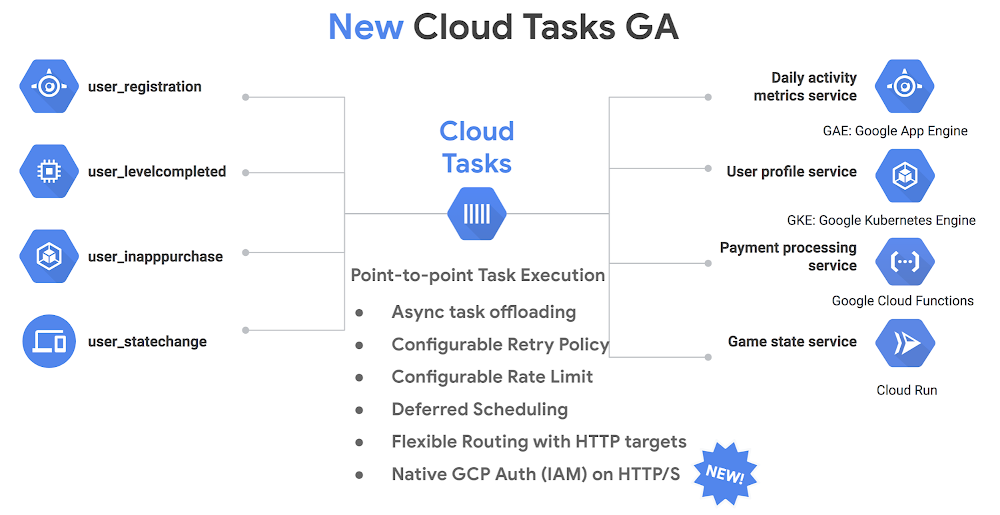
Microservices enable you to break up large monolithic applications into smaller chunks that are easy to build, maintain and upgrade. With a microservices architecture, individual services can now offload work to the background and be consumed later by another service. This gives users quicker response times as well as smoother interactions across a mesh of services. At Google Cloud Next 2019, we announced Cloud Tasks, a fully managed, asynchronous task execution service that lets you offload long-running asynchronous operations, facilitating point-to-point collaboration and interaction across these microservices. It is already generally available for App Engine targets (tasks that originate from App Engine) and today, we are announcing new HTTP targets in beta that securely reach Google Kubernetes Engine (GKE), Compute Engine, Cloud Run or on-prem systems using industry-standard OAuth/OpenID Connect authentication.With Cloud Tasks, you can offload long-running and background activities, decouple services from one another, and make your applications much more resilient to failures. At the same time, Cloud Tasks provides all the benefits of a distributed task queue: flexible routing, task offloading, loose coupling between services, rate limiting and enhanced system reliability:Flexible routing: You can dispatch tasks that can reach any target within Google Cloud Platform (GCP) and on on-prem systems using HTTP/S securely with OAuth/OpenID Connect authentication. (NEW)Task offloading: You can dispatch heavyweight and long running processes to a task queue, allowing your application to be more responsive to your users.Loose coupling: Services don’t talk to one another via direct request/response, but rather asynchronously, allowing them to scale independently.Rate limiting controls the rate at which tasks are dispatched to ensure the processing microservice doesn’t get overwhelmed.Higher reliability and resilience comes from the fact that your tasks are persisted in storage and retried automatically, making your infrastructure resilient to intermittent failures. Additionally, you can customize the maximum number of retry attempts, and the minimum wait time between attempts in order to meet the specific needs of your system.Finally, Cloud Tasks does all this in a fully managed serverless fashion, with no manual intervention needed from the developer or IT administrator. You also pay only for the operations you run; GCP takes care of all the provisioning of resources, replication and scaling required to operate Cloud Tasks. As a developer, simply add tasks to the queue and Cloud Tasks handles the rest. A1 Comms is one of the UK’s leading business-to-business communications providers and uses Cloud Tasks to simplify its application architecture:“Cloud Tasks allows us to focus on the core requirements of the application we’re developing, instead of other utility requirements. We’ve been using Cloud Tasks extensively, from handling high volumes of notifications between applications that reside on different platforms, to data ingestion/migration tasks and the delegation, trigger, or control of workloads. After using Cloud Tasks, our development velocity has been given a significant boost and our overall architecture simplified.”  – Jonathan Liversidge, IT Director, A1 CommsHow Cloud Tasks worksCloud Tasks operates in a push queue fashion, dispatching tasks to worker services via HTTP requests according to a routing configuration. The worker then attempts to process them. If a task fails, an HTTP error is sent back to Cloud Tasks which then pauses and retries to execute the task until a maximum number of attempts is reached. Once the task executes successfully, the worker sends a 2xx success status code to Cloud Tasks.Cloud Tasks handles all of the process management for the task, ensuring tasks are processed in a reliable manner and deleting tasks as they finish executing. Additionally, you can track the status of the tasks in the system through an intuitive UI, CLI or client libraries. Glue together an end-to-end solutionYou can use Cloud Tasks to architect interesting solutions, for example wiring together a deferred task processing system across microservices using products such as Cloud Run, Cloud Functions, GKE, App Engine, BigQuery and Stackdriver. Here’s an example from Braden Bassingthwaite from Vendasta at Cloud Next 2019.Get started todayYou can get started with Cloud Tasks today by using the quickstart guide. Create and configure your own Cloud Tasks queues using the documentation here or start your free trial on GCP!
Quelle: Google Cloud Platform

Goodbye Hadoop. Building a streaming data processing pipeline on Google Cloud

Editor’s note: Today we hear from Qubit, whose personalization technology helps leading brands in retail, travel, and online gaming curate their customers’ online experiences. Qubit recently moved its data ingestion platform from Hadoop and MapReduce, to a stack consisting of fully managed Google Cloud tools like Cloud Pub/Sub, Cloud Dataflow and BigQuery. Here’s their story.At Qubit, we firmly believe that the most effective way to increase customer loyalty and lifetime value is through personalization. Our customers use our data activation technology to personalize customer experiences and to help them get closer to their customers by using real-time data that we collect from browsers and mobile devices. Collecting e-commerce clickstream data to the tune of hundreds of thousands of events per second results in absolutely massive datasets. Traditional systems can take days to deliver insight from data at this scale. Relatively modern tools like Hadoop can help reduce this time tremendously— from days to hours. But to really get the most out of this data, and generate for example real-time recommendations, we needed to be able to get live insights as the data comes in. That means scaling the underlying compute, storage, and processing infrastructure quickly and transparently. We’ll walk you through how building a data collection pipeline using serverless architecture on Google Cloud let us do just that.Our data collection and processing infrastructure is built entirely on Google Cloud Platform (GCP) managed services (Cloud Dataflow, PubSub, and BigQuery). It streams, processes, and stores more than 120,000 events per second (during peak traffic) in BigQuery, with a very low end-to-end latency (sub-second). We then make that data, often hundreds of terabytes per day, available and actionable through an app that plugs into our ingestion infrastructure—all of this without ever provisioning a single VM. The pastIn our early days, we built most of our data processing infrastructure ourselves, from the ground up. It was split across two data centers with 300 machines deployed in each. We collected and stored the data in storage buckets, dumped it into Hadoop clusters and then waited for massive MapReduce jobs on the data to finish. This meant spinning up hundreds of machines overnight, which was a problem because many of our customers expected near real-time access in order to power experiences to their in-session visitors. And then there’s the sheer scale of our operation: at the end of two years, we had stored 4PB of data.Auto-scaling was pretty uncommon back then. And provisioning and scaling machines and capacity is tricky, to say the least, eating up valuable man-hours and causing a lot of pain. Scaling up to handle an influx of traffic, for instance during a big game or Black Friday, was an ordeal. Requesting additional machines for our pool had to be done at least two months in advance and it took another two weeks for our infrastructure team to provision them. Once the peak traffic period was over, the scaled up machines sat idle, incurring costs. A team of four full-time engineers needed to be on-hand to keep the system operational.In a second phase, we switched to stream processing on Apache Storm to overcome the latency inherent in batch processing. We started running Hive jobs on our datasets so that they could be accessible to our analytics layer and integrated business intelligence tools like Tableau and Looker. With the new streaming pipeline, it now took hours instead of days for the data to become available for analytics. But while this was an incredible improvement, it still wasn’t good enough to drive real-time personalization solutions like recommendations and social proof. This launched our venture into GCP.The presentFast forward to today, and our pipeline is built entirely on Google Cloud managed services, namely Cloud Dataflow as the data processing engine, and BigQuery as the data warehouse. Events flow through our pipeline in three stages: validation, enrichment, and ingestion. Every incoming event is first validated against our schema, enriched with metadata like geo location, currency conversion, etc, and finally written to partitioned tables in BigQuery. The data then flows through Cloud Pub/Sub topics between dataflows within a Protobuf envelope. Finally, an additional dataflow reads failed events emitted by the three main dataflows from a dead letter Pub/Sub topic and stores them in BigQuery for reporting and monitoring. All this happens in less than a few seconds.Getting to this point took quite a bit of experimentation, though. As an early adopter of Google Cloud, we were one of the first businesses to test Cloud Bigtable, and actually built Stash, our in-house key/value datastore, on top of it. In parallel, we had also been building a similar version with HBase, but the ease of use and deployment, manageability, and flexibility we experienced with Bigtable convinced us of the power of using serverless architecture, setting us on our journey to build our new infrastructure on managed services.As with many other Google Cloud services, we were fortunate to get early access to Cloud Dataflow, and started scoping out the idea of building a new streaming pipeline with it. It took our developers only a week to build a functional end-to-end prototype for the new pipeline. This ease of prototyping and validation cemented our decision to use it for a new streaming pipeline, since it allowed us to rapidly iterate ideas. We briefly experimented with building a hybrid platform, using GCP for the main data ingestion pipeline and using another popular cloud provider for data warehousing. However, we quickly settled on using BigQuery as our exclusive data warehouse. It scales effortlessly and on-demand, lets you run powerful analytical queries in familiar SQL, and supports streaming writes, making it a perfect fit for our use case. At the time of writing this article, our continuously growing data storage in BigQuery is at a 5PB mark and we run queries processing over 10PB of data every month. Our data storage architecture requires that the events be routed to different BigQuery datasets based on client identifiers baked into the events. This, however, was not supported by the early versions of the Dataflow SDK, so we wrote some custom code for the BigQuery streaming write transforms to connect our data pipeline to BigQuery. Routing data to multiple BigQuery tables has since been added as a feature in the new Beam SDKs.Within a couple of months, we had written a production-ready data pipeline and ingestion infrastructure. Along the way, we marveled at the ease of development, management, and maintainability that this serverless architecture offered, and observed some remarkable engineering and business-level optimizations. For example, we reduced our engineering operational cost by approximately half. We no longer needed to pay for idle machines, nor manually provision new ones as traffic increases, as everything is configured to autoscale based on incoming traffic. We now pay for what we use. We have dealt with massive traffic spikes (10-25X) during major retail and sporting events like Black Friday, Cyber Monday, Boxing Day etc, for three years in a row without any hiccups.Google’s fully managed services allow us to save on the massive engineering efforts required to scale and maintain our infrastructure, which is a huge win for our infrastructure team. Reduced management efforts mean our SREs have more time to build useful automation and deployment tools.It also means that our product teams can get proof-of concepts out the door faster, enabling them to validate ideas quickly, reject the ones that don’t work, and rapidly iterate over the successful ones. This serverless architecture has helped us build a federated data model fed by a central Cloud Pub/Sub firehose that serves all our teams internally, thus eliminating data silos. BigQuery serves as a single source of truth for all our teams and the data infrastructure that we built on Google Cloud powers our app and drives all our client-facing products. Wrap upOur partnership with Google is fundamental to our success—underpinning our own technology stack, it ensures that every customer interaction on web, mobile, or in-app is smarter, sharper, and more personal. Serverless architecture has helped us build a powerful ingestion infrastructure that forms the basis of our personalization platform. In upcoming posts, we’ll look into some tools we developed to work with the managed services, for example an open source tool to launch dataflows and our in-house Pub/Sub event router. We’ll also look at how we monitor our platform. Finally, we’ll deep dive into some of the personalization solutions that we built that leverage serverless architecture, like our recommendation engine. In the interim, feel free to reach out to us with comments and questions.
Quelle: Google Cloud Platform

Thanks for 10 years and welcome to a new chapter in SQL innovation

Tomorrow, July 9, 2019, marks the end of extended support for SQL Server 2008 and 2008 R2. These releases transformed the database industry, with all the core components of a database platform built-in at a fraction of the cost of other databases. We saw broad adoption across applications, data marts, data warehousing, and business intelligence. Thank you for the ten amazing years we’ve had together.

But now support for the SQL Server 2008 and R2 versions is ending. Whether you prefer the evergreen SQL of Azure SQL Database managed instance which never needs to be patched or upgraded, or if you need the flexibility and configurability of SQL Server hosted on a Azure Virtual Machine with three free years of Extended Security Updates, Azure provides the best choice of destinations to secure and modernize your database.

Customers are moving critical SQL Server workloads to Azure

Customers like Allscripts, Komatsu, Paychex, and Willis Towers Watson are taking advantage of these innovative destinations and migrating their SQL Server databases to Azure. Danish IT solutions provider KMD needed a home for their legacy SQL Server in the cloud. They had to migrate an 8-terabyte production database to the cloud quickly and without interruption to its service. Azure SQL Database managed instance allowed KMD to transfer their production data with minimal downtime and no code changes.

“We moved our SQL Server 2008 to Azure SQL Database managed instance, and it has been a great move for us. Not only do we spend less time on maintenance, but we now run a version of SQL that is always current with no need for upgrade and patching.”

– Charlotte Lindahl, Project Manager, KMD

Azure SQL Database offers differentiated value to customers including:

Chose the only cloud with evergreen SQL. Azure SQL Database compatibility levels mean that you can move your on-premises workloads to managed SQL without worrying about application compatibility or performance changes. Customers who move to SQL Database never have to worry about patching, upgrades, or end of support again.
Host larger SQL databases than any other cloud with Azure SQL Database Hyperscale. Hyperscale is a highly scalable service tier for SQL databases that adapts on-demand to your workload's needs. With Hyperscale, databases can achieve the best performance for workloads of unlimited size and scale.
Harness the power of artificial intelligence to monitor and secure your workloads. Trained on millions of databases, the intelligent security and performance features in Azure SQL Database mean consistent and predictable workload performance. In addition to intelligent performance, SQL database customers get peace of mind with automatic threat detection, which identifies unusual log-in attempts or potential SQL injection attacks.
Move to the most economical cloud database for SQL Server, Azure SQL Database managed instance. With the full surface area of your on-premises SQL Server database engine and with an anticipated ROI of 212 percent and a payback period of as little as 6 months1, only SQL Database managed instance cements its status as the most cost effective service for running SQL in the cloud. SEB is a technology company providing software, solutions, and services specializing in managing group benefit solutions and healthcare claims processing. They chose Azure not only for its cost reduction compared to on-premises, but its more than 90 compliance offerings as well.

"With SQL Server 2008 approaching end of support, SEB needed to migrate two critical business applications that contained sensitive health and PII information. In Azure, we were able to get three years of Extended Security Updates for application VMs, and move the data to Azure SQL Database which significantly decreased both management and infrastructure spend. Azure's compliance certifications for HIPAA, PCI and ISO-27k, as well as data residency in Canada, were critical in meeting our regulatory requirements.”

– Mario Correia, Chief Technology Officer, SEB Inc.

See how Hyperscale in Azure SQL Database is enabling customer innovation.

SQL innovation remains our focus now and in the future

Microsoft continues to invest in innovation with SQL Server 2019 and Azure SQL Database. Our priority is to future proof your database workloads. Today, I am excited to announce new innovation across on-premises and in the cloud:

Preview of Azure SQL, a simplified portal experience for SQL databases in Azure: Coming soon, Azure SQL will provide a single pane of glass through which you can manage Azure SQL Databases and SQL Server on Azure Virtual Machines. In Azure SQL, customers will be able to register their self-installed (custom image) SQL VMs using the Resource Provider to access benefits like auto-patching, auto-backup, and new license management options.
Preview of SQL Server 2019 big data clusters: Available later this month, the SQL Server 2019 big data clusters preview combines SQL Server with Apache Spark and Hadoop Distributed File System for a unified data platform that enables analytics and artificial intelligence (AI) over all data, relational and non-relational. Early Adoption Program participants like Startup Systems Imagination Inc. are already using big data cluster to solve challenging AI and machine learning problems.  

“With SQL Server 2019 big data clusters, we can solve for on-demand big data experiments. We can analyze cancer research data coming from dozens of different data sources, mine interesting graph features, and carry out analysis at scale.”

– Pieter Derdeyn, Knowledge Engineer, Systems Imagination Inc.

Get started with SQL in Azure

As we reach end of support for SQL Server 2008 and 2008 R2, and with just six more months until the end of support for Windows Server 2008 and 2008 R2, there’s never been a better time to secure and modernize these older workloads by moving them to Azure. Secure, manage, and transform your SQL Server workloads with the latest data and AI capabilities:

Find the best destination for your SQL Server 2008 and 2008 R2.
Get started on your Azure migration with the Data Migration Guide. 


1The Total Economic Impact™ of Microsoft Azure SQL Database Managed Instance, a Forrester Consulting Study, 10/25/2018. https://azure.microsoft.com/en-us/resources/forrester-tei-sql-database-managed-instance/en-us/
Quelle: Azure

Azure Data Box Heavy is now generally available

Our customers continue to use the Azure Data Box family to move massive amounts of data into Azure. One of the regular requests that we receive is for a larger capacity option that retains the simplicity, security, and speed of the original Data Box. Last year at Ignite, we announced a new addition to the Data Box family that did just that – a preview of the petabyte-scale Data Box Heavy

With thanks to those customers who provided feedback during the preview phase, I’m excited to announce that Azure Data Box Heavy has reached general availability in the US and EU!

How Data Box Heavy works

In many ways, Data Box Heavy is just like the original Data Box. You can order Data Box Heavy directly from the Azure portal, and copy data to Data Box Heavy using standard files or object protocols. Data is automatically secured on the appliance using AES 256-bit encryption. After your data is transferred to Azure, the appliance is wiped clean according to National Institute of Standards and Technology (NIST) standards.

But Data Box Heavy is also designed for a much larger scale than the original Data Box. Data Box Heavy’s one petabyte of raw capacity and multiple 40 Gbps connectors mean that a datacenter’s worth of data can be moved into Azure in just a few weeks.

Data Box Heavy

1 PB per order
770 TB usable capacity per order
Supports Block Blobs, Page Blobs, Azure Files, and Managed Disk
Copy to 10 storage accounts
4 x RJ45 10/1 Gbps, 4 x QSFP 10/40 Gbps Ethernet
Copy data using standard NAS protocols (SMB/CIFS, NFS, Azure Blob Storage)

Data Box

100 TB per order
80 TB usable capacity per order
Supports Block Blobs, Page Blobs, Azure Files, and Managed Disk
Copy to 10 storage accounts
2 x RJ45 10/1 Gbps, 2 x SFP+ 10 Gbps Ethernet
Copy data using standard NAS protocols (SMB/CIFS, NFS, Azure Blob Storage)


Data Box Disk

40 TB per order/8 TB per disk
35 TB usable capacity per order
Supports Block Blobs, Page Blobs, Azure Files, and Managed Disk
Copy to 10 storage accounts
USB 3.1, SATA II or III
Copy data using standard NAS protocols (SMB/CIFS, NFS, Azure Blob Storage)


Expanded regional availability

We’re also expanding regional availability for Data Box and Data Box Disk.

Data Box Heavy
US, EU

Data Box
US, EU, Japan, Canada, and Australia

Data Box Disk
US, EU, Japan, Canada, Australia, Korea, Southeast Asia, and US Government

Sign up today

Here’s how you can get started with Data Box Heavy:

Learn more about our family of Azure Data Box products.
Order any Data Box today via the Azure portal.
Review the Data Box documentation for more details.
Interested in finding a partner? See our list of Data Box Partners.

We’ll be at Microsoft Inspire again this year, so stop by our booth to say hello to the team!
Quelle: Azure