Always-on, real-time threat protection with Azure Cosmos DB – part one

This two-part blog post is a part of a series about how organizations are using Azure Cosmos DB to meet real world needs, and the difference it’s making to them. In part one, we explore the challenges that led the Microsoft Azure Advanced Threat Protection team to adopt Azure Cosmos DB and how they’re using it. In part two, we’ll examine the outcomes resulting from the team’s efforts.

Transformation of a real-time security solution to cloud scale

Microsoft Azure Advanced Threat Protection is a cloud-based security service that uses customers’ on-premises Azure Active Directory signals to identify, detect, and investigate advanced threats, compromised identities, and malicious insider actions. Launched in 2018, it represents the evolution of Microsoft Advanced Threat Analytics, an on-premises solution, into Azure. Both offerings are composed of two main components:

An agent, or sensor, which is installed on each of an organization’s domain controllers. The sensor inspects traffic sent from users to the domain controller along with Event Tracing for Windows (ETW) events generated by the domain controller, sending that information to a centralized back-end.
A centralized back-end, or center, which aggregates the information from all the sensors, learns the behavior of the organization’s users and computers, and looks for anomalies that may indicate malicious activity.

Advanced Threat Analytics’ center used an on-premises instance of MongoDB as its main database—and still does today for on-premises installations. However, in developing the Azure Advanced Threat Protection center, a managed service in the cloud, Microsoft needed something more performant and scalable. “The back-end of Azure Advanced Threat Protection needs to massively scale, be upgraded on a weekly basis, and run continuously-evolving, advanced detection algorithms—essentially taking full advantage of all the power and intelligence that Azure offers,” explains Yaron Hagai, Principal Group Engineering Manager for Advanced Threat Analytics at Microsoft.

In searching for the best database for Azure Advanced Threat Protection to store its entities and profiles—the data learned in real time from all the sensors about each organization’s users and computers—Hagai’s team mapped out the following key requirements:

Elastic, per-customer scalability: Each organization that adopts Azure Advanced Threat Protection can install hundreds of sensors, generating potentially tens of thousands of events per second. To learn each organization’s baseline and apply its anomaly detection algorithms in real-time, Azure Advanced Threat Protection needed a database that could efficiently and cost-effectively scale.
Ease of migration: The Azure Advanced Threat Protection data model is constantly evolving to support changes in detection logic. Hagai’s team didn’t want to worry about constantly maintaining backwards compatibility between the service’s code and its ever-changing data model, which meant they needed a database that could support quick and easy data migration with almost every new update to Azure Advanced Threat Protection they deployed.
Geo-replication: Like all Azure services, Advanced Threat Protection must support customers’ critical disaster recovery and business continuity needs, including in the highly unlikely event of a datacenter failure. Through the use of geo-replication, customers’ data can be replicated from a primary datacenter to a backup datacenter, and the Azure Advanced Threat Protection workload can be switched to the backup datacenter in the event of a primary datacenter failure.

A managed, scalable, schema-less database in the cloud

The team chose Azure Cosmos DB as the back-end database for Azure Advanced Threat Protection. “As the only managed, scalable, schema-less database in Azure, Azure Cosmos DB was the obvious choice,” says Hagai. “It offered the scalability needed to support our growing customer base and the load that growth would put on our back-end service. It also provided the flexibility needed in terms of the data we store on each organization and its computers and users. And it offered the flexibility needed to continually add new detections and modify existing ones, which in turn requires the ability to constantly change the data stored in our Azure Cosmos DB collections.”

Collections and partitioning

Of the many APIs that Azure Cosmos DB supports, the development team considered both the SQL API and the Azure Cosmos DB API for MongoDB for Azure Advanced Threat Protection. Eventually, they chose the SQL API because it gave them access to a rich, Microsoft-authored client SDK with support for multi-homing across global regions, and direct connectivity mode for low latency. Developers chose to allocate one Azure Cosmos DB database per tenant, or customer. Each database has five collections, which each start with a single partition. “This allows us to easily delete the data for a customer if they stop using Azure Advanced Threat Protection,” explains Hagai. “More importantly, however, it lets us scale each customer’s collections independently based on the throughput generated by their on-premises sensors.”

Of the set of collections per customer, two usually grow to more than one partition:

UniqueEntity, which contains all the metadata about the computers and users in the organization, as synchronized from Active Directory.
UniqueEntityProfile, which contains the behavioral baseline for each entity in the UniqueEntity collection and is used by detection logic to identify behavioral anomalies that imply a compromised user or computer, or a malicious insider.

“Both collections have very high read/write throughput with large Request Units per second (RU/s) consumption,” explains Hagai. “Azure Cosmos DB seamlessly scales out storage of collections as they grow, and some of large customers have scaled up to terabytes in size per collection, which would have not been possible with MongoDB on VMs.”

The other three collections for each customer typically contain less than 1,000 documents and do not grow past a single partition. They include:

SystemProfile, which contains data learned for the tenant and applied to behavioral based detections.
SystemEntity, which contains configuration information and data about tenants.
Alert, which contains alerts that are generated and updated by Azure Advanced Threat Protection.

Migration

As the Azure Advanced Threat Protection detection logic constantly evolves and improves, so does the behavioral data stored in each customer’s UniqueEntityProfile collection. To avoid the need for backwards compatibility with outdated schemas, Azure Advanced Threat Protection maintains two migration mechanisms, which run with each upgrade to the service that includes changes to its data models:

On-the-fly: As Azure Advanced Threat Protection reads documents from Azure Cosmos DB, it checks their version field. If the version is outdated, Azure Advanced Threat Protection migrates the document to the current version using explicit transformation logic written by Hagai’s team of developers.
Batch: After a successful upgrade, Azure Advanced Threat Protection spins up a scheduled task to migrate all documents for all customers to the newest version, excluding those that have already been migrated by the on-the-fly mechanism.

Together, these two migration mechanisms ensure that after the service was upgraded and the data access layer code was changed, no errors will occur due to parsing outdated documents. No backwards compatibility code is needed besides the explicit migration code, which is always removed in the subsequent version.

Automatic scaling and backups

Collections with very high read/write throughput often are rate-limited as they reach their provisioned RU/s limits for a collection. When one of the service’s nodes, each node is a virtual machine, tries to perform an operation against a collection and gets a “429 Too Many Requests” rate limiting exception, it uses Azure Service Fabric remoting to send a request to a centralized auto-scale service for increased throughput. The centralized service aggregates such requests from multiple nodes to avoid increasing throughput more than once within a short window of time, as this may be caused by a single burst of throughput that affects multiple nodes. To minimize overall RU/s costs, a similar, periodic scale-down process reduces provisioned throughput when appropriate, such as during each customer’s non-working hours.

Azure Advanced Threat Protection takes advantage of the auto-backup feature of Azure Cosmos DB to help protect each of the collections. The backups reside in Azure Blob storage and are replicated to another region through the use of geo-redundant storage (GRS). Azure Advanced Threat Protection also replicates customer configuration data to another region, which allows for quick recovery in the case of a disaster. “We do this primarily to safeguard the sensor configuration data—preventing the need for an IT admin to reconfigure hundreds of sensors if the original database is lost,” explains Hagai.

Azure Advanced Threat Protection recently began onboarding full geo-replication. “We’ve started to enable geo-replication and multi-region writes for seamless and effortless replication of our production data to another region,” says Hagai. “This will allow us to further improve and guarantee service availability and will simplify service delivery versus having to maintain our own high-availability mechanisms.”

Continue on to part two, which covers the outcomes resulting from the Azure Advanced Threat Protection team’s implementation of Azure Cosmos DB.
Quelle: Azure

Always-on, real-time threat protection with Azure Cosmos DB – part two

This two-part blog post is a part of a series about how organizations are using Azure Cosmos DB to meet real world needs, and the difference it’s making to them. In part one, we explored the challenges that led the Microsoft Azure Advanced Threat Protection team to adopt Azure Cosmos DB and how they’re using it. In part two, we’ll examine the outcomes resulting from the team’s efforts.

Built-in scalability, performance, availability, and more

The Azure Advanced Threat Protection team’s decision to use Azure Cosmos DB for its cloud-based security service has enabled the team to meet all key requirements, including zero database maintenance, uncompromised real-time performance, elastic scalability, high availability, and strong security and compliance. “Azure Cosmos DB gives us everything we need to deliver an enterprise-grade security service that’s capable of supporting the largest companies in the world, including Microsoft itself,” says Yaron Hagai, Principal Group Engineering Manager for Advanced Threat Analytics at Microsoft.

Zero maintenance

A managed database service has saved Hagai’s team immense maintenance efforts, allowing Azure Advanced Threat Protection to stay up and running with only a handful of service engineers. “Azure Advanced Threat Protection saves us from having to patch and upgrade servers, worry about compliance, and so on,” says Hagai. “We also get capabilities like encryption at rest without any work on our part, which further enables us to direct our resources to improving the service instead of keeping it up and running.”

Scaling to support customer growth is just as hands-free. “We use Azure CLI scripts to provision and deprovision clusters in multiple Azure regions—it’s all done automatically, so new clusters for new customers can be deployed easily and when needed,” says Hagai. “Scaling is also automatic. Throughput-based splitting has been especially helpful because it lets our databases scale to support customer growth with zero maintenance from the team.”

Real-time performance

Azure Cosmos DB is delivering the performance needed for an important security service like Azure Advanced Threat Protection. “Since we protect organizations after they have been breached, speed of detection is essential to minimizing the damage that might be done,” explains Hagai. “A high-throughout, super-scalable database lets us support lots of complex queries in real-time, which is what allows us to go from breach to alerting in seconds. The performance provided by Azure Cosmos DB is one more thing that makes it the most production-grade document DB in the market, which is another reason we chose it.”

The following graph shows sustained high throughout for the service’s largest tenant, with a heavy bias towards writes, which happen every 10 minutes as Azure Advanced Threat Protection persists in-memory caches of profiles to Azure Cosmos DB.

Elastic scalability

Since Azure Advanced Threat Protection launched in March 2018, its usage has grown exponentially in terms of both users protected and paying organizations. “Azure Cosmos DB allows us to scale constantly, without any friction, which has helped us support a 600 percent growth in our customer base over the past year,” says Hagai. “That same scalability allows us to support larger customer installations than we could with Microsoft Advanced Threat Analytics, our on-premises solution. Microsoft’s own internal network is a prime example; it had grown too large to support with a single, on-premises server running Mongo DB, but with Azure Cosmos DB, it’s no problem.”

Scaling up and down to support frequent fluctuations in traffic, as shown in the following graph, is just as painless. “The graph shows traffic for our largest tenant, with the spikes in throughout due to scheduled tasks that produce business telemetry,” he explains. “This is a great example of the auto-scaling benefits of Azure Cosmos DB and how they allow us to automatically scale up individual databases to support a short burst of throughput each day, then automatically scale back down after the telemetries are calculated to minimize our service delivery costs.”

Strong security and compliance

Because Azure Advanced Threat Protection is built on Azure Cosmos DB and other Azure services, which themselves have high compliance certifications, it was easy to achieve the same for Azure Advanced Threat Protection. “The access control mechanisms in Azure Cosmos DB allow us to easily secure access and apply advanced JIT policies, helping us keep customer data secure,” says Hagai.

High availability

Although the availability SLA for Azure Cosmos DB is 99.999 percent for multi-region databases, to Hagai, the actual availability they’ve seen in production is even higher. “I had the Azure Cosmos DB team pull some historical availability numbers, and it turns out that the actual availability we’ve seen during April, May, and June of 2019 has been between 99.99995 and 99.99999 percent,” says Hagai. “To us, that’s essentially 100 percent uptime, and another thing we don’t need to worry about.”

Learn more about Azure Advanced Threat Protection and Azure Cosmos DB today.
Quelle: Azure

What’s happening in BigQuery: New persistent user-defined functions, increased concurrency limits, GIS and encryption functions, and more

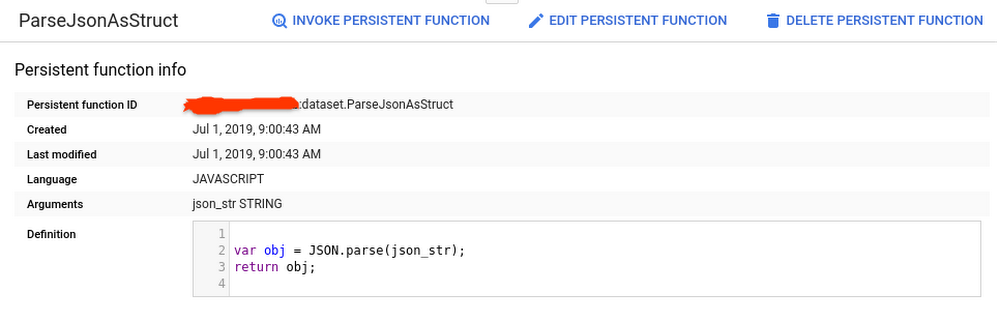
We’ve been busy this summer releasing new features for BigQuery, Google Cloud’s petabyte-scale data warehouse. BigQuery lets you ingest and analyze data quickly and with high availability, so you can find new insights, trends, and predictions to efficiently run your business. Recently added BigQuery features include new user-defined functions, faster reporting capabilities, increased concurrency limits, and new functions for encryption and GIS, all with the goal of helping you get more out of your data faster.  Read on to learn more about these new capabilities and get quick demos and tutorial links so you can try these features yourself.BigQuery persistent user-defined functions are now in betaThe new persistent user-defined functions (UDFs) in BigQuery let you create SQL and JavaScript functions that you can reuse across queries and share with others. Setting up these functions allows you to save time and automate for consistency and scalability. For example, if you have a custom function that handles date values a certain way, you can now create a shared UDF library, and anyone who has access to your dataset can invoke those date values in their queries. UDFs can be defined in SQL or JavaScript. Here’s an example:Creating a function to parse JSON into a SQL STRUCTIngesting and transforming semi-structured data from JSON objects into your SQL tables is a common engineering task. With BigQuery UDFs, you can now create a persistent Javascript UDF that does the parsing for you. Here, we’ll take a JSON string input and convert it into multiple fields in a SQL STRUCT. First we’ll define the function in this query:After executing the query, click the “Go to function” button in the BigQuery UI to see the function definition:You can now execute a separate query to call the UDF:And voila! Our JSON string is now a SQL STRUCT:Share your Persistent UDFs The benefit of persistent UDFs is that other project team members can now invoke your new function in their scripts without having to re-create it or import it first. Keep in mind that you will need to share the dataset that contains your UDFs in order for them to access it. Learn more:Documentation: CREATE FUNCTION statementMore examples: New in BigQuery—Persistent UDFs by Felipe HoffaConcurrent query limit has doubledTo help enterprises get insights faster, we’ve raised the concurrent rate limit for on-demand, interactive queries from 50 to 100 concurrent queries per project in BigQuery. This means you can run twice as many queries at the same time. As before, queries with results returned from the query cache, dry run queries, and queries ran inbatch mode do not count against this limit.You can monitor your team’s concurrent queries in Stackdriver and visualize them in Data Studio.Learn more:Documentation: Quotas and limitsBlog: Taking a practical approach to BigQuery monitoringTutorial: BigQuery monitoring with StackdriverTutorial: Visualize billing data with Data StudioBigQuery’s new user interface is now GAWe introduced the new BigQuery user interface (UI) last year to make it easier for you to uncover data insights and share them with teammates and colleagues in reports and charts. The BigQuery web UI is now generally available in the Google Cloud Platform (GCP) console. You can check out key features of the new UI in the quick demo below:Easily discover data by searching across tables, datasets, and projectsQuickly preview table metadata (size, last updated) and total rowsStart writing queries faster by clicking on columns to add.If you haven’t seen the new UI yet, try it out by clicking the blue button in the top right of your Google Cloud console window.Learn more:Documentation: BigQuery Web UILab: Using BigQuery in the GCP ConsoleBigQuery’s GIS functions are now GAWe’re continually working on adding new functionality to BigQuery so you can expand your data analysis to other data types. You might have noticed in the BigQuery Web UI demo that there’s now a field for hurricane latitude and longitude. These Geographic Information System (GIS) data types are now natively supported in BigQuery, as are the GIS functions to analyze, transform, and derive insights from GIS data. Here’s a look at using BigQuery GIS functions and this tutorial to plot the path of a hurricane:Applying GIS functions to geographic data (including lat/long, city, state, and zip code) lets analysts perform geographic operations within BigQuery. You can more easily answer common business questions like “Which store is closest for this customer?” “Will my package arrive on time?” or “Who should we mail a promotion coupon to?”You can also now cluster your tables using geography data type columns. The order of the specified clustered columns determines the sort order of the data. For our hurricane example, we clustered on `iso_time` to increase performance for common reads that want to track the hurricane path sorted by time. Learn more:Documentation: BigQuery GISDemo: BigQuery Public Dataset and GIS demo plotting U.S. lightning strikesTutorial: Plot the path of a hurricaneAEAD encryption functions are now available in Standard SQLBigQuery usesencryption at rest to help keep your data safe, and provides support for customer managed encryption keys (CMEKs), so you can encrypt tables with specific encryption keys you control. But in some cases, you may want to encrypt individual values within a table. AEAD (Authenticated Encryption with Associated Data) encryption functions, now available in BigQuery, allow you to create keysets that contain keys for encryption and decryption, use these keys to encrypt and decrypt individual values in a table, and rotate keys within a keyset.This can be particularly useful for applications of crypto-deletion or crypto-shredding. For example, say you want to keep data for all your customers in a common table. By encrypting each of your customers’ data using a different key, you can easily render that data unreadable by simply deleting the encryption key. If you’re not familiar with the concept of crypto-shredding, you’ve probably already used it without realizing it—it’s a common practice for things like factory-resetting a device and securely wiping its data. Now you can do the same type of data wipe on your structured datasets in BigQuery. Learn more:Understand crypto-deletion, crypto-shredding, and more: AEAD Encryption Concepts Documentation: AEAD Encryption Functions Documentation: AEAD.ENCRYPT() example codeCheck out a few more updates worth sharingOur Google Cloud engineering team is continually making improvements to BigQuery to accelerate time-to-value for our customers. Here are a few other recent highlights: You can now run scheduled queries at more frequent intervals. The minimum time interval for custom schedules has changed from three hours to 15 minutes. Faster schedules means fresher data for your reporting needs.The BigQuery Data Transfer Service now supports transferring data into BigQuery from Amazon S3. These Amazon S3 transfers are now in beta.Creating a new dataset? Want to make it easy for all to use? Add descriptive column labels within SQL using SQL DDL labels.Clean up your old BigQuery ML models with new SQL DDL statement support for DROP MODEL.In case you missed itFor more on all things BigQuery, check out these recent posts, videos and how-tos:Looker, Snowflake, and more on This Week in CloudPersistent UDF examples Uber Datasets now in BigQueryQuerying the night sky with BigQuery GISExperimenting with BigQuery sandboxAnalyze BigQuery data with Kaggle Kernels notebooksData Catalog hands-on guide: A mental modelTo keep up on what’s new with BigQuery, subscribe to our release notes and stay tuned to the blog for news and announcements And let us know how else we can help.
Quelle: Google Cloud Platform

GCP developer pro-tips: How to schedule a recurring Python script on GCP

So, you find yourself executing the same Python script each day. Maybe you’re executing a query in BigQuery and dumping the results in BigTable each morning to run an analysis. Or perhaps you need to update the data in a Pivot Table in Google Sheets to create a really pretty histogram to display your billing data. Regardless, no one likes doing the same thing every day if technology can do it for them. Behold the magic ofCloud Scheduler, Cloud Functions, and PubSub!Cloud Scheduler is a managed Google Cloud Platform (GCP) product that lets you specify a frequency in order to schedule a recurring job. In a nutshell, it is a lightweight managed task scheduler. This task can be an ad hoc batch job, big data processing job, infrastructure automation tooling—you name it. The nice part is that Cloud Scheduler handles all the heavy lifting for you: It retries in the event of failure and even lets you run something at 4 AM, so that you don’t need to wake up in the middle of the night to run a workload at otherwise off-peak timing. When setting up the job, you determine what exactly you will “trigger” at runtime. This can be a PubSub topic, HTTP endpoint, or an App Engine application. In this example, we will publish a message to a PubSub topic.Our PubSub topic exists purely to connect the two ends of our pipeline: It is an intermediary mechanism for connecting the Cloud Scheduler job and the Cloud Function, which holds the actual Python script that we will run. Essentially, the PubSub topic acts like a telephone line, providing the connection that allows the Cloud Scheduler job to talk, and the Cloud Function to listen. This is because the Cloud Scheduler job publishes a message to the topic. The Cloud Function subscribes to this topic. This means that it is alerted whenever a new message is published. When it is alerted, it then executes the Python script.The CodeSQLFor this example, I’ll show you a simple Python script that I want to run daily at 8 AM ET and 8 PM ET. The script is basic: it executes a SQL query in BigQuery to find popular Github repositories. We will specifically be looking for which owners created repositories with the most amount of forks and in which year they were created. We will use data from the public dataset bigquery-public-data:sample, which holds data about repositories created between 2007 and 2012. Our SQL query looks like this:PythonWe will soon paste this query in our github_query.sql file. This will be called in our main.py file, which calls a main function that executes the query in Python by using the Python Client Library for BigQuery.Step 1: Ensure that you have Python 3 and install and initialize the Cloud SDK. The following will walk you through how to create the GCP environment. If you wish to test it locally, ensure that you have followed the instructions for setting up Python 3 on GCP first.Step 2: Create a file called requirements.txt and copy and paste the following:Step 3: Create a file called github_query.sql and paste in the SQL query from above.Step 4: Create a file called config.py and edit with your values for the following variables. You may use an existing dataset for this or pick an ID of a new dataset that you will create, just remember the id as you will need it for granting permissions later on.Step 4:Create a file called main.py which references the previous two files.In order to deploy the function on GCP, you can run the following gcloud commands. This specifies using a runtime of Python 3.7, creating a PubSub topic with a name of your choosing, and specifying that this function is triggered whenever a new message is published to this topic. I have also set the timeout to the maximum that GCP offers of 540 seconds, or nine minutes.Make sure you first cd into the directory where the files are located before deploying, or else the following will not work.You specify the frequency of how often your Cloud Function will run in UNIX cron time when setting up Cloud Scheduler with the schedule flag. This means that it will publish a message to the PubSub topic every 12 hours in the UTC timezone, as seen below:where [JOB_NAME] is a unique name for a job, [SCHEDULE] is the frequency for the job in UNIX cron, such as “0 */12 * * *” to run every 12 hours, [TOPIC_NAME] is the name of the topic created in the step above when you deployed the Cloud Function, and [MESSAGE_BODY] is any string. An example command would be:Our Python code does not use the actual message This is a job that I run twice per day!“” published in the topic because we are just executing a query in BigQuery, but it is worth noting that you could retrieve this message and act on it, such as for logging purposes or otherwise.Grant permissionsFinally, open up the BigQuery UI and click ‘Create Dataset’ in the project that you referenced above.By creating the Cloud Function, you created a service account with the email in the format [PROJECT_ID]@appspot.gserviceaccount.com. Copy this email for the next step.Hover over the plus icon for this new dataset.Click “Share Dataset”.In the pop-up, enter the service account email. Give it permission “Can Edit”.Run the job:You can test the workflow above by running the project now, instead of waiting for the scheduled UNIX time. To do this:Open up the Cloud Scheduler page in the console.Click the ‘Run Now’ button.Open up BigQuery in the console.Under your output dataset, look for your [output_table_name], this will contain the data.To learn more, read our documentation on setting up Cloud Scheduler with PubSub trigger, and try it out using one of our BigQuery public datasets.
Quelle: Google Cloud Platform