Cloud Scheduler, a fully managed cron job service from Google Cloud

At Google Cloud Next, we announced the general availability of Cloud Scheduler, a fully managed cron job service that allows any application to invoke batch, big data and cloud infrastructure operations. Since then, we have added an important new feature that allows you to trigger any service, running anywhere: on-prem, on Google Cloud or any third party datacenter.Invoke any service with Cloud SchedulerNow, you can securely invoke HTTP targets on a schedule to reach services running on Google Kubernetes Engine (GKE), Compute Engine, Cloud Run, Cloud Functions, or on on-prem systems or elsewhere with a public IP using industry-standard OAuth/OpenID Connect authentication.With Cloud Scheduler, you get the following benefits:Reliable delivery: Cloud Scheduler offers at-least-once delivery of a job to the target, guaranteeing that mission-critical jobs are invoked for execution.Secure Invocation: Use industry standard OAuth/OpenID Connect tokens to invoke your HTTP/S schedules in a secure fashion. (NEW)Fault-tolerant execution: Cloud Scheduler lets you automate your retries and execute a job in a fault-tolerant manner by deploying to different regions, so you eliminate the risk of single point of failure as seen in traditional cron services.Unified management experience: Cloud Scheduler lets you invoke your schedules through the UI, CLI or API and still have a single pane of glass management experience. It also supports the familiar Unix cron format to define your job schedules.Better yet, Cloud Scheduler does all this in a fully managed serverless fashion, with no need to provision the underlying infrastructure, or manually intervene since it automatically retries failed jobs. You also pay only for the operations you run—GCP takes care of all resource provisioning, replication and scaling required to operate Cloud Scheduler. As a developer you simply create your schedules and Cloud Scheduler handles the rest.How Cloud Scheduler worksTo schedule a job, you can use the Cloud Scheduler UI, CLI or API to invoke your favorite HTTP/S endpoint, Cloud Pub/Sub topic or App Engine application. Cloud Scheduler runs a job by sending an HTTP request or Cloud Pub/Sub message to a specified target destination on a recurring schedule. The target handler executes the job and returns a response. If the job succeeds, a success code (2xx for HTTP/App Engine and 0 for Pub/Sub) is returned to Cloud Scheduler. If a job fails, an error is sent back to Cloud Scheduler, which then retries the job until the maximum number of attempts is reached. Once the job has been scheduled, you can monitor it on the Cloud Scheduler UI and check the status of the job.Glue together an end-to-end solutionCloud Scheduler can be used to architect interesting solutions like wiring together a reporting system on a schedule using Cloud Functions, Compute Engine, Cloud Pub/Sub and Stackdriver. Here’s an example from Garrett Kutcha from Target at Cloud Next 2019.You can also use Cloud Scheduler to do things like schedule database updates and push notifications, trigger CI/CD pipelines, schedule tasks such as image uploads, and invoke cloud functions. Tightly integrated with most Google Cloud Platform (GCP) products, the sky’s the limit with Cloud Scheduler!Get started todayWith Cloud Scheduler, you now have a modern, serverless solution to your job scheduling needs. To try out Cloud Scheduler today, check out the quickstart guide. Then, create and configure your own schedules using the documentation or start a free trial on GCP!
Quelle: Google Cloud Platform
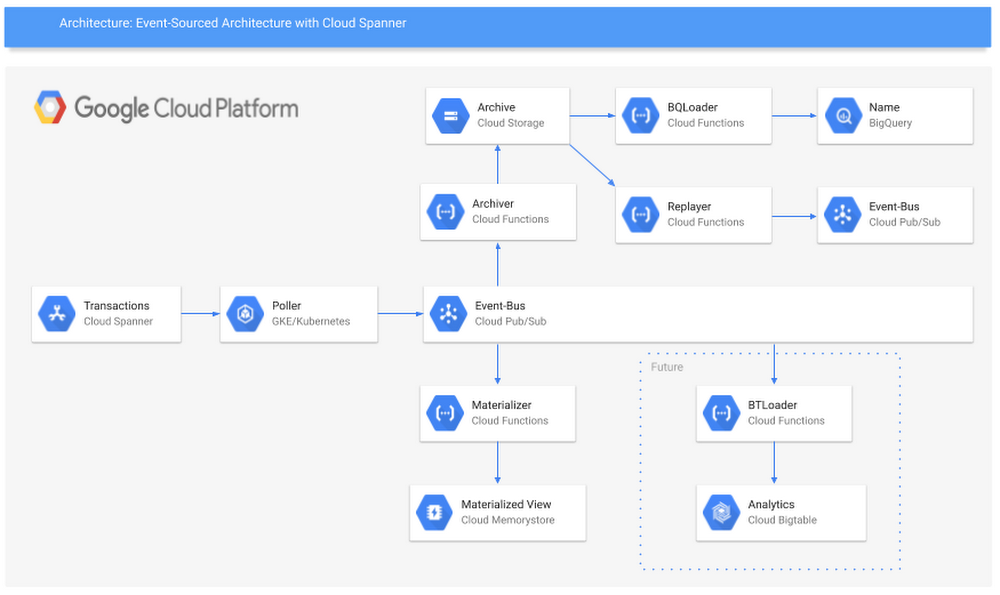
Build your own event-sourced system using Cloud Spanner

When you’re developing a set of apps or services that are coordinated by, or dependent on, an event, you can take an event-sourced approach to model that system in a thorough way. Event-sourced systems are great for solving a variety of very complex development problems, triggering a series of tasks based on an event, and creating an ordered list of events to process into audit logs. But there isn’t really an off-the-shelf solution for getting an event-sourced system up and running.With that in mind, we are pleased to announce a newly published guide to Deploying Event-Sourced Systems with Cloud Spanner, our strongly consistent, scalable database service that’s well-suited for this project. This guide walks you through the why and the how of bringing this event-sourced system into being, and how to tackle some key challenges, like keeping messages in order, creating a schema registry, and triggering workloads based on published events. Based on the feedback we got while talking through this guide with teammates and customers, we went one step further: We are pleased to announce working versions of the apps described in the guide, available in our Github repo, so you can easily introduce event-sourced development into your own environment.Getting started deploying event-sourced systemsIn the guide, you’ll find out how to make an event-sourced system that uses Cloud Spanner as the ingest sink, then automatically publishes each record to Cloud Pub/Sub. Cloud Spanner as a sink solves two key challenges of creating event-sourced systems: performing multi-region writes and adding global timestamps.Multi-region writes are necessary for systems that run in multiple places—think on-prem and cloud, east and west coast for disaster recovery, etc. Multi-region writes are also great for particular industries, like retailers that want to send events to a single system from each of their stores for things like inventory tracking, rewards updates, and real-time sales metrics.Cloud Spanner also has the benefit of TrueTime, letting you easily add a globally consistent timestamp for each of your events. This establishes a ground truth of the order of all your messages for all time. This means you can make downstream assumptions anchored in that ground truth, which solves all sorts of complexity for dependent systems and services.In the guide, we use Avro as a serialization format. The two key reasons for this are that the schema travels with the message, and BigQuery supports direct uploading of Avro records. So even if your events change over time, you can continue to process them using the same systems without having to maintain and update a secondary schema registry and versioning system. Plus, you get an efficient record format on the wire and for durable storage.Finally, we discuss storing each record in Cloud Storage for archiving and replay. With this strategy, you can create highly reliable long-term storage and your system of record in Cloud Storage, while also allowing your system to replay records from any timestamp in the past. This concept can build the foundation for a backup and restore pattern for Cloud Spanner, month-over-month analysis of events, and even end-of-month reports or audit trails.Here’s a look at the architecture described in the guide, and details about the services and how you can deploy them.Poller app: Polls Cloud Spanner, converts the record format to Avro, and publishes to Cloud Pub/Sub.Archiver: Gets events triggered by messages published to a Cloud Pub/Sub topic and writes those records to a global archive in Cloud Storage.BQLoader: Gets triggered by records written to Cloud Storage and loads those records into a corresponding BigQuery table.Janitor: Reads all entries written to the global archive at a fixed rate, then compresses them for long-term storage.Replayer: Reads the records in order from long-term storage, decompresses them, and loads them into a new Cloud Pub/Sub stream.Materializer: Filters records written to Cloud Pub/Sub, then loads them to a corresponding Redis (materialized view) database for easy query access.Building your own event-sourced systemIt can be a lot of work to build out each of these components, test them and then maintain them. The set of services we released in GitHub do just that. You can use these services out of the box, or clone the repo and use them as examples or starting points for more sophisticated, customized systems for your use cases. We encourage you to file bugs and to add feature requests for things you would like to see in our services. Here’s a bit more detail on each of the services:PollerThe core service, Spez, is a polling system for Cloud Spanner. Spez is intended to be deployed in a Kubernetes cluster (we suggest Google Kubernetes Engine, naturally), and is a long-running service. Spez will poll Cloud Spanner at a fixed interval, look for any newly written records, serialize them to Avro and then publish them to Cloud Pub/Sub. It will also populate the table name and the Cloud Spanner TrueTime timestamp as metadata on the Cloud Pub/Sub record. All the configurable bits are located in config maps and loaded into the service via environment variables.ArchiverThere is also a Cloud Function included in the repo that will be triggered by a record being written to Cloud Pub/Sub, then take that record and store it in Cloud Storage. It will also create a unique name for the record and populate the table name and TrueTime timestamp as metadata on the blob. This sets up the ability to order, filter and replay the records without having to download each record first.ReplayerWe’ve added a feature in Spez that allows you to replay records from a given timestamp to another timestamp. Replayer allows you to select replay to Cloud Pub/Sub, a Cloud Spanner table or a Spez queue. You can use this to back up and restore a Cloud Spanner table, fan out Cloud Pub/Sub ledgers, create analytics platforms, or run monthly audits. We’re very excited about this one!Spez queueSo, what is a Spez queue? Spez queues are Cloud Spanner-backed queues with a Java client listener that will trigger a function each time a record is added to the queue. Spez queues can guarantee exact ordering across the world (thanks to Cloud Spanner) as well as exactly-once delivery (as long as there is only one subscriber). Spez queues give you a high-performance, feature-rich alternative to Kafka of Cloud Pub/Sub as your event ledger or as a general coordination queue.We’re very excited to share these resources with you. To get started, read the guide and download the services.
Quelle: Google Cloud Platform






