Securing the hybrid cloud with Azure Security Center and Azure Sentinel

Infrastructure security is top of mind for organizations managing workloads on-premises, in the cloud, or hybrid. Keeping on top of an ever-changing security landscape presents a major challenge. Fortunately, the power and scale of the public cloud has unlocked powerful new capabilities for helping security operations stay ahead of the changing threat landscape. Microsoft has developed a number of popular cloud based security technologies that continue to evolve as we gather input from customers. Today we’d like to break down a few key Azure security capabilities and explain how they work together to provide layers of protection.

Azure Security Center provides unified security management by identifying and fixing misconfigurations and providing visibility into threats to quickly remediate them. Security Center has grown rapidly in usage and capabilities, and allowed us to pilot many new solutions, including a security information and event management (SIEM)-like functionality called investigations. While the response to the investigations experience was positive, customers asked us to build out more capabilities. At the same time, the traditional business model of Security Center, which is priced per resource such as per virtual machine (VM), doesn’t necessarily fit for SIEM. We realized that our customers needed a full-fledged standalone SIEM solution that stood apart from and integrated with Security Center, so we created Azure Sentinel. This blog post clarifies what each product does and how Azure Security Center relates to Azure Sentinel.

Going forward, Security Center will continue to develop capabilities in three main areas:

Cloud security posture management: Security Center provides you with a bird’s eye security posture view across your Azure environment, enabling you to continuously monitor and improve your security posture using the Azure secure score. Security Center helps you identify and perform the hardening tasks recommended as security best practices and implement them across your machines, data services, and apps. This includes managing and enforcing your security policies and making sure your Azure Virtual Machine instances, non-Azure servers, and Azure PaaS services are compliant. With newly added IoT capabilities, you can now reduce attack surface for your Azure IoT solution and remediate issues before they can be exploited. We will continue to expand our resource coverage and the depth insights that are available in security posture management. In addition to providing full visibility into the security posture of your environment, Security Center also provides visibility into the compliance state of your Azure environment against common regulatory standards.
Cloud workload protection: Security Center’s threat protection enables you to detect and prevent threats at the infrastructure-as-a-service (IaaS) layer as well as in platform-as-a-service (PaaS) resources like Azure IoT and Azure App Service and on-premises virtual machines. Key features of Security Center threat protection include config monitoring, server endpoint detection and response (EDR), application control, network segmentation, and is extending to support container and serverless workloads.
Data security: Security Center includes capabilities that identify breaches and anomalous activities against your SQL databases, data warehouse, and storage accounts, and will be extending to other data services. In addition, Security Center helps you perform automatic classification of your data in Azure SQL database.

When it comes to cloud workload protection, the goal is to present the information to users within Security Center in an easy-to-consume manner so that you can address individual threats. Security Center is not intended for advanced security operations (SecOps) hunting scenarios or to be a SIEM tool.

Going forward SIEM and security orchestration and automated response (SOAR) capabilities will be delivered in Azure Sentinel. Azure Sentinel delivers intelligent security analytics and threat intelligence across the enterprise, providing a single solution for alert detection, threat visibility, proactive hunting, and threat response.

Azure Sentinel is your service organization control (SOC) view across the enterprise, alleviating the stress of increasingly sophisticated attacks, increasing volumes of alerts, and long resolution timeframes. With Azure Sentinel you can:

Collect data at cloud scale across all users, devices, applications, and infrastructure, both on-premises and in multiple clouds.
Integrate curated alerts from Microsoft’s security products like Security Center, Microsoft Threat Protection, and from your non-Microsoft security solutions.
Detect previously undetected threats and minimize false positives using Microsoft Intelligent Security Graph, which uses trillions of signals from Microsoft services and systems around the globe to identify new and evolving threats. Investigate threats with artificial intelligence and hunt for suspicious activities at scale, tapping into years of cyber security experience at Microsoft.
Respond to incidents rapidly with built-in orchestration and automation of common tasks.

SIEMs typically integrate with a broad range of applications including threat intelligence applications for specific workloads, and the same is true for Azure Sentinel. SecOps has the full power of querying against the raw data, using AI models, even building your own model.

So how does Azure Security Center relate to Azure Sentinel?

Security Center is one of the many sources of threat protection information that Azure Sentinel collects data from, to create a view for the entire organization. Microsoft recommends that customers using Azure use Azure Security Center for threat protection of workloads such as VMs, SQL, Storage, and IoT, in just a few clicks can connect Azure Security Center to Azure Sentinel. Once the Security Center data is in Azure Sentinel, customers can combine that data with other sources like firewalls, users, and devices, for proactive hunting and threat mitigation with advanced querying and the power of artificial intelligence.

Are there any changes to Security Center as a result of this strategy?

To reduce confusion and simplify the user experience, two of the early SIEM-like features in Security Center, namely investigation flow in security alerts and custom alerts will be removed in the near future. Individual alerts remain in Security center, and there are equivalents for both security alerts and custom alerts in Azure Sentinel.

Going forward, Microsoft will continue to invest in both Azure Security Center and Azure Sentinel. Azure Security Center will continue to be the unified infrastructure security management system for cloud security posture management and cloud workload protection. Azure Sentinel will continue to focus on SIEM.

To learn more about both products, please visit the Azure Sentinel home page or Azure Security Center home page.
Quelle: Azure

Red Hat OpenShift 4 is Now Available

  As of today, Red Hat OpenShift 4 is generally available to Red Hat customers. This rearchitecting in how we install, upgrade and manage the platform also brings with it the power of Kubernetes Operators, Red Hat Enterprise Linux CoreOS, and the Istio-base OpenShift Service Mesh. As transformational as our open hybrid cloud platform can […]
The post Red Hat OpenShift 4 is Now Available appeared first on Red Hat OpenShift Blog.
Quelle: OpenShift

Announcing self-serve experience for Azure Event Hubs Clusters

For businesses today, data is indispensable. Innovative ideas in manufacturing, health care, transportation, and financial industries are often the result of capturing and correlating data from multiple sources. Now more than ever, the ability to reliably ingest and respond to large volumes of data in real time is the key to gaining competitive advantage for consumer and commercial businesses alike. To meet these big data challenges, Azure Event Hubs offers a fully managed and massively scalable distributed streaming platform designed for a plethora of use cases from telemetry processing to fraud detection.

Event Hubs has been immensely popular with Azure’s largest customers and now even more so with the recent release of Event Hubs for Apache Kafka. With this powerful new capability, customers can stream events from Kafka applications seamlessly into Event Hubs without having to run Zookeeper or manage Kafka clusters, all while benefitting from a fully managed platform-as-a-service (PaaS) with features like auto-inflate and geo-disaster recover. As the front door to Azure’s data pipeline, customers can also automatically Capture streaming events into Azure Storage or Azure Data Lake, or natively perform real-time analysis on data streams using Azure Stream Analytics.

For customers with the most demanding streaming needs, Event Hubs clusters in our Dedicated tier provide a single-tenant offering that guarantees the capacity to ingest millions of events per second while boasting a 99.99% SLA. Clusters are used by the Xbox One Halo team, as well as powers both Microsoft Teams and Microsoft Office client application telemetry pipelines.

Azure portal experience for Event Hubs clusters

Today, we are excited to announce that Azure Event Hubs clusters can be easily created through the Azure portal or through the Azure Resource Manager as a self-serve experience (preview), and is instantly available with no further setup. Within your cluster, you can subsequently create and manage namespaces and event hubs per usual and ingest events with no throttling. Creating a cluster to contain your event hubs offers the following benefits:

Single tenant hosting for better performance with guaranteed capacity at full scale, enabling ingress of gigabytes of streaming data at millions of events per second while maintaining fully durable storage and sub-second latency.
Capture feature included at no additional cost, which allows you to effortlessly batch and deliver your events to Azure Storage or Azure Data Lake.
Significant savings on your Event Hubs cloud costs with fixed hourly billing while scaling your infrastructure with Dedicated Event Hubs.
No maintenance since we take care of load balancing, security patching, and OS updates. You can spend less time on infrastructure maintenance and more time building client-side features.
Exclusive access to upcoming features like bring your own key (BYOK).

In the self-serve experience (preview), you can create 1 CU clusters in the following strategic regions through the Azure portal:

North Europe
West Europe
US Central
East US
East US 2
West US

West US 2
North US
South Central US
South East Asia
UK South

Larger clusters of up to 20 CUs or clusters in regions not listed above will also be available upon direct request to the Event Hubs team.

Data is key to staying competitive in this fast moving world and Azure Event Hubs can help your organization gain the competitive edge. With so many possibilities, it’s time to get started.

Learn more about Event Hubs clusters in our Dedicated offering.
Get started with an Event Hubs cluster on the Azure portal.
Quickstart: Data streaming with Event Hubs using the Kafka protocol

Quelle: Azure

A look at Azure's automated machine learning capabilities

The automated machine learning capability in Azure Machine Learning service allows data scientists, analysts, and developers to build machine learning models with high scalability, efficiency, and productivity all while sustaining model quality. Automated machine learning builds a set of machine learning models automatically, intelligently selecting models for training then recommending the best one for your scenario and data set. Traditional machine learning model development is resource-intensive requiring both significant domain knowledge and time to produce and compare dozens of models.

With the announcement of automated machine learning in Azure Machine Learning service as generally available last December, we have started the journey to simplify artificial intelligence (AI). This helps data scientists who want to automate part of their machine learning workflow so they can spend more time focusing on other business objectives. It also makes AI available for a wider audience of business users who don’t have advanced data science and coding knowledge.

We are furthering our investment for accelerating productivity with this release that includes exciting capabilities and features in the areas of model quality, improved model transparency, the latest integrations, ONNX support, a code-free user interface, time series forecasting, and product integrations.

1. Automated machine learning no-code web interface (preview)

Continuing our mission to simplify machine learning, Azure introduced the automated machine learning web user interface in Azure portal. The web user interface enables business domain experts to train models on their data, without writing a single line of code. Users can simply bring their data and, with a few clicks, start training on it. After automated machine learning comes up with the best possible model, customized to the user’s data, they can deploy the model to Azure machine learning service as a web service to generate future predictions on new data.

To start exploring the automated machine learning UI, simply go to Azure portal and navigate to an Azure machine learning workspace, where you will see “Automated machine learning” under the “Authoring” section. If you don’t have an Azure machine learning workspace yet, you can always learn how to create a workspace. To learn more, refer to the automated machine learning UI blog.

2. Time series forecasting

Building forecasts is an integral part of any business, whether it’s revenue, inventory, sales, or customer demand. Forecasting with automated machine learning is now generally available. These capabilities improve the accuracy and performance of recommended models with time series data including a predict forecast function, rolling cross validation splits for time series data, configurable lags, window aggregation, and a holiday featurizer. This ensures high accuracy forecasting models and supporting automation for machine learning across many scenarios.

To learn more, refer to the how to guide with time series data and samples on GitHub.

3. Model transparency

We understand transparency is very important for you to trust the models recommended by automated machine learning.

Now you can understand all steps in the machine learning pipeline including automated featurization (if you set preprocess=True). Learn more about all the preprocessing and featurization steps that automated machine learning performs. You can also programmatically understand how your input data got preprocess and featurized, what kind of scaling and normalization was done and the exact machine learning algorithm and hyperparameter values for a chosen machine learning pipeline. Follow these steps to learn more.
Model interpretability (feature importance) was enabled as a preview capability back in December. Since then, we have made improvements including significant performance boost.

4. ONNX Models (preview)

In many enterprises, data scientists build models in Python since the popular machine learning frameworks are in Python. Many Azure Machine Learning service users also create models using Python. However, in many deployment environments, line of business applications are written in C# or Java, requiring users to “recode” the model. This adds a lot of friction as many times models never get deployed into production. With ONNX support, users can build ONNX models using automated machine learning and integrate with C# applications, without recoding.

To find out more information, please visit GitHub notebook.

5. Enabling .NET developers using Visual Studio/VS Code (preview)

Empower your applications with automated machine learning while remaining in the comfort of the .NET ecosystem. The .NET automated machine learning API enables developers to leverage automated machine learning capabilities without needing to learn Python. Seamlessly integrate automated machine learning within your existing .NET project by using the API's NuGet package. Tackle your binary classification, multiclass classification, and regression tasks within Visual Studio and Visual Studio Code.

6. Empowering data analysts in PowerBI (preview)

We have enabled data analysts and BI professionals using PowerBI to build, deploy, and inference machine learning models, all within PowerBI. This integration allows PowerBI customers to use their data in PowerBI dataflows and leverage the power of automated machine learning capability of Azure Learning service to build models with a no-code experience and then deploy and use the models from PowerBI. Imagine the kind of machine learning powered PowerBI applications and reports you can create with this capability.

7. Automated machine learning in SQL Server

If you are looking to build models using your data in SQL server using your favorite SQL Server Management Studio interface, you can now leverage automated machine learning in Azure Machine Learning service to build, deploy, and use models. This is made possible by simply wrapping python-based machine learning training and inferencing scripts in SQL stored procedures. This is well suited for use with data residing in SQL Server tables and provides an ideal solution for any version of SQL Server that supports SQL Server Machine Learning Services.

8. Automated machine learning in Spark

HDInsight has been integrated with automated machine learning. With this integration, customers who use automated machine learning can now effortlessly process massive amounts of data and get all the benefits of a broad, open source ecosystem with the global scale of Azure to run automated machine learning experiments. HDInsight allows customers to provision clusters with hundreds of nodes. Automated machine learning running on Apache Spark in the HDInsight cluster, allows users to use compute capacity across these nodes to be able to run training jobs at scale, as well as running multiple training jobs in parallel. This allows users to run automated machine learning experiments while sharing the compute with their other big data workloads. To find out more information, please visit GitHub notebooks and documentation.

We support automated machine learning on Azure Databricks clusters with a simple installation of the SDK in the cluster. You can get started by visiting the “Azure Databricks” section in our documentation, “Configure a development environment for Azure Machine Learning.”

Improved accuracy and performance

Since we announced general availability back in December, we have added several new capabilities to generate high quality models in a shorter amount of time.

An intelligent stopping capability that automatically figures out when to stop an experiment based on progress made on the primary metric. If no significant improvement is seen in the primary metric, an experiment is automatically stopped saving you time and compute.

With the goal of exploring a greater number of model pipelines in a given amount of time, users can leverage a sub-sampling strategy to train much faster, while minimizing loss.

Specify preprocess=True, to intelligently search across different featurization strategies to find the best one for the specified data with the goal of getting to a better model. Learn more about the various preprocessing/featurization steps.

XGBoost is available to the set of learners automated machine learning explores, as we see XGBoost models performing well.

Improved support for larger datasets, currently supporting datasets up to 10GB in size.

Learn more

Automated machine learning makes machine learning more accessible for data scientists of all levels of experience. Get started by visiting our documentation and let us know what you think. We are committed to making automated machine learning better for you!

Learn more about the Azure Machine Learning service.

Get started with a free trial of the Azure Machine Learning service.
Quelle: Azure

Thinking big: Google Cloud databases named a Leader in The Forrester Wave Database-as-a-Service, Q2 2019

We’re pleased to announce that Google is a Leader in the Q2 2019 Forrester Database-as-a-Service Wave™, which we believe reflects the depth of our database technology and variety of options for enterprises. This Wave evaluated all of our managed database services: Cloud Spanner, Cloud Bigtable, Cloud Firestore, Cloud SQL, Cloud Memorystore, and BigQuery.  Along with building flexible, compatible, and scalable databases, we recently extended our database offerings to many open source-centric partners to provide tightly integrated services across management, billing and support.Forrester noted that “Google’s DBaaS offering has grown over the years, with large enterprises embracing various Google Cloud services…Enterprise customer references like the platform’s broad offerings to support large and complex applications, high performance, scale, ease of use, and automation.”Choosing the right database for the jobTo build a data platform that works for you and your company, it’s essential to have flexibility in the building blocks you choose. That’s true whether you’re migrating databases straight into the cloud, or re-architecting and modernizing your workloads. Database services from Google Cloud come in a range of options, roughly organized into those that offer compatibility and manageability and those that solve hard engineering problems—such as scalability, manageability, reliability, and flexibility—in unique ways. Here’s a look at Google Cloud’s database offerings.Relational databasesCloud Spanner is built specifically to offer scale insurance for relational workloads.Cloud SQL brings PostgreSQL and MySQL into the cloud with recently announced support for Microsoft SQL Server (coming soon).NoSQL/non-relational databasesCloud Bigtable serves global users up to petabyte scale with low latency. It’s used to help Spotify serve up music quickly and Precognitive scale to support real-time fraud detection workloads.  Cloud Firestore is a cloud-native serverless document database, designed to help store, sync, and query data for web, mobile, and IoT apps. Cloud Firestore customers choose itfor scalability and easier app dev.Cloud Memorystore is an in-memory data store service to build application caches with super-fast data access—especially useful if you’re migrating Redis-based workloads.Data warehousingBigQuery, our serverless data warehouse, is highly scalable with built-in machine learning. Here’s how one retail company uses BigQuery for fast analytics.Get all the details and download the Forrester Wave™Database-as-a-Service Q2 2019 report for more information.
Quelle: Google Cloud Platform

How IFG and Google Cloud AI bring structure to unstructured financial documents

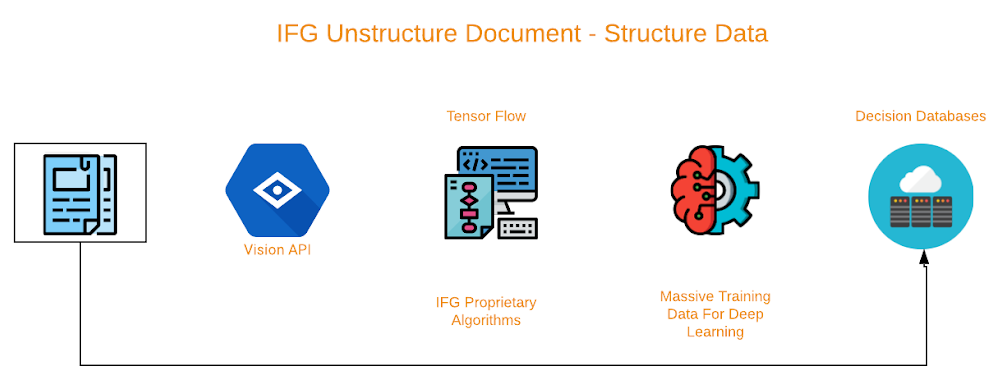
In the world of banking, commercial lenders often struggle to integrate the accounting systems of financial institutions with those of their clients. This integration allows financial service providers to instantly capture information regarding banking activity, balance sheets, income statements, accounts receivable, and accounts payable reports. Based on these, financial institutions can perform instant analysis, using decision engines to provide qualitative and quantitative provisions for credit limits and approval.Today’s commercial and consumer-lending solutions depend on third-party data in order to offer funding opportunities to businesses. These new integrations can facilitate tasks like originations, on-boarding, underwriting, structuring, servicing, collection, and compliance.However, borrowers are reluctant to grant third parties access to internal data, which creates a barrier for adoption. Hence, clients must often submit unstructured financial documents such as bank statements and audited or interim financial statements via drag-and-drop interfaces on a client portal. Many lenders use OCR or virtual printer technology in the background to extract data, but the results are still far from consistent. These processes still require manual intervention to achieve acceptable accuracy, which may cause additional inconsistency and provide an unsatisfactory outcome.To address these challenges, the data science team at Interface Financial Group (IFG) turned to Google Cloud. IFG partnered with Google Cloud to develop a better solution, using Document Understanding AI, which has become an increasingly invaluable tool to process unstructured invoices. It lets the data science team at IFG build classification tools that capture layout and textual properties for each field of significance, and identify specific fields on an invoice. With Google’s tools they can tune feature selection, threshold tuning, and model comparison, yielding 99% accuracy in early trials.Extracting invoices will benefit the fast growing e-invoicing industry and financiers such as trade finance, asset based lending and supply chain finance platforms, connecting buyers and suppliers in a synchronized ecosystem. This environment creates transparency, which is essential for regulators and tax authorities. Ecosystems would benefit from suppliers who submit financial documents in various formats via supplier’s portals—once the documents are converted and analyzed, the structured output can contribute to the organization’s data feed almost instantly. This blog post explains the high level approach for the document understanding project, and you can find more details in the whitepaper.What the project set out to achieveIFG’s invoice recognition project aims to build a tool that extracts all useful information from invoice scans regardless of their format. Most commercially available invoice recognition tools rely on invoices that have been directly rendered to PDF by software and that match one of a set of predefined templates. In contrast, the IFG project starts with images of invoices that could originate from scans or photographs of paper invoices or be directly generated from software. The machine learning models built into IFG’s invoice recognition system recognize, identify, and extract 26 fields of interest.How IFG built its invoice classification solutionThe first step in any invoice recognition project is to collect or acquire images. Many companies consider their supply chains—their suppliers’ resulting invoices—to be confidential. And others simply do not see a benefit to maintaining scans of their invoices, IFG found it challenging to locate a large publicly available repository of invoice images. However, they were able to identify a robust, public dataset of line-item data from invoices. With this data, they were able to synthetically generate a set of 25,011 invoices with different styles, formats, logos, and address formats. From there, they used 20% of the invoices to train its models and then validate the models on the remaining 80%.The synthetic dataset only covers a subset of the standard invoices that businesses use today, but because the core of the IFG system uses machine learning instead of templates, it was able to classify new types invoices, regardless of format. IFG restricted the numbers in its sample set to U.S. standards for grouping, and restricted the addresses in its dataset to portions of the U.S.The invoice recognition process IFG built consists of several distinct steps and relies on several third-party tools. The first step in processing an invoice is to translate the image into text using optical character recognition (OCR). IFG chose Cloud Document Understanding AI for this step. The APIs output text grouped into phrases and their bounding boxes as well as individual words and numbers and their bounding box.IFG’s collaboration with the Google machine learning APIs team helped contribute to a few essential features in Document Understanding AI, most of which involve processing tabular data. IFG’s invoice database thus became a source of data for the API, and should assist other customers in achieving reliable classification results as well. The ability to identify tables has the potential to solve a variety of issues identifying data in the details table included in most invoices.After preprocessing, the data is fed into several different neural networks that were designed and trained using TensorFlow—and IFG also used other, more traditional models in its pipeline using scikit-learn. The machine learning systems used are sequence to sequence, naive Bayes, and a decision tree algorithms. Each system has its own strengths and weaknesses, and each system is used to extract different subsets of the data IFG was interested in. Using this ensemble model allowed them to achieve higher accuracy than any individual model.Next, sequence to sequence (Seq2Seq) models use a recurrent neural network to map input sequences to output sequences of possibly different lengths. IFG implemented a character-level sequence to sequence model for invoice ID parsing, electing to parse the document at the character level because invoice numbers can be numeric, alphanumeric, or even include punctuation.IFG found that Seq2Seq performs very well at identifying invoice numbers. Because invoice numbers can consist of virtually arbitrary sequences of characters, IFG abandoned the tokenized input and focused on the text as a character string. When applied to the character stream, the Seq2Seq model matched invoice numbers with approximately 99% accuracy.Because the Seq2Seq model was unable to distinguish street abbreviations from state abbreviations, IFG added a naive Bayes model to its pipeline. This hybrid model is now able to distinguish state abbreviations from street abbreviations with approximately 97% accuracy.IFG used naive Bayes integrates n-grams to reconstruct the document and place the appropriate features in their appropriate fields at the end of the process. Even though an address is identified, it must be associated with either the payor or payee in the case of invoice recognition. What precedes the actual address is of utmost importance in this instance.Neither Seq2Seq nor naive Bayes models were able to use the bounding box information to distinguish nearly identical fields such as payor address and payee address, so IFG added a decision tree model to its pipeline in order to distinguish these two address types.Lastly, IFG used a Pandas data frame to compare the output to the test data, using cross-entropy as a loss function for both accuracy and validity. Accuracy was correlated to the number of epochs used in training. An optimum number of epochs was discovered during testing to reach 99% accuracy or higher element recognition in most invoices.ConclusionDocument Understanding AI performs exceptionally well when capturing raw data from an image. The collaboration between IFG and Google Cloud allowed the team to focus on training a high-accuracy machine learning model that processes a variety of business documents. Additionally, the team leaned on several industry-standard NLP libraries to help parse and clean the output of the APIs for use in the trained models. In the process, IFG found the sequence to sequence techniques provided it with enough flexibility to solve the document classification problem for a number of different markets. The full technical details are available in this whitepaper.Going forward, IFG plans to take advantage of the growing number of capabilities in Document Understanding AI—as well as its growing training set—to properly process tabular data. Once all necessary fields are recognized and captured to an acceptable level of accuracy, IFG will extend the invoice recognition project to other types of financial documents. IFG ultimately expects to be able to process any sort of structured or unstructured financial document from an image into a data feed with enough accuracy to eliminate the need for consistent human intervention in the process. You can find more details about Document Understanding AI here.AcknowledgementsRoss Biro, Chief Technology Officer; Michael Cave, Senior Data Scientist, The Interface Financial Group drove implementation for IFG. Shengyang Dai, Engineering Manager, Vision API, Google Cloud, provided guidance throughout the project.
Quelle: Google Cloud Platform