How to optimize your Azure environment

Without the right tools and approach, cloud optimization can be a time-consuming and difficult process. There is an ever growing list of best practices to follow, and it’s constantly in flux as your cloud workloads evolve. Add the challenges and emergencies you face on a day-to-day basis, and it’s easy to understand why it’s hard to be proactive about ensuring your cloud resources are running optimally.

Azure offers many ways to help ensure that you’re running your workloads optimally and getting the most out of your investment.

Three kinds of optimization: organizational, architectural, and tactical

One way to think about these is the altitude of advice and optimization offered: organizational, architectural, or tactical.
At the tactical or resource level, you have Azure Advisor, a free Azure service that helps you optimize your Azure resources for high availability, security, performance, and cost. Advisor scans your resource usage and configuration and provides over 100 personalized recommendations. Each recommendation includes inline actions to make remediating your cloud resource optimizations fast and easy.

At the other end of the spectrum is Azure Architecture Center, a collection of free guides created by Azure experts to help you understand organizational and architectural best practices and optimize your workloads. This guidance is especially useful when you’re designing a new workload for the cloud or migrating an existing workload from on-premises to the cloud.

The guides in the Azure Architecture Center range from the Microsoft Cloud Adoption Framework for Azure, which can help guide your organization’s approach to cloud adoption and strategy, to Azure Reference Architectures, which provides recommended architectures and practices for common scenarios like AI, IoT, microservices, serverless, SAP, web apps, and more.

Start small, gain momentum

There are many ways to get started optimizing your Azure environment. You can align as an organization on your cloud adoption strategy, you can review your workload architecture against the reference architectures we provide, or you can open up Advisor and see which of your resources have best practice recommendations. Those are just a few examples, ultimately it’s a choice only you and your organization can make.

If your organization is like most, it helps to start small and gain momentum. We’ve seen many customers have success kicking off their optimization journey at the tactical or resource level, then the workload level, and ultimately working their way up to the organizational level, where you can consolidate what you’ve learned and implement policy.

Get started with Azure Advisor

When you visit Advisor, you’ll likely find many recommended actions you can take to optimize your environment. Our advice? Don’t get overwhelmed. Just get started. Scan the recommendations for opportunities that are the most meaningful to you and your organization. For some, that might be high availability considerations like VM backup, a common oversight in VM creation, especially when making the transition from dev/test to production. For others, it might be finding cost savings by looking at VMs that are being underutilized.

Once you’ve found a suitable recommendation, go ahead and remediate it as shown in this video. Optimization is an ongoing process and never really finished, but every step you take is a step in the right direction.

Visit Advisor in the Azure portal to get started reviewing and remediating your recommendations. For more in-depth guidance, visit the Azure Advisor documentation. Let us know if you have a suggestion for Advisor by submitting an idea in our feedback tool here.
Quelle: Azure

Save money by stopping and starting Compute Engine instances on schedule

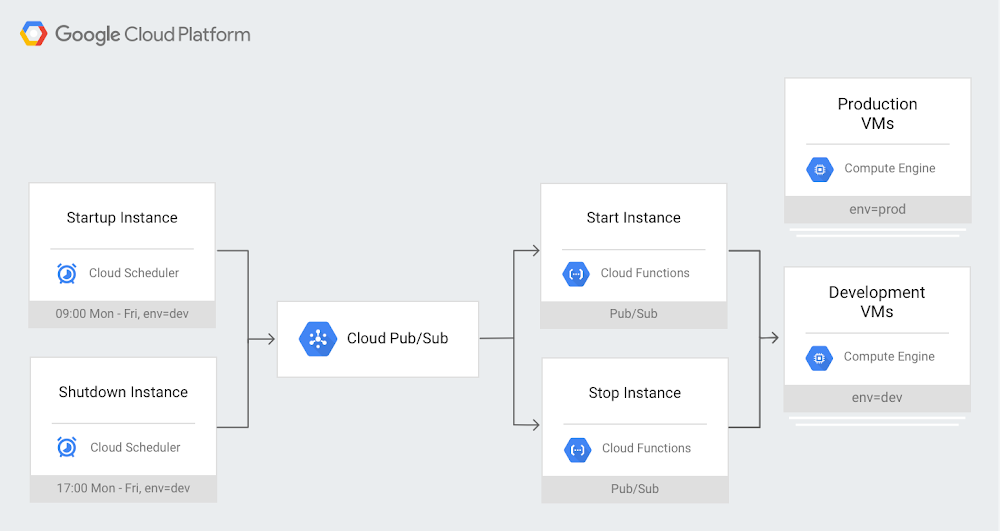
A key feature of running virtual machine instances (VMs) in the cloud is that you only pay for the compute resources you use. On Google Cloud Platform (GCP), Compute Engine VMs are charged per second. Production systems tend to run 24/7; however, some VMs, like those in development or test environments, are typically used only during business hours. Keeping them running in the middle of the night or on weekends serves no useful purpose, so turning them off saves money. But stopping and starting large groups of VMs by hand every day can be tedious and hard to encourage or enforce across an organization.Cloud Scheduler, GCP’s fully managed cron job scheduler, provides a straightforward solution for automatically stopping and starting VMs. By employing Cloud Scheduler with Cloud Pub/Sub to trigger Cloud Functions on schedule, you can stop and start groups of VMs identified with labels of your choice (created in Compute Engine). Here you can see an example schedule that stops all VMs labeled “dev” at 5pm and restarts them at 9am, while leaving VMs labeled “prod” untouched:Using this setup gives you a high degree of flexibility, since you can assign different schedules for different groups of VMs by creating multiple Cloud Scheduler cron jobs.This also helps give you more control over Compute Engine VMs, since the functions use a GCP service account to start and stop Compute Engine instances. Using Cloud Identity and Access Management (IAM), you can follow the principle of least privilege and limit the permissions granted to this service account to the minimum necessary.Since the shutdown is planned, the VMs will run shutdown scripts to ensure they’re in a clean state. Any attached disks with auto-delete turned off will retain their contents and be available again when the VM is restarted. Last but not least, if someone needs a development or test VM at odd hours, you can temporarily remove the label in advance or simply restart the VM if it has already stopped.For a sample implementation of this design pattern, check out Scheduling compute instances with Cloud Scheduler. For more about what else you can accomplish with Cloud Scheduler, check out Reliable task scheduling on Compute Engine with Cloud Scheduler.
Quelle: Google Cloud Platform

Google Cloud networking in depth: Cloud CDN

For more than a decade, Google has invested heavily in the infrastructure and software to build a network that offers a great experience to users all over the planet. At Google Cloud, we leverage these same core technologies and infrastructure as the foundation of Cloud CDN, which lets businesses deliver content to their users with industry-leading performance and throughput. Cloud CDN caches content in locations all over the world to stream video, serve images, download game updates, and other digital distribution use cases.In this blog post, we’ll discuss Cloud CDN’s architecture and key features that help you accelerate content delivery to users across the globe. We’ll conclude with some best practices and useful references.Cloud CDN infrastructureWe realized early on that we needed to build our own systems and infrastructure to keep up with traffic growth and delight our users. That’s when we started our investments in core infrastructure and technology innovations that we continue to this day.The Cloud for Google is intensely physical: we lay down actual fiber under land and sea to carry your data.Left: underground fiber optic cables being laid; Right: adding optical amplifiers aboard a ship before lowering a subsea fiber optic cableThe result of these investments is that Google Cloud operates on one of the best connected and fastest networks on the planet, reaching most of the Internet’s users through a direct connection between Google and their ISP.As part of Google Cloud, Cloud CDN caches your content in 96 locations around the world and hands it off to 134 network edge locations, placing your content close to your users, usually within one network hop through their ISP.A map of Google’s global network showing Google cables connecting various continents and sub-regions. When using Cloud CDN, traffic from your origin traverses this proprietary fiber network for delivery through the edge closest to the customerWhile the number of points of presence (PoPs) and cache locations are important, other factors also contribute to Cloud CDN’s high performance, high throughput, and low latency:Direct network connections with the vast majority of user-facing networks allow Cloud CDN to choose the optimal cache regardless of the location of the origin.Google’s proprietary fiber optic backbone carries network traffic uninterrupted by extra hops.Innovations such as QUIC, HTTP/2, and advanced congestion control protocols such as BBR, contribute to higher performance at the edge. This blog post outlines the benefits of these innovations on Google Cloud Platform to an app’s overall performance globally.To learn more about Cloud CDN’s performance, check out these benchmark reports from Citrix ITM. Cloud CDN architecture: caching, load balancing, and Google’s premium networkHTTP(S) Load Balancer is a distributed system that provides load balancing at the edge of our global infrastructure. Cloud CDN is integrated with the HTTP(S) Load Balancer at those edge locations.When your customers request content, they connect with Cloud CDN at the edge location closest to them. In the case of a cache hit, Cloud CDN serves it directly from the most proximal of the 96 aforementioned edge caches located in metros around the world. In the case of a cache miss, Cloud CDN requests the content from the GCP origin (either a storage bucket or a VM) over Google’s high performance backbone, and then delivers the content back to the customer through the same route. This “cold potato” routing runs on our Premium Network Service Tier, keeping the customer’s traffic on GCP fiber for the longest possible distance, for reduced latency and improved throughput.Cloud CDN featuresIn addition to running over Google’s premium fiber, Cloud CDN offers a wealth of advanced useability features.First of all, it’s incredibly easy to turn on Cloud CDN for a Google Cloud back-end service (either a storage bucket or a virtual machine). There are no complex DNS rules or distributions to configure—selecting a single checkbox (or making a single API call) employs all of Google’s distribution infrastructure in the service of caching and serving your content.In addition, Cloud CDN offers many features out of the box that make it a great option for global content delivery:Google premium network: using Cloud CDN automatically gives access to Google’s premium networkfor delivering content to end usersGlobal Anycast IP: Cloud CDN is accessed through a single global anycast IP, greatly simplifying DNS configurations. Additionally, utilizing Anycast IP distributes inbound requests and makes it hard for bad actors to concentrate their attacks on a single regional or zonal component, thus giving you more resilience to volumetric attacks.No-cost SSL termination: As an extension of the HTTP(S) Load Balancer, Cloud CDN offloads TLS termination from back-end applications. You can control how the load balancer negotiates TLS, providing up to 15 certificates per target proxy at no charge, and applying configurable SSL policies to restrict the TLS versions and cipher suites that the load balancer will negotiate. And load balancers can even use Google-managed TLS certificates, which entirely offloads the process of issuing and renewing certificates.Encryption in-transit: Cloud Load Balancer implicitly encrypts all transit to the back end. Also, you can attach your own certificate to create an SSL connection from Cloud HTTP(S) Load Balancer to the back-end service if you choose.Signed URLs: Cloud CDN can use a 128-bit AES key (provided by you, or generated by GCP) to produce signed URLs with an expiration date. Signed URLs give a client temporary access to a private resource without requiring additional authorization.Global Scale: Cloud CDN leverages the same high availability and scaling infrastructure used by other Google products to provide resiliency and scale without pre-warming. This allows you to ensure that your services and content remain available to legitimate customers even in the event of large scale demand.Logging and monitoring through Stackdriver: Cloud CDN logs each content request. You can then use this information to build dashboards that measure various metrics, cache hits, cache misses, etc. for a near-real-time view into your CDN usage.Configurable cache keys: You can configure inclusions/exclusions for various query parameters when computing the cache keys.Large object support and automatic content size optimization: Cloud CDN can cache objects ranging from 1 byte to 5 terabytes. It also automatically optimizes the underlying storage substrate based on the object size, using flash for smaller objects and HDD for larger objects, thus freeing you from having to tune this manually.IPV6 support: Cloud CDN supports IPV6 clients.Getting started with Cloud CDN Since Cloud CDN is an extension of HTTP(S) Load Balancer, setting up a CDN distribution involves creating a load balancer and attaching CDN caching functionality to one or more of the load-balanced back ends:Create a load balancer: Follow these instructions to set up a load balancer for a content bucket with a suitable front end (using an Anycast IP) and attach the appropriate SSL certificates and DNS entries as required.Activate CDN: Enable Cloud CDN on the back-end service/bucket created above using these instructions.And that’s it! Cloud CDN now caches any content with the appropriate caching headers, served through the Anycast IP (or any domain names mapped to that IP through DNS records).In addition, Cloud CDN’s documentation lists some best practices that can help you optimize its use for your content. Some things to consider are:Thoughtful use of invalidationsTuning the expiration date of time-sensitive contentUsing custom cache keys to improve the cache hit ratioUsing versioned URLs to update contentTo learn more about Cloud CDN, here are some helpful references:Presentation on Cloud CDN from Google Cloud Next ‘19Cloud CDN Product PageWe’d love your feedback on the above and more that you’d like to see—you can reach us at gcp-networking@google.com.
Quelle: Google Cloud Platform

New Translate API capabilities can help localization experts and global enterprises

Whether they’re providing global content for e-commerce, news, or video streaming, many businesses need to share information across many languages, and increasingly they’re turning to automated machine translation to do it faster and more cost-effectively.As one of our longest-standing AI products, Google Cloud Translation has substantially evolved over the years to meet the increasing needs of developers and localization providers around the world. Last year we launched AutoML Translation to help businesses with limited machine learning expertise to build high-quality, production-ready custom translation models without writing a single line of code.But that only met part of the need for customization. While AutoML Translation offers full customization flexibility, companies using Translation API wanted to have more granular control on specific words and phrases, such as a list of location names or street names. Many businesses also told us they use both custom and pre-trained models in the same translation project for different languages, so we wanted to make it easier for them to move between models to run translation predictions.As a result of these learnings, we recently launched Translation API v3 to better serve the needs of our customers. Here’s a look at the enhanced features in Translation API v3.Define specific names and terms with a glossaryIf you need to maintain and control specific terms such as brand names in translated content, creating a glossary can help. Simply define your company-specific names and vocabulary in your source and target languages, then save the glossary file to your translation project. Those words and phrases will be included in your copy when you apply the glossary in your translation request.Welocalize, a global leader in multilingual content and data transformation solutions, is already using the glossary feature to increase accuracy, efficiency and fluency for their customers. “The new Google glossary feature will have a significant impact on our day-to-day business. We process hundreds of million words per year using machine translation in widely disparate enterprise client scenarios,” said Olga Beregovaya, their Vice President of Language Services. “The ease of customization and API consumption allows us to enforce broad terminology coverage for both clients with voluminous data in Google AutoML Translation and clients with sparse data in Google Cloud Translation API. Our initial benchmarking in five languages shows a preference for translation with glossary as much as 20% over the non-glossary.”              Select between custom and pre-trained modelsNow you can choose between Translation API’s traditional pre-trained models or use custom model translations so that you can streamline your workflow within the same client library.Streamline your localization process with batch translationsYou can now translate larger volumes of content in one translation request for text and HTML files stored on Google Cloud. This means you can use a single request to upload multiple files translated into multiple languages using multiple models.For example, if you wanted to translate an English product description on your website into Spanish, Japanese, and Russian, you could use your custom AutoML model for Spanish and a pre-trained model for Japanese and Russian. You would simply upload your English HTML file to your Cloud Storage bucket and send a batch request pointing to your Spanish AutoML model and pre-trained models for Japanese and Russian. Translation v3 will then output your HTML to Cloud Storage in Spanish, Russian, and Japanese in three separate files.Integrations with TMS/CATTechnology partners are starting to integrate these new features within their TMS systems as well.“Based on feedback from our clients using Google translation technology in CAT tools, the most sought after features are the ability to customize Google Cloud Translation output with glossary and to make translation faster via batch translation,” says Konstantin Savenkov, CEO of Intento. “Now both are available via our plugin to CAT Tools (SDL APPStore, MemoQ, and Matecat). Also, we may deliver Translation API v3 to enterprise TMS systems via our XLIFF-based connectors.” You can learn more in Intento’s recent blog post.Introducing the Translation API v3 free tierStarting with Translation API v3, businesses can take advantage of a free tier for the first 500,000 characters per month. Beyond that, the pricing remains on a simple and affordable per-character basis, so you only pay for what you use. You can learn more on our pricing page.How to get startedIf you’re already using Translation API v2, you can begin migrating your applications to v3 using this guide. For more information on Translation API v3, visit our website.
Quelle: Google Cloud Platform

Build more accurate forecasts with new capabilities in automated machine learning

We are excited to announce new capabilities which are apart of time-series forecasting in Azure Machine Learning service. We launched preview of forecasting in December 2018, and we have been excited with the strong customer interest. We listened to our customers and appreciate all the feedback. Your responses helped us reach this milestone. Thank you.

Building forecasts is an integral part of any business, whether it’s revenue, inventory, sales, or customer demand. Building machine learning models is time-consuming and complex with many factors to consider, such as iterating through algorithms, tuning your hyperparameters and feature engineering. These choices multiply with time series data, with additional considerations of trends, seasonality, holidays and effectively splitting training data.

Forecasting within automated machine learning (ML) now includes new capabilities that improve the accuracy and performance of our recommended models:

New forecast function
Rolling-origin cross validation
Configurable Lags
Rolling window aggregate features
Holiday detection and featurization

Expanded forecast function

We are introducing a new way to retrieve prediction values for the forecast task type. When dealing with time series data, several distinct scenarios arise at prediction time that require more careful consideration. For example, are you able to re-train the model for each forecast? Do you have the forecast drivers for the future? How can you forecast when you have a gap in historical data? The new forecast function can handle all these scenarios.

Let’s take a closer look at common configurations of train and prediction data scenarios, when using the new forecasting function. For automated ML the forecast origin is defined as the point when the prediction of forecast values should begin. The forecast horizon is how far out the prediction should go into the future.

In many cases training and prediction do not have any gaps in time. This is the ideal because the model is trained on the freshest available data. We recommend you set your forecast this way if your prediction interval allows time to retrain, for example in more fixed data situations such as financial forecasts rate or supply chain applications using historical revenue or known order volumes.

When forecasting you may know future values ahead of time. These values act as contextual information that can greatly improve the accuracy of the forecast. For example, the price of a grocery item is known weeks in advance, which strongly influences the “sales” target variable. Another example is when you are running what-if analyses, experimenting with future values of drivers like foreign exchange rates. In these scenarios the forecast interface lets you specify forecast drivers describing time periods for which you want the forecasts (Xfuture). 

If train and prediction data have a gap in time, the trained model becomes stale. For example, in high-frequency applications like IoT it is impractical to retrain the model constantly, due to high velocity of change from sensors with dependencies on other devices or external factors e.g. weather. You can provide prediction context with recent values of the target (ypast) and the drivers (Xpast) to improve the forecast. The forecast function will gracefully handle the gap, imputing values from training and prediction context where necessary.

In other scenarios, such as sales, revenue, or customer retention, you may not have contextual information available for future time periods. In these cases, the forecast function supports making zero-assumption forecasts out to a “destination” time. The forecast destination is the end point of the forecast horizon. The model maximum horizon is the number of periods the model was trained to forecast and may limit the forecast horizon length.

The forecast model enriches the input data (e.g. adds holiday features) and imputes missing values. The enriched and imputed data are returned with the forecast.

Notebook examples for sales forecast, bike demand and energy forecast can be found on GitHub.

Rolling-origin cross validation

Cross-validation (CV) is a vital procedure for estimating and reducing out-of-sample error for a model. For time series data we need to ensure training only occurs using values to the past of the test data. Partitioning the data without regard to time does not match how data becomes available in production, and can lead to incorrect estimates of the forecaster’s generalization error.

To ensure correct evaluation, we added rolling-origin cross validation (ROCV) as the standard method to evaluate machine learning models on time series data. It divides the series into training and validation data using an origin time point. Sliding the origin in time generates the cross-validation folds.

As an example, when we do not use ROCV, consider a hypothetical time-series containing 40 observations. Suppose the task is to train a model that forecasts the series up-to four time-points into the future. A standard 10-fold cross validation (CV) strategy is shown in the image below. The y-axis in the image delineates the CV folds that will be made while the colors distinguish training points (blue) from validation points (orange). In the 10-fold example below, notice how folds one through nine result in model training on dates future to be included the validation set resulting inaccurate training and validation results.

This scenario should be avoided for time-series instead, when we use an ROCV strategy as shown below, we preserve the time series data integrity and eliminate the risk of data leakage.

ROCV is used automatically for forecasting. You simply pass the training and validation data together and set the number of cross validation folds. Automated machine learning (ML) will use the time column and grain columns you have defined in your experiment to split the data in a way that respects time horizons. Automated ML will also retrain the selected model on the combined train and validation set to make use of the most recent and thus most informative data, which under the rolling-origin splitting method ends up in the validation set.

Lags and rolling window aggregates

Often the best information a forecaster can have is the recent value of the target. Creating lags and cumulative statistics of the target then increases accuracy of your predictions.

In automated ML, you can now specify target lag as a model feature. Adding lag length identifies how many rows to lag based on your time interval. For example, if you wanted to lag by two units of time, you set the lag length parameter to two.

The table below illustrates how a lag length of two would be treated. Green columns are engineered features with lags of sales by one day and two day. The blue arrows indicate how each of the lags are generated by the training data. Not a number (Nan) are created when sample data does not exist for that lag period.

In addition to the lags, there may be situations where you need to add rolling aggregation of data values as features. For example, when predicting energy demand you might add a rolling window feature of three days to account for thermal changes of heated spaces. The table below shows feature engineering that occurs when window aggregation is applied. Columns for minimum, maximum, and sum are generated on a sliding window of three based on the defined settings. Each row has a new calculated feature, in the case of date January 4, 2017 maximum, minimum, and sum values are calculated using temp values for January 1, 2017, January 2, 2017, and January 3, 2017. This window of “three” shifts along to populate data for the remaining rows.

Generating and using these additional features as extra contextual data helps with the accuracy of the trained model. This is all possible by adding a few parameters to your experiment settings.

Holiday features

For many time series scenarios, holidays have a strong influence on how the modeled system behaves. The time before, during, and after a holiday can modify the series’ patterns, especially in scenarios such as sales and product demand. Automated ML will create additional features as input for model training on daily datasets. Each holiday generates a window over your existing dataset that the learner can assign an effect to. With this update, we will support over 2000 holidays in over 110 countries. To use this feature, simply pass the country code as a part of the time series settings. The example below shows input data in the left table and the right table shows updated dataset with holiday featurization applied. Additional features or columns are generated that add more context when models are trained for improved accuracy.

Get started with time-series forecasting in automated ML

With these new capabilities automated ML increases support more complex forecasting scenarios, provides more control to configure training data using lags and window aggregation and improves accuracy with new holiday featurization and ROCV. Azure Machine Learning aims to enable data scientists of all skill levels to use powerful machine learning technology that simplifies their processes and reduces the time spent training models. Get started by visiting our documentation and let us know what you think – we are committed to make automated ML better for you!

Learn more about the Azure Machine Learning service and get started with a free trial.

Learn more about automated machine learning
How to Guide: Auto-train a time-series forecast model
Automated ML GitHub Samples

Quelle: Azure

Reisen: Google Trips wird eingestellt

Google stellt die nächste App ein: Ab August 2019 wird Google Trips nicht mehr nutzbar sein. Reisen können aber künftig über die Google-Suche und Maps geplant werden, der Service wird im weitesten Sinne nur verlagert. (Google, Applikationen)
Quelle: Golem