Google Cloud networking in-depth: Simplify routing between your VPCs with VPC peering

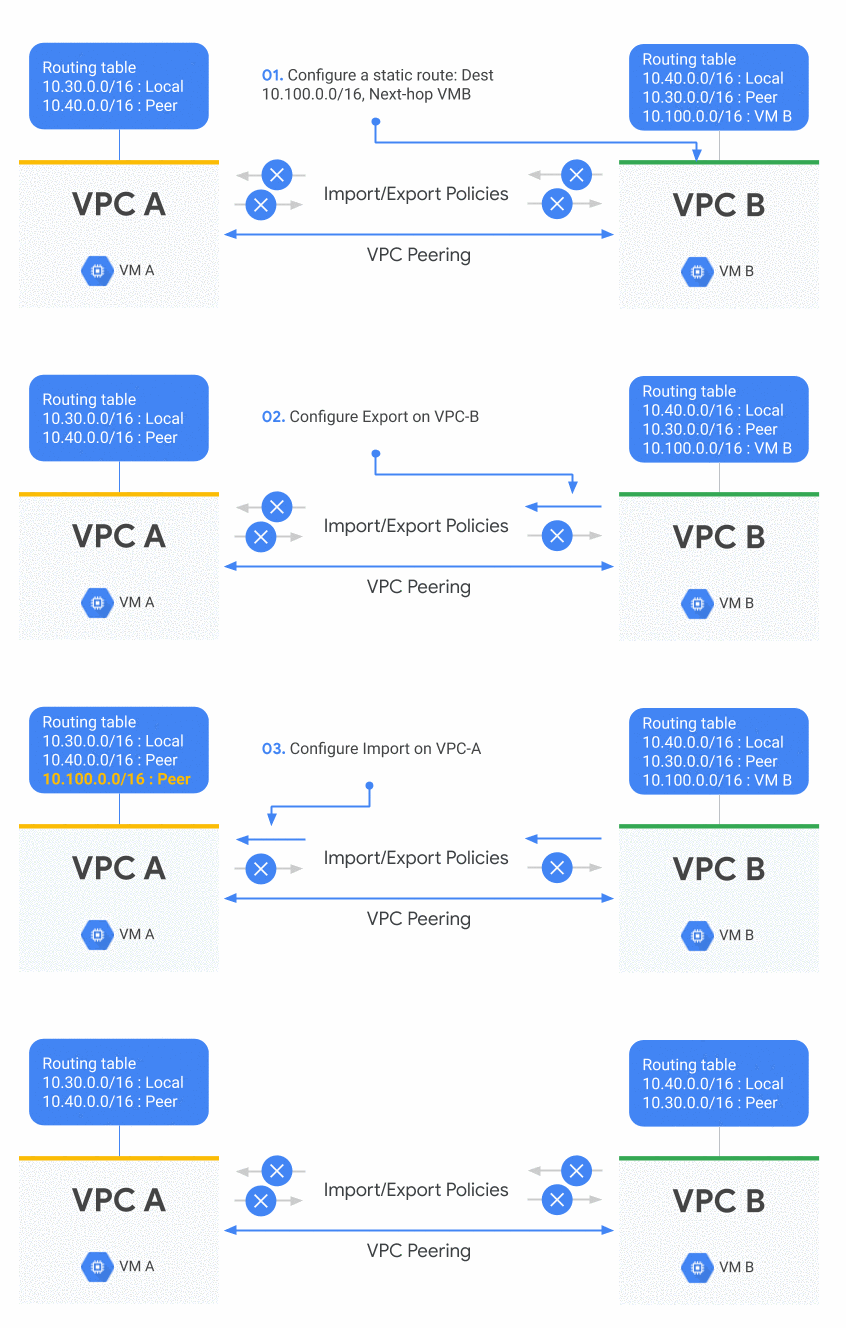
Editor’s note: Google Cloud networking products and services fall into five main pillars: ‘Connect,’ ‘Scale,’ ‘Secure,’ ‘Optimize,’ and ‘Modernize.’ At Google Cloud Next ‘19 we announced several additions to our networking portfolio, and heard from customers, prospects and partners who wanted to learn more about the technical aspects of these announcements. What follows is a deep dive into the Connect pillar, exploring the enhanced routing capabilities in Google Cloud VPC. Stay tuned in the coming weeks as we explore the Google Cloud networking pillars further.Network routing is about creating reliable paths between multiple networks by exchanging IP address information, where a network is either remote behind some type of hybrid connectivity service or a Virtual Private Cloud (VPC) network.Today, we thought we would share a little more insight into how to use a new VPC peering capability to help you improve your on-prem connectivity to Google Cloud Platform (GCP), share VPNs across multiple VPCs or accessing a third party appliance on a peered VPC.In Google Cloud a VPC is global so VPC peering is not needed to communicate between regions. Still, organizations may want to separate their deployments in different VPCs for isolation purposes and in this case VPC peering is ideal to keep those entities connected. But until now, you could only exchange subnet routes with VPC peering. For example, if you learned a BGP dynamic route in one VPC via Cloud Router, it couldn’t be used or wasn’t visible from any of its peered VPCs.At Google Cloud Next ’19, we announced that you can now exchange any type of routes between two peered VPC networks, including static routes, subnet routes and dynamic BGP routes. Let’s look at a couple of use cases where it might be useful.Using a peered VPC service with static routesMany applications or services are using static routes instead of subnets routes for connectivity. An example is using Equal Cost Multi-Path (ECMP) with static routes to load balance traffic to multiple third party appliances. Starting now, you can set up your VPC peering so that two VPCs exchange their static routes; this means that those appliances are available from another VPC. You can do this by configuring import/export policies on a VPC peering connection. By default only subnet routes are exchanged across peers.In the following example, there are two VPC networks. VPC-A is peered with VPC-B. A static route is created on VPC-B. VPC-B exports that route to VPC-A which is importing it. It results in the static route being visible in VPC-A.Exchange of static routes between VPCsBetter connectivity from an on-prem networkImagine that you have two VPCs connected via VPC peering and you would like to reach both of them from an on-prem network with a single VPN. This is a very common use case as many managed services in GCP use VPC peering, including Cloud SQL. (Note: To better understand the existing types of services and connections in GCP, check out this Google Cloud Next ’19breakout session on how to privately access your Google Cloud or third-party managed services.)Connecting those VPCs from an on-prem network means that you need the on-prem routes to be advertised to both VPCs. In the example below, VPC-A is connected to an on-prem network and to another VPC-B. On-prem routes are exported to VPC-B through VPC-A, resulting in the connectivity between the on-prem network and both VPCs.Exchange of on-premise routes with two VPCsYou can use this functionality to share a single on-prem hybrid connection such as a VPN tunnel or an interconnect between multiple VPC networks, by creating a transit VPC.What’s next for VPC connectivityAs enterprises migrate different types of workloads, public cloud providers’ networking topologies will become more complex. GCP routing solutions like VPC peering will continue to become more flexible with extensible policy filters to fine-tune your connectivity and security boundaries. In a way, VPC peering inherits many attributes of traditional routing protocols like BGP.In short, we’re far from done. Click here to learn more about GCP cloud networking and reach us at gcp-networking@google.com.
Quelle: Google Cloud Platform

Getting started with Identity Platform

Modern businesses need to manage not only the identities of their employees but also the identities of customers, partners, and Things (IoT). In April, we made Identity Platform generally available to help you add Google-grade identity and access management functionality to your apps and services, protect user accounts, and scale with confidence.Customers are already using Identity Platform to add authentication and identity management to apps for their customers, build data intelligence platforms, enhance device management, and issue tokens for Things. Let’s now take a deeper look at how to use Identity Platform to add identity and access management functionality to your apps and services.Before you beginBefore you get started, you need to have a Google Cloud Platform (GCP) project for which you’re a Project Owner, with billing enabled for the project.Enable Identity PlatformThe first step is to enable Identity Platform in GCP Marketplace:Go to the Identity Platform Marketplace page in the GCP Console.Turn on Identity Platform by clicking Enable Identity Platform.Navigate to the GCP Console.Now you are ready to start using Client and Admin SDKs for your apps and services.Configure authentication methodsAfter you enable Identity Platform, you can configure authentication methods (e.g. email/password, social login, etc), so that your users can sign in to your applications and services.To enable an authentication method:1. Go to the Identity Providers page in the GCP Console.2. Click Add A Provider.3. Select the provider you want to use from the list of providers and enterprise federation standards:Email & Password/PasswordlessPhoneSocial providersSAMLOpenID ConnectAnonymous4. After you select a provider, enter your provider’s relevant details, like Client ID, secret, and other provider-specific information.You can find more information on configuring authentication methods here.Using the Client SDKsYou can use Identity Platform Client SDKs for Android, iOS, and Web to allow end-users to authenticate to your service. You can obtain the SDKs and learn more about them here.  You can also use Identity Platform with the pre-built, open-source UI components that are available on the Web, iOS or Android via GitHub. You can customize the UI components to align with the look and feel of your app. A web quickstart is available for the UI components for all three clients. You can also see an example of integrating the UI components with a web app here.Using the Admin SDKsThe Admin SDKs let you interact with Identity Platform from privileged environments to perform actions like:Read and write custom claims and attributes to Identity Platform objectsGenerate and verify Identity Platform ID tokens.Access GCP resources like Cloud Storage buckets and Firestore databases associated with your Identity Platform projects.Create your own simplified admin console to do things like look up user data or change a user’s email address for authentication.The Admin SDKs are available across major platforms. To learn more and get the SDKs, see add the SDK.Migrate users to Identity PlatformThe Admin SDKs can also help you import a collection of email and password users into Identity Platform, helping you move from an existing provider without requiring users to reset their passwords. This is a common process for existing applications. You can see an example here.SummaryYou can set up Identity Platform with few clicks and at no additional cost to get started (up to 49,999 monthly active users). To learn more, watch a webinar, check out our Next ‘19 presentation, and follow the quickstart for step-by-step instructions.
Quelle: Google Cloud Platform

UPS uses Google Cloud to build the global smart logistics network of the future

The power of data analytics and machine learning is making it possible for companies that have mastered entire industries to take the next step and digitally transform their business. One of my favorite examples is United Parcel Service (UPS), which started out as a messenger company in 1907 and has steadily grown to become the largest package delivery and specialized transportation and logistics company in the world.Throughout the advent of e-commerce, UPS continues to play an even greater role in the movement of goods around the globe, and yet this 112 year-old company is just getting started. The massive amounts of data underlying its operations provide the foundation for UPS to lead the way in implementing more efficient, profitable and forward-thinking approaches in running its business.To fully appreciate the scale of the opportunity, it helps to start with the numbers:Every day, UPS delivers 21 million packages in more than 220 countries worldwide. During the all-important holiday season, the number of packages delivered per day can reach its peak.The drivers who make that possible perform 120 pickup and dropoff stops daily.The number of possible routes each driver can take from stop number one to stop number 120 is unthinkably large at 199 digits.Sifting through all of this data to select the single best, most efficient and cost effective route is the perfect challenge for Google Cloud.Working in collaboration with Google Cloud Platform(GCP), UPS was able to design routing software that tells the delivery driver exactly where to go, every step of the way. The routing software saves the company up to $400 million a year, and reduces fuel consumption by 10 million gallons a year.At our Google Cloud Next ‘19 conference last month, Juan Perez, Chief Information Officer at UPS, talked about how the work we’re doing together is transforming the company’s smart logistics network. “We’re grateful for the opportunity to collaborate with great partners like Google in a way that lets us use our joint expertise to bolster visibility across supply chains around the world,.”This is the power of analytics at scale, and it’s just the beginning. Today, Google Cloud’s BigQuery also helps UPS power the most precise and comprehensive forecasting in the company’s history. GCP provides the capacity to run machine learning models across 1 billion data points per day, including package weight, shape and size, and facility capacity across the network. The insights extracted from that data help inform UPS on how to load delivery vehicles, make more targeted operations adjustments, and minimize forecast uncertainty, especially around the holidays.Ultimately, this all helps UPS deliver more packages at a lower cost and serve its customers in a smarter, more agile way, which also means more smiling faces on holiday mornings.For more information on GCP, visit our website.
Quelle: Google Cloud Platform

Building recommender systems with Azure Machine Learning service

Recommendation systems are used in a variety of industries, from retail to news and media. If you’ve ever used a streaming service or ecommerce site that has surfaced recommendations for you based on what you’ve previously watched or purchased, you’ve interacted with a recommendation system. With the availability of large amounts of data, many businesses are turning to recommendation systems as a critical revenue driver. However, finding the right recommender algorithms can be very time consuming for data scientists. This is why Microsoft has provided a GitHub repository with Python best practice examples to facilitate the building and evaluation of recommendation systems using Azure Machine Learning services.

What is a recommendation system?

There are two main types of recommendation systems: collaborative filtering and content-based filtering. Collaborative filtering (commonly used in e-commerce scenarios), identifies interactions between users and the items they rate in order to recommend new items they have not seen before. Content-based filtering (commonly used by streaming services) identifies features about users’ profiles or item descriptions to make recommendations for new content. These approaches can also be combined for a hybrid approach.

Recommender systems keep customers on a businesses’ site longer, they interact with more products/content, and it suggests products or content a customer is likely to purchase or engage with as a store sales associate might. Below, we’ll show you what this repository is, and how it eases pain points for data scientists building and implementing recommender systems.

Easing the process for data scientists

The recommender algorithm GitHub repository provides examples and best practices for building recommendation systems, provided as Jupyter notebooks. The examples detail our learnings on five key tasks:

Data preparation – Preparing and loading data for each recommender algorithm
Modeling – Building models using various classical and deep learning recommender algorithms such as Alternating Least Squares (ALS) or eXtreme Deep Factorization Machines (xDeepFM)
Evaluating – Evaluating algorithms with offline metrics
Model selection and optimization – Tuning and optimizing hyperparameters for recommender models
Operationalizing – Operationalizing models in a production environment on Azure

Several utilities are provided in reco utils to support common tasks such as loading datasets in the format expected by different algorithms, evaluating model outputs, and splitting training/test data. Implementations of several state-of-the-art algorithms are provided for self-study and customization in an organization or data scientists’ own applications.
In the image below, you’ll find a list of recommender algorithms available in the repository. We’re always adding more recommender algorithms, so go to the GitHub repository to see the most up-to-date list.


Let’s take a closer look at how the recommender repository addresses data scientists’ pain points.

It’s time consuming to evaluate different options for recommender algorithms

One of the key benefits of the recommender GitHub repository is that it provides a set of options and shows which algorithms are best for solving certain types of problems. It also provides a rough framework for how to switch between different algorithms. If model performance accuracy isn’t enough, an algorithm better suited for real-time results is needed, or the originally chosen algorithm isn’t the best fit for the type of data being used, a data scientist may want to switch to a different algorithm.

Choosing, understanding, and implementing newer models for recommender systems can be costly

Selecting the right recommender algorithm from scratch and implementing new models for recommender systems can be costly as they require ample time for training and testing as well as large amounts of compute power. The recommender GitHub repository streamlines the selection process, reducing costs by saving data scientists time in testing many algorithms that are not a good fit for their projects/scenarios. This, coupled with Azure’s various pricing options, reduces data scientists’ costs on testing and organization’s costs in deployment.

Implementing more state-of-the-art algorithms can appear daunting

When asked to build a recommender system, data scientists will often turn to more commonly known algorithms to alleviate the time and costs needed to choose and test more state-of-the-art algorithms, even if these more advanced algorithms may be a better fit for the project/data set. The recommender GitHub repository provides a library of well-known and state-of-the-art recommender algorithms that best fit certain scenarios. It also provides best practices that, when followed, make implementing more state-of-the-art algorithms easier to approach.

Data scientists are unfamiliar with how to use Azure Machine Learning service to train, test, optimize, and deploy recommender algorithms

Finally, the recommender GitHub repository provides best practices for how to train, test, optimize, and deploy recommender models on Azure and Azure Machine Learning (Azure ML) service. In fact, there are several notebooks available on how to run the recommender algorithms in the repository on Azure ML service. Data scientists can also take any notebook that has already been created and submit it to Azure with minimal or no changes.

Azure ML can be used intensively across various notebooks for tasks relating to AI model development, such as:

Hyperparameter tuning
Tracking and monitoring metrics to enhance the model creation process
Scaling up and out on compute like DSVM and Azure ML Compute
Deploying a web service to Azure Kubernetes Service
Submitting pipelines

Learn more

Utilize the GitHub repository for your own recommender systems.

Learn more about the Azure Machine Learning service.

Get started with a free trial of Azure Machine Learning service.
Quelle: Azure

How to Automatically Scale Low Code Apps with Joget and JBoss EAP on OpenShift

This is a guest post by Julian Khoo, VP Product Development and Co-Founder at Joget Inc.  Julian has almost 20 years of experience in the IT industry, specifically in enterprise software development. He has been involved in the development of various products and platforms in application development, workflow management, content management, collaboration and e-commerce. Introduction […]
The post How to Automatically Scale Low Code Apps with Joget and JBoss EAP on OpenShift appeared first on Red Hat OpenShift Blog.
Quelle: OpenShift

Continuous delivery and the DevOps approach to modernization

Businesses are working to increase agility, deliver innovative and engaging experiences to clients, and stay ahead of competition. Increasingly, companies are modernizing business applications to make these business goals a reality.
Modernizing applications is generally composed of three transformations: cloud-native architecture, continuous delivery and infrastructure automation. These typically occur concurrently, but do have distinct characteristics. For example, the cloud-native architecture journey transforms organizations from monolithic applications to containerized microservices applications in which lightweight data collectors help enable success.
Continuous delivery is also critical to business transformation success. Teams may be responding to industry pressure to keep up with competitors, often cloud-native companies, who are pushing updates out faster. The bar is set increasingly higher as users become accustomed to applications that are highly reliable and frequently updated.
There are two additional levels of transformation that teams must implement in order to reach continuous delivery. Companies must also adopt agile development and a DevOps approach. These approaches are practiced and honed over time to constantly refine and discover what works best for the team.
How to start incorporating continuous delivery
The best way to begin on the continuous delivery journey is to start adopting an agile approach to development. However, agile by itself is not sufficient. Incorporating a DevOps approach also adds another important component in this journey.
DevOps involves increasing collaboration and implementing a tighter feedback loop between the development and operations teams. This enhanced connectivity between the teams translates to increased speed of delivery, along with increased reliability and stability in production.
Another component to DevOps is the Site Reliability Engineering (SRE) approach. An SRE approach involves automating as many repetitive tasks as possible and spending at least 50 percent of team time focusing on improving application reliability, instead of simply maintaining it.
Once a team has organized around DevOps and SRE principles, they can continue refining their process and culture to increase the frequency and reliability of updates.
How to overcome continuous delivery challenges

Ensure seamless communication between developers and operation teams. Development teams often instrument their own tools, such as lightweight and open source solutions, but these don’t necessarily translate into production environments. Particularly for continuous delivery, development teams need to ensure their code is ready for production and operations teams need to trust that this is the case. If the two teams are using separate tools, visibility is limited, which can result in delays. IBM Cloud App Management offers a solution by making it easy for developers to add lightweight data collectors, which will also seamlessly work in the production environment, to their code. Now when a code change occurs, the production team can see it and developers can easily quickly grasp how their code is working in production. This feedback loop is critical to accelerating delivery.
Identify code bugs early with lightweight data collectors. Another impediment to accelerating application delivery is that bugs are often not discovered during development. This can lead to costly fixes once the code is deployed. Again, by easily instrumenting lightweight data collectors early in the development process, the dev team can find and fix bugs before going into production. This is essential for the continuous delivery process.
Automate application processes. Seeing how changes correlate to performance can be another challenge. IBM UrbanCode Deploy automates application deployment by promoting code through the pipeline. It can also rollback or uninstall applications. Automating these processes is a key component in continuous delivery. To make it even more useful, companies can connect UrbanCode events directly into IBM Cloud App Management to see how the deployment correlates with application performance.
Support multiple development pipelines. To successfully implement continuous delivery, it’s important that enterprises support multiple development pipelines for dev, staging, test and production. This enables work to continue in each pipeline without affecting the others. With this agile approach, the same data collectors run in your services whether they are running in dev, staging, test or production.
Continuously monitor key metrics. Lastly, it can be difficult to quickly find the root cause of a problem if and when it does occur. This is due, in no small part, to the wide range of specialized technologies that make up the distributed network of microservices comprising an application. There’s no time to have the experts in each technology look through their logs and determine if their service is causing the problem. Dashboard monitoring tools can help. IBM Cloud App Management monitors the four SRE golden signals, which are latency, errors, traffic and saturation. Teams can immediately see these four golden signals, so root causes can be quickly identified and fixed.

While the path to continuous delivery can be long, implementing the best practices above can ease the transition and help teams incorporate the core components of agile, DevOps and SRE.
Learn more about continuous delivery and a DevOps approach.
The post Continuous delivery and the DevOps approach to modernization appeared first on Cloud computing news.
Quelle: Thoughts on Cloud




