5 Reasons to Containerize Production Windows Apps on Docker Enterprise

We started working with Microsoft five years ago to containerize Windows Server applications. Today, many of our enterprise customers run Windows containers in production. We’ve seen customers containerize everything from 15 year old Windows .NET 1.1 applications to new ASP.NET applications.

If you haven’t started containerizing Windows applications and running them in production, here are five great reasons to get started:
1. It’s time to retire Windows Server 2008
Extended Support ends in January 2020. Rewriting hundreds of legacy applications to run on Windows Server 2016 or 2019 is a ridiculously expensive and time-consuming headache, so you’ll need to find a better way — and that’s Docker Enterprise.
2. It’s much easier than you think to containerize legacy Windows apps
You can containerize legacy Windows applications with Docker Enterprise without needing to rewrite them. Once containerized, these applications are easier to modernize and extend with new services.
3. Both Swarm and Kubernetes will support Windows nodes
The recently announced Kubernetes 1.14 includes support for Windows nodes. With Docker Enterprise, you will soon be able to use either orchestrator to run Windows nodes.
4. Your Windows apps become fully portable to the cloud
Once you containerize your Windows applications, it’s easy to migrate them to almost any cloud. With Docker Enterprise, applications are fully portable.
5. You’re in good company
Hundreds of enterprises now run Windows container nodes in production. Last fall, we talked about how GE Digital, Jabil and the largest bank in Italy have containerized Windows Server applications. Two of the world’s top ten bio-pharmaceutical companies and one of the largest manufacturers now run production Windows containers on Docker Enterprise.
At DockerCon Barcelona 2018 and DockerCon 2019, we heard from several other customers about how they use Docker Enterprise to containerize Windows applications:

Quicken Loans, a $3 billion home mortgage lender, is rolling out the Docker Enterprise container platform to support hundreds of Windows applications. Docker Captain Tommy Hamilton, who works at Quicken Loans, shared his advice on how to successfully containerize Windows applications at DockerCon this year.
Mitchell International, a software company in the auto insurance industry, is containerizing over 400 Windows .NET and IIS applications with Docker Enterprise. Marius Dornean, Director of R&D at Mitchell International, explains how they modernized .NET applications in his DockerCon session.
Entergy, a large utility company headquartered in New Orleans, is modernizing its infrastructure and reducing security exposure by containerizing over 500 Windows 2000, 2003 and 2008 applications.
Mizuho Financial Group, an international financial services firm with over $1.9 trillion in assets, modernized its JVM-based internal service bus by containerizing Windows Server applications on Docker Enterprise.
Tele2, a Dutch telecom company, has containerized over 500 legacy applications, including .NET, Magento and Jenkins. Application updates that used to take 3+ days to deploy now take minutes, and the company saw a significant increase in customer satisfaction metrics within 6 months.

If you’re thinking about containerizing old or new Windows applications, there’s never been a better time to do it.

5 reasons to containerize production #Windows apps on #Docker EnterpriseClick To Tweet

For more information:

Learn more about containerizing Windows Server applications with Docker Enterprise.
Register for the Docker for Windows Container Development webinar.
Learn more about Docker Enterprise 
Read the blog on Windows Containers with Kubernetes

The post 5 Reasons to Containerize Production Windows Apps on Docker Enterprise appeared first on Docker Blog.
Quelle: https://blog.docker.com/feed/

A little light reading: New and interesting stories from around Google

There’s never a dull moment in the big world of Google, and we came across a few especially interesting stories in the past month for you tech lovers out there. Read on for the latest in new technology and new ideas.Neural networks help create kiss detection technologyThat’s right, “kiss detection” is an actual feature in the Pixel 3 Camera app in Photobooth mode, part of its improved selfie-taking capabilities. Photobooth mode is optimized for the front-facing camera, and developing this new detection mode required the use of two models: one for facial expressions and one to detect when people kiss. The team worked with photographers to identify key facial expressions that would trigger capture, then trained a neural network to classify those expressions. The new feature means the camera automatically takes a photo when the camera is steady and can tell that the subjects are kissing, resulting in better selfies.Build your own smart deviceOur brand-new Coral platform, designed to make AI hardware development easier, is now available through several global distributors. The Coral products include a dev board, USB accelerator, and camera, all powered by Google AI’s Edge TPU, a custom-designed ASIC chip that provides high-performance ML inferencing for low-power devices. For example, the Edge TPU chip can execute state-of-the-art mobile vision models such as MobileNet V2 at 100+ fps in a power-efficient manner. Last month, the new Environmental Sensor Board became available, so developers can bring sensor input into models. It has integrated light, temperature, humidity, and barometric sensors, and the ability to add more sensors via its four Grove connectors. There’s also an updated Edge TPU model compiler and new C++ API.Witnessing happy little cloud momentsHere’s a bird’s-eye view from a Google cloud architect who’s worked with lots of companies getting started with cloud, and his take on what makes users really happy when they start using Google Cloud Platform (GCP). Some are simple, like the concept of a project in GCP, which is a namespace that groups resources together and by default isn’t available to any other project. There are also network tags to make firewall rule creation easier, and some console features that users often love.Serverless and containers, better togetherServerless should really be called “service-ful,” says one interviewee on this GCP podcast about the new Cloud Run, since running serverless containers in the cloud lets you focus on code and building services, not infrastructure. Cloud Run lets you to run any language, binary, or code in a container in the cloud, and delivers the pay-per-use model serverless is known for. There are two versions: Cloud Run, the fully managed service for running serverless containers, and Cloud Run for GKE, which runs the compute inside your GKE cluster.Google Earth Timelapse shows the world go roundThe Google Earth team released some new updates last month to the Google Earth Timelapse, a video visualization of our planet’s surface from 1984 to 2018. If you haven’t checked this out yet, it’s now available to see on mobile devices and tablets. It’s a very cool look at how the Earth has changed, for example how Las Vegas has grown or how landslides have increased on one island. The visualization uses Google Earth Engine to analyze more than 15 million satellite images, and uses technology from Carnegie Mellon’s CREATE Lab to make the video interactively explorable. And for an extra dash of inspiration, see how a high school student is using Google Earth Engine at her NASA internship to monitor mangrove ecosystems.Let us know what you’ve been reading lately. Tell us your recommendations here.
Quelle: Google Cloud Platform

Sunny spells: How SunPower puts solar on your roof with AI Platform

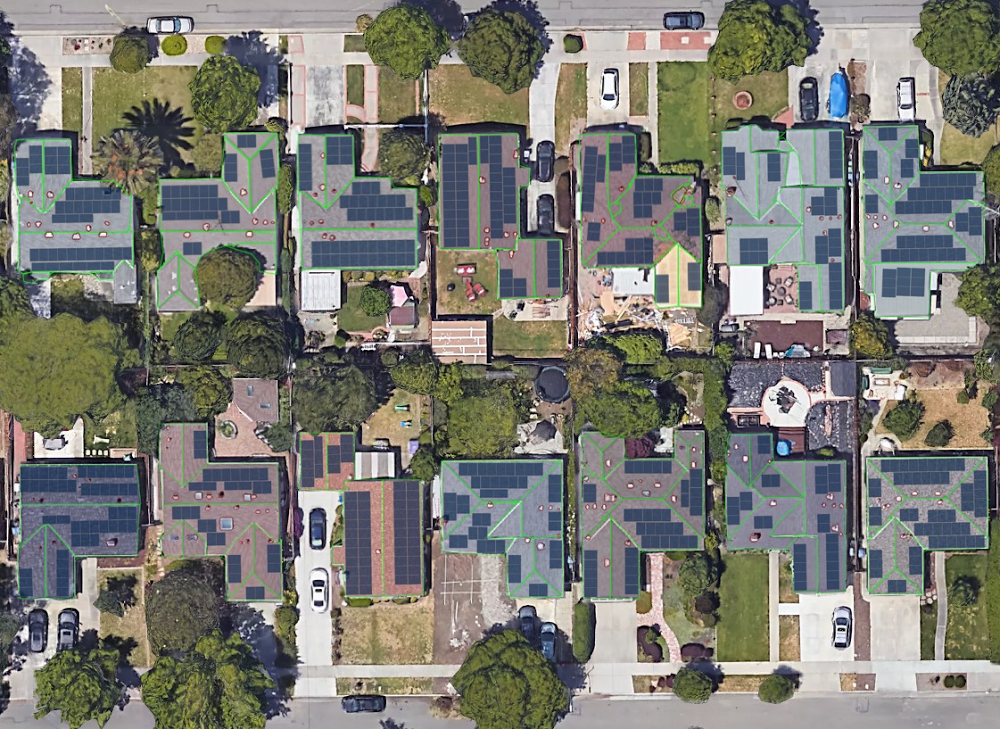
Editor’s Note: Today’s post comes from Nour Daouk, Product Manager at SunPower. She describes how SunPower uses AI Platform to provide users with useful models and proposals of solar panel layouts for their home, with only a street address for user input.Have you ever wondered what solar panels would look like on your roof? At SunPower, we’re helping homeowners create solar designs from the comfort of their home. Specifically, we use deep learning and high-resolution imagery as inputs to models that design and visualize solar power systems on residential roofs. Read on to learn how and why we built this technology for our customers, called SunPower Instant Design.Homeowners typically spend a significant amount of time online researching solar panels and running calculations to understand their potential savings and  the number of panels they need for their home. There are no quick answers because every roof is different and every house requires a customized design. With SunPower Instant Design, homeowners can create their own designs in seconds, which improves their buying experience, reduces barriers to going solar, and ultimately increases solar adoption.Instant Design’s 3D model of a roof with obstructions in red (left), satellite image with panel layout (middle), and input satellite image (right)How we helpDesigning a solar power system for a home is a process that relies on factors unique to each home. First, we model the roof in three dimensions to account for obstructions such as chimneys and vents. Second, we lay legally-mandated access walkways and place solar panels on the roof segments. Finally, we model the angle and exposure of sunlight hitting the roof to calculate the system’s potential energy production. With Instant Design, we replicate this same process by leveraging tools including machine learning and optimization. Below, we’ll explain how we used deep neural networks to obtain accurate three-dimensional models of residential roofs.The data: guiding the design with both color and depth imageryIt is probably possible to design a three-dimensional model of a roof with satellite imagery alone, but design accuracy improves greatly with the use of a height map. For Instant Design, we partnered with Google Project Sunroof for access to both satellite and digital surface model (DSM) data. We used our database of manually generated designs as a base for our labeled data, and projected those onto the RGB and depth channels for the training, validation, and test sets. We also generated augmentations—including rotation and translation—to reduce overfitting.  Roof segmentationTo reconstruct a roof, we model each roof segment with its corresponding pitch and azimuth in three dimensions. We began to identify roof segments by applying image processing and edge detection on both the satellite and depth data, but we quickly realized that semantic segmentation would yield much better results, as similar edges were detected successfully with that method in research literature.Image processing result (left), neural network-based result (middle) and input satellite image (right)After some experimentation, we chose to perform semantic segmentation, and then selected a version of a U-net that works well with our type of imagery at high speeds. The U-net architecture was a solid starting point, with a few tweaks for better results. For instance, we added batch normalization to each convolutional layer for regularization and selected the Wide Residual Network as our encoder for improved accuracy. We also created a domain-specific loss function to get the model to converge to meaningful outcomes.U-net diagram (click for source)What gets in the way: chimneys, vents, pipes, and skylightsIn an effort to avoid mistakenly placing panels on obstructions such as chimneys, vents, pipes, skylights, and previously-installed panels, our next step is to detect those obstructions as separate items on the roof. Our main challenge here was that we had to handle both the quantity and size of the obstructions, and address any imbalance in class representation. Indeed, there are more roof pixels than obstruction pixels in our images. Due to the difference in shape and scale of chosen classes we decided to use a separate model from the segmentation model to detect obstructions, although both models are similar in structure.Roof with detected obstructions outlined in redSpeed and scale via Cloud AI PlatformOnce we had built a satisfactory proof of concept, we quickly realized that we would need to iterate on our model in order to deliver an experience that was ready for homeowners. We needed to build a development pipeline that could quickly bring modeling ideas from conception to deployment, so we chose AI Platform to help us scale. Our initial training setup was on our own servers, and the training process was slow: training a new model took a week. In contrast, on AI Platform, we were able to train and test a new model in a single day. Moreover, we took full advantage of the ability to train multiple models simultaneously to conduct a vast hyperparameter search. For our prediction, we used NVIDIA V100 GPU-enabled virtual machines on GCP with nvidia-docker, which helped us achieve prediction times of around one second.ConclusionSunPower empowers homeowners to understand the amount of energy they can generate with solar, now with just a few clicks. Our team was able to start work on this exciting project due to advances in aerial imagery and machine learning. And AI Platform helped us focus on the core design problem, achieve our goals faster, and create designs quickly.We are changing how we offer solar power to homeowners by giving them immediate answers to their questions. While we have more work to do, we are optimistic that SunPower Instant Design will transform the solar industry when our first product featuring this technology launches this summer.To learn more about how SunPower is using the cloud, read this blog post from Google Cloud CEO Thomas Kurian.
Quelle: Google Cloud Platform

How SunPower is using Google Cloud to create a sustainable business

At Google, we have spent the past 20 years building and expanding our infrastructure to support billions of users and sustainability has been a key consideration throughout this journey. As our cloud business has taken off, we have continued to scale our operations to be the most sustainable cloud in the world. In 2017, we became the first company of our size to match 100% of our annual electricity consumption with purchases of new renewable energy. In fact, we have purchased over 3 gigawatts (GW) of renewables to-date, making us the largest corporate purchaser of renewable energy on the planet.Our commitment to be the most sustainable cloud provider makes our work with SunPower even more impactful. Working together, we want to make it easy for homeowners and businesses to positively impact our planet.SunPower makes the world’s most efficient solar panels which are distributed world-wide for residential and commercial customers. Since their beginning in 1985, they have installed over 10 GW of solar panels, which have cumulatively off-set about 40 million metric tons of carbon dioxide. To put that into perspective, that is the same amount of carbon dioxide nine million cars produce in a year.Even with this impressive progress, rooftop solar design can still be a complicated process:Potential solar buyers spend a significant amount of time online researching solar panels and understanding potential savings is challenging.Once engaged with a provider, the design is a manual, time-intensive process and relies on the identification and understanding of factors unique to each home. These include chimneys or vents, legally-mandated access walkways, and the amount of sunlight exposure for every part of the roof.At their current pace, SunPower’s solar designers would need over a century to create optimized systems and calculate cost savings for the 100 million future solar homes in the United States. By partnering with Google Cloud, SunPower significantly changed this timeline by developing Instant Design, a technology that allows homeowners and businesses to create their own design in seconds. This technology leverages Google Cloud in three important ways.First, Instant Design uses Google Project Sunroof for access to both satellite and digital surface (DSM) data. By using the 1 petabyte of Sunroof data and imagery around the world, along with SunPower’s database of manually generated designs as a base, Instant Design can easily develop a model through a quick process of training, validation, and analyzing test sets.Second, once SunPower built a satisfactory proof of concept, they leveraged Google Cloud’s AI Platform to iterate and improve upon their machine learning models and  quickly integrate them with their web application.Third, Google Cloud allows the SunPower team to choose the processing power that best fits their needs, and can easily combine technologies for optimal performance. SunPower is using a combination of CPUs, GPUs, and Cloud TPUs to put the “instant” in Instant Design.Our goal is to help SunPower empower their customers to make the transition to solar panels seamless. With the help of Google Cloud, homeowners can create their own design in seconds, which improves their buying experience, reduces barriers to going solar, and increases solar adoption on a larger scale.At our Google Cloud Next ‘19 conference last month, Jacob Wachman, vice president of Digital Product and Engineering at SunPower, explained how Instant Design’s use of Google Cloud reflects the best of machine learning by providing applications that can improve the human condition and the health of our environment (see video here). We’re honored that SunPower has partnered with us to develop a technology that can advance our larger goal of a more sustainable future. Instant Design rolls out this summer and we’re excited to continue our work with the SunPower team.More information on how SunPower is leveraging Google Cloud Platform can be found here. If you’re interested in how we are working with SunPower and other organizations across the globe to build a more sustainable future, check out cloud.google.com/sustainability.
Quelle: Google Cloud Platform