Topping the tower: the Obstacle Tower Challenge AI Contest with Unity and Google Cloud

Ever since Marvin Minsky and several collaborators coined the term “artificial intelligence” in 1956, games have served as both a training ground and a benchmark for AI research. At the same time, in many cultures around the world, the ability to play certain games such as chess or Go has long been considered one of the hallmarks of human intelligence. And when computer science researchers started thinking about building systems that mimic human behavior, games emerged as a natural “playground” environment.Over the last decade, deep learning has driven a resurgence in AI research, and games have returned to the spotlight. Perhaps most significantly, in 2015 AlphaGo, an autonomous Go bot built by DeepMind (an Alphabet subsidiary) emerged as the best player in the world at the traditional board game Go. Since then, the DeepMind team has built bots that challenge top competitors at a variety of other games, including Starcraft.The competitionAs games have become a prominent arena for AI, Google Cloud and Unity decided to collaborate on a game-focused AI competition: the Obstacle Tower Challenge. Competitors create advanced AI agents in a game environment. The agents they create are AI programs that take as inputs the image data of the simulation, including obstacles, walls, and the main character’s avatar. They then provide the next action that the character takes in order to solve a puzzle or advance to the next level. The Unity engine runs the logic and graphics for the environment, which operates very much like a video game.Unity launched the first iteration of the Obstacle Tower Challenge in February, and the reception from the AI research community has been very positive. The competition has received more than 2,000 entries from several hundred teams around the world, including both established research institutions and collegiate student teams. The top batch of competitors, the highest scoring 50 teams, will receive an award sponsored by Google Cloud and advance to the second round.Completing the first round was a significant milestone, since teams had to overcome a fairly difficult hurdle, advancing past several levels of increased difficulty in the challenge. None of these levels were available to the researchers or their agents during training, so the agents had to learn complex behavior and generalize their behavior to handle previously unseen situations.The contest’s second round features a set of additional levels. These new three-dimensional environments incorporate brand new puzzles and graphical elements that force contestant research teams to develop more sophisticated machine learning models. New obstacles may stymie many of the agents that passed the levels from first phase.How Google Cloud can helpDeveloping complex game agents is a computationally demanding task, which is why we hope that the availability of Cloud credits will help participating teams. Google Cloud offers the same infrastructure that trained AlphaGo’s world-class machine learning models, to any developer around the world. In particular we recently announced the availability of Cloud TPU pods, for more information you can read this blog post.All of us at Google Cloud AI would like to congratulate the first batch of successful contestants of the Unity AI challenge, and we wish them the best of luck as they enter the second phase. We are excited to learn from the winning strategies.
Quelle: Google Cloud Platform

Microsoft Azure portal May 2019 update

This month is packed with updates on the Azure portal, including enhancements to the user experience, resource configuration, management tools and more.

Sign in to the Azure portal now and see for yourself everything that’s new. Download the Azure mobile app to stay connected to your Azure resources anytime, anywhere.

Here’s the list of May updates to the Azure portal:

User experience

Improvements to the Azure portal user experience
Tabbed browsing support for more portal links

IaaS

Improved VMSS Diagnostics and troubleshooting with Boot Diagnostics, Serial Console access, and Resource Health
Updated VM computer name and Hostname display
New full-screen create experience for Azure Container Instances
New integrations for Azure Kubernetes Service
Multiple node pools for Azure Kubernetes Service (preview)

Storage

Azure Storage Data Transfer

Management tools

View change history in Activity Log

Create your first cloud project with confidence

Azure Quickstart Center now generally available

Security Center

Changing a VM group membership on adaptive application controls
Advanced Threat Protection for Azure Storage now generally available
Virtual machine scale set support now generally available
Adaptive network hardening now in public preview
Regulatory Compliance Dashboard in now generally available

Site Recovery

Add a disk to an already replicated Azure VM
Enhancements to Process Server monitoring
Dynamic Non-Azure groups for Azure Update Management public preview

Intune

Updates to Microsoft Intune

Let’s look at each of these updates in greater detail.

User experience

Improvements to the Azure portal user experience

Several new improvements this month help enrich your experience in the Azure portal:

Improvements to Global Search
Faster and more intuitive resource browsing
Powerful resource querying capabilities

For a detailed view of all these improvements, please visit this blog, “Key improvements to the Azure portal user experience.”

Tabbed browsing support for more portal links

We have heard your feedback that despite being a single page application, the portal should behave like a normal web site in as many cases as possible. With this month's release you can open many more of the portal's links in a new tab using standard browser mechanisms such as right click or CtrlShift + Left click. The improvement is most visible in the pages that list resources. You'll find that the links in the NAME, RESOURCE GROUP, and SUBSCRIPTION columns all support this behavior. A normal click will still result in an in place navigation.

IaaS

Improved VMSS diagnostics and troubleshooting with boot diagnostics, serial console access, and resource health

Azure Virtual Machine Scale Sets (VMSS) let you create and manage a group load balanced VMs. The number of VM instances can automatically increase or decrease in response to demand or a defined schedule. Scale sets provide high availability to your applications, and allow you to centrally manage, configure, and update a large number of VMs.

You can now manage and access additional diagnostic tools for your VMSS instances via the portal:

Boot diagnostics: access console output and screenshot support for Azure Virtual Machines.
Serial console: this serial connection connects to the COM1 serial port of the virtual machine, providing access independent of the virtual machine's network or operating system state.
Resource health: resource health informs you about the current and past health of your resources, including times your resources were unavailable in the past because of Azure service problems.

Serial console

To try out these tools, take the following steps:

Navigate to an existing Virtual Machine Scale Set instance.
In the left navigation menu, you'll find the Boot Diagnostics tab in the Support + troubleshooting section. Ensure that Boot diagnostics is enabled for the scale set (you'll need to create or select a storage account to hold the diagnostic logs).
If your scale set is set to automatic or rolling upgrade mode, each instance will be updated to receive the latest scale set model. If your scale set is set to manual upgrade mode, you will have to manually update instances from the VMSS > Instances blade.

Once each instance has received the latest model, boot diagnostics and serial console will be available for you.

Updated VM computer name and hostname display

The Azure naming convention documentation reminds you that Azure virtual machines have two names:

Virtual machine resource name: this is the Azure identifier for the virtual machine resource. It is the name you use to reference the virtual machine in any Azure automation. It cannot be changed.
Computer hostname: the runtime computer name of the in-guest operating system. The computer name can be changed at will.

If you create a VM using the Azure portal, for simplicity we use the same name for both the virtual machine resource name, and the computer hostname. You could always log into the VM and change the hostname; however, the portal only showed the virtual machine resource name. With this change, the portal now exposes both the virtual machine name, and the computer hostname in the VM overview blade. We also added more detailed operation system version info. These properties are visible for running virtual machines that have a healthy running VMAgent installed.

The resource name and guest computer hostname

New full-screen create experience for Azure Container Instances

The Azure Container Instances creation experience in portal has been completely redone, moving it to the new create style with convenient tabs and a simplified flow. Specific improvements to adding environment variables and specifying container sizes (including support for GPU cores) were also included.

ACI now uses the same create pattern as other services

To try out the new create experience: 

Go to the "+ Create a resource" button in the top-left of the portal
Choose the "Containers" category, and then choose "Container Instances".

New integrations for Azure Kubernetes Service

From an Azure Kubernetes Service cluster in the portal you can now add integrations with other Azure services including Dev Spaces, deployment center from Azure DevOps, and Policies. With the enhanced debugging capabilities offered by Dev Spaces, the robust deployment pipeline offered through the deployment center, and the increased control over containers offered by policies, setting up powerful tools for managing and maintaining Kubernetes clusters in Azure is now even easier.

New integrations now available

To try out the new integrations:

Go to the overview for any Azure Kubernetes Service cluster
Look for the following new menu items on the left:

Dev Spaces
Deployment center (preview)
Policies (preview)

Multiple node pools for Azure Kubernetes Service (preview)

Multiple node pools for Azure Kubernetes Service are now shown in the Azure portal for any clusters in the preview. New node pools can be added to the cluster and existing node pools can be removed, allowing for clusters with mixed VM sizes and even mixed operating systems. Find more details on the new multiple node pool functionality.

Node pools blade

Add a node pool

To try out multiple node pools: 

If you are not already participating, please visit the multiple node pools preview to learn more about multiple node pools.
If you already have a cluster with multiple node pools, look for the new 'Node pools (preview)' option in the left menu for your cluster in the portal.

Storage

Azure Storage Data Transfer

Azure has numerous data transfer offerings catering to different capabilities in order help users transfer data to a storage account. The new Data Transfer feature presents the recommended solutions depending on the available network bandwidth in your environment, the size of the data you intend to transfer, and the frequency at which you transfer. For each solution, a description, estimated time to transfer and best use case is shown.

Data Transfer

To try out Azure Storage Data Transfer:

Select a Storage Account
Click on the "Data transfer" ToC menu item on the left-hand side
Select an item in the drop down for 3 different fields:

Estimate data size for transfer
Approximate available network bandwidth
Transfer frequency

For more in-depth information, check out the documentation.

Management tools

View change history in Activity Log

The Activity Log shows you what changes happened to a resource during an event. Now you can view this information with Change history in preview.

For more details visit the blog, “Key improvements to the Azure portal user experience” and scroll to the “View change tracking in Activity Log” section.

Create your first cloud project with confidence

Azure Quickstart Center now generally available

The Azure Quickstart Center is a new experience to help you create and deploy your first cloud projects with confidence. We launched it as a preview at Microsoft Build 2018 and are now proud to announce it is generally available.

For more details, including the updated design please visit the blog,“Key improvements to the Azure portal user experience” and scroll to the “Take your first steps with Azure Quickstart Center” section.

Security Center

Changing a VM group membership on adaptive application controls

Users can now move a VM from one group to another, and by doing that, the application control policy applied to it will change according to the settings of that group. Up to now, after a VM was configured within a specific group, it could not be reassigned. VMs can now also be moved from a configured group to a non-configured group, which will result in removing any application control policy that was previously applied to the VM. For more information, see Adaptive application controls in Azure Security Center.

Advanced Threat Protection for Azure Storage now generally available

Advanced Threat Protection (ATP) for Azure Storage provides an additional layer of security intelligence that detects unusual and potentially harmful attempts to access or exploit storage accounts. This layer of protection allows you to protect and address concerns about potential threats to your storage accounts as they occur, without needing to be an expert in security. To learn more, see Advanced Threat Protection for Azure Storage or read about the ATP for Storage price in Azure Security Center pricing page.

Virtual machine scale set support now generally available

Azure Security Center now identifies virtual machine scale sets and provides recommendations for scale sets. For more information, see virtual machine scale sets.

Adaptive network hardening now in public preview

One of the biggest attack surfaces for workloads running in the public cloud are connections to and from the public Internet. Our customers find it hard to know which Network Security Group (NSG) rules should be in place to make sure that Azure workloads are only available to required source ranges. With this feature, Security Center learns the network traffic and connectivity patterns of Azure workloads and provides NSG rule recommendations, for internet facing virtual machines. This helps our customer better configure their network access policies and limit their exposure to attacks.

For more information about network hardening, see Adaptive Network Hardening in Azure Security Center.

Regulatory Compliance Dashboard in now generally available

The Regulatory Compliance Dashboard helps Security Center you streamline your compliance process, by providing insights into your compliance posture for a set of supported standards and regulations.

The compliance dashboard surfaces security assessments and recommendations as you align to specific compliance requirements, based on continuous assessments of your Azure and hybrid workload. The dashboard also provides actionable information for how to act on recommendations and reduce risk factors in your environment, to improve your overall compliance posture.  The dashboard is now generally available for Security Center Standard tier customers. For more information, see Improve your regulatory compliance.

Azure Site Recovery feature updates

Add a disk to an already replicated Azure VM

Azure Site Recovery for IaaS VMs now support the addition of new disks to an already replicated Azure virtual machine.

Adding new disks

To try out this feature:

Select any virtual machine which is protected using ASR.
Add new disk to this virtual machine.
Navigate to the Recovery services vault where you will see warning about the replication health of this virtual machine.
Click on the this VM and navigate to Disks > click on unprotected disk >Enable Replication.
Refer documentation for more details

Enhancements to Process Server monitoring

Azure Site Recovery has enhanced the health monitoring of your workloads on VMware or physical servers by introducing various health signals on the replication component, Process Server. Notifications are raised on multiple parameters of Process Server: free space utilization, memory usage, CPU utilization, and achieved throughput.

Enhancements to Process Server monitoring

For more details refer to this blog, “Monitoring enhancements for VMware and physical workloads protected with Azure Site Recovery.”

The new enhancement on Process Server alerts for VMware and physical workloads also helps in new protections with Azure Site Recovery. These alerts also help with load balancing of Process Servers. The signals are powerful as the scale of the workloads grows. This guidance ensures that the apt number of virtual machines are connected to a Process Server, and that related issues can be avoided.


New alerts

To try out the new alerts:

Start the enable replication workflow for a Physical or a VMware machine.
At the time of source selection, choose the Process Server from the dropdown list.
The health of the Process Server is displayed against each Process Server. Warning health status deters the user’s choice by raising warning, while critical health completely blocks the PS selection.

Dynamic Non-Azure groups for Azure Update Management public preview

Non-Azure group targeting for Azure update management is now available in public preview. This feature supports dynamic targeting of patch deployments to non-Azure machines based on Log Analytics saved searches.

This feature enables dynamic resolution of the target machines for an update deployment based on saved searches. After the deployment is created, any new machines added to update management that meet the search criteria will be automatically picked up and patched in the next deployment run without requiring the user to modify the update deployment itself.

Dynamic non-Azure groups

To try out this feature:

Deploy Azure Update Management and add 1 or more non-Azure machines to be managed by the service.
Create a saved search that targets your non-Azure machines.
Create a new periodic Update Deployment in Azure Update Management.

For target machines, select Groups to Update and choose your saved search from the Non-Azure (preview) tab.

Complete your Update Deployment.
When new machines are added to update management that match the saved search, they will be picked up by this deployment.

To learn more about Azure Update Management and creating saved searches, see the documentation.

Intune

Updates to Microsoft Intune

The Microsoft Intune team has been hard at work on updates as well. You can find the full list of updates to Intune on the What's new in Microsoft Intune page, including changes that affect your experience using Intune.

Azure portal “how to” video series

Have you checked out our Azure portal “how to” video series yet? The videos highlight specific aspects of the portal so you can be more efficient and productive while deploying your cloud workloads from the portal. Recent videos include a demonstration of how to create a storage account and upload a blob and how to create an Azure Kubernetes Service cluster in the portal. Keep checking our playlist on YouTube for a new video each week.

Next steps

The Azure portal’s large team of engineers always wants to hear from you, so please keep providing us with your feedback in the comments section below or on Twitter @AzurePortal.

Don’t forget to sign in the Azure portal and download the Azure mobile app today to see everything that’s new. See you next month!
Quelle: Azure

GKE Sandbox: Bring defense in depth to your pods

Editor’s note:This is one of several posts in a series on the unique capabilities you can find in Google Kubernetes Engine (GKE) Advanced.There’s a saying among security experts: containers do not contain. Security researchers have demonstrated vulnerabilities that allow an attacker to compromise a container and gain access to the shared host operating system (OS), also known as “container escape.” For applications that use untrusted code, container escape is a critical part of the threat profile.At Google Cloud Next ‘19 we announced GKE Sandbox in beta, a new feature in Google Kubernetes Engine (GKE) that increases the security and isolation of your containers by adding an extra layer between your containers and host OS. At general availability, GKE Sandbox will be available as part of the upcoming GKE Advanced, which offers enhanced features to help you build demanding production applications on top of our managed Kubernetes service.Let’s look at an example of what could happen with a container escape. Say you have a software as a service (SaaS) application that runs machine learning (ML) workloads for users. Imagine that an attacker uploads malicious code that generates a privilege escalation to the host OS, and from that host OS, the attacker accesses the model and data of the other ML workloads, when the model and data aren’t theirs.GKE Sandbox is based on gVisor, the open-source container sandbox runtime that we released last year. We originally created gVisor to defend against a host compromise when running arbitrary, untrusted code, while still integrating with our container-based infrastructure. And because we use gVisor to increase the security of Google’s own internal workloads, it continuously benefits from our expertise and experience running containers at scale in a security-first environment. We also use gVisor in Google Cloud Platform (GCP) services like the App Engine standard environment, Cloud Functions, Cloud ML Engine, and most recently Cloud Run.gVisor works by providing an independent operating system kernel to each container. Applications then interact with the virtualized environment provided by gVisor’s kernel rather than the host kernel. gVisor also manages and places restrictions on file and network operations, ensuring that there are two isolation layers between the containerized application and the host OS. By reducing and restricting the application’s interaction with the host kernel, attackers have a smaller attack surface with which to circumvent the isolating mechanism of the container.GKE Sandbox takes gVisor, abstracts the internals, and presents it as an easy-to-use service. When you create a pod, simply choose GKE Sandbox and continue to interact with your containers as you normally would—no need to learn a new set of controls or a new mental model.In addition to limiting potential attacks, GKE Sandbox helps teams running multi-tenant clusters, such as SaaS providers, who often execute unknown or untrusted code. There are many components to multi-tenancy, and technologies like GKE Sandbox take the first step toward delivering more secure multi-tenancy in GKE.How users are hardening containers with GKE SandboxData refinery creator Descartes Labs applies machine intelligence to massive data sets. “At Descartes Labs, we have a wide range of remote sensing data measuring the Earth and we wanted to enable our users to build unique custom models that deliver value to their organizations,” said Tim Kelton, Co-Founder and Head of SRE, Security, and Cloud Operations at Descartes Labs. “As a multi-tenant SaaS provider, we still wanted to leverage Kubernetes scheduling to achieve cost optimizations, but build additional security layers on top of users’ individual workloads. GKE Sandbox provides an additional layer of isolation that is quick to deploy, scales, and performs well on the ML workloads we execute for our users.”We also heard from early customer Shopify about how they’re using GKE Sandbox. “Shopify is always looking for more secure ways of running our merchants’ stores,” said Catherine Jones, Infrastructure Security Engineer at Shopify. “Hosting over 800,000 stores and running customer code (such as custom templates and third-party applications) requires substantial work to ensure that a vulnerability in an application cannot be exploited to affect other services running in the same cluster.”Jones and her team developed proof-of-concept trials to use GKE Sandbox and now plan on upgrading existing clusters and enabling it for all new clusters for developers. “GKE Sandbox’s userland kernel acts as a firewall between applications and the cluster node’s kernel, preventing a compromised application from exploiting other applications through it,” said Jones. “This will allow us to provide more security to our 600+ applications without impacting developers’ workflows or requiring our security team to maintain custom seccomp and apparmor profiles for each individual application. In addition, because GKE Sandbox is based on the open-source gVisor project, we can troubleshoot it more effectively and contribute code to support our use cases as need be.”Getting started with GKE SandboxWhen we say that running a cluster with GKE Sandbox is easy, we really mean it. The following command creates a node pool with GKE Sandbox enabled, which you can attach to your existing cluster.To run your application in GKE Sandbox, you just need to set runtimeClassName: gvisor in your Kubernetes pod spec. The following example creates a Kubernetes deployment to run on a node with GKE Sandbox enabled.For a more detailed explanation of GKE Sandbox, check out the documentation.Applications that are a great fit for GKE SandboxGKE Sandbox uses gVisor efficiently, but running in a sandbox can still have additional costs. Memory overhead is typically on the order of tens of megabytes, while CPU overhead depends more on the workload. Therefore GKE Sandbox is well-suited to run compute and memory-bound applications, such as:Microservices and functions: Microservices and functions built with third-party and open-source components often have varying levels of trust. GKE Sandbox enables additional defense in depth while preserving low spin-up times and high service density. gVisor itself can launch in less than 150ms and its memory footprint can be as low as 15MB.Data processing: Processing untrusted sensor inputs, complex media, or data formats may require using potentially vulnerable tools or parsers. Isolating these activities in sandboxed services can help to reduce the risk of exploitation. The CPU overhead of sandboxing data processing depends on how I/O intensive the service is, but is less than 5 percent for streaming disk I/O and compute-bound applications like FFmpeg. Other examples are MapReduce, ETL (Extract, Transform, Load), and media processing.CPU-based machine learning: Training and executing machine learning models frequently involves large quantities of data and complex workflows. Often the data or the model itself is from a third party. Typically, the CPU overhead of sandboxing compute-bound machine learning tasks is less than 10 percent.The above list is not exhaustive, and GKE Sandbox works with a wide variety of applications. Keep in mind that the extra validation for file system and network operations can increase your overhead. We recommend that you always test your specific use case and application with GKE Sandbox.Try GKE Sandbox todayTo get started using GKE Sandbox today, visit our feature page here. To learn more, check out our GKE Sandbox and gVisor sessions:“GKE Sandbox for Multi-Tenancy and Security (Cloud Next ’19)”“Sandboxing your containers with gVisor (Cloud Next ’18)”As GKE Sandbox gets closer to general availability, look for a free trial of GKE Advanced coming soon.
Quelle: Google Cloud Platform

Google Cloud networking in depth: Understanding Network Service Tiers

Editor’s note:Today we continue to explore the updates to the Google Cloud networking portfolio that we made at Next ‘19. You can find other posts in the series here.With Network Service Tiers, now generally available, Google Cloud Platform (GCP) brings customization all the way to the underlying network, letting you optimize for performance or cost on a per workload basis. For excellent performance around the globe, you can choose Premium Tier, which continues to be our recommended tier of choice. Standard Tier delivers a lower-performance alternative appropriate for some cost-sensitive workloads.Premium TierWhen you choose Premium Tier, you benefit from the same rock-solid global network that powers Google Search, Gmail, YouTube, and other Google services, and that GCP customers such as The Home Depot, Spotify and Evernote use to power their services. Premium Tier takes advantage of Google’s well-connected, high-bandwidth, low latency, highly reliable global backbone network, consisting of over 100,000 miles of fiber and over 100 points of presence (POPs) across the globe. By this measure, Google’s network is the largest of any public cloud provider.This network is engineered and provisioned to ensure at least three independent paths (N+2 redundancy) between any two points, ensuring availability even in the case of a fiber cut or other unplanned outages.When you use the Premium Tier network, your traffic stays on the Google backbone for most of its journey, and is only handed off to the public internet close to the destination user. This maximizes the amount your traffic can benefit from Google’s private network. Compare this to “hot-potato” routing used by other cloud providers and in Standard Tier, which hands off traffic to the public internet early in its journey.On the ingress path, Global BGP announcements ensure that traffic from a client enters Google’s network as close to the client as possible. On the egress path, we use our Espresso mapping infrastructure to choose a peering location near the destination ISP while avoiding congestion on peering links, then encapsulate the response traffic with a label directing it to this peering connection. This sends outgoing packets along Google’s backbone for the bulk of their journey, and has them egress near the destination, ensuring a fast response path. In many cases, Google is directly connected to the client’s ISP, further helping traffic to avoid delays and congestion on third-party networks.Many GCP customers extensively use Global Load Balancing (HTTP(S) Load Balancing, SSL Proxy Load Balancing, and TCP Proxy Load Balancing) and Cloud CDN, two services available with Premium Tier. These customers benefit from Premium Tier’s use of dedicated global anycast IP addresses. Compared with using multiple addresses with DNS-based load balancing, dedicated anycast addresses mean that clients anywhere can connect to the same IP address, while still entering Google’s network as fast as possible and connecting to a load balancer at the edge of Google’s network where their traffic entered. This minimizes the network distance between the client and the frontline load balancer. That in turn means that any TCP retransmits, for example due to last-mile packet loss, only have to travel a short distance, even if your instances are located much further away. This improves throughput and minimizes latency for clients around the world. Further, if you also use Cloud CDN, you benefit from caching at these edge locations. Finally, a global anycast IP address enables you to seamlessly change or add regions for deploying application instances and  increase capacity as needed.Standard TierIn contrast, Standard Tier offers regional networking with performance comparable to that of other cloud providers. In Standard Tier, Google uses hot potato routing to ingress and egress traffic local to your instances. It also reduces costs by using the ISP transit rather than Google’s premium network to bring traffic to your regional  instances. Similarly, it egresses traffic from your instances locally, encapsulating it to transit ports near the instance and relying on transit networks to relay it to your clients. This reduces costs while delivering performance comparable to other clouds but lower than Premium Tier.Because Standard Tier networking is regional, instances behind a Standard Tier load balancer are limited to a single GCP region—you don’t get the benefits of global networking like when you choose Premium Tier. In addition, if you want to use multiple regions with Standard Tier, you need to use one IP address for each region and direct traffic to the appropriate region using another mechanism, such as DNS load balancing.Standard Tier networking is now available to all cloud customers in asia-northeast1, us-central1, us-east1, us-east4, us-west1, europe-west1, and europe-west3. It is additionally available with approval in asia-east1. For up-to-date information on where you can access Standard Tier, please visit this link.Performance comparisonFor an independent third-party assessment of the performance of Premium Tier vs. Standard Tier networking, we turned to Citrix ITM, an internet performance monitoring and optimization tools company. At time of publication, Citrix ITM found that Premium Tier has almost double the median throughput and 20% lower latency than Standard Tier in us-central1. You can view the live results on Citrix ITM dashboard under “Network Tiers”. Citrix ITM explains their testing methodology on their website.Source: https://www.cedexis.com/google-reports/Click here to learn more about Network Service Tiers and send us your feedback at gcp-networking@google.com.
Quelle: Google Cloud Platform

What's new and next with Cloud Identity

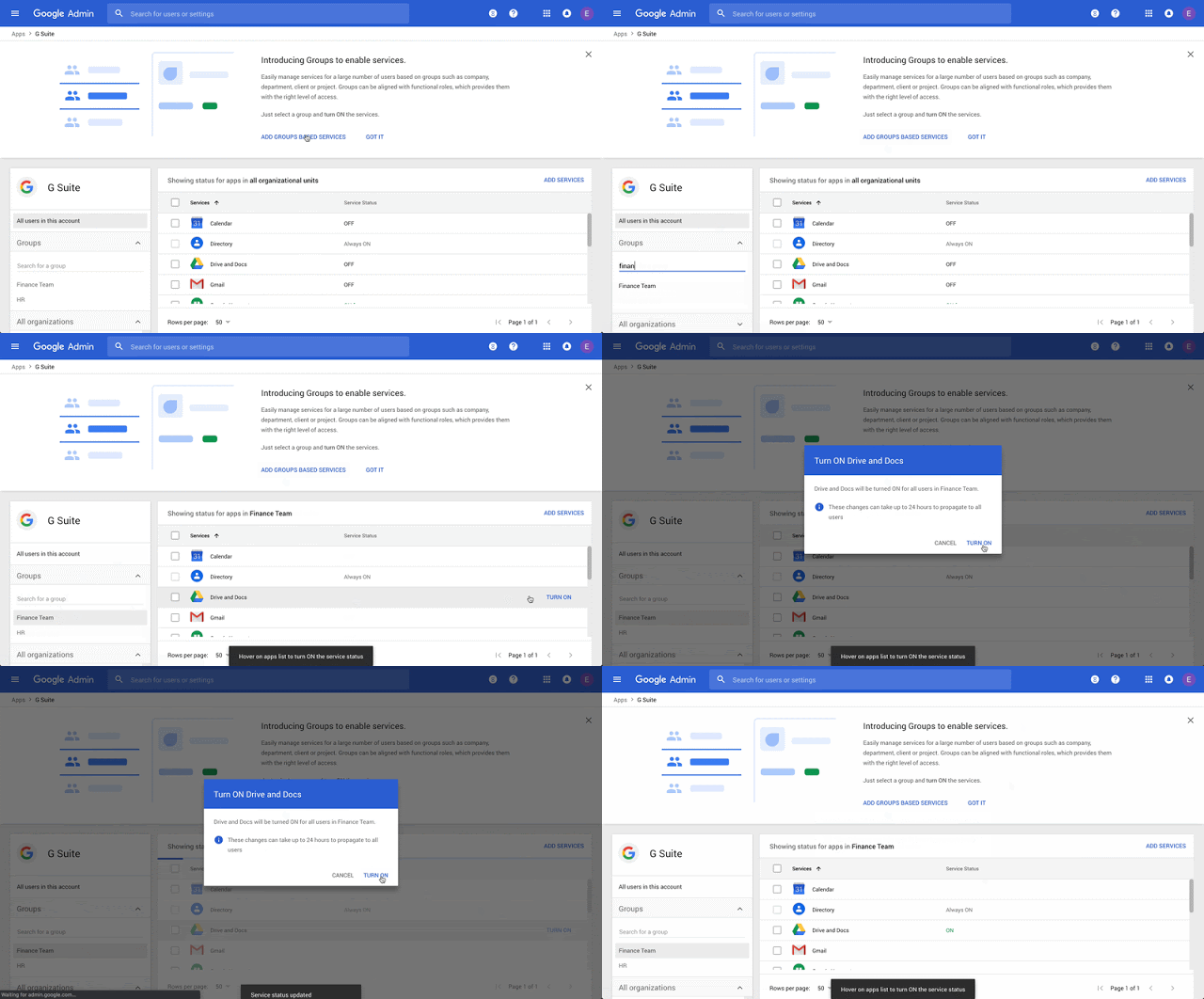
Over the past year, we’ve seen tremendous growth of Cloud Identity, Google Cloud’s unified identity, access, and device management solution, available to both our G Suite and Google Cloud Platform (GCP) customers. We released a number of exciting features, saw significant growth in the number of users and devices managed, and partnered with many customers on their digital transformation journeys, including Air Asia, Essence, Airbnb, and Health Channels. We were also recognized as a 2018 Gartner Peer Insights Customers’ Choice for Enterprise Mobility Management Suites (EMMs).Today, we’ll highlight a number of new and upcoming features in Cloud Identity and share how you can get started.Enhancing group policy management functionalityMany of our customers rely on group policy to grant access to G Suite. A few months ago, we added the ability to use Google Groups to control access to G Suite apps and services within your organization outside of the organizational unit (OU) level. This makes it possible to control G Suite access based on department, job function, project team, seniority, location, and more. We’ll soon launch group-based policy support for Drive, Docs, Chat, App Maker and YouTube, which will give IT additional flexibility when managing G Suite policies.Frequently, we see customers utilize Google Groups to control access to GCP projects and resources. In an effort to streamline security and access monitoring, they’ve told us they needed a way to view changes to groups using the same tools they use for other GCP audit logs. To address this, we are excited to announce the general availability of group audit logs in Google Cloud Audit Logs, allowing customers to manage all GCP-related activities in a single place, without the need to integrate with multiple APIs to get a complete audit inventory.Enabling BeyondCorp in your organizationMany attendees at Google Cloud Next ‘19 expressed interest in adopting Google’s BeyondCorp (zero trust) security model. At the event, we announced context-aware access for G Suite, which is a key component of BeyondCorp and allows IT to define and enforce granular access to apps and infrastructure based on a user’s identity, device state, and context of their request. This is an extension of the context-aware access capabilities we’ve previously built to protect GCP web apps and virtual machines (VMs). Context-aware access for G Suite can help increase your organization’s security posture while giving users an easy way to more securely access apps from virtually any device, anywhere.Essence, a global data and measurement-driven media agency, has already been using this capability to help secure access to G Suite:“Context-aware access is a natural expansion of the mobile device management (MDM) we’ve had in place on Android and iOS devices since 2014. It allows us to place manageable controls on how client G Suite data is accessed, and it does so in a way that does not inhibit the end user while ensuring security compliance.” – Colin McCarthy, VP Global IT, EssenceMulti-factor authentication (MFA) or 2-factor authentication (2FA) is a critical building block for BeyondCorp, and we consider security keys based on FIDO standards, such as Google’s Titan Security Key, to be the strongest, most phishing-resistant MFA method on the market today. At Google I/O, we announced that you can now use the security key that is built into your Android phone for MFA, so you can add this extra layer of protection for even more of your users. We also recently gave our customers the ability to block the use of SMS as an MFA method, giving IT additional control and strengthening user security.If you’re like a lot of organizations, you may already have security solutions that help you assess the security posture of your endpoints. In an effort to integrate with your existing solutions and meet you where you are, we recently announced BeyondCorp Alliance, a group of endpoint security and management partners with whom we are working to feed device posture data to our context-aware access engine. Initially, we are working with Check Point, Lookout, Palo Alto Networks, Symantec, and VMware, and we will make this capability available to joint customers in the coming months.Strengthening our device management capabilitiesOne of the key inputs into our context-aware access rule engine is device trust. Google manages over 55 million 30 day active devices across mobile and desktop platforms (including Cloud Identity and Chrome Enterprise), and we’re constantly working to enhance this functionality. To that end, we’re giving admins more control over their corporate data by integrating Cloud Identity and Drive File Stream, our service which streams data directly from the cloud to your Mac or PC. This will ensure users can securely access the files they need, whether they’re online or offline. This integration ensures corporate data is protected by controlling which devices can be used to access Drive File Stream, and with the ability to block or wipe the Drive cache with a few clicks, admins have more control over remediation activities.In addition, we have enhanced the capabilities of our platform by extending our agentless management capabilities, allowing administrators to manage and distribute Android apps without the installation of a device policy controller. This will allow IT to have an additional layer of security on their endpoints without negatively impacting the end user experience.Improving the single-sign on (SSO) and end-user experienceWhile we already support a large catalog of SAML and OpenID Connect (OIDC) apps for single sign-on (SSO), you may still need to use credential-based authentication for some apps. To address this, we’ll be adding support for password vaulted apps in the coming months. With this capability, Cloud Identity will support thousands of additional apps and have one of the largest SSO app catalogs, giving your employees one-click access to all the apps they need to be productive. As part of this work, we’ll also releasing a new, unified hub where employees can see and access all of their SSO apps. Dashboard will provide a user-friendly and efficient user experience, allowing your employees to quickly launch and access all of their apps.Partnering with HR providers for automated user lifecycle managementWe’ve also recently partnered with leading HRIS/HRMS providers such as ADP, BambooHR, Namely, and Ultimate Software, enabling you to sync employee information directly from your HR system with Cloud Identity and automatically provision and deprovision user accounts and access throughout the employee lifecycle.  Try it yourselfWe’ve made great progress with Cloud Identity for our G Suite and GCP customers over the past year, and we’re excited to continue working hard to deliver new features and functionality in the coming months. If you’re interested in learning more, please take a look at our solution pages for single sign-on, multi-factor authentication, and device management, and consider signing up for a free trial to test out the solution yourself.
Quelle: Google Cloud Platform