Got hybrid? Getting started with hybrid patterns and practices

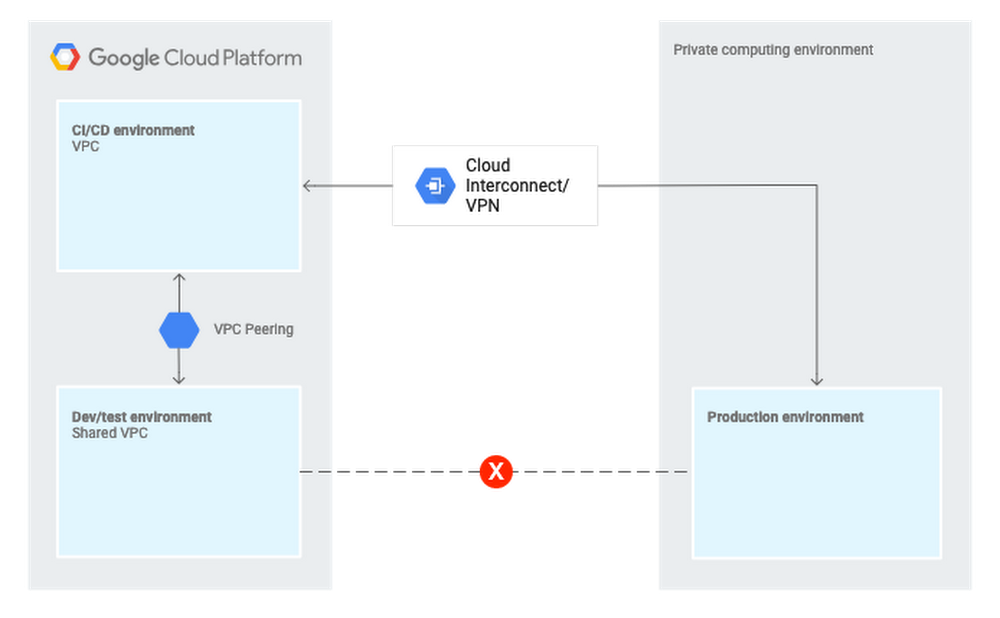
Our solutions team here at Google Cloud is made up of solutions architects who are industry veterans and experts in cloud architecture and applications. Our goal is to help you put Google Cloud Platform (GCP) services together for you to solve your business needs and create the best solution for the infrastructure you’re building.One topic we work on a lot is hybrid cloud. As we hear from many of our customers, you want to move some of your workloads to the cloud to create a hybrid cloud, with some workloads on-premises and some on GCP. Where do you start? What do you have to think about? What does the topology look like? In this post, we’ll look at some of the solutions that we’ve published that can help you implement hybrid cloud topologies, starting from the very beginning of setting them up.Hybrid cloud patterns and best practicesImplementing a cloud architecture that involves workloads that run on-premises, on GCP, and possibly on another cloud provider can be a bit challenging. Let’s start with an overview of the process and what that architecture might look like once you’ve implemented it.Our Hybrid and Multi-Cloud Patterns and Practices series addresses precisely the types of questions you’re probably asking. This series, written by one of our solutions architects, Johannes Passing, distills his decade-plus years of experience with creating cloud-based architectures into solutions.The series starts by walking through the preliminaries, like articulating what your goals are for using hybrid cloud. You’ll then see some of the options for moving workloads to the cloud, and which approach might best suit your goals. The discussion is copiously illustrated with diagrams that offer a high-level view of what a hybrid solution might look like, such as this one:At each stage, you’ll see a list of the advantages of the various approaches to hybrid cloud and a concise list of best practices. Everything in the documents is very much rooted in the author’s hands-on experience with designing these types of systems.Authentication and single sign-on in hybrid cloudManaging authentication and authorization in a hybrid environment generally means matching your existing, on-premises identity system with how it’s done in GCP. For example, you might already run Active Directory on-premises. How can you map your user identities to GCP identities so that your users don’t have to sign in separately to your on-premises services and to GCP?In a three-part series, Federating Google Cloud Platform with Active Directory, Johannes tackles the topic of integrating Active Directory with Cloud Identity using Google Cloud Directory Sync. This series discusses how to deal with various Active Directory topologies (such as single or multi-forest), and how to perform Windows-integrated authentication and single sign-on (SSO) for apps running on GCP.”Rip and replace” with GKEThere’s another approach to moving systems to the cloud. If you’re modernizing a complex website to a refactored, container-based microservices platform (Google Kubernetes Engine, or GKE) on GCP, check out Migrating a monolithic application to microservices on GCP, from solutions architect and DevOps engineering veteran Théo Chamley.As an example in this solution, Theo uses an e-commerce site. You’ll see how to perform the migration feature by feature, avoiding the risks of a large-scale, all-at-once migration. During the migration itself, the application has a hybrid architecture, where some features are in the cloud and some are still on-premises. After the migration is finished, the complete application is hosted in the cloud, but it still interacts with back-end services that remain on-premises. In addition to describing the architecture of various steps in this migration, you’ll see how to take advantage of a variety of GCP services as part of the process, including Cloud Interconnect.Wait, there’s moreSeveral other solutions architects have also been writing about hybrid architectures to share best practices and offer advice. Here are a few to check out:In TCP optimization for network performance in GCP and hybrid scenarios, Kishor Aher explains how to tune network performance when moving workloads from on-premises to GCP. You’ll get a look at the details of TCP transmission so that you can understand why his recommendations can help reduce network latencies.What if you want to communicate between GCP and another cloud without using public IP addresses? Etsuji Nakai’s solution Using APIs from an External Network shows how to use a private network on Amazon Virtual Private Cloud (Amazon VPC) to emulate an on-premises private network.Check out all of our solutions here. And take a look through all the hybrid cloud sessions from Google Cloud Next ’19.
Quelle: Google Cloud Platform

Cloud Run: Bringing serverless to containers

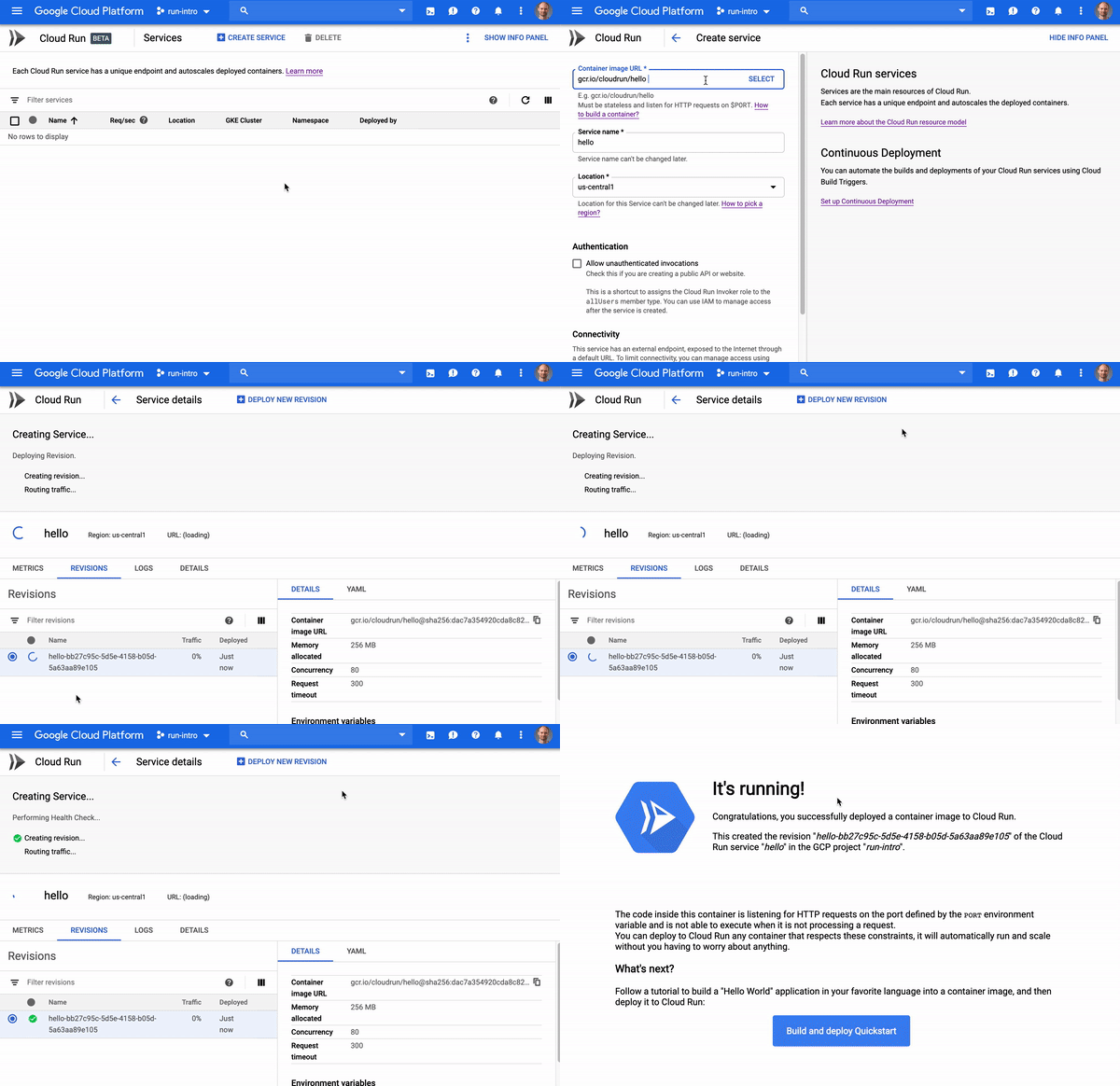
Developers love serverless. With serverless, you can focus on code, deploy it, and let the platform take care of the rest—all while only paying for exactly what you use. But traditional serverless solutions can limit what programming languages you can use, or require you to organize our code around functions.At Google Cloud Next 2019, we launched Cloud Run, a serverless compute platform that lets you run any stateless request-driven container on a fully managed environment. In other words, with Cloud Run, you can take an app—any stateless app—containerize it, and Cloud Run will provision it, scale it up and down, all the way to zero!Check out how easy it is to get started and deploy your first container to the fully managed version of Cloud Run:Cloud Run is unique among serverless platforms, and brings a number of benefits:Do less work with a fully managed solution: With Cloud Run, you can forget about provisioning or managing infrastructure—it does that for you. Cloud Run automatically and quickly scales up or down based on your incoming traffic, and even scales down to zero. In addition, each Cloud Run service gets a stable and secure HTTPS endpoint, and you can easily add your own custom domain for which we automatically provision an SSL certificate. And if you need an easy way to serve static content or cache responses, Cloud Run integrates with Firebase Hosting.Pay exactly for what you use: Cloud Run charges you for the resources you use only when your containers are processing requests or events, billed to the nearest 100 milliseconds.Serve web traffic, or process Pub/Sub events: Run publicly accessible web services or APIs, or securely push Pub/Sub events to private Cloud Run microservices.Leverage the power of containers: Containers have become an industry standard for packaging and deploying code, and let you write your code in your favorite language, with whatever framework or binary library that works for you. If you’re not familiar with containers, don’t be scared; Cloud Run includes official base images for all the most popular languages, and there are examples of Dockerfiles in the documentation.Enjoy the portability that comes with Knative: Cloud Run implements the Knative serving API, an open-source project to run serverless workloads on top of Kubernetes. That means you can deploy Cloud Run services anywhere Kubernetes runs. And if you need more control over your services (like access to GPU or more memory), you can also deploy these serverless containers in your own GKE cluster instead of using the fully managed environment.On a run since Google Cloud Next’19Since it launched in April, Cloud Run has gotten a terrific reception from developers. Early adopters tell us that deploying their favorite apps on Cloud Run “just works.””Cloud Run allows us to access, process and serve large amounts of imagery data stored in Google Cloud Storage, with the freedom to use our own custom toolchains and without having to worry about scaling the service to the real time load.” – Thomas Bonfort, R&D Earth Observation Software Engineer at Airbus, and Cloud Run alpha testerEarly Cloud Run alpha testers and then beta users have provided valuable feedback to help us shape and improve the product. Today, we are pleased to launch several new features to address your top requests:Cloud SQL supportWith one configuration change, you can now  securely and privately connect your Cloud Run services to Cloud SQL instances. Read more in the documentation.Metrics at a glanceAs Cloud Run developers, you have been able to benefit from out-of-the-box integration with Stackdriver Logging and Monitoring. But you do not always need the full power of Stackdriver tools. Starting today, the Cloud Run user interface features several key performance indicators, such as:Comparing the average number of requests per second in the Cloud Run service listObserving request counts, request latencies, CPU and Memory allocation in a dedicated tab of the Cloud Run service viewNew regionsInitially offered only in the U.S., we’ve also seen great adoption of Cloud Run among developers in other parts of the world. That’s why we are very happy to announce that we will start Cloud Run’s regional expansion within the next few weeks, starting by opening new regions in Europe and Asia.Learn moreTake our quickstart to deploy your first container to Cloud Run in seconds. For a deep dive on Cloud Run’s features and characteristics, check out my session at Google Cloud Next 2019:We can’t wait to see what you’ll build with Cloud Run!
Quelle: Google Cloud Platform

Azure.Source – Volume 83

News and updates

Azure SQL Database Edge: Enabling intelligent data at the edge

At Microsoft Build 2019, we announced Azure SQL Database Edge, available in preview, to help address the requirements of data and analytics at the edge using the performant, highly available and secure SQL engine. Developers will now be able to adopt a consistent programming surface area to develop on a SQL database and run the same code on-premises, in the cloud, or at the edge.

Microsoft Azure portal May 2019 update

This month is packed with updates on the Azure portal, including enhancements to the user experience, resource configuration, management tools, and more. Sign in to the Azure portal now and see everything that’s new for yourself. Download the Azure mobile app to stay connected to your Azure resources anytime, anywhere.

A Cosmonaut’s guide to the latest Azure Cosmos DB announcements

At Microsoft Build 2019 we announced exciting new capabilities, including the introduction of real-time operational analytics using new built in support for Apache Spark and a new Jupyter notebook experience for all Azure Cosmos DB APIs. We believe these capabilities will help our customers easily build globally distributed apps at Cosmos scale. But there is even more! This blog lists additional enhancements to the developer experience, announced at Microsoft Build.

Azure Updates

Learn about important Azure product updates, roadmap, and announcements. Subscribe to notifications to stay informed.

Generally available

Premium files redefine limits for Azure Files

Azure Premium Files preview is now available to everyone! Premium files is a new performance tier that unlocks the next level of performance for fully managed file services in the cloud. Premium tier is optimized to deliver consistent performance for IO-intensive workloads that require high-throughput and low latency. Premium shares store data on the latest solid-state drives (SSDs) making it suitable for a wide variety of workloads like file services, databases, shared cache storage, home directories, content and collaboration repositories, persistent storage for containers, media and analytics, high variable and batch workloads, and many more.

Technical content

Azure Firewall and network virtual appliances

Network security solutions can be delivered as appliances on premises, as network virtual appliances (NVAs) that run in the cloud or as a cloud native offering (known as firewall-as-a-service). Customers often ask us how Azure Firewall is different from Network Virtual Appliances, whether it can coexist with these solutions, where it excels, what’s missing, and the total cost of ownership (TCO) benefits expected. We answer these questions in this blog post.

Operationalizing your PostgreSQL database health checks using SQL Notebooks

Most Postgres database administrators and community members would usually bookmark or save such articles so they can revisit them and reuse the queries shared in the article to run checks against their databases. The common challenge with this approach is, you end up with many saved archives, and searching through them when you need it is time consuming and less productive. A better way to operationalize your health check runbooks and database scripts is by creating SQL Notebooks in Azure Data Studio. This blog explains how to do that.

The Urlist — An application study in Serverless and Azure

The Urlist is an application that lets you create lists of URL's that you can share with others. Get it? A list of URL’s? The Urlist? Listen, naming things is hard and all the good domains are already taken. This project was born out of the author’s realization that I was ending my presentations with a slide full of links to additional resources. That’s crazy! What exactly is the audience supposed to do with that? Take a picture with their phone and then go back and manually type it all in later? What decade is this!?

How to Migrate Windows Server 2008 R2 FSMO roles to Windows Server 2019

With the "end of support" on the horizon for Windows Server 2008 R2 coming January 2020, folks are looking around for resources to help them check off some high ticket items from their "to do" list. While coming back from my last Microsoft Ignite The Tour stop, the author had some time to kill waiting for a connection. So he dusted off some of his Active Directory admin skills and document the quick and dirty process of upgrading your Active Directory from 2008 R2 over to the latest version of Windows Server 2019.

AI Search Algorithms Every Data Scientist Should Know

While in recent years, search and planning algorithms have taken a back seat to machine and deep learning methods, better understanding these algorithms can boost the performance of your models. Additionally as more powerful computational technologies such as quantum computing emerge it is very likely that search based AI will make a comeback. This TL;DR post outlines a few of the key search algorithms in AI, why they are important, what and what they are used for.

Azure shows

Next-level maps with ArcGIS for .NET

This week, James is joined by friend of the show & Microsoft MVP Morten Nielsen who introduces us to the world of advanced mapping with ArcGIS for .NET and Xamarin. Morten walks us through what ArcGIS is, how developers can build and use custom maps and data in mobile apps, and awesome 3D visualizations on maps.

Deep Dive: Deploying IoT Edge workloads on Kubernetes

Azure IoT Edge now features support for running natively on the Kubernetes orchestrator. This video goes into how the integration works and caps off with a demo showing what the experience is like for deploying a workload on an on-premise Kubernetes cluster.

Howden: How they built a knowledge-mining solution with Azure Search

Customers across industries including healthcare, legal, media, and manufacturing are looking for new solutions to solve business challenges with AI, including knowledge mining with Azure Search. Howden, a global engineering company, focuses on providing quality solutions for air and gas handling. With over a century of engineering experience, Howden creates industrial products that help multiple sectors improve their everyday processes; from mine ventilation and waste water treatment to heating and cooling. Watch a video to see how they implemented a knowledge-mining solution with Azure Search.

How to enable and use soft delete in a storage account | Azure Portal Series

In this video of the Azure Portal “how to” Series, you will learn how to enable and use “soft delete” in an Azure storage account.
Quelle: Azure

WoW Classic: Spieler verwechseln Bugs mit Features

Die Regenerationsrate des Kriegers wirkt falsch, die Hitbox der Tauren ist in World of Warcraft Classic zu groß? Klingt nach Bug, ist es aber nicht: Als Reaktion auf Meldungen von Betatestern hat Blizzard eine Liste mit Inhalten veröffentlicht, die wie Fehler wirken – aber keine sind. (WoW, MMORPG)
Quelle: Golem

IBM Cloud Garage helps Grupo Planetun improve auto inspection app capabilities

Investopedia describes “insurtech” (the term inspired by its commonly known cousin, “fintech”) as the use of technology to create savings and efficiency in the insurance industry. Investopedia also suggests that the insurance industry is ripe for innovation and disruption.
At Grupo Planetun, we know this to be especially true in Brazil. In the Brazilian insurance market, only 30 percent of the automotive market, 10 percent of the housing market, and two percent of cell phones are insured.
Grupo Planetun is an insurtech company in Brazil poised to take advantage of this growth opportunity. We know the big insurance companies we serve need to reduce costs and improve operations, which is why they seek to partner with us.
Innovating the auto inspection process
In 2017, we developed our App Web de Vistoria Prévia, or Preview Web App, that enables image capturing for auto inspections online. When we released the first version of the application, the primary innovation was that the insured individual could take and submit photos rather than needing to drive somewhere or wait for an insurance representative to come to their location.
Today in Brazil the insurance inspection process takes an average of five days, beginning to end. With our application, images can be sent to the insurance company in an average of five-and-half hours. This is a drastic reduction that is speeding overall inspection time.
Despite these gains, we learned by evaluating app use that 30 percent of customer photos submitted were not usable by insurance companies. For example, the photo might be diagonal, cropped incorrectly, or too dark. Or the customer might have submitted a selfie with the vehicle, which cannot be used for inspection.
We knew we needed to address the 30 percent of unusable photos, so we sought a way to provide immediate feedback to customers.
Infusing artificial intelligence into the app
We were introduced to IBM Watson offerings at Think Brasil in 2018. Following that introduction, we began to see how artificial intelligence (AI) could further the capabilities of our auto inspection app with image recognition.
We spent eight weeks with an IBM Garage team in São Paulo to automate our Preview Web App using the open source IBM Cloud Kubernetes service and Watson Visual Recognition on IBM Cloud. Now the solution can confirm or reject customer photos in real time.
The collaboration between the IBM team and our team of developers was crucial. In addition to our enhanced solution, we came away from our engagement with technical knowledge of the IBM Garage methodology for designing and building applications.
Shaking up the insurance market
Aside from the benefits of workflow transformation and user experience improvement, the project with the Garage team helped us reduce app management costs. By reducing the amount of unusable photos shared through the app, our team no longer needs to manually evaluate and flag those submissions.
Additionally, because the new version of Preview Web App is built on microservices and each system has its own API, we are free to offer our customers only what they need.
Through the Garage project, we saw that the agile methodology improved our workflow, so we adopted it internally in our organization as well. We came away from IBM Garage with technical knowledge about Watson, AI tools, image recognition and the Kubernetes database, all of which our developer team is replicating with our other employees.
By partnering with IBM, Grupo Planetun has brought radical change to the Brazilian insurance market. We are the first insurtech company to implement an image recognition methodology for insurance processes in Brazil and throughout South America. This is a major differentiator for our business and is driving company success.
The next step for Preview Web App will be to put the Watson Visual Recognition service to work sorting and pricing the amount of damage a vehicle has suffered in accident situations.
Read the case study for more details.
The post IBM Cloud Garage helps Grupo Planetun improve auto inspection app capabilities appeared first on Cloud computing news.
Quelle: Thoughts on Cloud