Simplifying identity and access management of your employees, partners, and customers

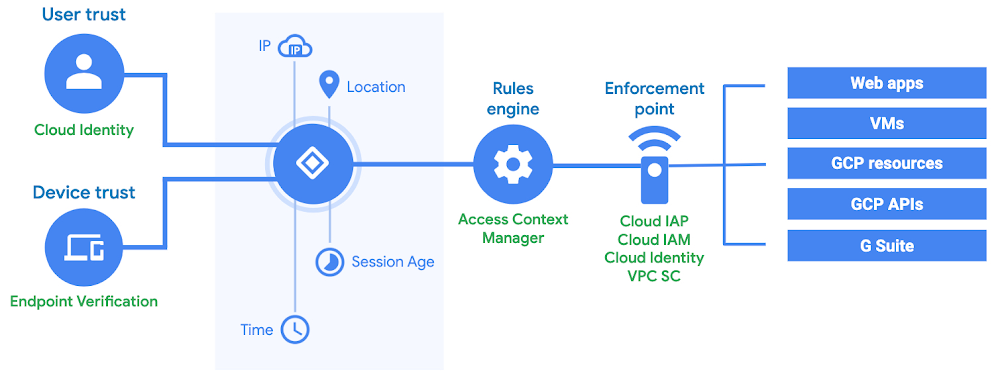
Identity and access management (IAM) is a cornerstone of the modern enterprise, helping you manage and secure employee, customer, and other identities, and their access to apps and data, both in the cloud and on-premises. In the past few months, we helped you simplify access to traditional LDAP apps, control access to web apps and VMs without a VPN, and add identity management to your own apps and services.Today, we’re announcing five new ways to help you adopt the BeyondCorp security model and improve IT, developer, and end-user efficiency:Context-aware access enhancements, including the launch of BeyondCorp Alliance.Security key built into your Android phone—one of the strongest defenses against phishing now available through the convenience of your phone.Cloud Identity enhancements, including single sign-on to thousands of additional apps and integration with human resource management systems (HRMS).General availability of Identity Platform, which you can use to add identity management functionality to your own apps and services.Availability of Managed Service for Microsoft Active Directory for select customers.Context-aware access: your path to BeyondCorpAs the number and amount of Internet-facing apps and infrastructure increases, it becomes harder to secure access to your data using traditional network-based approaches. In 2011, we introduced the BeyondCorp security model to protect our internal resources, and now you can adopt the same model with context-aware access.Over the past few months, we added context-aware access capabilities in beta to Cloud Identity-Aware Proxy (IAP) and VPC Service Controls to help protect web apps, VMs, and Google Cloud Platform (GCP) APIs. Today, we are making these capabilities generally available in Cloud IAP, as well as extending them in beta to Cloud Identity, to help you protect access to G Suite apps.Context-aware access high-level architectureContext-aware access allows you to define and enforce granular access to apps and infrastructure based on a user’s identity and the context of their request. This can help increase your organization’s security posture while giving users an easy way to more securely access apps or infrastructure resources, from virtually any device, anywhere. With today’s general availability of context-aware access in Cloud IAP, you can now enforce access to cloud-based and on-premises web apps. Veolia, a global water, waste and energy management company, has expanded the use of Cloud IAP, leveraging context in access decisions for their apps:”Veolia provides water, waste and energy services to industry, cities, and citizens around the world. To keep our data protected, we are using context-aware access capabilities in Cloud IAP to ensure that our support team members can access applications only from trusted locations and devices.” —Antoine Castex, Product Manager & Cloud Developer, VeoliaWe’re also launching context-aware access capabilities in Cloud Identity and G Suite in beta, to help you enforce access to G Suite apps, including Gmail, Drive, Docs, Sheets, Slides, Forms, Calendar, and Keep. Essence, a global data and measurement-driven media agency, has already been using this capability along with Endpoint Verification for desktop devices to help secure access to G Suite:“Context-aware access is a natural expansion of the MDM we’ve had in place on Android and iOS devices since 2014. It allows us to place manageable controls on how client G Suite data is accessed, and it does so in a way that does not inhibit the end user while ensuring security compliance.” —Colin McCarthy, VP Global IT, EssenceCloud Identity admin experience to create a context-aware access policyIf you’re like a lot of organizations, you already have endpoint security solutions that help you assess the security posture of your devices. Today, we are excited to announce BeyondCorp Alliance, a group of endpoint security and management partners with whom we are working to feed device posture data to our context-aware access engine. Initially, we are working with Check Point, Lookout, Palo Alto Networks, Symantec, and VMware, and will make this capability available to joint customers in the coming months.Using context-aware access to protect access to GCP workloads (web apps, VMs, APIs) is available at no additional charge with Cloud IAP, Cloud IAM, and VPC Service Controls. Context-aware access for G Suite apps is available in beta for customers using Cloud Identity Premium, G Suite Enterprise, and G Suite Enterprise for Education. To get started, sign up for a free trial of Cloud Identity, watch a webinar, and check out our website for how-to guides.Security key: one of the strongest defenses against phishing, now built into your Android phoneStrong user security paves the way for context-aware access and safer online experiences. Attackers, however, are always looking for new ways to compromise user accounts and access sensitive data, using techniques such as stealing passwords, phishing, and pretexting. Google automatically blocks the overwhelming majority of malicious sign-in attempts (even if an attacker has your username or password)—but you can boost your security even more with two-factor authentication (2FA).We consider security keys based on FIDO standards, such as Google’s Titan Security Key, to be the strongest, most phishing-resistant method of 2FA on the market today, and now, launching in beta, you have an additional choice to use a security key that is built into your Android phone.User experience on Pixel 3Security keys use a protocol based on standard public key cryptography and provide stronger phishing and account takeover protection in comparison to traditional 2FA methods such as SMS, code, or push notification, which sophisticated attacks can skirt around. Last year, we stated that we had no reported or confirmed account takeovers since implementing security keys for Google employees.Now in beta, we are making security keys available built-in on phones running Android 7.0+ (Nougat) at no additional cost. This means you can use your existing phone as your primary 2FA method for your work (G Suite, Cloud Identity, and GCP) and personal Google accounts to sign in on a Bluetooth-enabled Chrome OS, macOS X, or Windows 10 devices with a Chrome browser. This gives you a stronger 2FA method with the convenience of a phone that’s always in your pocket, making it easier for you to implement phishing-resistant 2FA in your organization while keeping user training and overall costs to a minimum. Leading the effort to protect against cyber threats in New York City, NYC Cyber Command started to use this technology to further improve their defenses against phishing and other identity attacks. And for Deputy CISO at NYC Cyber Command, Colin Ahern, this capability means he’s able to better protect New York City.To try this out and protect your own Google Account, follow these simple steps to activate the security key on your phone today. Then, you can enforce the use of security keysfor your users in G Suite, Cloud Identity, and GCP, letting them choose between using a physical FIDO security key, their Android phone, or both.Cloud Identity: simplify identity, app, and device managementCloud Identity can help unify identity, app, and device management for your employees and other users accessing company data, including enforcing the use of security keys. Last year, we made a number of enhancements in Cloud Identity, including the ability to manage access to traditional LDAP-based apps and infrastructure that are hosted on-premises or in the cloud.Today, we’re excited to announce the upcoming availability of single sign-on (SSO) to thousands of additional apps with password vaulting, an enhanced end-user portal, and integration with popular human resource management systems (HRMS) to simplify and automate user lifecycle management.Cloud Identity admin experience to enable SSOWhile Cloud Identity supports a large catalog of SAML and OpenID Connect (OIDC) apps for SSO, you might prefer to use credential-based authentication for some apps. With the support of password vaulted apps, your employees can have one-click access to thousands of additional apps. With this capability, Cloud Identity will have one of the largest SSO app catalogs, giving you a single system to manage access for all your apps.Dashboard for end-usersThe upcoming password vaulting release also includes Dashboard, a unified hub where employees can see and access all of their apps with single sign-on. Dashboard will replace Apps User Hub to provide an improved user experience, so your employees can efficiently and quickly launch and log in to their work apps.And finally, we’re tackling the challenge of user lifecycle management—automating user account and access management as employees join a company, change roles or move within the org, and eventually leave. To that end, we’re working with leading HRIS/HRMS providers such as ADP, BambooHR, Namely, and Ultimate Software, to integrate with Cloud Identity. This functionality will let you sync employee information directly from your HR system to Cloud Identity, automatically provisioning and deprovisioning user accounts and access throughout the employee lifecycle, resulting in enhanced productivity for both IT and end users and a greater ROI on existing investments.Automated employee lifecycle management, password vaulting, and Dashboard will be generally available in the coming months. To get started with Cloud Identity today, sign up for a free trial, watch a webinar, and check out our documentation for how-to guides.Identity Platform: identity management for your apps and servicesModern businesses also need to manage the identities of customers, partners, and Things (IoT). Last year, we launched the beta of Cloud Identity for Customers and Partners (CICP) to help you add Google-grade identity and access management functionality to your apps, protect user accounts, and scale with confidence. Our customers are already using the service to add authentication and identity management to apps for their customers, build a data intelligence platform, enhance a device management service, and issue tokens for Things. Today, we are making the service generally available and renaming it to Identity Platform.We work hard to keep Identity Platform up-to-date with evolving authentication requirements, helping you keep identities more secure in the face of sophisticated threats and quickly scale when the demand for your app or service grows. Identity Platform provides a drop-in, customizable authentication service that manages the UI flows for user sign-up and sign-in, supports multiple authentication methods, client and server SDKs, and is integrated with Google’s intelligence and threat signals to help detect compromised user accounts.Identity Platform admin experienceLightspeed, a commerce solutions provider, is using Identity Platform to upgrade a home-grown authentication solution:“Identity Platform offers solid features that allow us to build a great solution knowing that the foundations are trustworthy.” —Alexandre Vallières-Lagacé, Team Lead, API Platform, LightspeedTo get started with Identity Platform, enable it in GCP Marketplace, watch a webinar, and check out the quickstart for how-to guides.Managed Service for Microsoft Active Directory: simplify AD managementIdentity-as-a-service (IDaaS) solutions such as Cloud Identity continue to grow in popularity, but many organizations still rely on Microsoft Active Directory (AD) to manage users and access to traditional applications. While you can deploy a fault-tolerant AD environment in GCP on your own, you are still responsible for its maintenance and security.Today, we are announcing Managed Service for Microsoft Active Directory (AD), a highly available, hardened Google Cloud service running Microsoft AD, to help you manage cloud-based AD-dependent workloads, automate AD server maintenance and security configuration, and connect your on-premises AD domain to the managed service.Managed Service for Microsoft AD admin experienceAs more AD-dependent apps and servers move to the cloud, it becomes harder for IT and security teams to maintain latency and security requirements, on top of typical maintenance required to configure and secure AD domain controllers. Managed Service for Microsoft AD can help you address these issues by automating common tasks and allowing the IT and security teams to focus on higher-value projects.Google Cloud partner itopia has already integrated their Cloud Automation Stack (CAS) solution with this new service:“Our platform has supported hybrid AD environments and deep integration with Google Cloud APIs for years now. Since Managed Service for Microsoft AD runs real AD domain controllers, it was natural to add integration and offer even more value to our customers.” —Jonathan Lieberman, CEO, itopia.Sign up to express interest in trying Managed Service for Microsoft AD early and to be notified when it becomes available in beta.More to comeWe have been hard at work building enterprise-ready IAM services for our customers and partners. We’re excited to continue delivering innovative ways to enhance end-user experiences and protect user accounts to help you gain peace of mind. Check out our security announcements focused on increased control and visibility in the cloud, and visit our security and compliance webpage to learn more.
Quelle: Google Cloud Platform

Announcing Cloud Code—accelerating cloud-native application development

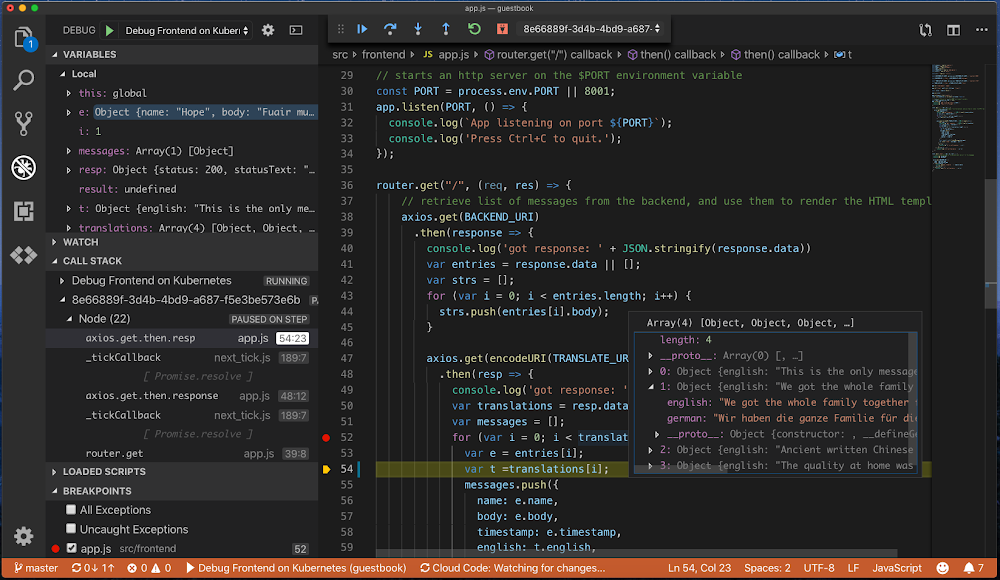
As more enterprises move to Google Cloud, developers and operators need to evolve how they build and manage applications. Moving to the cloud isn’t just about getting rid of data centers—it’s also about going faster (without sacrificing reliability and security).Today, we’re excited to introduce Cloud Code, a new set of plug-ins for IntelliJ and VS Code that brings automation and assistance to every phase of the software development lifecycle, using the tools you already have.The central tool of software development is the Integrated Development Environment (IDE). IDEs like IntelliJ and Visual Studio Code help developers stay productive while editing, compiling, and debugging code, but they work best with local applications. That can lead to challenges when developing applications for the cloud, as the local and cloud environments differ, which can cause errors to be caught late in the development cycle.Cloud Code for VS Code has the debugger attached to a running Kubernetes cluster.With this first release of Cloud Code we have focused on making it easier to develop applications that run on Kubernetes, including Google Kubernetes Engine (GKE). Cloud Code extends VS Code and IntelliJ to bring all the power and convenience of IDEs to developing cloud-native Kubernetes applications. With Google’s command-line container tools like Skaffold, Jib and Kubectl under the hood, Cloud Code gives you continuous feedback on your project as you build it, extending the local edit-compile-debug loop to any local or remote Kubernetes environment. Support for deployment profiles lets you define different deployment targets, like local development, shared development, test, or production, so you can easily test and debug on your workstation or in the cloud.Cloud Code for IntelliJ continuously deploying an application to Kubernetes via a Run Configuration. Deployments support profiles, and can be run locally or via Cloud Build. Log file streaming is supported, as seen in the output window.Cloud Code also makes it easy to integrate Google APIs into your application. For instance, within IntelliJ we offer an integrated library manager that adds the required dependencies to your application, enables the API automatically for your project and manages any required secrets.Cloud Code for IntelliJ’s library manager makes it easy to find libraries, related samples and documentation and then integrate them with your existing code base.To get an application up and running in Kubernetes there are a lot of concepts you need to understand. Cloud Code also helps you when you’re getting started, with an updated set of Kubernetes samples that come pre-configured for debugging, build and deployment. These let you focus on developing your app instead of on initial set-up and configuration.We built Cloud Code to easily integrate with existing DevOps tools and services including Cloud Build and Stackdriver. For example, once your code is ready to deploy, simply do a pull request or commit, which triggers Cloud Build to automatically build, test, and deploy your application.Ops is made easier too with Cloud Code. A core tenet of DevOps is to use “infrastructure as code” in which all environment configurations are managed as source code in a repo. This makes environments reproducible and helps find errors sooner. Cloud Code and Cloud Build make editing, reviewing, testing, and applying changes to a Kubernetes config easy and convenient. Cloud Code provides templates, linting and error highlighting for Kubernetes yaml files. Of course Cloud Code also supports logging, so you can view application logs from any environment directly in your IDE.Cloud Code for VS Code leverages the full power of the IDE when working with configuration files—colorization, error checking, suggestions, snippets and more. Here you see a referenced secret from the live app running in GKE which was created 21 hours ago, the developer is ‘peeking’ the definition of the secret and ‘hovering’ over it decodes the Base64 encoded string.Anevia, a leading OTT and IPTV software provider, uses Cloud Code to monitor their Kubernetes clusters right within their IDE of choice.”With Cloud Code and its integrated cluster explorer, I have a quick overview of what is running on my different Kubernetes clusters, what works well and what needs to be fixed. The logs and status of all the objects are accessible with a single click. No need to access my terminal anymore.” – Phillippe Martin, Anevia, Software EngineerWith Cloud Code, we want to make it easy to create applications for the cloud from the comfort of your favorite development tools. Get started developing for the cloud with Cloud Code today.
Quelle: Google Cloud Platform

Day 2 at Next ‘19: Working smarter, better, and more securely in the cloud

At this week’s Google Cloud Next ’19, we’re joining partners and customers to learn together and make connections. Yesterday, we talked about the ways we’re helping you modernize—on premises, in the cloud, or a combination of both. Today is all about what’s possible once you’re in the cloud, whether that’s moving legacy servers easily to cloud, improving contact center experiences with AI, connecting colleagues with email and chat, or optimizing transportation routes.Here’s a look at our broad range of announcements spanning security and identity, productivity and collaboration, data management, analytics, and AI.Expanding our identity and security offeringsSecurity is at the core of everything we do, and it continues to be a major focus of Google Cloud. Today’s announcements are all designed to bring you more visibility and more control over your security environment and help you adopt the BeyondCorp security model to improve IT, developer, and end-user efficiency.What we announced: securityAccess Transparency (new GA and beta services, GA for G Suite) and Access Approval (beta) give you meaningful oversight over provider operations.Data Loss Prevention (DLP) user interface (beta) and Virtual Private Cloud (VPC) Service Controls (GA) help you prevent data exfiltration and risk.Cloud Security Command Center (GA) with new Event Threat Detection (beta), Security Health Analytics (alpha), Cloud Security Scanner (new beta integrations) and Stackdriver Incident Response and Management (coming soon to beta) help you centralize security management.Apigee security reporting (beta) offers visibility into the security status of your APIs.Container Registry vulnerability scanning (GA), Binary Authorization (GA), GKE Sandbox (beta), Managed SSL Certificates for GKE (beta), and Shielded VMs (GA) help you secure your software supply chain.Control and protect G Suite data with G Suite data regions enhancements (GA), enhanced advanced phishing and malware protections (beta), security sandbox (beta), security center, and alert center admin collaboration and automation (beta).Policy Intelligence (alpha) helps you gain meaningful security insights using ML.Phishing Protection (beta) and reCAPTCHA Enterprise (beta) help businesses stay safe on the web.What we announced: identity and access managementContext-aware access enhancements, including the launch of BeyondCorp Alliance, to help you define and enforce granular access to apps and infrastructure based on a user’s identity and the context of their request.Android phone’s built-in security key—the strongest defense against phishing—is now available on your phone.Cloud Identity enhancements include single sign-on to thousands of additional apps and integration with human resource management systems (HRMS).General availability of Identity Platform, which you can use to add identity management functionality to your own apps and services.Helping you focus on data, not infrastructure, with managed servicesAn organization’s ability to manage data scalably, reliably, and securely is critical to its success. GCP offers a broad set of capabilities to help you manage data for the most widely used workloads today, both analytical and operational, so you can make your data work for you and deliver great customer experiences.What we announced: databasesComing soon to Google Cloud: bring your existing SQL Server workloads to GCP and run them in a fully managed database service.CloudSQL for PostgreSQL now supports version 11, with useful new features like partitioning improvements, stored procedures, and more parallelism.Cloud Bigtable multi-region replication is now generally available, giving you the flexibility to make your data available across a region or worldwide as demanded by your app.What we announced: storageA new low-cost archive class for Cloud Storage offers the same consistent API as other classes of Cloud Storage and millisecond latency to access your content.Cloud Filestore, our managed file storage system, is now generally available for high-performance storage needs.Regional Persistent Disks will be generally available next week, providing active-active disk replication across two zones in the same region.Bucket Policy Only is now in beta for Google Cloud Storage, so you can enforce Cloud IAM policies at the bucket level for consistent and uniform access control for your Cloud Storage buckets.V4 signatures are now available in beta for Google Cloud Storage to provide improved security and let you access multiple object stores using the same application code. In addition to HMAC keys, V4 signed requests are also supported for Google RSA keys.Cloud IAM roles are now available for Transfer Service, allowing security and IT administrators to use Cloud IAM permissions for creating, reading, updating, and deleting transfer jobs.What we announced: networkingTraffic Director delivers configuration and traffic control intelligence to sidecar service proxies, providing global resiliency for your services by allowing you to deploy application instances in multiple Google Cloud regions.High Availability VPN and 100 Gbps Cloud Interconnect lets you connect your on-premises deployment to GCP VPC with an industry-leading SLA of 99.99% service availability at general availability.Private Google Access from on-premises to the cloud is now generally available, allowing you to securely use Google services like Cloud Storage and BigQuery as well as third-party SaaS through Cloud Interconnect or VPN.With Network Service Tiers, you can customize your network for performance or price on a per-workload basis by selecting Premium or Standard Tier.Delivering insights through smart analytics and AIWe want to make it easier for businesses to find meaningful insights from data, so we’re radically simplifying how you move data into the cloud, expanding our data warehouse capabilities, and expanding the tools you can use to apply AI and machine learning.What we announced: data analyticsData Fusion (beta) is a fully managed and cloud-native data integration service so you can easily ingest and integrate data from various sources into BigQuery.BigQuery DTS now supports 100+ SaaS apps, enabling you to lay the foundation for a data warehouse without writing a single line of code.Cloud Dataflow SQL (public alpha) lets you build pipelines using familiar SQL for unified batch and stream data processing.Dataflow Flexible Resource Scheduling (FlexRS), in beta, lets you schedule batch processing jobs with flexibility for cost savings.BigQuery BI Engine, in beta, is an in-memory analysis service that lets you visually analyze and interact with large or complex data almost immediately.Connected Sheets are a new type of spreadsheet that combine the simplicity of a spreadsheet interface with the power of BigQuery. With a few clicks, you can visualize data as a dashboard in Sheets and securely share it with anyone in your organization.BigQuery ML will soon be generally available, with support for additional models to build customer segmentations and product recommendations.AutoML Tables, in beta, lets you build and deploy state-of-the-art machine learning models on structured data in just a few clicks, without writing a single line of code.Cloud Data Catalog (beta), a fully managed metadata discovery and management platform, helps organizations quickly discover, manage, secure, and understand their data assets.What we announced: AI and machine learningAI Platform, in beta, helps teams prepare, build, run, and manage ML projects via the same shared interface.AutoML updates—including AutoML Tables (beta), AutoML Video Intelligence (beta), AutoML Vision Edge (beta) and object detection (beta), and AutoML Natural Language custom entity extraction (beta)—offer developers with minimal ML expertise more ways to train and deploy high-quality custom machine learning models.Document Understanding AI, in beta, offers a scalable, serverless platform to automatically classify, extract, and digitize data within your scanned or digital documents.Contact Center AI is now in beta, helping businesses build modern, intuitive customer care experiences with the help of Google AI.Retail-oriented solutions, including Vision Product Search (GA) and Recommendations AI (beta), help retailers take advantage of AI for their unique business cases.Build better APIs, tooDevelopers don’t just create applications, they create APIs to expose services to other developers. To help them, we’re excited to announce new capabilities that let enterprise IT teams accelerate API development by making it easy to consume a variety of Google Cloud services directly from the Apigee API Management platform. New supported services include:Cloud Functions (secured by IAM)Cloud Data Loss Prevention (templates support)Cloud Machine Learning EngineBigQueryBy leveraging these Google Cloud technologies with Apigee, developers can speed the time to market for their API products while promoting maximum security and scalability. See the full list of extensions here.Transforming the way businesses work and collaborateOur updates to G Suite bring together everyone at work, no matter where they are, what device they’re using, or in what context, aided by the benefits of Google AI.What we announced: G SuiteGoogle Assistant is integrating with Calendar, in beta, to help you know when and where your next meeting is, and stay on top of scheduling changes.G Suite Add-ons, coming soon to beta, let you access your favorite workplace apps in the G Suite side panel to complete tasks, instead of toggling between multiple apps and tabs.Third-party Cloud Search is now generally available for eligible customers to help employees search—and find—digital assets and people in their company. Learn more.Drive metadata, in beta, lets G Suite admins and their delegates create metadata categories and taxonomies to make content more discoverable in search.Hangouts Meet updates, including automatic live captions in Google Slides which displays a presenter’s words in real-time at the bottom of the screen (generally available), as well as the ability to make live streaming in Meet “public” and for up to 250 people to join a single meeting (both coming soon). Learn more.Google Voice for G Suite, now generally available, is a cloud telephony service that gives you a phone number that works from anywhere on any device. Learn more.We’re bringing Hangouts Chat into Gmail (beta) so your team communications can easily be accessed in one place on your desktop.Microsoft Office editing in Google Docs, Slides and Sheets, now generally available, lets you work on Office files straight from G Suite without having to worry about converting file types. Learn more in our Help Center article.Visitor sharing in Google Drive, in beta, provides a simple way for you to invite others outside of your organization to collaborate on files in G Suite using PIN codes. Learn more.Currents (beta), the new name for the enterprise version of Google+, helps employees share ideas and engage in meaningful discussions with others across their organization. Read more or visit our website for details.Broadening our coverage for Windows ecosystem usersWe’re offering new features and services to help those of you running Windows workloads take advantage of GCP’s leading infrastructure, data analytics and open-source innovations.What we announced: Windows ecosystemFor your Microsoft workloads, in addition to purchasing on-demand licenses from Google Cloud, you now have the flexibility to bring your existing licenses to GCP.Velostrata 4.2, our streaming migration tool, will soon give you the ability to specifically tag Microsoft workloads that require sole tenancy, and to automatically apply existing licenses.Coming soon, you’ll be able to use Managed Service for Microsoft Active Directory (AD), a highly available, hardened Google Cloud service running actual Microsoft AD, to manage your cloud-based AD-dependent workloads, automate AD server maintenance and security configuration, and extend your on-premises AD domain to the cloud.We’ve expanded Cloud SQL, our fully managed relational database server, to support Microsoft SQL Server, and we’ll be extending Anthos for hybrid deployments to Microsoft environments.New tools for doing DevOps and SREAs more enterprises move to the cloud, developers and operators have to adjust how they develop and manage applications. Google’s DevOps-inspired tools and services, and our Site Reliability Engineering (SRE) practices, help you bring automation to every phase of the software development lifecycle and to the tools you’re already using.What we announced: DevOps/SRECloud Code extends VS Code and IntelliJ to bring all the power and convenience of Integrated Development Environments (IDEs) to creating cloud-native Kubernetes applications.We’re most of the way through Next, but there’s still so much to learn, discover, and share. We’re looking forward to an outstanding day three!
Quelle: Google Cloud Platform

Expanding Google Cloud AI to make it easier for developers to build and deploy AI

Every year, more and more businesses look to AI to help them solve complex business challenges. Whether they’re using AI to anticipate demand, predict when equipment will need routine maintenance, or deliver better customer experiences, they all have one thing in common: they need a workforce that can help them do it.Our goal has always been to make AI simpler, faster, and more useful for businesses. This means easy-to-use AI solutions that make it simple for enterprises to adopt them. But it also means making it simpler for developers, data scientists, and data engineers to build and deploy machine learning models.Today we’re announcing a number of new ways we’re doing exactly that—from introducing an integrated platform of AI services that helps you build AI capabilities, then run them in the cloud or on premises, to expanding our AutoML offerings to make it easier for businesses to build and deploy their own custom ML models.Here’s a selection of what’s new:AI Platform (beta)AutoML updates, including:AutoML Tables (beta)AutoML Video Intelligence (beta)AutoML VisionAutoML Vision Edge (beta)Object detection (beta)AutoML Natural LanguageCustom entity extraction (beta)Custom sentiment analysis (beta)Introducing AI Platform: build AI applications, then run them in the cloud or on premisesWhen approaching AI projects, businesses grapple with a variety of problems—from unstructured data to siloed teams to complex deployments. They need a place that brings all these things together in a way that makes ML easier and more collaborative.Today, we’re announcing AI Platform in beta, a comprehensive, end-to-end development platform that helps teams prepare, build, run, and manage ML projects via the same shared interface. Whether you’re a developer, data scientist, or data engineer, you can collaborate on model sharing, training, and scaling workloads from the same dashboard within Cloud Console.With AI Platform, you can ingest streaming or batch data, and use a built-in labeling service to easily label training data—like images, videos, audio, and text—by applying classification, object detection, entity extraction, and other processes. You can import your data directly into AutoML, or use Cloud Machine Learning Engine, now part of AI Platform, to train and serve your own custom-built ML models on GCP. AI Platform complements AI Hub, so developers can discover ML pipelines, notebooks, and other instructional content, and because AI Platform supports Kubeflow, Google’s open-source platform, you can build portable ML pipelines that you can then run on premises or in the cloud with almost no code changes.Learn more about AI Platform on our website.Making AI more accessible with updates to Cloud AutoMLWhen we first introduced Cloud AutoML, our goal was to help developers with limited ML expertise train high-quality custom machine learning models and deploy them in their business. Today, we’re excited to announce new and enhanced AutoML solutions that will further our mission of making it easy, fast, and useful for all developers and enterprises to use AI.AutoML Tables: easily create ML models from datasets with no coding necessaryEnterprises are generating more structured data than ever, and tools that help them easily turn all that data into actionable predictive insights can be a huge help. AutoML Tables, now available in beta, lets you build and deploy state-of-the-art machine learning models on structured tabular datasets with zero code. With just a few clicks, you can ingest data from BigQuery and other GCP storage services into AutoML Tables and build and deploy ML models in just days versus weeks. The codeless interface guides you through the full end-to-end machine learning lifecycle, making it easy for anyone on your team—whether data scientist, analyst, or developer—to build models and reliably incorporate them into broader applications.For an ever deeper look at AutoML Tables, read our data analytics blog post.Extending AutoML Vision to the edgeOptimizing machine learning models to run on edge devices, like connected sensors or cameras, can be challenging because these devices often grapple with latency and unreliable connectivity. Last year, we announced AutoML Vision to make it easier for developers to create custom ML models for image recognition. Today we’re announcing AutoML Vision Edge to simplify training and deployment of high-accuracy, low-latency custom ML models for (on premises or remote) edge devices. AutoML Vision Edge supports a variety of devices and can take advantage of Edge TPUs for faster inference. For example, LG CNS is using AutoML Vision Edge to create manufacturing intelligence solutions that detect defects in everything from LCD screens to optical films to automotive fabrics on the assembly line.Enabling powerful content discovery and engaging experiences with AutoML VideoAnalyzing volumes of video footage to identify specific moments, prepare special cuts, or better classify visual data can be a difficult and time-consuming process. Today, we’re announcing AutoML Video, in beta, so that developers can easily create custom models that automatically classify video content with labels they define. Companies that deal with mountains of diverse video data can instantly discover content according to their own taxonomy. This means media and entertainment businesses can simplify tasks like automatically removing commercials or creating highlight reels, and other industries can apply it to their own specific video analysis needs—for example, better understanding traffic patterns or overseeing manufacturing processes.In addition to these three entirely new AutoML solutions, we are continuing to improve the core functionality of AutoML Vision and AutoML Natural Language. AutoML Vision object detection (beta) can identify the position of objects within an image, and in context with one another, for example, a pedestrian walking in a crosswalk. AutoML Natural Language custom entity extraction (beta) helps you automatically identify entities—such as medical terms or contractual clauses—within documents and label them based on company-specific keywords and phrases. And AutoML Natural Language custom sentiment analysis (beta) helps you apply machine learning to better understand the overall opinion, feeling or attitude expressed in a block of text, tuned to your organization’s own domain-specific sentiment scores.Continuing to make machine learning faster with the latest acceleratorsWe continue to invest in the infrastructure that makes machine learning possible for you. Our Cloud TPUs, custom-built to quickly train ML models, lets you iterate at scale to achieve higher classification accuracy, at a lower cost. Our third generation liquid-cooled TPUs are now generally available, and all Cloud TPUs are also generally available in Google Kubernetes Engine (GKE), which is a new and flexible way to run your containerized ML workloads, giving you the flexibility to switch between on-prem and cloud-based training. GCP is also the first cloud provider to offer the new NVIDIA Tesla T4, now generally available across eight regions.A fully-featured, user-centric ecosystem for machine learningAs part of today’s announcements, we’re also working with numerous partners—including Accenture, Atos, Cisco, Gigster, Intel, NVIDIA, Pluto 7, SpringML, and UiPath—to build Kubeflow pipelines to grow and extend AI Hub. It takes a robust partner ecosystem to build a successful platform, and we’re grateful to all of our partners who enable our customers to train and serve machine learning pipelines on the infrastructure of their choosing.To learn more about our AI solutions for businesses and industries, read this blog post. And to learn more about AI on Google Cloud, visit our website.
Quelle: Google Cloud Platform