Building Modern Distributed Applications with Redis Enterprise on Red Hat OpenShift

This piece was written by Sheryl Sage, Director of Partner Marketing at Redis Labs. We live in a connected world and expect that our services are always-on and instantly delivered. The Red Hat OpenShift Container Platform helps you easily build and deploy applications in nearly any public, private or multi-cloud environment. But what about building […]
The post Building Modern Distributed Applications with Redis Enterprise on Red Hat OpenShift appeared first on Red Hat OpenShift Blog.
Quelle: OpenShift

How to develop an IoT strategy that yields desired ROI

This article is the second in a four-part series designed to help companies maximize their ROI on the Internet of Things (IoT). In the first post, we discussed how IoT can transform businesses. In this post, we share insights into how to create a successful strategy that yields desired ROI.

The Internet of Things (IoT) holds real promise for fueling business growth and operational efficiency. However, many companies experience challenges applying IoT to their businesses.

In an earlier post, we discussed why and how to get started with IoT, recommending that companies shift their mindset, develop a business case, secure ongoing executive sponsorship and budget, and seize the early-mover advantage. In this post, we’ll cover the six elements of crafting an IoT strategy that will yield ongoing ROI.

1. Have a vision of where you’re headed

IoT leaders benefit from having a vision for where they’re headed and how to commercialize IoT, whether it’s improving the customer experience, redesigning products, expanding a service business, or driving operational excellence. As with any business vision, making it a reality is a long game. IoT leaders and teams will gain insights slowly over a series of projects that stairstep to more significant gains.

“The advice I would give any organization is first and foremost, understand the problem. Fall in love with the problem, not the solution,” says Shane O’Neill, enterprise infrastructure architect and IoT lead for Rolls-Royce, in the Unlocking ROI white paper. Rolls-Royce has used IoT to transform their services business.

That’s sound advice because digital transformation isn’t easy. According to McKinsey, the first 15 or so IoT use cases typically provide modest payback but enable companies to develop the expertise they need to expand IoT’s footprint in their business. For IoT leaders, that can mean cost savings and new revenue gains of 15 percent or more.

2. Define what ROI means to you

It can be difficult to calculate the ROI for IoT projects because there are so many variables, and business processes that don’t exist in isolation. However, doing so will enable cross-functional IoT teams to win and keep executive sponsorship and demonstrate progress over time.

Here are some of the types of value companies are realizing on their IoT investments—gains that could be part of your ROI rationale. They include:

Avoiding unnecessary production costs by minimizing operational downtime and extending the usable lifespan of machinery.
Reducing production costs by capitalizing on automated processes, remote monitoring, proactive repair and replacement, and fewer break-fix incidents.
Protecting assets by securing costly, and multi-million-dollar equipment from diversion and theft.
Enabling smarter decision-making with data analytics that include edge insights, process automation, artificial intelligence (AI), and machine learning.
Optimizing energy use by identifying sources of waste and prioritizing sustainability initiatives.
Revolutionizing product and service development through access to test-and-learn processes, highly accurate customer analytics, brand-new digital-physical products, and subscription-based services.
Enabling customizations of products at the point of sale or later in the service lifecycle after customers have gained some experience with them.
Getting a competitive advantage, with the ability to execute rapidly based on real-time insights and connected services.

3. Get everyone on the same team

Ideally, IoT is an enterprise-wide collaborative effort that involves senior decision-makers, IT, operations technology, and lines of business. IT and operations can collaborate closely to determine how IoT devices and systems will be connected to each other, digital platforms and networks, and partners. They also need to decide how they will be monitored, managed, and secured.

Getting everyone aligned around the path forward helps companies avoid the temptation of connecting devices and running projects in isolation. Although new IoT platforms empower the business and IT alike to pilot projects, executing a series of independent efforts could invite technology chaos into the organization. Connected devices and IoT systems introduce a myriad of new endpoints that need to be managed appropriately and at scale to avoid creating cyber gaps and introducing the opportunity for data breaches.

Similarly, IoT leaders can communicate a plan for when and how they will serve the different lines of business and win their patience and cooperation. For lines of business, the wait could be years, not months, for an IoT project. Help business executives understand the strategic reasons, corporate priorities, better execution, and efficient scaling, among them.

4. Align strategy to real needs

When starting with IoT, it’s tempting to set a big and audacious goal. Yet, the reality is that companies will probably have more success if they start with something small and quantifiable and quickly solvable, and then build on it.

Take for example, a commercial fleet or logistics company that needs to improve its ability to locate its vehicles. By using IoT and GPS, workers can stage vehicles for maximal usability, stop wasting time searching for cars, and optimize the throughput of the fleet.

Over time, this same company could measure more of its data (vehicle speeds, starts and stops, turns, time to load and unload, and fuel use) to test new processes and institutionalize them. Employees could plan truck routes to maximize right turns, saving time and fuel use, service vehicles proactively to avoid flat tires, oil loss, and other issues, sequence arrivals to speed loading and unloading, and more. This is how the savings from IoT data, analytics, and reporting add up to big gains.

5. Collect only the data you need

Because of IoT’s ability to optimize processes, it’s tempting to connect everything and pan for gold in the torrents of data that result. However, the reality is that businesses analyze only a fraction of the data they possess.

Companies new to IoT as well as those that lack a data management practice often take time to analyze the data they really need—and whether they currently have access to it. If they do, the next step is to focus on data collection. Do you have access to the right information, or do you need strategy to collect something new? And be specific. Too much data can create unnecessary noise, making it difficult to understand and isolate what actually improved processes or why it didn’t.

Conversely, if companies don’t possess that data, they may need to commit to a phase zero data collection effort, connecting devices and waiting an appropriate period of time to create the historical trend and real-time data they will need to truly understand their processes.

6. Consider starting with services to prove the value of IoT

Today, IoT initiatives fall into two buckets. The first is to improve operational efficiency. But the more powerful and emerging trend is evolving to become a managed service provider. That’s because IoT data provides value that the business and customers can see, aligning partners around making improvements. In fact, optimizing services is the number one strategic IoT priority for companies today, according to McKinsey.

Rolls-Royce manufactures engines for commercial aircrafts, some 13,000 of which are in service around the world. Rolls-Royce has forged deeper connections with its customers and delivered real value by using IoT to help service their customer engines. The company uses the Microsoft Azure IoT platform and Azure AI to collect terabytes of data from large aircraft fleets, analyze them for operational anomalies, and plan relevant actions. Rolls-Royce’s services help airlines trim fuel consumption, service parts or replace them when needed, and minimize unplanned downtime that could cost millions of dollars across fleets.

“The Microsoft Azure platform makes it a lot easier for us to deliver on our vision without getting stuck on the individual IT components. We can focus on our end solution and delivering real value to customers rather than on managing the infrastructure,” says Richard Beesley, Senior Enterprise Architect of Data Services for Rolls-Royce.

Using IoT to increase efficiency

Although IoT can have almost limitless applicability to the business, its greatest value is helping companies use data to grow and operate with ruthless efficiency.

Consider this tale of two companies: Both have exceptional products that offer comparable new business capabilities. However, the first company has a reactive business model, with limited interactions with customers after the product buy. It’s still relying on a customer-initiated, break-fix service model.

The second company uses IoT to move further into its customers’ businesses, offering insights into how its products can be used for maximal value, automating manual processes, scheduling servicing proactively, and providing insight into other processes that can be fine-tuned for new business gains.

It’s easy to see which company is best positioned to cross-sell and upsell new products from its position as trusted partner. It’s easy to see which company will seize shares from its competitors and triumph in the digital economy. That’s why now is the time to lead—not lag—with IoT.

Need help? Read this white paper on how to maximize the ROI of IoT.

Download the white paper.
Quelle: Azure

Using advanced Kubernetes autoscaling with Vertical Pod Autoscaler and Node Auto Provisioning

Editor’s note: This is one of the many posts on unique differentiated capabilities in Google Kubernetes Engine (GKE). Find the first post here for details on GKE Advanced.Whether you run it on-premises or in the cloud, Kubernetes has emerged as the de facto tool for scheduling and orchestrating containers. But while Kubernetes excels at managing individual containers, you still need to manage both your workloads and the underlying infrastructure to make sure Kubernetes has sufficient resources to operate (but not too many resources). To do that, Kubernetes includes two mature autoscaling features: Horizontal Pod Autoscaler for scaling workloads running in pods, and Cluster Autoscaler to autoscale—you guessed it—your clusters. Here is how they relate to one another:GKE, our cloud-hosted managed service, also supports Horizontal Pod Autoscaler and Cluster Autoscaler. But unlike open-source Kubernetes, where cluster autoscaler works with monolithic clusters, GKE uses node pools for its cluster automation. Node pools are a subset of node instances within a cluster that all have the same configuration. This lets administrators provision multiple node pools of varying machine sizes within the same cluster that the Kubernetes scheduler then uses to schedule workloads. This approach lets GKE use the right size instances from the get-go to avoid creating nodes that are too small to run some pods, or too big and waste unused compute space.Although Horizontal Pod Autoscaler and Cluster Autoscaler are widely used on GKE, they don’t solve all the challenges that a DevOps administrator may face—pods that are over- or under-provisioned for CPU and RAM, and clusters that don’t have the appropriate nodes in a node pool with which to scale.For those scenarios, GKE includes two advanced features: Vertical Pod Autoscaler, which automatically adjusts a pod’s CPU and memory requests, and Node Auto Provisioning, a feature of Cluster Autoscaler that automatically adds new node pools in addition to managing their size on the user’s behalf. First introduced last summer in alpha, both of these features are now in beta and ready for you to try out as part of the GKE Advanced edition, introduced earlier this week. Once these features become generally available, they’ll be available only through GKE Advanced, available later this quarter.Vertical Pod Autoscaler and Node Auto Provisioning in actionTo better understand Vertical Pod Autoscaler and Node Auto Provisioning, let’s look at an example. Helen is a DevOps engineer in a medium-sized company. She’s responsible for deploying and managing workloads and infrastructure, and supports a team of around 100 developers who build and deploy around 50 various services for the company’s internet business.The team deploys each of the services several times a week across dev, staging and production environments. And even though they thoroughly test every single deployment before it hits production, the services are occasionally saturated or run out of memory.Helen and her team analyze the issues and realize that in many cases the applications go out of memory under a heavy load. This worries Helen. Why aren’t these problems caught during testing? She asks her team about how the resource requests are being estimated and assigned, but to her surprise, finds that no one really knows for sure how much CPU and RAM should be requested in the pod spec to guarantee the stability of workload. In most cases, an administrator set the memory request a long time ago and never changed it…until the application crashed, and they were forced to adjust it. Even then, adjusting the memory request isn’t always a systematic process—sometimes the admin regularly tests the app under heavy load, but more often they simply add some more memory. How much memory exactly? Nobody knows.In some ways, the Kubernetes CPU and RAM allocation model is a bit of a trap: Request too much and the underlying cluster is less efficient; request too little and you put the entire service at risk. Helen checks the GKE documentation and discovers Vertical Pod Autoscaler.Vertical Pod Autoscaler is inspired by a Google Borg service called AutoPilot. It does three things:1. It observes the service’s resource utilization for the deployment.2. It recommends resource requests.3. It automatically updates the pods’ resource requests, both for new pods as well as for current running pods.A functional schema of the GKE Vertical Pod AutoscalerBy turning on Vertical Pod Autoscaler, deployments won’t run out of memory and crash anymore, because every pod request is adjusted independently of what was set in the pod spec. Problem solved!Vertical Pod Autoscaler solves the problem of pods that are over- or under-provisioned, but what if it requests far more resources in the cluster? Helen returns to the GKE documentation, where she is relieved to learn that Cluster Autoscaler is notified ahead of an update and scales the cluster so that all re-deployed pods find enough space in the cluster. But what if none of the node pools has a machine type big enough to fit the adjusted pod? Cluster Autoscaler has a solution for this too: Node Auto Provisioning automatically provisions an appropriately sized node pool if it is needed.Putting GKE autoscaling to the testHelen decides to set up a simple workload to familiarize herself with Vertical Pod Autoscaling and Node Auto Provisioning. She creates a new cluster where both are enabled.Helen knows that by activating this functionality at cluster creation time, she is making sure that both features are available to that cluster—she won’t need to enable them later.Helen deploys a simple shell script that uses a predictable amount of CPU. She sets her script to use 1.3 CPU, but only sets cpu: “0.3” in the pod’s resource request.Here is the manifest:deployment.yamlAnd here is how she creates the deployment.Please note that at this point no Vertical Pod Autoscaler is active on the deployment. After a couple of minutes Helen checks what is happening with her deployment. Apparently both of the deployed pods went way above allotted CPU, consuming all of the processing power of their respective nodes—much like what happens with some of the company’s production deployments.Helen decides to explore what happens if she enables Vertical Pod Autoscaler. First, she enables it in recommendation mode, without it taking any action automatically. She constructs a vpa.yaml file and creates a Vertical Pod Autoscaler in “Off” mode.vpa.yamlCreate Vertical Pod Autoscaler:She waits a couple of minutes and then asks it for recommendations.After observing the workload for a short time, Vertical Pod Autoscaler provides some initial low-confidence recommendations for adjusting the pod spec, including the target as well as upper and lower bounds.Then, Helen decides to enable the automatic actuation mode, which applies the recommendation to the pod by re-creating it and automatically adjusting the pod request. This is only done when the value is below the lower bound of the recommendation and only if allowed by the pod’s disruption budget.vpa_auto.yamlNote: This could also have been done using kubectl edit vpa and changing updateMode to Auto on the fly.While Vertical Pod Autoscaler gathers data to generate its recommendations, Helen checks the pods’ status using filters to look just at the data she needs.To Helen’s surprise, the cluster that had been running only one-core machines is now running pods with 1168 mCPU.Using Node Auto Provisioning, Cluster Autoscaler created two high-CPU machines and automatically deployed pods there. Helen can’t wait to run this in production.Getting started with Vertical Pod Autoscaling and Node Auto ProvisioningManaging a Kubernetes cluster can be tricky. Luckily, if you use GKE, these sophisticated new tools can take the guesswork out of setting memory requests for nodes and sizing your clusters. To learn more about Vertical Pod Autoscaler and Node Auto Provisioning, check out the GKE documentation, and be sure to reach out to the team with questions and feedback.Have questions about GKE? Contact your Google customer representative for more information, and sign up for our upcoming webcast, Your Kubernetes, Your Way Through GKE.
Quelle: Google Cloud Platform

Shielded VM: Your ticket to guarding against rootkits and exfiltration

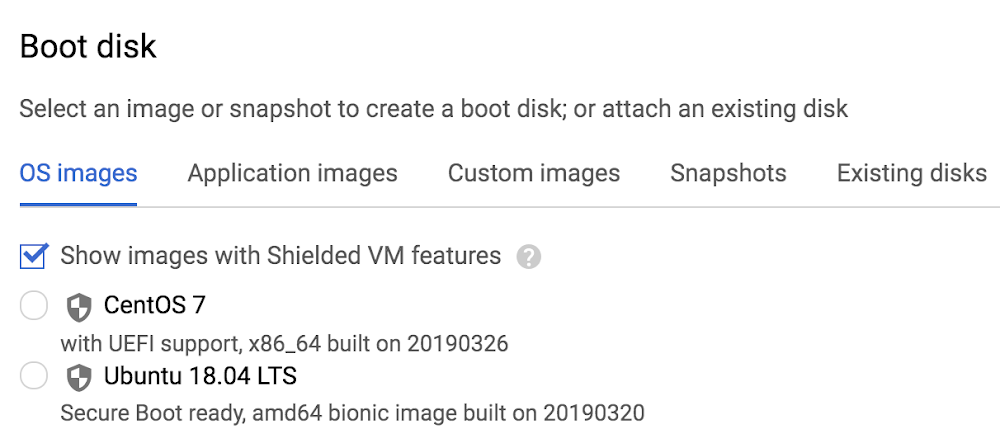
In the cloud, establishing trust in your environment is multifaceted, involving hardware and firmware, as well as host and guest operating systems. Unfortunately, threats like boot malware or firmware rootkits can stay undetected for a long time, and an infected virtual machine can continue to boot in a compromised state even after you’ve installed legitimate software.Last week at Google Cloud Next ’19, we announced the general availability of Shielded VM—virtual machine instances that are hardened with a set of easily configurable security features that assure you that when your VM boots, it’s running a verified bootloader and kernel.Shielded VM can help you protect your system from attack vectors like:Malicious guest OS firmware, including malicious UEFI extensionsBoot and kernel vulnerabilities in guest OSMalicious insiders within your organizationTo guard against these kinds of advanced persistent attacks, Shielded VM uses:Unified Extensible Firmware Interface (UEFI): Ensures that firmware is signed and verifiedSecure and Measured Boot: Help ensure that a VM boots an expected, healthy kernelVirtual Trusted Platform Module (vTPM): Establishes a root-of-trust, underpins Measured Boot, and prevents exfiltration of vTPM-sealed secretsIntegrity Monitoring: Provides tamper-evident logging, integrated with Stackdriver, to help you quickly identify and remediate changes to a known integrity stateGemalto, a global security company focused on financial services, enterprise, telecom, and public sectors, turned to Shielded VM for its SafeNet Data Protection On Demand Cloud HSM solution, which provides a wide range of cloud HSM and key management services through a simple online marketplace.”Shielded VM lets us better protect sensitive applications in the cloud,” said Raphaël de Cormis, VP Innovation at Gemalto. “Using Shielded VM, we envision our customers get increased protection from remote attacks and can meet strict regulatory requirements for data protection and encryption key ownership. And the point/click/deploy model of Shielded VM makes increasing security quick and simple.”Image availabilityShielded VM is available in all of the same regions as Google Compute Engine, and there is no separate charge for using it. Shielded VM is available for the following Google-curated images:CentOS 7Container-Optimized OS 69+Red Hat Enterprise Linux 7Ubuntu 16.04 LTS (coming soon)Ubuntu 18.04 LTSWindows Server 2012 R2 (Datacenter Core and Datacenter)Windows Server 2016 (Datacenter Core and Datacenter)Windows Server 2019 (Datacenter Core and Datacenter)Windows Server version 1709 Datacenter CoreWindows Server version 1803 Datacenter CoreWindows Server version 1809 Datacenter CoreYou can also find Shielded VM in the GCP Marketplace. These images, brought to you in collaboration with the Center for Internet Security (CIS), include:CIS CentOS Linux 7CIS Microsoft Windows Server 2012 R2CIS Microsoft Windows Server 2016CIS Red Hat Enterprise Linux 7CIS Ubuntu Linux 18.04″Bringing CIS Hardened Images to Shielded VM gives users a VM image that’s been both hardened to meet our CIS Benchmarks, and that’s verified to protect against rootkits,” said Curtis Dukes, Executive Vice President of Security Best Practices at CIS. “These additional layers of security give customers a platform they can trust to protect their critical applications.”And if you prefer to import a custom image, Shielded VM now lets you transform an existing VM into a Shielded VM that runs on GCP, bringing verifiable integrity and exfiltration resistance to your existing images.Getting startedIt’s easy to get started with Shielded VM. In the GCP Console, when you’re creating a new VM instance or instance template, simply check the “Show images with Shielded VM features” checkbox.Next, you can adjust your Shielded VM configuration options under the Security tab. Here you can gain more granular control over Shielded VM functionality, including the option to enable or disable Secure Boot, vTPM, and integrity monitoring. By default, vTPM and integrity monitoring are enabled; Secure Boot requires explicit opt-in.If you’re looking for additional centralized and programmatic control over your organization’s VM instances, we’ve also made a new organization policy available for Shielded VM. This constraint, when enabled, requires all new Compute Engine VM instances to use shielded disk images and to enable vTPM and integrity monitoring.All functionality exposed via the GCP Console is also available using gcloud.What’s next?As methods for attackers to persist on and exfiltrate from VM instances grow more sophisticated, so too must your defenses. Shielded VM allows you to stay one step ahead of the game by leveraging the security benefits of UEFI firmware, Secure Boot, and vTPM. To learn more, please check out the Shielded VM documentation.You can also join the conversation in the Shielded VM discussion group and make feature suggestions here. We look forward to hearing from you and helping you harden your cloud infrastructure!
Quelle: Google Cloud Platform

Getting started with Cloud Security Command Center

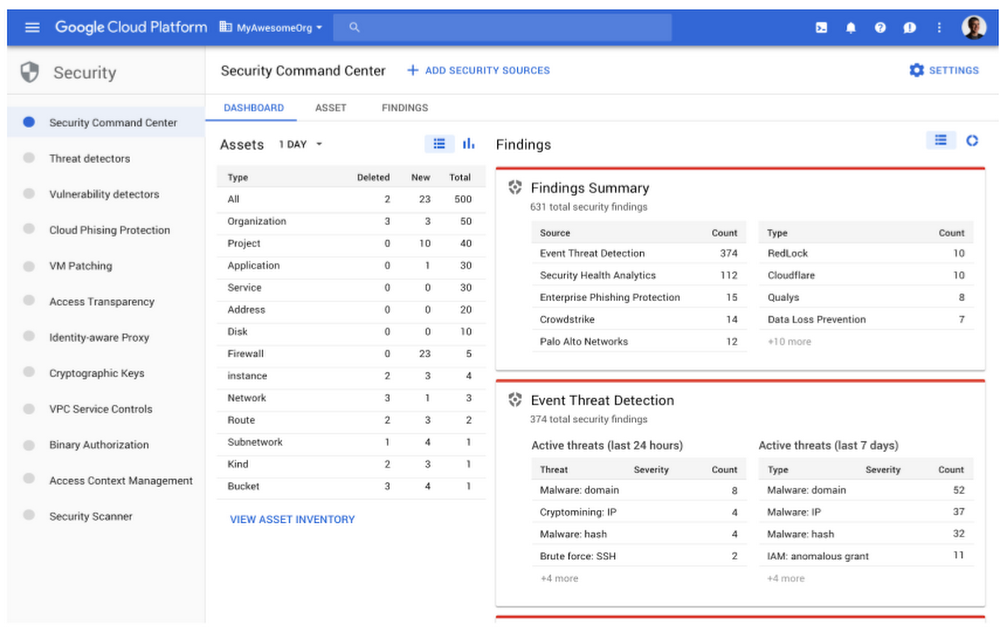
As you deploy Google Cloud Platform (GCP) services in Google Cloud, you need centralized visibility into what resources are running and their security state. You also need to know if there has been anomalous activity and how to take action against it.Last week at Google Cloud Next ‘19, we announced the general availability of Cloud Security Command Center (Cloud SCC), a security management and data risk tool for GCP resources that helps you prevent, detect, and respond to threats from a single pane of glass.Cloud SCC helps you identify misconfigured virtual machines, networks, applications, and storage and act on them before they damage your business. Cloud SCC has built-in threat detection services, including Event Threat Detection, that can quickly surface suspicious activity or compromised resources. You can also use it to reduce the amount of time it takes to respond to threats by following actionable recommendations or exporting data to your security information and event management (SIEM) system.Let’s take a deeper look at how to use Cloud SCC to prevent, detect, and respond to threats.Prevent threats with visibility and control over your cloud data and servicesThe cloud makes it easier for anyone in your IT department to create a service. However, if these services are not deployed through your central IT department, you may be unaware of what services are running in GCP and how they are protected. Cloud SCC gives you visibility into what GCP services you are running on Google Cloud, including App Engine, BigQuery, Cloud SQL, Cloud Storage, Compute Engine, Cloud Identity and Access Management (IAM) policies, Google Kubernetes Engine, and more.With this visibility, you can quickly understand how many projects you have, what resources are deployed, where sensitive data is located, which service accounts have been added or removed, and how firewall rules are configured. It’s also easy to see if users outside of your designated domain, or GCP organization, have access to your resources.Besides giving you visibility into your GCP assets, Cloud SCC tracks changes to your assets so you can quickly act on unauthorized modifications. You can also view new, deleted, and total assets for within a specific time period or view resources at an organizational or project level. Cloud SCC generates notifications when changes occur and trigger Cloud Functions from a Cloud SCC query.Oilfield services company Schlumberger uses Google Cloud to help them safely and efficiently manage hydrocarbon exploration and production data. “Adopting Google’s Cloud Security Command Center enables an automated inventory of our numerous assets in GCP,” said Jean-Loup Bevierre, Cyber Security Engineering Manager at Schlumberger. “It provides us with a comprehensive view of their rapidly evolving running status, configuration and external exposure. This is a key enabler for us to proactively secure these resources and engineer solutions for our next-gen SOC.”In addition to giving you visibility into your GCP assets in Google Cloud and when changes are made, Cloud SCC can help you see resources that have been misconfigured or have vulnerabilities—before an attacker can exploit them.Available today in alpha, Cloud SCC’s Security Health Analytics capability assesses the overall security state and activity of your virtual machines, network, and storage. You can see issues with public storage buckets, open firewall ports, stale encryption keys, or deactivated security logging. To learn more about this capability, visit our documentation. To get started with this new capability, sign up for the alpha program.Another native capability that helps you prevent threats is Cloud Security Scanner. This scanner can detect vulnerabilities such as cross-site-scripting (XSS), use of clear-text passwords, and outdated libraries in your App Engine apps. It is generally available for App Engine and now available in beta for Google Kubernetes Engine (GKE) and Compute Engine.Detect threats targeting your GCP assetsIt takes an enterprise 197 days, on average, to detect a threat, but it only takes an attacker hours to gain access to your environment, causing an average of $3.86 million dollars worth of damage, according to a Ponemon Institute study.This does not have to be your reality if you use Cloud SCC’s integrated threat detection services.Available today in beta, Event Threat Detection scans your Stackdriver security logs for high-profile indicators that your environment has been compromised. Event Threat Detection uses industry-leading threat intelligence, including Google Safe Browsing, to detect malware, cryptomining, unauthorized access to GCP resources, outgoing DDoS attacks, port scanning, and brute-force SSH. Event Threat Detection sorts through large quantities of logs to help you identify high-risk incidents and focus on remediation. For further analysis, you can send findings to a third-party solution, such as a SIEM, using Cloud Pub/Sub and Cloud Functions. Sign up for the beta program today.Cloud Anomaly Detection, another built-in Cloud SCC service, can detect leaked credentials, cryptomining, unusual activity, hijacked accounts, compromised machines used for botnets or DDoS attacks, and anomalous data activity. In just a few clicks, you can find out more information about the attack and follow actionable recommendations.Respond to threats targeting your GCP assetsWhen a threat is detected, we know that every second counts. Cloud SCC gives you several ways to respond to threats, including updating a configuration setting on a VM, changing your firewall rules, tracking an incident in Stackdriver Incident Response Management or pushing security logs to a SIEM for further analysis.Meet your security needs with a flexible platformWe understand that you have investments in security solutions for both on-premises and other cloud environments. Cloud SCC is a flexible platform that integrates with partner security solutions and Google security tools.Partner solutions surface vulnerabilities or threats directly into Cloud SCC. Now you can see findings from Google security tools and partner tools in one location and quickly take action. You can also move from the Cloud SCC dashboard into third-party consoles to remediate issues.We’re excited to share today that Acalvio, Capsule8, Cavirin, Chef, Check Point CloudGuard Dome 9, Cloudflare, CloudQuest, McAfee, Qualys, Reblaze, Redlock by Palo Alto Networks, StackRox, Tenable.io, and Twistlock are running their security services on Google Cloud and integrate into Cloud SCC. Find out more about how Capsule8, Cavirin, CloudQuest, McAfee, Reblaze, and Cloud SCC work together.Cloud SCC also integrates with GCP security tools, including Access Transparency, Binary Authorization, Cloud Data Loss Prevention (DLP) API, Enterprise Phishing Protection, and the open-source security toolkit Forseti, letting you view and take action on the information provided by these tools.Access Transparency gives you near real-time logs when GCP administrators access your content. Gain visibility into accessor location, access justification, or the action taken on a specific resource from Cloud SCC.Binary Authorization ensures only trusted container images are deployed on GKE. With Cloud SCC, it’s easy to see if you are running containers with trusted or untrusted images and take action.Cloud DLP API shows storage buckets that contain sensitive and regulated data. Cloud DLP API can help prevent you from unintentionally exposing sensitive data and ensure access is conditional.Forseti integrates with Cloud SCC to help you keep track of your environment, monitor and understand your policies, and provide correction.Enterprise Phishing Protection reports URLs directly to Google Safe Browsing and publishes phishing results in the Cloud SCC dashboard, making it your one-stop shop to see and respond to abnormal activity in your environment and respond.Cloud SCC pricingThere is no separate charge for Cloud SCC. However, you will be charged if you upload more than 1 GB per day of external findings into Cloud SCC. In addition, some detectors that are integrated into Cloud SCC, such as Cloud DLP API, charge by usage. Learn more on the DLP API pricing page.Get started todayThere are lots of ways to start taking advantage of Cloud SCC.Enable it from the GCP Marketplace and start using for free.Learn more about Cloud SCC by reading the documentation.Watch Cloud SCC in action in this session from Next ‘19.
Quelle: Google Cloud Platform

Oneweb: Airbus will Kleinsatelliten vermarkten

Eine große Konstellation aus kleinen Satelliten: Airbus arbeitet mit dem US-Unternehmen Oneweb am Satelliteninternet. Der Chef der Airbus-Raumfahrtsparte sieht zudem weitere Anwendungsmöglichkeiten für die Kleinsatelliten. Für die interessiert sich unter anderem die Darpa. (Satelliteninternet, Internet)
Quelle: Golem