How to use Stackdriver monitoring export for long-term metric analysis

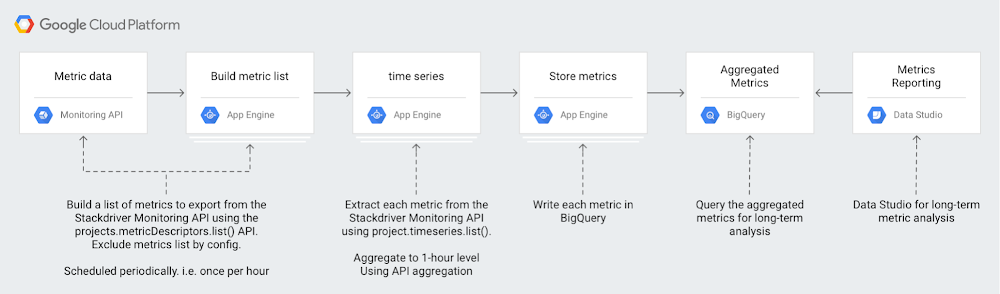
Our Stackdriver Monitoring tool works on Google Cloud Platform (GCP), Amazon Web Services (AWS) and even on-prem apps and services with partner tools like Blue Medora’s BindPlane. Monitoring keeps metrics for six weeks, because the operational value in monitoring metrics is often most important within a recent time window. For example, knowing the 99th percentile latency for your app may be useful for your DevOps team in the short term as they monitor applications on a day-to-day basis.However, there’s a lot of value in a longer-term analysis over quarters or years. That long-term analysis may reveal trends that might not be apparent with short-term analysis. Analyzing longer-term Monitoring metrics data may provide new insights to your DevOps, infrastructure and even business teams. For example, you might want to compare app performance metrics from Cyber Monday or other high-traffic events against metrics from the previous year so you can plan for the next high-traffic event. Or you might want to compare GCP service usage over a quarter or year to better forecast costs. There might also be app performance metrics that you want to view across months or years.With our new solution guide, you can understand the metrics involved in analyzing long-term trends. The guide also includes a serverless reference implementation for metric export to BigQuery.Creating a Stackdriver reference architecture for longer-term metrics analysisHere’s a look at how you can set up a workflow to get these longer-term metrics:Monitoring provides a time series list API method, which returns collected time series data. Using this API, you can download your monitoring data for external storage and analysis. For example, using the Monitoring API, you could download your time series and then store it in BigQuery for efficient analysis.Analyzing metrics over a larger time window means that you’ll have to make a design choice around data volumes. Either you include each individual data point and incur the time and cost processing of each one, or you aggregate metrics over a time period, which reduces the time and cost of processing at the expense of reduced metrics granularity.Monitoring provides a powerful aggregation capability in the form of aligners and reducers available in the Monitoring API. Using aligners and reducers, you can collapse time-series data to a single point or set of points for an alignment period. Selecting an appropriate alignment period depends on the specific use case. One hour provides a good trade-off between granularity and aggregation.Each of the Monitoring metrics have a metricKind and a valueType, which describe both the type of the metric values as well as what the values represent (i.e., DELTA or GAUGE values). These values determine which aligners and reducers may be used during metric aggregation.For example, using an ALIGN_SUM aligner, you can collapse your App Engine http/server/response_latencies metrics for each app in a given Stackdriver Workspace into a single latency metric per app per alignment period. If you don’t need to separate the metrics by their associated apps, you can use an ALIGN_SUM aligner combined with a REDUCE_PERCENTILE_99 reducer to collapse all of your App Engine latency metrics into a single value per alignment period, as shown here:For more considerations on metrics, metric types, and exporting to BigQuery for analysis, check out our solution guide.Be sure to let us know about other guides and tutorials you’d like to see using the “Send Feedback” button at the top of the solution page. And you can check out our full list of how-to solutions for all GCP products.
Quelle: Google Cloud Platform

Cloud Filestore powers high-performance storage for ClioSoft's design management platform

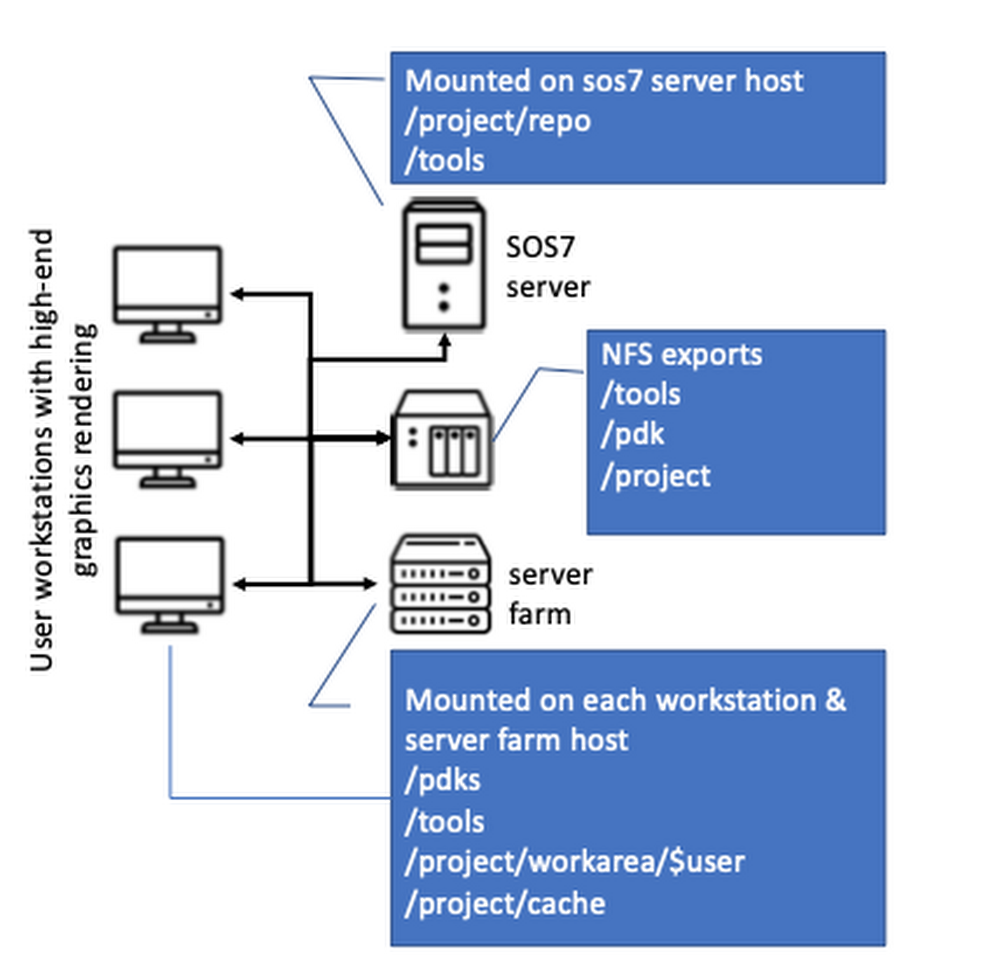
Editor’s note: As we see computing and data needs grow exponentially, we’re pleased to hear today from ClioSoft, which offers system-on-chip (SoC) design data and IP management solutions. Their platform is used widely in the semiconductor industry. Running ClioSoft’s SOS7 design management platform on Google Cloud Filestore is simple and can provide great performance.Along with hearing ClioSoft’s story, we’re also excited that Cloud Filestore is now generally available. Read on for details on how ClioSoft tested Cloud Filestore against typical on-premises performance for its customer needs. Learn more here about Cloud Filestore.Integrated circuits (ICs) powering today’s automotive, mobile and IoT applications are enormously powerful and complex. To develop an IC, design teams often undergo an extended engineering and testing process. They’re often faced with tight schedules to bring products to market and compete with consumer demands, and are borrowing the best practices of software design to speed development.However, IC design environments are notably different than software design environments because they rely heavily on shared files. A typical design engineer’s work area consists of large number of binary files, which tend to be rather large, often numbering in GB size. These files are often generated by electronic design automation (EDA) tools. Some of these files are generated only a few times during the life of the project, but used by almost all members of the project very often. In addition, there are usually third-party libraries and process design kits (PDKs) that the entire team relies on for practically each simulation or verification run. This setup requires a lot of high-performance storage to be accessible on several compute machines, and the productivity of teams designing integrated circuits can easily be impacted without enough high-performance storage.We know from what our customers tell us that optimization of storage resources is one of the top criterion in the design environment, since the design data size is so large. Our SOS7 design management platform creates shared smart cache areas where all design files not being modified are hosted. User access to these design files is provided by tool-managed Linux symbolic links in the user’s working directory. This is one key feature used by most of our customers to create links to the cache workspace, since it can help reduce up to 90% of the design team’s storage requirements.We’re always eager to optimize the user’s design environment, so we used Google’s Cloud Filestore, recently made generally available, to replicate a typical IC design environment in the cloud with high performance.Using a typical IC design environmentA typical design environment that we see design automation teams use successfully looks like this:The environment generally works this way:The high-performance NAS file server exports volumes using NFS protocolEach machine (servers and workstations) mounts the NAS-exported NFS volumesWorkstations rendering high-end graphics and the server access large data stored on the NFS volumes for typical activitiesDesign tools, such as layout editors, require rendering complex graphics displaying millions of polygons. The responsiveness of the toolset directly affects user experience. Another challenge of this on-premises setup is that shared NFS/NAS drives can easily be a bottleneck. Local drives offer strong performance, but the complex logistics involved in replicating a large amount of ever-changing data on several local drives means it’s not a practical solution for most customers.Setting this design environment up in the cloud brings the promise of high scalability, high availability, and reliability that is difficult (if not impossible) to achieve with an in-house design environment. The challenge, however, is how this complex design environment can be replicated and perform in the cloud.Using a cloud-based IC design environmentWe tried recreating a typical design environment using Google Cloud Platform (GCP), specifically Cloud Filestore and Compute Engine, to see if IaaS is viable. You can see how we set up the environment here:Setting up the GCP environmentWe set up Cloud Filestore and the Compute Engine instances using the web interface. We used readily available documentation to set up the environment in a couple of days, shown here:Once the Cloud Filestore instance was available, we simply needed to:1. Install nfs-utils> yum install nfs-utils2. Add the following line to /etc/fstab on the Compute Engine instances10.198.128.10:/us_central1_nas  /nfs_driv nfs defaults 0 03. Run the Unix mount command.> mount -aThe data shared on the Cloud Filestore instance was available on the Compute Engine instances, ready to use.We started our SOS primary and cache services and used the SOS client to create design workspaces on the Cloud Filestore instance. We were also able to create links-to-cache workspaces, which is a key requirement for our customers. A typical EDA environment with SOS design management was up and fully functional in a short time. We needed only a basic ISP-powered network and open-source tools like VNC for remote access.Cloud performance testingWe also ran a couple of test suites to simulate typical design management operations that a team would do during the course of a project. The SOS7 test suites 13K and 74K are a part of ClioSoft’s benchmarking that simulates typical customer workflows. Both these design suites represent design activity on an image sensor chip used to develop high-resolution, low-light devices.We ran these test suites against an on-premises network that we built to emulate the design environments at a typical ClioSoft customer.The following table shows some performance results, with our cloud design environment on GCP running up to 75% faster. Note that this isn’t an apples-to-apples comparison, since the results are highly dependent on the on-premises infrastructure and the GCP configuration.We noticed in benchmark testing that there was a positive effect on performance as the data moved from a local drive to a shared drive. In a typical customer environment, NAS/NFS shared drives are often the primary bottleneck affecting EDA tool performance. Tools perform much better if the on-premises environments use local disks instead of shared NFS/NAS filers. However, the complex logistics involved in replicating large amounts of quickly changing data on several local drives means it’s not a practical solution for most customers. The following table quantifies and compares performance degradation on a shared drive (NAS/Cloud Filestore) as compared to a local drive [direct-attached storage (DAS)].Performance degrades by almost 3x when an on-premises network uses shared NFS/NAS storage. The most notable discovery was that Cloud Filestore provides a near-local drive performance level while providing all the benefits of a shared drive.We found that using GCP with Cloud Filestore is a viable solution to replicate a typical IC design environment in the cloud. It brings high performance, high reliability and high availability to the design environment. The performance comparison between an on-premises network and GCP isn’t exactly one-to-one—the compute resources available in these environments are significantly different. However, the fact that there is virtually no difference between running these design tools on standard persistent disk and Cloud Filestore is a big discovery if you’re implementing an IC design environment.Find out more here about designing integrated circuits with ClioSoft SOS7, and learn more here about Cloud Filestore.Looking for the similarly named Cloud Firestore? Learn about that NoSQL database here.
Quelle: Google Cloud Platform

Azure Cost Management now generally available for Pay-As-You-Go customers!

We are excited to announce the general availability of Azure Cost Management features for all Pay-As-You-Go and Azure Government customers that will greatly enhance your ability to analyze and proactively manage your cloud costs. These features will allow you to analyze your cost data, configure budgets to drive accountability for cloud costs, and export pre-configured reports on a schedule to support deeper data analysis within your own systems. This release for Pay-As-You-Go customers also provides invoice reconciliation support in the Azure portal via a usage csv download of all charges applicable to your invoices.

New feature

Azure Usage Download for invoice reconciliation

As a part of this general availability for Pay-As-You-Go customers, we are now providing usage download capabilities in the Azure portal. This downloadable csv file can be used to reconcile your charges with your monthly invoice.

Your usage download file can also be accessed by a new API that is now available for developers. To learn more about developing on top of our APIs, including Usage Download, please visit our Azure REST API documentation.

Generally available features

The features below are now generally available for Pay-As-You-Go and Azure Government customers within the Azure portal. Log into the Azure portal and test them out today! If you are a Government customer, log into the Azure Government portal.

Cost analysis

This feature allows you to track costs over the course of the month and offers you a variety of ways to analyze your data. To learn more about how to use Cost Analysis, please visit our documentation, “Quickstart: Explore and analyze costs with Cost analysis.”

Budgets

Use budgets to proactively manage costs and drive accountability within your organization. To learn more about using Azure budgets please visit our documentation, “Tutorial: Create and manage Azure budgets.”

Exports

Export all of your cost data to an Azure storage account using our new exports feature. You can use this data in external systems and combine it with your own data to maximize your cost management capabilities. To learn more about using Azure exports please visit our documentation, “Tutorial: Create and manage exported data.”

GA data limitations

The GA release of the features identified above has a few limitations that are identified below. We expect to bring many of these features to you soon so stay tuned for announcements of future releases!

Feature support for Pay-As-You-Go customers is available for native Azure resources only. Resources available via the Azure Marketplace, including recurring charges, will be supported in upcoming releases.
Cost management data for Pay-As-You-Go customers is currently only available from September 2018 and later. Data prior to this date can be accessed via the Usage Details API.
Feature support for Azure Reserved Instances is not currently available for Pay-As-You-Go or Azure Government customers and will be incorporated into upcoming releases.
Feature support for the Power BI Content Pack is not currently available for Pay-As-You-Go customers and will be incorporated into upcoming releases.

Follow us on Twitter @AzureCostMgmt for exciting cost management updates.
Quelle: Azure

Azure.Source – Volume 79

Preview | Generally available | News & updates | Technical content | Azure shows | Events | Customers, partners, and industries


Now in preview

Azure Container Registry now supports Singularity Image Format containers

We announced public preview support for storing Singularity Image Files (SIF) in Azure Container Registry based on the OCI Distribution based Container Registries specification. The Singularity project defines a new secure SIF file format which enables untrusted users to run untrusted containers in a trusted way. The work done in collaboration with Sylabs enables customers using Singularity to leverage their investments in Azure Container Registry and other OCI complaint registries, without having to run and maintain another SIF distribution library.

Move your data from AWS S3 to Azure Storage using AzCopy

AzCopy v10 (Preview) now supports Amazon Web Services (AWS) S3 as a data source. Copy an entire AWS S3 bucket, or even multiple buckets, to Azure Blob Storage using AzCopy. Previously, if you wanted to migrate your data from AWS S3 to Azure Blob Storage, you had to bring up a client between the cloud providers to read the data from AWS to then put it in Azure Storage. We addressed this issue in the latest release of AzCopy using a scale out technique thanks to the new Blob API.

Also in preview


Web Application Firewall for Azure Front Door is in preview
Pod security policy for Azure Kubernetes Service (AKS) is now available in preview

Now generally available

Announcing general availability of Apache Hadoop 3.0 on Azure HDInsight

We announced the general availability of Apache Hadoop 3.0 on Azure HDInsight. Microsoft Azure is the first cloud provider to offer customers the benefit of the latest innovations in the most popular open source analytics projects, with unmatched scalability, flexibility, and security. With the general availability of Apache Hadoop 3.0 on Azure HDInsight, we are building upon existing capabilities with a number of key enhancements that further improve performance and security, and deepen support for the rich ecosystem of big data analytics applications.

Manage Azure HDInsight clusters using .NET, Python, or Java

We announced the general availability of the new Azure HDInsight management SDKs for .NET, Python, and Java. Azure HDInsight is an easy, cost-effective, enterprise-grade service for open source analytics that enables customers to easily run popular open source frameworks including Apache Hadoop, Spark, Kafka, and others.

Also generally available


Azure Front Door Service is now available
ExpressRoute Global Reach is now available
ExpressRoute Direct is now available
Azure Database for PostgreSQL Read Replica is now generally available
Azure Database for MariaDB: New compute options are now generally available

News & updates

Announcing Azure Government Secret private preview and expansion of DoD IL5

We announced a significant milestone in serving our mission customers from cloud to edge with the initial availability of two new Azure Government Secret regions, now in private preview and pending accreditation. In addition, we expanded the scope of all Azure Government regions to enable DoD Impact Level 5 (IL5) data, providing a cost-effective option for L5 workloads with a broad range of available services.

Microsoft open sources Data Accelerator, an easy-to-configure pipeline for streaming at scale

We announced that an internal Microsoft project known as Data Accelerator is now being open sourced. Data Accelerator for Apache Spark simplifies streaming big data using Spark. Data Accelerator has been used for two years within Microsoft for processing streamed data across many internal deployments handling data volumes at Microsoft scale. Offering an easy to use platform to learn and evaluate your streaming needs and requirements, we are excited to share this project with the wider community as open source.

Microsoft driving standards for the token economy with the Token Taxonomy Framework

We announced that the Token Taxonomy Initiative (TTI) is a milestone in the maturity of the blockchain industry, which brings together some of the most important blockchain platforms from the Ethereum ecosystem, Hyperledger and IBM, Intel, R3, and Digital Asset in a joint effort to establish a common taxonomy for tokens.

New Bot Framework v4 Template for QnA Maker

The QnA Maker service lets you easily create and manage a knowledge base from your data, including FAQ pages, support URLs, PDFs, and doc files. You can test and publish your knowledge base and then connect it to a bot using a bot framework sample or template. With this update we have simplified the bot creation process by allowing you to easily create a bot from your knowledge base, without the need for any code or settings changes.

Azure Updates

Learn about important Azure product updates, roadmap, and announcements. Subscribe to notifications to stay informed.

Technical content

Rewrite HTTP headers with Azure Application Gateway

We are pleased to share the capability to rewrite HTTP headers in Azure Application Gateway. With this, you can add, remove, or update HTTP request and response headers while the request and response packets move between the client and backend application. You can also add conditions to ensure that the headers you specify are rewritten only when the conditions are met. The capability also supports several server variables which help store additional information about the requests and responses, thereby enabling you to make powerful rewrite rules.

Machine Learning powered detections with Kusto query language in Azure Sentinel

As cyberattacks become more complex and harder to detect. The traditional correlation rules of a SIEM are not enough, they are lacking the full context of the attack and can only detect attacks that were seen before. This can result in false negatives and gaps in the environment. In addition, correlation rules require significant maintenance and customization since they may provide different results based on the customer environment. Advanced Machine Learning capabilities that are built in into Azure Sentinel can detect indicative behaviors of a threat and helps security analysts to learn the expected behavior in their enterprise. Here you will see three examples.

.NET application migration using Azure App Services and Azure Container Services

Designed for developers and solution architects who need to understand how to move business critical apps to the cloud, this online workshop series gets you hands-on with a proven process for migrating an existing ASP.NET based application to a container-based application. Join us live for 90 minutes on Wednesday and Fridays through May 3 to get expert guidance and to get your questions answered. At the end of this series you will have a good understanding of container concepts, Docker architecture and operations, Azure Container Services, Azure Kubernetes Services and SQL Azure PaaS solutions.

Automated Machine Learning: how do teams work together on an AutoML project?

In this article from Medium, the author shows you an automated machine learning use case (published on GitHub) and, specifically, how a data scientist, a project manager, and a business lead can use automated machine learning to improve team collaboration and learning, and facilitate the successful implementation of data science initiatives.

Uploading your JSON data to Azure Cosmos DB for MongoDB API

If you have built an application and are currently storing the data in a static JSON file, you may want to consider the MongoDB API for Microsoft Azure Cosmos DB. You will have the document data storage you require for your application with the full management of Microsoft Azure with Cosmos DB along with the ability to scale out globally. This will permit you to create replication to regions where your customers are.

Search Like a Boss with Azure Graph Query

Frank Boucher shows how to install the Azure Graph Query extension and explains why you should definitely care about it, and do a few simple queries across multiple Azure subscription.

Securing IoT Data Capture at its Source

What happens when devices only require your organization’s network for connectivity to pass through data or accept commands? Do those attempting to access the IoT devices only access the IoT devices or do they attempt to access other parts of the network now connected to the newly installed IoT device?  Enter the new realm of Shadow IT of which “off-the-shelf” IoT devices are being connected to company networks at the request of businesses without understanding the risks or notifying those who govern over the networks themselves, the IT Professional.

How to develop an IoT strategy that yields desired ROI

In an earlier post, we discussed why and how to get started with IoT, recommending that companies shift their mindset, develop a business case, secure ongoing executive sponsorship and budget, and seize the early-mover advantage. This post covers the six elements of crafting an IoT strategy that will yield ongoing ROI.

Azure shows

Episode 275 – Azure Foundations | The Azure Podcast

Derek Martin, a Technology Solutions Principal (TSP) at Microsoft talks about his approach to ensuring that customers get the foundational elements of Azure in place first before deploying anything else. He discusses why Microsoft is getting more opinionated, as a company, when advocating for best practices.

HTML5 audio not supported

Getting started with Azure App Configuration | Azure Friday

Azure App Configuration is a service that enables you to centralize your application configuration. Built on the simple concept of key-value pairs, this service provides manageability, availability, and ease-of-use. You can use Azure App Configuration to store and retrieve settings for applications, microservices, platforms, and CI/CD pipelines.

Real-time ML Based Anomaly Detection in Azure Stream Analytics | Internet of Things Show

Azure Stream Analytics is a PaaS cloud offering on Microsoft Azure to help customers analyze IoT telemetry data in real-time. Stream Analytics now has embedded ML models for Anomaly Detection, which can be invoked with simple function calls. Learn how you can leverage this powerful feature set for your scenarios.

Using Ethereum Logic Apps to publish ledger data to Azure Search | Block Talk

In this episode we use the Ethereum Logic App connector to push contract data into an Azure Search index. This makes contract data available to a wide range of Enterprise applications via simple search queries.

DevOps for ASP.NET Developers Pt. 1 – What is DevOps? | On .NET

DevOps is the union of people, process, and products to enable continuous delivery of value to our end users. Azure DevOps is everything you need to turn an idea into a working piece of software. In this first episode of the DevOps for ASP.NET Developers series, Abel and Jeremy introduce us the benefits of DevOps.


DevOps for ASP.NET Developers Pt. 2 – Source Control
DevOps for ASP.NET Developers Pt. 3 – Work Item Tracking

How to deploy monitored Azure App Services with Azure DevOps | Azure Makers Series

Learn to use Azure DevOps to configure continuous build and release for your web apps. With Application Insights, you'll even be able to monitor everything in real-time—from IDE all the way to production.

How to use Azure Resource Manager | Azure Tips and Tricks

In this edition of Azure Tips and Tricks, learn how to use Azure Resource Manager templates to describe your infrastructure and deploy it.

How to browse your resources in the Azure Portal | Azure Portal Series

The Azure Portal enables you to view and navigate to all your resources more easily. In this video, learn how to go through your Azure resources across locations and subscriptions and customize your views.

How to export your resources to CSV using the Azure Portal | Azure Portal Series

The Azure Portal enables you to customize the information you'd like to export. In this video, learn how easy it is to export your files to CSV.

Udi Dahan on Microservices | Azure DevOps Podcast

This week Udi Dahan, founder of NServiceBus, CEO of Particular Software, and Microsoft Regional Director, joins the Azure DevOps Podcast to discuss microservices and some of the trends, challenges, and problems in the software industry today. Udi gives his advice and recommendations to developers and teams on how to go about making decisions around microservices while giving examples of common mistakes and problems he often sees. He also gives advice on those looking to move forward with an existing legacy system they are trying to modernize as well as those who are looking to build something entirely new.

HTML5 audio not supported

Episode 7 – “Gaming” March Madness with Azure AI | AzureABILITY Podcast

Doyenne of Data Science Laura Edell visits the pod with new-word-crafter / AI-expert Anthony Franklin to talk about how to use Azure AI to "game" March Madness. During the episode we talk about all sorts of things related to Machine Learning and AI.

HTML5 audio not supported

Events

Put IoT in action to overcome public building safety challenges

IoT brings transparency to public safety initiatives. Advances in sensors, edge computing, and data analytics give stakeholders a more comprehensive, more immediate view of events as they unfold. Faster, smarter reactions potentially enhance public safety. Given the nature of public safety projects, however, IoT needs collaborative frameworks that provide community members with the network they need to work toward common goals together. This brings challenges that span hardware, software, networks, security, and platform management. Innovative companies are solving these problems, however. Learn how SoloInsight and Microsoft have created secure, manageable and economical IoT solutions for public safety by registering for the IoT in Action webinar, IoT and the New Safety Net. Get insights from industry experts and Microsoft partner SoloInsight around how transparent frameworks create secure buildings.

Customers, partners, and industries

Azure resources to assess risk and compliance

This post walks through some common recommendations for various functions in Financial Services organizations. It is vital for customers in the Financial Services Industry to deliver innovation and value to their customers while adhering to strict security and regulatory requirements. Azure is uniquely positioned to help global FSI customers meet their regulatory requirements and we understand the complexities of trying to innovate fast and effectively, while also ensuring that key regulations and compliance necessities are not overlooked.

Deploying Grafana for production deployments on Azure

Grafana is one of the popular and leading open source tools for visualizing time series metrics. Grafana has quickly become the preferred visualization tool of choice for developers and operations teams for monitoring server and application metrics. Grafana dashboards enable operation teams to quickly monitor and react to performance, availability, and overall health of the service. You can now also use it to monitor Azure services and applications by leveraging the Azure Monitor data source plugin, built by Grafana Labs.

Azure hybrid storage performance & rewrite HTTP headers with Application Gateway | Azure This Week – A Cloud Guru

In this Easter special of Azure This Week, Lars covers hybrid storage performance and a new app service migration assistant. Plus you can now rewrite HTTP headers with Application Gateway.

Quelle: Azure
Red Hat Summit is almost there

Wow! We can’t believe it’s almost time for another exciting Red Hat Summit!
This year, aside from all the super interesting sessions we usually have, please, take a look at our keynote speakers! Satya Nadella, Microsoft CEO will be on stage with Jim

 
This year it will be in Boston, MA  from May 7 until May 9

Red Hat Summit 2019 is at the Boston Convention and Exhibition Center.
415 Summer St
Boston, MA 02210

 
You can find more information here https://www.redhat.com/en/summit/2019
Quelle: CloudForms

Elaw uses IBM AI to automate management of complex Brazilian labor lawsuits

Brazil has strict and complicated labor laws and according to The Brazil Business, Brazilians are prone to sue their employers. It is a cultural behavior and a way to make “easy money”. With an awareness of this tendency, many companies operate illegally and wait to see if the employee is going to sue them or not. In many cases, this practice is a lot cheaper than working under proper regulations.
Brazil is said to have the highest number of labor claims in the world. TMF Group reports that Brazil currently operates with 11,000 labor lawsuits a day. In comparison, the average in France is 60,000 lawsuits per year. In Chile, there are 40,000 per year and Japan has only 10,000 lawsuits per year.
Elaw Tecnologia SA is a company that specializes in the development of corporate solutions for legal management. It currently manages approximately 2.2 million active lawsuits.
Cognitive legal process management solution
Elaw wanted to automate its legal process management. The company approached the IBM Cloud Garage team, knowing that it needed a new business model, believing that artificial intelligence (AI) could improve the solution, but not having a clear scope of what it planned to develop.
The Garage team conducted an agile planning session to capture the issues faced when dealing with labor lawsuits. Elaw brought a chief legal officer that personified the end user of the solution, as well as lawyers who specialize in labor law.
Together, they created an Elaw cognitive solution using the IBM Watson Machine Learning service on the IBM Cloud.
IBM Cloud Garage projects included training Watson to identify employee complaints in lawsuits and document them in its legal management system. Elaw looked at the five most common labor lawsuit claims — such as “I’m owed overtime wages” or “my salary should be the same as my colleague’s” — and identified the claims and factors that influence each lawsuit. This helps lawyers predict what legal approach could be more effective when dealing with that case.
Watson also learned how to monitor the status of existing cases. With the application programming interface (API), Elaw automatically taps into more than 90 different court software systems to keep a close watch on new subpoenas or sentences, as well as which cases are most likely to close.
Now with Elaw’s cognitive service, client lawyers are able to analyze, compare and interpret cases.
Improved efficiency with AI and automation
Because processes are automated in the Elaw cognitive solution, they are faster and more accurate. The AI capabilities of Watson are more accurate than a human by 15 percentage points (80 percent compared to 65 percent) when reviewing and documenting employee complaints in lawsuits.
Financially, the solution is a big win for clients. Since they can act on orders faster, they avoid penalties for non-compliance. The ability to predict the outcome of cases correctly means more strategically provisioned financial resources. Additionally, being able to close cases in a timely manner means cost savings, since eLaw clients pay by active case.
Ultimately, Elaw’s AI-enabled legal process management solutions reduce the time it takes lawyers to understand lawsuits, thus improving efficiency and productivity. Lawyers perform less tedious, routine work and focus on effectively practicing law.
Read the case study for more details.
See how the IBM Cloud Garage team can help your business. Schedule a free four-hour virtual consultation.
The post Elaw uses IBM AI to automate management of complex Brazilian labor lawsuits appeared first on Cloud computing news.
Quelle: Thoughts on Cloud

Guillaume Faury: Neuer Airbus-Chef setzt auf Elektroflieger

Der Klimaschutz ist ihm wichtig: Guillaume Faury ist seit knapp zwei Wochen Chef von Airbus. In einem Zeitungsinterview hat er angekündigt, dass der europäische Luft- und Raumfahrtkonzern größere Flugzeuge mit Elektroantrieb bauen werde. Ein kommerzieller Einsatz sei Ende des kommenden Jahrzehnts denkbar. (Luftfahrt, GreenIT)
Quelle: Golem