Simplify enterprise threat detection and protection with new Google Cloud security services

Today’s enterprises face a complex threat environment. Attacks targeting users, networks, sensitive information and communications are increasing in sophistication and scale. Organizations of all sizes need advanced security capabilities that are easy to deploy and manage to help defend against these threats. At Google Cloud, we are constantly looking to bring innovative capabilities to users of our platform, and now, even to organizations who may not be running workloads on our platform.Introducing the Web Risk APIToday, we’re excited to announce the beta release of Web Risk API, a new Google Cloud service designed to keep your users safe on the web. With a simple API call, client applications can check URLs against Google’s lists of unsafe web resources, including social engineering sites such as phishing and deceptive sites, and sites that host malware or unwanted software. With the Web Risk API, you can quickly identify known bad sites, warn users before they click links in your site that may lead to infected pages, and prevent users from posting links to known malicious pages (for example, adding a malicious URL into a comment) from your site.The Web Risk API includes data on more than a million unsafe URLs that we keep up-to-date by examining billions of URLs each day, and is powered by the same technology that underpins Google Safe Browsing. Safe Browsing protections work across Google products to help protect over three billion devices every day across the Internet. Our Safe Browsing engineering, product, and operations teams work at the forefront of security research and technology to build systems that protect people from harm, and now, the Web Risk API lets enterprises use this same technology to protect their users.Protect against DDoS and targeted attacks with Cloud ArmorIf you run internet-facing services or apps, you have a tough job: you have to quickly and responsively serve traffic to your end users, while simultaneously protecting against malicious attacks trying to take your services down. Cloud Armor is a Distributed Denial of Service (DDoS) defense and Web Application Firewall (WAF) service for Google Cloud Platform (GCP), and it’s based on the same technologies and global infrastructure that we use to protect services like Search, Gmail and YouTube. Today, we are pleased to announce that Cloud Armor is now generally available, offering L3/L4 DDoS defense as well as IP Allow/Deny capabilities for applications or services behind the Cloud HTTP/S Load Balancer.The GA release includes a new Cloud Armor dashboard that is available in Stackdriver Monitoring. This flexible dashboard makes it easy to monitor and analyze traffic subject to Cloud Armor protection and lets network admins or Security Operations teams understand the effectiveness of Cloud Armor security policies. Additionally, users can now evaluate and validate the potential impact of proposed rules in preview mode across their whole project or drill down into individual security policies or backend services.With Cloud Armor, you can quickly visualize your application traffic and see which requests are allowed and blocked.Easily use HSM keys to protect your data in the cloudProtecting sensitive data is a top priority for organizations, especially for those in highly-regulated industries like financial services. Encryption is a core way to help with this challenge, and many security-sensitive organizations deploy hardware security modules (HSMs) to add extra layers of security to their crypto operations. But deploying, configuring and running HSMs can be hard.To help, today, we’re also announcing the general availability of Cloud HSM, our managed cloud-hosted hardware security module (HSM) service on GCP. Cloud HSM allows you to protect encryption keys and perform cryptographic operations in FIPS 140-2 Level 3 certified HSMs (see image below). With this fully managed service, you can protect your most sensitive workloads without needing to worry about the operational overhead of managing an HSM cluster. Many large companies have moved workloads to GCP with the knowledge that they can very easily and quickly use HSM keys to help protect their data.Cloud HSM brings hassle-free hardware cryptography and key management to your GCP deploymentCloud HSM has been available in several locations across the US and is now available for GCP customers in multiple locations in Europe as well, with more to come.With these three capabilities, we continue to empower Google Cloud customers with advanced security functionality that is easy to deploy and use. Learn more about our entire portfolio of security capabilities on our Trust & Security Center.
Quelle: Google Cloud Platform
New file checksum feature lets you validate data transfers between HDFS and Cloud Storage

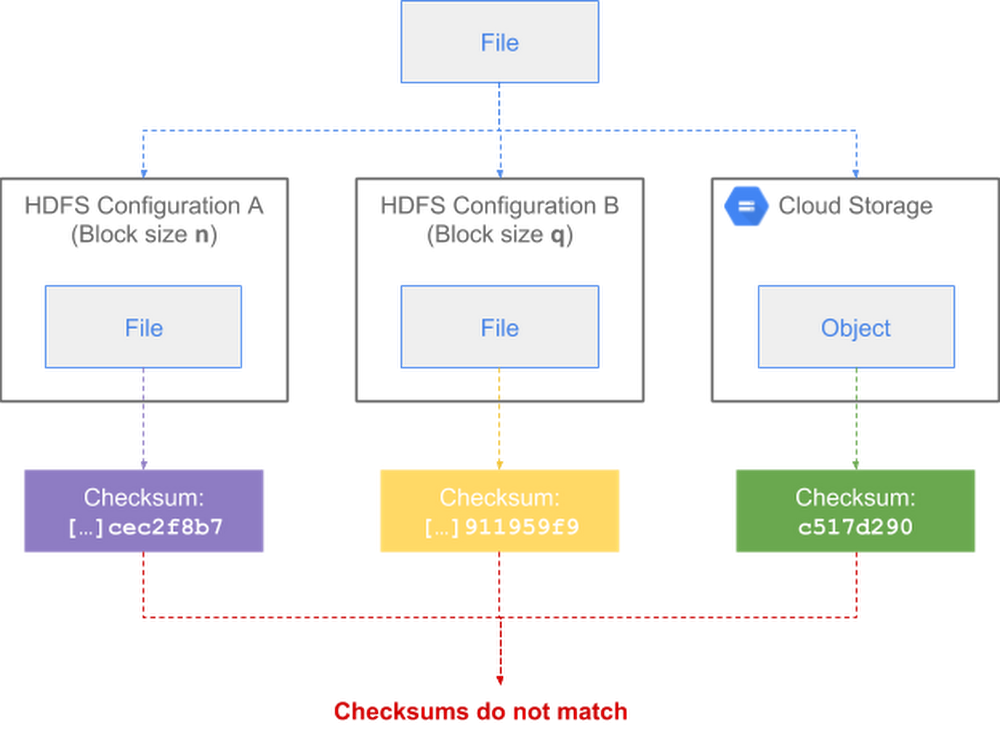
When you’re copying or moving data between distinct storage systems such as multiple Apache Hadoop Distributed File System (HDFS) clusters or between HDFS and Cloud Storage, it’s a good idea to perform some type of validation to guarantee data integrity. This validation is essential to be sure data wasn’t altered during transfer.For Cloud Storage, this validation happens automatically client-side with commands like gsutil cp and rsync. Those commands compute local file checksums, which are then validated against the checksums computed by Cloud Storage at the end of each operation. If the checksums do not match, gsutil deletes the invalid copies and prints a warning message. This mismatch rarely happens, and if it does, you can retry the operation.Now, there’s also a way to automatically perform end-to-end, client-side validation in Apache Hadoop across heterogeneous Hadoop-compatible file systems like HDFS and Cloud Storage. Our Google engineers recently added the feature to Apache Hadoop, in collaboration with Twitter and members of the Apache Hadoop open-source community.While various mechanisms already ensure point-to-point data integrity in transit (such as TLS for all communication with Cloud Storage), explicit end-to-end data integrity validation adds protection for cases that may go undetected by typical in-transit mechanisms. This can help you detect potential data corruption caused, for example, by noisy network links, memory errors on server computers and routers along the path, or software bugs (such as in a library that customers use).In this post, we’ll describe how this new feature lets you efficiently and accurately compare file checksums.How HDFS performs file checksumsHDFS uses CRC32C, a 32-bit Cyclic Redundancy Check (CRC) based on the Castagnoli polynomial, to maintain data integrity in several different contexts:At rest, Hadoop DataNodes continuously verify data against stored CRCs to detect and repair bit-rot.In transit, the DataNodes send known CRCs along with the corresponding bulk data, and HDFS client libraries cooperatively compute per-chunk CRCs to compare against the CRCs received from the DataNodes.For HDFS administrative purposes, block-level checksums are used for low-level manual integrity checks of individual block files on DataNodes.For arbitrary application-layer use cases, the FileSystem interface defines getFileChecksum, and the HDFS implementation uses its stored fine-grained CRCs to define such a file-level checksum.For most day-to-day uses, the CRCs are used transparently with respect to the application layer, and the only CRCs used are the per-chunk CRC32Cs, which are already precomputed and stored in metadata files alongside block data. The chunk size is defined by dfs.bytes-per-checksum and has a default value of 512 bytes.Shortcomings of Hadoop’s default file checksum typeBy default when using Hadoop, all API-exposed checksums take the form of an MD5 (a message-digest algorithm that produces hash values) of a concatenation of chunk CRC32Cs, either at the block level through the low-level DataTransferProtocol, or at the file level through the top-level FileSystem interface. The latter is defined as the MD5 of the concatenation of all the block checksums, each of which is an MD5 of a concatenation of chunk CRCs, and is therefore referred to as an MD5MD5CRC32FileChecksum. This is effectively an on-demand, three-layer Merkle tree.This definition of the file-level checksum is sensitive to the implementation and data-layout details of HDFS, namely the chunk size (default 512 bytes) and the block size (default 128MB). So this default file checksum isn’t suitable in any of the following situations:Two different copies of the same files in HDFS, but with different per-file block sizes configured.Two different instances of HDFS with different block or chunk sizes configured.Copying across non-HDFS Hadoop-compatible file systemshttps://wiki.apache.org/hadoop/HCFS(HCFS) such as Cloud Storage.You can see here how the same file can end up with three checksums depending on the file system’s configuration:For example, below is the default checksum for a file in an HDFS cluster with a block size of 64MB (dfs.block.size=67108864):And below, the default checksum for the same file in an HDFS cluster with a block size of 128MB (dfs.block.size=134217728):You can see in the above examples that the two checksums differ for the same file.Because of these shortcomings, it can be challenging for Hadoop users to reliably copy data from HDFS to the cloud using the typical Apache Hadoop Distributed Copy (DistCp) method. As a workaround for Twitter’s data migration to Google Cloud, Twitter engineers initially modified DistCp jobs to recalculate checksums on the fly. While the workaround provided the desired end-to-end validation, the on-the-fly recalculation could cause a non-negligible performance strain at scale. So Joep Rottinghuis, leading the @TwitterHadoop team, requested that Google help implement a new comprehensive solution in Hadoop itself to eliminate the recalculation overhead. With this solution, there’s now an easier, more efficient way to perform this validation.How Hadoop’s new composite CRC file checksum worksOur Google engineers collaborated with Twitter engineers and other members of the Hadoop open-source community to create a new checksum type, tracked in HDFS-13056 and released in Apache Hadoop 3.1.1, to address the above shortcomings. The new type, configured by dfs.checksum.combine.mode=COMPOSITE_CRC, defines new composite block CRCs and composite file CRCs as the mathematically composed CRC across the stored chunk CRCs. This replaces using MD5 of the component CRCs in order to calculate a single CRC that represents the entire block or file and is independent of the lower-level granularity of chunk CRCs.CRC composition is efficient, allows the resulting checksums to be completely chunk/block agnostic, and allows comparison between striped and replicated files, between different HDFS instances, and between HDFS and other external storage systems. (You can learn more details about the CRC algorithm in this PDF download.)Here’s a look at how a file’s checksum is consistent after transfer across heterogenous file system configurations:This feature is minimally invasive: it can be added in place to be compatible with existing block metadata, and doesn’t need to change the normal path of chunk verification. This also means even large preexisting HDFS deployments can adopt this feature to retroactively sync data. For more details, you can download the full design PDF document.Using the new composite CRC checksum typeTo use the new composite CRC checksum type within Hadoop, simply set the dfs.checksum.combine.mode property to COMPOSITE_CRC (instead of the default value MD5MD5CRC). When a file is copied from one location to another, the chunk-level checksum type (i.e., the property dfs.checksum.type that defaults to CRC32C) must also match in both locations.For example, below is the composite CRC checksum for a file in an HDFS cluster with a block size of 64MB (dfs.block.size=67108864):And below, for the same file in an HDFS cluster with a block size of 128MB (dfs.block.size=134217728):And below, for the same file in Cloud Storage:When using the Cloud Storage connector to access Cloud Storage, as shown in the above example, you must explicitly set the fs.gs.checksum.type property to CRC32C. This property otherwise defaults to NONE, causing file checksums to be disabled by default. This default behavior by the Cloud Storage connector is a preventive measure to avoid an issue with DistCp, where an exception is raised if the checksum types mismatch instead of failing gracefully.You can see that the composite CRC checksums returned by the above three commands all match, regardless of block size, as well as between HDFS and Cloud Storage. By using composite CRC checksums, you can now guarantee that data integrity is preserved when transferring files between all types of Hadoop cluster configurations.Last, the validation is performed automatically by the hadoop distcp command:If the above command detects a file checksum mismatch between the source and destination during the copy, then the operation will fail and return a warning.Accessing the feature and migrating HadoopThe new composite CRC checksum feature is available in Apache Hadoop 3.1.1 (see release notes) and backports to versions 2.7, 2.8 and 2.9 are in the works. It is included by default in sub-minor versions of Cloud Dataproc 1.3 since late 2018.For more details about Hadoop migration, check out our guide on Migrating On-Premises Hadoop Infrastructure to Google Cloud Platform.Thanks to contributors to the design and development of this feature, in no particular order: Joep Rottinghuis, Vrushali Channapattan, Lohit Vijayarenu, and Zhenzhao Wang from the Twitter engineering team; Xiao Chen, Steve Loughran, Ajay Kumar, and Aprith Agarwal from the Hadoop open-source community; Anil Sadineni and Yan Zhou, partner engineers from the Google Cloud Professional Services.
Quelle: Google Cloud Platform

Real-time serverless applications with the SignalR Service bindings in Azure Functions

Since our public preview announcement at Microsoft Ignite 2018, every month thousands of developers worldwide have leveraged the Azure SignalR Service bindings for Azure Functions to add real-time capabilities to their serverless applications. Today, we are excited to announce the general availability of these bindings in all global regions where Azure SignalR Service is available!

SignalR Service is a fully managed Azure service that simplifies the process of adding real-time web functionality to applications over HTTP. This real-time functionality allows the service to push messages and content updates to connected clients using technologies such as WebSocket. As a result, clients are updated without the need to poll the server or submit new HTTP requests for updates.

Azure Functions provides a productive programming model based on triggers and bindings for accelerated development and serverless hosting of event-driven applications. It enables developers to build apps using the programming languages and tools of their choice, with an end-to-end developer experience that spans from building and debugging locally, to deploying and monitoring in the cloud. Combining Azure SignalR Service with Azure Functions using these bindings, you can easily push updates to the UI of your applications with just a few lines of code. The source of those updates can be data coming from different Azure services, or any service able to communicate over HTTP, thanks to the triggers supported in Azure Functions that will start the execution of a script responding to an event.

A common scenario worth mentioning is updating the UI of an application based on modifications made on the database. Using a combination of Cosmos DB change feed, Azure Functions, and SignalR Service, you can automate these UI updates in real-time with just a few lines of code for registering the client that will receive those updates and pushing the updates themselves. This fully managed experience is a great fit for event-driven scenarios and enables the creation of serverless backends and applications with real-time capabilities, reducing development time and operations overhead.

Using the Azure SignalR Service bindings for Azure Functions you will be able to:

Use SignalR Service without dependency on any application server for a fully managed, serverless experience.
Build serverless real-time applications using all Azure Functions generally available languages: JavaScript, C#, and Java.
Leverage the SignalR Service bindings with all event triggers supported by Azure Functions to push messages to connected clients in real-time.
Use App Service Authentication with SignalR Service and Azure Functions for improved security and out-of-the-box, fully managed authentication.

Next steps

Check out the documentation, “Build real-time apps with Azure Functions and Azure SignalR Service.”
Follow the quickstart, “Create a chat room with Azure Functions and SignalR Service using JavaScript” to get started.
Check out more code samples on the GitHub repo.
Sign up for your Azure account for free.

We'd like to hear about your feedback and comments. You can reach the product team on the GitHub repo, or by email. 
Quelle: Azure

Azure Databricks – New capabilities at lower cost

Azure Databricks provides a fast, easy, and collaborative Apache Spark™-based analytics platform to accelerate and simplify the process of building big data and AI solutions backed by industry leading SLAs.

With Azure Databricks, customers can set up an optimized Apache Spark environment in minutes. Data scientists and data engineers can collaborate using an interactive workspace with languages and tools of their choice. Native integration with Azure Active Directory (Azure AD) and other Azure services enables customers to build end-to-end modern data warehouse, machine learning and real-time analytics solutions.

We have seen tremendous adoption of Azure Databricks and today we are excited to announce new capabilities that we are bringing to market.

General availability of Data Engineering Light

Customers can now get started with Azure Databricks with a new low-priced workload called Data Engineering Light that enables customers to run batch applications on managed Apache Spark. It is meant for simple, non-critical workloads that don’t need the performance, autoscaling, and other benefits provided by Data Engineering and Data Analytics workloads. Get started with this new workload.

Additionally, we have reduced the price for the Data Engineering workload across both the Standard and Premium SKUs. Both the SKUs are now available at up to 25 percent lower cost. To check out the new pricing for Azure Databricks SKUs, visit the pricing page.

Preview of managed MLflow

MLflow is an open source framework for managing the machine learning lifecycle. With managed MLflow, customers can access it natively from their Azure Databricks environment and leverage Azure Active Directory for authentication. With managed MLflow on Azure Databricks customers can:

Track experiments by automatically recording parameters, results, code, and data to an out-of-the-box hosted MLflow tracking server. Runs can now be organized in experiments from within the Azure Databricks, and results can be queried from within the Azure Databricks notebooks to identify the best performing models.
Package machine learning code and dependencies locally in a reproducible project format and execute remotely on a Databricks cluster.
Quickly deploy models to production.

Learn more about managed MLFlow.

Machine learning on Azure with Azure Machine Learning and Azure Databricks

Since the general availability of Azure Machine Learning service (AML) in December 2018, and its integration with Azure Databricks, we have received overwhelmingly positive feedback from customers who are using this combination to accelerate machine learning on big data. Azure Machine Learning complements the Azure Databricks experience by:

Unlocking advanced automated machine learning capability which enables data scientists of all skill levels to identify suitable algorithms and hyperparameters faster.
Enabling DevOps for machine learning for simplified management, monitoring, and updating of machine learning models.
Deploying models from the cloud and the edge.
Providing a central registry for experiments, machine learning pipelines, and models that are being created across the organization.

The combination of Azure Databricks and Azure Machine Learning makes Azure the best cloud for machine learning. Customers benefit from an optimized, autoscaling Apache Spark based environment, an interactive collaborate workspace, automated machine learning, and end-to-end Machine Learning Lifecycle management.

Get started today!

Try Azure Databricks and let us know your feedback!

Try Azure Databricks through a 14-day premium trial.
Try Azure Machine Learning.
Watch the webinar on Machine Learning on Azure.

Quelle: Azure

Considerations on OpenShift PKIs and Certificates

OpenShift features several Public Key Infrastructures (PKIs) that manage certificates for specific purposes. To help deploy OpenShift more securely, it’s necessary to know what each of these infrastructures does and how to best configure them. Note that the information discussed in this article refers to OpenShift 3.x and it is subject to change in the […]
The post Considerations on OpenShift PKIs and Certificates appeared first on Red Hat OpenShift Blog.
Quelle: OpenShift

Keep the honeymoon going with the right DevOps environment

By marrying a company’s software development processes and IT operations, DevOps breaks down organizational silos, improves business performance and lowers costs. When done right, the DevOps honeymoon never ends.
But chemistry only happens when an enterprise shapes the goals of its DevOps environment around the proper IT infrastructure. Here are a few considerations to keep in mind as your organization meshes development and operations to become more agile and responsive to the changing demands of customers.
“Shift left” with development and testing
If inefficiencies and department isolation cause a consistent backlog in software development, your products will never get off the ground. Development and testing teams should work more quickly and efficiently together, since they’ll be required to create and test applications in just a few days and often in a matter of hours or minutes.
Speed and efficiency will happen naturally as testing and development remove wasteful coding and testing processes. That comes with a “shift left,” the process that moves testing to an earlier stage of the software development cycle. By combining service virtualization with test automation, teams can test sooner in the process. That gives them ample time to offer feedback to the development team, which means issues can be resolved sooner, when they’re less costly to fix.
Automation supports continuous delivery
Automation lays the groundwork for continuous testing, a process that ensures software can be developed to high standards while getting the job done quicker and for less money than ever before. By continuously testing, your organization can follow a standard of continuous delivery, helping you validate the quality of software even after it goes out the door.
Continuous delivery connects development and testing with users so feedback can be rapidly implemented to improve the product. Repetition and exactness allow every version of software to be released with confidence and speed.
Application management runs the DevOps engine
Automated tools let you shift left and continuously test and deliver, but it’s also critical for all of your DevOps applications to be aligned. Applications constantly change for the better, so syncing them with every step of development and delivery gives developers and IT the insight they need to see what they’re working with.
With the support of application management tools, teams can detect, isolate, diagnose and solve any problems that come down the line. With the clarity to measure application availability and performance, your continuous processes will always be ready for the demands of DevOps.
PaaS packs the right punch for cloud DevOps
While cloud technology isn’t an absolute requirement of DevOps, it does offer the necessary provisioning resources that developers and testers need to quickly create the test environments for software development.
The type of service level — not whether it’s a public or private cloud — is what powers a DevOps environment. The higher the service level, the more responsive, agile and reliable your pipeline will be. A platform-as-a-service (PaaS) deployment is an ideal model because it offers application management tools and supports DevOps technologies such as containers. PaaS also consistently helps development teams create and migrate applications to the cloud more quickly and easily.
Make sure your commitment to DevOps starts on the right foot. Learn how to make the method work by registering for “DevOps for Dummies”, which can help you discover how you can fulfill your DevOps needs around the cloud.
The post Keep the honeymoon going with the right DevOps environment appeared first on Cloud computing news.
Quelle: Thoughts on Cloud





