LG V40 Thinq im Test: Gut reicht nicht für die Spitze

LG versucht es bei seinem neuen V40 Thinq mit insgesamt fünf Kameraobjektiven – zwei auf der Vorderseite, drei auf der Rückseite. Das Gesamtpaket mit gutem Display und starkem Prozessor überzeugt, allerdings hinkt LG mit dem Smartphone trotzdem der Konkurrenz hinterher. Ein Test von Tobias Költzsch (LG, Smartphone)
Quelle: Golem

Transitioning big data workloads to the cloud: Best practices from Unravel Data

Migrating on-premises Apache Hadoop® and Spark workloads to the cloud remains a key priority for many organizations. In my last post, I shared “Tips and tricks for migrating on-premises Hadoop infrastructure to Azure HDInsight.” In this series, one of HDInsight’s partners, Unravel Data, will share their learnings, best practices, and guidance based on their insights from helping migrate many on-premises Hadoop and Spark deployments to the cloud.

Unravel Data is an AI-driven Application Performance Management (APM) solution for managing and optimizing big data workloads. Unravel Data provides a unified, full-stack view of apps, resources, data, and users, enabling users to baseline and manage app performance and reliability, control costs and SLAs proactively, and apply automation to minimize support overhead. Ops and Dev teams use Unravel Data’s unified capability for on-premises workloads and to plan, migrate, and operate workloads on Azure. Unravel Data is available on the HDInsight Application Platform.
Today’s post, which kicks off the five-part series, comes from Shivnath Babu, CTO and Co-Founder at Unravel Data. This blog series will discuss key considerations in planning for migrations. Upcoming posts will outline the best practices for the migration, operation, and optimization phases of the cloud adoption lifecycle for big data.

Unravel Data’s perspective on migration planning

The cloud is helping to accelerate big data adoption across the enterprise. But while this provides the potential for much greater scalability, flexibility, optimization, and lower costs for big data, there are certain operational and visibility challenges that exist on-premises that don’t disappear once you’ve migrated workloads away from your data center.

Time and time again, we have experienced situations where migration is oversimplified and considerations such as application dependencies and system version mapping are not given due attention. This results in cost overruns through over-provisioning or production delays through provisioning gaps.

Businesses today are powered by modern data applications that rely on a multitude of platforms. These organizations desperately need a unified way to understand, plan, optimize, and automate the performance of their modern data apps and infrastructure. They need a solution that will allow them to quickly and intelligently resolve performance issues for any system through full-stack observability and AI-driven automation. Only then can these organizations keep up as the business landscape continues to evolve, and be certain that big data investments are delivering on their promises.

Current challenges in big data

Today, IT uses many disparate technologies and siloed approaches to manage the various aspects of their modern data apps and big data infrastructure.
Many existing monitoring solutions often do not provide end-to-end support for big data environments, lack full-stack compatibility, or require complex instrumentation. This includes configuration changes to applications and their components, which requires deep subject matter expertise. The murky soup of monitoring solutions that organizations currently rely on doesn’t deliver the application agility that is required by the business.
Consequently, this results in poor user experience, inefficiencies and mounting costs as organizations buy more and more tools to solve these problems and then have to spend additional resources managing and maintaining those tools.
Additionally, organizations see a high Mean Time to Identify (MTTI) and Mean Time to Resolve (MTTR) issues because it is hard to understand the dependencies and keep focused on root cause analysis. The lack of granularity and end to end visibility makes it impossible to remedy all of these problems, and businesses are stuck in a state of limbo.
It’s not an option to continue doing what was done in the past. Teams need a detailed appreciation of what they are doing today, what gaps they still have, and what steps they can take to improve business outcomes. It’s not uncommon to see 10x or more improvements in root cause analysis and remediation times for customers who are able to gain a deep understanding of the current state of their big data strategy and make a plan for where they need to be.

Starting your big data journey to the cloud

Without a unified APM platform, the challenges only intensify as enterprises move big data to the cloud. Cloud adoption is not a finite process with a clear start and end date — it’s an ongoing lifecycle with four broad phases (planning, migration, operation, and optimization). Below, we briefly discuss some of the key challenges and questions that arise for organizations below, which we will dive into in further detail in subsequent posts.

In the planning phase, key questions may include:

“Which apps are best suited for a move to the cloud?”
“What are the resource requirements?
“How much disk, compute, and memory am I using today?”
“What do I need over the next 3, 6, 9, and 12 months?”
“Which datasets should I migrate?”
“Should I use permanent, transient, autoscaling, or spot instances?”

During migration, which can be a long running process as workloads are iteratively moved, there is a need for continuous monitoring of performance and costs. Key questions may include:

“Is the migration successful?”
“How does the performance compare to on-premises?”
“Have I correctly assessed all the critical dependencies and service mapping?”

Once workloads are in production on the cloud, key considerations include:

“How do I continue to optimize for cost and for performance to guarantee SLAs?”
“How do I ensure Ops teams are as efficient and as automated as possible?”
“How do I empower application owners to leverage self-service to solve their own issues easily to improve agility?”

The challenges of managing disparate big data technologies both on-premise and in the cloud can be solved with a comprehensive approach to operational planning. In this blog series, we will dive deeper into each stage of the cloud adoption lifecycle and provide practical advice for every part of the journey. Upcoming posts will outline the best practices for the planning, migration, operation, and optimization phases of this lifecycle.

About HDInsight application platform

The HDInsight application platform provides a one-click deployment experience for discovering and installing popular applications from the big data ecosystem. The applications cater to a variety of scenarios such as data ingestion, data preparation, data management, cataloging, lineage, data processing, analytical solutions, business intelligence, visualization, security, governance, data replication, and many more. The applications are installed on edge nodes which are created within the same Azure Virtual Network boundary as the other cluster nodes so you can access these applications in a secure manner.

Additional resources

Learn more about Azure HDInsight
Migrate on-premises Apache Hadoop clusters to Azure HDInsight
Get up to speed with Azure HDInsight: The comprehensive guide
Open Source component guide on HDInsight
HDInsight release notes
Ask HDInsight questions on MSDN forums
Ask HDInsight questions on StackOverflow

Quelle: Azure

Improving the developer experience with the enhanced Apigee Developer Portal

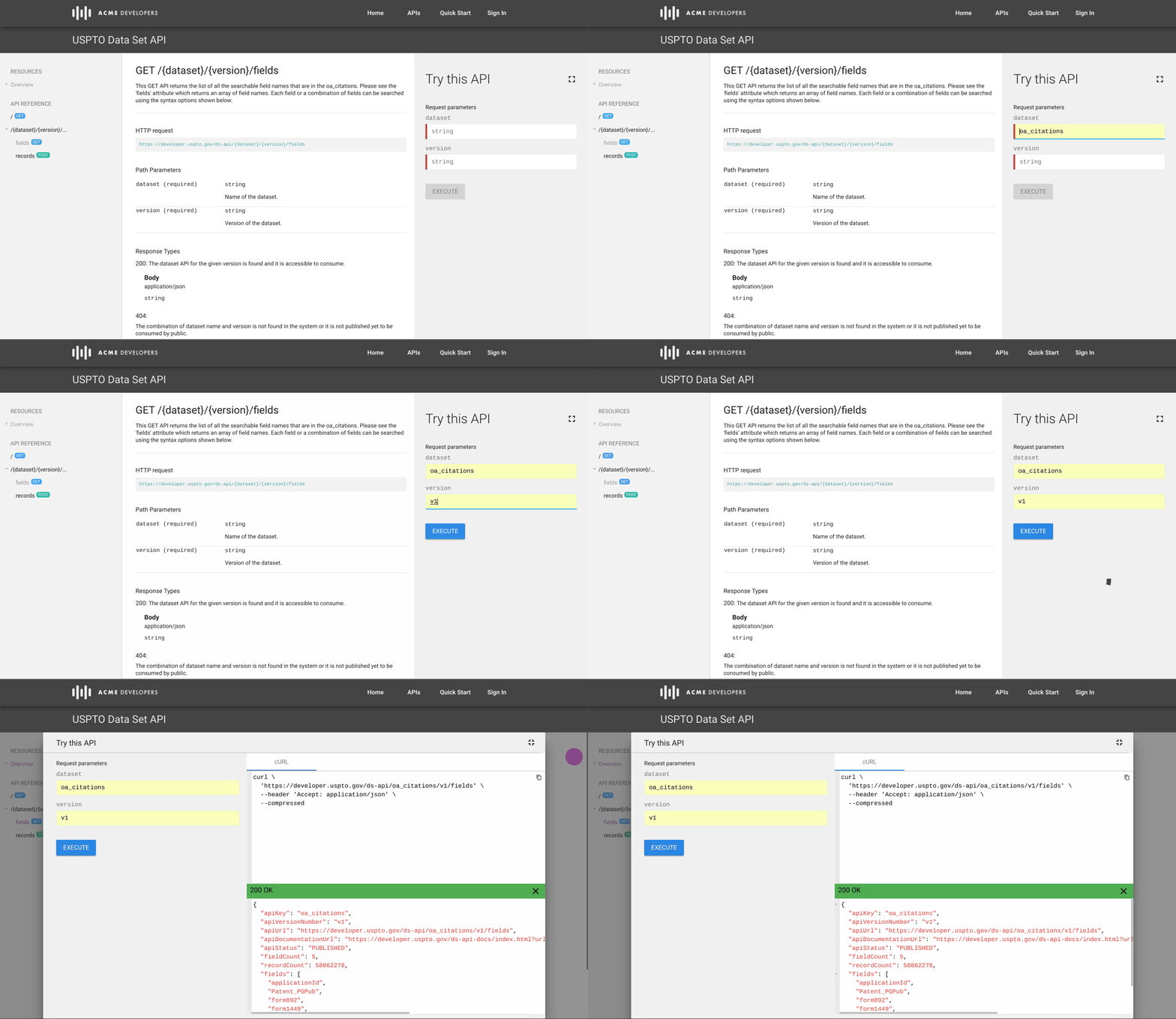
Part and parcel of modern enterprise development is building APIs that enable you to expose your services to developers both inside and outside your organization. But just building APIs isn’t enough. Getting APIs and API programs to market successfully hinges on convincing your developers to actually use them. And the key driver of getting developers to adopt and consume APIs, both within a company or among the wider developer community, is the developer portal.To help enterprises create great developer experiences, we’re announcing several enhancements to the Apigee Developer Portal, a comprehensive, customizable solution that helps API providers seamlessly onboard developers and admins who use APIs managed by Google Cloud’s Apigee platform. Here is what’s included in this round of updates:A new version of SmartDocs API reference documentationAn enhanced theme editor and redesigned default portal themeImprovements to managing developer accountsSmartDocsApigee’s SmartDocs automatically creates beautiful API reference documentation for your developers, and features a new, three-pane view. The left pane helps developers navigate between areas of the API, while the center pane gives detailed documentation for a given operation. The right pane enables you to make API requests directly from the docs, and it includes an “expand” button so you can focus on the details of the request itself.Documentation is built upon on the OpenAPI Specification and supports both versions 2.0 and 3.0.x. Every operation defined in the OpenAPI spec gets its own page, which makes it easy for users to share and discuss specific areas of the docs and for your API team to deep-link users to the exact content they need.Theme editor Along with SmartDocs, we’ve enhanced the default theme using Google’s Material Design toolkit. The integrated tool for creating portal themes now supports SCSS and Angular Material Themes, which introduce variables, rules, and other powerful features.Account managementLastly, this release of the Apigee Developer Portal improves how developers create and manage accounts and gives administrators new views for managing the users of their developer portals. API providers can now view and manage all registered user accounts, and configure automatic or manual approval for new user accounts in the list of users of the API portal admin interface. This view also lets API providers see details for all registered user accounts, view custom account registration fields, and approve, block, and delete user accounts.Getting startedTo learn more about this launch and view a demo of the latest features, please join our upcoming webcast, “How to create world-class developer experiences” on Thursday, Feb. 14.If you’re already an Apigee Edge cloud customer, check out our latest documentation to get started. There you’ll find a complete feature overview, guided tutorials, FAQs, and more.If you’re not already an Apigee Edge customer, try it for free.
Quelle: Google Cloud Platform

Announcing the general availability of Query Store for Azure SQL Data Warehouse

Since our preview announcement, hundreds of customers have been enabling Query Store to provide insight on query performance. We’re excited to share the general availability of Query Store worldwide for Azure SQL Data Warehouse.

Query Store automatically captures a history of queries, plans, and runtime statistics and retains them for your review when monitoring your data warehouse. Query Store separates data by time windows so you can see database usage patterns and understand when plan changes happen.

Top three reasons to use Query Store right now

1. Find the full text of any query: Using the sys.query_store_query and sys.query_store_query_text catalog views, you can see the full text of queries executed against your data warehouse over the last 7 days.

SELECT
q.query_id
, t.query_sql_text
FROM
sys.query_store_query q
JOIN sys.query_store_query_text t ON q.query_text_id = t.query_text_id;

2. Finding your top executing queries: Query Store tracks all query executions for your review. On a busy data warehouse, you may have thousands or millions of queries executed daily. Using the Query Store catalog views, you can get the top executing queries for further analysis:

SELECT TOP 10
q.query_id [query_id]
, t.query_sql_text [command]
, SUM(rs.count_executions) [execution_count]
FROM
sys.query_store_query q
JOIN sys.query_store_query_text t ON q.query_text_id = t.query_text_id
JOIN sys.query_store_plan p ON p.query_id = q.query_id
JOIN sys.query_store_runtime_stats rs ON rs.plan_id = p.plan_id
GROUP BY
q.query_id , t.query_sql_text ORDER BY 3 DESC;

3. Finding the execution times for a query: Query also gathers runtime query statistics to help you focus on queries with variance in execution. The variance could be for a variety of reasons such as loading a bunch of new data.

SELECT
q.query_id [query_id]
, t.query_sql_text [command]
, rs.avg_duration [avg_duration]
, rs.min_duration [min_duration]
, rs.max_duration [max_duration]
FROM
sys.query_store_query q
JOIN sys.query_store_query_text t ON q.query_text_id = t.query_text_id
JOIN sys.query_store_plan p ON p.query_id = q.query_id
JOIN sys.query_store_runtime_stats rs ON rs.plan_id = p.plan_id
WHERE
q.query_id = 10
AND rs.avg_duration > 0;

Get started now

Query Store is available in all regions for all generations of SQL Data Warehouse with no additional charges. You can enable Query Store by running the ALTER DATABASE <database name> SET QUERY_STORE = ON; command.

To get started, you can read the monitoring performance by using the Query Store overview topic. A complete list of supported operations can be found in the Query Store Catalog Views documentation.

Next steps

Azure SQL Data Warehouse continues to lead in the areas of security, compliance, privacy, and auditing. For more information, refer to the whitepaper, “Guide to enhancing privacy and addressing GDPR requirements with the Microsoft SQL platform,” on Microsoft Trust Center, or our documentation, “Secure a database in SQL Data Warehouse.”

For more information on Query Store in Azure SQL Data Warehouse, refer to the article, “Monitoring performance by using the Query Store,” and the Query Store DMVs, such as sys.query_store_query.
For feature requests, please vote on our UserVoice.
To get started today, create an Azure SQL Data Warehouse.
To stay up-to-date on the latest Azure SQL Data Warehouse news and features, follow us on Twitter @AzureSQLDW.

Quelle: Azure

The Things Network and Azure IoT connect LoRaWAN devices

This week, at The Things Conference in Amsterdam, Microsoft and The Things Network Foundation collaborate with 2,000 LoRaWAN developers, innovators, and integrators on connecting devices to Azure IoT Central using the open source project Azure IoT Central Device Bridge.

Internet of Things (IoT) applications are about harnessing sensors and device data to transform processes and businesses. They require pervasive connectivity to allow compute at the intelligent edge, connected devices and sensors, communicate and share learnings with the intelligent cloud. The heterogenous nature of IoT devices, networks, and infrastructures leads to the creation of different protocols and technologies for wirelessly connecting IoT devices, each addressing specific needs and requirements for battery consumption, range, security, frequency usage, and more.

LoRaWAN™ is one of these technologies – a specification developed by the LoRa Alliance as a low power, wide area networking protocol based on a star-of-stars topology in which gateways relay messages between end-devices and a central network server. Many companies have adopted LoRaWAN and often offer IoT connectivity services, simplifying connectivity for IoT devices. The Things Network, an active member of the LoRa Alliance, is a Foundation that aims at building a global open LoRaWAN network and supporting developers in building industrial grade LoRaWAN solutions. They foster an active global community of over 60,000 developers and offer a marketplace of LoRaWAN compatible solutions, devices, and services.

To bring the intelligence of Microsoft Azure to existing IoT cloud solutions, such as The Things Network, the Azure IoT team created the Azure IoT Central Device Bridge, an open source, ready to deploy project that leverages Azure services and makes it trivial to connect LoRaWAN devices to Microsoft’s SaaS offering for IoT. The combination of both solutions, integrated in a matter of minutes, allows you to ingest The Things Network devices and sensors’ data into Azure IoT Central to be displayed, analyzed, and trigger actions in business applications.

“The bridge with Azure IoT Central is a necessary step to enhance the experience and reduce complexity for LoRaWAN developers. We are thrilled to collaborate with the Azure IoT team on this open source project that facilitates the community to develop end to end IoT applications faster and with less effort.”

– Alexander Overtoom, Head of Business Development at The Things Industries

The Things Conference brings 2,000 LoRaWAN developers, innovators, and integrators together and is the ideal playground to work with LoRaWAN experts on this simple and robust integration. We are eager to make the Azure IoT Central Device Bridge project grow with the help of the community and look forward to connecting the millions of LoRaWAN things to Azure IoT. If you are planning to or already developing LoRaWAN solutions, join the project today and contribute your code, comments, and suggestions!
Quelle: Azure