Speed up and organize your move to cloud with new migration waves from Velostrata

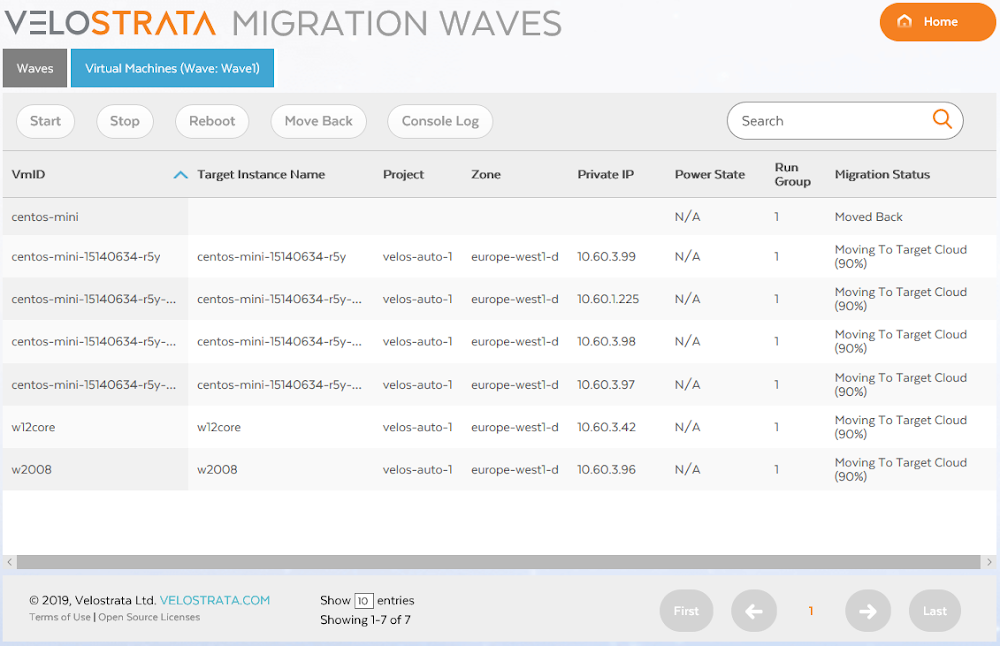
Enterprise cloud migration projects often include moving hundreds or thousands of application workloads from on-prem or other clouds into Google Cloud Platform (GCP). Migrating the entirety of your data center at once is challenging, if not impossible. The best practice we’ve seen is to assess your workloads and batch them into different migration groups based on factors like their production level, inter-application affinity and collaboration, size, importance to the business, performance needs, and more. To do that, it’s crucial to have a high-level view of the entire migration project, in addition to granular views and controls over when and how these batches are migrated.That’s why we’ve introduced migration waves in the latest release of Velostrata, GCP’s real-time enterprise migration tool. A migration wave is a way of organizing the systems you want to move into batches that make your migration strategy more manageable. Migration waves give you vantage points and controls to plan, execute, and monitor your migration to GCP at each step of the journey. You can see here what migration waves look like:Velostrata’s new user interface for migration wavesUsing migration waves makes the cloud migration process simpler. For example, you may choose to migrate all of the VMs in your data center that are associated with dev/test first, so you create a wave with the first 25 VMs, then another 25 VMs, and so on until your dev/test landscape is successfully in the cloud.In addition to that, with migration waves you are able to:Plan and prioritize specific groups of systems in the migration plan for a holistic view of how the project will proceed over time, while broken down into smaller, logical waves.Pre-validate migration waves to ensure that your VM and GCP configurations are correct before you begin migrating.Perform migration operations as needed on any given wave, giving you the power to control their pace and progress. For example, you can launch test instances in GCP for a particular migration wave and confirm that performance and SLAs are met before you migrate. Another example: with migration waves, you can perform dynamic instance right-sizing to optimize the post-migration cloud costs. You can perform as many operations as desired on any given wave.Monitor the progress of any wave operation down to each specific system in that wave. If something unplanned occurs, like a particular VM fails to migrate, you can restart the operation, but Velostrata will intelligently re-run it only on the systems needed. This gives you peace of mind that the systems that migrated successfully won’t be impacted by unexpected errors.Review historical migration wave logs and records any time, giving you an easy way to track and analyze progress against timelines and milestones.In addition to migration waves, Velostrata now includes other new capabilities that give you a smoother, faster path to GCP. These include:Velostrata can now be deployed directly using Google Click to Deploy, making it available to anyone with just a few clicks.We’ve right-sized support for instances migrating from Amazon EC2 to Google Compute Engine, helping you maintain cloud costs without accidentally over-provisioning. This complements the right-sizing support we’ve been offering for VMs migrating from VMware on-prem.Conversion to pay-as-you-go licenses: There is now an option for automatic conversion of existing (on-prem) Enterprise Linux licenses to GCP pay-as-you-go premium licenses. This makes it easier for you to reduce your license costs and management after you migrate, without having to rebuild your virtual machines.Along with all the new capabilities, we’re also thrilled to relay that all of the documentation forVelostrata 4.0 is officially a part of the GCP family, following our 2018 acquisition. You can also find support information for Velostrata here.If you’d like more information on cloud migration to GCP, get Velostrata details here or contact us for more information.
Quelle: Google Cloud Platform

Azure Security Center can detect emerging vulnerabilities in Linux

Recently a new flaw was discovered in PolKit – a component which controls system-wide privileges in Unix OS. This vulnerability potentially allows unprivileged account to have root permission. In this blog post, we will focus on the recent vulnerability, demonstrate how attacker can easily abuse and weaponize it. In addition, we will preset how Azure Security Center can help you detect threats, and provide recommendations for mitigation steps.

The PolKit vulnerability

PolKit (previously known as PolicyKit) is a component that provides centralized way to define and handle policies and controls system-wide privileges in Unix OS. The vulnerability CVE-2018-19788 was caused due to improper validation of permission requests. It allows a non-privileged user with user id greater than the maximum integer to successfully execute arbitrary code under root context.

The vulnerability exists within PolKit’s versions earlier than 0.115, which comes pre-installed by some of the most popular Linux distributions. A patch was released, but it required a manual install by the relevant package manager issuer.
You can check if your machine is vulnerable by running the command “pkttyagent -version” and verify that your PolKit’s version is not vulnerable.

How an attacker can exploit this vulnerability to gain access to your environment

We are going to demonstrate a simple exploitation inspired from a previously published proof of concept (POC). The exploitation shows how an attacker could leverage this vulnerability for achieve privilege escalation technique and access restrict files. For this demonstration, we will use one of the most popular Linux distributions today.

First, we verify that we are on vulnerable machine by checking the PolKit version. Then, we verify that the user ID is greater than the maximal integer value.

Now, that we know we are on vulnerable machine, we can leverage this flaw by using another pre-installed tool, Systemctl, that uses PolKit as the permission policy enforcer and has the ability to execute arbitrary code. If you take closer look into CVE-2018-19788, you would find Systemctl is impacted by the vulnerability. Systemctl is one of Systemd utilities, and the system manager that is becoming the new foundation for building with Linux.

Using Systemctl, we will be able to create a new service in order to execute our malicious command with root context. Because of the flaw in PolKit, we can bypass the permission checks and runs systemctl operations. Let’s take a look at how we can do that.

Bash script content:

#!/bin/bash
cat <<EOF >> /tmp/polKitVuln.service
[Unit]
Description= Abusing PolKit Vulnerability
[Service]
ExecStart=/bin/bash -c 'cat /etc/sudoers > /tmp/sudoersList.txt'
Restart=on-failure
RuntimeDirectoryMode=0755

[Install]
WantedBy=multi-user.target
Alias= polKitVuln.service
EOF

systemctl enable /tmp/polKitVuln.service
systemctl start polKitVuln.service

First, we define a new service and provides the required information to “/tmp/polkitVuln.service”. The ExecStart directive contains our command (bolded above), accesses the sudoers file, and copies its content to a share folder. This shared folder can be accessed by unprivileged users. The Sudoers file is one of the most important files in the system, as it contains the users and groups privileges information of the machine. At the last part of the script, we make the actual call for systemctl tool to create and start our new service.

Execute the script:

Notice the errors regarding Polkit failing to handle the uid field. As the Sudoers file is copied using the exploitation, we can read its content.

With this vulnerability attackers can bypass permissions to check and gain root access to your environment. In another blog post, “How Azure Security Center helps detect attacks against your Linux machines,” we showed how attackers can exploit hosts for installing crypto miners or attack other resources.

Protect against and respond to threats with Azure Security Center

Azure Security Center can help detect threats, such as the PolKit vulnerability, and help you quickly mitigate these risks. Azure Security Center consolidates your security alerts into a single dashboard, making it easier for you to see the threats in your environment and prioritize your response to threats. Each alert gives you a detailed description of the incident as well as steps on how to remediate the issue.

While we investigate Azure Security Center hosts impact, we could determine what is the frequency in which machines are under attack and using behavioral detection techniques, inform customers when they have been attacked. Below is the security alert based on our previous activity which you can see in Security Center.

In addition, Azure Security Center provides a set of steps that enable customers to quickly remediate the problem:

System administration should not allow negative user IDs or user IDs greater than 2147483646.

Verify user ID maximum and minimum values under “/etc/login.defs.”

Upgrade your policykit package by the package manager in advance.

Get started with Azure Security Center

Start using Azure Security Center’s Standard Tier for free today.
Quelle: Azure

Making an automation platform stronger through technical partnership

Automation is at the forefront of the next wave of digital transformation. Robotic process automation (RPA) is one of the key technology contributors with its ability to quickly introduce automation and achieve business value through increased efficiency and employee productivity at low cost and with near-zero risk.
Analysts who observe the RPA market see companies using RPA to achieve desired business outcomes as they digitally transform with the help of automation. Three conditions are driving this investment:

Some companies are deploying RPA bots in attended and unattended modes to automate front-office and back-office tasks, so they need an RPA platform that offers both capabilities.
Some companies are deploying larger transformational automation initiatives and need an enterprise-class RPA solution that is scalable and able to meet any security and compliance requirements.
Some companies have limited IT resources and want a no-code RPA solution that can be easily deployed by business users without significant involvement from IT.

To address these drivers, we’ve been enabling the IBM digital business automation platform to interoperate with more RPA solutions to give clients freedom of choice to execute according to their objectives. Our newest collaboration is with UiPath, a market-leading RPA vendor.
IBM and UiPath have jointly developed API connectors, which will help companies seamlessly integrate the UiPath RPA task automation technology with the IBM Digital Business Automation platform’s low-code tools. This technical collaboration will help customers digitize their operations and drive new efficiencies.
By integrating the core RPA technology of UiPath with IBM Digital Business Automation capabilities, customers can get the benefits of compliance and scale without any technical integration efforts. We wanted to ensure that technical skill gaps didn’t get in the way of building enterprise-class automation applications.
To see how this integration works, watch the following video showing how an insurance company can automate claims processing by using UiPath RPA along with IBM automation capabilities such as Business Automation Workflow, Operational Decision Manager and Datacap.

The above demo combines UiPath RPA with automation capabilities from the IBM Digital Business Automation platform so that organizations can integrate all of the elements — people, systems, content and bots — into one seamless process. This level of collaboration can shorten project lifecycle times, accelerate time to value for automation investments and boost return on investment.
Freedom of choice is a good thing, especially when it comes to RPA platforms. Schedule a no-charge consultation session to unlock greater value from your UiPath RPA investment.
The post Making an automation platform stronger through technical partnership appeared first on Cloud computing news.
Quelle: Thoughts on Cloud






