How to Add a Kubernetes Minion with Mirantis Cloud Platform — Live Demo Q&A

The post How to Add a Kubernetes Minion with Mirantis Cloud Platform — Live Demo Q&A appeared first on Mirantis | Pure Play Open Cloud.
Earlier this month, we hosted a live demo of some of the infrastructure-related Kubernetes capabilities of Mirantis Cloud Platform. Here are the questions we received during the presentation.
What other distros besides Ubuntu are supported by Mirantis Cloud Platform? For example, can we use CentOS 7?
We use strictly Ubuntu to manage our control plane, currently only Ubuntu 16.04 – 18.04. So even if it’s OpenStack, we use the Ubuntu KVM. We can negotiate running CentOS as a minion to it, but in order for us to test things, as you can imagine, we run through some intensive testing and scaling of environments and to repeat those on multiple operating systems would reduce our ability to provide the version to you that has been tested and scaled.
What are the best tools for monitoring a k8s cluster?
There are a lot of monitoring tools out there in the world, but I believe the tools that we gather together in Mirantis StackLight — which is really a combination of the ELK stack (Elasticsearch, Logstash, Kibana) and Prometheus for long term storage and trending and Alerta for alert management — provide a really good foundation for managing all kinds of clusters including Kubernetes clusters. See StackLight overview slides.
Aside from x86, what CPU architectures does MCP support?
Currently Intel x86/x64 processors are supported in our Mirantis reference architecture.
Is the cluster persistent or removed when we closed Kubernetes in the demo?
It’s persistent. The Kubernetes cluster out there will stay there forever until I delete it.
Can you please give me the latest MCP OpenStack deployment end to end guide?
You can download the MCP Deployment Guide here.
Is K8s part of the MCP platform or it is deployed over MCP?
Mirantis Cloud Platform is actually deployed separately. It’s a set of virtual machines, the Salt masters, the MaaS service is all virtualized on the control plane nodes of your environment. It sits right alongside your Kubernetes masters, and then your minions are bare metal services running external to that. That allows us to do all the high availability and monitoring at a very close level to the infrastructure itself. K8S is not part of MCP, but rather deployed, managed, and maintained by MCP
Do you support or have any experience with OracleDB in Kubernetes?
Oracle Containers can run on top of an MCP deployed Kubernetes cluster. Additionally, you can run an Oracle DB in a Virtual Machine as a Pod using Virtlet.
What are your views on Istio?
I’m glad you asked that! I think that Istio is probably the current winner in that environment, although there are a ton of new ones coming out there, like Kong and other commercial offerings that are very competitive. See my recent blog, “Spinnaker Shpinnaker and Istio Shmistio to make a shmesh!”
Since it’s an application oriented thing, you build it into the Kubernetes framework. We provide Istio as one of the additional components in addition to Virtlet and some of the others. I mentioned Kong and several of the other possibilities for service meshing. Those would be licensable, and we would have to incorporate them as custom, since it would be your license not ours that would run it. Everything we provide to you is open source. We never restricted anything to something that needs to be licensed by a third party. That’s why we use Istio. We have implemented it so that it works inside of application services like Spinnaker.
Does Mirantis has any video recording of installation of MCP?
We do for the MCP Edge virtual appliance. Watch the video here.
Can we also use NUMA topology for Kubernetes deployment?
Mirantis is working directly with Google on this project.
Our next Live Demo will be on running a Kubernetes multi-node cluster with kubeadm-dind-cluster. Sign up for upcoming demos or webinars here.
The post How to Add a Kubernetes Minion with Mirantis Cloud Platform — Live Demo Q&A appeared first on Mirantis | Pure Play Open Cloud.
Quelle: Mirantis

Announcing Support for Windows Server 2019 within Docker Enterprise

 
Docker is pleased to announce support within the Docker Enterprise container platform for the Windows Server 2019 Long Term Servicing Channel (LTSC) release and the Server 1809 Semi-Annual Channel (SAC) release. Windows Server 2019 brings the range of improvements that debuted in the Windows Server 1709 and 1803 SAC releases into a LTSC release preferred by most customers for production use. The addition of Windows Server 1809 brings support for the latest release for customers who prefer to work with the Semi-Annual Channel. As with all supported Windows Server versions, Docker Enterprise enables Windows Server 2019 and Server 1809 to be used in a mixed cluster alongside Linux nodes.
Windows Server 2019 includes the following improvements:

Ingress routing
VIP service discovery
Named pipe mounting
Relaxed image compatibility requirements
Smaller base image sizes

Docker and Microsoft: A Rich History of Advancing Containers
Docker and Microsoft have been working together since 2014 to bring containers to Windows Server applications, along with the benefits of isolation, portability and security. Docker and Microsoft first brought container technology to Windows Server 2016 which ships with a Docker Enterprise Engine, ensuring consistency for the same Docker Compose file and CLI commands across both Linux and Windows Server environments. Recognizing that most enterprise organizations have both Windows Server and Linux applications in their environment, we followed that up in 2017 with the ability to manage mixed Windows Server and Linux clusters in the same Docker Enterprise environment with Docker Swarm, enabling support for hybrid applications and driving higher efficiencies and lower overhead for organizations. In 2018 we extended customer choice by adding support for the Semi-Annual Channel (SAC) Windows Server 1709 and 1803 releases.
Delivering Choice of Container Orchestration
Docker Enterprise 2.1 supports both Swarm and Kubernetes orchestrators interchangeably in the same cluster. Docker and Microsoft are now working together to let you deploy Windows workloads with Kubernetes while leveraging all the advanced application management and security features of Docker Enterprise. While the Kubernetes community work to support Windows Server 2019 is still in beta, investments made today using Docker Enterprise to containerize Windows applications using Swarm can translate to Kubernetes when available.
Accelerating Your Legacy Windows Server Migration
Docker Enterprise’s Support for Windows Server 2019 also provides customers with more options for migrating their legacy Windows Server workloads from Windows Server 2008, which is facing end-of-life, to a modern OS. The Docker Windows Server Application Migration Program represents the best and only way to containerize and secure legacy Windows Server applications while enabling software-driven business transformation. By containerizing legacy applications and their dependencies with the Docker Enterprise container platform, they can be moved to Windows Server 2019, without code changes, saving millions in development costs. Docker Enterprise is the only container platform to support Windows Global Managed Service Accounts (gMSAs) – a crucial component in containerizing applications that require the ability to work with external services via Integrated Windows Authentication.
Next Steps

Read more about Getting started with Windows containers
Try the new Windows container experience today, using a Windows Server 2019 machine or Windows 10 with Microsoft’s latest 1809 update.
All the Docker labs for Windows containers are being updated to use Windows Server 2019 – you can follow along with the labs, and see how Docker containers on Windows continue to advance.


Announcing support for Windows Server 2019 within #Docker Enterprise:Click To Tweet

The post Announcing Support for Windows Server 2019 within Docker Enterprise appeared first on Docker Blog.
Quelle: https://blog.docker.com/feed/

Disaster Recovery support for Linux on VMware

Over the last five years, a gradual shift is observed toward open source environments for a number of advantages over boxed open sources. Factors of lower cost, flexibility, security, performance, and community support for open source operating systems, primarily Linux distros have largely been driving this shift across organizations. Microsoft has embraced this industry trend and has been continuously worked with providers hand in hand to contribute and strengthen the community. All major platform providers of Linux have also witnessed frequent release upgrades, assuring the developers with continued support. With all the more increasing adoption of Linux worldwide, a large number of organizations are moving their mission-critical workloads to Linux based server machines.

Azure Site Recovery (ASR) has always been onboarded with all major Linux server versions on VMware and/or physical machines for disaster recovery. Also, over the last six months, it has continued to put a keen focus on extending support for the latest OS version releases from multiple providers such as Red Hat Enterprise Linux (RHEL), CentOS, Ubuntu, Debian, SUSE, and Oracle.

ASR started supporting RHEL 7.5, 6.10, and 7.6 from July 2018, August 2018, January 2019, and onward.
Support for SUSE Linux Enterprise Server 12 (up to SP3) was added in July 2018 after the success of SP2 and SP3 releases and wide usage for critical workloads.
ASR started supporting CentOS 6.10 from August 2018 onward.
Latest versions of Oracle Enterprise Linux versions 6.8, 6.9, 7.0, to 7.5 and UEK Release 5 were added for support in November 2018, followed by OEL versions 6.10 and 7.6 in January 2019.

In addition to the above release updates from providers, Linux OS in terms of file systems and partitioning methods have been enhanced. ASR has been watching out for these enhancements and their industry adoption on VMware and physical Linux machines.

In 2018, a large number of implementations moved to GUID partitioning table (GPT), allowing for nearly unlimited number of partitions. It also stores multiple copies of boot data which makes the system more robust. ASR started supporting GPT partition style in legacy BIOS compatibility mode from August 2018 onward.
Custom usage of Linux has also evolved variety in system structure. Some specific scenarios include having /boot on disk partition (and on LVM volumes), having /(root), /boot, /usr, /usr/local, /var, /etc directories on separate file systems and separate partitions that are not on same system disk. ASR added support for these customizations in November 2018.

Below, the timeline captures the Linux support extended by ASR since July 2018 for VMware and physical machines.


Related Links and additional content

ASR Update Rollup 27
ASR Update Rollup 28
ASR Update Rollup 31
ASR Update Rollup 32
Learn about the supported operating systems for replicating VMware virtual machines.
Get started by configuring disaster recovery for VMware machines.
Need help? Reach out to ASR forum for support.
Tell us how we can improve ASR by contributing new ideas and voting up existing ones.

Quelle: Azure

Building a serverless online game: Cloud Hero on Google Cloud Platform

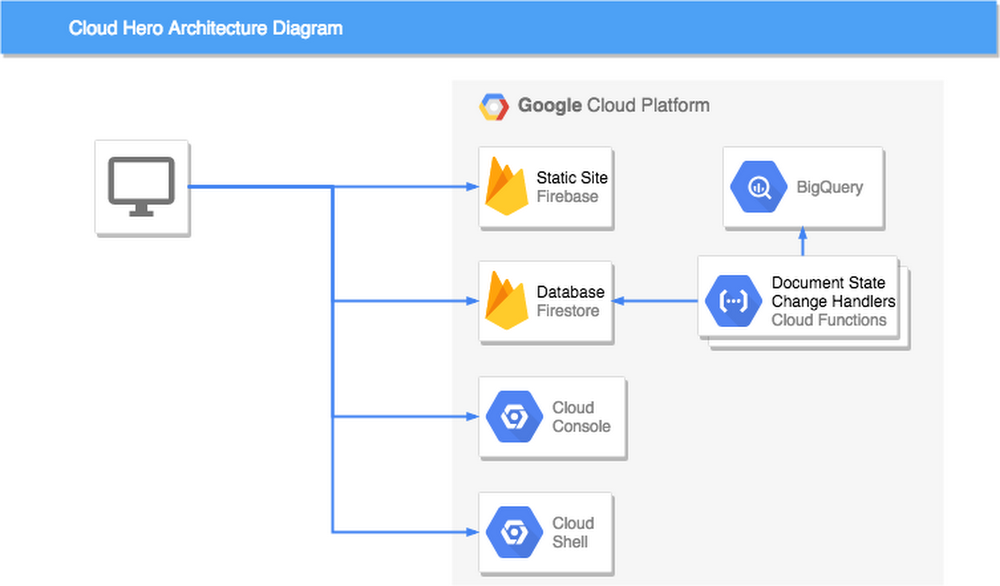
If you’ve ever been to one of our live events, you may have played Cloud Hero, a game we built with Launch Consulting to help you test your knowledge of Google Cloud through the use of timed challenges. Cloud Hero gets a room full of people competing head-to-head, with a live play-by-play leaderboard and lots of prizes. To date, over 1,000 players have played Cloud Hero at 12 public events like Google Cloud Next and Google Cloud Summits—with more venues on the way!When we set out to build Cloud Hero, we knew we wanted interactive and snappy game play, and an extensible and flexible game platform so that we could easily create new challenges and content. We also wanted to build the game quickly—and try out early versions with real players, without writing a lot of custom backend code. And with our event schedule, we also needed an architecture that would easily scale up and down on gameday, without having to run servers when it wasn’t in play.It goes without saying that Cloud Hero would run on Google Cloud. Beyond that though, we chose to architect the game play system as an entirely serverless system, using Angular, Cloud Firestore, and Cloud Functions. Participants complete challenges directly in the Cloud Console, while BigQuery aggregates data for analytics. There’s not a single stateful server to be found in this game engine.If you’re looking to test your Google Cloud skills, be sure to sign up for a round of Cloud Hero at one of our upcoming events. If you’re thinking about creating your next scalable, online, interactive game, read on to learn how we built Cloud Hero—we think it’s a winning architecture.Game setupWhen users play Cloud Hero, they are provided a game-specific project that is provisioned by script in a specific folder of a Resource Manager organization. Provisioning these projects enables certain APIs in advance which lets players focus on using the products, and less on setting up the project. Finally, the game system’s service account is given access to the project. This is key to the game design, which will become clear shortly.When a player registers and begins a game, documents are created in Firestore that represent the player and that player’s specific instance of the game. The player is added to one of the pre-provisioned projects, and it is also associated with the game. And then the timed game challenges begin.Game timeWhen a player starts a challenge, the game takes note of their start time. The challenge includes instructions to complete a variety of tasks in GCP. The more the player knows about GCP, the faster they are likely to complete the task, and the more points they will accrue. But players can also do well if they are good at finding the answers in docs and on the web—nobody knows everything, so navigating to the right information is a critical skill in cloud development.While the game’s front end keeps the gameplay feeling active with a running clock and animations, the serverless backend is idle—that is, until the user submits the challenge for verification, no compute is running. When a player completes a challenge, this changes the state of the challenge document in Firestore to ‘submitted’. The document change triggers a cloud function that runs using the game system’s authorized service account that was added earlier to the player’s game project. With this access, and the information from the submitted challenge, the function introspects the state of the player’s cloud resources to verify if the task was completed. Updating the result of this check in the Firestore document is immediately reflected to the player through Firestore’s real-time watch system and Angular’s reactive subscription model.Not only is the player notified of their update immediately, but so is the live projected leaderboard, which uses Firestore’s ability to update queries in real time as the documents change to match the query’s condition.Finally, data is pushed from Firestore into BigQuery, whose enhanced analytics feed a real-time game analytics console that lets event coordinators see where players may be getting stuck, and which challenges are taking the most time.Timed challenges FTWFrom the outset, we expected that a live game and real-time feedback would be well received by players. Further, we hoped that the immersive game experience and direct access to the player’s project Cloud Console would help players learn more about GCP products. What we didn’t expect is that even novice GCP users would enjoy the experience as much as GCP pros. In fact, the top spot in our first event was won by someone who had never signed into the Cloud Console before! We’ve even got great feedback from people who didn’t advance past the first stage of challenges—they might be the group who took the most away. Not everyone finishes the game, but they have fun learning and challenging themselves.In 2019 we are taking Cloud Hero in an exciting new direction: online! Early registrations for the new online version are now open. And if you’re interested in learning more about building serverless games, check out these guides and how-tos for Cloud Firestore and Cloud Functions.
Quelle: Google Cloud Platform

Build a custom data viz with Data Studio community visualizations

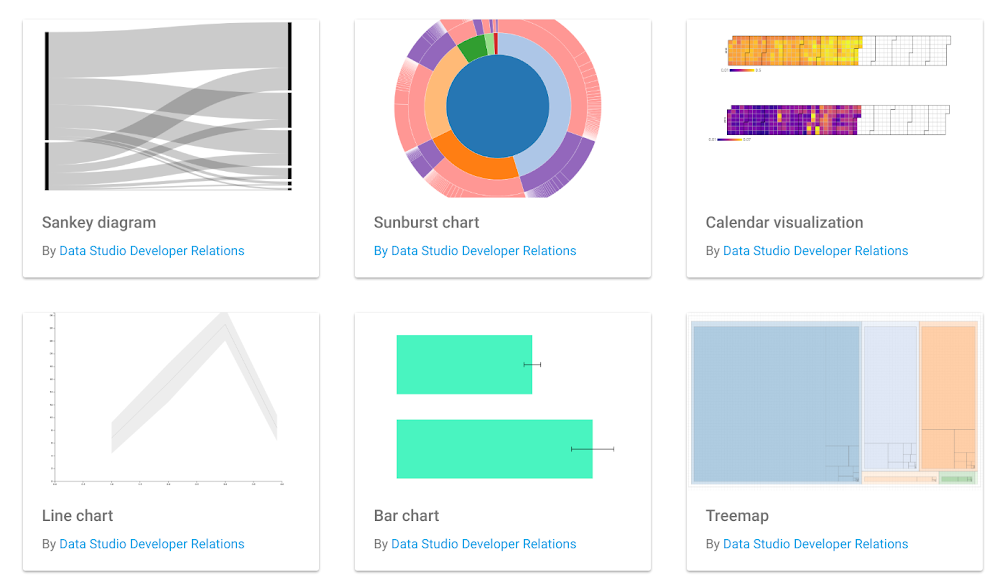
Data Studio, Google’s free data visualization and business intelligence product, lets you easily connect to and report on data from hundreds of data sources. Over the past year, we’ve added more than 75 new features to Data Studio. We’ve heard from users that you want more chart options and flexibility, so you can tell more compelling stories with your data.The new Data Studio community visualizations feature, now in developer preview, allows you to design your own custom visualizations and components for Data Studio. This is particularly useful for business intelligence teams who are building custom charts to improve business outcomes, whether it’s a funnel diagram to show conversions, or a network diagram to understand interconnected data. You can see a few sample custom visualizations here:The Data Studio community visualizations galleryUsing community visualizationsWith this new feature, you can go beyond the standard charts that come with Data Studio. Community visualizations allow you to render your own custom JavaScript and CSS into a component that integrates with the rest of your Data Studio dashboard.With community visualizations, you can:Create an endless variety of charts using JavaScript librariesVisualize any data that is already part of your dashboardDistribute these custom charts to users within your organization (or external stakeholders)Once you write a custom visualization, end users can interact with the chart through the Data Studio UI just like they would with any other chart. For example, they can change data fields and edit styling options without diving back into the code. You can see how this works below (click on the image below to explore a custom visualization, then copy the report):A custom-built timeline visualization of Data Studio release notes, highlighting the launch of community visualizations.ClickInsight, a Google Marketing Platform partner, has been experimenting with community visualizations.“Data Studio reports and dashboards have become indispensable to our clients, and community visualizations will enable us to more easily display the funnels, flows, and complex patterns that exist within their data,” says Marc Soares, Manager, Analytics Solutions at ClickInsight. “By combining community visualizations with the community connectors, we can develop fully customized, end-to-end reporting solutions for our clients. We can connect to any data source and visualize it exactly how we want, all while leveraging the powerful infrastructure of Data Studio.”You can see some of ClickInsight’s visualizations here:Building and sharing community visualizationsIf you’ve ever written a visualization in JavaScript, you can build a community visualization. You can write something from scratch, or from any JavaScript charting library, including D3.js and Chart.js. You can even use your organization’s internal visualization libraries and styling to create a unique visual identity.The reports you build using community visualizations can be shared, just like any other Data Studio report. Additionally, you can share your visualization, allowing others with the same needs to use the visualization.Getting started with community visualizationsA developer preview launch means that the API is stable, and the feature is ready for you to use. We also have a roadmap of features and improvements to extend the capabilities of community visualizations and create an even better experience for users and developers.To get started visit the Data Studio community visualization gallery, complete the codelab, or visit our documentation. Once you’ve built a visualization you’d like to share, submit a report to the showcase, or share the code. Happy custom charting!
Quelle: Google Cloud Platform