Pilotregion: Vodafone bei erster Analogabschaltung erfolgreich
Die erste Analogabschaltung im TV-Kabelnetz von Vodafone verlief offenbar ohne größere Probleme. Nach der Pilotregion werden weitere folgen. (Vodafone, Telekommunikation)
Quelle: Golem

Die erste Analogabschaltung im TV-Kabelnetz von Vodafone verlief offenbar ohne größere Probleme. Nach der Pilotregion werden weitere folgen. (Vodafone, Telekommunikation)
Quelle: Golem

(This post is part of a series. Read part one, part two, part three, part four and part five to learn more about the urgent need for Hybrid Integration.)
Just like Ricky Bobby in Talladega Nights, in today’s ultra-competitive marketplace there is only one rule: “If you ain’t first, you’re last.” First movers have a distinct advantage in the marketplace. They set the tone, define the space and create name recognition. Take Uber, for example. Uber and Lyft offer almost the same service, but most people, no matter which car service they use, will “call an Uber.” Unless you are offering something substantially different, (like the experience of driving with a live cougar in the car) first movers are hard to displace.
That is why the line of business (LOB) is constantly driving to develop faster, get to market faster and adapt faster. Business leaders understand the implications — it’s a race, and they can’t wait months or even weeks to complete implementations. As a result, business functions are going around Central IT and solving their own problems by acquiring and implementing their own solutions. And while this might work in a sprint over the equivalent of 500 miles, in the long-term it is going to cause a wreck, since many of these solutions don’t integrate, don’t scale and are not secure. So, now IT faces the challenge of trying to support and govern what could be dozens of unsanctioned, un-architected, standalone LOB solutions. How do you team these two together?
What many winning IT departments are doing instead of fighting the line of business is working with it (just like Shake and Bake). By being the source of lightweight business solutions they not only help the business work more effectively but also retain greater control over the applications. One of the key areas where we see a major focus is self-service integration. Self-service integration can encompass a variety of scenarios, including the following:
Tactical automation by end users of a process that involves connecting to two or more applications
Situational integration associated with a project or short-term need (With this type of integration, the ease of integration provides an opportunity to automate workflow, distribution of tasks and delivery of data across two or more applications.)
Use by developers for rapid integration or workflow-oriented use cases
End-user data prep to automate activities requiring creation of data sets which can then be used for analytics, monitoring or reporting.
The result is an influx of no-code integration solutions targeted at the business entering the market. However, this subset of solutions has its own set of requirements that you’ll need to consider. According to a report from IDC, “Organizations that are faced with end users demanding self-service integration and automation capabilities need to:
Consider standardizing on an approved solution for self-service integration that provides a level of control and governance in keeping with user abilities and corporate policies.
Develop technology acquisition policies that prefer services that offer open APIs accessible by self-service integration solutions.
Monitor integration solutions implemented by end users to ensure that compliance, security, and technology policies are not being violated.
Factor the near-term eventuality of end-user self-service into integration adoption decisions.”
The benefits are twofold. The business users are happy because they feel empowered to move at the speed of the market, and IT reduces the burden on its resources that comes from having to respond to every application integration request that arises. Wave the checkered flag. It is a win win. (Ok, it is just a win because you can’t have two number ones. That would be eleven.)
If your line of business is coming at you like a spider monkey, learn how to help them get to market faster by downloading the IDC Report, The Urgent Need for Hybrid Integration or going to the IBM Integration website.
SHAKE AND BAKE
(Does that just blow your mind?)
The post Your line of business can “go fast” with hybrid integration appeared first on Cloud computing news.
Quelle: Thoughts on Cloud

Web applications are increasingly becoming targets of attacks such as cross-site scripting, SQL injection, and application DDoS. While OWASP provides guidance on writing applications that can make them more resistant to such attacks, it requires rigorous maintenance and patching at multiple layers of application topology. Microsoft Web Application Firewall (WAF) and Azure Security Center (ASC) can help secure web applications against such vulnerabilities.
Microsoft WAF is a feature of Azure Application Gateway (layer 7 load balancer) that protects web applications against common web exploits using OWASP core rule sets. Azure Security Center scans Azure resources for vulnerabilities and recommends mitigation steps for those issues. One such vulnerability is the presence of web applications that are not protected by WAF. Currently, Azure Security Center recommends a WAF deployment for public facing IPs that have an associated network security group with open inbound web ports (80 and 443). Azure Security Center offers provisioning of application gateway WAF to an existing Azure resource as well as adding a new resource to an existing web application firewall. By integrating with WAF, Azure Security Center can analyze its logs and surface important security alerts.
In some cases, the security admin may not have resource permissions to provision WAF from ASC or the application owner has already configured WAF as part of the app deployment. To accommodate these scenarios, we are pleased to announce that Azure Security Center will now automatically discover non-ASC provisioned Microsoft WAF instances. Previously provisioned WAF instances will be displayed in ASC security solutions pane under discovered solutions where the security admin can integrate them with Azure Security Center. Connecting existing Microsoft WAF deployments will allow customers to take advantage of ASC detections regardless of how WAF was provisioned. Additional configuration settings such as custom firewall rules sets are available in the WAF console which is linked directly from security center. This article on configuring Microsoft WAF can provide more guidance on provisioning process.
We would love to hear your feedback! If you have suggestions or questions, please leave a comment at the bottom of the post or reach out to ascpartnerssupport@microsoft.com.
Interested in learning more about Azure Security Center?
Intro to Azure Security Center
Azure Security Center FAQ
Quelle: Azure
With the release of Kubernetes v1.9, our mission of ensuring Kubernetes works well everywhere and for everyone takes a great step forward. We’ve advanced support for Windows Server to beta along with continued feature and functional advancements on both the Kubernetes and Windows platforms. SIG-Windows has been working since March of 2016 to open the door for many Windows-specific applications and workloads to run on Kubernetes, significantly expanding the implementation scenarios and the enterprise reach of Kubernetes.Enterprises of all sizes have made significant investments in .NET and Windows based applications. Many enterprise portfolios today contain .NET and Windows, with Gartner claiming that 80% of enterprise apps run on Windows. According to StackOverflow Insights, 40% of professional developers use the .NET programming languages (including .NET Core).But why is all this information important? It means that enterprises have both legacy and new born-in-the-cloud (microservice) applications that utilize a wide array of programming frameworks. There is a big push in the industry to modernize existing/legacy applications to containers, using an approach similar to “lift and shift”. Modernizing existing applications into containers also provides added flexibility for new functionality to be introduced in additional Windows or Linux containers. Containers are becoming the de facto standard for packaging, deploying, and managing both existing and microservice applications. IT organizations are looking for an easier and homogenous way to orchestrate and manage containers across their Linux and Windows environments. Kubernetes v1.9 now offers beta support for Windows Server containers, making it the clear choice for orchestrating containers of any kind.FeaturesAlpha support for Windows Server containers in Kubernetes was great for proof-of-concept projects and visualizing the road map for support of Windows in Kubernetes. The alpha release had significant drawbacks, however, and lacked many features, especially in networking. SIG-Windows, Microsoft, Cloudbase Solutions, Apprenda, and other community members banded together to create a comprehensive beta release, enabling Kubernetes users to start evaluating and using Windows.Some key feature improvements for Windows Server containers on Kubernetes include:Improved support for pods! Multiple Windows Server containers in a pod can now share the network namespace using network compartments in Windows Server. This feature brings the concept of a pod to parity with Linux-based containersReduced network complexity by using a single network endpoint per podKernel-Based load-balancing using the Virtual Filtering Platform (VFP) Hyper-v Switch Extension (analogous to Linux iptables)Container Runtime Interface (CRI) pod and node level statistics. Windows Server containers can now be profiled for Horizontal Pod Autoscaling using performance metrics gathered from the pod and the nodeSupport for kubeadm commands to add Windows Server nodes to a Kubernetes environment. Kubeadm simplifies the provisioning of a Kubernetes cluster, and with the support for Windows Server, you can use a single tool to deploy Kubernetes in your infrastructureSupport for ConfigMaps, Secrets, and Volumes. These are key features that allow you to separate, and in some cases secure, the configuration of the containers from the implementationThe crown jewels of Kubernetes 1.9 Windows support, however, are the networking enhancements. With the release of Windows Server 1709, Microsoft has enabled key networking capabilities in the operating system and the Windows Host Networking Service (HNS) that paved the way to produce a number of CNI plugins that work with Windows Server containers in Kubernetes. The Layer-3 routed and network overlay plugins that are supported with Kubernetes 1.9 are listed below:Upstream L3 Routing – IP routes configured in upstream ToRHost-Gateway – IP routes configured on each hostOpen vSwitch (OVS) & Open Virtual Network (OVN) with Overlay – Supports STT and Geneve tunneling typesYou can read more about each of their configuration, setup, and runtime capabilities to make an informed selection for your networking stack in Kubernetes.Even though you have to continue running the Kubernetes Control Plane and Master Components in Linux, you are now able to introduce Windows Server as a Node in Kubernetes. As a community, this is a huge milestone and achievement. We will now start seeing .NET, .NET Core, ASP.NET, IIS, Windows Services, Windows executables and many more windows-based applications in Kubernetes.What’s coming nextA lot of work went into this beta release, but the community realizes there are more areas of investment needed before we can release Windows support as GA (General Availability) for production workloads. Some keys areas of focus for the first two quarters of 2018 include:Continue to make progress in the area of networking. Additional CNI plugins are under development and nearing completionOverlay – win-overlay (vxlan or IP-in-IP encapsulation using Flannel) Win-l2bridge (host-gateway) OVN using cloud networking – without overlaysSupport for Kubernetes network policies in ovn-kubernetesSupport for Hyper-V IsolationSupport for StatefulSet functionality for stateful applicationsProduce installation artifacts and documentation that work on any infrastructure and across many public cloud providers like Microsoft Azure, Google Cloud, and Amazon AWSContinuous Integration/Continuous Delivery (CI/CD) infrastructure for SIG-WindowsScalability and Performance testingEven though we have not committed to a timeline for GA, SIG-Windows estimates a GA release in the first half of 2018.Get InvolvedAs we continue to make progress towards General Availability of this feature in Kubernetes, we welcome you to get involved, contribute code, provide feedback, deploy Windows Server containers to your Kubernetes cluster, or simply join our community.If you want to get started on deploying Windows Server containers in Kubernetes, read our getting started guide at https://kubernetes.io/docs/getting-started-guides/windows/ We meet every other Tuesday at 12:30 Eastern Standard Time (EST) at https://zoom.us/my/sigwindows. All our meetings are recorded on youtube and referenced at https://www.youtube.com/playlist?list=PL69nYSiGNLP2OH9InCcNkWNu2bl-gmIU4Chat with us on Slack at https://kubernetes.slack.com/messages/sig-windows Find us on GitHub at https://github.com/kubernetes/community/tree/master/sig-windowsThank you,Michael Michael (@michmike77)SIG-Windows LeadSenior Director of Product Management, Apprenda
Quelle: kubernetes

Kein Kabel, aber auch kein Akku und deshalb besonders leicht: Razer stellt ein neues induktives Pad für Gaming-Mäuse vor. Das erste unterstützte Modell ist eine Hyperflux-Version der Mamba – und nicht gerade preisgünstig. (Razer, Eingabegerät)
Quelle: Golem

Immer mehr Hersteller wollen mit Routern punkten, die den Kunden automatische Sicherheitsfunktionen bieten. Neu dabei sind D-Link und McAfee, die einen MU-MIMO-Router mit McAfees Threat Intelligence verbinden wollen. (McAfee, Virenscanner)
Quelle: Golem

American Farm Bureau Federation / Via livestream.com
President Donald Trump barely addressed critical issues for America's farmers — trade and immigration — in a roughly half-hour speech to the American Farm Bureau Federation on Monday afternoon.
Though he spoke at length about low unemployment, a soaring stock market, tax cuts, and reduced regulation, Trump only touched on trade late in his address, and then only briefly. Many farmers who struggle to make a profit and rely on exports are anxious about what will happen to the North American Free Trade Agreement (NAFTA), a deal that has been hugely beneficial to agriculture and has helped to sustain a trade surplus. Yet on NAFTA negotiations, the president merely said:
We're reviewing all our trade agreements to make sure they are fair and reciprocal. Reciprocal, so important. On NAFTA, I am working very hard to get a better deal for our country, and for our farmers, and for our manufacturers. It's under negotiation as we speak. But think of it, when Mexico is making all of that money, when Canada is making all of that money, it's not the easiest negotiation. We're going to make it fair for you people again.
People commenting on the address online seemed disappointed Trump didn't provide more detail on trade.
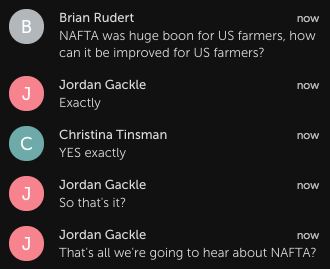
American Farm Bureau Federation
America's farm industry also relies heavily on immigrant labor, which is under threat under the current administration. The Farm Bureau said on its website, “Where American workers are unwilling or unavailable, workers from other countries have stepped in. Congress needs to pass responsible immigration reform that addresses agriculture’s current experienced workforce and creates a new flexible guest worker program. Instability in the agricultural workforce places our food supply at risk.”
Yet all the president said on the issue of immigration in Monday's address was:
“We are going to end chain migration. We are going to end the lottery system. And we are going to build the wall.”
Some viewers said Trump's address seemed more like a campaign speech.

American Farm Bureau Federation

American Farm Bureau Federation
As for the 2018 Farm Bill, Trump said briefly:
“I am looking forward to working with Congress to pass the Farm Bill on time so that it delivers for all of you, and I support a bill that includes crop insurance, unless you don't want me to. I guess you like it, right?”
The Farm Bureau did not immediately respond to an inquiry about the president's address to the agricultural community.
Quelle: <a href="Trump Misses Key Points In Address To America's Farmers“>BuzzFeed

An seinem ersten Patchday des Jahres dichtet Adobe einen Speicherfehler im Flash Player ab, der zu einem Informationsleck führen kann.
Quelle: Heise Tech News

Zu viele Kunden von Vodafone müssen sich ein Netzsegment teilen. Das hat für einige zur Folge, dass die Datenrate viel zu niedrig ist. Der Node wird nun ausgebaut. (Bundesnetzagentur, Vodafone)
Quelle: Golem

Die drei an Sondierungsgesprächen zu einer möglichen Regierungskoalition beteiligten Parteien haben sich laut einem Medienbericht in Sachen Ausbau des Mobilfunknetzes geeinigt.
Quelle: Heise Tech News






