Docker at Microsoft Ignite 2017

Docker will be at Microsoft Ignite in Orlando, FL the week of Sept 24th to showcase the latest release of Docker Enterprise Edition (EE) and the joint solutions with our partner Microsoft. Docker Enterprise Edition is the only platform available to secure and manage Linux and Windows containers in production.
In the Docker Booth #2127
Visit Docker in Booth #2127 for a #DockerSelfie, a chance for cool swag and to learn more about how Docker Enterprise Edition can help you save costs on legacy applications, accelerate your cloud strategy and uniformly secure and manage your Linux and Windows app landscape.
Register Here for daily in-booth talks or to schedule time to ask questions about containers and clouds on Linux and Windows Server.

Monday 3pm: Save $ on Legacy Apps with Docker
Tuesday 11am: Windows and Linux Together with Docker EE
Tuesday 3pm: Docker Enterprise Edition Demo
Wednesday 11am: Take Legacy .NET Apps to Azure with Docker
Thursday 11am: Docker Enterprise Edition Demo

Add these great sessions to your schedule
Container Fest on Sunday Sept 24th:
Docker will be on hand at the Container Fest Pre Day to discuss the possibilities of Docker Enterprise Edition for modernizing traditional Windows and Linux applications. Talks will feature Docker product specialists and the MetLife team sharing their journey on Docker EE and Azure. Register to save your seat.
BRK3322  Wednesday 2:15pm
Windows Server feature release: How to maximize developer efficiency today and tomorrow
Join this session to learn more about Windows Server and Docker Enterprise Edition and how they are used together in practice at Fox Interactive to leverage the latest capabilities in Windows Server and accelerate their cloud strategy without having to recode apps to get started.
BRK3214  Thursday 9:00am
Containers: From Infrastructure to Applications on Thursday 9am:
MetLife is a global provider of insurance for life, auto & home, dental, vision and more. Attend the session to hear how they approach infrastructure and applications with containers and cloud with Docker Enterprise Edition and Azure to transform 150 years of technology and customer data. 
Cisco Booth #735

Tuesday 2:45pm: Modernize Traditional Apps with Docker EE and Cisco UCS

Swing by for an in booth session about the Cisco and Docker program to Modernize Traditional Apps (MTA) to the latest UCS servers. This program uses Docker EE to containerize Linux and Windows applications to accelerate tech refresh, increase security and gain IT efficiency. Join Partner Integration Engineer, Uday Shetty on the combined benefit of Docker EE on UCS.

Tuesday 4:00pm: Container Q&A at the Cisco Genius Bar

Are you an MVP? Stop by for Coffee & Chocolate with Elton Stoneman
On Wednesday at 1pm in the Docker booth Elton Stoneman, Docker Developer Advocate and Microsoft MVP, will discuss the Docker technology and the new resources exclusively available to Microsoft MVPs. Sign up here for this session.
Docker Meetup on Tuesday 5:00pm
Free workshop: Deploying Multi-OS Applications with Docker EE
Full Sail University – Bldg 4D, Room 108  – 517 S Semoran Blvd, Winter Park, FL
Enter through door with large “D” and glass facade. Parking in front.
Bring your laptop, it’s workshop time! Mike Coleman and Elton Stoneman are helping to present a workshop on deploying Multi-OS Applications with Docker EE. This is your opportunity to learn how enterprises can manage a diverse set of applications that includes both traditional applications and microservices, built on Linux and Windows, and intended for x86 servers, mainframes, and public clouds. Save your seat!
Learn More:

Sign up for a Docker booth talk
Learn more about Docker and Microsoft
Visit IT Starts with Docker and sign up for ongoing alerts
Start a hosted trial
Sign up for upcoming webinars
Check out the video series: Modernize .NET Apps

Check out all the #Docker sessions and activities at #MSIngiteClick To Tweet

The post Docker at Microsoft Ignite 2017 appeared first on Docker Blog.
Quelle: https://blog.docker.com/feed/

Ask us anything about the new Azure Log Analytics language

Join our first AMA session on Thursday, September 21, 2017 from 9:00 AM-10:00 AM Pacific Time. Add the event to your calendar!

Last month, we announced a new query language for Azure Log Analytics, offering advanced search and analytics capabilities, a straight-forward syntax, and a variety of new features. These features include joins, search-time calculated fields, rich date-time and string manipulation, machine-learning operators, and much more. We’ve also held a webinar, which reviewed the short upgrade process, and the new experiences we offer based on the new language.

We’ve since seen a lot of users upgrade their workspaces and get familiar with the language, through different channels:

The Advanced Analytics playground: A free analytics environment that already includes demo data, and is open to anyone who wants to play around with the new language and portal. It also offers some basic examples to get started.
The new language site: Everything you need to know about the new language – language references, cheat-sheets for users that are already familiar with SQL or the Log Analytics legacy language, videos, tutorials and guides for writing queries and using the Analytic portal, and lots of examples!
An open git-hub repo for shared examples: You are invited to share your own examples with us! We will publish them on the language site as well.
Finally – where real the action happens – our brand new community space: This is the place to post and answer questions, check out our announcement, and stay in touch.

Today, we’re excited to invite you to a live AMA (Ask Microsoft Anything) session we'll hold on Thursday, September 21, 2017 from 9:00 AM-10:00 AM Pacific Time – an hour of live Q&A with the product team! This is your opportunity to ask us anything about the new language features, and our opportunity to hear what you want.

To join the AMA session, first join Microsoft Tech Community and familiarize yourself with the Azure Log Analytics space. The AMA session will take place in the Azure AMA space.

See you there!
Quelle: Azure

More secure hybrid cloud deployments with Google Cloud Endpoints

By Dan Ciruli, Product Manager

The shift from on-premises to cloud computing is rarely sudden and rarely complete. Workloads move over time; in some cases new workloads get built in the cloud and old workloads stay on-premises. In other cases, organizations lift and shift some services and continue to do new developments on their own infrastructure. And, of course, many companies have deployments in multiple clouds.

When you run services across a wide array of resources and locations, you need to secure communications between them. Networking may be able to solve some issues, but it can be difficult in many cases: if you’re running containerized workloads on hardware that belongs to three different vendors, good luck setting up a VPN to protect that traffic.

Increasingly, our customers use Google Cloud Endpoints to authenticate and authorize calls to APIs rather than (or even in addition to) trying to secure them through networking. In fact, providing more security for calls across a hybrid environment was one of the original use cases for Cloud Endpoints adopters.

“When migrating our workloads to Google Cloud Platform, we needed to more securely communicate between multiple data centers. Traditional methods like firewalls and ad hoc authentication were unsustainable, quickly leading to a jumbled mess of ACLs. Cloud Endpoints, on the other hand, gives us a standardized authentication system.” 

—  Laurie Clark-Michalek, Infrastructure Engineer, Qubit 
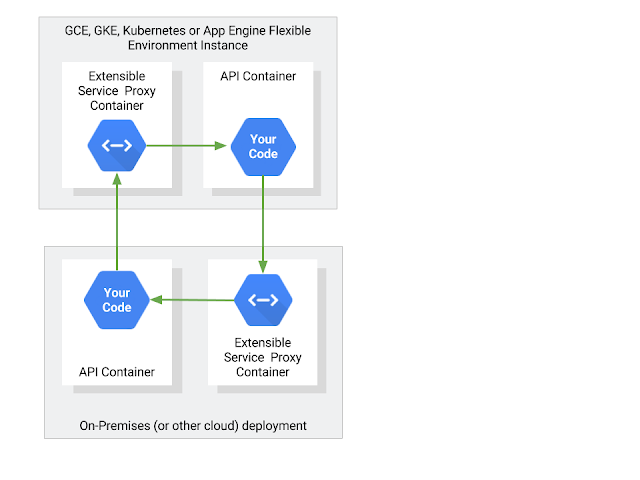
Cloud Endpoints uses the Extensible Service Proxy, based on NGINX, which can validate a variety of authentication schemes from JWT tokens to API keys. We deploy that open source proxy automatically if you use Cloud Endpoints on App Engine Flexible environment, but it is also available via the Google Container Registry for deployment anywhere: on Google Container Engine, on-premises, or even in another cloud.

Protecting APIs with JSON Web Tokens 

One of the most common and more secure ways to protect your APIs is to require a JSON Web Token (JWT). Typically, you use a service account to represent each of your services, and each service account has a private key that can be used to sign a JSON Web Token.

If your (calling) service runs on GCP, we manage the key for you automatically; simply invoke the IAM.signJwt method on your JSON web token and put the resulting signed JWT in the OAuth Authorization: Bearer header on your call.

If your service runs on-premises, install ESP as a sidecar that proxies all traffic to your service. Your API configuration tells ESP which service account will be placing the calls. ESP uses the public key for your service account to validate that it was signed properly, and validates several fields in the JWT as well.

If the service is on-premises and calling to the cloud, you still need to sign your JWT, but it’s your responsibility to manage the private key. In that case, download the private key from Cloud Console (following best practices to help securely store it) and sign your JWTs.

For more details, check out the sample code and documentation on service-to-service authentication (or this, if you’re using gRPC).

Securing APIs with API keys 

Strictly speaking, API keys are not authentication tokens. They’re longer-lived and more dangerous if stolen. However, they do provide a quick and easy way to protect an API by easily adding them to a call — either in a header or as a query parameter.

API keys also allow an API’s consumers to generate their own credentials. If you’ve ever called a Google API that doesn’t involve personal data, for example the Google Maps Javascript API, you’ve used an API key.

To restrict access to an API with an API key, follow these directions. After that, you’ll need to generate a key. You can generate the key in that same project (following these directions). Or you can share your project with another developer. Then, in the project that will call your API, that developer can create an API key and enable the API. Add the key to the API calls as a query parameter (just add ?key=${ENDPOINTS_KEY} to your request) or in the x-api-key header (see the documentation for details).

Wrapping up 

Securing APIs is good practice no matter where they run. At Google, we use authentication for inter-service communication, even if both run entirely on our production network. But if you live in a hybrid cloud world, authenticating each and every call is even more important.

To get started with Cloud Endpoints, take a look at our tutorials. It’s a great way to build scalable and more secure applications that can span a variety of cloud and on-premises environments.
Quelle: Google Cloud Platform

EDNS Client Subnet support in Azure Traffic Manager

Over the past few months, we announced the support for Geographic Traffic Routing, Fast failover, and TCP probing using Azure Traffic Manager. It is our constant endeavor to add new capabilities that add value to our customers. Today, we are excited to announce the support for EDNS Client Subnet (ECS) in Azure Traffic Manager.

When customers choose to use Performance or Geographic routing methods with Azure Traffic Manager, the routing decision made depends on the origin of the Domain Name System (DNS) request. Azure Traffic Manager determines the request origin region by inspecting the source IP address of the query, which in most cases will be the IP address of the local DNS resolver that does the recursive DNS lookup on behalf of the end user.

While this is a good proxy for the location of the end user, there are many cases where a user can be using a resolver outside of their geographical location. This results in our query response not being optimized.

With the support for ECS, Azure Traffic Manager will use this information, if it is passed by the DNS resolver proxying the query, to make routing decisions. This will result in increased accuracy when Performance routing method is used and increased correctness of geographic location identification if Geographic routing method is used.

Specifically, this feature provides support for RFC 7871 – Client Subnet in DNS Queries that provides an Extension Mechanism for DNS (EDNS0) which can pass on the client subnet address to resolvers.

There is no customer action needed to enable this feature and it is available in all the Azure clouds. All your end user queries with ECS information are already benefitting from this new capability from Azure Traffic Manager!
Quelle: Azure

[Podcast] PodCTL #6 – What’s included with Kubernetes?

This week we discuss a topic that often comes up with companies that want to build a DIY platform using Kubernetes. How much is included in the Kubernetes open source project, and how many other things have to be integrated to create a functional platform for deploying applications into production? We explore: What’s included? What’s […]
Quelle: OpenShift