Bot conversation history with Azure Cosmos DB

The Bot Framework provides a service for tracking the context of a conversation, called Bot Framework State. It enables you to store and retrieve data associated with a user, conversation or a specific user within the context of a conversation.

In this article, it is assumed you have previous experience with developing bots using Bot Builder SDK (C# or Node.js), so we will not get into the details in terms of bot implementation.

Before using Cosmos DB, it’s helpful to understand the importance of storing conversation data and how it is stored in Bot Framework State.

Why store conversation data?

Some scenarios where conversation data can be useful:

Analytics: When you want to analyze user data and conversations in near real time. You can also apply Machine Learning models and tools (like Microsoft Cognitive Services APIs).
Some examples:

Sentiment analysis to track the quality of a conversation  
Funnel analysis of messages in bots to identify where the Natural Language Processing (as LUIS) has failed or can be improved to better handle input messages
Metrics: Number of active or new users and message counts (to determine the level of engagement the bot has with users)

Audit: When you have to store data of all users for audit purposes. It can even be a requirement, depending on your solution.

How conversation data is stored

The conversation data is stored in three different structures (in JSON format), known as property bags:

UserData: It's the user property bag, where the ID is the user ID. It stores user data globally across all conversations. It's useful for storing data about the user that isn't dependent on a specific conversation. For example, you can track all conversations of a specific user and get additional information (username, birth date and so on):

{
"id": "emulator:userdefault-user",
"botId": "<your Bot ID>",
"channelId": "emulator",
"conversationId": "<your conversation ID>",
"userId": "<user ID>",
"data": {
"username": "Fernando de Oliveira"
},
"_rid": "9G5GANrnJQADAAAAAAAAAA==",
"_self": "dbs/9G5GAA==/colls/9G5GANrnJQA=/docs/9G5GANrnJQADAAAAAAAAAA==/",
"_etag": ""01008737-0000-0000-0000-5993a11d0000"",
"_attachments": "attachments/",
"_ts": 1502847257
}

This is an example of how you can save data to UserData in C#:

private bool userWelcomed;

public virtual async Task MessageReceivedAsync(IDialogContext context, IAwaitable<IMessageActivity> result)
{
var message = await result;

string userName;

if (!context.UserData.TryGetValue("username", out userName))
{
PromptDialog.Text(context, ResumeAfterPrompt, "Before get started, please tell me your name?");
return;
}

if (!userWelcomed)
{
userWelcomed = true;
await context.PostAsync($"Welcome back {userName}!");

context.Wait(MessageReceivedAsync);
}
}

private async Task ResumeAfterPrompt(IDialogContext context, IAwaitable<string> result)
{
try
{
var userName = await result;
userWelcomed = true;

await context.PostAsync($"Welcome {userName}!");

context.UserData.SetValue("username", userName);
}
catch (TooManyAttemptsException ex)
{
await context.PostAsync($"Oops! Something went wrong :( Technical Details: {ex}");
}

context.Wait(MessageReceivedAsync);
}

ConversationData: It's the conversation property bag, where the ID is the conversation ID. It stores data related to a single conversation globally. This data is visible to all users within the conversation. For example, a group conversation where you can set a default language to your bot (the language your bot will understand and interact with group members):

{
"id": "emulator:conversation<your conversation ID>",
"botId": "<your Bot ID>",
"channelId": "emulator",
"conversationId": "<your conversation ID>",
"userId": "default-user",
"data": {
"defaultLanguage": "pt-BR"
},
"_rid": "9G5GANrnJQAEAAAAAAAAAA==",
"_self": "dbs/9G5GAA==/colls/9G5GANrnJQA=/docs/9G5GANrnJQAEAAAAAAAAAA==/",
"_etag": ""0800357b-0000-0000-0000-598b52060000"",
"_attachments": "attachments/",
"_ts": 1502302725
}

This is an example of how you can save data to ConversationData:

public async Task StartAsync(IDialogContext context)
{
string language;

if (!context.ConversationData.TryGetValue("defaultLanguage", out language))
{
language = "pt-BR";
context.ConversationData.SetValue("defaultLanguage", country);
}

await context.PostAsync($"Hi! I'm currently configured for {language} language.");

context.Wait(MessageReceivedAsync);
}

PrivateConversationData: It's the private conversation property bag, where the ID is a merge of user ID and conversation ID. It stores data related to a single conversation globally, where the data is visible only to the current user within the conversation. It's useful for storing temporary data that you want to be cleaned up when a conversation ends (like a browser cache). For example a bot for online purchases, where you can save an order ID:

{
"id": "emulator:private<your conversation ID>:default-user",
"botId": "<your Bot ID>",
"channelId": "emulator",
"conversationId": "<your conversation ID>",
"userId": "default-user",
"data": {
"ResumptionContext": {
"locale": pt-BR",
"isTrustedServiceUrl": false
},
"DialogState": "<dialog state ID>",
"orderId": "<order ID>"
},
"_rid": "9G5GANrnJQAXAAAAAAAAAA==",
"_self": "dbs/9G5GAA==/colls/9G5GANrnJQA=/docs/9G5GANrnJQAXAAAAAAAAAA==/",
"_etag": ""0100f938-0000-0000-0000-5993ab090000"",
"_attachments": "attachments/",
"_ts": 1502849796
}

This is an example of how you can save data to PrivateConversationData:

string orderId;

if (!context.PrivateConversationData.TryGetValue("orderId", out orderId))
{
// Generic method to generate an order ID
orderId = await GetOrderIdAsync();

context.PrivateConversationData.SetValue("orderId", orderId);

await context.PostAsync($"{userName}, this is your order ID: {orderId}");
}

Cosmos DB rather than Bot Framework State

By default, Bot Framework uses the Bot Framework State to store conversation data. It is designed for prototyping, and is useful for development and testing environments. At the time of this writing, it has only a size limit of 32KB. Learn more about data management.

For production environments, it’s highly recommended to use a NoSQL database to store data as documents, such as Azure Cosmos DB. It's a multi-model database (like document, graph, key-value, table and column-family models) that can offer some key benefits, including:

Global distribution: It's possible to distribute your data across different Azure Regions, ensuring low latency to users.
Horizontal Scalability: You can easily scale your database at a per second granularity and scale storage size up and down automatically according to your needs.
Availability: You can ensure your database will have at least 99.99% availability in a single region.

For document models, there are options like Azure DocumentDB and MongoDB. In this article we are going to use the DocumentDB API.

Storing Conversation Data

To customize your bot conversation data storage, you can use the Bot Builder SDK Azure Extensions. If you are developing your bot with Bot Builder SDK in C#, you have to edit the Global.asax file:

protected void Application_Start()
{
// Adding DocumentDB endpoint and primary key
var docDbServiceEndpoint = new Uri("<your documentDB endpoint>");
var docDbKey = "<your documentDB key>";

// Creating a data store based on DocumentDB
var store = new DocumentDbBotDataStore(docDbServiceEndpoint, docDbKey);

// Adding Azure dependencies to your bot (documentDB data store and Azure module)
var builder = new ContainerBuilder();

builder.RegisterModule(new AzureModule(Assembly.GetExecutingAssembly()));

// Key_DataStore is the key for data store register with the container
builder.Register(c => store)
.Keyed<IBotDataStore<BotData>>(AzureModule.Key_DataStore)
.AsSelf()
.SingleInstance();

// After adding new dependencies, update the container
builder.Update(Conversation.Container);

GlobalConfiguration.Configure(WebApiConfig.Register);
}

If you run your bot and open your Cosmos DB service on Azure Portal, you can see all stored documents (clicking on Data Explorer).

References

Key concepts in the Bot Builder SDK for .NET
Bot Builder: Manage state data
Where is conversation state stored?
Azure Cosmos DB Documentation
Bot Builder Samples

Quelle: Azure

Online Fundraisers For DACA Recipients Raise Thousands Overnight

Via youcaring.com

In the immediate aftermath of the Trump administration’s repeal of DACA — the Obama-era rule that allowed some immigrants to work and go to school in the United States — activists, undocumented immigrants, and nonprofit organizations have taken to crowdfunding platforms like YouCaring and GoFundMe, raising thousands of dollars to support those impacted in only a few days.

The new rule gives some DACA recipients, or DREAMers just one month to renew their documents. The application costs $495. According the Federal Reserve, nearly half of all Americans would be unable to come up with $400 in the face of an emergency.

Prior to the Trump administration’s announcement on Tuesday, a number of DACA recipients were already using crowdfunding platforms to raise money for application fees, airfare and lodging to join a DACA rally in Washington D.C., or school tuition. But the amount of money being directed at these causes has spiked dramatically since the weekend.

Ernesto Lopez is a development manager with the Puente Human RIghts Movement in Phoenix, Arizona, which has so far raised $5,264 on YouCaring.

“I put this up at 8 p.m. [Tuesday] night, and in less than 24 hours, we were close to $5,000,” Lopez told BuzzFeed News. “People are energized, and want to do something, but sometimes people don’t know what to do. This is an opportunity where money actually makes a big difference.”

Puente helps undocumented immigrants file their paperwork with US Citizenship and Immigration Services (USCIS); Lopez said the money the organization raises, which so far is enough to cover about ten applications, will be distributed directly to people coming into their offices looking for help.

Another group, this one called Fuerza Colectiva in Seattle, raised more than $10,700 in less than two days. One of the group’s members, Leo Carmona, said the inability to afford the application fee is one major reason that undocumented immigrants don’t renew their permits.

“I myself am a DACA recipient. Thankfully, I just renewed my permit, but as someone who has been a student or who has lacked the resources to fund a $500 application, I saw the need of fundraising,” he told BuzzFeed News. “I think given the timeline, knowing it's only a month that they have to renew their permits, I felt it was extremely urgent for us to act.”

Rather than cover application costs in full, Carmona said his organization is asking applicants how much they can afford to pay, and offering to cover the rest.

In the case of one GoFundMe campaign, just a single tweet made a major impact. Muna Mire of BET tweeted about Cecilia Sierra’s request for $1,000 to help cover the cost of her DACA renewal. Mire’s tweet was retweeted 529 times, and Sierra met her goal in just a few hours.

(BuzzFeed News reached out to Sierra for comment, but didn’t immediately hear back.)

A spokesperson for YouCaring said the number of campaigns related to immigration issues has increased by 75% since last week. “We are also seeing that these campaigns are gathering momentum faster than usual and hitting their goals and even surpassing their funding goals in a matter of days, most likely thanks to the elevated profile of this particular cause in the news cycle and a heightened sense of urgency around it,” she wrote in an email statement.

GoFundMe said it has also seen an increase in campaigns supporting undocumented immigrants. “We are working with the campaign organizers to ensure the Dreamers receive the funds transferred as soon as possible,” a GoFundMe spokesperson wrote via email.

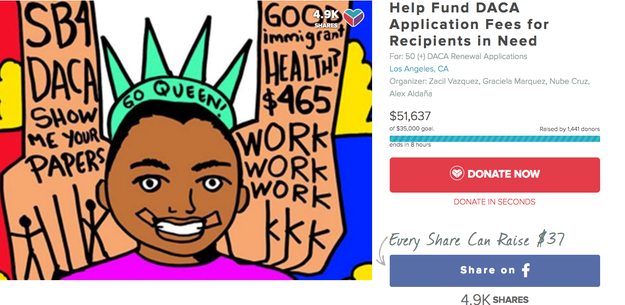
Other campaigns have raised far more with the help of social media. A group of activists named Zacil Vazquez, Graciela Marquez and Nube Cruz posted a campaign to YouCaring over the weekend. In less than a week, it has raised $57,372 from over 1,500 donors after being shared 6,000 times. Vazquez attributed the success of the campaign so far to the fact that all four organizers are undocumented immigrants or DACA recipients with roots in the activist community.

“We grew tired of nonprofits and others taking advantage of this to further their growth and decided to fundraise on our own,” said Cruz. “By us for us.”

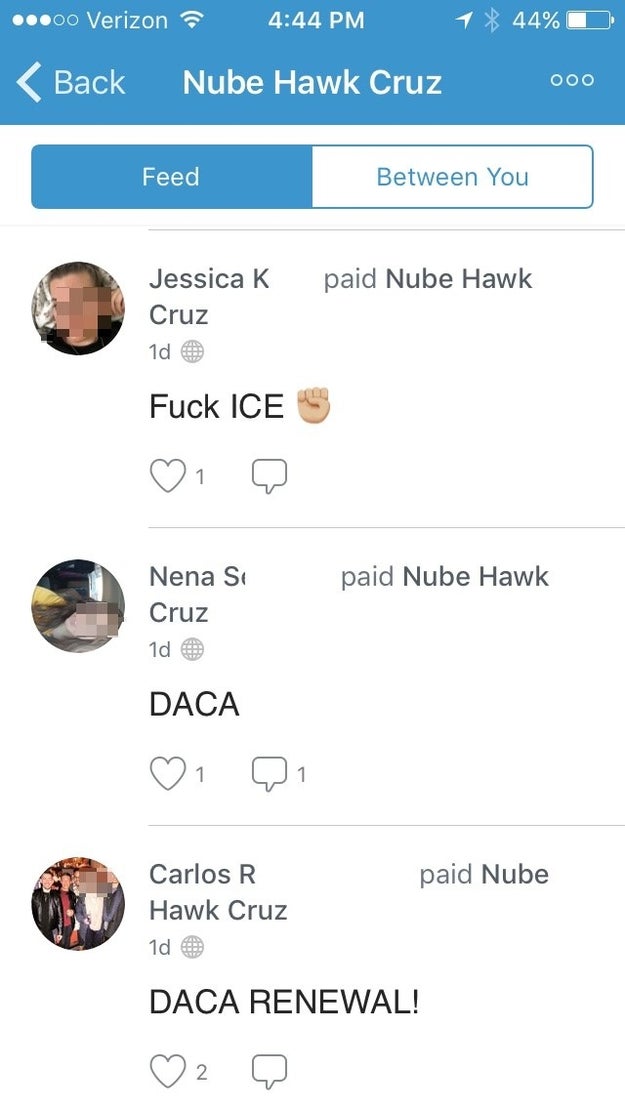
In addition to wanting to help other DACA recipients, Cruze himself was worried about being able to get together enough money to pay for his own application. He used his Facebook page to ask for donations via Venmo; his fees were covered by donations from friends within 24 hours.

Meanwhile, in Texas, a campaign led by Dr. Dona Kim Murphey raised over $43,000 in just a week. Murphey started the campaign after Hurricane Harvey devastated a number of undocumented families in Houston. Murphey’s original goal was to set up a fund that would support four families with donations of $5,000 each, which they could use at their discretion for things like rebuilding homes, buying cars, covering lost wages, or paying lawyers. Having exceeded her initial goal, Murphey now hopes to support as many as ten families, if donations continue apace.

Quelle: <a href="Online Fundraisers For DACA Recipients Raise Thousands Overnight“>BuzzFeed

Microsoft at PostgresOpen 2017

Earlier this year at Microsoft Build, we announced the public preview of Azure Database for PostgreSQL. Since then, we have been engaging deeply with the PostgreSQL community and are proud to be involved with PostgresOpen 2017 as a sponsor.

During my keynote at PostgresOpen 2017, I’ll share more about how at Microsoft we are committed to meeting customers where they are, enabling them to achieve more with the technologies and tools of their choice. Azure Database for PostgreSQL, built using the community edition of PostgreSQL database, offers built-in high availability, security and scaling on-the-fly with minimal downtime. Developers can seamlessly migrate their existing apps without any changes, and continue using existing tools. The simple pricing model enables developers to focus on developing apps.

Since introducing the preview a few months ago, we have been working closely with customers to understand their requirements and we continue to add features and updates as we move towards general availability. In addition to ensuring customer requirements are reflected in the product development, we continue to work closely with the PostgreSQL community, engage on pgsql-hackers mailing list, and work with the community on patches. PostgreSQL is a great product, with industry leading innovations in extensibility, and we hope to work with the community to make PostgreSQL even better for our customers.

“Spinning up the PostgreSQL database through the Azure portal was very easy. Then we just exported the database from the existing system and imported it into Azure Database for PostgreSQL. It only took two or three hours, and we really didn't run into any problems.”

– Eric Spear, Chief Executive Officer, Higher Ed Profiles

In addition to Azure Database for PostgreSQL, we also introduced Azure Database for MySQL. Developers using PostgreSQL and MySQL to build and deploy applications for web, mobile, content management system (CMS), customer relationship management (CRM), business, or analytical applications can now choose their favorite database engines delivered as a managed service on Azure. They seamlessly integrate with the most common open source programming languages such as PHP, Python, Node.js, and application development frameworks such as WordPress, Magento, Drupal, Django, and Ruby on Rails. Whether you want to build a website using MySQL database, or want to quickly build and deploy a geospatial web or mobile app with PostgreSQL, you can now quickly get setup using the managed service capabilities offered by Azure. In addition, app developers can continue to use the familiar community tools to manage their MySQL or PostgreSQL databases. The Azure Database for MySQL and PostgreSQL improves application developer productivity by bringing the following common differentiated benefits of the relational database platform services to all applications:

The ability to provision a database server in minutes with built-in high availability that does not require any configuration, VMs, or setup.
Predictable performance with provisioned resources and governance.
The option to scale Compute Units up/down in response to actual or anticipated workload changes without application downtime.
Built-in security to protect sensitive data by encrypting user data and backups, as well as data in-motion using SSL encryption.
Automatic backups with storage for recovery to any point up to 35 days.
Consistent management experience with Azure Portal, Command Line Interface (CLI), or REST APIs.

Get started

Explore more with 5-minute quickstarts and step-by-step tutorials for Azure Database for PostgreSQL and Azure Database for MySQL. If you are ready to go, you can start using the $200 free credit when you create a free account with Azure.

Feedback

We would love to receive your feedback. Feel free to leave comments below. You can also engage with us directly through User Voice (PostgreSQL and MySQL) if you have suggestions on how we can further improve the service.
Quelle: Azure