Windows Networking at Parity with Linux for Kubernetes

Editor’s note: today’s post is by Jason Messer, Principal PM Manager at Microsoft, on improvements to the Windows network stack to support the Kubernetes CNI model.Since I last blogged about Kubernetes Networking for Windows four months ago, the Windows Core Networking team has made tremendous progress in both the platform and open source Kubernetes projects. With the updates, Windows is now on par with Linux in terms of networking. Customers can now deploy mixed-OS, Kubernetes clusters in any environment including Azure, on-premises, and on 3rd-party cloud stacks with the same network primitives and topologies supported on Linux without any workarounds, “hacks”, or 3rd-party switch extensions.”So what?”, you may ask. There are multiple application and infrastructure-related reasons why these platform improvements make a substantial difference in the lives of developers and operations teams wanting to run Kubernetes.  Read on to learn more!Tightly-Coupled CommunicationThese improvements enable tightly-coupled communication between multiple Windows Server containers (without Hyper-V isolation) within a single “Pod”. Think of Pods as the scheduling unit for the Kubernetes cluster, inside of which, one or more application containers are co-located and able to share storage and networking resources. All containers within a Pod shared the same IP address and port range and are able to communicate with each other using localhost. This enables applications to easily leverage “helper” programs for tasks such as monitoring, configuration updates, log management, and proxies. Another way to think of a Pod is as a compute host with the app containers representing processes.Simplified Network TopologyWe also simplified the network topology on Windows nodes in a Kubernetes cluster by reducing the number of endpoints required per container (or more generally, per pod) to one. Previously, Windows containers (pods) running in a Kubernetes cluster required two endpoints – one for external (internet) communication and a second for intra-cluster communication between other nodes or pods in the cluster. This was due to the fact that external communication from containers attached to a host network with local scope (i.e. not publicly routable) required a NAT operation which could only be provided through the Windows NAT (WinNAT) component on the host. Intra-cluster communication required containers to be attached to a separate network with “global” (cluster-level) scope through a second endpoint. Recent platform improvements now enable NAT”ing to occur directly on a container endpoint which is implemented with the Microsoft Virtual Filtering Platform (VFP) Hyper-V switch extension. Now, both external and intra-cluster traffic can flow through a single endpoint.Load-Balancing using VFP in Windows kernelKubernetes worker nodes rely on the kube-proxy to load-balance ingress network traffic to Service IPs between pods in a cluster. Previous versions of Windows implemented the Kube-proxy’s load-balancing through a user-space proxy. We recently added support for “Proxy mode: iptables” which is implemented using VFP in the Windows kernel so that any IP traffic can be load-balanced more efficiently by the Windows OS kernel. Users can also configure an external load balancer by specifying the externalIP parameter in a service definition. In addition to the aforementioned improvements, we have also added platform support for the following:Support for DNS search suffixes per container / Pod (Docker improvement – removes additional work previously done by kube-proxy to append DNS suffixes)[Platform Support] 5-tuple rules for creating ACLs (Looking for help from community to integrate this with support for K8s Network Policy)Now that Windows Server has joined the Windows Insider Program, customers and partners can take advantage of these new platform features today which accrue value to eagerly anticipated, new feature release later this year and new build after six months. The latest Windows Server insider build now includes support for all of these platform improvements.In addition to the platform improvements  for Windows, the team submitted code (PRs) for CNI, kubelet, and kube-proxy with the goal of mainlining Windows support into the Kubernetes v1.8 release. These PRs remove previous work-arounds required on Windows for items such as user-mode proxy for internal load balancing, appending additional DNS suffixes to each Kube-DNS request, and a separate container endpoint for external (internet) connectivity.https://github.com/kubernetes/kubernetes/pull/51063https://github.com/kubernetes/kubernetes/pull/51064These new platform features and work on kubelet and kube-proxy align with the CNI network model used by Kubernetes on Linux and simplify the deployment of a K8s cluster without additional configuration or custom (Azure) resource templates. To this end, we completed work on CNI network and IPAM plugins to create/remove endpoints and manage IP addresses. The CNI plugin works through kubelet to target the Windows Host Networking Service (HNS) APIs to create an ‘l2bridge’ network (analogous to macvlan on Linux) which is enforced by the VFP switch extension.The ‘l2bridge’ network driver re-writes the MAC address of container network traffic on ingress and egress to use the container host’s MAC address. This obviates the need for multiple MAC addresses (one per container running on the host) to be “learned” by the upstream network switch port to which the container host is connected. This preserves memory space in physical switch TCAM tables and relies on the Hyper-V virtual switch to do MAC address translation in the host to forward traffic to the correct container. IP addresses are managed by a default, Windows IPAM plug-in which requires that POD CIDR IPs be taken from the container host’s network IP space.The team demoed (link to video) these new platform features and open-source updates to the SIG-Windows group on 8/8. We are working with the community to merge the kubelet and kube-proxy PRs to mainline these changes in time for the Kubernetes v1.8 release due out this September. These capabilities can then be used on current Windows Server insider builds and the Windows Server, version 1709.Soon after RTM, we will also introduce these improvements into the Azure Container Service (ACS) so that Windows worker nodes and the containers hosted are first-class, Azure VNet citizens. An Azure IPAM plugin for Windows CNI will enable these endpoints to directly attach to Azure VNets with network policies for Windows containers enforced the same way as VMs.FeatureWindows Server 2016 (In-Market)Next Windows Server Feature Release, Semi-Annual ChannelLinuxMultiple Containers per Pod with shared network namespace (Compartment)One Container per Pod✔✔Single (Shared) Endpoint per PodTwo endpoints: WinNAT (External) + Transparent (Intra-Cluster)✔✔User-Mode, Load Balancing✔✔✔Kernel-Mode, Load Balancing Not Supported✔✔Support for DNS search suffixes per Pod (Docker update)Kube-Proxy  added multiple DNS suffixes to each request✔✔CNI Plugin Support Not Supported✔✔The Kubernetes SIG Windows group meets bi-weekly on Tuesdays at 12:30 PM ET. To join or view notes from previous meetings, check out this document.
Quelle: kubernetes

AWS Glue is Now Available in the US West (Oregon) and US East (Ohio) regions

AWS Glue is a fully managed extract, transform, and load (ETL) service that makes it easy for customers to prepare and load their data for analytics. AWS Glue is serverless, so there is no infrastructure to set up or manage. With a few clicks in the AWS Management Console, customers can create and run an ETL job. You simply point AWS Glue to your data stored on AWS, and AWS Glue discovers your data and stores associated metadata (e.g. table definition and schema) in the AWS Glue Data Catalog. Once cataloged, your data is immediately searchable, queryable, and available for ETL. With AWS Glue, data can be available for analytics in minutes. 
Quelle: aws.amazon.com

OpenStack Developer Mailing List Digest September 2 – 8

Successbot Says!

fungi: Octavia has migrated from Launchpad to StoryBoard [1]
sc’ : OpenStack is now on the Chef Supermarket! https://supermarket.chef.io/users/openstack [2]

Summaries:

Notifications Update Week 36 [3]

Updates:

Summit Free Passes [4]

People that have attended the Atlanta PTG or will attend the Denver PTG will receive 100% discount passes for the Sydney Summit
They must be used by October 27th

Early Bird Deadline for Summit Passes is September 8th [5]

Expires at 6:59 UTC
Discount Saves you 50%

Libraries Published to pypi with YYY.X.Z versions [6]

Moving forward with deleting the libraries from Pypi
Removing these libraries:

python-congressclient 2015.1.0
python-congressclient 2015.1.0rc1
python-designateclient 2013.1.a8.g3a2a320
networking-hyperv 2015.1.0

Still waiting on approval from PTL’s about the others

mistral-extra
networking-odl
murano-dashboard
networking-midonet
sahara-image-elements
freezer-api
murano-agent
mistral-dashboard
Sahara-dashboard

Unified Limits work stalled [7]

Need for new leadership
Keystone merged a spec [8]

Should we continue providing FQDN’s for instance hostnames?[9]

Nova network has deprecated the option that the domain in the FQDN is based on
Working on getting the domain info from Neutron instead of Nova, but this may not be the right direction
Do we want to use a FQDN as the hostnames inside the guest?

The Infra servers are built with the FQDN as the instance name itself

Cinder V1 API Removal[10]

Patch here[11]

Removing Screen from Devstack- RSN

It’s been merged
A few people are upset that they don’t have screen for debugging anymore
Systemd docs are being updated to include pdb path so as to be able to debug in a similar way to how people used screen [12] [13] [14]

PTG Planning

Video Interviews [15]

 
[1] http://eavesdrop.openstack.org/irclogs/%23storyboard/%23storyboard.2017-09-06.log.html#t2017-09-06T22:03:06
[2] http://eavesdrop.openstack.org/irclogs/%23openstack-chef/%23openstack-chef.2017-09-08.log.html#t2017-09-08T13:48:14
[3] http://lists.openstack.org/pipermail/openstack-dev/2017-September/121769.html
[4] http://lists.openstack.org/pipermail/openstack-dev/2017-September/121843.html #Free
[5] http://lists.openstack.org/pipermail/openstack-dev/2017-September/121847.html
[6] http://lists.openstack.org/pipermail/openstack-dev/2017-September/121705.html #YYYY
[7] http://lists.openstack.org/pipermail/openstack-dev/2017-September/121944.html
[8] https://specs.openstack.org/openstack/keystone-specs/specs/keystone/ongoing/unified-limits.html
[9] http://lists.openstack.org/pipermail/openstack-dev/2017-September/121762.html
[10] http://lists.openstack.org/pipermail/openstack-dev/2017-September/121956.html
[11] https://review.openstack.org/#/c/499342/
[12] https://review.openstack.org/#/c/501834/
[13] https://pypi.python.org/pypi/remote-pdb
[14] https://review.openstack.org/#/c/501870/
[15] http://lists.openstack.org/pipermail/openstack-dev/2017-September/121901.html
Quelle: openstack.org

IoT Device SDK For Python – Now With Greengrass Discovery

We are pleased to announce an updated IoT Device SDK for Python, now including group discovery for Greengrass. With Greengrass Discovery, the Python SDK makes it easier for your device to interact locally with another device running Greengrass Core. The updated SDK package includes a full changelog. You can download each of the IoT Device SDKs here: https://aws.amazon.com/iot/sdk/ 
Quelle: aws.amazon.com

AWS CodePipeline now provides notifications on pipeline, stage, and action status changes

Now, you can get notified whenever there is a pipeline, stage, or action status change in AWS CodePipeline. This makes it easy for you to track, manage, and react to any changes during a pipeline execution. CodePipeline now integrates with Amazon Cloudwatch and enables you to receive notifications with Amazon Simple Notification Service or invoke an AWS Lambda function on a status change. Learn how to configure CodePipeline notifications by visiting here. You can also follow our step by step tutorial to receive a notification on pipeline state change here. 
Quelle: aws.amazon.com

Why we migrated to Firebase and GCP: Smash.gg

By Nathan Welch, Engineering Director/Co-founder, Smash.gg

[Editor’s note:
Smash.gg is an esports platform used by players and organizers worldwide, running nearly 2,000 events per month with 60,000+ competitors, and recently hosted brackets for EVO 2017, the world’s largest fighting game tournament. This is its first post in a multi-part series about migrating to Google Cloud Platform (GCP) — what got them interested in GCP, why they migrated to it, and a few of the benefits they’ve seen as a result. Stay tuned for future posts that will cover more technical details about migrating specific services.]

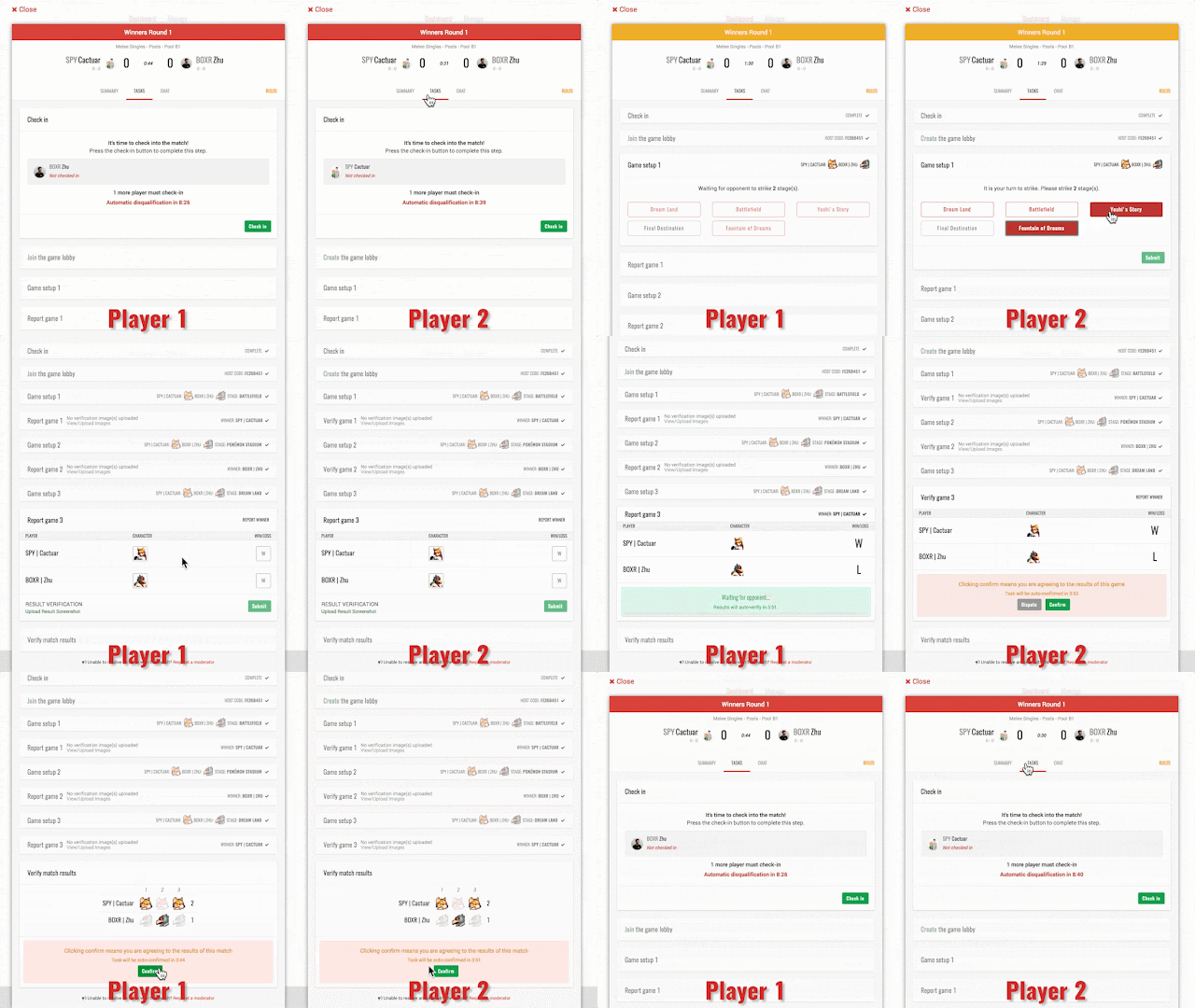
Players in online tournaments running on smash.gg need to be able to interact in real time. Both entrants must confirm that they are present, set up the game, and reach a consensus on the results of the match. They also need a simple chat service to resolve any issues with joining or reporting the match, to talk to one another and to tournament moderators.

We built our initial implementation of online match reporting with an off-the-shelf chat service and UI interactions that weren’t truly real-time. When the chat service failed in a live tournament, it became clear that we needed a better solution. We looked into building our own using a websocket-based approach, and a few services like PubNub and Firebase. Ultimately, we decided to launch with Firebase because it’s widely used, is backed by Google, and is incredibly well-priced.

Two players checking into, setting up, and reporting an online match using the Firebase Realtime Database for real-time interactions. 

We got our start with Firebase in May, 2016. Our first release used the Firebase Realtime Database as a kind of real-time cache to keep match data in sync between both entrants. When matches were updated or reported on our backend, we also wrote the updated match data to Firebase. We use React and Flux so we made a wrapper component to listen to Firebase and dispatch updated match data to our Flux stores. Implementing a chat service with Firebase was similarly easy. Using Firechat as inspiration, it took us about a day to build the initial implementation and another day to make it production-ready.

Compared with rolling our own solution, Firebase was an obvious choice given the ease of development and time/financial cost savings. Ultimately, it reduced the load on our servers, simplified our reporting flow, and made the match experience truly real-time. Later that year, we started using Firebase Cloud Messaging (FCM) to send browser push notifications using Cloud Functions triggers as Firebase data changed (e.g., to notify admins of moderator requests). Like the Realtime Database, Cloud Functions was incredibly easy to use and felt magical the first time we used it. Cloud Functions also gave us a window into how well Firebase interacts with Google Cloud Platform (GCP) services like Cloud Pub/Sub and Google BigQuery.

Migrating to GCP 
In March of 2017 we attended Google Cloud Next ’17 for the Cloud Functions launch. There, we saw that other GCP products had a similar focus on improving the developer experience and lowering development costs. Current products like Pub/Sub, Stackdriver Trace and Logging, and Google Cloud Datastore solved some of our immediate needs. Out of the box, these services gave us things that we were planning to build to supplement products from our existing service provider. And broadly speaking, GCP products seemed to focus on improving core developer workflows to reduce development and maintenance time. After seeing some demos of the products interacting (e.g., Google Container Engine and App Engine with Stackdriver Trace/Logging, Stackdriver with Pub/Sub and BigQuery), we decided to evaluate a full migration.

We started migrating our application in mid May, using the following services: Container Engine, Pub/Sub, Google Cloud SQL, Datastore, BigQuery, and Stackdriver. During the migration, we took the opportunity to re-architect some of our core services and move to Kubernetes. Most of our application was already containerized but had previously been running on a PaaS-like service so Kubernetes was a fairly dramatic shift. While Kubernetes had many benefits (e.g., industry standard, more efficient use of cloud instances, application portability, and immutable infrastructure defined in code), we also lost some top-level application metrics that our previous PaaS service had provided: for instance overall Requests Per Second (RPS), RPS by status, and latency. We were able to easily recreate these graphs from our container logs using log-based metrics and logs export from Stackdriver to BigQuery. You could also do this using other services, but our GCP-only approach was a quick and mostly free way for us to get to parity while experimenting with GCP services.

Request timing and analysis using Stackdriver Trace was another selling point in GCP that we didn’t have with our previous service. However, at the time of our migration, the Trace SDK for PHP (our backend services are in PHP, but I promise it’s nice PHP!) didn’t support asynchronous traces. The Google Cloud SDK for PHP has since added async trace support, but we were able to build async tracing by quickly gluing some GCP services together:

We built a trace reporter to log out traces as JSON. 
We then sent the traces to a Pub/Sub topic using Stackdriver log exports. 
Finally, we made a Pub/Sub subscriber in Cloud Functions to report the traces using the REST API. 

The Google Cloud SDK is certainly a more appropriate solution for tracing in production, but the fact that this combination of services worked well speaks to how easy it is to develop in GCP.

Post-migration results 
After running our production environment on GCP for a month, we’ve saved both time and money. Overall costs are ~10% lower without any Committed Use Discounts, with capacity to spare. Stackdriver logging/monitoring, Container Engine, and Kubernetes have made it easier for our engineers to perform DevOps tasks, leveling up our entire team. And being able to search all our logs in one centralized place allows us to easily cross-reference logs from multiple systems, making it possible to track down root causes of issues much faster. This combined with fully-managed, usage-priced services like Datastore and Firebase means development on GCP is easier and more accessible to all of our engineers. We’re really glad we migrated to GCP, and look forward to telling you more about how we did it in future posts. Meanwhile, if you’re a developer who loves competitive play and would like to help us build cool things on top of GCP, we’d love to hear from you. We recently closed our Series A from Spark Capital, Accel, and Horizon Ventures, and we’re hiring!
Quelle: Google Cloud Platform

Try Azure #CosmosDB for free

Today we are launching Try Azure Cosmos DB for free, an experience that allows anyone to play with Azure Cosmos DB, with no Azure sign up required and at no charge for a limited time. As many of you know, Azure Cosmos DB is the first globally distributed, massively scalable, multi-model database service. The service is designed to allow customers to elastically and horizontally scale both throughput and storage across any number of geographical regions.It also offers guaranteed <10 ms latencies at the 99th percentile, 99.99% high availability, and five well defined consistency models to developers to make precise tradeoffs between performance, availability and consistency of data. Azure Cosmos DB is also the first globally distributed database service in the market today to offer comprehensive Service Level Agreements (SLAs) for throughput, latency, availability, and consistency.

Why did we launch Try Cosmos DB for free? It’s simple. We want to make it easy for developers to evaluate Azure Cosmos DB, build and test their app against Azure Cosmos DB, do a hands-on-lab, a tutorial, create a demo or perform unit testing without incurring any costs. Our goal is to enable any developer to easily experience Azure Cosmos DB and what it has to offer, become more comfortable with our database service and build the expertise with our stack at zero cost. With Try Cosmos DB for free, you can go from nothing to a fully running planet-scale Azure Cosmos DB app in less than a minute.

Try Cosmos DB Now

Try it out for yourself, it takes less than a minute. Or watch this quick video.

1. Go to Try Azure Cosmos DB for free page.

2. Pick the API/data model of your choice either SQL (DocumentDB), MongoDB, Table or Gremlin (Graph) API, and click Create. Note, you will need to login using a Microsoft Account (a.k.a. Live ID). 

In seconds, you will have your newly created free Azure Cosmos DB account with an invite to open it in the Azure portal and try out our Quick Starts.

3. Click Open in Azure Portal, which will navigate the browser to the newly created free Azure Cosmos DB account with Quick Starts page open.

4. Follow the Quick Starts to get a running app connected to Azure Cosmos DB in under 30 seconds or proceed exploring the service on your own.

When in the portal, you will be reminded how long you have before your account expires.

You can extend the trial period for another 24 hours, or click on the link to sign up for a Free Trial (if you are new to Azure) or create a new Azure Cosmos DB account if you already have a subscription.

With Try Azure Cosmos DB for free, you can create a container (a collection of documents, a table, or a graph) and globally-distribute it to up to 3 regions, and use any of the capabilities Azure Cosmos DB provides for 24 hours. Once the trial expires, you can always come back and create it all over again.

Play with Azure Cosmos DB and let us know what you think

Azure Cosmos DB is the database of the future – it is what we believe is the next big thing in the world of massively scalable databases! It makes your data available close to where your users are, worldwide. It is a globally distributed, multi-model database service for building planet scale apps with ease using the API and data model of your choice. You never know it until YOU TRY IT!

If you need any help or have questions or feedback, please reach out to us on the developer forums on Stack Overflow. Stay up-to-date on the latest Azure Cosmos DB news and features by following us on Twitter #CosmosDB, @AzureCosmosDB.

– Your friends at Azure Cosmos DB
Quelle: Azure






