By Neal Cardwell, Senior Staff Software Engineer; Yuchung Cheng, Software Engineer; C. Stephen Gunn, Packet Mechanic; Soheil Hassas Yeganeh, Software Engineer; Van Jacobson, Research Scientist and Amin Vahdat, Google Fellow
We’re excited to announce that Google Cloud Platform (GCP) now features a cutting-edge new congestion control algorithm, TCP BBR, which achieves higher bandwidths and lower latencies for internet traffic. This is the same BBR that powers TCP traffic from google.com and that improved YouTube network throughput by 4 percent on average globally — and by more than 14 percent in some countries.
“BBR allows the 500,000 WordPress sites on our digital experience platform to load at lightening speed. According to Google’s tests, BBR’s throughput can reach as much as 2,700x higher than today’s best loss-based congestion control; queueing delays can be 25x lower. Network innovations like BBR are just one of the many reasons we partner with GCP.” — Jason Cohen, Founder and CTO, WP Engine
GCP customers, like WP Engine, automatically benefit from BBR in two ways:
From GCP services to cloud users: First, when GCP customers talk to GCP services like Cloud Bigtable, Cloud Spanner or Cloud Storage, the traffic from the GCP service to the application is sent using BBR. This means speedier access to your data.
From Google Cloud to internet users: When a GCP customer uses Google Cloud Load Balancing or Google Cloud CDN to serve and load balance traffic for their website, the content is sent to users’ browsers using BBR. This means faster webpage downloads for users of your site.
At Google, our long-term goal is to make the internet faster. Over the years, we’ve made changes to make TCP faster, and developed the Chrome web browser and the QUIC protocol. BBR is the next step. Here’s the paper describing the BBR algorithm at a high level, the Internet Drafts describing BBR in detail and the BBR code for Linux TCP and QUIC.
What is BBR?
BBR (“Bottleneck Bandwidth and Round-trip propagation time”) is a new congestion control algorithm developed at Google. Congestion control algorithms — running inside every computer, phone or tablet connected to a network — that decide how fast to send data.
How does a congestion control algorithm make this decision? The internet has largely used loss-based congestion control since the late 1980s, relying only on indications of lost packets as the signal to slow down. This worked well for many years, because internet switches’ and routers’ small buffers were well-matched to the low bandwidth of internet links. As a result, buffers tended to fill up and drop excess packets right at the moment when senders had really begun sending data too fast.
But loss-based congestion control is problematic in today’s diverse networks:
In shallow buffers, packet loss happens before congestion. With today’s high-speed, long-haul links that use commodity switches with shallow buffers, loss-based congestion control can result in abysmal throughput because it overreacts, halving the sending rate upon packet loss, even if the packet loss comes from transient traffic bursts (this kind of packet loss can be quite frequent even when the link is mostly idle).
In deep buffers, congestion happens before packet loss. At the edge of today’s internet, loss-based congestion control causes the infamous “bufferbloat” problem, by repeatedly filling the deep buffers in many last-mile links and causing seconds of needless queuing delay.
We need an algorithm that responds to actual congestion, rather than packet loss. BBR tackles this with a ground-up rewrite of congestion control. We started from scratch, using a completely new paradigm: to decide how fast to send data over the network, BBR considers how fast the network is delivering data. For a given network connection, it uses recent measurements of the network’s delivery rate and round-trip time to build an explicit model that includes both the maximum recent bandwidth available to that connection, and its minimum recent round-trip delay. BBR then uses this model to control both how fast it sends data and the maximum amount of data it’s willing to allow in the network at any time.
Benefits for Google Cloud customers
Deploying BBR has resulted in higher throughput, lower latency and better quality of experience across Google services, relative to the previous congestion control algorithm, CUBIC. Take, for example, YouTube’s experience with BBR. Here, BBR yielded 4 percent higher network throughput, because it more effectively discovers and utilizes the bandwidth offered by the network. BBR also keeps network queues shorter, reducing round-trip time by 33 percent; this means faster responses and lower delays for latency-sensitive applications like web browsing, chat and gaming. Moreover, by not overreacting to packet loss, BBR provides 11 percent higher mean-time-between-rebuffers. These represent substantial improvements for all large user populations around the world, across both desktop and mobile users.
These results are particularly impressive because YouTube is already highly optimized; improving the experience for users watching video has long been an obsession here at Google. Ongoing experiments provide evidence that even better results are possible with continued iteration and tuning.
The benefits of BBR translate beyond Google and YouTube, because they’re fundamental. A few synthetic microbenchmarks illustrate the nature (though not necessarily the typical magnitude) of the advantages:
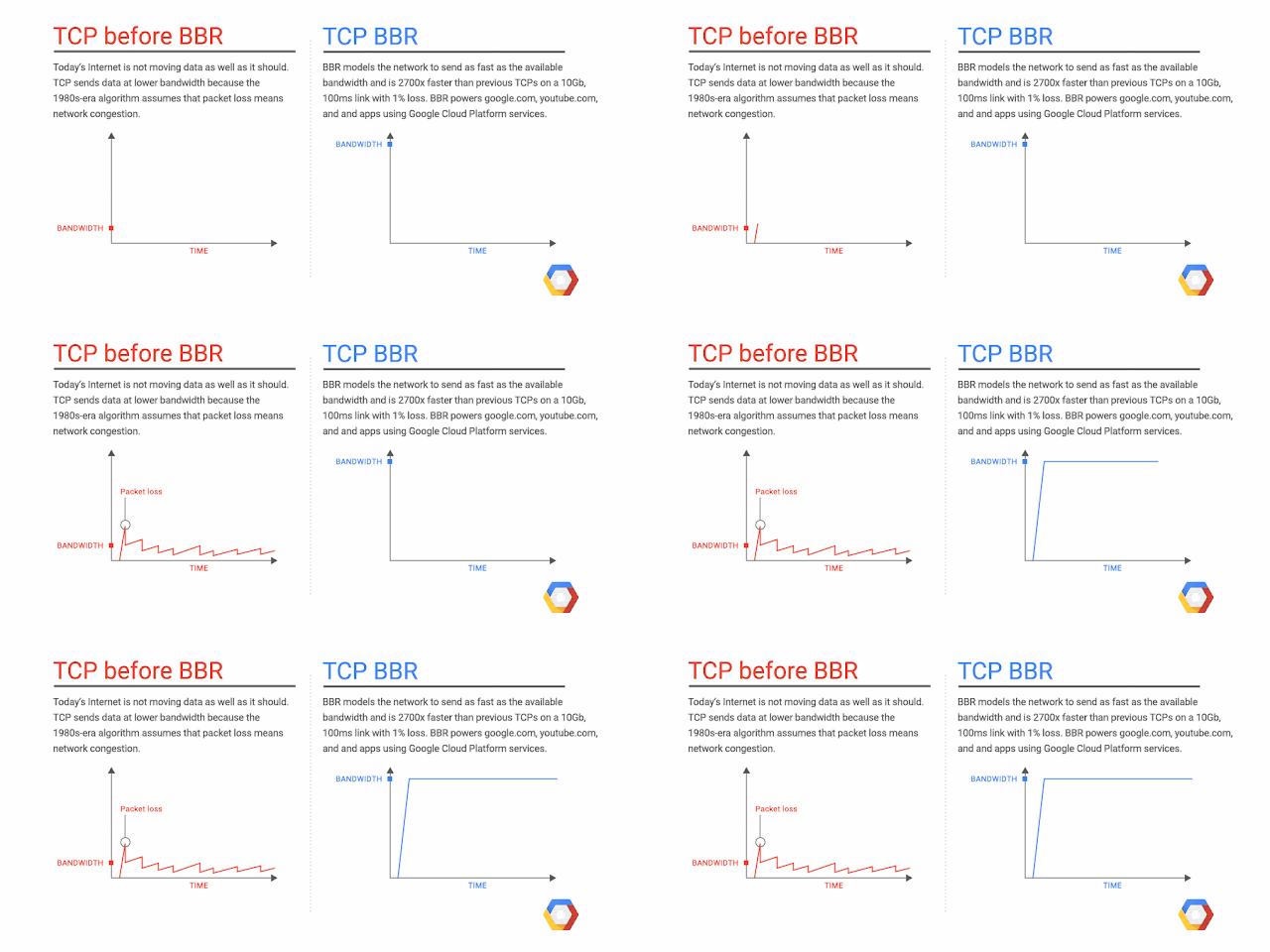
Higher throughput: BBR enables big throughput improvements on high-speed, long-haul links. Consider a typical server-class computer with a 10 Gigabit Ethernet link, sending over a path with a 100 ms round-trip time (say, Chicago to Berlin) with a packet loss rate of 1%. In such a case, BBR’s throughput is 2700x higher than today’s best loss-based congestion control, CUBIC (CUBIC gets about 3.3 Mbps, while BBR gets over 9,100 Mbps). Because of this loss resiliency, a single BBR connection can fully utilize a path with packet loss. This makes it a great match for HTTP/2, which uses a single connection, and means users no longer need to resort to workarounds like opening several TCP connections to reach full utilization. The end result is faster traffic on today’s high-speed backbones, and significantly increased bandwidth and reduced download times for webpages, videos or other data.
Lower latency: BBR enables significant reductions in latency in last-mile networks that connect users to the internet. Consider a typical last-mile link with 10 Megabits of bandwidth, a 40 ms round-trip time, and a typical 1000-packet bottleneck buffer. In a scenario like this, BBR keeps queuing delay 25x lower than CUBIC (CUBIC has a median round-trip time of 1090 ms, versus just 43 ms for BBR). BBR reduces queues and thus queuing delays on last-mile links while watching videos or downloading software, for faster web surfing and more responsive video conferencing and gaming. Because of this ability to curb bufferbloat, one might say that BBR could also stand for BufferBloat Resilience, in addition to Bottleneck Bandwidth and Round-trip propagation time.
GCP is continually evolving, leveraging Google technologies like Espresso, Jupiter, Andromeda, gRPC, Maglev, Cloud Bigtable and Spanner. Open source TCP BBR is just the latest example of how Google innovations provide industry-leading performance.
If you’re interested in participating in discussions, keeping up with the latest BBR-related news, watching videos of talks about BBR or pitching in on open source BBR development or testing, join the public bbr-dev e-mail group.
Quelle: Google Cloud Platform