So You Got An Amazon Echo. Now What?

If you were one of the people who nabbed a voice-activated, Alexa-powered Echo or Echo Dot when Amazon slashed their prices on Prime Day, you’re probably wondering: What the hell do I do with this thing?

Welcome to the ~future~ of computing. I reviewed the original Echo in February 2016 and have tried every kind of Echo since. After over a year of living with Alexa, here are my best tips for getting the most out of your new smart home tech. Onward!

Right out of the box, think location, location, location – especially if you have an Echo Dot.
Nicole Nguyen / BuzzFeed News / Via Amazon

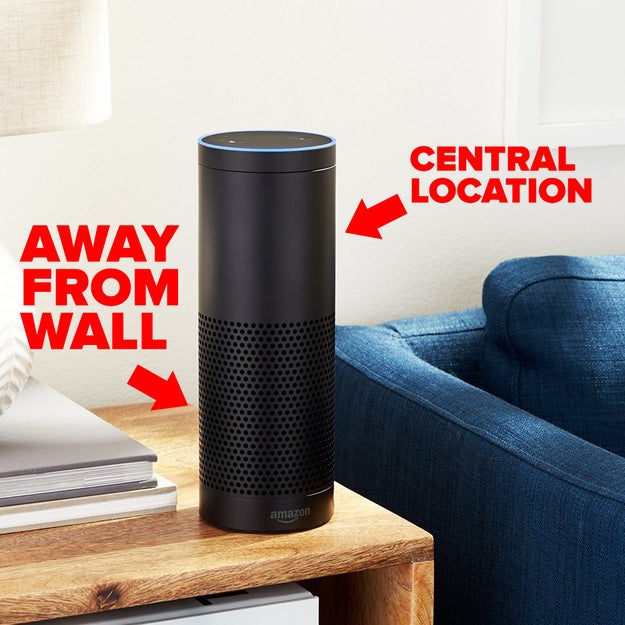
The Echo’s most powerful feature is being able to hear and process your requests, even if there’s background noise or you’re far away. But its ability to listen depends completely on *where* it is.

Place the device in a central location, as far from the wall as possible. Don’t hide it behind your toaster—or any other appliances or pieces of furniture. Feeling extra? Check out this Redditor’s ambitious ceiling mount or this Imgur user's Echo Dot wall plate.

If you have an Echo Dot, you’re going to need to be even more thoughtful about placement, especially if the Dot is connected to an external speaker. In my experience, it’s better to place the Dot closer to eye level (like a fireplace mantle) and away from the speaker it’s connected to, so it’s better at hearing you over loud music.

If you don’t like the look of the Echo’s black power cord, you can try painting it to match the color of your wall and mounting the cord with small clear cord clips.

OK – so you’ve set up your Echo. Here are some settings you should take a look at.
Nicole Nguyen / BuzzFeed News

Change the wake word from “Alexa” to “Echo.” It’s less syllables.

CBS Entertainment / Via startrek.com

The wake word is how you signal to your Echo that you’re asking it something. You’re going to be saying whatever word you select a LOT, so choose wisely. If you live in a household with someone named Alex or Alexa, you should definitely change the wake word from Alexa (which is the default) to “Echo.” Plus, it’s a bit easier to say.

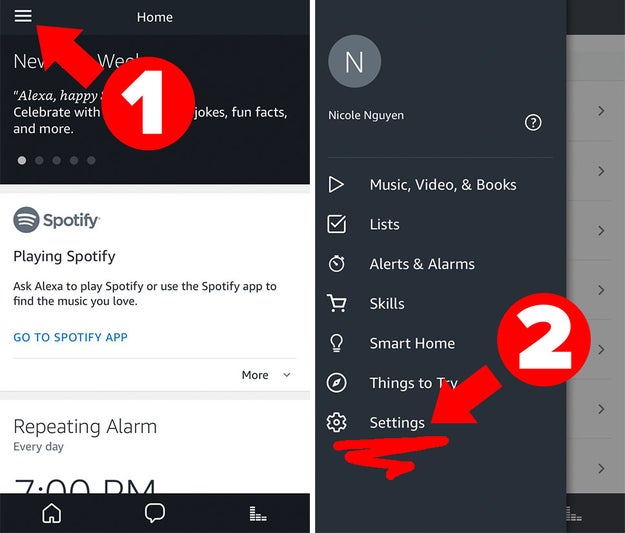
Alexa is the default wake word. To change it, open the Alexa app, go to Settings, tap on your Echo device’s name, then scroll down to Wake Word. The options are “Alexa,” “Amazon,” “Echo,” and the Star Trek-inspired “Computer.”

Training the Echo to recognize your voice will help the device hear you.

Voice training will *significantly* enhance your Alexa experience. In the Settings app, scroll down to Voice Training, and select your Echo device from the menu at the top. You’ll then say 25 phrases aloud, which takes about 10 to 15 minutes – but you can pause the training and return to it at any time.

Adjust your Echo’s volume (or prepared to be VERY startled the next time you set an alarm).
Nicole Nguyen / BuzzFeed News

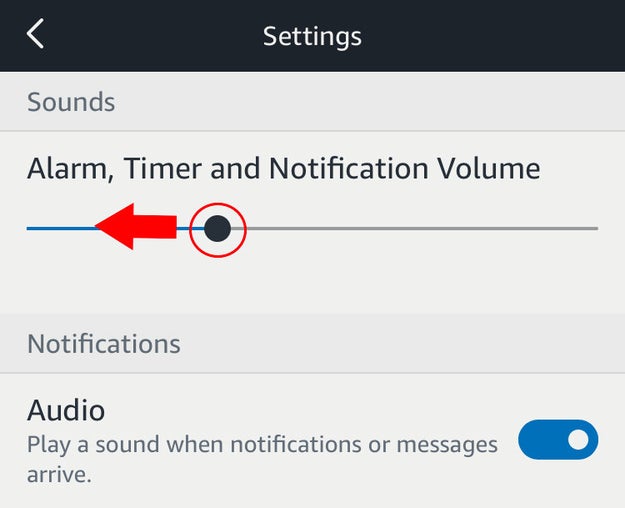
If your Echo is right next to your bed, you might want to lower its notification volume, which was unnecessarily loud when I initially set up my Echo. In Settings, tap on your Echo’s device name > under General, tap Sounds > use the top slider to adjust how loud alarms, timers, and notifications play.

Choose Spotify as your default music service.
Nicole Nguyen / BuzzFeed News

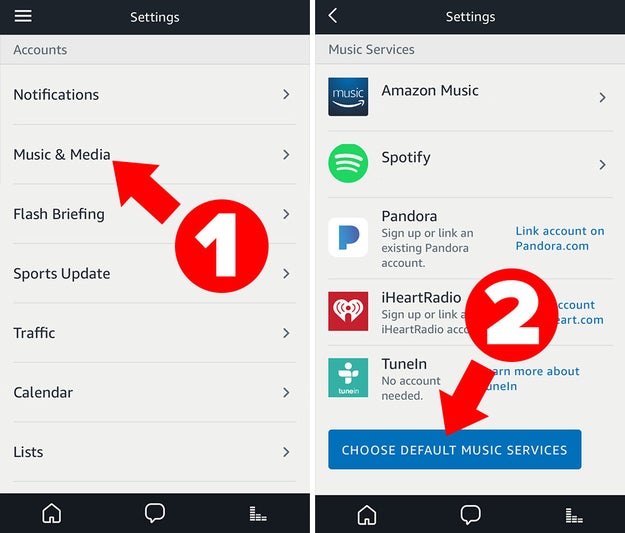
Spotify isn’t the only music service you can connect to Alexa — Amazon Music, Pandora, iHeartRadio, TuneIn, and SiriusXM are also Echo-compatible (sorry, no Apple Music) — but Spotify is certainly the most popular. Alexa’s default music service is the “free” version of Prime Music that comes with Prime, which has a smaller music library than the $8 per month Amazon Music Unlimited Plan. If Spotify is how you usually listen to tunes, you can easily make it your default player in Settings.

In the Alexa app, go to Settings > under Account > go to Music & Media > tap Choose Default Music Services at the bottom. Now you can simply say, “[Wake word], play my Discover Weekly.”

If you use Apple Music or Tidal, you can stream your music by pairing a mobile device to your Echo via Bluetooth. Scroll down to You can play your personal music collection on the Echo to learn more.

You can connect an additional Spotify account by adding another Alexa profile.
Nicole Nguyen / BuzzFeed News

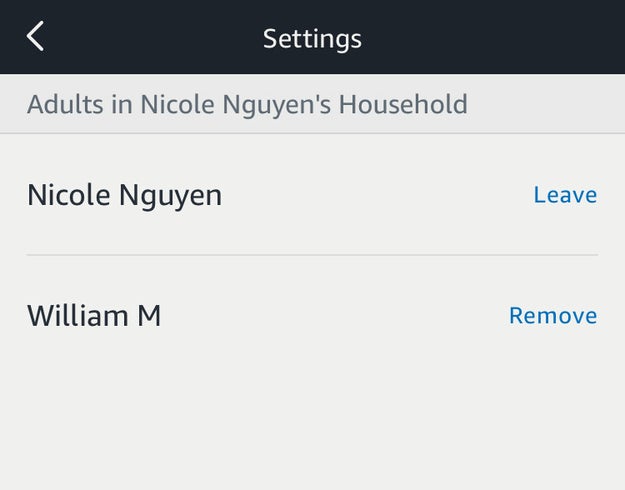
Spotify integration can get a little tricky if multiple people have access to your Echo. For example, if the Echo is only connected to one Spotify account and someone is listening to Spotify on the Echo at home, you won’t be able to listen to Spotify on your laptop at work.

Adding a user to your Amazon household fixes this problem (one household can only have two adults). Go to Settings > under Account > select Household Profile to add another adult to your Amazon Household. Say, “[Wake word], switch accounts” to access the other profile’s Discovery Weekly on Spotify or audiobooks. You can also say “Which account is this?” at anytime.

Careful: If you remove an adult from an Amazon Household, you won’t be able to join another Household or add another adult to your Household for 180 days.

The Echo can also be your new home phone.
You can use the Echo to make or receive calls. The caveat? The person on the other end also needs an Echo device, or the free Alexa app installed on their phone.

Once you set up Amazon’s new Wi-Fi calling and messaging service, the Alexa app will request access to your phone’s contact list and will automatically add all contacts who have signed up for Alexa calling to your Alexa app. To call one of those contacts, you can say, “[Wake word], call [first name/last name],” then Alexa will confirm which person you want to call, and then ping their Echo or mobile device.

It’s important to note that your Echo can’t call 9-1-1 or other emergency services.

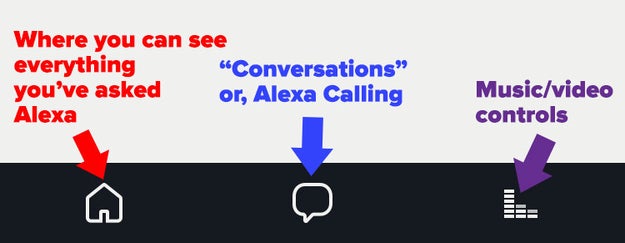
When someone calls you, you can say, “[Wake word], answer” or “[Wake word], ignore.” You can block people you’d probably rather *not* call your Echo, by tapping on the “Conversations” tab (the middle icon on the bottom right in the Alexa app) > tap the contact list icon on the top right > scroll all the way down to Block Contacts. And if Alexa calling isn’t for you? Deactivate the service by calling the Amazon help number.

If you have multiple Echo devices, you can use them as an inter-house intercom.

Fox / Via simpsonsworld.com

With this setting enabled, you can essentially use multiple Echos as walkie-talkies. Name each device by room (like, “office” or “kitchen”). Then go to Settings > for each device listed, turn on Drop In > for Only my household. Now you can say, “[Wake word], call the kitchen” or “[Wake word], drop in on the kitchen.”

You can also call these Echo devices from your phone while you’re away from home, by opening the Alexa app and saying the same command (“[Wake word] call the kitchen”).

Speaking of Alexa Calling, schedule “Do Not Disturb” during sleeping hours.

bravotv.com

Do Not Disturb prevents Alexa from letting calls through. Your Echo will, however, play alarms and timers. You can say, “[Wake word], do not disturb” or “[Wake word], turn off do not disturb.”

In the Alexa app, you can also schedule the feature. Go to Settings > your Echo device name > under Do Not Disturb, tap Scheduled, then select Start and End times.

Add a confirmation code to voice purchasing.

The Echo can buy stuff for you (because Amazon). You can say things like, “Reorder diapers” or “Order AA batteries.”

The feature is an easy way to make sure you never run out of olive oil, laundry detergent, etc. — but it can also be disastrous. A six-year-old in Texas was able to order a $170 dollhouse and four pounds of cookies through voice purchasing. You do need to say “yes” to confirm the order, but that’s not difficult for a toddler. Protect yourself from accidental purchases by going to the app’s Settings > Voice Purchasing > and under Require confirmation code, enter a 4-digit code.

The Echo can be a great to-do manager, but the Alexa app sucks. Link Any.do or Todoist instead.
Any.do

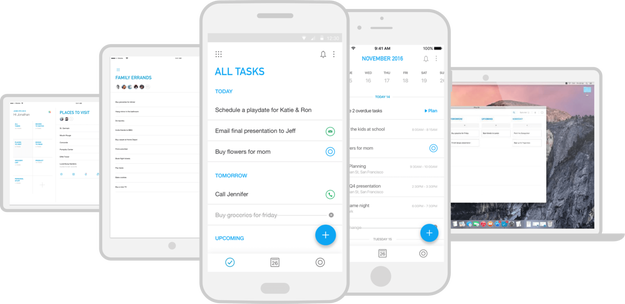
When you need to remember to do something, it’s incredibly convenient to utter “Add ‘Take out the trash tomorrow’ to my to do list” into thin air. But the Alexa app’s built-in to-do list looks a little clunky and doesn’t have many features (like the ability to set a reminder), so try using an Alexa-compatible app instead, like Any.do or Todoist.

Go to Settings > Lists to link an Anydo or Todoist account (Any.do is my personal preference because it’s so well-designed). By connecting your Alexa to-do list to a more robust app, you can set better reminders, add notes, and share and assign individual tasks. In other words, you’ll actually get stuff done.

Now that you’ve fiddled with some of the most important settings – read this post on the most useful, basic Amazon commands.

Nicole Nguyen / BuzzFeed News

Since that article was published last year, I’ve discovered some neat new Alexa uses.

Kindle + Audiobook + Whispersync + Echo = Amazingness.
Nicole Nguyen / BuzzFeed News

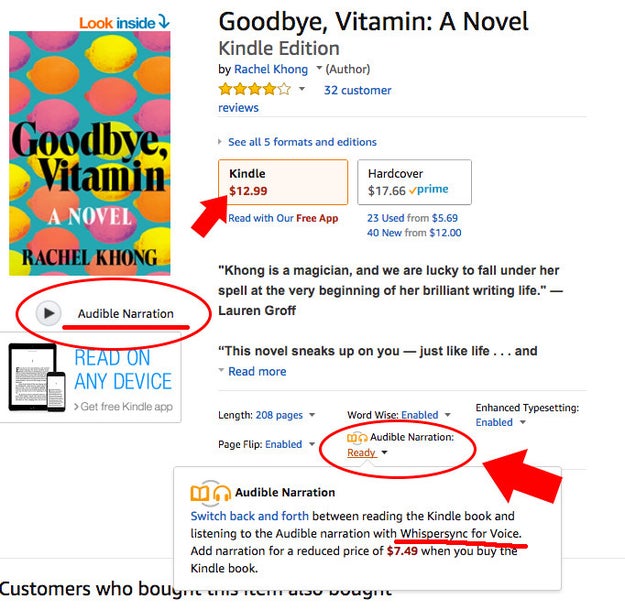
Guys. Synced Kindle and audiobooks are the BEST. You can start reading your Kindle book on your bus ride home, and then, while you’re folding laundry later that night, pick up where you left off via the audio version of that same book on your Echo. THEN, before you go to bed, open up your book on your Kindle (or phone, tablet, whatever) where the audio left off.

Bonus tip: Pair your Echo via Bluetooth to a waterproof speaker and listen to your book while you shower.

It’s the only way I’ve been able to actually finish books this year (seriously). When you search for a book on Amazon in Kindle e-books, the result will read “Whispersync for Voice-ready” under the price, which indicates that title is also available as an audiobook, and can be synced to your Kindle e-book progress. The audiobook add-on typically costs between $6 and $15 and it’s worth it.

You can play your personal music collection on the Echo.

If you have music purchased through iTunes or Google Play, you can access that library via your Echo devices.

There are two ways to do this: The easy way is connecting a phone or tablet to your Echo device via Bluetooth. Say, “[Wake word], pair” and in the Bluetooth settings page of your mobile device, the Echo device will appear as a speaker. You can now play music stored locally on your phone or tablet. It’s also the easiest way to play podcasts if you’re not on the most recent episode.

The slightly harder way is to upload your music library to Amazon Music using the app for PC or Mac. You can sync up to 250 songs for free, before having to upgrade to Amazon Music Unlimited ($8 per month for Prime users).

If you move your Echo between rooms a lot, get an extra adapter. It might need resetting, too.
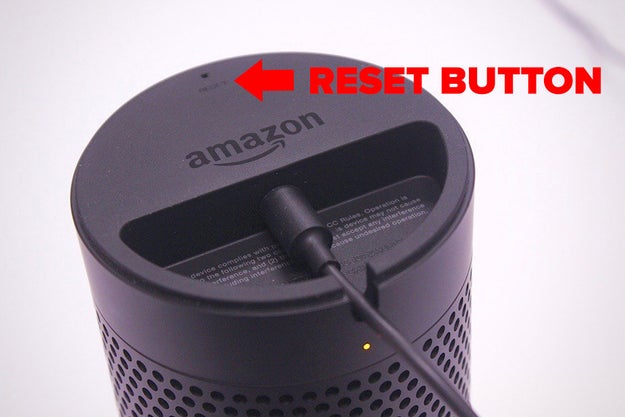
Nicole Nguyen / BuzzFeed News

Quelle: <a href="So You Got An Amazon Echo. Now What?“>BuzzFeed

OpsTools on RDO

OpsTools for RDO

CentOS SIG

In the CentOS community there are Special Interest Groups (SIG) that focus on specific issues such as cloud, storage, virtualization, or operational tools (OpsTools). These special interest groups are created to either to create awareness or to tackle the development of that subject with focus. Among the groups there is the Operational tools group (OpsTools) that focus on

Performance Monitoring
Availability Monitoring
Centralized Logging

OpenStack Operational Tools

While the OpsTools are created for the CentOS community, it is also applicable and available for RDO. More information can be found at GitHub.

Centralized Logging

The centralized logging has the following components:

A Log Collection Agent (Fluentd)
A Log relay/transformer (Fluentd)
A Data store (Elasticsearch)
An API/Presentation Layer (Kibana)

With the minimum hardware requirement:

8GB of Memory
Single Socket Xeon Class CPU
500GB of Disk Space

Detailed instruction to install can be found here.

Availability Monitoring

The Availability Monitoring has the following components:

A Monitoring Agent (sensu)
A Monitoring Relay/proxy (rabbitmq)
A Monitoring Controller/Server (sensu)
An API/Presentation Layer (uchiwa)

With the minimum hardware requirement:

4GB of Memory
Single Socket Xeon Class CPU
100GB of Disk Space

Detailed instruction to install can be found here.

Performance Monitoring

The Performance Monitoring has the following components:

A Collection Agent (collectd)
A Collection Aggregator/Relay (graphite)
A Data Store (whisperdb)
An API/Presentation Layer (grafana)

With the minimum hardware requirement:

4GB of Memory
Single Socket Xeon Class CPU
500GB of Disk Space

Detailed instruction to install can be found here.

Ansible playbooks for deploying OpsTools

Besides manually install the OpsTools, there are Ansible roles and playbooks to automate the installation process and instructions can be found here.
Quelle: RDO

The Pro-Trump Media Is Full Of Offensive Memes And Trolls, But Is It A Hate Group?

On July 19, the Anti-Defamation League kicked the pro-Trump media hornet’s nest with the publication of a new report cataloging the factions of the alt-right and their key voices. It also prompted the question: How do you classify a hate group in 2017?

Titled “From Alt Right to Alt Lite: Naming The Hate,” the ADL report attempts to define those movements, noting the meaningful differences between the two and listing 36 personalities closely associated with them. For example, the moniker alt-lite was coined by the alt-right in order to differentiate itself from those in the pro-Trump world who denounce white supremacist ideology.

The report's publication sparked near-immediate outrage from some of those who were included. New Right personality Mike Cernovich lambasted the ADL’s report as a “hit list of political opponents,” alleging that by including him on a list of hate leaders, the organization had made him and his family targets of an intolerant and violent left that “murder[s] those the ADL disagrees with politically.” Jack Posobiec, a pro-Trump Twitter personality, took an equally combative stance. On vacation in Poland, he tweeted a short video from Auschwitz. “It would be wise of the ADL to remember the history of what happened the last time people started going around making lists of undesirables,” he said, panning the camera across the concentration camp.

Over the next few days, the controversy gathered considerable momentum on Twitter. Cernovich’s followers tweeted prayers for the safety of him and his family, and condemned the ADL. Gateway Pundit founder Jim Hoft called the organization’s report a “death list,” while his White House reporter, Lucian Wintrich, decried the ADL as a “liberal terrorist organization.” Rebel Media’s Gavin McInnes — named on the list along with Wintrich — threatened to “sue the living shit out of everyone even remotely involved.” The hashtag #ADLterror trended for a few hours. Last week, Republican Senate candidate and Ohio Treasurer Josh Mandel jumped into the controversy, siding with Cernovich and chastising the ADL.

But beneath all the murk and outrage and alt-right/alt-lite/New Right semantics was a reasonable question: In the Trump era, where is the line between hate speech and the extremist, often outlandish, conspiracy-propagating messaging of those movements?

For Cernovich — who played a role in the Twitter propagation of the #Pizzagate conspiracy and has a history of tweeting incendiary opinions from everything from date rape and immigration (much of which he has argued was clear satire) — the line doesn't fall anywhere near him. He argues that, while his statements might not be politically correct or always in good taste, they aren't hate speech, and certainly don’t make him a member of a hate group.

“What does the ADL have on me? Some satirical tweets, hell, even some mean tweets and stuff I'm not proud of?” Cernovich told BuzzFeed News in response to the report. “I have a lot of liberal friends. Many of them in high places. They think I'm an asshole, but 'hate group' has them livid.”

Cernovich insists he’s being unfairly targeted for his pro-Trump views. “This tweet mining bullshit is only used on the right,” he argued. In his view, the New Right is a movement defined not by discrimination or hateful rhetoric, but by pugnacious political commentary and debate. It is nothing, he says, like the alt-right of Richard Spencer, which hews toward a race-based white nationalism. As with Trump himself, the New Right’s true ideology isn’t always clear, and the group tends to behave more as a pro-Trump media arm than as an ideological group. Its main target isn’t a protected race or religion, but the mainstream media. It doesn’t behave quite like any traditional hate group. So can it be called one?

In an interview with BuzzFeed News, the ADL argued that it most certainly can. “I don't think irony and self-promotion is an excuse for bigotry of any kind, whether it’s misogyny or any other form of bigotry,” said Oren Segal, who runs the ADL's Center on Extremism. “Doing it in a way that's more modern or tech-y doesn't make it OK — nor does it make it any less difficult for those who've been impacted.”

“I don't think irony and self-promotion is an excuse for bigotry of any kind.”

Segal noted that the alt-lite or New Right — while not particularly well-defined as a movement — includes individuals with extremist views. “These are people who are on the record with anti-Muslim bigotry and hatred and misogyny — people who support trolling,” he said in defense of the ADL’s report.

Jeff Giesea, an entrepreneur and consultant who helped organize the pro-Trump DeploraBall — an inaugural ball to celebrate the work of the pro-Trump internet — sees the ADL’s decision to categorize the New Right as hate group personalities as a bridge too far. “Based on the ADL's logic, all 63 million Americans who voted for Trump should be on their hate list. If everyone is an extremist, no one is,” he told BuzzFeed News.

Giesea argues that, historically, Cernovich’s views are quite moderate. Perhaps more importantly, he contends that the New Right’s strategy — to promote a pro-Trump agenda via an ongoing, meme-fueled assault on the mainstream media — is a new kind of political discourse.

“By being so quick to label something 'bigotry,' the ADL is getting in the way of the healthy exchange of ideas,” Giesea said. “It pushes people further right by pathologizing common sense. It is a mode of social control that simply doesn't work in the age of social media.”

“Based on the ADL's logic, all 63 million Americans who voted for Trump should be on their hate list.”

Since the beginning of the 2016 election our political discourse has become increasingly fraught, muddied by misinformation and trolling from the fringes of both sides of the aisle. And within this morass, a reflex has emerged on both sides to reflexively label political disagreements as signs of hate. Back in April, the internet erupted over Cernovich and another pro-Trump reporter flashing the “OK” sign at the podium in the White House Briefing Room. A number of news outlets misidentified the sign as a white power symbol, falling for a trap laid by pro-Trump trolls who had been trying to trick the media into thinking the meaningless symbol had nefarious origins. The incident sparked a defamation lawsuit filed by one of the pro-Trump reporters, as well as an existential argument around when exactly a symbol morphs from an ironic troll to a real sign of hate.

Giesea has run this over in his mind frequently, and argues that there’s more nuance and craft to the pro-Trump movement’s tactics. “Memetics is a form of art,” he said. “Shock and controversy is what makes memes effective. They push moral boundaries. Sometimes this is healthy and can challenge certain narratives, other times it can feel toxic and juvenile. Think about it – what memes would Voltaire share?” Giesea concedes that there are moral considerations to social media behavior, but suggests that “the ADL list feels like an act of political warfare, rather than a good faith attempt to discuss these issues.”

Ultimately, the problem appears to be definitional. For Heidi Beirich, the director of the Southern Poverty Law Center’s Intelligence Project, the alt-right and alt-lite movements may be fluid, but the definition of hate is not. Beirich says the SPLC follows roughly the same standards for defining hate groups as the FBI uses for hate crimes. In a recent op-ed for Huffington Post, SPLC President Richard Cohen defined a hate group as “those that have ‘beliefs or practices that attack or malign an entire class of people, typically for their immutable characteristics.’”

“What memes would Voltaire share?”

“We don't care as much about the pro-Trump stuff,” Beirich told BuzzFeed News. “It's the specific policies we're worried about — whether it's anti-Muslim or anti-immigrant.” For example, she noted that despite articles with anti-immigrant sentiment, “we're not going to list a publication like Breitbart as a hate group unless they publish much more stuff that’s much further over the line.”

In trying to categorize the Cernoviches and Posobiecs of the world, Beirich said it’s best to categorize them on a case-by-case basis, remembering that hate speech isn't necessarily the only (or most) relevant category. “Take Pizzagate,” she said. “We've written about anti-government conspiracy theorists since the 1990s and that's a different thing than our hate lists — it doesn’t excuse the behavior, but it’s different.”

The ADL sees no such difference and, on its Naming the Hate report, is standing its ground. To Segal, the fact that the behavior of the New Right doesn’t follow the established patterns of other fringe movements is reason enough to worry about its evolution and growth. “In a sense this rhetoric is potentially more harmful because it's not so clearly being promoted as hate,” he told BuzzFeed News. “I think we can see through that. If they call it a joke, we're not laughing.”

Quelle: <a href="The Pro-Trump Media Is Full Of Offensive Memes And Trolls, But Is It A Hate Group?“>BuzzFeed

Introducing AWS Config Dashboard

AWS Config now provides a dashboard with a summarized view of resources in your account. With the AWS Config Dashboard, you can view the total number of resources being recorded in your account and the count of resources by type to easily access the configuration history of a resource. You can also quickly spot the number of resources that are non-compliant with your Config rules in each region, view the Config rules with the most non-compliant resources, and drill down to view the resources that are non-compliant with a particular Config rule. 
Quelle: aws.amazon.com

Three steps to Compute Engine startup-time bliss: Google Cloud Performance Atlas

By Colt McAnlis, Developer Advocate

Scaling to millions of requests, with less headaches, is one of the joys of working on Google Cloud Platform (GCP). With Compute Engine, you can leverage technologies like Instance Groups and Load Balancing to make it even easier. However, there comes a point with VM-based applications where the time it takes to boot up your instance can be problematic if you’re also trying to scale to handle a usage spike.

Before startup time causes woes in your application, let’s take a look at three simple steps to find what parts of bootup are taking the most time and how you can shorten your boot time.

Where does the time go?
One of the most important first steps to clearing up your startup time performance is to profile the official boot stages at a macro level. This gives you a sense of how long Compute Engine is taking to create your instance, vs. how much time your code is taking to run. While the official documentation lists the three startup phases as provisioning, staging and running, it’s a little easier to do performance testing on request, provisioning and booting, since we can time each stage externally, right from Cloud Shell.

Request is the time between asking for a VM and getting a response back from the Create Instance API acknowledging that you’ve asked for it. We can directly profile this by timing how long it takes GCP to respond to the insert instance REST command.
Provisioning is the time GCE takes to find space for your VM on its architecture; you can find this by polling the Get Instance API on a regular basis, and wait for the “status” flag to change from “provisioning” to “running.”
Boot time is when your startup scripts, and other custom code, executes; all the way up to the point when the instance is available. Fellow Cloud Developer Advocate Terry Ryan likes to profile this stage by repeatedly polling the endpoint, and timing the change between receiving 500, 400 and 200 status codes

An example graph generated by timing the request, provision and boot stages, measured 183 times

Profiling your startup scripts
Barring some unforeseen circumstance, the majority of boot-up time for your instances usually happens during the boot phase, when your instance executes its startup scripts. As such, it’s extremely helpful to profile your boot scripts in order to see which phases are creating performance bottlenecks.

Timing your startup scripts is a little trickier than it may seem at first glance. Chances are that your code is integrated into a very powerful tooling system (like Stackdriver Custom Metric API, statsd or brubeck) to help you profile and monitor performance. However applying each one to the startup scripts can create a difficult interaction and boot time overhead, which could skew your profiling results, thus making the testing meaningless.

One neat trick that gets the job done is wrapping each section of your startup script with the SECONDS command (if you’re on a linux build), then append the time elapsed for each stage to a file, and set up a new endpoint to serve that file when requested.

This allows you to poll the endpoint from an external location and get data back without too much heavy lifting or modification to your service. This method will also give you a sense of what stages of your script are taking the most boot time.

An example graph generated by timing each stage in a linux startup script

Moving to custom images
For most developers, most of the time that a startup script runs is bringing down packages and installing applications to allow the service to run properly. That’s because many instances are created with public images — preconfigured combinations of OS and bootloaders. These images are great when you want to get up and running fast, but as you start building production-level systems, you’ll soon realize that the large portion of bootup time is no longer booting the OS, but the user-executed startup sequence that grabs packages and binaries and initializes them.

You can address this by creating custom images for your instance. Create a custom image by taking a snapshot of the host disk information (post-boot and install), and store it in a distribution location. Later, when the target instance is booted, the image information is copied right to the hard drive. This is ideal for situations where you’ve created and modified a root persistent disk to a certain state and would like to save that state to reuse it with new instances. It’s also good when your setup includes installing (and compiling) a number of big libraries, or pieces of software.

An example graph generated by timing the startup phases of the instance. Notice that the graph on the right side is in sub-second scale.

Every millisecond counts
When you’re trying to scale to millions of requests per second, being serviced by thousands of instances, small change in boot time can make a big difference in costs, response time and most importantly, the perception of performance by your users.

If you’d like to know more about ways to optimize your Google Cloud applications, check out the rest of the Google Cloud Performance Atlas blog posts and videos because when it comes to performance, every millisecond counts.

Quelle: Google Cloud Platform