What can NFV do for a business?

The post What can NFV do for a business? appeared first on Mirantis | Pure Play Open Cloud.
[NOTE:  This article is an excerpt from Understanding OPNFV, by Amar Kapadia. You can also download an ebook version of the book here.]
Telcos, multiple-system operators (MSOs i.e. cable & satellite providers), and network providers are under pressure on several fronts, including:


OTT/ Web 2.0
Over-the-top and Web services are exploding, requiring differentiated services and not just a ‘pipe’.
ARPU under pressure
Average revenue per user is under pressure due to rising acquisition costs, churn and competition.
Increased Agility
Pressure to evolve existing services and introduce new services faster is increasing.

 
Enterprises with extensive branch connectivity or IOT deployments also face similar challenges. If telecom operators or enterprises were to build their networks from scratch today, they would likely build them as software-defined resources, similar to Google or Facebook’s infrastructure. That is the premise of Network Functions Virtualization.
What is NFV?
In the beginning, there was proprietary hardware.
We’ve come a long way since the days of hundreds of wires connected to a single tower, but even when communications services were first computerized, it was usually with the help of purpose-built hardware such as switches, routers, firewalls, load balancers, mobile networking nodes and policy platforms. Advances in communications technology moved in tandem with hardware improvements, which was slow enough that there was time for new equipment to be developed and implemented, and for old equipment to be either removed or relegated to lesser roles. This situation applied to phone companies and internet service providers, of course, but it also applied to large enterprises that controlled their own IT infrastructure.
Today, due largely to the advent of mobile networking and cloud computing, heightened user demands in both consumer and enterprise networks have led to unpredictable (“anytime, anywhere”) traffic patterns and a need for new services such as voice and video over portable devices. What’s more, constant improvement in consumer devices and transmission technology continue to evolve these themes.
This need for agility led to the development of Software Defined Networking (SDN). SDN enables administrators to easily configure, provision, and control networks, subnets, and other networking architectures on demand and in a repeatable way over commodity hardware, rather than having to manually configure proprietary hardware. SDN also made it possible to provide “infrastructure as code,” where configuration information and DevOps scripts can be subject to the same oversight and version control as other applications.
Of course, there was still the matter of those proprietary hardware boxes.
Getting rid of them wasn’t as simple as deploying an SDN; they were there for a reason, and that reason usually had to do with performance or specialized functionality. But with advances in semiconductor performance and the ability of conventional compute hardware to perform sophisticated packet processing functions came the ability to virtualize and consolidate these specialized networking functions.
And so, Network Functions Virtualization (NFV) was born. NFV enables complex network functions to be performed on compute nodes in data centers. A network function performed on a compute node is called a Virtualized Network Function (VNF). So that VNFs can behave as a network, NFV also adds the mechanisms to determine how they can be chained together to provide control over traffic within a network.
Simplified Network Architecture Before NFV

Simplified Network Architecture After NFV

Although most people think of it in terms of telecommunications, NFV encompasses a broad set of use cases, from Role Based Access Control (RBAC) based on application or traffic type, to Content Delivery Networks (CDN) that manage content at the edges of the network (where it is often needed), to the more obvious telecom-related use cases such as Evolved Packet Core (EPC) and IP Multimedia System (IMS).
Benefits of NFV
NFV is based on the “Google infrastructure for everyone else” trend where large companies attempt to copy the best practices from the web giants to increase revenue and customer satisfaction while also slashing operational and capital costs. This explains the strong interest in NFV from both telcos and enterprises with numerous benefits:
Increased Revenue
New services can be rolled out faster (since we are writing and trying out code and vs. designing ASICs or new hardware systems), and existing services can be provisioned faster (again, software deployment vs. hardware purchases). For example, Telstra’s PEN product was able to reduce the provisioning time for WAN-on-demand from three weeks to seconds, eliminate purchase orders and man-hours of work and reduce customer commitment times for the WAN link from one year to one hour.
Telstra’s PEN Offering

Improved Customer Satisfaction
With an agile infrastructure, no one service runs out of resources as each service is dynamically provisioned with the exact amount of infrastructure required based on the utilization at that specific point in time. (Of course, there’s still a limit on the aggregate amount of infrastructure.) For example, no longer will mobile end users experience reduced speed or service degradation. Customer satisfaction also improves due to rapid self-service deployment of services, a richer catalog of services and the ability, if offered by the operator, to try-before-you-buy.
Reduced Operational Expenditure (Opex)
NFV obviates numerous manual tasks. Provisioning of underlying infrastructure, network functions and services can all be automated; even offered as self-service. This removes a whole range of truck rolls, program meetings, IT tickets, architecture discussions, and so on. At a non-telco user, cloud technologies have been able to reduce operations team sizes by up to 4x, freeing up individuals to focus on other higher-value tasks.
The standardization of hardware also slashes operational costs. Instead of managing thousands of unique inventory items, your team can now standardize on a few dozen. A bonus to reduced opex is reduced time-to-break-even. This occurs because, in addition to just virtualizing individual functions, NFV also allows complex services consisting of a collection of functions to be deployed rapidly, in an automated fashion. By shrinking the time and expense from customer request to revenue by instantly deploying services, the time-to-break-even can go down significantly for operators.
Reduced Capital Expenditure (Capex)
NFV dramatically improves hardware utilization. No longer do you waste unused cycles on proprietary fixed function boxes provisioned for peak load. Instead you can deploy services with the click of a button, and have them automatically scale-out or scale-in depending on utilization. In another non-telco industry example, a gaming IT company, G-Core, was able to double their hardware utilization by switching to a private cloud.
Using industry standard servers and open source software further reduces capex. Industry standard servers are manufactured in high volumes by multiple vendors resulting in attractive pricing. Open source software is also typically available from multiple vendors, and the competition drives down pricing. This is a win-win where reduced or elimination of vendor lock-in comes with reduced pricing.
Additionally, operators can reduce capex by utilizing different procurement models. Before NFV, the traditional model was to issue an RFP to Network Equipment Manufacturers (NEMs) and purchase a complete solution from one of them. With NFV, operators can now pick and choose different best-in-class vendors for different components of the stack. In fact, in some areas an operator could also choose to skip vendors entirely via the use of 100% open source software. (The last two option is not for the faint-of-heart, and we will explore the pros and cons of different procurement models in the next chapter.)
TIA Network’s “The Virtualization Revolution: NFV Unleashed – Network of the Future Documentary, Part 6” states that the total opex plus capex benefit of an NFV-based architecture could be a cost reduction of up to 70%.
Freed up Resources for New Initiatives
If every operator resource is busy with keeping current services up and running, there aren’t enough staff resources to work on new upcoming initiatives such as 5G and IoT. The side effect of reduced opex is that the organization will now have resources freed up to look at these important new initiatives, and so contribute to overall increased competitiveness. Or putting it another way, unless you fully automate the lower layers, there won’t be enough time and focus on the OSS/BSS layer, which is the layer that improves competitiveness and generates revenue.
Example Total-cost-of-ownership (TCO) Analysis
 

Intel and the PA Consulting Group have created a comprehensive TCO analysis tool for the vCPE use case (see below). In one representative study conducted with British Telecom, the tool was populated with assumptions for an enterprise customer where physical network functions from the customer’s premise were moved to the operator’s cloud. In this study, the tool shows that the operator can reduce their total cost by 32% to 39%. The figure encompassed all costs including hardware, software, data center, staff and communication costs. The TCO analysis was conducted over a five-year period, and included a range of functions such as firewall, router, CGNAT, SBC, VPN and WAN optimization. These results are representative and will obviously change if another study has different assumptions. Also, as mentioned earlier, cost is only one of the many benefits of NFV.

NFV Use Cases
Since the initial group of companies that popularized NFV was made up primarily of telecommunications carriers, it is perhaps no surprise that most of the original use cases are related to that field. As we’ve discussed, NFV use cases span a broader set of industries. Instead of covering all use cases comprehensively, we are going to touch upon the three most common:
vCPE (Virtual Customer Premise Equipment)
vCPE virtualizes the set of boxes (such as firewall, router, VPN, NAT, DHCP, IPS/ IDS, PBX, transcoders, WAN optimization and so on) used to connect a business or consumer to the internet, or branch offices to the main office. By virtualizing these functions, operators and enterprises can deploy services rapidly to increase revenue and cut cost by eliminating truck rolls and lengthy manual processes. vCPE also provides an early glimpse into distributed computing where functionality in a centralized cloud can be supplemented with edge compute.
vEPC (Virtual Evolved Packet Core)
Both the sheer amount of traffic and the number of subscribers using data services has continued to grow as we have moved from 2G to 4G/LTE, with 5G around the corner. vEPC enables mobile network operators (MVNO) and enablers (MVNE) to use a virtual infrastructure to host voice and data services rather than using an infrastructure built with physical functions. A prerequisite to providing multiple services simultaneously requires “network slicing” or the network multi-tenancy, a capability also enabled by vEPC. In summary, vEPC can cut opex and capex while speeding up delivery and enabling on-demand scalability.
vIMS (Virtual IP Multimedia System)
OTT competitors are driving traditional telco, cable and satellite providers towards offering voice, video, and messaging over IP as a response. A virtualized system can offer the agility and scalability required to make IMS an economically viable offering to effectively compete with startups.
This list is by no means comprehensive, even in the short term. Numerous other use cases exist today and new ones are likely to emerge. The most obvious one is 5G. With 50x higher speeds, 10x lower latencies, machine-to-machine communication, connected cars, smart cities, e-health, IOT and the emergence of mobile edge computing and network slicing, it is hard to imagine telecom providers or enterprises being successful with physical network functions.
[NOTE:  This article is an excerpt from Understanding OPNFV, by Amar Kapadia. You can also download an ebook version of the book here.]
The post What can NFV do for a business? appeared first on Mirantis | Pure Play Open Cloud.
Quelle: Mirantis

Fox Sports ensures uninterrupted content delivery with Aspera

When people down under want to watch AFL, rugby, cricket rugby league, car racing or even darts, they turn to Fox Sports Australia.
The network provides round-the-clock coverage of worldwide sports, including exclusive coverage of everything from events such as UFC to MotoGP and F1 racing. Fans can find scores, commentary and videos on the Fox website, as well as view highly sought-after insights in and around their sports from former and current players. For many, Fox Sports is a permanent fixture in their daily television watching.
Fox Sports Australia Pty Limited is Australia’s leading producer of sports television coverage and is home to Australia’s favorite subscription television sports channels, as well as Australia’s number one general sports website.
How does Fox Sports keep fans engrossed? It provides a constant stream of interesting and relevant content with more than 13,000 hours of live sports programming every year across the network’s seven channels, coupled with quality programs sourced from all over the world.
This is no easy feat: up until recently, as with most broadcasters, the final line in the sand for the change from physical- to file-based delivery of content is still yet to complete. The content is distributed in multiple formats (including tapes and hard drives), and people are tasked with assimilating it in a haphazard way, holding their collective breath that everything goes off without a hitch. Fox Sports, being in the unique geographical location of Australia, is further impacted by the tyranny of distance, so logistics and data transfer are even more of a challenge.
As the network grows, more providers are being added to the mix, and the process of sourcing programming becomes increasingly convoluted and time consuming to ensure viewers aren’t looking at stale content. In the world of premium sports, the speed to customer is paramount.
Fox Sports selected high-speed file transfer solutions from Aspera to streamline the ingestion of content from global providers. Aspera, an IBM company, enables suppliers to upload programs quickly and reliably, saving time and ensuring content is received, processed and ready to go in time for broadcast.
Fox Sports uses Aspera Shares and Aspera Point-to-Point to simplify and accelerate the process. Providers initiate a secure, high-speed transfer via Aspera Point-to-Point. Administrators at Fox are immediately notified when the transfer completes and the content is ready. The files are then passed through a series of steps, including transcoding and quality control (QC) checks via Telestream Vantage. Once editing and processing is completed, the finished content is uploaded to Aspera Shares for distribution, where it can be browsed and downloaded at high speed by users with appropriate access rights.
The network chose Aspera because Aspera has established itself as the international market leader for efficient, file-based transfer. Fox Sports wants granular control over all the content coming in and out of its building from third party vendors, internal vendors and syndicated vendors. Additionally, Aspera’s strong local presence in Australia was appealing.
The platform also gives Fox Sports the capability to conduct ad hoc business. For instance, if the network hears of an upcoming sporting event it wants to rapidly deliver and that a niche sport content aggregator has, the network can quickly arrange to feature it without changing infrastructure or negatively impacting workflows. With Australia on the other side of the world, and its low bandwidth and poor infrastructure, Aspera’s ability to move data at maximum speed regardless of file size, transfer distance or network conditions was and continues to be an essential feature.
Sports is an enormous commodity in Australia, and fans want the best-quality premium content on their screens as quickly as possible. Whether they’ve invited all their friends over to watch the big game or it’s the kids who want to watch soccer, when people click their remotes, they expect to be entertained, as do their family and friends. There can be no hiccups in the broadcast, or providers run the risk of rowdy sports fans tossing beer cans at the TV set or switching channels.
Learn more about Aspera.
The post Fox Sports ensures uninterrupted content delivery with Aspera appeared first on Cloud computing news.
Quelle: Thoughts on Cloud

Choosing the right compute option in GCP: a decision tree

By Terrence Ryan, Developer Advocate and Adam Glick, Product Marketing Manager

When you start a new project on Google Cloud Platform (GCP), one of earliest decisions you make is which computing service to use: Google Compute Engine, Google Container Engine, App Engine or even Google Cloud Functions and Firebase.

GCP offers a range of compute services that go from giving users full control (i.e., Compute Engine) to highly-abstracted (i.e., Firebase and Cloud Functions), letting Google take care of more and more of the management and operations along the way.

Here’s how many long-time readers of our blog think about GCP compute options. If you’re used to managing VMs and want a similar experience in the cloud, pick Compute Engine. If you use containers and Kubernetes, you can abstract away some of the necessary management overhead by using Container Engine. If you want to focus on your code and avoid the infrastructure pieces entirely, use App Engine. Finally, if you want to focus purely on code and build microservices that expose API endpoints for your applications, use Firebase and Cloud Functions.

Over the years, you’ve told us that this model works great if you have no constraints, but can be challenging if you do. We’ve heard your feedback and propose another way to choose your compute options using a constraint-based set of questions. (It should go without saying that we’re considering very small aspects of your project.)

1. Are you building a mobile or HTML application that does its heavy lifting, processing-wise, on the client? If you’re building a thick client that only relies on a backend for synchronization and/or storage, Firebase is a great option. Firebase allows you to store complex NoSQL documents (or objects if that’s how you think of them) and files using a very easy-to-use API and client available for iOS, Android and Javascript. There’s also a REST API for access from other platforms.

2. Are you building a system based more on events than user interaction? In other words, are you building an app that responds to uploaded files, or maybe logins to other applications? Are you already looking at “serverless” or “Functions as a Service” solutions? Look no further than Cloud Functions. Cloud Functions allows you to write Javascript functions that run on Node.js and that can call any one of our APIs including Cloud Vision, Translate, Cloud Storage or over 100 others. With Cloud Functions, you can build complex individual functions that get exposed as microservices to take advantage of all our services without having to maintain systems and glue them all together.

3. Does your solution already exist somewhere else? Does it include licensed software? Does it require anything other than HTTP/S? If you answered “no,” App Engine is worth a look. App Engine is a serverless solution that runs your code on our infrastructure and charges you only for what you use. We scale it up or down for you depending on demand. In addition, App Engine has access to all the Google SDKs available so you can take advantage of the full Google Cloud ecosystem.

4. Are you looking to build a container-based system built on Kubernetes? If you’re already using Kubernetes on GCP, you should really consider Container Engine. (You should think about it wherever you’re going to run Kubernetes actually.) Container Engine reduces building a Kubernetes solutions to a single click. Additionally, it auto-scales Kubernetes cluster members, allowing you to build Kubernetes solutions that grow and contract based on demand.

5. Are you building a stateful system? Are you looking to use GPUs in your solution? Are you building a non-Kubernetes container-based solution? Are you migrating an existing on-prem solution to the cloud? Are you using licensed software? Are using protocols other than HTTP/S? Have you not found another solution to meet your needs? If you answered “yes” to any of these questions, you’re probably going to need to run your solution on virtual machines on Compute Engine. Compute Engine is our most flexible computing product, and allows you the most freedom to configure and manage your VMs however you like.

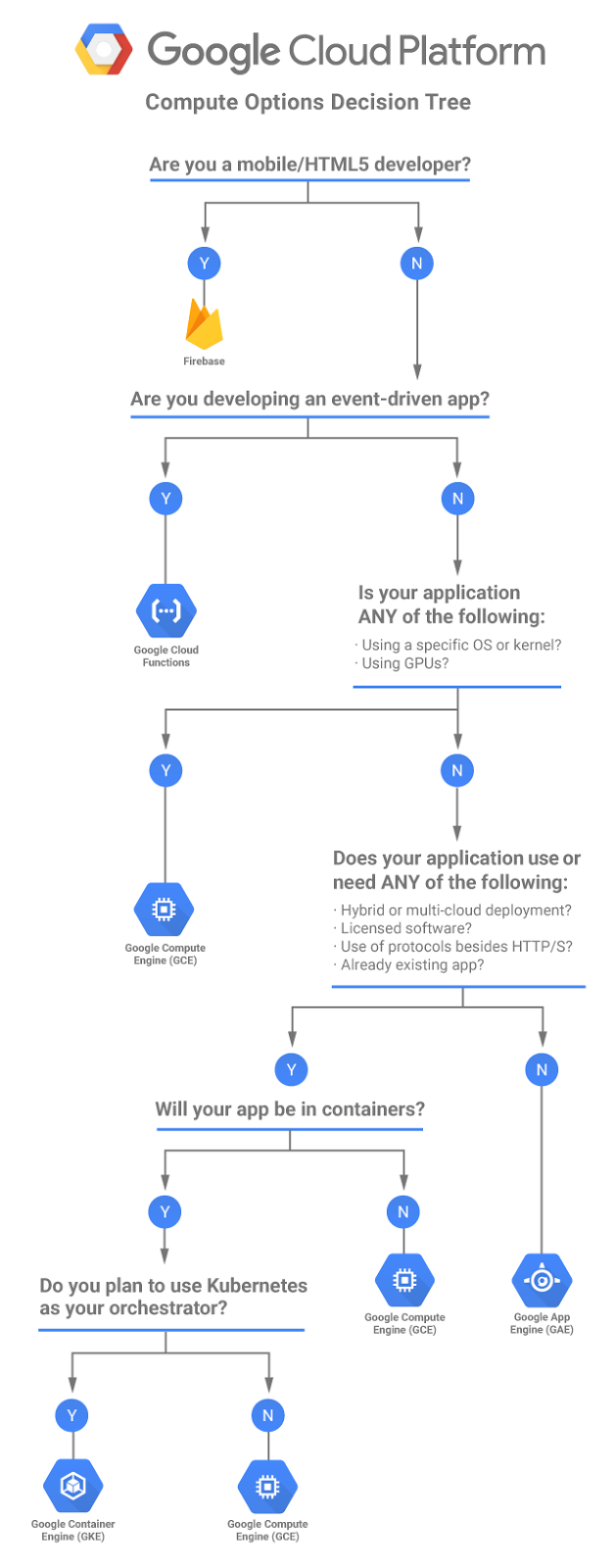
Put all of these questions together and you get the following flowchart:

This is by no means a comprehensive decision tree, and each one of our products supports a wider range of use cases than is presented here. But this should be a good guide to get you started.

To find out more about or computing solutions please check out Computing on Google Cloud Platform and then try it out for yourself today with $300 in free credits when you sign up.

Happy building!

Quelle: Google Cloud Platform

Announcing new set of Azure Services in the UK

We’re pleased to announce the following services which are now available in the UK!

Azure Container Service –  Azure Container Service is the fastest way to realize the benefits of running containers in production. It uses customers’ preferred choice of open source technology, tools, and skills, combined with the confidence of solid support and a thriving community ecosystem. Simplified configurations of proven open source container orchestration technology, optimized to run in the Azure cloud, are provided. In just a few clicks, customers can deploy in production container-based applications, and on a framework designed to help manage the complexity of containers deployed at scale. Unlike other container services, Azure Container Service is built on 100% open source software and offer a choice between open source orchestrators Kubernetes, DC/OS, or Docker Swarm with Swarm mode.
The UK region is the first Azure region featuring Docker Swarm mode instead of legacy Swarm.

Learn more about Container Service.

Log Analytics – Azure Log Analytics is a service in the Operations Management Suite (OMS) offering that monitors your cloud and on-premises environments to maintain their availability and performance. It collects data generated by resources in your hybrid cloud environments and from other monitoring tools to provide insights and analysis and help you detect and respond to issues quickly.
With the availability of Log Analytics in the UK, you can now access a full set of operations management and security services (Log Analytics, Automation, Security Center, Backup and Site Recovery) in the UK.

Learn more about Log Analytics.

Logic Apps –  Logic Apps provide a way to simplify and implement scalable integrations and workflows in the cloud. It provides a visual designer to model and automate your process as a series of steps known as a workflow. Logic Apps is a fully managed iPaaS (integration Platform as a Service) allowing developers not to have to worry about building, hosting, scalability, availability and management. Logic Apps scale up automatically to meet demand.

Learn more about Logic Apps.

Azure Stream Analytics –  Azure Stream Analytics is a fully managed, cost effective real-time event processing engine that helps to unlock deep insights from data. Stream Analytics makes it easy to set up real-time analytic computations on data streaming from devices, sensors, web sites, social media, applications, infrastructure systems, and more.

With a few clicks in the Azure portal, you can author a Stream Analytics job specifying the input source of the streaming data, the output sink for the results of your job, and a data transformation expressed in a SQL-like language. You can monitor and adjust the scale/speed of your job in the Azure portal to scale from a few kilobytes to a gigabyte or more of events processed per second.
Stream Analytics leverages years of Microsoft Research work in developing highly tuned streaming engines for time-sensitive processing, as well as language integrations for intuitive specifications of such.

Learn more about Stream Analytics.

SQL Threat Detection –  SQL Threat Detection provides a new layer of security, which enables customers to detect and respond to potential threats as they occur by providing security alerts on anomalous activities. Users will receive an alert upon suspicious database activities, potential vulnerabilities, and SQL injection attacks, as well as anomalous database access patterns. SQL Threat Detection alerts provide details of suspicious activity and recommend action on how to investigate and mitigate the threat. Users can explore the suspicious events using SQL Database Auditing to determine if they are caused by an attempt to access, breach, or exploit data in the database. Threat Detection makes it simple to address potential threats to the database without the need to be a security expert or manage advanced security monitoring systems.

Learn more about SQL Threat Detection.

SQL Data Sync Public Preview –  SQL Data Sync (Preview) is a service of SQL Database that enables you to synchronize the data you select across multiple SQL Server and SQL Database instances. To synchronize your data, you create sync groups which define the databases, tables and columns to synchronize as well as the synchronization schedule. Each sync group must have at least one SQL Database instance which serves as the sync group hub in a hub-and-spoke topology.

Learn more about Azure SQL Data Sync.

Managed Disks SSE (Storage Service Encryption) –  Azure Storage Service Encryption (SSE) is now supported for Managed Disks. SSE provides encryption-at-rest and safeguards your data to meet your organizational security and compliance commitments.
Starting June 10th, 2017, all new managed disks, snapshots, images and new data written to existing managed disks are automatically encrypted-at-rest with keys managed by Microsoft.

Learn more about Storage Service Encryption for Azure Managed Disks.

We are excited about these additions, and invite customers using the UK Azure region to try them today!
Quelle: Azure