Build and deploy hybrid applications in Azure using Docker Enterprise Edition

Don’t miss the Azure OpenDev event on June 21 2017 at 9am PDT.
Is your organization asking you to modernize a traditional app that uses old code to make it simpler to deploy and more scalable based on customer demand – what to do?
Scott Johnston, COO and Michael Friis, Product Manager at Docker will highlight two use cases that demonstrate how Docker and Microsoft are working together to help developers and IT-Pros build and deploy hybrid apps using Docker Enterprise Edition that span on-premises and Azure. Scott and Michael will also show how to use Docker to build microservices-based solutions on Azure and create agile software delivery pipelines in the cloud.
Scott Johnston’s session will cover the first use case: “Modernize Traditional Applications (MTA)” – a program that enables IT organizations to modernize legacy applications, transforming them in hybrid cloud deployments while simultaneously realizing substantial savings in their total cost of ownership (TCO). In partnership with companies such as Avanade and Microsoft, Docker is helping organizations containerize existing .NET Windows or Java Linux applications without modifying source code or re-architecting the applications. The applications can then be easily deployed to Azure in minutes.
This, addresses two major realities that IT organizations face: Existing applications consume 80% of most IT budgets, and IT organizations have to deliver on cloud migration initiatives. The heart of the program is methodology and tooling designed to make it easy for DevOps to deploy and manage newly-containerized applications onto hybrid cloud infrastructure. Put simply, Docker’s MTA program can help enterprise IT move forward on the path to digital transformation.
Michael Friis, will demo Image2Docker where you start with an VM image of an legacy Linux-based app and you run Image2Docker to extract Docker artifacts. You can then build and deploy the migrated application to Azure with Docker Enterprise Edition.
The second use case will demo how a developer can build a new Java Linux app on their laptop and deploy it to Azure using Docker Cloud and Docker Community Edition (CE) for Azure Container Service (ACS). The demo will start from running Docker CE with Swarm mode on Azure, registering Swarm with Docker Cloud, accessing Swarm with Docker ID and building, deploying a Java/Linux application.
Finally, watch Mark West, Senior Architect at MS IT sharing the success story of how the MS IT organization migrated 10 applications from two different business units into Docker containers running on the same host using Docker Enterprise Edition to Azure. All of this was possible with just a few Docker commands and didn’t require significant IT investments and approvals.

 
Continue your Docker journey with these helpful links:

Learn More about Modernize Traditional Applications
Try Docker Enterprise Edition for free
Learn More about Docker Enterprise Edition
Learn more about image2Docker for Linux and Windows Server

The post Build and deploy hybrid applications in Azure using Docker Enterprise Edition appeared first on Docker Blog.
Quelle: https://blog.docker.com/feed/

Uber Will Soon Roll Out In-App Tipping In Seattle, Houston, And Minneapolis

Spencer Platt / Getty Images

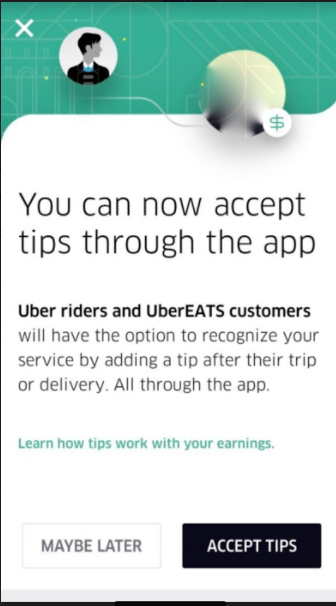
Uber said it will roll out the ability for riders to tip drivers within its app across the US by the end of July, addressing one of drivers' biggest and longest-standing complaints with the ridehail giant.

Uber drivers and their advocates have long pushed for in-app tipping. The Independent Drivers Guild, a non-union worker body backed by Uber and affiliated with the International Association of Machinists and Aerospace Workers, found in a survey last year that the lack of in-app tipping was drivers' top concern.

While Uber's app didn't allow riders to tip, the company had said riders were welcome to tip in cash. As part of a lawsuit settlement earlier this year, Uber agreed to clarify its tipping policy by allowing drivers to place signs in their cars noting that tips are not included in the app's fares.

Lyft, Uber's biggest competitor in the US, already offers the option to tip drivers through its app. Riders are prompted to rate their trips as well as add a tip after Lyft rides end. The company has attempted to highlight this distinction in national ads, poking at an Uber-like company for not allowing in-app tipping. Lyft said on Monday that drivers had amassed more than $250 million to date in tips, and announced passengers would begin seeing new prompts to encourage more tipping.

In April, regulators in New York City said they planned to begin writing a rule that would require the ride-hail giant to offer an in-app tipping option.

BuzzFeed News reported last year that in three major US markets — Denver, Detroit, and Houston — Uber drivers earned less than $13.25 an hour after expenses in late 2015. Earlier this year, the company paid the Federal Trade Commission $20 million to settle claims that it misled drivers about pay. The ride-hail giant claimed drivers in New York made more than $90,000 a year, but the agency found the median income of drivers there is $29,000 less than that.

Quelle: <a href="Uber Will Soon Roll Out In-App Tipping In Seattle, Houston, And Minneapolis“>BuzzFeed

Predictive maintenance using PySpark

Predictive maintenance is one of the most common machine learning use cases and with the latest advancements in information technology, the volume of stored data is growing faster in this domain than ever before which makes it necessary to leverage big data analytic capabilities to efficiently transform large amounts of data into business intelligence. Microsoft has published a series of learning materials including blogs, solution templates, modeling guides and sample tutorials in the domain of predictive maintenance. Recently, we extended those materials by providing a detailed step-by-step tutorial of using Spark Python API PySpark to demonstrate how to approach predictive maintenance for big data scenarios. The tutorial covers typical data science steps such as data ingestion, cleansing, feature engineering and model development.

Business Scenario and Data

The input data is simulated to reflect features that are generic for most of the predictive maintenance scenarios. To enable the tutorial to be completed very quickly, the data was simulated to be around 1.3 GB but the same PySpark framework can be easily applied to a much larger data set. The data is hosted on a publicly accessible Azure Blob Storage container and can be downloaded by clicking this link. In this tutorial, we import the data directly from the blob storage.

The data set has around 2 million records with 172 columns simulated for 1900 machines collected over 4 years. Each machine includes a device which stores data such as warnings, problems and errors generated by the machine over time. Each record has a Device ID and time stamp for each day and aggregated features for that day such as total number of a certain type of warning received in a day. Four categorical columns were also included to demonstrate generic handling of categorical variables. The goal is to predict if a machine will fail in the next 7 days. The last column of the data set indicates if a failure occurred on that day.

Jupyter Notebooks

There are three Jupyter Notebooks on the GitHub repository. To visit the repository, click the green "View Tutorial" button at right of the gallery page.

Notebook_1_DataCleansing_FeatureEngineering
Notebook_2_FeatureEngineering_RollingCompute
Notebook_3_Labeling_FeatureSelection_Modeling

We formatted this tutorial as Jupyter notebooks because it is easy to show the step-by-step process this way. You can also easily compile the executable PySpark script(s) using your favorite IDE.

Specifications & Configurations

The hardware used in this tutorial is a Linux Data Science Virtual Machine with 32 cores and 448 GB memory. For more detailed information of the Data Science Virtue Machine, please visit the link. For the size of the data used in this tutorial (1.3 GB), a machine with less cores and memory would also be adequate. However, in real life scenarios, one should choose the hardware configuration that is appropriate for the specific big data use case. Jupyter Notebooks included in this tutorial can also be downloaded and run on any machine that has PySpark enabled.

The Spark version installed on the Linux Data Science Virtual Machine for this tutorial is 2.0.2 with Python version 2.7.5. Please see the tutorial page for some configurations that needs to be performed before running this tutorial on a Linux machine.

Prerequisites

The user should already know some basics of PySpark. This is not meant to be a PySpark 101 tutorial.
Have PySpark (Spark 2.0., Python 2.7) already configured. Please note if you are using Python 3 on your machine, a few functions in this tutorial require some very minor tweaks because some Python 2 functions deprecated in Python 3.

References

Blog post: Predictive Maintenance Modelling Guide in the Cortana Intelligence Gallery
Predictive Maintenance Modelling Guide
Predictive Maintenance Modelling Guide R Notebook
Predictive Maintenance Modelling Guide Python Notebook
Predictive Maintenance solution
Predictive Maintenance Template

Acknowledgement

Special thanks to Said Bleik, Yiyu Chen and Ke Huang for learning PySpark together. Thank Fidan Boylu Uz and Danielle Dean for proof reading and modifying the tutorial materials.
Quelle: Azure






