Announcing New AWS Direct Connect Locations in Atlanta, Columbus and Toronto

AWS Direct Connect now has three new locations in the Digital Realty ATL1 and ATL2, Atlanta facility, Cologix COL2 Columbus, OH facility, and Allied 250 Front St W, Toronto, Canada facility supporting the US East (Virginia), US East (Ohio) and Canada (Central) AWS Regions respectively. Customers in these cities can now establish a dedicated network connection from their premise to AWS. 
Quelle: aws.amazon.com

Äthiopien schaltet Internetzugang ab

Im Vorfeld der Abschlussprüfungen an Schulen wurde in Äthiopien der gesamte Internetverkehr des Landes abgeschaltet. Möglicherweise soll so verhindert werden, dass Prüfungsaufgaben veröffentlicht und verbreitet werden.

Quelle: Heise Tech News

Announcing the Docker Student Developer Kit & Campus Ambassador Program!

For quite some time now we have been receiving daily requests from students all over the world, asking for our help learning Docker, using Docker and teaching their peers how to use Docker. We love their enthusiasm, so we decided it was time to reach out to the student community and give them the helping hand they need!

Understanding how to use Docker is now a must have skill for students. Here are 5 reasons why:

Understanding how to use Docker is one of the most important skills to learn if you want to advance in a career in tech, according to Business Insider.
You can just start coding instead of spending time setting up your environment.
You can collaborate easily with your peers and enable seamless group work: Docker eliminates any ‘works on my machine’ issues.
Docker allows you to easily build applications with a modern microservices architecture.
Using Docker will greatly enhance the security of your applications.

Getting Started with Docker
Are you a student who is excited about the prospect of using Docker but still don’t know exactly what Docker is or where to start learning? Now that your finals are over and you have all this free time on your hands, it’s the perfect time for you to get started! Here are a couple of resources to get you up to speed in time for the fall semester:

Get Started with Docker (official documentation)
Introduction to Docker Presentation (slides)
Docker Beginner labs (Self paced training)

The Docker Student Developer Kit
We know that many college students are eager to learn and use Docker but don’t have the money to build, ship and run their apps with Docker on their favorite cloud. We really understand all the associated costs of being a student like tuition, textbooks, lab materials, video games, etc. so we decided they deserved our assistance. That is why we are giving 5 private repos from Docker Cloud to every student for free for one year! What is Docker Cloud? Docker Cloud provides a hosted registry service with build and testing facilities for Dockerized application images; tools to help you set up and manage host infrastructure; and application lifecycle features to automate deploying services created from images (read more here).
The Docker Student Developer Kit will also contain access to many free images from Docker Store publishers (100s of Enterprise grade images and 1000s of Community images)! As if all that wasn’t enough, cloud providers Azure, AWS and DigitalOcean are also feeling generous and are offering substantial cloud credits to the first 150 students who apply for the kit! Get your Student Developer Kit by applying here! Just make sure to put your school-issued email address, an upload of your student card and specify your preferred cloud provider!
Docker in Higher Education Community Directory
In redeeming the Docker Student Developer Kit, students will also have access to the Docker in Higher Education Community Directory and the Docker Community Slack team, including the #docker-students channel. The benefits of this are twofold; students will receive updates on Docker community events, activities, and programs including exclusive invitations and promo codes to DockerCon and other community events; and they will be able to network easily with like-minded students and teachers from across the globe. The directory allows search of other members by location or interest, private messaging and group discussions on the slack channel without sharing email addresses. The possibilities for collaboration are limitless!
The Docker Campus Ambassador Program

For those students who are already using Docker and want to initiate and foster a Docker community on their college campus, we have created the Docker Campus Ambassador program. This program is for students of any discipline, who already have an intermediate to advanced knowledge of Docker and want to run events (workshops, talks, show and tells etc.) to help their peers learn Docker. Students who are accepted into this program will receive exclusive training from Docker to learn both technical and professional skills, privileged access to the latest Docker editions, admission to all Beta programs, discounted and free tickets to community events like DockerCon and of course… lots of swag!  Students who apply to this program should be leaders on campus and have a knack for organizing and catalyzing groups of people. If this is you, please read the guidelines and apply to the Campus Ambassadors program here.
 

Are you a student learning #Docker? Apply to our Campus Ambassador program + free Student Dev Kit!Click To Tweet

The post Announcing the Docker Student Developer Kit & Campus Ambassador Program! appeared first on Docker Blog.
Quelle: https://blog.docker.com/feed/

Compute Engine updates bring Skylake GA, extended memory and more VM flexibility

By Hanan Youssef, Sami Iqram and Scott Van Woudenberg, Product Managers, Google Compute Engine

We’re pleased to announce several updates to Google Compute Engine that give you more powerful and flexible instances. Google Cloud is the first and only public cloud to deliver Intel’s next-generation Xeon server processor (codenamed Skylake), and starting today, it’s generally available (GA). In addition, we’ve made several other enhancements to Compute Engine:

Increased total amount of memory per instance by removing memory caps
Increased variety of machine shapes
Simple process to select a baseline processor type
Availability of 64-core processors in all regions
Broadwell CPUs available in all regions

These improvements help you get the performance from Compute Engine that you need, in the configuration you want.

Skylake is generally available
With up to 64 vCPUs and 455GB of RAM, Skylake-based instances support a wide range of compute-intensive workloads, including scientific modeling, genomic research, 3D rendering, data analytics and engineering simulations. Since we first launched Skylake for Compute Engine in February, GCP customers have run millions of hours of compute on Skylake VMs, seeing increased performance for a variety of applications.

With this GA release, you can create new VMs with Skylake across Compute Engine’s complete family of VM instance types — standard, highmem, highcpu, Custom Machine Types, as well as Preemptible VMs. You can provision Skylake VMs using Cloud Console, the gcloud command line tool, or our APIs. Skylake is available in three GCP regions: Western US, Western Europe and Eastern Asia Pacific. Customer demand for Skylake has been very strong; we have more capacity arriving every day, and support for additional regions and zones coming in the near future.

To help you experience Skylake, we’re offering Skylake VMs at no additional cost for a limited time. After a 60-day promotional period, Skylake VMs will be priced at a 6-10% premium depending on the specific machine configuration. Given the significant performance increase over previous generations of Intel processors, this continues our record of providing a leading price-performance cloud computing platform.

CPU platform selector
Google Cloud Platform (GCP) regions and zones are equipped with a diverse set of Intel Xeon-based host machines, with CPUs including Sandy Bridge, Ivy Bridge, Haswell, Broadwell and now Skylake microarchitectures. In addition to fundamental systems features like clock speed and memory access time, these CPU platforms also support unique features like AVX-2 and AVX-512.

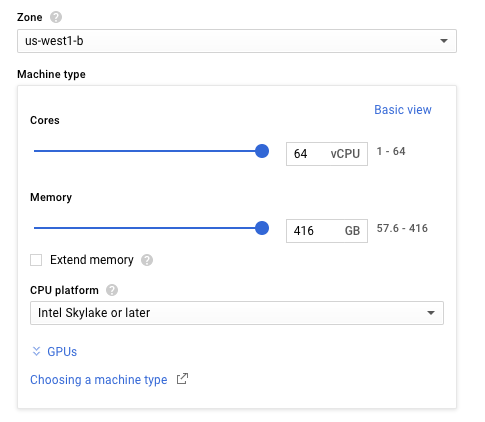
Now, with our Minimum CPU Platform feature, you can select a specific CPU platform for VMs in that zone, and Compute Engine will always schedule your VM to that CPU family or above. You can assign a minimum CPU platform to a VM from the Cloud Console, Google Cloud SDK, or API, with full flexibility to choose the CPU features that work best for your applications.

Enabling this enhanced flexibility also allows us to now offer Broadwell CPU support in every region, as well as the ability to create VMs up to 64 vCPUs in size.

In the gcloud command line tool, use the instances create subcommand, followed by the –min-cpu-platform flag to specify a minimum CPU platform.

For example, the following command creates an n1-standard-1 instance with the Intel Broadwell (or later) CPU platform.

gcloud beta compute instances create example-instance –machine-type
n1-standard-1 –min-cpu-platform “Intel Broadwell”

To see which CPUs are available in different GCP zones, check our Available Regions and Zones page. For complete instructions for using –min-cpu-platform, please refer to our documentation.

Extended memory, where you want it
Compute Engine Custom Machine Types allow you to create virtual machines with the vCPU and memory ratios to fit your application needs. Now, with extended memory, we’ve removed memory ratio restrictions for a vCPU (previously set at 6.5GB), for a maximum of 455GB of memory per VM instance. This is great news for applications like in-memory databases (e.g. Memcached & Redis), high-performance relational databases (e.g. Microsoft SQL Server) and NoSQL databases (e.g. MongoDB) that benefit from flexible memory configurations to achieve optimum price-performance. To learn more about the pricing for extended memory please take a look at our pricing page.

You can create a VM with extended memory using the Cloud Console, Cloud SDK or APIs.

For example, this command creates a 2 vCPU, 15GB memory instance (including an extended memory of 2GB):

gcloud beta compute instances create example-instance
–custom-cpu 2 –custom-memory 15 –custom-extensions

Complete instructions for using extended memory are available in our documentation.

Get started today
The minimum CPU platform selector, extended memory to 455GB, availability of 64-core machines, Broadwell processors in all regions and the GA of Skylake processors are now all available for you and your applications. If you’re new to GCP you can try all of this out when you sign up for $300 free trial. We’d love to hear about the amazing things you do with these Compute Engine enhancements in the comments below.
Quelle: Google Cloud Platform

How to connect MQ Bridge and Salesforce events

In March, Salesforce and IBM announced a strategic partnership. The partnership reflects that many large corporations have investments in technologies from both Salesforce and IBM. A common scenario at some of these corporations: the applications used by customer-facing staff were not tied to the enterprise systems of record. So a key aim of the partnership is to make it simpler to integrate applications and systems.
Salesforce has an event-based interface. Wouldn’t it be good to have Salesforce applications sending events data into the enterprise IT systems? Could a company benefit from exposing systems of record data directly into a Salesforce application as an external data source?
One of the fruits of the partnership is the MQ Bridge to Salesforce delivered in IBM MQ 9.0.2. The bridge enables event data sent from the Salesforce platform to be re-published as MQ messages that can easily be processed by enterprise applications.
MQ customers are used to events being delivered as messages. So an intuitive way to integrate Salesforce’s events is to turn them into MQ messages.
MQ Bridge connects your Salesforce events to your back-end systems and applications.
There are two kinds of events supported by the MQ bridge: PushTopics events and platform events.
PushTopics are queries you define to receive events when changes are made to data in Salesforce. You specify the kind of data conditions in which you want the events generated and the data you’d like included in the events. For example, you might want an event generated every time a new contact is created.
Platform events are customizable event messages that you define in Salesforce containing whatever data you like. Once defined, you send platform events directly from application code in Salesforce. Platform events are much more flexible. For example, you can include any data in your event that you like and create a distributed application, part of which runs in Salesforce and part of which runs in your enterprise data center.
Each PushTopic and platform event type corresponds to a separate topic that the MQ Bridge to Salesforce can use receive events.
Bridge the gap with the MQ Bridge
Here’s a hypothetical scenario.  Let’s assume you already use Salesforce to manage relationships with your customers. Unfortunately, something has gone wrong with an order, and the customer is expressing their frustration over the phone to someone on your team. How can you make your customer happy again, quickly?
As your team member is logging the call with the customer, they flag a record in Salesforce triggering special treatment for this customer. By registering a PushTopic that matches this flag, an event will flow across to MQ. There, the event can be picked up by a back end system to take an appropriate action, such as applying a promotion for the customer’s next order.
With the MQ Bridge, it’s easy to close the gap between the Salesforce applications and back end systems. You can enhance the experience you offer your customers with minimal impact on existing systems.
The MQ Bridge to Salesforce will likely run on the edge of the data center, connecting to Salesforce on the cloud and to an enterprise queue manager. The bridge itself is available on Linux x86-64, but it can connect to any queue manager running MQ 7.0 and later.
If you know MQ and want to experiment with the bridge, it’s easy to sign up for a no-cost 30-day trial of Salesforce here.
Learn more about how the IBM and Salesforce partnership can help your business.
The post How to connect MQ Bridge and Salesforce events appeared first on Cloud computing news.
Quelle: Thoughts on Cloud

Prysmian: Glasfaser wird knapp

Prysmian hat der Deutschen Telekom vor vielen Jahrzehnten die Kupferkabel verkauft. Diese nutzt der Konzern noch immer. Die Nachfrage nach Glasfaser ist in Deutschland noch gering. (Glasfaser, Breko)
Quelle: Golem

Protect Windows Server 2016 and vCenter/ESXi 6.5 using Azure Backup Server

Azure Backup Server is a cloud-first backup solution that helps in protecting business critical applications as well as virtual machines running on Hyper-V or VMware VMs. With the latest release of Azure Backup Server, you can protect applications such as SQL 2016, SharePoint 2016, Exchange 2016, and Windows Server 2016, locally to disk for short term retention as well as to cloud for long term retention. Azure Backup Server also introduces Modern Backup Storage technology that helps in reducing overall Total Cost of Ownership (TCO) by providing savings on storage and faster backups. Azure Backup Server also guards your critical data not only against accidental deletion but also against various security threats such as ransomware. You also get free restores from cloud recovery points, thereby further reducing backup TCO.

Native Integration of Azure Backup Server with Windows Server 2016

Azure Backup Server natively integrates with Windows Server 2016 capabilities to provide more secure, reliable and efficient backups.

Value Propositions

Efficient: Azure Backup Server’s Modern Backup Storage technology leverages Windows Server 2016 capabilities such as ReFS Block Cloning, VHDX, and Deduplication to reduce storage consumption and improve performance. This leads to 3X faster disk backups and 50% reduction in on premise storage consumption. Azure Backup Server’s workload-aware backup storage technology gives you the flexibility to choose appropriate storage for a given data source type. This flexibility optimizes overall storage utilization and thus reduces backup TCO further.
Reliable: Azure Backup Server uses RCT (the native change tracking in Hyper-V), which removes the need for time-consuming consistency checks. Azure Backup Server also uses RCT for incremental backup. It identifies VHD changes for virtual machines, and transfers only those blocks that are indicated by the change tracker. With Hyper-V building this tracking feature natively within the platform, you can avoid painful consistency checks that would have led to restarting backups.
Secure: Azure Backup Server’s ability to do backup and recovery of Shielded VMs securely helps in maintaining security in backups. Azure Backup Server can protect Shielded VMs and maintain the security in the backups as well. Azure Backup Server’s security features are built on three principles – Prevention, Alerting, and Recovery – to enable organizations increase preparedness against ransomware attacks and equip them with a robust backup solution.
Flexible: Windows Server 2016 comes with Storage Spaces Direct (S2D), that eliminates the need for expensive shared storage and related complexities. Azure Backup Server can backup Hyper-V VMs on Windows Server 2016 deployed on Storage Spaces Direct. Azure Backup Server can also auto protect SQL instances and VMware VMs to cloud as well. Upgrading Azure Backup Server from an older release is simple and will not disrupt your production servers. After upgrading to latest version of Azure Backup Server and upgrading agents on production servers, the backups will continue without rebooting production servers.

Support for vCenter and ESXi 6.5

VMware VM backup with Azure Backup Server was announced as part of Update 1 of the previous release. There are a couple of enhancements with respect to VMware VM protection with the new version of Azure Backup Server:

Azure Backup Server comes with support for vCenter and ESXi 6.5 along with support for 5.5 and 6.0
Azure Backup Server comes with the added feature of auto protecting VMware VMs to cloud. If VMware VMs are added to a folder, they will be automatically protected to disk and cloud.

If Azure Backup Server is installed on Windows Server 2016, protection of VMware VMs is in preview mode until VMware releases support for VDDK 6.5 for Windows Server 2016.

Learn more about Azure Backup Server

1. How does Modern Backup Storage work with Azure Backup Server?

2. How to backup VMware VMs with Azure Backup Server?

3. Download Azure Backup Server for free and get started!


Related links and additional content

Want more details? Check out Azure Backup documentation and Azure Advisor documentation
New to Azure Backup and Azure Advisor, sign up for a free Azure trial subscription
Need help? Reach out to Azure Backup forum for support
Tell us how we can improve Azure Backup by contributing new ideas and voting up existing ones.
Follow us on Twitter @AzureBackup for the latest news and updates

Quelle: Azure

Introducing Modern Backup Storage with Azure Backup Server on Windows Server 2016

One of the key features that was announced with the latest release of Azure Backup Server is Modern Backup Storage. Modern Backup Storage is a technology that leverages Windows Server 2016 native capabilities such as ReFS block cloning, deduplication and workload aware storage to optimize backup storage and time, and delivers nearly 50% disk storage savings and 3x faster backups. With Modern Backup Storage, Azure Backup Server goes a step further in enhancing enterprise backups by completely restructuring the way data is backed up and stored. 

How does Modern Backup Storage work?

Add volumes to Modern Backup Storage and configure Workload Aware Storage

Begin backing up by creating Protection Group with Modern Backup Storage

With these simple steps, you can efficiently store your backups using Modern Backup Storage technology.

Related links and additional content

Want more details? Check out Azure Backup documentation and Azure Advisor documentation
New to Azure Backup and Azure Advisor, sign up for a free Azure trial subscription
Need help? Reach out to Azure Backup forum for support
Tell us how we can improve Azure Backup by contributing new ideas and voting up existing ones.
Follow us on Twitter @AzureBackup for the latest news and updates

Quelle: Azure