Forrester report: What tech leaders are saying about cloud adoption

If your CEO asked about your progress moving to the cloud compared to other companies, would you know the answer? The "Benchmark Your Enterprise Cloud Adoption" report, published by Forrester Research, presents a wide-ranging look at strategies, priorities, and insights from infrastructure and technology leaders to help you assess and improve your cloud adoption initiatives.

Based on surveys of several thousand businesses, the report serves as a check-in for such topics as trends driving enterprise cloud demand, shifting attitudes toward cloud security, the prevalence of cost and usage monitoring, and the most popular platform options for starting a cloud adoption initiative. Along with the data, Forrester analysts also provide guidance such as these four strategies for growing cloud use at your company:

Connect with influencers
Make sure your cloud initiatives focus on the topics that are important to the people who are invested in their success, such as developers and business leaders.
Shift your metrics mindset
New performance metrics are required that align with business outcomes like speed, agility, flexibility, and autonomy, and tech leaders need to align themselves with that shift.
Know before you go
Before starting your cloud development or migration initiatives, evaluate your portfolio to identify the services that are the best candidates in terms of effort and impact.
New metrics mean new rewards
Rethink success in terms of speed and consistency, time to market, and meeting customer needs. That means not only encouraging technology management teams to standardize and automate, but rewarding them when they succeed.

Featuring peer-based benchmark survey data, this report will help you assess your company's move to the cloud, understand the approaches and priorities other tech leaders are using, and what should be at the top of your cloud priority list for 2017. Download your complimentary copy of "Benchmark Your Enterprise Cloud Adoption."

Quelle: Azure

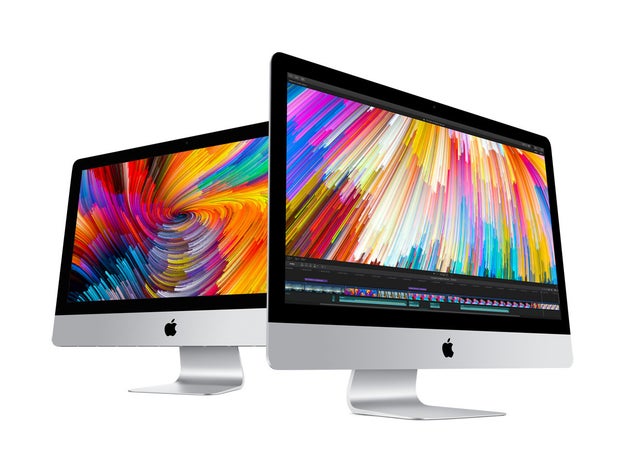
The First iMac Update In Two Years Ships Today

Apple

The last update to the iMac was all the way back in October 2015. Then, earlier this week, Apple announced it was finally refreshing its desktop computer line with the newest processors (Intel’s seventh generation Kaby Lake chips) and faster storage and graphics, too.

I’ve only spent a day with the new 2017 iMac with a 4k Retina display — and that’s not enough time to take in one of the most powerful computers Apple has to offer. But here’s what I know for sure:

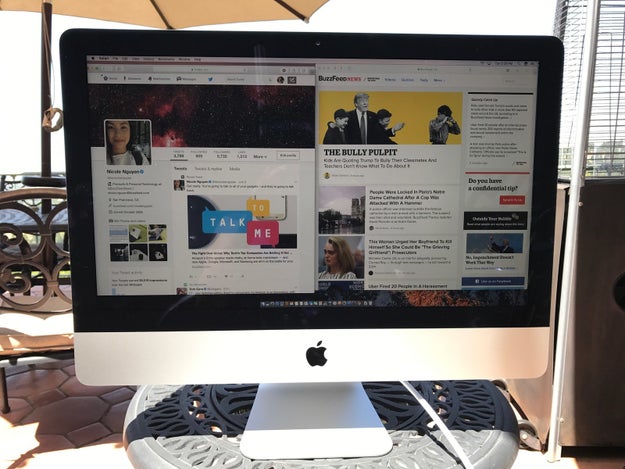
The iMac is bright enough to take outside.

The iMac is bright enough to take outside.

Nicole Nguyen / BuzzFeed News

I know, because I tried. (Do you not also dream of working on a high performance desktop computer in the open air?) And, though I wouldn’t recommend it (because heat, the elements, etc.), the new iMac’s screen is finally bright enough to work in direct sunlight. Window seats, rejoice!

It’s 500 nits bright, the same as last year’s MacBook Pro and MacBook with Retina displays. Apple says that’s 43% brighter than the October 2015 model.

Nicole Nguyen / BuzzFeed News

The iMac's design hasn't changed.

There’s a vent in the back, and two new Thunderbolt 3/USB-C ports, which, compared to Thunderbolt 2, offer twice as fast data transfer and display bandwidth. That means you can connect the iMac to two 4k displays or one 5k display. But the essential design, meaning the silver hardware and the thick bezel around the display, remains the same.

You can now stuff even more memory into the computer.

The 21.5-inch model can go up to 32 GB, and the 27-inch can go up to 64 GB.

The verdict on everything else is still out.

The truth is: the iMac’s new innards are where its real updates live. Because I only got a day with it, over the next few weeks, I’ll use the new iMac as it’s meant to be used – cutting videos, editing photos, watching 4k movies, playing games. Then I’ll publish an update to this first impressions review.

Until then, here’s a look at what’s new inside of the 2017 iMac. There are a lot of configurations, so hang on tight. To be clear, there are three iMac base models: a non-Retina 25-inch iMac ($1,099+), a 4k Retina iMac ($1,299+), and a 5k Retina 27-inch iMac ($1,799). After picking the base model, you can choose a unique cocktail of specifications based on what kind of performance you need, including processor (i5 or i7), memory (8, 16, 32, or 64GB), and storage capacity (1, 2, or 3 terabyte Fusion Drive, or 256GB, 512GB, or 1TB solid state drive).

The iMacs now have the latest Intel processors, and all Retina iMacs ship with quad-core chips. The 27-inch models now offer Turbo Boost (which kicks your computer into overdrive when you’re running especially processor-intensive applications) up to 4.5GHz, while the 21.5-inch Retina 4k model goes up to 4.2 GHz.

Graphics are improving all around, too. The non-Retina, entry-level iMac gets an Intel Iris Plus 640 GPU, and the 21.5-inch with 4K offers the Radeon Pro 555 and 560 graphics cards. The 27-inch 5k can be configured with Radeon Pro 570, 575, and 580 graphics.

Stay tuned for what the heck this spec salad actually means!

Quelle: <a href="The First iMac Update In Two Years Ships Today“>BuzzFeed

The New MacBook Is Almost Perfect

Nicole Nguyen / BuzzFeed News

When it comes to laptops, most people don’t need much space. A lot of our stuff – apps, photos, documents – can now be put on The Cloud. Most people don’t need serious computing power either, unless they’re editing videos or playing games. Many people don’t even need a touchscreen, a notorious battery zapper and finger grease magnet. If you’re a Netflix-watching, web-browsing, email-checking, and word-processing kind of human, all you really need is a keyboard and a nice screen, with a decent processor powering it all.

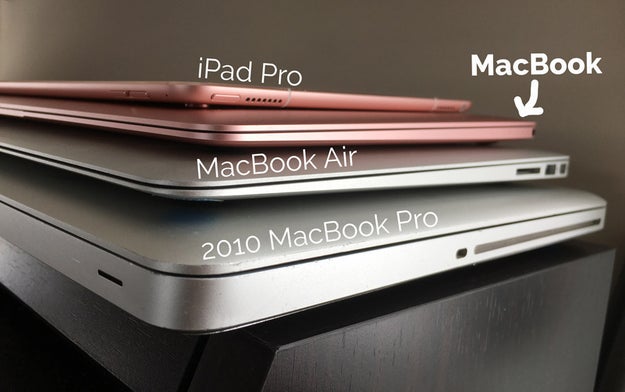
And that’s what makes the MacBook so good. It has a stunning, high-resolution display with a full-sized keyboard. It doesn’t have the umph of a Pro – but what it lacks in performance, it makes up for in outta-this-world lightness and thinness, making it an ideal laptop for someone who’s always moving around. Plus, unlike an iPad, it can run desktop apps, like the full version of Photoshop, and it's much better for multi-tasking. On top of all that, it comes in rose gold (as well as gold, silver, and space gray, but my stance is clear). It’s the most indulgent, design-y, Apple-y computer on the market – and it’s *this* close to being perfect.

During Monday’s WWDC keynote, Apple announced that it was giving its 12-inch MacBook lineup, which arrives in stores today, a little boost.

The new 2017 MacBooks don’t look any different on the outside, but on the inside, they’re getting the next generation of Intel processors (Kaby Lake), faster drives (50% faster), support for twice as much memory (16 GB of RAM, though it’ll cost ya), and, most exciting of all, an updated keyboard.

These upgrades address the last-generation MacBook’s two biggest problems: that it 1) sacrificed performance for lighter weight (it was only 2.03 pounds) and 2) had a horrible, sticky keyboard that made it hard to type. The 2017 MacBook is the same weight, but it’s zippier (Apple claims by 20%) than before, and it has bouncier keys that won’t totally destroy your fingers the way its old shallow keyboard did.

Nicole Nguyen / BuzzFeed News

After a day and a half with the new model, it definitely feels like an upgrade.

The keys are more comfortable than the original. To make the MacBook as thin as it is, Apple developed a space-saving “butterfly mechanism” underneath big, flat keys that were less bouncy and took some getting used to. This year’s MacBook features the second generation of this mechanism – the same one that the 2016 MacBook Pro has – but somehow it feels a little stickier in this model.

It’s fast enough for running Slack and 19 tabs in Chrome simultaneously, before the system started slowing down (last year's Macbook could handle about 10 tabs before hiccup-ing). And I'm reviewing the base 1.2GHz Core m3 model with 8GB on board. I did some Photoshop editing and the laptop handled that quite well, without any hiccups. But only time will tell if those speeds keep up.

In my testing, which was primarily with the energy-hogging Chrome browser, the Macbook’s battery performance clocked in at around eight hours, with brightness set between three and four clicks from the top. Apple gets 10 hours in its web browsing battery tests, which includes browsing 25 different sites at 75% brightness (four clicks from the top), but that’s on Safari, which is much more battery efficient. But that’s not a deal breaker. Eight hours is enough to cover most of my day.

Here’s the MacBook’s sore spot, though: It still only has one USB-C port.

Even just two, like in the 13-inch MacBook Pro, would be a *significant* improvement. The USB-C standard is supposed to be very versatile. A single USB-C cable, like the one on this LG external display can both power and connect the laptop to the monitor. But, in many cases, like when you’re on the road, one port just means a tangle of hubs, dongles, and adapters when you need to do something as simple as charge your laptop and back up your phone simultaneously. If only Apple slapped on another input, the MacBook would my Perfect Laptop. Until then, it’s just short of that.

And before you @ me with all the reasons why the MacBook sucks, let me start off by saying that it’s not the Perfect Laptop For Everyone. The MacBook starts at $1,300, another ding on near perfect marks everywhere else. That's puzzlingly the same price as the 13-inch MacBook Pro base model (without a Touch Bar or Touch ID), which comes with more processing power (2.3GHz Core i5).

If you want to spend less money on Mac, you can get an Air with a lower resolution screen for $1k. If you use demanding software and need power, get a Pro or iMac. But if you’re always on the go (and can sink over $1k into a new computer), the MacBook is a great choice.

The MacBook is still what a lot of people are looking for.

I’ve been using a MacBook for over a year. Not the original MacBook, which most reviewers complained was too laggy for any amount of stress, but the updated 2016 model, which got a bitty speed bump (thanks to a new Intel Core M chip and graphics card). For someone who is constantly traveling, posting updates and tweeting from events, and needing to stream The Handmaid’s Tale, like, ASAP on Wednesday nights, the MacBook has met all of my needs and then some. I can get serious writing and inbox clearing done on this machine (my main computing tasks), plus make GIFs and edit images in Photoshop when I need to.

The MacBook is actually light enough to hold in one hand without feeling like your wrist is going to snap, and to have on your lap while you’re messaging galfriends during The Bachelorette or while you poop or whatever it is you need to do sitting down. The pencil-thin hardware means zero bulk when I throw it in a tote or backpack. I also live in a studio apartment where space is precious and footprint matters! I love the MacBook’s form factor. Hard stop.

I’ve tried other super-portable computers, but nothing compared to the MacBook. Chromebooks didn’t quite make the cut. On the software side, they’re a little too shallow, even though 80% of my work is done in the Chrome browser. I need full desktop Adobe apps and am too attached to my Mac menu bar regulars, like f.lux (Twilight was too buggy) for not ruining my eyes before bed and BetterSnapTool for resizing windows. Ultrabooks running Windows (I tried the XPS 13) were fine for a while, but …Windows. To each her own (truly, I think it’s more personal preference), but I find Mac OS’s interface more accessible and easier to use. Also, I have an iPhone, and being able to Airdrop links/photos/videos quickly from my phone to my laptop and text people from my Mac, is pretty great.

A word of advice if you are considering the MacBook, in its almost perfect state: Because it’s not upgradeable after you buy it, I’d suggest bumping up the model to the core i5 processor (+$100). If you *really* want to future-proof your laptop and make it an investment, 16GB of RAM (+$200) will ensure that your MacBook will last, and help with giant Excel spreadsheets or big Photoshop files – but 8GB should be sufficient for most people. The entry-level MacBook Pro offers more power (2.3GHz Core i5 vs. the MacBook’s 1.2GHz Core m3), but the battery life isn’t as great and, if you lug around your laptop a lot, that extra pound will make a difference.

You’re paying for portability. And if you were already in the market for an Apple laptop, you’re probably prepared to do that.

Quelle: <a href="The New MacBook Is Almost Perfect“>BuzzFeed

Spark Connector for #CosmosDB – seamless interaction with globally-distributed, multi-model data

Today, we’re excited to announce that the Spark connector for Azure Cosmos DB is now truly multi-model! As noted in our recent announcement Azure Cosmos DB: The industry’s first globally-distributed, multi-model database service, our goal is to help you write globally distributed apps, more easily, using the tools and APIs you are already familiar with. Azure Cosmos DB’s database engine natively supports SQL (DocumentDB) API, MongoDB API, Gremlin (graph) API, and Azure Table storage API. With the updated Spark connector for Azure Cosmos DB, Apache Spark can now interact with all Azure Cosmos DB data models: Documents, Tables, and Graphs.

What is Azure Cosmos DB?

Azure Cosmos DB is Microsoft's globally distributed, multi-model database service for mission-critical applications. Azure Cosmos DB provides turn-key global distribution, elastic scale out of throughput and storage worldwide, single-digit millisecond latencies at the 99th percentile, five well-defined consistency levels, and guaranteed high availability, all backed by industry-leading, comprehensive SLAs. Azure Cosmos DB automatically indexes all data without requiring you to deal with schema and index management. It is multi-model and supports document, key-value, graph, and columnar data models. As a cloud-born service, Azure Cosmos DB is carefully engineered with multi-tenancy and global distribution from the ground up.

Perform Real-time Machine Learning on Globally-Distributed Data with Apache Spark and Azure Cosmos DB

The Spark connector for Azure Cosmos DB enables real-time data science, machine learning, advanced analytics and exploration over globally distributed data in Azure Cosmos DB. Connecting Apache Spark to Azure Cosmos DB accelerates our customer’s ability to solve fast-moving data science problems, where data can be quickly persisted and queried using Azure Cosmos DB. It efficiently exploits the native Azure Cosmos DB managed indexes and enables updateable columns when performing analytics.  It also utilizes push-down predicate filtering against fast-changing globally-distributed data addressing a diverse set of IoT, data science, and analytics scenarios.

Other use-cases of Azure Cosmos DB + Spark include:

Streaming Extract, Transformation, and Loading of data (ETL)
Data enrichment
Trigger event detection
Complex session analysis and personalization
Visual data exploration and interactive analysis
Notebook experience for data exploration, information sharing, and collaboration

The Spark Connector for Azure Cosmos DB uses the Azure DocumentDB Java SDK. You can get started today and download the Spark connector from GitHub!

Working with Azure Cosmos DB Tables

Azure Cosmos DB provides the Table API for applications that need a key-value store with flexible schema, with predictable performance and global distribution. Azure Table storage SDKs and REST APIs can be used to work with Azure Cosmos DB. Azure Cosmos DB supports throughput-optimized tables (informally called "premium tables"), currently in public preview.

To connect Apache Spark to the Azure Cosmos DB Table API, you can use the Spark Connector for Azure Cosmos DB as follows.

// Initialization
import com.microsoft.azure.cosmosdb.spark.schema._
import com.microsoft.azure.cosmosdb.spark._
import com.microsoft.azure.cosmosdb.spark.config.Config

val readConfig = Config(Map("Endpoint" -> "https://$tableContainer$.documents.azure.com:443/",
"Masterkey" -> "$masterkey$",
"Database" -> "$tableDatabase$",
"Collection" -> "$tableCollection$",
"SamplingRatio" -> "1.0"))

// Create collection connection
val tblCntr = spark.sqlContext.read.cosmosDB(readConfig)
tblCntr.createOrReplaceTempView("tableContainer")

Once you have connected to the Table, you can create a Spark DataFrame (in the preceding example, this would be tblCntr).

// Print tblCntr DataFrame Schema
scala> tblCntr.printSchema()
root
|– _etag: string (nullable = true)
|– $id: string (nullable = true)
|– _rid: string (nullable = true)
|– _attachments: string (nullable = true)
|– City: struct (nullable = true)
| |– $t: integer (nullable = true)
| |– $v: string (nullable = true)
|– State: struct (nullable = true)
| |– $t: integer (nullable = true)
| |– $v: string (nullable = true)
|– $pk: string (nullable = true)
|– id: string (nullable = true)
|– _self: string (nullable = true)
|– _ts: integer (nullable = true)

// Run Spark SQL query against your Azure Cosmos DB table
scala > spark.sql("select `$id`, `$pk`, City.`$v` as City, State.`$v` as State from tableContainer where City.`$v` = 'Seattle'").show()
+—-+—–+——-+—–+
| $id| $pk| City|State|
+—-+—–+——-+—–+
|John|Smith|Seattle| WA|
+—-+—–+——-+—–+

You will be able quickly and easily interact with your schema and execute Spark SQL queries against your underlying Azure Cosmos DB table.

Working with Azure Cosmos DB Graphs

Azure Cosmos DB provides graph modeling and traversal APIs along with turn-key global distribution, elastic scale out of storage and throughput, <10 ms read latencies and <15 ms at the 99th percentile, automatic indexing and query, tunable consistency levels, and comprehensive SLAs including 99.99% availability. Azure Cosmos DB can be queried using Apache TinkerPop's graph traversal language, Gremlin, with seamless integration with other TinkerPop-compatible graph systems like Apache Spark GraphX.

To connect Apache Spark to the Azure Cosmos DB Graph, you will use the Spark Connector for Azure Cosmos DB as follows.

// Initialization
import com.microsoft.azure.cosmosdb.spark.schema._
import com.microsoft.azure.cosmosdb.spark._
import com.microsoft.azure.cosmosdb.spark.config.Config

// Maps
val baseConfigMap = Map(
"Endpoint" -> "https://$graphContainer$.documents.azure.com:443/",
"Masterkey" -> "$masterKey$"
"Database" -> "$database$",
"Collection" -> "$collection$",
"SamplingRatio" -> "1.0",
"schema_samplesize" -> "1000"
)

val airportConfigMap = baseConfigMap ++ Map("query_custom" -> "select * from c where c.label='airport'")
val delayConfigMap = baseConfigMap ++ Map("query_custom" -> "select * from c where c.label='flight'")

// Configs
// get airport data (vertices)
val airportConfig = Config(airportConfigMap)
val airportColl = spark.sqlContext.read.cosmosDB(airportConfig)
airportColl.createOrReplaceTempView("airportColl")

// get flight delay data (edges)
val delayConfig = Config(delayConfigMap)
val delayColl = spark.sqlContext.read.cosmosDB(delayConfig)
delayColl.createOrReplaceTempView("delayColl")

Here, we have created Spark DataFrames – one for the airport data (which are the vertices) and one for the flight delay data (which are the edges). The graph we have stored in Azure Cosmos DB can be visually depicted as in the figure below, where the vertexes are the blue circles representing the airports and the edges are the black lines representing the flights between those cities.  In this example, the originating city for those flights (edges) is Seattle (blue circle top left of map where all the edges are originating from).

Figure: Airport D3.js visualization of airports (blue circles) and edges (black lines) which are the flights between the cities.

Benefit of Integrating Cosmos DB  Graphs with Spark

One of the key benefits of working with Azure Cosmos DB graphs and Spark connector is that Gremlin queries and Spark DataFrame (as well as other Spark queries) can be executed against the same data container (be it a graph, a table or a collection of documents).  For example, below are some simple Gremlin Groovy queries against this flights graph stored in our Azure Cosmos DB graph.

,,,/
(o o)
—–oOOo-(3)-oOOo—–
plugin activated: tinkerpop.server
plugin activated: tinkerpop.utilities
plugin activated: tinkerpop.tinkergraph
gremlin> :remote connect tinkerpop.server conf/remote-secure.yaml
==>Configured tychostation.graphs.azure.com/52.173.137.146:443

gremlin> // How many flights into each city leaving SEA
==>true
gremlin> :> g.V().has('iata', 'SEA').outE('flight').inV().values('city').groupCount()
==>[Chicago:1088,New York:432,Dallas:800,Miami:90,Washington DC:383,Newark:345,Boston:315,Orlando:116,Philadelphia:193,Fort Lauderdale:90,Minneapolis:601,Juneau:180,Ketchikan:270,Anchorage:1097,Fairbanks:260,San Jose:611,San Francisco:1698,San Diego:617,Oakland:798,Sacramento:629,Los Angeles:1804,Orange County:569,Burbank:266,Ontario:201,Palm Springs:236,Las Vegas:1204,Phoenix:1228,Tucson:90,Austin:90,Denver:1231,Spokane:269,San Antonio:90,Salt Lake City:860,Houston:568,Atlanta:521,St. Louis:90,Kansas City:95,Honolulu, Oahu:415,Kahului, Maui:270,Lihue, Kauai:128,Long Beach:345,Detroit:244,Cincinnati:4,Omaha:90,Santa Barbara:90,Fresno:142,Colorado Springs:90,Portland:602,Jackson Hole:13,Cleveland:6,Charlotte:169,Albuquerque:105,Reno:90,Milwaukee:82]

gremlin> // SEA -> Reno flight delays
==>true
gremlin> :> g.V().has('iata', 'SEA').outE('flight').as('e').inV().has('iata', 'RNO').select('e').values('delay').sum()
==>963

The preceding code connects to the tychostation graph (tychostation.graphs.azure.com) to run the following Gremlin Groovy queries:

Using graph traversal and groupCount(), determines the number of flights originating from Seattle to the listed destination cities (e.g. there are 1088 flights from Seattle to Chicago) in this dataset).
Using graph to determine the total delay (in minutes) of the 90 flights from Seattle to Reno (i.e. 963 minutes of delay).

With the Spark connector using the same tychostation graph, we can also run our own Spark DataFrame queries. Following up from the preceding Spark connector code snippet, let’s run our Spark SQL queries – in this case we’re using the HDInsight Jupyter notebook service.

Top 5 destination cities departing from Seattle

%%sql
select a.city, sum(f.delay) as TotalDelay
from delays f
join airports a
on a.iata = f.dst
where f.src = 'SEA' and f.delay < 0
group by a.city
order by sum(f.delay) limit 5

Calculate median delays by destination cities departing from Seattle

%%sql
select a.city, percentile_approx(f.delay, 0.5) as median_delay
from delays f
join airports a
on a.iata = f.dst
where f.src = 'SEA' and f.delay < 0
group by a.city
order by median_delay

With Azure Cosmos DB, you can use both Apache Tinkerpop Gremlin queries AND Apache Spark DataFrame queries targeting the same graph.

Working with Azure Cosmos DB Document data model

Whether you are using the Azure Cosmos DB graph, table, or documents, from the perspective of the Spark Connector for Azure Cosmos DB, the code is the same!  Ultimately, the template to connect to any of these data models is noted below:

Configure your connection.
Build your config and DataFrame.
And voila – Apache Spark is working in tandem with Azure Cosmos DB.

// Initialization
import com.microsoft.azure.cosmosdb.spark.schema._
import com.microsoft.azure.cosmosdb.spark._
import com.microsoft.azure.cosmosdb.spark.config.Config

// Configure your connection
val baseConfigMap = Map(
"Endpoint" -> "https://$documentContainer$.documents.azure.com:443/",
"Masterkey" -> "$masterKey$"
"Database" -> "$database$",
"Collection" -> "$collection$",
"SamplingRatio" -> "1.0",
"schema_samplesize" -> "1000"
)

// Build config and DataFrame
val baseConfig = Config(baseConfigMap)
val baseColl = spark.sqlContext.read.cosmosDB(baseConfig)

And, with the Spark Connector for Azure Cosmos DB, data is parallelized between the Spark worker nodes and Azure Cosmos DB data partitions.  Therefore, whether your data is stored in the Tables, Graph, or Documents, you will get the performance, scalability, throughput, and consistency all backed by Azure Cosmos DB when you are solving your Machine Learning and Data Science problems with Apache Spark.

Next Steps

In this blog post, we’ve looked at how Spark Connector for Azure Cosmos DB can seamlessly interact with multiple data models supported by Azure Cosmos DB. Apache Spark with Azure Cosmos DB enables both ad-hoc, interactive queries on big data, as well as advanced analytics, data science, machine learning and artificial intelligence. Azure Cosmos DB can be used for capturing data that is collected incrementally from various sources across the globe. This includes social analytics, time series, game or application telemetry, retail catalogs, up-to-date trends and counters, and audit log systems. Spark can then be used for running advanced analytics and AI algorithms at scale and globally on top of the data living in Azure Cosmos DB.  With Azure Cosmos DB being the industry’s first globally distributed multi-model database service, the Spark connector for Azure Cosmos DB can work with tables, graphs, and document data models – with more to come!

To get started running queries, create a new Azure Cosmos DB account from the Azure portal and work with the project in our Azure-CosmosDB-Spark GitHub repo.

Stay up-to-date on the latest Azure Cosmos DB news and features by following us on Twitter @AzureCosmosDB and #CosmosDB and reach out to us on the developer forums on Stack Overflow.
Quelle: Azure